原文:如何在 HTML 中添加按钮 | w3cschool笔记
(请勿将文章标记为付费!!!!)
在网页开发中,按钮是用户界面中不可或缺的元素之一。无论是用于提交表单、触发动作还是导航,按钮都能提供直观的交互方式。本文将详细介绍如何在 HTML 中添加按钮,并通过实际示例帮助你快速掌握这一技能。
一、HTML 中添加按钮的基本方法
(一)使用 <button> 标签
<button> 标签是 HTML 中专门用于创建按钮的元素。它提供了丰富的属性,使我们能够创建功能多样的按钮。
1. 基本语法
<button>点击我</button>2. 常用属性
| 属性名 | 取值 | 描述 |
|---|---|---|
autofocus |
autofocus |
指定按钮在页面加载时自动获得焦点。 |
disabled |
disabled |
指定按钮是否禁用。 |
form |
form_id |
指定按钮所属的表单。 |
formaction |
URL | 指定表单提交的目标 URL。 |
formenctype |
application/x-www-form-urlencoded、multipart/form-data、text/plain |
指定表单数据提交时的编码类型。 |
formmethod |
get、post |
指定表单提交的方法。 |
formnovalidate |
formnovalidate |
指定表单提交时不进行验证。 |
formtarget |
_blank、_self、_parent、_top |
指定表单提交结果的显示目标。 |
name |
文本 | 指定按钮的名称。 |
type |
button、reset、submit |
指定按钮的类型。 |
value |
文本 | 指定按钮的初始值。 |
(二)使用 <input> 标签
除了 <button> 标签,我们还可以使用 <input> 标签创建按钮。<input> 标签的 type 属性指定按钮的类型。
1. 基本语法
<input type="button" value="点击我">2. 常用类型
type="button":普通按钮type="reset":重置按钮,用于重置表单中的输入字段type="submit":提交按钮,用于提交表单数据
二、按钮的样式定制
(一)使用内联样式
我们可以在按钮标签中直接使用 style 属性来设置样式。
<button style="background-color: blue; color: white; padding: 10px 20px; border: none; border-radius: 5px; cursor: pointer;">点击我</button>(二)使用内部样式表
在文档的 <head> 部分定义样式,然后通过类选择器应用到按钮上。
<head>
    <style>
        .custom-button {
            background-color: blue;
            color: white;
            padding: 10px 20px;
            border: none;
            border-radius: 5px;
            cursor: pointer;
        }
    </style>
</head>
<body>
    <button class="custom-button">点击我</button>
</body>
(三)使用外部样式表
将样式定义在一个单独的 CSS 文件中,然后通过 <link> 标签引入。
styles.css
.custom-button {
    background-color: blue;
    color: white;
    padding: 10px 20px;
    border: none;
    border-radius: 5px;
    cursor: pointer;
}
HTML 文件
<head>
    <link rel="stylesheet" href="styles.css">
</head>
<body>
    <button class="custom-button">点击我</button>
</body>
三、按钮的交互效果
(一)使用 JavaScript 添加点击事件
我们可以通过 JavaScript 为按钮添加点击事件,实现交互效果。
<button id="myButton">点击我</button>
<script>
    document.getElementById('myButton').addEventListener('click', function() {
        alert('按钮被点击了!');
    });
</script>
(二)使用表单提交
如果按钮用于提交表单,可以使用 type="submit"。
<form action="/submit" method="post">
    <input type="text" name="username" placeholder="请输入用户名">
    <button type="submit">提交</button>
</form>
四、完整示例:创建一个功能按钮
以下是一个完整的示例,展示如何创建一个带有样式和交互效果的按钮。
<!DOCTYPE html>
<html>
<head>
    <title>HTML Button Tag - 编程狮教程</title>
    <style>
        body {
            font-family: 'Microsoft YaHei', sans-serif;
            max-width: 800px;
            margin: 0 auto;
            padding: 20px;
            background-color: #f5f5f5;
        }
        .demo-container {
            background-color: white;
            padding: 20px;
            border-radius: 8px;
            box-shadow: 0 2px 4px rgba(0, 0, 0, 0.1);
        }
        button {
            padding: 10px 20px;
            font-size: 16px;
            border: none;
            border-radius: 4px;
            cursor: pointer;
            margin: 10px;
        }
        .default-btn {
            background-color: #4CAF50;
            color: white;
        }
        .primary-btn {
            background-color: #2196F3;
            color: white;
        }
        .danger-btn {
            background-color: #f44336;
            color: white;
        }
        .disabled-btn {
            background-color: #cccccc;
            color: #666666;
            cursor: not-allowed;
        }
    </style>
</head>
<body>
    <h1>HTML 按钮示例 - 编程狮教程</h1>
    <div class="demo-container">
        <h2>基本按钮</h2>
        <button type="button" class="default-btn">默认按钮</button>


        <h2>不同类型的按钮</h2>
        <button type="button" class="primary-btn">普通按钮</button>
        <button type="submit" class="primary-btn">提交按钮</button>
        <button type="reset" class="primary-btn">重置按钮</button>


        <h2>禁用按钮</h2>
        <button type="button" class="disabled-btn" disabled>禁用按钮</button>


        <h2>按钮事件</h2>
        <button type="button" class="default-btn" onclick="showAlert()">点击显示提示</button>
    </div>


    <script>
        function showAlert() {
            alert('按钮被点击了!');
        }
    </script>
</body>
</html>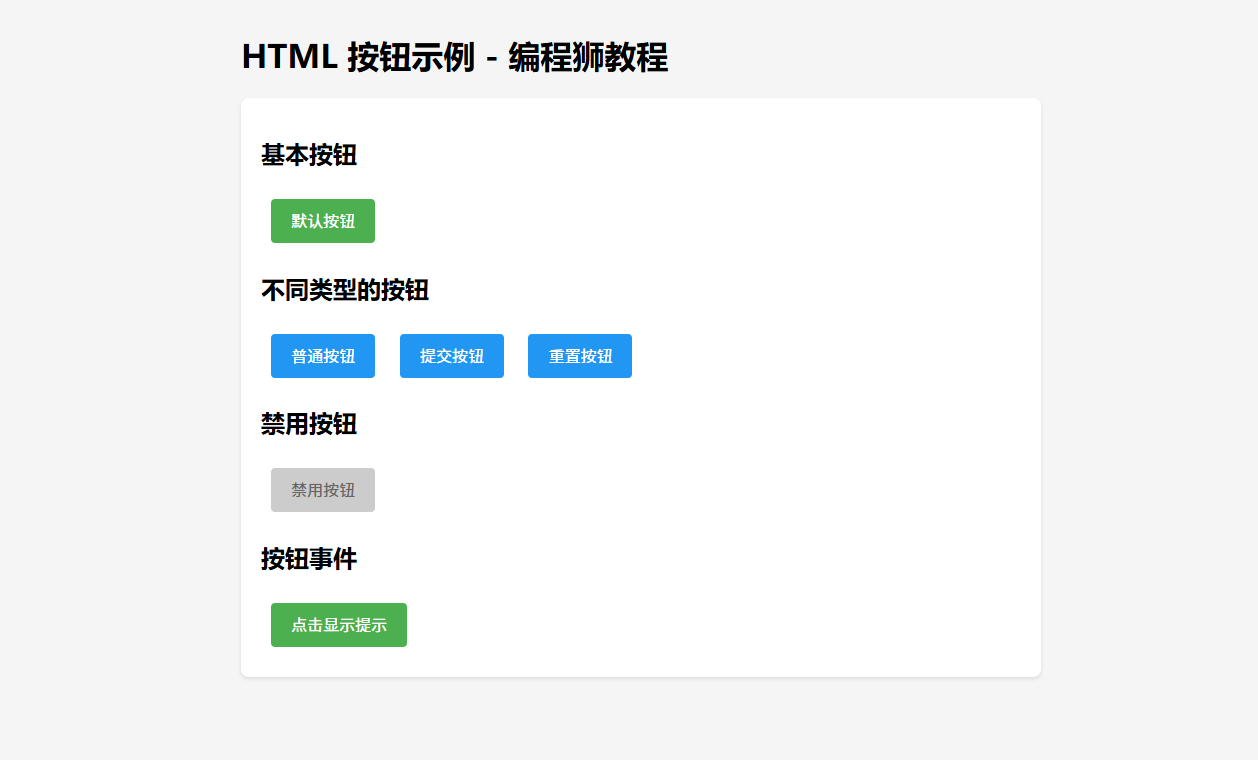
五、总结
本文详细介绍了如何在 HTML 中添加按钮,并通过多种方式实现样式定制和交互效果。希望这个教程能帮助你更好地理解和使用 HTML 按钮元素。