千人中小型校园网络的网络规划

注:该文章最终归属权为博客:等不到释怀

!!!未经允许请勿转载!!!

前言介绍(未经允许禁止转发任何内容)

该网络运用到的技术主要有vlan划分、MSTP、VRRP、DHCP、OSPF、AC+AP、ACL和NAT等技术。非常适合适用于校园、企业、园区网络的小伙伴使用,还可适用于毕设,课设,园区网络的实现等等场景!

一、设计思路

设计要求:

  • 完成服务器、防火墙、路由器相应的接口地址的配置
  • 核心交换机配置Eth-Trunk链路捆绑来提高链路的冗余
  • 根据不同的地域划分多个不同的vlan,减小广播域大小,提高网络的可靠性和安全性
  • 配置MSTP+VRRP,同时实现冗余,划分实例,让不同的vlan优先选择相应的交换机,并减少stp震荡
  • DHCP中继使得所有的有线用户和无线用户均是自动获取地址
  • 内网内运行OSPF路由
  • 配置NAT实现用户可以访问公网
  • 配置ACL使得vlan10网段不得访问vlan40网络的网络用户
  • 所有用户都可通过域名访问www.test.com

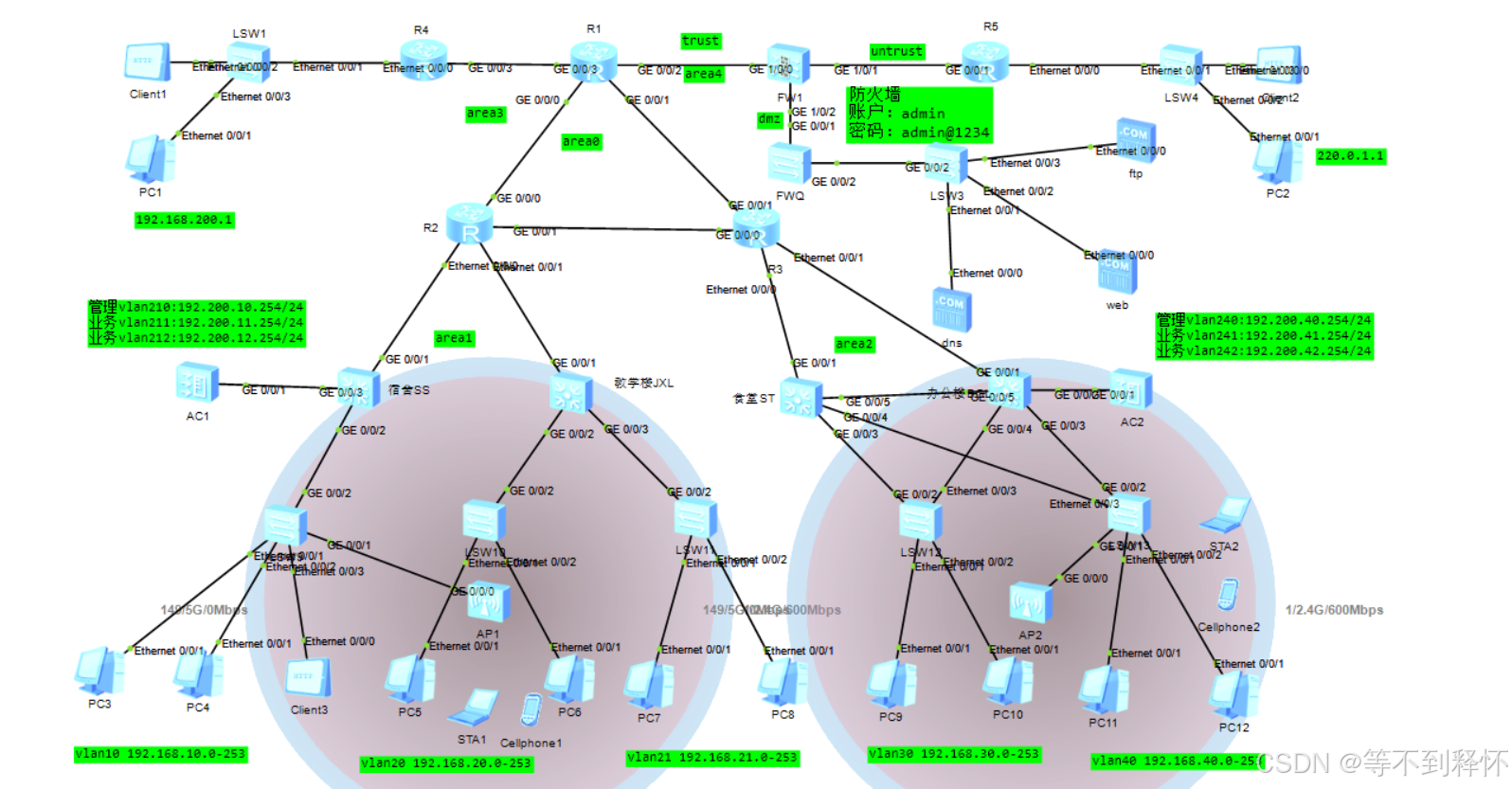
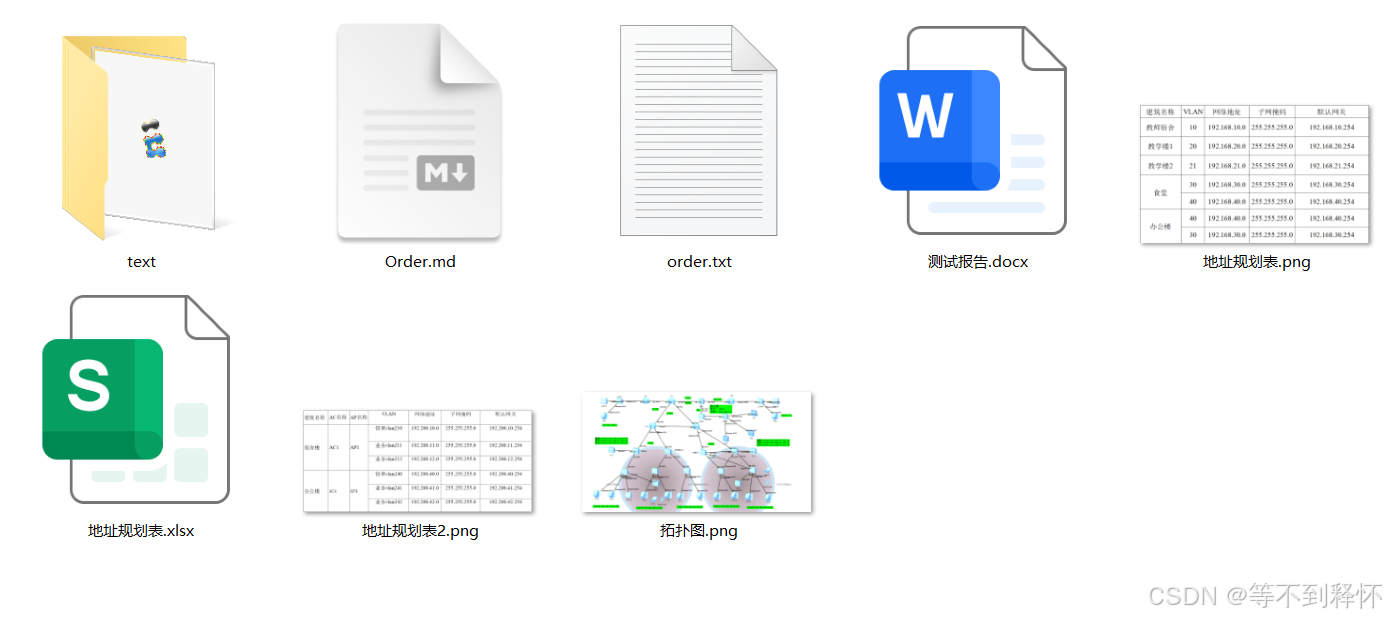
该topo图中防火墙使用的是USG6000V防火墙,topo图就是如下,相应的地址规划表在图中标明了。

防火墙账户:admin 密码:admin@1234

无线用户密码:aaaa1111

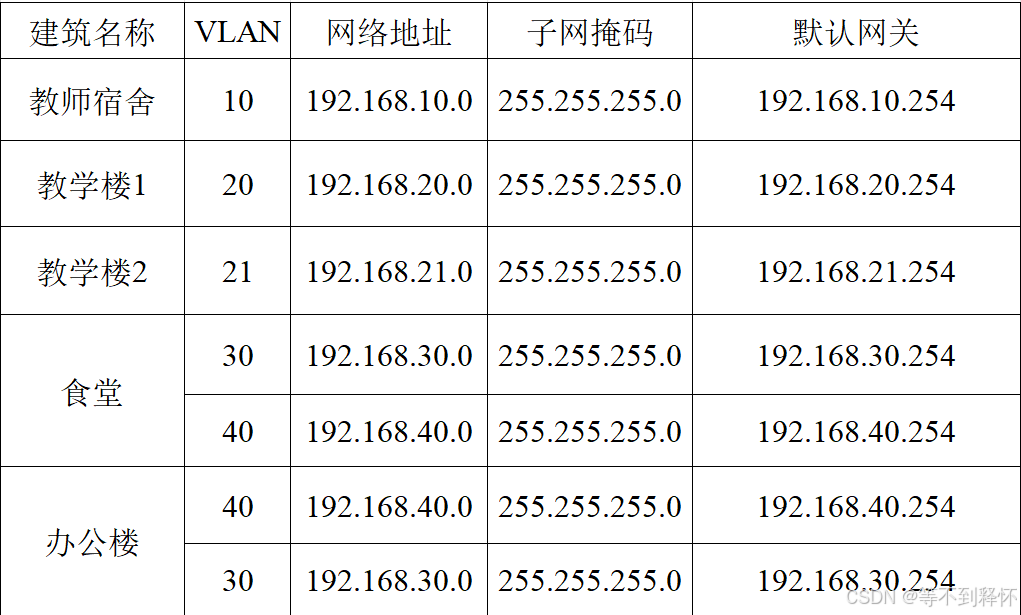
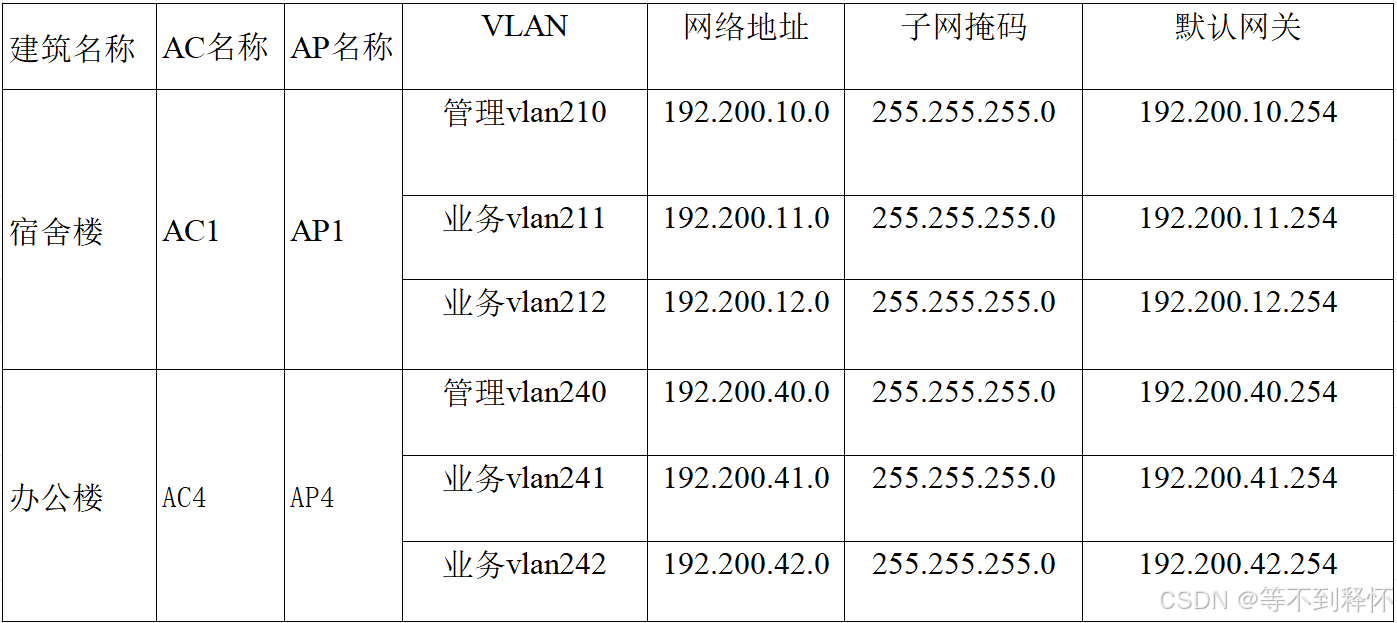
二、地址规划表

三、基于ENSP中小型企业网的设计(可以不看)

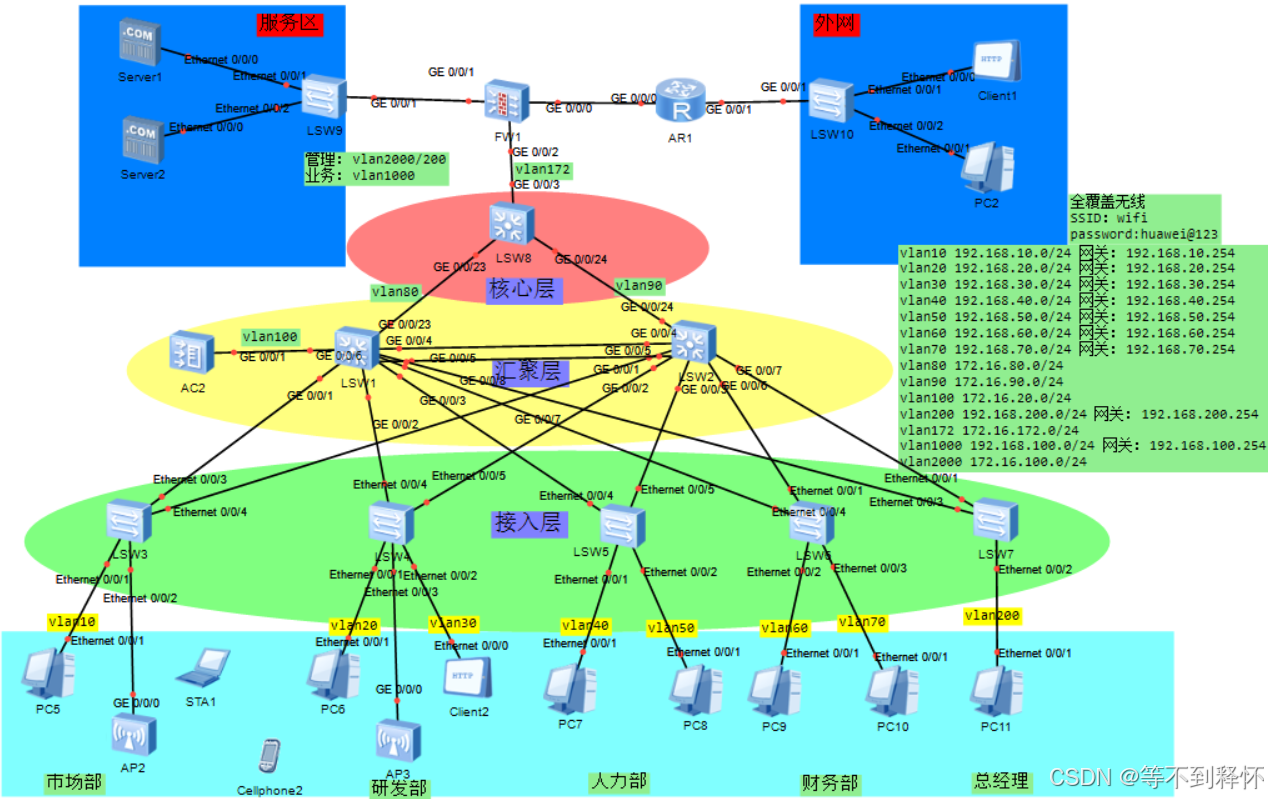
插曲部分:基于ENSP中小型企业网的设计如下图所示(查看详情可点击进入查看详细的介绍和阅读)

该网络运用到的技术主要有链路聚合、VLAN划分、MSTP生成树、VRRP网关冗余、DHCP中继、OSPF路由、NAT地址转换和无线AC+AP等技术。非常适合适用于校园、企业和园区网络的小伙伴使用,还可适用于毕设,课设,园区网络的实现等等场景!

四、详细配置步骤(跟着一步一步走)

1、VLAN划分

Haskell 复制代码
宿舍-SS:
vlan batch 10 100 200 210 to 212
interface GigabitEthernet0/0/1
port link-type access
port default vlan 100
interface GigabitEthernet0/0/2
port link-type trunk
port trunk allow-pass vlan 2 to 4094
interface GigabitEthernet0/0/3
port link-type access
port default vlan 200
-----------------------------

教学楼-JXL:
vlan batch 20 to 21 100
interface GigabitEthernet0/0/1
port link-type access
port default vlan 100
interface GigabitEthernet0/0/2
port link-type trunk
port trunk allow-pass vlan 2 to 4094
interface GigabitEthernet0/0/3
port link-type trunk
port trunk allow-pass vlan 2 to 4094
-----------------------------

食堂-ST
vlan batch 30 40 100
interface GigabitEthernet0/0/1
port link-type access
port default vlan 100
traffic-filter inbound acl 3040
interface GigabitEthernet0/0/3
port link-type trunk
port trunk allow-pass vlan 2 to 4094
interface GigabitEthernet0/0/4
port link-type trunk
port trunk allow-pass vlan 2 to 4094
interface GigabitEthernet0/0/5
port link-type trunk
port trunk allow-pass vlan 2 to 4094
-----------------------------

办公楼BGL:
vlan batch 30 40 100 200 240 to 242
interface GigabitEthernet0/0/1
port link-type access
port default vlan 100
traffic-filter inbound acl 3040
interface GigabitEthernet0/0/2
port link-type access
port default vlan 200
interface GigabitEthernet0/0/3
port link-type trunk
port trunk allow-pass vlan 2 to 4094
interface GigabitEthernet0/0/4
port link-type trunk
port trunk allow-pass vlan 2 to 4094
interface GigabitEthernet0/0/5
port link-type trunk
port trunk allow-pass vlan 2 to 4094
-----------------------------

FWQ:
vlan batch 10 100
interface GigabitEthernet0/0/1
port link-type access
port default vlan 10
interface GigabitEthernet0/0/2
port link-type access
port default vlan 100
-----------------------------

2、VRRP网关冗余

Haskell 复制代码
SS:
interface Vlanif10
ip address 192.168.10.254 255.255.255.0 
dhcp select global
interface Vlanif100
ip address 200.0.1.2 255.255.255.0 
interface Vlanif200
ip address 192.200.1.254 255.255.255.0 
interface Vlanif210
ip address 192.200.10.254 255.255.255.0 
dhcp select relay
dhcp relay server-ip 192.200.1.1
interface Vlanif211
ip address 192.200.11.254 255.255.255.0 
dhcp select relay
dhcp relay server-ip 192.200.1.1
interface Vlanif212
ip address 192.200.12.254 255.255.255.0 
dhcp select relay
dhcp relay server-ip 192.200.1.1
-----------------------------

ST:
interface Vlanif30
ip address 192.168.30.1 255.255.255.0 
vrrp vrid 30 virtual-ip 192.168.30.254
vrrp vrid 30 priority 120
vrrp vrid 30 track interface GigabitEthernet0/0/1 reduced 30
dhcp select global
interface Vlanif40
ip address 192.168.40.1 255.255.255.0 
vrrp vrid 40 virtual-ip 192.168.40.254
dhcp select global
interface Vlanif100
ip address 200.0.3.2 255.255.255.0 
-----------------------------

JXL:
interface Vlanif20
ip address 192.168.20.254 255.255.255.0 
dhcp select global
interface Vlanif21
ip address 192.168.21.254 255.255.255.0 
dhcp select global
interface Vlanif100
ip address 200.0.2.2 255.255.255.0 
-----------------------------

BGL:
interface Vlanif30
ip address 192.168.30.2 255.255.255.0 
vrrp vrid 30 virtual-ip 192.168.30.254
dhcp select global
interface Vlanif40
ip address 192.168.40.2 255.255.255.0 
vrrp vrid 40 virtual-ip 192.168.40.254
vrrp vrid 40 priority 120
vrrp vrid 40 track interface GigabitEthernet0/0/1 reduced 30
dhcp select global
interface Vlanif100
ip address 200.0.4.2 255.255.255.0 
interface Vlanif200
ip address 192.200.4.254 255.255.255.0 
interface Vlanif240
ip address 192.200.40.254 255.255.255.0 
dhcp select relay
dhcp relay server-ip 192.200.4.1
interface Vlanif241
ip address 192.200.41.254 255.255.255.0 
dhcp select relay
dhcp relay server-ip 192.200.4.1
interface Vlanif242
ip address 192.200.42.254 255.255.255.0 
dhcp select relay
dhcp relay server-ip 192.200.4.1
-----------------------------

FWQ:
interface Vlanif10
ip address 200.0.60.254 255.255.255.0 
interface Vlanif100
ip address 200.0.61.254 255.255.255.0 
-----------------------------

3、DHCP中继

Haskell 复制代码
SS:
ip pool vlan10
gateway-list 192.168.10.254 
network 192.168.10.0 mask 255.255.255.0 
-----------------------------

JXL:
ip pool vlan20
gateway-list 192.168.20.254 
network 192.168.20.0 mask 255.255.255.0 
ip pool vlan21
gateway-list 192.168.21.254 
network 192.168.21.0 mask 255.255.255.0 
-----------------------------

BGL:
ip pool vlan30
gateway-list 192.168.30.254 
network 192.168.30.0 mask 255.255.255.0 
excluded-ip-address 192.168.30.1 192.168.30.2 
ip pool vlan40
gateway-list 192.168.40.254 
network 192.168.40.0 mask 255.255.255.0 
excluded-ip-address 192.168.40.1 192.168.40.2 
-----------------------------
ST:
ip pool vlan30
gateway-list 192.168.30.254 
network 192.168.30.0 mask 255.255.255.0 
excluded-ip-address 192.168.30.1 192.168.30.2 
ip pool vlan40
gateway-list 192.168.40.254 
network 192.168.40.0 mask 255.255.255.0 
excluded-ip-address 192.168.40.1 192.168.40.2 
-----------------------------

4、OSPF路由

Haskell 复制代码
ST:
ospf 1 
area 0.0.0.2 
network 200.0.3.0 0.0.0.255 
network 192.168.30.0 0.0.0.255 
network 192.168.40.0 0.0.0.255 
-----------------------------

SS:
ospf 1 
area 0.0.0.1 
network 192.168.10.0 0.0.0.255 
network 192.200.11.0 0.0.0.255 
network 192.200.12.0 0.0.0.255 
network 200.0.1.0 0.0.0.255 
-----------------------------

JXL:
ospf 1 
area 0.0.0.1 
network 200.0.2.0 0.0.0.255 
network 192.168.20.0 0.0.0.255 
network 192.168.21.0 0.0.0.255 
-----------------------------

BGL:
ospf 1 
area 0.0.0.2 
network 200.0.4.0 0.0.0.255 
network 192.168.40.0 0.0.0.255 
network 192.168.30.0 0.0.0.255 
network 192.200.41.0 0.0.0.255 
network 192.200.42.0 0.0.0.255 
-----------------------------

R1:
ospf 1 
area 0.0.0.0 
network 200.0.10.0 0.0.0.255 
network 200.0.20.0 0.0.0.255 
area 0.0.0.3 
network 200.0.40.0 0.0.0.255 
area 0.0.0.4 
network 200.0.30.0 0.0.0.255 
-----------------------------

R2:
ospf 1 
area 0.0.0.0 
network 200.0.10.0 0.0.0.255 
network 200.0.0.0 0.0.0.255 
area 0.0.0.1 
network 200.0.1.0 0.0.0.255 
network 200.0.2.0 0.0.0.255 
-----------------------------

R3:
ospf 1 
area 0.0.0.0 
network 200.0.0.0 0.0.0.255 
network 200.0.20.0 0.0.0.255 
area 0.0.0.2 
network 200.0.3.0 0.0.0.255 
network 200.0.4.0 0.0.0.255 
-----------------------------

R4:
ospf 1 
area 0.0.0.3 
network 192.168.200.0 0.0.0.255 
network 200.0.40.0 0.0.0.255 
-----------------------------

R5:
ospf 1 
area 0.0.0.4 
network 200.0.50.0 0.0.0.255 
network 220.0.1.0 0.0.0.255 
-----------------------------

FWQ:
ospf 1 
area 0.0.0.4 
network 200.0.60.0 0.0.0.255 
network 200.0.61.0 0.0.0.255 
-----------------------------

5、出口路由

Haskell 复制代码
R1:
interface Serial0/0/0
link-protocol ppp
interface Serial0/0/1
link-protocol ppp
interface Serial0/0/2
link-protocol ppp
interface Serial0/0/3
link-protocol ppp
interface GigabitEthernet0/0/0
ip address 200.0.10.1 255.255.255.0 
interface GigabitEthernet0/0/1
ip address 200.0.20.1 255.255.255.0 
interface GigabitEthernet0/0/2
ip address 200.0.30.1 255.255.255.0 
interface GigabitEthernet0/0/3
ip address 200.0.40.1 255.255.255.0 
-----------------------------

R2:
interface Ethernet0/0/0
ip address 200.0.1.1 255.255.255.0 
interface Ethernet0/0/1
ip address 200.0.2.1 255.255.255.0 
interface Serial0/0/0
link-protocol ppp
interface Serial0/0/1
link-protocol ppp
interface Serial0/0/2
link-protocol ppp
interface Serial0/0/3
link-protocol ppp
interface GigabitEthernet0/0/0
ip address 200.0.10.2 255.255.255.0 
interface GigabitEthernet0/0/1
ip address 200.0.0.5 255.255.255.0 
-----------------------------

R3:
interface Ethernet0/0/0
ip address 200.0.3.1 255.255.255.0 
interface Ethernet0/0/1
ip address 200.0.4.1 255.255.255.0 
interface Serial0/0/0
link-protocol ppp
interface Serial0/0/1
link-protocol ppp
interface Serial0/0/2
link-protocol ppp
interface Serial0/0/3
link-protocol ppp
interface GigabitEthernet0/0/0
ip address 200.0.0.6 255.255.255.0 
interface GigabitEthernet0/0/1
ip address 200.0.20.2 255.255.255.0 
-----------------------------

R4:
interface Ethernet0/0/0
ip address 192.168.200.254 255.255.255.0 
interface Serial0/0/1
link-protocol ppp
interface Serial0/0/2
link-protocol ppp
interface Serial0/0/3
link-protocol ppp
interface GigabitEthernet0/0/3
ip address 200.0.40.2 255.255.255.0 
-----------------------------


R5:
interface Ethernet0/0/0
ip address 220.0.1.254 255.255.255.0 
interface GigabitEthernet0/0/1
ip address 200.0.50.254 255.255.255.0 
-----------------------------

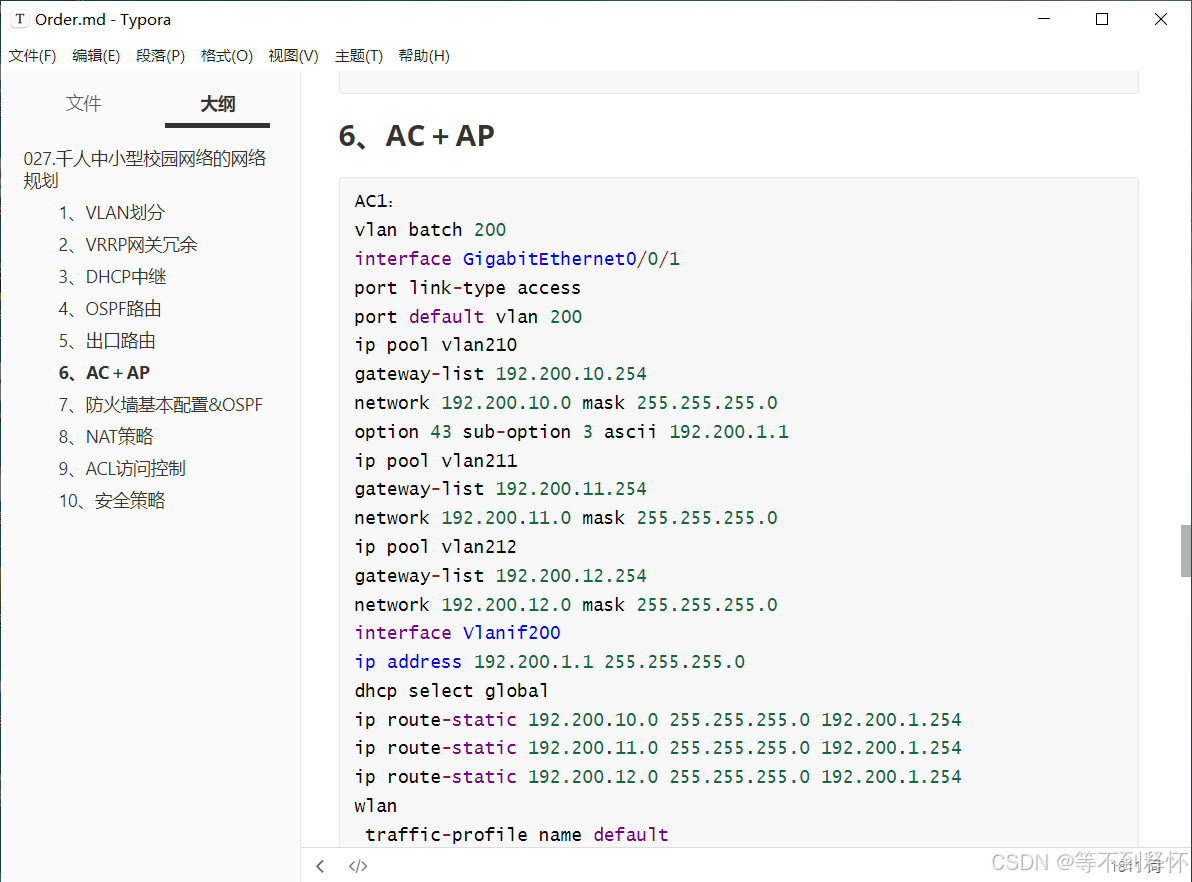
6、AC+AP

Haskell 复制代码
该部分我就不放在文章里了,这部分
主要配置了AC1和AC2,相信
会做的这部分肯定也没问题,小白
的话可能就有些困难了。


因为部分资源是有偿的,要收取一些费用
所以请大家谅解,下载下来的
资源都是每一步的配置都有的。

7、防火墙基本配置&OSPF

Haskell 复制代码
FW1:
admin
admin@1234
interface GigabitEthernet0/0/0
ip binding vpn-instance default
ip address 192.168.0.1 255.255.255.0
interface GigabitEthernet1/0/0
ip address 200.0.30.2 255.255.255.0
service-manage ping permit
interface GigabitEthernet1/0/1
ip address 200.0.50.1 255.255.255.0
service-manage ping permit
interface GigabitEthernet1/0/2
ip address 200.0.60.1 255.255.255.0
service-manage ping permit
irewall zone trust
set priority 85
add interface GigabitEthernet0/0/0
add interface GigabitEthernet1/0/0
firewall zone untrust
set priority 5
add interface GigabitEthernet1/0/1
firewall zone dmz
set priority 50
add interface GigabitEthernet1/0/2

ospf 1
area 0.0.0.4
network 200.0.30.0 0.0.0.255
network 200.0.50.0 0.0.0.255
network 200.0.60.0 0.0.0.255
ip route-static 200.0.50.1 255.255.255.255 NULL0
-----------------------------

8、NAT策略

Haskell 复制代码
FW1:
nat address-group napt 0
mode pat
section 0 200.0.50.1 200.0.50.30
nat-policy
rule name napt
source-zone trust
destination-zone untrust
action source-nat address-group napt
-----------------------------

9、ACL访问控制

Haskell 复制代码
ST:
acl number 3040  
rule 5 deny ip source 192.168.10.0 0.0.0.255 destination 192.168.40.0 0.0.0.255 
rule 10 deny ip source 192.200.11.0 0.0.0.255 destination 192.168.40.0 0.0.0.255 
rule 15 deny ip source 192.200.12.0 0.0.0.255 destination 192.168.40.0 0.0.0.255 
rule 20 permit ip source 192.168.10.0 0.0.0.255 destination 192.168.40.0 0.0.0.255 
rule 25 permit ip source 192.200.11.0 0.0.0.255 destination 192.168.40.0 0.0.0.255 
rule 30 permit ip source 192.200.12.0 0.0.0.255 destination 192.168.40.0 0.0.0.255 
-----------------------------

BGL:
acl number 3040  
rule 5 deny ip source 192.168.10.0 0.0.0.255 destination 192.168.40.0 0.0.0.255 
rule 10 deny ip source 192.200.11.0 0.0.0.255 destination 192.168.40.0 0.0.0.255 
rule 15 deny ip source 192.200.12.0 0.0.0.255 destination 192.168.40.0 0.0.0.255 
-----------------------------

10、安全策略

Haskell 复制代码
FW1:
security-policy
rule name ping1
source-zone trust
destination-zone untrust
action permit
rule name trust-dmz-1
source-zone trust
destination-zone dmz
action permit
rule name untrust-dnz-1
source-zone untrust
destination-zone dmz
action permit
-----------------------------
相关推荐
m0_749690239 小时前
【寻迹校园 HarmonyOS NEXT 实战 03】NavPathStack 路由实战:18 个页面如何集中管理
华为·移动开发·harmonyos·arkui·navigation·navpathstack
虹科网络安全10 小时前
KnowBe4 SAT 是什么?安全意识培训平台功能与应用详解
网络
艺杯羹10 小时前
古典密码学攻防演进全景:从凯撒移位、频率分析到一次一密与恩尼格玛机破译
网络·人工智能·安全·网络安全·密码学·密码安全
发量惊人的中年网工10 小时前
多品牌酒店门店如何集中管控网络?SD-WAN 实现住客网与业务网隔离的实践
网络·组网
m0_7496902310 小时前
【寻迹校园 HarmonyOS NEXT 实战 02】多模块工程拆解:entry、HAR 与 HSP 如何分工
华为·harmonyos·arkts·软件架构·har·hsp
IT学长编程11 小时前
计算机毕业设计 基于用户评论主题挖掘的旅游景点推荐系统 Python 大数据毕业设计 Hadoop毕业设计选题【附源码+文档报告+安装调试】
大数据·python·django·毕业设计·数据可视化分析·旅游景点推荐系统·基于用户评论主题挖掘
艺术留白11 小时前
MokaTest使用篇-HTTP接口
网络·网络协议·http
金刚钻信息11 小时前
如果服务器坏了,加密文件还能恢复吗?
服务器·网络·加密软件·桌面管理·防泄密
bbq粉刷匠12 小时前
HTTP 深度解析
网络·网络协议·http
数据知道12 小时前
网络安全实战:渗透测试全流程 SOP——从授权到报告交付
服务器·网络·安全·web安全·网络安全