
简介
American fuzzy lop 是一款模糊测试工具,它采用编译时插桩和遗传算法,自动发现干净、有趣的测试用例,这些用例会在目标二进制文件中触发新的内部状态。这显著提升了模糊测试代码的功能覆盖率。该工具生成的紧凑合成语料库也可用于为未来其他更耗费人力或资源的测试方案提供种子。
AFLplusplus 是 Michał "lcamtuf" Zalewski 开发的 American Fuzzy Lop 模糊测试器的子代,其最初创建是为了整合多年来为 AFL 系列模糊测试器开发的所有最佳功能,但并未合并到 AFL 中,因为它自 2017 年 11 月以来就没有更新过。
afl++-fuzz 的设计注重实用性:它性能开销适中,使用多种高效的模糊测试策略,几乎无需任何配置,并且能够无缝处理复杂的实际用例,例如常见的图像解析或文件压缩库。
afl++ 是已不再维护的 afl 的一个分支。
AFL++ 模糊测试框架包含以下内容:
- 一个包含多种修改器和配置的模糊测试器:afl-fuzz。
- 不同的源代码插桩模块:LLVM 模式、afl-as、GCC 插件。
- 不同的二进制代码插桩模块:QEMU 模式、Unicorn 模式、QBDI 模式。
- 用于测试用例/语料库最小化的实用程序:afl-tmin、afl-cmin。
- 辅助库:libtokencap、libdislocator、libcompcov。
它包含许多与 AFL 相关的更改、优化和新功能,例如 AFLfast 电源调度、带有 CompareCoverage 的 QEMU 5.1 升级、MOpt 修改器、InsTrim 插桩等等。
特征
在官方 afl 版本的基础上,进行了多项改进------自 2017 年 11 月以来,官方版本一直未进行任何功能改进。
除其他改进外,afl++ 还拥有更高性能的 llvm_mode,支持最高版本 11 的 llvm、QEMU 5.1,速度更快,并修复了 QEMU 的崩溃问题,更好地支持 *BSD 和 Android 系统,等等。
此外,还集成了以下功能和补丁:
- Marcel Böhme 编写的 AFLfast 电源调度程序:https://github.com/mboehme/aflfast
- 全新优秀的 MOpt 修改器:https://github.com/puppet-meteor/MOpt-AFL
- InsTrim,一个针对大型目标的高效 CFG llvm_mode 插桩实现:https://github.com/csienslab/instrim
- C. Holler 的 afl-fuzz Python 修改器模块和 llvm_mode 白名单支持:https://github.com/choller/afl
- kyakdan 编写的自定义修改器(非 Python 库)
- Unicorn 模式,允许对来自完全不同平台的二进制文件进行模糊测试(由 domenukk 提供集成)
- LAF-Intel 或 CompCov 支持 llvm_mode、qemu_mode 和 unicorn_mode
- NeverZero 补丁,适用于 afl-gcc llvm_mode、qemu_mode 和 unicorn_mode 可防止映射值被包装为零,从而提高覆盖率
- qemu_mode 的持久模式和延迟 forkserver
- 使用 QEMU 和 Wine 进行 Win32 PE 二进制模糊测试
- Radamsa 修改器(使用 -R 启用以添加或使用 -RR 以独占运行)。
- QBDI 模式,通过 QBDI 框架模糊测试 Android 原生库
- 受 Redqueen 启发,适用于 LLVM 和 QEMU 的全新 CmpLog 工具
- 由 Adrian Herrera 撰写的 LLVM 模式 Ngram 报道 https://github.com/adrianherrera/afl-ngram-pass
安装
源码安装
通过以下命令来进行克隆项目源码,建议请先提前挂好代理进行克隆。
bash
git clone https://github.com/AFLplusplus/AFLplusplus.git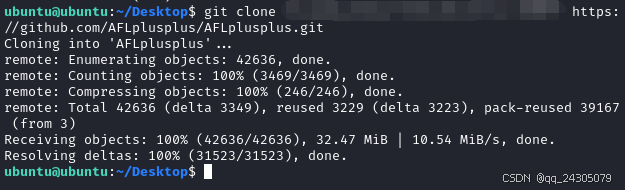
进入目录并查看。
bash
cd AFLplusplus/
ls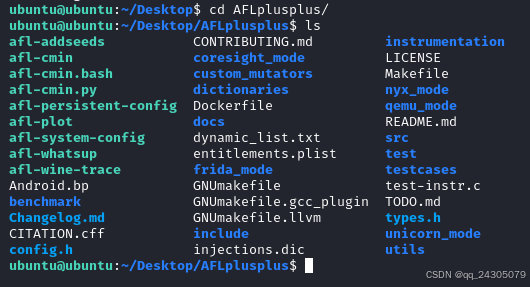
构建所有功能模式(包括源代码模式、QEMU 模式、Frida、Unicorn 等)
bash
make distrib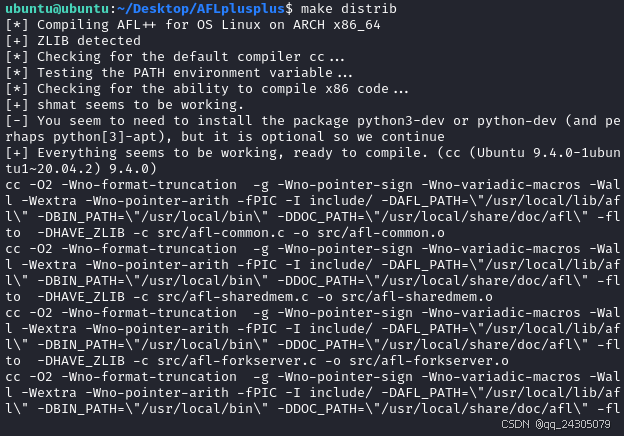
编译
bash
make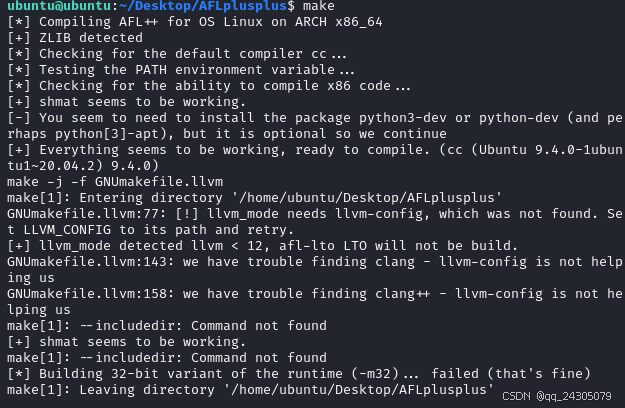
运行以下命令,如果出现这个界面,就说明安装成功了。
bash
./afl-fuzz -h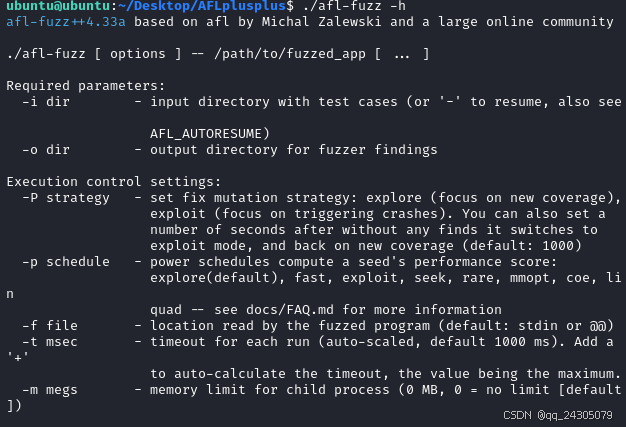
Docker安装
通过以下命令来进行克隆项目源码,建议请先提前挂好代理进行克隆。
bash
git clone https://github.com/AFLplusplus/AFLplusplus.git进入目录并查看。
bash
cd AFLplusplus/
ls
拉取 ubuntu:22.04 镜像
bash
sudo docker pull ubuntu:22.04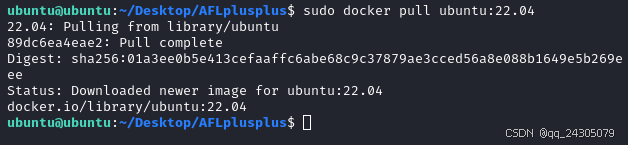
开始安装
bash
sudo docker build -t aflplusplus .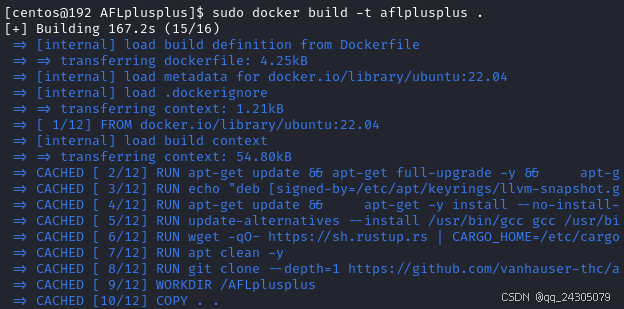
运行以下命令,出现相关界面就说明安装成功了。
bash
sudo docker run -it --rm aflplusplus -hDocker镜像安装
通过以下命令来进行安装
bash
sudo docker pull aflplusplus/aflplusplus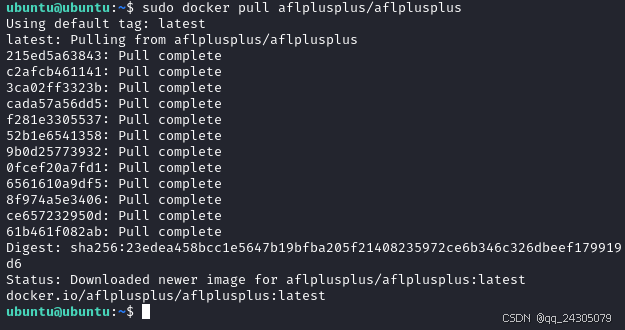
运行以下命令,如果出现这个界面,就说明安装成功了。
bash
sudo docker run -it aflplusplus/aflplusplus afl-fuzz -h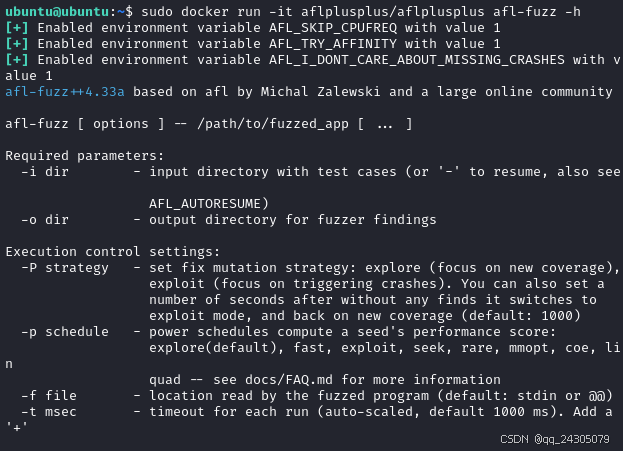
APT包管理器安装
Kali Linux 默认已经安装 aflplusplus 工具了,如果还未安装的话,也可以通过以下命令来进行安装。
bash
sudo apt install afl++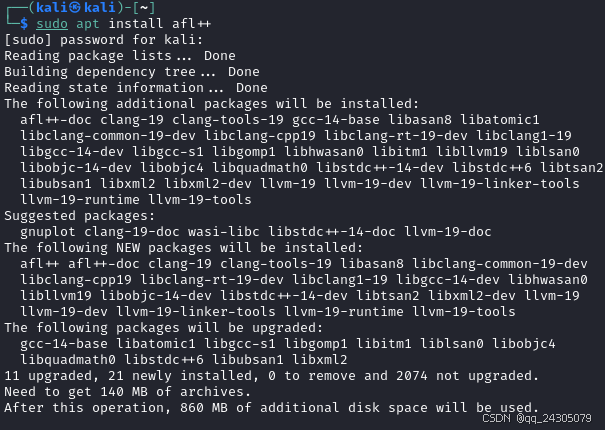
使用
afl-addseeds
向现有的 AFL++ 模糊测试活动添加新的种子。
1. 帮助文档
bash
afl-addseeds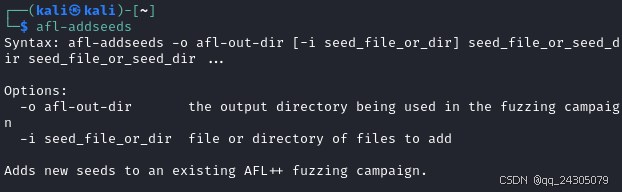
2. -o afl-out-dir
模糊测试活动中使用的输出目录
bash
afl-addseeds -o fuzz_results
3. -i seed_file_or_dir
要添加的文件或目录
bash
afl-addseeds -i fuzz_results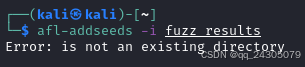
afl-analyze
1. -h
帮助文档
bash
afl-analyze -h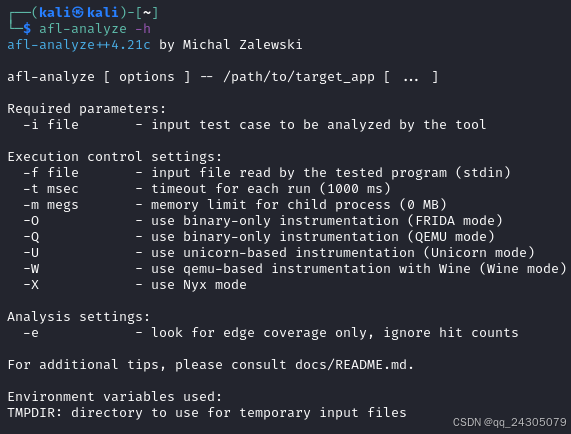
必需参数
2. -i file
工具要分析的输入测试用例
bash
afl-analyze -i input/testcase -- ./target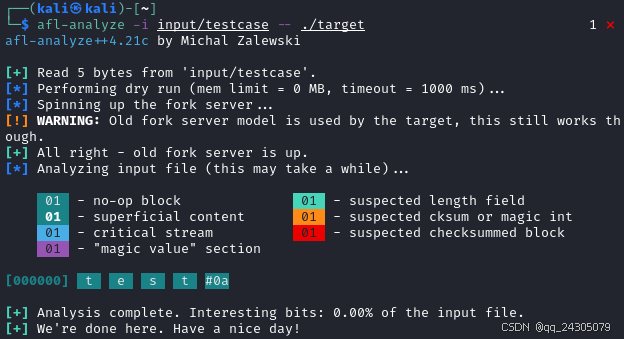
执行控制设置
3. -f file
被测程序读取的输入文件(标准输入)
bash
afl-analyze -i input/testcase -f input.data -- ./target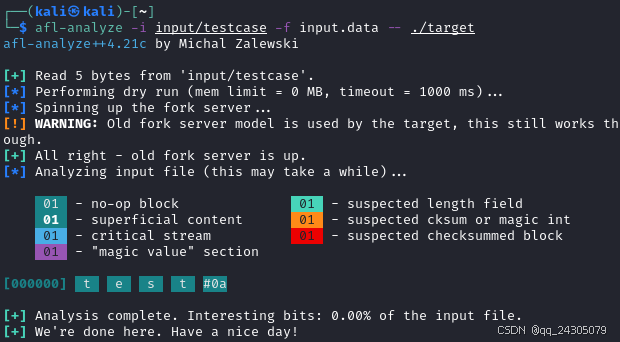
4. -t msec
每次运行的超时时间(1000 毫秒)
bash
afl-analyze -i input/testcase -t 1000 -- ./target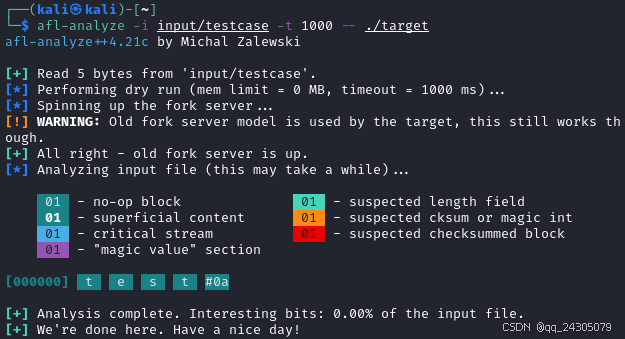
5. -m megs
子进程的内存限制(0 MB)
bash
afl-analyze -i input/testcase -m 10 -- ./target 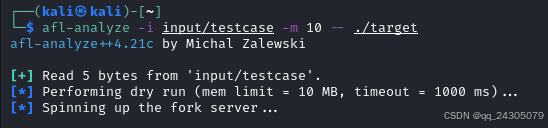
6. -O
使用仅二进制插桩(FRIDA 模式)
bash
afl-analyze -i input/testcase -O -- ./target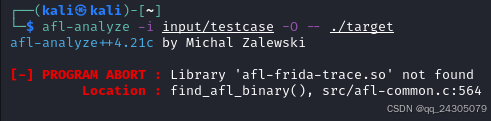
7. -Q
使用仅二进制插桩(QEMU 模式)
bash
afl-analyze -i input/testcase -Q -- ./target
8. -U
使用基于 Unicorn 的插桩(Unicorn 模式)
bash
afl-analyze -i input/testcase -U -- ./target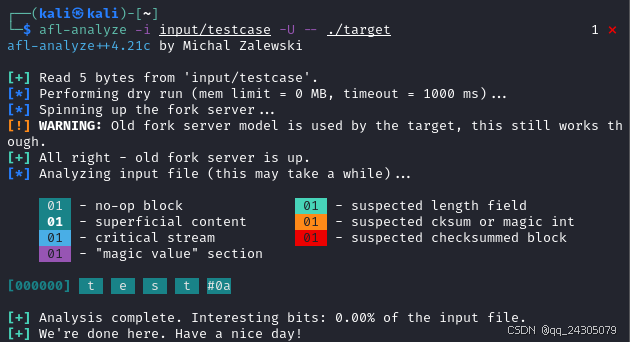
9. -W
使用基于 qemu 的 Wine 插桩(Wine 模式)
bash
afl-analyze -i input/testcase -W -- ./target
10. -X
使用 Nyx 模式
bash
afl-analyze -i input/testcase -X -- ./target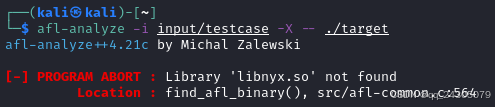
分析设置
11. -e
仅查找边缘覆盖,忽略命中计数
bash
afl-analyze -i input/testcase -e -- ./target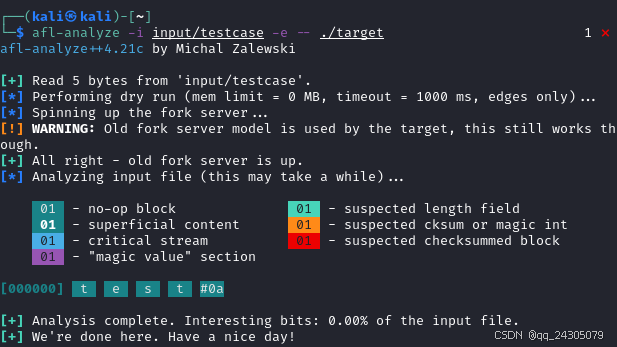
afl-c++
1. --help
帮助文档
bash
afl-c++ --help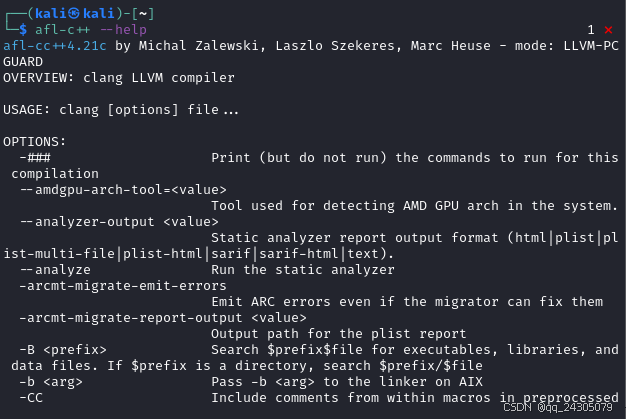
2. -###
打印(但不运行)本次编译所需的命令
3. --amdgpu-arch-tool=<value>
用于检测系统中 AMD GPU 架构的工具。
4. --analyzer-output <value>
静态分析器报告输出格式 (html|plist|plist-multi-file|plist-html|sarif|sarif-html|text)。
bash
afl-cc -### --amdgpu-arch-tool=10 --analyzer-output html
afl-cc -### --amdgpu-arch-tool=10 --analyzer-output plist
afl-cc -### --amdgpu-arch-tool=10 --analyzer-output plist-multi-file
afl-cc -### --amdgpu-arch-tool=10 --analyzer-output plist-html
afl-cc -### --amdgpu-arch-tool=10 --analyzer-output sarif
afl-cc -### --amdgpu-arch-tool=10 --analyzer-output sarif-html
afl-cc -### --amdgpu-arch-tool=10 --analyzer-output text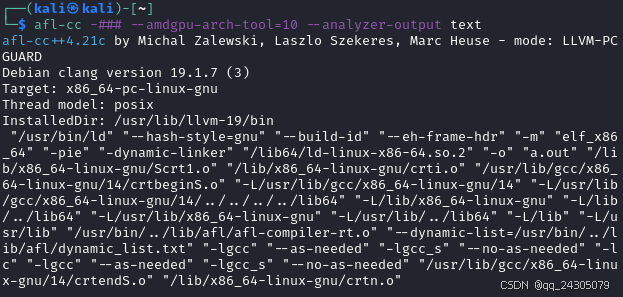
5. --analyze
运行静态分析器
6. -arcmt-migrate-emit-errors
即使迁移器可以修复,也发出 ARC 错误
7. -arcmt-migrate-report-output <value>
plist 报告的输出路径
8. -B <prefix>
在 prefixfile 中搜索可执行文件、库和数据文件。如果 prefix 是目录,则搜索 prefix/$file
9. -b <arg>
在 AIX 上将 -b <arg> 传递给链接器
bash
afl-cc --analyze -arcmt-migrate-emit-errors -arcmt-migrate-report-output output -B prefix -b arg
10. -CC
在预处理输出中包含宏内的注释
11. -cl-denorms-are-zero
仅限 OpenCL。允许将非正规数刷新为零。
12. -cl-ext=<value>
仅限 OpenCL。启用或禁用 OpenCL 扩展/可选功能。参数是一个或多个扩展名的逗号分隔序列,每个扩展名以"+"或"-"为前缀。
13. -cl-fast-relaxed-math
仅限 OpenCL。设置 -cl-finite-math-only 和 -cl-unsafe-math-optimizations,并定义 FAST_RELAXED_MATH。
14. -cl-finite-math-only
仅限 OpenCL。允许浮点优化,并假设参数和结果不为 NaN 或 +-Inf。
15. -cl-fp32-correctly-rounded-divide-sqrt
仅限 OpenCL。指定程序源代码中使用的单精度浮点除法和平方根运算必须正确舍入。
16. -cl-kernel-arg-info
仅限 OpenCL。生成内核参数元数据。
17. -cl-mad-enable
仅限 OpenCL。允许在生成的二进制文件中使用精度较低的 MAD 计算。
18. -cl-no-signed-zeros
仅限 OpenCL。允许在生成的二进制文件中使用精度较低的无符号零计算。
19. -cl-no-stdinc
仅限 OpenCL。禁用所有包含非原生编译器类型和函数的标准包含文件。
20. -cl-opt-disable
仅限 OpenCL。此选项禁用所有优化。默认情况下,优化处于启用状态。
21. -cl-single-precision-constant
仅限 OpenCL。将双精度浮点常量视为单精度常量。
bash
afl-cc -CC -cl-denorms-are-zero -cl-ext=10 -cl-fast-relaxed-math -cl-finite-math-only -cl-fp32-correctly-rounded-divide-sqrt -cl-kernel-arg-info -cl-mad-enable -cl-no-signed-zeros -cl-no-stdinc -cl-opt-disable -cl-single-precision-constant22. -cl-std=<value>
编译所针对的 OpenCL 语言标准。
23. -cl-strict-aliasing
仅限 OpenCL。添加此选项是为了与 OpenCL 1.0 兼容。
24. -cl-uniform-work-group-size
仅限 OpenCL。定义全局工作大小为 clEnqueueNDRangeKernel 指定的工作组大小的倍数。
25. -cl-unsafe-math-optimizations
仅限 OpenCL。允许不安全的浮点优化。也隐含了 -cl-no-signed-zeros 和 -cl-mad-enable。
26. --config=<file>
指定配置文件。
27. --cuda-compile-host-device
为主机和设备编译 CUDA 代码(默认)。对非 CUDA 编译无效。
28. --cuda-device-only
仅为设备编译 CUDA 代码
29. --cuda-feature=<value>
手动指定要使用的 CUDA 特性
30. --cuda-host-only
仅为主机编译 CUDA 代码。对非 CUDA 编译无效。
31. --cuda-include-ptx=<value>
为以下 GPU 架构(例如 sm_35)或"全部"包含 PTX。可以多次指定。
bash
afl-cc -cl-std=1 -cl-strict-aliasing -cl-uniform-work-group-size -cl-unsafe-math-optimizations --config=config --cuda-compile-host-device --cuda-device-only --cuda-feature=1 --cuda-host-only --cuda-include-ptx=ptx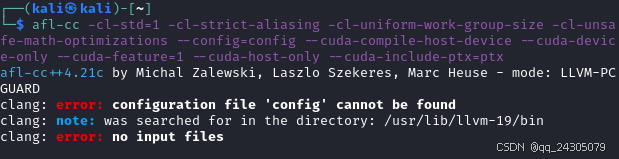
32. --cuda-noopt-device-debug
启用设备端调试信息生成。禁用 ptxas 优化。
33. --cuda-path-ignore-env
忽略环境变量以检测 CUDA 安装
34. --cuda-path=<value>
CUDA 安装路径
35. -cuid=<value>
编译单元的 ID,同一编译单元的 ID 应相同,不同编译单元的 ID 应不同。它用于将单源卸载语言 CUDA 和 HIP 的设备端静态变量外部化,以便它们可以被同一编译单元的主机代码访问。
36. -cxx-isystem <directory>
将目录添加到 C++ SYSTEM 包含搜索路径
37. -C
在预处理输出中包含注释
38. -c
仅运行预处理、编译和汇编步骤
39. -darwin-target-variant-triple <value>
指定 Darwin 目标变体 Triple
40. -darwin-target-variant <value>
为部署目标的其他运行时变体生成代码
41. -dD
在 -E 模式下,除了正常输出外,还打印宏定义
42. -dependency-dot <value>
用于写入 DOT 格式头文件依赖项的文件名
43. -dependency-file <value>
用于写入依赖项输出的文件名(或 -)
44. -dI
在 -E 模式下,除了正常输出外,还打印包含指令
bash
afl-cc --cuda-noopt-device-debug --cuda-path-ignore-env --cuda-path=value -cuid=11 -cxx-isystem file -C -c -darwin-target-variant-triple value -darwin-target-variant 20 -dD -dependency-dot 30 -dependency-file 40 -dI45. -dM
在 -E 模式下打印宏定义,而不是正常输出
46. -dsym-dir <dir>
dSYM(如果有)的输出目录
47. -dumpdir <dumppfx>
使用 <dumpfpx> 作为前缀来生成辅助文件名和转储文件名
48. -dumpmachine
显示编译器的目标处理器
49. -dumpversion
显示编译器的版本
50. -D <macro>=<value>
将 <macro> 定义为 <value>(如果省略 <value>,则为 1)
51. --embed-dir=<dir>
将目录添加到嵌入搜索路径
52. -emit-ast
为源输入生成 Clang AST 文件
53. --emit-extension-symbol-graphs
为扩展模块生成额外的符号图。
54. -emit-interface-stubs
生成接口存根文件。
55. -emit-llvm
使用 LLVM 表示法来表示汇编程序和目标文件。
56. -emit-merged-ifs
生成接口存根文件,生成合并后的文本文件而非二进制文件。
57. --emit-static-lib
启用链接器作业以生成静态库。
58. -emit-symbol-graph
生成提取 API 信息作为编译的副作用。
59. --end-no-unused-arguments
开始针对未使用的驱动程序参数发出警告。
bash
afl-cc -dM -dsym-dir dir -dumpdir dumpfirfile -dumpmachine -dumpversion -D macro=1 --embed-dir=dir -emit-ast --emit-extension-symbol-graphs -emit-interface-stubs -emit-llvm -emit-merged-ifs --emit-static-lib -emit-symbol-graph --end-no-unused-arguments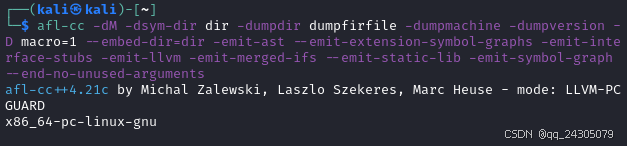
60. --extract-api-ignores=<value>
以逗号分隔的文件列表,其中包含提取 API 信息时要忽略的 API 符号列表,并以换行符分隔。
61. -extract-api
提取 API 信息。
62. -E
仅运行预处理器。
63. -faapcs-bitfield-load
遵循 AAPCS 标准,即所有易失性位字段写入至少会生成一次加载。(仅限 ARM)。
64. -faapcs-bitfield-width
遵循 AAPCS 标准要求,即易失性位字段宽度由字段容器类型决定。(仅限 ARM)。
65. -faddrsig
发出地址有效性表。
66. -falign-loops=<N>
N 必须是 2 的幂。将循环与边界对齐
67. -faligned-allocation
启用 C++17 对齐分配函数
68. -fallow-editor-placeholders
将编辑器占位符视为有效源代码
69. -faltivec-src-compat=<value>
Altivec 矢量的源代码级兼容性(适用于 PowerPC 平台)。这包括矢量比较的结果("xl"为标量,"gcc"为矢量),以及使用标量初始化时的行为("xl"为展开,"gcc"仅为元素零)。对于"mixed","vector bool/vector pixel"的兼容性与"gcc"相同,其他类型与"xl"相同。当前默认值为"mixed"。
70. -fansi-escape-codes
使用 ANSI 转义码进行诊断
bash
afl-cc --extract-api-ignores=api -extract-api -E -faapcs-bitfield-load -faapcs-bitfield-width -faddrsig -falign-loops=2 -faligned-allocation -fallow-editor-placeholders -faltivec-src-compat=gcc -fansi-escape-codes71. -fapinotes-modules
启用基于模块的外部 API 注释支持
72. -fapinotes-swift-version=<version>
指定筛选 API 注释时使用的 Swift 版本
73. -fapinotes
启用外部 API 注释支持
74. -fapple-kext
使用 Apple 的内核扩展 ABI
75. -fapple-link-rtlib
强制链接 clang 内置运行时库
76. -fapple-pragma-pack
启用与 Apple gcc 兼容的 #pragma pack 处理
77. -fapplication-extension
将代码限制为可用于应用扩展的代码
78. -fapprox-func
允许将某些数学函数调用替换为近似等效的计算
79. -fassume-nothrow-exception-dtor
假设异常对象的析构函数不抛出异常
80. -fasync-exceptions
启用 EH 异步异常
81. -fauto-import
MinGW 专用。启用代码生成对自动 dllimport 的支持,并在链接器中启用此功能。默认启用。
82. -fbasic-block-address-map
发出基本块地址映射段。
83. -fbasic-block-sections=<value>
将每个函数的基本块放置在唯一的段中(仅限 ELF 格式)
84. -fbinutils-version=<major.minor>
生成的目标文件可以使用此 binutils 版本及更高版本支持的所有 ELF 特性。如果指定 -fno-integrated-as,生成的汇编代码将视 GNU as 为支持。"none"表示所有 ELF 特性均可使用,无论 binutils 是否支持。默认为 2.26。
bash
afl-cc -fapinotes-modules -fapinotes-swift-version=version -fapinotes -fapple-kext -fapple-link-rtlib -fapple-pragma-pack -fapplication-extension -fapprox-func -fassume-nothrow-exception-dtor -fasync-exceptions -fauto-import -fbasic-block-address-map -fbasic-block-sections=value -fbinutils-version=2.2685. -fblocks
启用"blocks"语言功能
86. -fborland-extensions
接受 Borland 编译器支持的非标准结构
87. -fbuild-session-file=<file>
使用 <file> 的最后修改时间作为构建会话时间戳
88. -fbuild-session-timestamp=<time since Epoch in seconds>
当前构建会话的启动时间
89. -fbuiltin-module-map
加载 clang 内置模块映射文件。
90. -fc++-abi=<value>
要使用的 C++ ABI。这将覆盖目标 C++ ABI。
91. -fcall-saved-x10
使 x10 寄存器的调用被保存(仅限 AArch64)
92. -fcall-saved-x11
使 x11 寄存器的调用被保存(仅限 AArch64)
93. -fcall-saved-x12
使 x12 寄存器的调用被保存(仅限 AArch64)
94. -fcall-saved-x13
使 x13 寄存器的调用被保存(仅限 AArch64)
95. -fcall-saved-x14
使 x14 寄存器的调用被保存(仅限 AArch64)
96. -fcall-saved-x15
使 x15 寄存器的调用被保存(仅限 AArch64)
97. -fcall-saved-x18
使 x18 寄存器的调用被保存(仅限 AArch64)
98. -fcall-saved-x8
使 x8 寄存器的调用被保存(仅限 AArch64)
99. -fcall-saved-x9
使 x9 寄存器call-saved(仅限 AArch64)
bash
afl-cc -fblocks -fborland-extensions -fbuild-session-file=file -fbuild-session-timestamp=10s -fbuiltin-module-map -fc++-abi=4 -fcall-saved-x10 -fcall-saved-x11 -fcall-saved-x12 -fcall-saved-x13 -fcall-saved-x14 -fcall-saved-x15-fcall-saved-x18 -fcall-saved-x8 -fcall-saved-x9100. -fcaret-diagnostics-max-lines=<value>
设置插入符号诊断中显示的最大源代码行数(0 = 无限制)。
101. -fcf-protection=<value>
仪器控制流架构保护
102. -fcf-protection
在"完整"模式下启用 cf-protection
103. -fchar8_t
启用 C++ 内置类型 char8_t
104. -fcheck-new
不假设 C++ 运算符 new 不会返回 NULL
105. -fclang-abi-compat=<version>
尝试匹配 Clang <版本> 的 ABI
106. -fclangir
使用 ClangIR 流水线进行编译
bash
afl-cc -fcaret-diagnostics-max-lines=0 -fcf-protection=10 -fcf-protection -fchar8_t -fcheck-new -fclang-abi-compat=30 -fclangir107. -fcolor-diagnostics
在诊断中启用颜色
108. -fcomment-block-commands=<arg>
将 <arg> 中的每个逗号分隔的参数视为文档注释块命令
109. -fcommon
将未初始化的全局变量放入公共块中
110. -fcomplete-member-pointers
如果成员指针基类型在 Microsoft ABI 下具有重要意义,则要求它们完整
111. -fconstexpr-backtrace-limit=<value>
设置 constexpr 求值回溯中打印的最大条目数(0 = 无限制)
112. -fconstexpr-depth=<value>
设置递归 constexpr 函数调用的最大深度
113. -fconstexpr-steps=<value>
设置 constexpr 函数求值的最大步数
114. -fcoro-aligned-allocation
为 C++ 协程优先使用对齐分配
115. -fcoroutines
启用对 C++ 协程的支持
116. -fcoverage-compilation-dir=<value>
编译目录嵌入到覆盖率映射中。
117. -fcoverage-mapping
生成覆盖率映射以启用代码覆盖率分析
bash
afl-cc -fcolor-diagnostics -fcomment-block-commands=arg -fcommon -fcomplete-member-pointers -fconstexpr-backtrace-limit=0 -fconstexpr-depth=1 -fconstexpr-steps=2 -fcoro-aligned-allocation -fcoroutines -fcoverage-compilation-dir=dir -fcoverage-mapping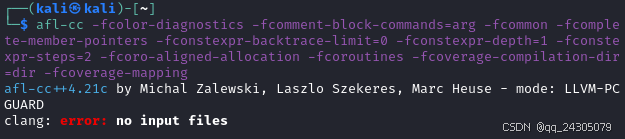
118. -fcoverage-mcdc
生成代码覆盖率时启用 MC/DC 标准
119. -fcoverage-prefix-map=<old>=<new>
在覆盖率映射中将文件源路径从 <old> 重新映射到 <new>。如果有多个选项,则从最后一个选项开始按相反的顺序应用前缀替换。
120. -fcrash-diagnostics-dir=<dir>
将崩溃报告文件放入 <dir>
121. -fcrash-diagnostics=<value>
设置崩溃诊断报告级别(选项:off、compiler、all)
122. -fcrash-diagnostics
启用崩溃诊断报告(默认)
bash
afl-cc -fcoverage-mcdc -fcoverage-prefix-map=old=new -fcrash-diagnostics-dir=dir -fcrash-diagnostics=off -fcrash-diagnostics123. -fcs-profile-generate=<directory>
生成插桩代码,将上下文相关的执行计数收集到 <directory>/default.profraw 中(会被 LLVM_PROFILE_FILE 环境变量覆盖)
124. -fcs-profile-generate
生成插桩代码,将上下文相关的执行计数收集到 default.profraw 中(会被 LLVM_PROFILE_FILE 环境变量覆盖)
125. -fcuda-short-ptr
使用 32 位指针访问 const/local/shared 地址空间
126. -fcx-fortran-rules
启用复杂算术运算的范围缩减。
127. -fcx-limited-range
启用涉及复杂算术运算的基本代数展开。
128. -fcxx-exceptions
启用 C++ 异常
129. -fcxx-modules
启用 C++ 模块
130. -fdata-sections
将每个数据放入其自己的段中
131. -fdebug-compilation-dir=<value>
嵌入调试信息的编译目录
132. -fdebug-default-version=<value>
如果 -g 选项导致生成 DWARF 调试信息,则使用默认的 DWARF 版本
133. -fdebug-info-for-profiling
发出额外的调试信息,使示例分析更准确
134. -fdebug-macro
发出宏调试信息
bash
afl-cc -fcs-profile-generate=file -fcs-profile-generate -fcuda-short-ptr -fcx-fortran-rules -fcx-limited-range -fcxx-exceptions -fcxx-modules -fdata-sections -fdebug-compilation-dir=10 -fdebug-info-for-profiling -fdebug-macro135. -fdebug-prefix-map=<old>=<new>
对于调试信息中的路径,将目录 <old> 重新映射到 <new>。如果多个选项与路径匹配,则最后一个选项有效。
136. -fdebug-ranges-base-address
在 .debug_ranges 中使用 DWARF 基址选择条目。
137. -fdebug-types-section
将调试类型放在其自己的节中(仅限 ELF)
138. -fdeclspec
允许使用 __declspec 作为关键字。
139. -fdefine-target-os-macros
启用预定义的目标操作系统宏。
140. -fdelayed-template-parsing
在翻译单元末尾解析模板函数定义。
141. -fdelete-null-pointer-checks
将空指针的使用视为未定义行为(默认)
142. -fdiagnostics-absolute-paths
在诊断信息中打印绝对路径。
143. -fdiagnostics-hotness-threshold=<value>
如果优化备注的配置文件数量未达到此值,则阻止输出这些备注。使用"自动"应用配置文件摘要中的阈值
bash
afl-cc -o target target.c -fdebug-prefix-map=old=new -fdebug-ranges-base-address -fdebug-types-section -fdeclspec -fdefine-target-os-macros -fdelayed-template-parsing -fdelete-null-pointer-checks -fdiagnostics-absolute-paths -fdiagnostics-hotness-threshold=auto144. -fdiagnostics-misexpect-tolerance=<value>
如果配置文件计数在预期值的 N% 以内,则阻止输出错误诊断信息。
145. -fdiagnostics-parseable-fixits
以机器可解析的形式打印修复信息
146. -fdiagnostics-print-source-range-info
以数字形式打印源范围跨度
147. -fdiagnostics-show-hotness
在诊断行中启用配置文件热度信息
148. -fdiagnostics-show-note-include-stack
显示诊断注释的包含堆栈
149. -fdiagnostics-show-option
打印带有可映射诊断信息的选项名称
150. -fdiagnostics-show-template-tree
打印不同模板的模板比较树
151. -fdigraphs
启用替代标记表示法"<:"、":>"、"<%"、"%>"、"%:"、"%:%:"(默认)
152. -fdirect-access-external-data
不使用 GOT 间接引用外部数据符号
153. -fdisable-block-signature-string
禁用块签名字符串
154. -fdiscard-value-names
丢弃值LLVM IR 中的名称
bash
afl-cc -o target target.c -fdiagnostics-misexpect-tolerance=test -fdiagnostics-parseable-fixits -fdiagnostics-print-source-range-info -fdiagnostics-show-hotness -fdiagnostics-show-note-include-stack -fdiagnostics-show-option -fdiagnostics-show-template-tree -fdirect-access-external-data -fdisable-block-signature-string -fdiscard-value-names155. -fdollars-in-identifiers
允许标识符中使用"$"
156. -fdriver-only
仅运行驱动程序。
157. -fdwarf-exceptions
使用 DWARF 样式异常
158. -feliminate-unused-debug-types
不为已定义但未使用的类型发出调试信息。
159. -fembed-bitcode-marker
将占位符 LLVM IR 数据嵌入为标记。
160. -fembed-bitcode=<option>
嵌入 LLVM 位码。
161. -fembed-bitcode
将 LLVM IR 位码嵌入为数据。
162. -fembed-offload-object=<value>
将卸载设备端二进制文件作为节嵌入到主机目标文件中。
163. -femit-all-decls
发出所有声明,即使未使用。
164. -femit-compact-unwind-non-canonical
尝试为非规范条目发出 Compact-Unwind。可能被其他约束覆盖
165. -femit-dwarf-unwind=<value>
何时发出 DWARF 展开(EH 帧)信息
166. -femulated-tls
使用 emutls 函数访问 thread_local 变量
167. -fenable-matrix
启用矩阵数据类型和相关的内置函数
168. -fexceptions
启用对异常处理的支持
bash
afl-cc -o target target.c -fdollars-in-identifiers -fdriver-only -fdwarf-exceptions -feliminate-unused-debug-types -fembed-bitcode-marker -fembed-bitcode=test -fembed-bitcode -fembed-offload-object=test -femit-all-decls -femit-compact-unwind-non-canonical -femit-dwarf-unwind=EH -femulated-tls -fenable-matrix -fexceptions169. -fexcess-precision=<value>
允许在不支持本地精度类型的目标上控制额外精度。默认情况下,额外精度用于按照 ISO C99 中指定的规则计算中间结果。
170. -fexperimental-late-parse-attributes
启用实验性的属性延迟解析
171. -fexperimental-library
控制是否启用不稳定和实验性的库功能。此选项启用各种库功能,这些功能要么是实验性的(也称为 TS),要么在所选的标准库实现中已经存在但尚未稳定。不建议在生产代码中使用此选项,因为它既不能保证 ABI 稳定性,也不能保证 API 的稳定性。这旨在提供未来将发布的实验性功能的预览。
172. -fexperimental-modules-reduced-bmi
生成简化的 BMI
173. -fexperimental-new-constant-interpreter
启用实验性的新常量解释器
174. -fexperimental-openacc-macro-override <value>
在 OpenACC 支持开发期间,覆盖 _OPENACC 宏值以进行实验性测试。
175. -fexperimental-relative-c++-abi-vtables
对带有虚表的类使用实验性的 C++ 类 ABI
bash
afl-cc -o target target.c -fexcess-precision=test -fexperimental-late-parse-attributes -fexperimental-library -fexperimental-modules-reduced-bmi -fexperimental-new-constant-interpreter -fexperimental-openacc-macro-override test -fexperimental-relative-c++-abi-vtables176. -fexperimental-sanitize-metadata-ignorelist=<value>
禁用与提供的特殊情况列表匹配的模块和函数的清理器元数据
177. -fexperimental-sanitize-metadata=<value>
指定二进制分析清理器生成的元数据类型
178. -fexperimental-strict-floating-point
允许对当前尚未就绪的目标使用非默认舍入模式和非默认异常处理。
179. -fextend-arguments=<value>
控制在调用非原型函数和可变参数函数时如何扩展标量整数参数。
180. -ffast-math
允许激进的有损浮点优化
181. -ffat-lto-objects
启用胖 LTO 对象支持
182. -ffile-compilation-dir=<value>
嵌入调试信息和覆盖率映射的编译目录。
183. -ffile-prefix-map=<value>
重新映射调试信息中的文件源路径、预定义预处理器宏和 __builtin_FILE()。隐含 -ffile-reproducible。
184. -ffile-reproducible
扩展 FILE 宏时使用目标平台特定的路径分隔符
bash
afl-cc -o target target.c -fexperimental-sanitize-metadata-ignorelist=test -fexperimental-sanitize-metadata=test -fexperimental-strict-floating-point -fextend-arguments=test -ffast-math -ffat-lto-objects -ffile-compilation-dir=test -ffile-prefix-map=test -ffile-reproducible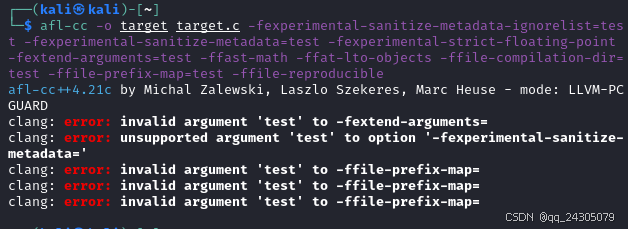
185. -ffine-grained-bitfield-accesses
对连续的位域运行使用单独的访问,并保证位域宽度和对齐方式合法。
186. -ffinite-loops
假设所有非平凡循环都是有限的。
187. -ffinite-math-only
允许浮点优化,并假设参数和结果不是 NaN 或 +-inf。这定义了 \_\_FINITE\MATH\ONLY\\ 预处理器宏。
188. -ffixed-a0
保留 a0 寄存器(仅限 M68k)
189. -ffixed-a1
保留 a1 寄存器(仅限 M68k)
190. -ffixed-a2
保留 a2 寄存器(仅限 M68k)
191. -ffixed-a3
保留 a3 寄存器(仅限 M68k)
192. -ffixed-a4
保留 a4 寄存器(仅限 M68k)
193. -ffixed-a5
保留 a5 寄存器(仅限 M68k)
194. -ffixed-a6
保留 a6 寄存器(仅限 M68k)
bash
afl-cc -o target target.c -ffine-grained-bitfield-accesses -ffinite-loops -ffixed-a0 -ffixed-a1 -ffixed-a2 -ffixed-a3 -ffixed-a4 -ffixed-a5 -ffixed-a6195. -ffixed-d0
保留 d0 寄存器(仅限 M68k)
196. -ffixed-d1
保留 d1 寄存器(仅限 M68k)
197. -ffixed-d2
保留 d2 寄存器(仅限 M68k)
198. -ffixed-d3
保留 d3 寄存器(仅限 M68k)
199. -ffixed-d4
保留 d4 寄存器(仅限 M68k)
200. -ffixed-d5
保留 d5 寄存器(仅限 M68k)
201. -ffixed-d6
保留 d6 寄存器(仅限 M68k)
202. -ffixed-d7
保留 d7 寄存器(仅限 M68k)
bash
afl-cc -o target target.c -ffixed-d0 -ffixed-d1 -ffixed-d2 -ffixed-d3 -ffixed-d4 -ffixed-d5 -ffixed-d6 -ffixed-d7203. -ffixed-g1
保留 G1 寄存器(仅限 SPARC)
204. -ffixed-g2
保留 G2 寄存器(仅限 SPARC)
205. -ffixed-g3
保留 G3 寄存器(仅限 SPARC)
206. -ffixed-g4
保留 G4 寄存器(仅限 SPARC)
207. -ffixed-g5
保留 G5 寄存器(仅限 SPARC)
208. -ffixed-g6
保留 G6 寄存器(仅限 SPARC)
209. -ffixed-g7
保留 G7 寄存器(仅限 SPARC)
210. -ffixed-i0
保留 I0 寄存器(仅限 SPARC)
211. -ffixed-i1
保留 I1 寄存器(仅限 SPARC)
212. -ffixed-i2
保留 I2 寄存器(仅限 SPARC)
213. -ffixed-i3
保留 I3 寄存器(仅限 SPARC)
214. -ffixed-i4
保留 I4 寄存器(仅限 SPARC)
215. -ffixed-i5
保留 I5 寄存器(仅限 SPARC)
216. -ffixed-l0
保留 L0 寄存器(仅限 SPARC)
217. -ffixed-l1
保留 L1 寄存器(仅限 SPARC)
218. -ffixed-l2
保留 L2 寄存器(仅限 SPARC)
219. -ffixed-l3
保留 L3 寄存器(仅限 SPARC)
220. -ffixed-l4
保留 L4 寄存器(仅限 SPARC)
221. -ffixed-l5
保留 L5 寄存器(仅限 SPARC)
222. -ffixed-l6
保留 L6 寄存器(仅限 SPARC)
223. -ffixed-l7
保留 L7 寄存器(仅限 SPARC)
bash
afl-cc -o target target.c -ffixed-g1 -ffixed-g2 -ffixed-g3 -ffixed-g4 -ffixed-g5 -ffixed-g6 -ffixed-g7 -ffixed-i0 -ffixed-i1 -ffixed-i2 -ffixed-i3 -ffixed-i4 -ffixed-i5 -ffixed-l0 -ffixed-l1 -ffixed-l2 -ffixed-l3 -ffixed-l4 -ffixed-l5 -ffixed-l6 -ffixed-l7224. -ffixed-o0
保留 O0 寄存器(仅限 SPARC)
225. -ffixed-o1
保留 O1 寄存器(仅限 SPARC)
226. -ffixed-o2
保留 O2 寄存器(仅限 SPARC)
227. -ffixed-o3
保留 O3 寄存器(仅限 SPARC)
228. -ffixed-o4
保留 O4 寄存器(仅限 SPARC)
229. -ffixed-o5
保留 O5 寄存器(仅限 SPARC)
230. -ffixed-point
启用定点类型
231. -ffixed-r19
保留寄存器 r19(仅限 Hexagon)
232. -ffixed-r9
保留 r9 寄存器(仅限 ARM)
233. -ffixed-x10
保留 x10 寄存器(仅限 AArch64/RISC-V)
234. -ffixed-x11
保留 x11 寄存器(仅限 AArch64/RISC-V)
235. -ffixed-x12
保留 x12 寄存器(仅限 AArch64/RISC-V)
236. -ffixed-x13
保留 x13 寄存器(仅限 AArch64/RISC-V)
237. -ffixed-x14
保留 x14 寄存器(仅限 AArch64/RISC-V)
238. -ffixed-x15
保留 x15 寄存器(仅限 AArch64/RISC-V)
239. -ffixed-x16
保留 x16 寄存器(仅限 AArch64/RISC-V)
240. -ffixed-x17
保留 x17 寄存器(仅限 AArch64/RISC-V)
241. -ffixed-x18
保留 x18 寄存器(仅限 AArch64/RISC-V)
242. -ffixed-x19
保留 x19 寄存器(仅限 AArch64/RISC-V)
243. -ffixed-x1
保留 x1 寄存器(仅限 AArch64/RISC-V)
bash
afl-cc -o target target.c -ffixed-o0 -ffixed-o1 -ffixed-o2 -ffixed-o3 -ffixed-o4 -ffixed-o5 -ffixed-point -ffixed-r19 -ffixed-r9 -ffixed-x10 -ffixed-x11 -ffixed-x12 -ffixed-x13 -ffixed-x14 -ffixed-x15 -ffixed-x16 -ffixed-x17 -ffixed-x18 -ffixed-x19 -ffixed-x1244. -ffixed-x20
保留 x20 寄存器(仅限 AArch64/RISC-V)
245. -ffixed-x21
保留 x21 寄存器(仅限 AArch64/RISC-V)
246. -ffixed-x22
保留 x22 寄存器(仅限 AArch64/RISC-V)
247. -ffixed-x23
保留 x23 寄存器(仅限 AArch64/RISC-V)
248. -ffixed-x24
保留 x24 寄存器(仅限 AArch64/RISC-V)
249. -ffixed-x25
保留 x25 寄存器(仅限 AArch64/RISC-V)
250. -ffixed-x26
保留 x26 寄存器(仅限 AArch64/RISC-V)
251. -ffixed-x27
保留 x27 寄存器(仅限 AArch64/RISC-V)
252. -ffixed-x28
保留 x28 寄存器(仅限 AArch64/RISC-V)
253. -ffixed-x29
保留 x29 寄存器(仅限 AArch64/RISC-V)
254. -ffixed-x2
保留 x2 寄存器(仅限 AArch64/RISC-V)
255. -ffixed-x30
保留 x30 寄存器(仅限 AArch64/RISC-V)
256. -ffixed-x31
保留 x31 寄存器(仅限 AArch64/RISC-V)
257. -ffixed-x3
保留 x3 寄存器(仅限 AArch64/RISC-V)
258. -ffixed-x4
保留 x4 寄存器(仅限 AArch64/RISC-V)
259. -ffixed-x5
保留 x5 寄存器(仅限 AArch64/RISC-V)
260. -ffixed-x6
保留 x6 寄存器(仅限 AArch64/RISC-V)
261. -ffixed-x7
保留 x7 寄存器(仅限 AArch64/RISC-V)
262. -ffixed-x8
保留 x8 寄存器(仅限 AArch64/RISC-V)
263. -ffixed-x9
保留 x9 寄存器(仅限 AArch64/RISC-V)
bash
afl-cc -o target target.c -ffixed-x20 -ffixed-x21 -ffixed-x22 -ffixed-x23 -ffixed-x24 -ffixed-x25 -ffixed-x26 -ffixed-x27 -ffixed-x28 -ffixed-x29 -ffixed-x2 -ffixed-x30 -ffixed-x31 -ffixed-x31 -ffixed-x4 -ffixed-x5 -ffixed-x6 -ffixed-x7 -ffixed-x8 -ffixed-x9264. -fforce-check-cxx20-modules-input-files
显式检查 C++20 模块的输入源文件
265. -fforce-dwarf-frame
始终发出调试框架部分
266. -fforce-emit-vtables
发出更多虚表以改进去虚拟化
267. -fforce-enable-int128
启用对 int128_t 类型的支持
268. -ffp-contract=<value>
形成融合浮点运算操作(例如 FMA)
269. -ffp-eval-method=<value>
指定用于浮点运算的求值方法。
270. -ffp-exception-behavior=<value>
指定浮点运算的异常行为。
271. -ffp-model=<value>
控制浮点计算的语义。
bash
afl-cc -o target target.c -fforce-check-cxx20-modules-input-files -fforce-dwarf-frame -fforce-emit-vtables -fforce-enable-int128 -ffp-contract=test -ffp-eval-method=test -ffp-exception-behavior=test -ffp-model=test272. -ffreestanding
断言编译在独立环境中进行
273. -ffuchsia-api-level=<value>
设置 Fuchsia API 级别
274. -ffunction-sections
将每个函数放在其自己的部分
275. -fglobal-isel
启用全局指令选择器
276. -fgnu-keywords
允许使用 GNU 扩展关键字,无论语言标准如何
277. -fgnu-runtime
生成与标准 GNU Objective-C 运行时兼容的输出
278. -fgnu89-inline
使用 gnu89 内联语义
279. -fgnuc-version=<value>
设置各种宏以声明与给定的 GCC 版本兼容(默认为 4.2.1)
280. -fgpu-allow-device-init
允许在 HIP 中使用设备端初始化函数(实验性)
281. -fgpu-approx-transcendentals
使用近似超越函数
282. -fgpu-default-stream=<value>
指定默认流。默认值为"legacy"。 (仅限 CUDA/HIP)
283. -fgpu-defer-diag
推迟 CUDA/HIP 的主机/设备相关诊断消息
284. -fgpu-flush-denormals-to-zero
在 CUDA/HIP 设备模式下,将非规格化浮点值刷新为零。
bash
afl-cc -o target target.c -ffreestanding -ffuchsia-api-level=test -ffunction-sections -fglobal-isel -fgnu-keywords -fgnu-runtime -fgnu89-inline -fgnuc-version=4.2.1 -fgpu-allow-device-init -fgpu-approx-transcendentals -fgpu-default-stream=legacy -fgpu-defer-diag -fgpu-flush-denormals-to-zero285. -fgpu-rdc
生成可重定位设备代码,也称为单独编译模式
286. -fgpu-sanitize
为支持的卸载设备启用清理程序
287. -fhip-emit-relocatable
将 HIP 源编译为可重定位代码
288. -fhip-fp32-correctly-rounded-divide-sqrt
指定程序源中使用的单精度浮点除法和平方根运算是否正确舍入(仅限 HIP 设备编译)
289. -fhip-kernel-arg-name
指定保留内核参数名称(仅限 HIP)
290. -fhip-new-launch-api
为 HIP 使用新的内核启动 API
291. -fhlsl-strict-availability
为 HLSL 内置函数启用严格可用性诊断模式。
292. -fhonor-infinities
指定不允许进行假设参数和结果不为 +-inf 的浮点优化。
293. -fhonor-nans
指定不允许进行假设参数和结果不为 NAN 的浮点优化。
294. -fignore-exceptions
启用忽略异常处理结构的支持。
295. -fimplicit-module-maps
隐式搜索文件系统中的模块映射文件。
296. -fincremental-extensions
启用增量处理扩展,例如全局范围内的处理语句。
bash
afl-cc -o target target.c -fgpu-rdc -fgpu-sanitize -fhip-emit-relocatable -fhip-fp32-correctly-rounded-divide-sqrt -fhip-kernel-arg-name -fhip-new-launch-api -fhlsl-strict-availability -fhonor-infinities -fhonor-nans -fignore-exceptions -fimplicit-module-maps -fincremental-extensions297. -finline-functions
内联合适的函数
298. -finline-hint-functions
内联(显式或隐式)标记为内联的函数
299. -finline-max-stacksize=<value>
抑制堆栈大小超过指定值的函数的内联
300. -finput-charset=<value>
指定源文件的默认字符集
301. -finstrument-function-entry-bare
仅在内联后对函数入口进行插桩,且不向插桩调用提供参数
302. -finstrument-functions-after-inlining
类似于 -finstrument-functions,但在内联后插入调用
303. -finstrument-functions
生成对插桩函数入口和出口的调用
304. -fintegrated-as
启用集成汇编器
305. -fintegrated-cc1
在进程内运行 cc1
306. -fintegrated-objemitter
使用内部机器目标代码发射器
307. -fjmc
启用"仅我的代码"调试
308. -fjump-tables
使用跳转表降低开关
309. -fkeep-persistent-storage-variables
启用保留所有具有持久存储期限的变量(包括全局变量、静态变量和线程局部变量),以确保它们可以被直接寻址
310. -fkeep-static-consts
保留静态常量变量,即使未使用
bash
afl-cc -o target target.c -finline-functions -finline-hint-functions -finline-max-stacksize=test -finput-charset=test -finstrument-function-entry-bare -finstrument-functions-after-inlining -finstrument-functions -fintegrated-as -fintegrated-cc1 -fintegrated-objemitter -fjmc -fjump-tables -fkeep-persistent-storage-variables -fkeep-static-consts311. -fkeep-system-includes
在发出预处理器输出时,保留 #include 指令,而不是扩展系统头文件。这在生成用于减少测试用例的预处理输出时非常有用。如果控制包含内容的预处理器符号(例如 _XOPEN_SOURCE)在包含源文件中定义,则可能会产生错误的输出。生成的源代码到其他编译环境的可移植性无法保证。
仅与 -E 选项一起使用时有效。
312. -flax-vector-conversions=<value>
启用隐式向量位转换
313. -flto-jobs=<value>
控制 -flto=thin 的后端并行度(默认值 0 表示线程数将根据检测到的 CPU 数量确定)
314. -flto=auto
在"完整"模式下启用 LTO
315. -flto=jobserver
在"完整"模式下启用 LTO
316. -flto=<value>
设置 LTO 模式
317. -flto
在"完整"模式下启用 LTO
318. -fmacro-backtrace-limit=<value>
设置宏扩展回溯中打印的最大条目数(0 = 无限制)
319. -fmacro-prefix-map=<value>
在预定义的预处理宏和 __builtin_FILE() 中重新映射文件源路径。隐含 -ffile-reproducible 选项。
320. -fmath-errno
要求数学函数通过设置 errno 来指示错误
bash
afl-cc -o target target.c -E -fkeep-system-includes -flax-vector-conversions=10 -flto-jobs=0 -flto=auto -flto=1 -flto -fmacro-backtrace-limit=0 -fmacro-prefix-map=0 -fmath-errno321. -fmax-tokens=<value>
指定 -Wmax-tokens 的最大预处理 token 总数。
322. -fmax-type-align=<value>
指定对未明确指定对齐方式的指针强制执行的最大对齐方式。
323. -fmemory-profile-use=<pathname>
使用内存配置文件进行配置文件引导的内存优化。
324. -fmemory-profile=<directory>
启用堆内存分析并将结果转储到 <directory>。
325. -fmemory-profile
启用堆内存分析。
326. -fmerge-all-constants
允许合并常量。
327. -fmessage-length=<value>
格式化诊断信息,使其适合 N 列。
328. -fminimize-whitespace
发出预处理器输出时忽略输入文件中的空格。它仅在必要时才包含空格,例如,为了防止两个减号合并到增量运算符中。与 -P 选项配合使用,可以规范化空格,使两个仅格式更改的文件相等。
仅适用于 C 类输入的 -E 选项,且与 -traditional-cpp 不兼容。
329. -fmodule-file=\= <file>
指定模块名称到预编译模块文件的映射,如果省略名称,则加载模块文件。
bash
afl-cc -o target target.c -fmax-tokens=0 -fmax-type-align=1 -fmemory-profile-use=test -fmemory-profile=output -fmerge-all-constants -fmessage-length=3 -fminimize-whitespace -fmodule-file=output/330. -fmodule-header=<kind>
从用户 (fmodule-header=user) 或系统 (fmodule-header=system) 搜索路径中应找到的头文件构建 C++20 头文件单元。
331. -fmodule-header
从头文件构建 C++20 头文件单元。
332. -fmodule-map-file=<file>
加载此模块映射文件。
333. -fmodule-name=<name>
指定要构建的模块名称。
334. -fmodule-output=<value>
编译标准 C++ 模块单元时,保存中间模块文件结果。
335. -fmodule-output
编译标准 C++ 模块单元时,保存中间模块文件结果。
336. -fmodules-cache-path=<directory>
指定模块缓存路径
337. -fmodules-decluse
要求声明模块中使用的模块
338. -fmodules-disable-diagnostic-validation
加载模块时禁用诊断选项验证
339. -fmodules-ignore-macro=<value>
构建和加载模块时忽略指定宏的定义
340. -fmodules-prune-after=<seconds>
指定模块文件被视为未使用的时间间隔(以秒为单位)
341. -fmodules-prune-interval=<seconds>
指定尝试修剪模块缓存的时间间隔(以秒为单位)
bash
afl-cc -o target target.c -fmodule-header=test -fmodule-header -fmodule-map-file=target -fmodule-name=target -fmodule-output=output -fmodules-cache-path=output -fmodules-decluse -fmodules-disable-diagnostic-validation -fmodules-ignore-macro=test -fmodules-prune-after=10 -fmodules-prune-interval=20342. -fmodules-search-all
搜索非导入模块以解析引用
343. -fmodules-strict-decluse
与 -fmodules-decluse 类似,但要求所有头文件都必须位于模块中
344. -fmodules-user-build-path <directory>
指定模块用户构建路径
345. -fmodules-validate-input-files-content
如果修改时间不同,则根据内容验证 PCM 输入文件
346. -fmodules-validate-once-per-build-session
如果模块在本次构建会话中已成功验证或加载,则不验证模块的输入文件
347. -fmodules-validate-system-headers
加载模块时验证模块所依赖的系统头文件
348. -fmodules
启用"modules"语言功能
349. -fms-compatibility-version=<value>
以点分隔的值,表示要在 _MSC_VER 中报告的 Microsoft 编译器版本号(0 = 未定义(默认))
350. -fms-compatibility
启用完整Microsoft Visual C++ 兼容性
351. -fms-define-stdc
在 MSVC 兼容模式下将 'STDC' 定义为 '1'
352. -fms-extensions
接受 Microsoft 编译器支持的一些非标准结构
353. -fms-hotpatch
确保所有函数均可在运行时进行热修补
bash
afl-cc -o target target.c -fmodules-search-all -fmodules-strict-decluse -fmodules-user-build-path output -fmodules-validate-input-files-content -fmodules-validate-once-per-build-session -fmodules-validate-system-headers -fmodules -fms-compatibility-version=0 -fms-compatibility -fms-define-stdc -fms-extensions -fms-hotpatch354. -fms-runtime-lib=<value>
选择 Windows 运行时库
355. -fms-volatile
易失性加载和存储具有获取和释放语义
356. -fmsc-version=<value>
要在 _MSC_VER 中报告的 Microsoft 编译器版本号(0 = 不定义(默认))
357. -fnew-alignment=<align>
指定 '::operator new(size_t)' 保证的最大对齐方式
358. -fnew-infallible
允许将抛出的全局 C++ 运算符 new 视为始终返回有效内存(使用 attribute((returns_nonnull)) 和 throw() 进行注释)。这在源代码中可检测到。
359. -fno-aapcs-bitfield-width
不遵循 AAPCS 标准要求,该要求规定易失性位字段宽度由字段容器类型决定。(仅限 ARM)。
360. -fno-access-control
禁用 C++ 访问控制
361. -fno-addrsig
不生成地址重要性表
362. -fno-apinotes-modules
禁用基于模块的外部 API 注释支持
363. -fno-apinotes
禁用外部 API 注释支持
364. -fno-assume-sane-operator-new
不要假设 C++ 的全局 new 运算符不能为任何指针指定别名
365. -fno-assume-unique-vtables
禁用基于 vtable 指针标识的优化
bash
afl-cc -o target target.c -fms-runtime-lib=windows -fms-volatile -fmsc-version=0 -fnew-alignment=10 -fnew-infallible -fno-aapcs-bitfield-width -fno-access-control -fno-addrsig -fno-apinotes-modules -fno-apinotes -fno-assume-sane-operator-new -fno-assume-unique-vtables366. -fno-assumptions
禁用 C++23 的 \[assume] 属性的代码生成和编译时检查
367. -fno-auto-import
MinGW 专用。禁用代码生成和链接中自动 dllimport 的支持
368. -fno-autolink
禁用自动库链接的链接器指令生成
369. -fno-builtin-<value>
禁用特定函数的隐式内置函数
370. -fno-builtin
禁用函数的隐式内置函数
371. -fno-c++-static-destructors
禁用 C++ 静态析构函数注册
372. -fno-char8_t
禁用 C++ 内置类型 char8_t
373. -fno-clangir
使用 AST -> LLVM 流水线进行编译
374. -fno-color-diagnostics
禁用诊断中的颜色
375. -fno-common
像普通定义一样编译通用全局变量
376. -fno-complete-member-pointers
如果成员指针基类型在 Microsoft ABI 下很重要,则不要求它们完整
377. -fno-constant-cfstrings
禁用创建 CodeFoundation 类型的常量字符串
378. -fno-convergent-functions
假设所有函数都可以收敛。
379. -fno-coverage-mapping
禁用代码覆盖率分析
380. -fno-coverage-mcdc
禁用 MC/DC 覆盖率标准
381. -fno-crash-diagnostics
禁用在 clang 崩溃期间自动生成预处理源文件和复现脚本
bash
afl-cc -o target target.c -fno-assumptions -fno-auto-import -fno-autolink -fno-builtin-0 -fno-builtin -fno-c++-static-destructors -fno-char8_t -fno-clangir -fno-color-diagnostics -fno-common -fno-complete-member-pointers -fno-constant-cfstrings -fno-convergent-functions -fno-coverage-mapping -fno-coverage-mcdc -fno-crash-diagnostics382. -fno-cx-limited-range
涉及复杂算术运算的基本代数展开已被禁用。
383. -fno-cxx-modules
禁用 C++ 模块
384. -fno-debug-macro
不显示宏调试信息
385. -fno-declspec
禁止使用 __declspec 作为关键字
386. -fno-define-target-os-macros
禁用预定义的目标操作系统宏
387. -fno-delayed-template-parsing
禁用延迟模板解析
388. -fno-delete-null-pointer-checks
不将空指针的使用视为未定义行为
389. -fno-diagnostics-fixit-info
诊断信息中不包含 fixit 信息
390. -fno-diagnostics-show-line-numbers
在诊断代码片段中显示行号
391. -fno-digraphs
禁止使用其他标记表示法,例如"<:"、":>"、"<%"、"%>"、"%:"、"%:%:"
392. -fno-direct-access-external-data
使用 GOT 间接引用外部数据符号
393. -fno-disable-block-signature-string
不禁用块签名字符串
394. -fno-discard-value-names
不丢弃 LLVM IR 中的值名称
395. -fno-dollars-in-identifiers
禁止在标识符中使用"$"
bash
afl-cc -o target target.c -fno-cx-limited-range -fno-cxx-modules -fno-debug-macro -fno-declspec -fno-define-target-os-macros -fno-delayed-template-parsing -fno-delete-null-pointer-checks -fno-diagnostics-fixit-info -fno-diagnostics-show-line-numbers -fno-digraphs -fno-direct-access-external-data -fno-disable-block-signature-string -fno-discard-value-names -fno-dollars-in-identifiers396. -fno-elide-constructors
禁用 C++ 复制构造函数省略
397. -fno-elide-type
打印诊断信息时不省略类型
398. -fno-eliminate-unused-debug-types
为已定义但未使用的类型发出调试信息
399. -fno-exceptions
禁用异常处理支持
400. -fno-experimental-late-parse-attributes
禁用实验性的属性延迟解析
401. -fno-experimental-relative-c++-abi-vtables
对于带有虚表的类,请勿使用实验性的 C++ 类 ABI
402. -fno-experimental-sanitize-metadata=<value>
禁用为二进制分析清理器发出元数据
403. -fno-fat-lto-objects
禁用胖 LTO 对象支持
404. -fno-file-reproducible
扩展 FILE 宏时使用主机平台特定的路径分隔符
405. -fno-fine-grained-bitfield-accesses
使用用于连续位域运行的大整数访问。
406. -fno-finite-loops
不假设任何循环都是有限的。
407. -fno-fixed-point
禁用定点类型
408. -fno-force-enable-int128
禁用对 int128_t 类型的支持
409. -fno-global-isel
禁用全局指令选择器
410. -fno-gnu-inline-asm
禁用 GNU 风格的内联汇编
bash
afl-cc -o target target.c -fno-elide-constructors -fno-elide-type -fno-eliminate-unused-debug-types -fno-exceptions -fno-experimental-late-parse-attributes -fno-experimental-relative-c++-abi-vtables -fno-experimental-sanitize-metadata=0 -fno-fat-lto-objects -fno-file-reproducible -fno-fine-grained-bitfield-accesses -fno-finite-loops -fno-fixed-point -fno-force-enable-int128 -fno-global-isel -fno-gnu-inline-asm 411. -fno-gpu-allow-device-init
禁止在 HIP 中使用设备端初始化函数(实验性)
412. -fno-gpu-approx-transcendentals
不使用近似超越函数
413. -fno-gpu-defer-diag
不延迟 CUDA/HIP 的主机/设备相关诊断消息
414. -fno-hip-emit-relocatable
不覆盖工具链以将 HIP 源编译为可重定位文件
415. -fno-hip-fp32-correctly-rounded-divide-sqrt
不指定程序源中使用的单精度浮点除法和平方根运算是否正确舍入(仅限 HIP 设备编译)
416. -fno-hip-kernel-arg-name
不指定保留内核参数名称(仅限 HIP)
417. -fno-hip-new-launch-api
不为 HIP 使用新的内核启动 API
418. -fno-integrated-as
禁用集成汇编程序
419. -fno-integrated-cc1
为每个 cc1 生成一个单独的进程
420. -fno-integrated-objemitter
使用外部机器目标代码发射器。
421. -fno-jump-tables
不使用跳转表来降低开关
bash
afl-cc -o target target.c -fno-gpu-allow-device-init -fno-gpu-approx-transcendentals -fno-gpu-defer-diag -fno-hip-emit-relocatable -fno-hip-fp32-correctly-rounded-divide-sqrt -fno-hip-kernel-arg-name -fno-hip-new-launch-api -fno-integrated-as -fno-integrated-cc1 -fno-integrated-objemitter -fno-jump-tables422. -fno-keep-persistent-storage-variables
禁用保留所有具有持久存储期限的变量,包括全局变量、静态变量和线程局部变量,以确保它们可以被直接寻址。
423. -fno-keep-static-consts
即使未使用,也不保留静态常量。
424. -fno-knr-functions
禁用对 K&R C 函数声明的支持。
425. -fno-lto
禁用 LTO 模式(默认)
426. -fno-memory-profile
禁用堆内存分析。
427. -fno-merge-all-constants
禁止合并常量。
428. -fno-modules-check-relocated<value>
加载 PCM 文件时跳过对重定位模块的检查。
429. -fno-modules-validate-textual-header-includes
不对文本头文件强制执行 -fmodules-decluse 和私有头文件限制。此标志将在未来的 Clang 版本中移除。
430. -fno-new-infallible
禁止将抛出的全局 C++ 运算符 new 视为始终返回有效内存(使用 attribute((returns_nonnull)) 和 throw() 进行注释)。这在源代码中是可检测的。
431. -fno-objc-avoid-heapify-local-blocks
不尝试避免堆化局部块
432. -fno-objc-infer-related-result-type
不根据方法族推断 Objective-C 相关结果类型
433. -fno-offload-lto
禁用 LTO 模式(默认)以进行卸载编译
bash
afl-cc -o target target.c -fno-keep-persistent-storage-variables -fno-keep-static-consts -fno-knr-functions -fno-lto -fno-memory-profile -fno-merge-all-constants -fno-modules-check-relocated -fno-modules-validate-textual-header-includes -fno-new-infallible -fno-objc-avoid-heapify-local-blocks -fno-objc-infer-related-result-type -fno-offload-lto434. -fno-offload-uniform-block
不假设内核以统一的块大小启动(CUDA/HIP 默认为 true,其他情况为 false)
435. -fno-openmp-extensions
禁用所有 OpenMP 指令和子句的 Clang 扩展
436. -fno-operator-names
不将 C++ 运算符名称关键字视为运算符的同义词
437. -fno-optimize-sibling-calls
禁用尾调用优化,保持调用堆栈的准确性
438. -fno-pch-codegen
不为使用此 PCH 且假设将为 PCH 构建显式目标文件的代码生成代码
439. -fno-pch-debuginfo
不为从此 PCH 构建的目标文件中的类型生成调试信息,也不在其他地方生成这些信息
440. -fno-plt
使用 GOT 间接寻址而不是 PLT 进行外部函数调用(仅限 x86)
441. -fno-preserve-as-comments
不保留内联汇编中的注释
442. -fno-profile-generate
禁用配置文件检测的生成。
443. -fno-profile-instr-generate
禁用生成配置文件插桩。
444. -fno-profile-instr-use
禁用使用插桩数据进行配置文件引导优化。
445. -fno-pseudo-probe-for-profiling
不为样本配置文件生成伪探针
bash
afl-cc -o target target.c -fno-offload-uniform-block -fno-openmp-extensions -fno-operator-names -fno-optimize-sibling-calls -fno-pch-codegen -fno-pch-debuginfo -fno-plt -fno-preserve-as-comments -fno-profile-generate -fno-profile-instr-generate -fno-profile-instr-use -fno-pseudo-probe-for-profiling446. -fno-raw-string-literals
禁用原始字符串字面值
447. -fno-register-global-dtors-with-atexit
不使用 atexit 或 __cxa_atexit 注册全局析构函数
448. -fno-relaxed-template-template-args
禁用 C++17 宽松模板参数匹配
449. -fno-rtlib-add-rpath
不要将 -rpath 和特定于体系结构的资源目录添加到链接器标志中。指定 --hip-link 时,请勿将带有 HIP 运行时库目录的 -rpath 添加到链接器标志中。
450. -fno-rtlib-defaultlib
在 Windows 上,请勿发出 /defaultlib: 指令来链接编译器 RT 库。
451. -fno-rtti-data
禁用 RTTI 数据的生成。
452. -fno-rtti
禁用 RTTI 信息的生成。
453. -fno-sanitize-address-globals-dead-stripping
在 AddressSanitizer 中禁用链接器对全局变量的死区剥离。
454. -fno-sanitize-address-outline-instrumentation
使用地址清理器的默认代码内联逻辑。
455. -fno-sanitize-address-poison-custom-array-cookie
在 AddressSanitizer 中使用自定义 new\[\] 运算符时,禁用对数组 cookie 进行污染。
bash
afl-cc -o target target.c -fno-raw-string-literals -fno-register-global-dtors-with-atexit -fno-relaxed-template-template-args -fno-rtlib-add-rpath -fno-rtlib-defaultlib -fno-rtti-data -fno-rtti -fno-sanitize-address-globals-dead-stripping -fno-sanitize-address-outline-instrumentation -fno-sanitize-address-poison-custom-array-cookie456. -fno-sanitize-address-use-after-scope
在 AddressSanitizer 中禁用 use-after-scope 检测
457. -fno-sanitize-address-use-odr-indicator
禁用 ODR 指示符全局变量
458. -fno-sanitize-cfi-canonical-jump-tables
请勿使符号表中的跳转表地址规范化
459. -fno-sanitize-cfi-cross-dso
禁用跨 DSO 调用的控制流完整性 (CFI) 检查。
460. -fno-sanitize-coverage=<value>
禁用 Sanitizer 的覆盖率检测功能
461. -fno-sanitize-hwaddress-experimental-aliasing
禁用 HWAddressSanitizer 中的别名模式
462. -fno-sanitize-ignorelist
禁用 Sanitizer 的忽略列表文件
463. -fno-sanitize-memory-param-retval
禁用未初始化参数和返回值的检测
464. -fno-sanitize-memory-track-origins
禁用 MemorySanitizer 中的来源跟踪
465. -fno-sanitize-memory-use-after-dtor
禁用 MemorySanitizer 中的 use-after-destroy 检测
bash
afl-cc -o target target.c -fno-sanitize-address-use-after-scope -fno-sanitize-address-use-odr-indicator -fno-sanitize-cfi-canonical-jump-tables -fno-sanitize-cfi-cross-dso -fno-sanitize-coverage=test -fno-sanitize-hwaddress-experimental-aliasing -fno-sanitize-ignorelist -fno-sanitize-memory-param-retval -fno-sanitize-memory-track-origins -fno-sanitize-memory-use-after-dtor466. -fno-sanitize-recover=<value>
禁用指定杀毒程序的恢复
467. -fno-sanitize-stable-abi
杀毒程序运行时的常规 ABI 检测。默认值:Conventional(常规)
468. -fno-sanitize-stats
禁用杀毒程序统计信息收集。
469. -fno-sanitize-thread-atomics
在 ThreadSanitizer 中禁用原子操作检测
470. -fno-sanitize-thread-func-entry-exit
在 ThreadSanitizer 中禁用函数入口/出口检测
471. -fno-sanitize-thread-memory-access
在 ThreadSanitizer 中禁用内存访问检测
472. -fno-sanitize-trap=<value>
禁用指定消毒剂的捕获
473. -fno-sanitize-trap
禁用所有消毒剂的捕获
474. -fno-short-wchar
强制 wchar_t 为无符号整数
475. -fno-show-column
诊断信息中不包含列号
476. -fno-show-source-location
诊断信息中不包含源位置信息
477. -fno-signed-char
字符为无符号字符
478. -fno-signed-zeros
允许忽略浮点零符号的优化
bash
afl-cc -o target target.c -fno-sanitize-recover=test -fno-sanitize-stable-abi -fno-sanitize-stats -fno-sanitize-thread-atomics -fno-sanitize-thread-func-entry-exit -fno-sanitize-thread-memory-access -fno-sanitize-trap=test -fno-sanitize-trap -fno-short-wchar -fno-show-column -fno-show-source-location -fno-signed-char -fno-signed-zeros479. -fno-skip-odr-check-in-gmf
对全局模块片段中的声明执行 ODR 检查。
480. -fno-spell-checking
禁用拼写检查
481. -fno-split-machine-functions
使用配置文件信息禁用后期函数拆分 (x86 ELF)
482. -fno-split-stack
不使用分段堆栈
483. -fno-stack-clash-protection
禁用堆栈冲突保护
484. -fno-stack-protector
禁用堆栈保护器
485. -fno-standalone-debug
限制生成的调试信息以减小调试二进制文件的大小
486. -fno-strict-aliasing
禁用基于严格别名规则的优化
487. -fno-strict-float-cast-overflow
放宽语言规则,并尝试匹配目标平台原生浮点型到整型转换指令的行为
488. -fno-strict-return
不将超出非 void 函数末尾的控制流路径视为不可访问
489. -fno-sycl
禁用设备的 SYCL 内核编译
490. -fno-temp-file
直接创建编译输出文件。如果编译器崩溃,这可能会导致错误的增量构建。
491. -fno-threadsafe-statics
不发出代码来确保局部静态变量的初始化线程安全。
492. -fno-trigraphs
不处理三字母序列。
bash
afl-cc -o target target.c -fno-skip-odr-check-in-gmf -fno-spell-checking -fno-split-machine-functions -fno-split-stack -fno-stack-clash-protection -fno-stack-protector -fno-standalone-debug -fno-strict-aliasing -fno-strict-float-cast-overflow -fno-strict-return -fno-sycl -fno-temp-file -fno-threadsafe-statics -fno-trigraphs493. -fno-unified-lto
使用不同的 LTO 流水线
494. -fno-unique-section-names
文本段和数据段不使用唯一名称
495. -fno-unroll-loops
关闭循环展开器
496. -fno-use-cxa-atexit
不使用 __cxa_atexit 调用析构函数
497. -fno-use-init-array
使用 .ctors/.dtors 替代 .init_array/.fini_array
498. -fno-verify-intermediate-code
禁用 LLVM IR 验证
499. -fno-visibility-inlines-hidden-static-local-var
禁用 -fvisibility-inlines-hidden-static-local-var(非 Darwin 目标平台默认设置)
500. -fno-xray-function-index
忽略函数索引段,但会降低单函数修补的性能
501. -fno-zero-initialized-in-bss
不放置BSS 中的零初始化数据
502. -fobjc-arc-exceptions
在 -fobjc-arc 中合成 retain 和 release 时,请使用 EH 安全代码
503. -fobjc-arc
合成 Objective-C 指针的 retain 和 release 调用
504. -fobjc-avoid-heapify-local-blocks
尽量避免堆化局部块
bash
afl-cc -o target target.c -fno-unified-lto -fno-unique-section-names -fno-unroll-loops -fno-use-cxa-atexit -fno-use-init-array -fno-verify-intermediate-code -fno-visibility-inlines-hidden-static-local-var -fno-xray-function-index -fno-zero-initialized-in-bss -fobjc-arc-exceptions -fobjc-arc -fobjc-avoid-heapify-local-blocks505. -fobjc-disable-direct-methods-for-testing
忽略 objc_direct 属性,以便测试直接方法
506. -fobjc-encode-cxx-class-template-spec
完全编码 C++ 类模板特化
507. -fobjc-exceptions
启用 Objective-C 异常
508. -fobjc-runtime=<value>
指定目标 Objective-C 运行时类型和版本
509. -fobjc-weak
在 Objective-C 中启用 ARC 风格的弱引用
510. -foffload-implicit-host-device-templates
不带主机、设备和全局属性的模板函数或特化具有隐式主机设备属性(仅限 CUDA/HIP)
511. -foffload-lto=<value>
设置 LTO 模式以进行卸载编译
512. -foffload-lto
启用"full"模式下的 LTO 以进行卸载编译
513. -foffload-uniform-block
假设内核以统一的块大小启动(CUDA/HIP 默认为 true,其他情况为 false)
514. -fomit-frame-pointer
忽略不需要帧指针的函数。某些堆栈展开情况(例如分析器和清理器)可能更倾向于指定 -fno-omit-frame-pointer。在许多目标平台上,-O1 及更高版本默认忽略帧指针。-mno-omit-leaf-frame-pointer 对于叶函数优先。
515. -fopenacc
启用 OpenACC
516. -fopenmp-extensions
启用所有 Clang 扩展以支持 OpenMP 指令和子句。
517. -fopenmp-force-usm
强制执行行为,如同用户指定的 pragma omp 需要 unified_shared_memory 一样。
bash
afl-cc -o target target.c -fobjc-disable-direct-methods-for-testing -fobjc-encode-cxx-class-template-spec -fobjc-exceptions -fobjc-runtime=0 -fobjc-weak -foffload-implicit-host-device-templates -foffload-lto=test -foffload-lto -foffload-uniform-block -fomit-frame-pointer -fopenacc -fopenmp-extensions -fopenmp-force-usm518. -fopenmp-offload-mandatory
如果卸载到设备失败,则不创建主机回退。
519. -fopenmp-simd
仅为基于 SIMD 的构造生成 OpenMP 代码。
520. -fopenmp-target-debug
在 OpenMP 卸载设备 RTL 中启用调试。
521. -fopenmp-target-jit
生成可进行 JIT 编译以用于 OpenMP 卸载的代码。隐含 -foffload-lto=full。
522. -fopenmp-targets=<value>
指定要支持的三元组 OpenMP 卸载目标的逗号分隔列表。
523. -fopenmp-version=<value>
设置 OpenMP 版本(例如,OpenMP 4.5 为 45,OpenMP 5.1 为 51)。Clang 的默认值为 51。
524. -fopenmp
解析 OpenMP 指令并生成并行代码。
525. -foperator-arrow-depth=<value>
成员访问时调用的最大"operator->"数量
526. -foptimization-record-file=<file>
指定包含优化备注的文件的输出名称。隐含 -fsave-optimization-record。在 Darwin 平台上,此选项不能与多个 -arch <arch> 选项一起使用。
bash
afl-cc -o target target.c -fopenmp-offload-mandatory -fopenmp-simd -fopenmp-target-debug -fopenmp-target-jit -fopenmp-targets=test -fopenmp-version=51 -foperator-arrow-depth=5 -foptimization-record-file=output527. -foptimization-record-passes=<regex>
仅包含生成的优化记录中与指定正则表达式匹配的pass(默认情况下包含所有pass)
528. -forder-file-instrumentation
生成已检测的代码,将订单文件收集到default.profraw文件中(可通过选项或LLVM_PROFILE_FILE环境变量的"="形式覆盖)
529. -fpack-struct=<value>
指定默认的最大结构体打包对齐方式
530. -fpascal-strings
识别并构造Pascal风格的字符串文字
531. -fpass-plugin=<dsopath>
从动态共享对象文件加载pass插件(仅限新的pass管理器)。
532. -fpatchable-function-entry=<N,M>
在函数入口前生成 M 个 NOP,在函数入口后生成 N-M 个 NOP
533. -fpcc-struct-return
覆盖默认 ABI 以返回堆栈上的所有结构体
534. -fpch-codegen
为使用此 PCH 生成代码,并假设将为 PCH 构建一个显式目标文件
535. -fpch-debuginfo
为从此 PCH 构建的目标文件中的类型生成调试信息,并且不会在其他地方生成它们
bash
afl-cc -o target target.c -foptimization-record-passes=pass -forder-file-instrumentation -fpack-struct=1 -fpascal-strings -fpass-plugin=output -fpatchable-function-entry=1,2 -fpcc-struct-return -fpch-codegen -fpch-debuginfo536. -fpch-instantiate-templates
构建 PCH 时实例化模板
537. -fpch-validate-input-files-content
如果修改时间不同,则根据内容验证 PCH 输入文件
538. -fplugin-arg-<name>-<arg>
将 <arg> 传递给插件 <name>
539. -fplugin=<dsopath>
加载指定插件(动态共享对象)
540. -fprebuilt-implicit-modules
在预构建模块路径中查找隐式模块
541. -fprebuilt-module-path=<directory>
指定预构建模块路径
542. -fproc-stat-report=<value>
将子进程统计信息保存到指定文件
543. -fproc-stat-report<value>
打印子进程统计信息
544. -fprofile-arcs
生成 gcov 数据文件 (*.gcda) 的 Instrument 代码
545. -fprofile-exclude-files=<value>
Instrument 仅对名称与所有以分号分隔的正则表达式不匹配的文件执行操作
546. -fprofile-filter-files=<value>
仪器仅对名称与分号分隔的正则表达式匹配的文件起作用
bash
afl-cc -o target target.c -fpch-instantiate-templates -fpch-validate-input-files-content -fplugin-arg-name-arg -fplugin=output -fprebuilt-implicit-modules -fprebuilt-module-path=output -fproc-stat-report=1 -fproc-stat-report -fprofile-arcs -fprofile-exclude-files=1 -fprofile-filter-files=2547. -fprofile-function-groups=<N>
将函数划分为 N 组,并使用 -fprofile-selected-function-group 仅选择第 i 组中的函数进行插桩
548. -fprofile-generate=<directory>
生成插桩代码,将执行计数收集到 <directory>/default.profraw 中(会被 LLVM_PROFILE_FILE 环境变量覆盖)
549. -fprofile-generate
生成插桩代码,将执行计数收集到 default.profraw 中(会被 LLVM_PROFILE_FILE 环境变量覆盖)
550. -fprofile-instr-generate=<file>
生成插桩代码,将执行计数收集到 <file> 中(会被 LLVM_PROFILE_FILE 环境变量覆盖)
551. -fprofile-instr-generate
生成插桩代码,将执行计数收集到 default.profraw 文件中(会被选项的"="形式或 LLVM_PROFILE_FILE 环境变量覆盖)
552. -fprofile-instr-use=<value>
使用插桩数据用于配置文件引导优化
553. -fprofile-list=<value>
定义要检测的函数/文件列表的文件名。该文件使用清理器特例列表格式。
bash
afl-cc -o target target.c -fprofile-function-groups=1 -fprofile-generate=default.profraw -fprofile-generate -fprofile-instr-generate=output -fprofile-instr-generate -fprofile-instr-use=value -fprofile-list=value554. -fprofile-remapping-file=<file>
使用 <file> 中描述的重新映射将配置文件数据与程序中的名称进行匹配。
555. -fprofile-sample-accurate
指定样本配置文件是精确的。
556. -fprofile-sample-use=<value>
启用基于样本的配置文件引导优化。
557. -fprofile-selected-function-group=<i>
使用 -fprofile-function-groups 将函数划分为 N 个组,并仅选择第 i 组中的函数进行检测。有效范围为 0 到 N-1(含)。
558. -fprofile-update=<method>
设置配置文件计数器的更新方法。
559. -fprofile-use=<pathname>
使用检测数据进行配置文件引导优化。如果 pathname 是目录,则从 <pathname>/default.profdata 读取。否则,从文件 <pathname> 读取。
560. -fprotect-parens
确定优化器在计算浮点表达式时是否支持括号
561. -fpseudo-probe-for-profiling
为样本分析发出伪探测
562. -fptrauth-auth-traps
启用身份验证失败时的陷阱
563. -fptrauth-calls
启用所有间接调用的签名和身份验证
bash
afl-cc -o target target.c -fprofile-remapping-file=output -fprofile-sample-accurate -fprofile-sample-use=test -fprofile-selected-function-group=1 -fprofile-update=method -fprofile-use=output -fprotect-parens -fpseudo-probe-for-profiling -fptrauth-auth-traps -fptrauth-calls564. -fptrauth-function-pointer-type-discrimination
启用 C 函数指针的类型识别
565. -fptrauth-indirect-gotos
启用间接 goto 目标的签名和身份验证
566. -fptrauth-init-fini
启用 init/fini 数组中函数指针的签名
567. -fptrauth-intrinsics
启用指针身份验证内在函数
568. -fptrauth-returns
启用返回地址的签名和身份验证
569. -fptrauth-type-info-vtable-pointer-discrimination
启用 std::type_info 虚表指针的类型和地址识别
570. -fptrauth-vtable-pointer-address-discrimination
启用虚表指针的地址识别
571. -fptrauth-vtable-pointer-type-discrimination
启用虚表指针的类型识别
572. -frandomize-layout-seed-file=<file>
保存随机化结构布局功能使用的种子的文件
573. -frandomize-layout-seed=<seed>
随机化结构布局功能使用的种子
574. -fraw-string-literals
启用原始字符串文字
575. -freciprocal-math
允许重新关联除法运算
bash
afl-cc -o target target.c -fptrauth-function-pointer-type-discrimination -fptrauth-indirect-gotos -fptrauth-init-fini -fptrauth-intrinsics -fptrauth-returns -fptrauth-type-info-vtable-pointer-discrimination -fptrauth-vtable-pointer-address-discrimination -fptrauth-vtable-pointer-type-discrimination -frandomize-layout-seed-file=output -frandomize-layout-seed=12 -fraw-string-literals -freciprocal-math576. -freg-struct-return
覆盖默认 ABI,以在寄存器中返回小型结构体
577. -fregister-global-dtors-with-atexit
使用 atexit 或 __cxa_atexit 注册全局析构函数
578. -frelaxed-template-template-args
启用 C++17 宽松模板参数匹配
579. -fropi
生成只读位置无关代码(仅限 ARM)
580. -frtlib-add-rpath
将 -rpath 和特定于体系结构的资源目录添加到链接器标志。指定 --hip-link 时,还需将 -rpath 和 HIP 运行时库目录添加到链接器标志中。
581. -frtlib-defaultlib
在 Windows 上,发出 /defaultlib: 指令以链接编译器实时库(默认)。
582. -frwpi
生成读写位置无关代码(仅限 ARM)。
583. -fsafe-buffer-usage-suggestions
显示与 -Wunsafe-buffer-usage 警告相关的代码更新建议。
584. -fsample-profile-use-profi
使用 profi 推断块数和边数。
bash
afl-cc -o target target.c -freg-struct-return -fregister-global-dtors-with-atexit -frelaxed-template-template-args -fropi -frtlib-add-rpath -frtlib-defaultlib -frwpi -fsafe-buffer-usage-suggestions -fsample-profile-use-profi585. -fsanitize-address-destructor=<value>
设置 AddressSanitizer 插桩工具发出的模块析构函数类型。这些析构函数用于在代码卸载时(例如通过 `dlclose()`)注销已插桩的全局变量。
586. -fsanitize-address-field-padding=<value>
AddressSanitizer 的字段填充级别
587. -fsanitize-address-globals-dead-stripping
在 AddressSanitizer 中启用链接器全局变量的死区剥离
588. -fsanitize-address-outline-instrumentation
始终为地址清理器插桩生成函数调用
589. -fsanitize-address-poison-custom-array-cookie
在 AddressSanitizer 中使用自定义运算符 new\[\] 时启用数组 cookie 中毒
590. -fsanitize-address-use-after-return=<mode>
选择 AddressSanitizer 中堆栈返回后使用检测模式
591. -fsanitize-address-use-after-scope
在 AddressSanitizer 中启用作用域后使用检测
592. -fsanitize-address-use-odr-indicator
启用 ODR 指示全局变量,以避免在部分清理的程序中出现错误的 ODR 违规报告,但会增加二进制大小
bash
afl-cc -o target target.c -fsanitize-address-destructor=test -fsanitize-address-field-padding=test -fsanitize-address-globals-dead-stripping -fsanitize-address-outline-instrumentation -fsanitize-address-poison-custom-array-cookie -fsanitize-address-use-after-return=mode -fsanitize-address-use-after-scope -fsanitize-address-use-odr-indicator593. -fsanitize-cfi-canonical-jump-tables
使符号表中的跳转表地址规范化
594. -fsanitize-cfi-cross-dso
为跨 DSO 调用启用控制流完整性 (CFI) 检查。
595. -fsanitize-cfi-icall-experimental-normalize-integers
在 CFI 间接调用类型签名检查中规范化整数
596. -fsanitize-cfi-icall-generalize-pointers
在 CFI 间接调用类型签名检查中泛化指针
597. -fsanitize-coverage-allowlist=<value>
将 Sanitizer 覆盖率检测限制在符合提供的特殊情况列表的模块和函数上,被阻止的模块和函数除外
598. -fsanitize-coverage-ignorelist=<value>
禁用 Sanitizer 覆盖率检测,即使这些模块和函数符合提供的特殊情况列表,即使是允许的模块和函数也是如此
599. -fsanitize-coverage=<value>
指定 Sanitizer 的覆盖率检测类型
bash
afl-cc -o target target.c -fsanitize-cfi-canonical-jump-tables -fsanitize-cfi-cross-dso -fsanitize-cfi-icall-experimental-normalize-integers -fsanitize-cfi-icall-generalize-pointers -fsanitize-coverage-allowlist=test -fsanitize-coverage-ignorelist=test -fsanitize-coverage=test600. -fsanitize-hwaddress-abi=<value>
选择要定位的 HWAddressSanitizer ABI(拦截器或平台,默认拦截器)。此选项目前未使用。
601. -fsanitize-hwaddress-experimental-aliasing
在 HWAddressSanitizer 中启用别名模式
602. -fsanitize-ignorelist=<value>
消毒器的忽略列表文件路径
603. -fsanitize-memory-param-retval
启用未初始化参数和返回值的检测
604. -fsanitize-memory-track-origins=<value>
在 MemorySanitizer 中启用来源跟踪
605. -fsanitize-memory-track-origins
在 MemorySanitizer 中启用来源跟踪
606. -fsanitize-memory-use-after-dtor
在 MemorySanitizer 中启用销毁后使用检测
607. -fsanitize-memtag-mode=<value>
将默认 MTE 模式设置为"同步"(默认)或"异步"
608. -fsanitize-recover=<value>
为指定的消毒器启用恢复
609. -fsanitize-stable-abi
稳定版用于杀毒器运行时的 ABI 检测。默认值:Conventional(常规)
610. -fsanitize-stats
启用杀毒器统计信息收集。
611. -fsanitize-system-ignorelist=<value>
杀毒器系统忽略列表文件的路径
bash
afl-cc -o target target.c -fsanitize-hwaddress-abi=1 -fsanitize-hwaddress-experimental-aliasing -fsanitize-ignorelist=test -fsanitize-memory-param-retval -fsanitize-memory-track-origins=1 -fsanitize-memory-track-origins -fsanitize-memory-use-after-dtor -fsanitize-memtag-mode=sync -fsanitize-recover=1 -fsanitize-stable-abi=normal -fsanitize-stats -fsanitize-system-ignorelist=output612. -fsanitize-thread-atomics
在 ThreadSanitizer 中启用原子操作检测(默认)
613. -fsanitize-thread-func-entry-exit
在 ThreadSanitizer 中启用函数入口/出口检测(默认)
614. -fsanitize-thread-memory-access
在 ThreadSanitizer 中启用内存访问检测(默认)
615. -fsanitize-trap=<value>
为指定的消毒器启用捕获
616. -fsanitize-trap
为所有消毒器启用捕获
617. -fsanitize-undefined-strip-path-components=<number>
在发出检查元数据时,删除(或仅保留,如果为负数)指定数量的路径组件。
618. -fsanitize=<check>
针对各种形式的未定义或可疑行为启用运行时检查。请参阅用户手册了解可用的检查
619. -fsave-optimization-record=<format>
生成特定格式的优化记录文件
620. -fsave-optimization-record
生成 YAML 优化记录文件
621. -fseh-exceptions
使用 SEH 样式的异常
622. -fseparate-named-sections
为命名部分使用单独的唯一部分(仅限 ELF)
623. -fshort-enums
为枚举类型分配其声明的可能值范围所需的字节数
bash
afl-cc -o target target.c -fsanitize-thread-atomics -fsanitize-thread-func-entry-exit -fsanitize-thread-memory-access -fsanitize-trap=test -fsanitize-undefined-strip-path-components=12 -fsanitize=check -fsave-optimization-record=format -fsave-optimization-record -fseh-exceptions -fseparate-named-sections -fshort-enums624. -fshort-wchar
强制 wchar_t 为短无符号整型
625. -fshow-overloads=<value>
当过载解析失败时,显示哪些过载候选项。默认为"all"。
626. -fshow-skipped-includes
在 -H 输出中显示跳过的包含。
627. -fsigned-char
字符是有符号的。
628. -fsized-deallocation
启用 C++14 大小的全局释放函数。
629. -fsjlj-exceptions
使用 SjLj 风格的异常。
630. -fskip-odr-check-in-gmf
跳过全局模块片段中声明的 ODR 检查。
631. -fslp-vectorize
启用超字级并行向量化过程
632. -fspell-checking-limit=<value>
设置对无法识别的标识符执行拼写检查的最大次数(0 = 无限制)
633. -fsplit-dwarf-inlining
在使用 Split DWARF 时,在没有 .dwo/.dwp 文件的情况下,在对象/可执行文件中提供最少的调试信息,以便于在线符号化/堆栈跟踪
634. -fsplit-lto-unit
启用 LTO 单元拆分
635. -fsplit-machine-functions
启用使用配置文件信息进行后期函数拆分 (x86 ELF)
636. -fsplit-stack
使用分段堆栈
637. -fstack-clash-protection
启用堆栈冲突保护
bash
afl-cc -o target target.c -fshort-wchar -fshow-overloads=all -fshow-skipped-includes -fsigned-char -fsized-deallocation -fsjlj-exceptions -fskip-odr-check-in-gmf -fslp-vectorize -fspell-checking-limit=0 -fsplit-dwarf-inlining -fsplit-lto-unit -fsplit-machine-functions -fsplit-stack -fstack-clash-protection 638. -fstack-protector-all
为所有函数启用堆栈保护器
639. -fstack-protector-strong
为一些易受堆栈溢出攻击 (stack smashing) 影响的函数启用堆栈保护器。与 -fstack-protector 相比,此选项采用更强的启发式算法,涵盖包含任意大小(和任意类型)数组的函数,以及任何对 alloca 的调用或从局部变量获取地址的操作。
640. -fstack-protector
为一些易受堆栈溢出攻击 (stack smashing) 影响的函数启用堆栈保护器。此选项采用宽松的启发式算法,如果函数包含字符(或 8 位整数)数组或常量大小的 alloca 调用,且其大小大于 ssp-buffer-size(默认值:8 字节),则认为这些函数易受攻击。所有可变大小的 alloca 调用都被视为易受攻击。启用堆栈保护器的函数会在堆栈框架中添加一个保护值,并在函数退出时进行检查。该保护值在堆栈框架中的位置必须确保易受攻击变量的缓冲区溢出在覆盖函数返回地址之前先覆盖该保护值。引用堆栈保护值存储在全局变量中。
641. -fstack-size-section
发出包含函数堆栈大小元数据的节
642. -fstack-usage
发出包含函数堆栈大小信息的 .su 文件
643. -fstandalone-debug
发出程序使用的所有类型的完整调试信息
644. -fstrict-aliasing
启用基于严格别名规则的优化
645. -fstrict-enums
启用基于枚举值范围的严格定义的优化
bash
afl-cc -o target target.c -fstack-protector-all -fstack-protector-strong -fstack-protector -fstack-size-section -fstack-usage -fstandalone-debug -fstrict-aliasing -fstrict-enums646. -fstrict-flex-arrays=<n>
启用基于灵活数组严格定义的优化
647. -fstrict-float-cast-overflow
假设溢出的浮点型到整型的强制类型转换未定义(默认)
648. -fstrict-vtable-pointers
启用基于覆盖多态 C++ 对象的严格规则的优化
649. -fswift-async-fp=<option>
控制 Swift 异步扩展帧信息的发布
650. -fsycl
启用设备的 SYCL 内核编译
651. -fsyntax-only
运行预处理器、解析器和语义分析阶段
652. -fsystem-module
将此模块构建为系统模块。仅与 -emit-module 一起使用
653. -ftemplate-backtrace-limit=<value>
设置模板实例化回溯中打印的最大条目数(0 = 无限制)
654. -ftemplate-depth=<value>
设置递归模板实例化的最大深度
655. -ftest-coverage
生成 gcov 注释文件 (*.gcno)
656. -fthin-link-bitcode=<value>
仅针对 ThinLTO 瘦链接,将最小化的位码写入 <file>
bash
afl-cc -o target target.c -fstrict-flex-arrays=1 -fstrict-float-cast-overflow -fstrict-vtable-pointers -fswift-async-fp=12 -fsycl -fsyntax-only -fsystem-module -ftemplate-backtrace-limit=0 -ftemplate-depth=0 -ftest-coverage -fthin-link-bitcode=10657. -fthinlto-index=<value>
使用提供的函数摘要索引执行 ThinLTO 导入
658. -ftime-report=<value>
(适用于新的 pass 管理器)'per-pass':每个 pass 生成一份报告;'per-pass-run':每次 pass 调用生成一份报告
659. -ftime-trace-granularity=<value>
时间分析器跟踪的最小时间粒度(以微秒为单位)
660. -ftime-trace-verbose<value>
使时间跟踪捕获详细的事件详细信息(例如源文件名)。这可以使输出大小增加 2-3 倍
661. -ftime-trace=<value>
与 -ftime-trace 类似。指定 JSON 文件或包含 JSON 文件的目录
662. -ftime-trace
启用时间分析器。根据输出文件名生成 JSON 文件。
663. -ftrap-function=<value>
调用指定函数,而不是陷阱指令
664. -ftrapv-handler=<function name>
指定溢出时调用的函数
665. -ftrapv
整数溢出陷阱
666. -ftrigraphs
处理三字组序列
667. -ftrivial-auto-var-init-max-size=<value>
如果变量大小超过指定的实例数(以字节为单位),则停止初始化简单的自动堆栈变量
bash
afl-cc -o target target.c -fthinlto-index=test -ftime-report=test -ftime-trace-granularity=10 -ftime-trace=test -ftime-trace -ftrap-function=1 -ftrapv-handler=test -ftrapv -ftrigraphs -ftrivial-auto-var-init-max-size=10668. -ftrivial-auto-var-init-stop-after=<value>
在指定数量的实例后停止初始化琐碎的自动堆栈变量
669. -ftrivial-auto-var-init=<value>
初始化琐碎的自动堆栈变量。默认为"uninitialized(未初始化)"
670. -funified-lto
使用统一的 LTO 流水线
671. -funique-basic-block-section-names
为基本块部分使用唯一名称(仅限 ELF)
672. -funique-internal-linkage-names
通过附加模块路径的 MD5 哈希值来唯一化内部链接符号名称
673. -funroll-loops
开启循环展开器
674. -funsafe-math-optimizations
允许不安全的浮点数学优化,这可能会降低精度
675. -fuse-cuid=<value>
为单源卸载语言 CUDA 和 HIP 生成编译单元 ID 的方法:'hash'(通过哈希文件路径和命令行选项生成的 ID)| 'random'(ID 生成为随机数)| 'none'(禁用)。默认值为 'hash'。如果指定了此选项,则将被选项 '-cuid=ID' 覆盖。
676. -fuse-line-directives
在预处理输出中使用 #line
bash
afl-cc -o target target.c -ftrivial-auto-var-init-stop-after=1 -ftrivial-auto-var-init=uninitalized -funified-lto -funique-basic-block-section-names -funique-internal-linkage-names -funroll-loops -funsafe-math-optimizations -fuse-cuid=hash -fuse-line-directives677. -fvalidate-ast-input-files-content
计算并存储用于构建AST的输入文件的哈希值。如果修改时间不匹配的文件内容相同,则视为有效文件。
678. -fveclib=<value>
使用指定的向量函数库
679. -fvectorize
启用循环向量化过程
680. -fverbose-asm
生成详细的汇编输出
681. -fverify-intermediate-code
启用LLVM IR验证
682. -fvirtual-function-elimination
启用死虚函数消除优化。需要-flto=full选项。
683. -fvisibility-dllexport=<value>
dllexport定义的可见性。如果指定了Keep,则不调整可见性。-fvisibility-from-dllstorageclass
684. -fvisibility-externs-dllimport=<value>
dllimport外部声明的可见性。如果指定了 Keep,则不调整可见性 -fvisibility-from-dllstorageclass
685. -fvisibility-externs-nodllstorageclass=<value>
未指定显式 DLL 存储类型的外部声明的可见性。如果指定了 Keep,则不调整可见性 -fvisibility-from-dllstorageclass
686. -fvisibility-from-dllstorageclass
根据全局变量的最终 DLL 存储类型覆盖其可见性。
bash
afl-cc -o target target.c -fvalidate-ast-input-files-content -fveclib=test -fvectorize -fverbose-asm -fverify-intermediate-code -fvirtual-function-elimination -fvisibility-dllexport=1 -fvisibility-externs-dllimport=2 -fvisibility-externs-nodllstorageclass=3 -fvisibility-from-dllstorageclass687. -fvisibility-global-new-delete-hidden
使全局 C++ 运算符 new 和 delete 声明具有隐藏可见性
688. -fvisibility-global-new-delete=<value>
全局 C++ 运算符 new 和 delete 声明的可见性。如果指定了"source",则不调整可见性。
689. -fvisibility-inlines-hidden-static-local-var
启用 -fvisibility-inlines-hidden 后,内联 C++ 成员函数中的静态变量也将默认具有隐藏可见性。
690. -fvisibility-inlines-hidden
使内联 C++ 成员函数默认具有隐藏可见性。
691. -fvisibility-ms-compat
使全局类型具有"default"可见性,全局函数和变量默认具有"hidden"可见性。
692. -fvisibility-nodllstorageclass=<value>
未指定显式 DLL 存储类的定义的可见性。如果指定了 Keep,则不调整可见性 -fvisibility-from-dllstorageclass
693. -fvisibility=<value>
设置所有全局定义的默认符号可见性
694. -fwasm-exceptions
使用 WebAssembly 风格的异常
695. -fwhole-program-vtables
启用全程序 vtable 优化。需要 -flto
696. -fwrapv
将有符号整数溢出视为二进制补码
bash
afl-cc -o target target.c -fvisibility-global-new-delete-hidden -fvisibility-global-new-delete=source -fvisibility-inlines-hidden-static-local-var -fvisibility-inlines-hidden -fvisibility-ms-compat -fvisibility-nodllstorageclass=keep -fvisibility=test -fwasm-exceptions -fwhole-program-vtables -fwrapv697. -fwritable-strings
将字符串文字存储为可写数据
698. -fxl-pragma-pack
启用 IBM XL #pragma pack 处理
699. -fxray-always-emit-customevents
即使包含函数并非始终被检测,也始终发出 __xray_customevent(...) 调用
700. -fxray-always-emit-typedevents
即使包含函数并非始终被检测,也始终发出 __xray_typedevent(...) 调用
701. -fxray-always-instrument=<value>
已弃用:定义用于注入"始终检测"XRay 属性的白名单的文件名。
702. -fxray-attr-list=<value>
定义用于注入 XRay 属性的函数/类型列表的文件名。
703. -fxray-function-groups=<value>
仅检测 N 个组中的 1 个
704. -fxray-ignore-loops
除非循环函数也满足最小函数大小要求,否则不检测带有循环的函数。
705. -fxray-instruction-threshold=<value>
设置使用 XRay 检测的最小函数大小。
706. -fxray-instrumentation-bundle=<value>
选择要发出的 XRay 检测点。选项:all、none、function-entry、function-exit、function、custom。默认值为"all"。"function"包含"function-entry"和"function-exit"。
bash
afl-cc -o target target.c -fwritable-strings -fxl-pragma-pack -fxray-always-emit-customevents -fxray-always-emit-typedevents -fxray-always-instrument=xray -fxray-attr-list=test -fxray-function-groups=1 -fxray-ignore-loops -fxray-instruction-threshold=12 -fxray-instrumentation-bundle=all707. -fxray-instrument
在函数入口和出口生成 XRay 插桩工具。
708. -fxray-link-deps
指定 -fxray-instrument 时链接 XRay 运行时库(默认)。
709. -fxray-modes=<value>
默认链接到 XRay 插桩二进制文件的模式列表。
710. -fxray-never-instrument=<value>
已弃用:定义用于注入"从不插桩"XRay 属性的白名单的文件名。
711. -fxray-selected-function-group=<value>
使用 -fxray-function-groups 时,选择要插桩的函数组。有效范围为 0 至 fxray-function-groups - 1
712. -fzero-call-used-regs=<value>
函数返回时清除调用使用的寄存器(仅限 AArch64/x86)
713. -fzvector
启用 System z 矢量语言扩展
714. -F <value>
将目录添加到框架包含文件搜索路径
715. --gcc-install-dir=<value>
使用指定目录中的 GCC 安装。该目录以类似"lib{,32,64}/gcc{,-cross}/triple/version"的路径部分结尾。注意:编译器使用的可执行文件(例如 ld)不会被所选的 GCC 安装覆盖
bash
afl-cc -o target target.c -fxray-instrument -fxray-link-deps -fxray-modes=ray -fxray-never-instrument=1 -fxray-selected-function-group=0 -fzero-call-used-regs=45 -fzvector -F output --gcc-install-dir=output716. --gcc-toolchain=<value>
指定 Clang 可以找到"include"和"lib{,32,64}/gcc{,-cross}/triple/version"的目录。Clang 将使用版本最高的 GCC 安装。
717. --gcc-triple=<value>
搜索包含指定三元组的 GCC 安装。
718. -gcodeview-command-line
将编译器路径和命令行发送到 CodeView 调试信息中
719. -gcodeview-ghash
将类型记录哈希值发送到 .debug$H 段
720. -gcodeview
生成 CodeView 调试信息
721. -gdwarf-2
使用 dwarf 版本 2 生成源代码级调试信息
722. -gdwarf-3
使用 dwarf 版本 3 生成源代码级调试信息
723. -gdwarf-4
使用 dwarf 版本 4 生成源代码级调试信息
724. -gdwarf-5
使用 dwarf 版本 5 生成源代码级调试信息
725. -gdwarf32
如果启用了调试信息生成,则为 ELF 二进制文件启用 DWARF32 格式。
726. -gdwarf64
如果启用了调试信息生成,则为 ELF 二进制文件启用 DWARF64 格式。
727. -gdwarf
使用默认的 Dwarf 版本生成源码级调试信息
728. -gembed-source
在 DWARF 调试部分嵌入源码文本
729. -gen-reproducer=<value>
启用重现器(选项:off(关闭), crash (default)(崩溃(默认)), error(错误), always(始终))
bash
afl-cc -o target target.c --gcc-toolchain=include --gcc-triple=test -gcodeview-command-line -gcodeview-ghash -gcodeview -gdwarf-2 -gdwarf-3 -gdwarf-4 -gdwarf-5 -gdwarf32 -gdwarf64 -gdwarf -gembed-source -gen-reproducer=crash730. -gline-directives-only
仅发出调试行信息指令
731. -gline-tables-only
仅发出调试行号表
732. -gmodules
生成包含对 clang 模块或预编译头文件的外部引用的调试信息
733. -gno-codeview-command-line
不将编译器路径和命令行发送到 CodeView 调试信息中
734. -gno-embed-source
恢复默认行为,不在 DWARF 调试段中嵌入源文本
735. -gno-inline-line-tables
不发出内联行号表。
736. --gpu-bundle-output
HIP 设备编译的捆绑输出文件
737. --gpu-instrument-lib=<value>
HIP 的仪器设备库,它是一个包含 __cyg_profile_func_enter 和 __cyg_profile_func_exit 的 LLVM 位码
738. --gpu-max-threads-per-block=<value>
HIP 内核启动边界的默认每个块最大线程数
739. -gpulibc
链接用于 GPU 的 LLVM C 库
740. -gsplit-dwarf=<value>
设置 DWARF 裂变模式
741. -gstrict-dwarf
将 DWARF 功能限制为指定版本中定义的功能,避免使用更高版本的功能。
742. -gz=<value>
DWARF 调试段压缩类型
743. -G <size>
将最多 <size> 字节的对象放入小数据段 (MIPS / Hexagon)
744. -g
生成源码级调试信息
bash
afl-cc -o target target.c -gline-directives-only -gline-tables-only -gmodules -gno-codeview-command-line -gno-embed-source -gno-inline-line-tables --gpu-bundle-output --gpu-instrument-lib=output --gpu-max-threads-per-block=12 -gpulibc -gsplit-dwarf=54 -gstrict-dwarf -gz=6 -G 78 -g745. --help-hidden
显示隐藏选项的帮助
bash
afl-cc --help-hidden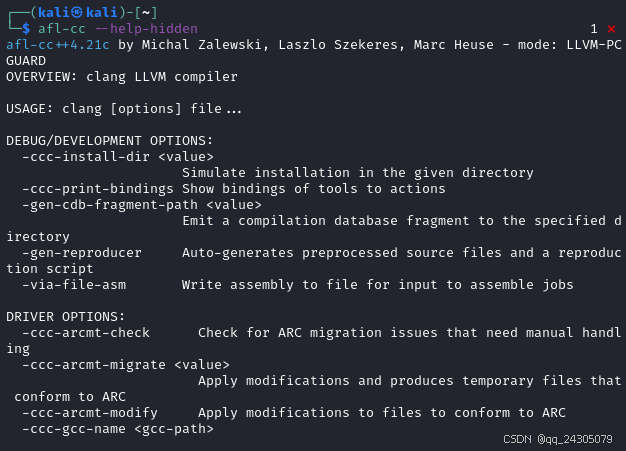
746. --hip-device-lib=<value>
HIP 设备库
747. --hip-link
为 HIP 链接 clang-offload-bundler 包
748. --hip-path=<value>
HIP 运行时安装路径,用于查找 HIP 版本并添加 HIP 包含路径。
749. --hip-version=<value>
HIP 版本号,格式为 major.minor.patch
750. --hipspv-pass-plugin=<dsopath>
HIP 到 SPIR-V 转换的转换插件路径。
751. --hipstdpar-interpose-alloc
将所有内存分配/释放调用替换为 hipManagedMalloc/hipFree 等效项
752. --hipstdpar-path=<value>
HIP 标准并行算法加速库路径,用于查找并隐式包含库头文件
753. --hipstdpar-prim-path=<value>
HIP 标准并行算法加速库所需的 rocPrim 路径,用于隐式包含 rocPrim 库
754. --hipstdpar-thrust-path=<value>
HIP 标准并行算法加速库所需的 rocThrust 路径,用于隐式包含 rocThrust 库
755. --hipstdpar
为标准并行算法启用 HIP 加速
756. -H
显示头文件包含和嵌套深度
bash
afl-cc -o target target.c --hip-device-lib=hip --hip-link --hip-path=output --hip-version=version --hipspv-pass-plugin=output --hipstdpar-interpose-alloc --hipstdpar-path=output --hipstdpar-prim-path=output --hipstdpar-thrust-path=output --hipstdpar -H757. -I-
将所有之前的 -I 标志限制为双引号包含,并从包含路径中移除当前目录
758. -iapinotes-modules <directory>
将模块名称引用的目录添加到 API 注释搜索路径
759. -ibuiltininc
即使在 -ibuiltininc 之前或之后使用 -nostdinc,也启用内置 #include 目录。在禁用该选项后使用 -nobuiltininc
760. -idirafter <value>
将目录添加到 AFTER 包含搜索路径
761. -iframeworkwithsysroot <directory>
将目录添加到 SYSTEM 框架搜索路径,绝对路径相对于 -isysroot
762. -iframework <value>
将目录添加到 SYSTEM 框架搜索路径
763. -imacros <file>
在解析前包含文件中的宏
764. -include-pch <file>
包含预编译头文件
765. -include <file>
在解析前包含文件
766. -index-header-map
将下一个包含目录(-I 或 -F)设置为索引器头文件映射
767. -iprefix <directory>
设置 -iwithprefix/-iwithprefixbefore 前缀
768. -iquote <directory>
将目录添加到 QUOTE 包含搜索路径
769. -isysroot <directory>
设置系统根目录(通常为 /)
770. -isystem-after <directory>
将目录添加到 SYSTEM 包含搜索路径的末尾
771. -isystem <directory>
将目录添加到 SYSTEM 包含搜索路径
bash
afl-cc -o target target.c -I- -iapinotes-modules output -ibuiltininc -idirafter output -iframeworkwithsysroot output -iframework output -imacros target.c -include-pch target.c -include target.c -index-header-map -iprefix output -iquote output -isysroot / -isystem-after output -isystem /772. -ivfsoverlay <value>
将文件描述的虚拟文件系统覆盖在真实文件系统上
773. -iwithprefixbefore <directory>
将目录设置为包含前缀的包含搜索路径
774. -iwithprefix <directory>
将目录设置为带前缀的系统包含搜索路径
775. -iwithsysroot <directory>
将目录添加到系统包含搜索路径,绝对路径相对于 -isysroot
776. -I <directory>
将目录添加到包含搜索路径列表的末尾
777. --libomptarget-amdgcn-bc-path=<value>
libomptarget-amdgcn 位码库的路径
778. --libomptarget-amdgpu-bc-path=<value>
libomptarget-amdgcn 位码库的路径
779. --libomptarget-nvptx-bc-path=<value>
libomptarget-nvptx 位码库的路径
780. -L <directory>
将目录添加到库搜索路径
781. -mabi=quadword-atomics
在 AIX 上启用四字原子 ABI (仅限 AIX PPC64)。使用 lqarx/stqcx 指令。
782. -mabicalls
启用 SVR4 样式的位置无关代码(仅限 Mips)
bash
afl-cc -o target target.c -ivfsoverlay 12 -iwithprefixbefore output -iwithprefix output -iwithsysroot output -I output --libomptarget-amdgcn-bc-path=output --libomptarget-amdgpu-bc-path=output --libomptarget-nvptx-bc-path=output -L output -mabi=quadword-atomics -mabicalls783. -maix-shared-lib-tls-model-opt
对于随主程序加载的共享库,在函数级别将本地动态访问更改为初始执行访问(仅限 AIX 64 位)。
784. -maix-small-local-dynamic-tls
为本地动态 TLS 变量生成更快的访问序列,其中 TLS 基地址的偏移量被编码为立即数操作数(仅限 AIX 64 位)。此访问序列不适用于大于 32KB 的变量。
785. -maix-small-local-exec-tls
为本地执行 TLS 变量生成更快的访问序列,其中 TLS 基地址的偏移量被编码为立即数操作数(仅限 AIX 64 位)。此访问序列不适用于大于 32KB 的变量。
786. -maix-struct-return
返回内存中的所有结构体(仅限 PPC32)
787. -malign-branch-boundary=<value>
指定边界大小以对齐分支
788. -malign-branch=<value>
指定要对齐的分支类型
789. -malign-double
将结构体中的双精度数对齐为两个字(仅限 x86)
790. -maltivec
启用 AltiVec 向量初始化器语法
791. -mamdgpu-ieee
设置预期默认浮点模式寄存器中的 IEEE 位。支持异常标志收集、静默和传播信号 NaN 输入的浮点操作码,符合 IEEE 754-2008 标准。此选项会更改 ABI。(仅限 AMDGPU)
792. -mamdgpu-precise-memory-op
启用精确内存模式(仅限 AMDGPU)
793. -mapx-features=<value>
启用 APX 功能
bash
afl-cc -o target target.c -maix-shared-lib-tls-model-opt -maix-small-local-dynamic-tls -maix-small-local-exec-tls -maix-struct-return -malign-branch-boundary=10 -malign-branch=10 -malign-double -maltivec -mamdgpu-ieee -mamdgpu-precise-memory-op -mapx-features=true794. -mapx-inline-asm-use-gpr32
允许在 APX 的内联汇编中使用 GPR32
795. -march=<value>
获取目标可用架构列表,请使用"-mcpu=help"
796. -marm64x<value>
链接为混合 ARM64X 映像
797. -mbackchain
在 System Z 上通过反向链链接堆栈框架
798. -mbranch-protection=<value>
强制执行间接分支和函数返回的目标
799. -mbranches-within-32B-boundaries
将选定的分支(fused、jcc、jmp)对齐在 32 字节边界内
800. -mcabac
启用 CABAC 指令
801. -mcmse
允许使用 CMSE(Armv8-M 安全扩展)
802. -mcode-object-version=<value>
指定代码对象 ABI 版本。默认为 5。(仅限 AMDGPU)
803. -mconstructor-aliases
启用在可能的情况下将完整的构造函数和析构函数以别名形式发出。
804. -mcpu=<value>
如需查看目标可用 CPU 的列表,请使用"-mcpu=help"
805. -mcrbits
控制 PowerPC 上的 CR 位跟踪功能。"-mcrbits"(启用 CR 位跟踪支持)是 POWER8 及以上版本以及所有其他 CPU(应用优化后,-O2 及以上版本)的默认设置。
806. -mcrc
允许使用 CRC 指令(仅限 ARM/Mips)
807. -mcumode
指定 CU 波前执行模式(仅限 AMDGPU)
bash
afl-cc -o target target.c -mapx-inline-asm-use-gpr32 -march=test -marm64x -mbackchain -mbranch-protection=output -mbranches-within-32B-boundaries -mcabac -mcmse -mcode-object-version=5 -mconstructor-aliases -mcpu=12 -mcrbits -mcrc -mcumode808. -mdaz-ftz
在程序启动时全局设置浮点控制寄存器中的非正规数为零 (DAZ) 和清零 (FTZ) 位。
809. -mdefault-visibility-export-mapping=<value>
默认可见性和导出之间的映射。
810. -mdouble=<n>
强制双精度浮点数为 <n> 位。
811. -MD
写入包含用户和系统头文件的 depfile。
812. -meabi <value>
设置 EABI 类型(默认值取决于三元组)。
813. -membedded-data
即使常量满足 -G <size> 阈值 (MIPS),也应将其放置在 .rodata 段而不是 .sdata 段。
814. -menable-experimental-extensions
启用实验性的 RISC-V 扩展。
815. -mexec-model=<value>
执行模型(仅限 WebAssembly)
816. -mexecute-only
禁止生成对代码段的数据访问(仅限 ARM)
817. -mextern-sdata
如果外部定义的数据满足 -G <size> 阈值 (MIPS),则假定其位于小数据区中
818. -mfentry
在函数入口处插入对 fentry 的调用(仅限 x86/SystemZ)
819. -mfix-cmse-cve-2021-35465
解决 VLLDM 勘误表 CVE-2021-35465(仅限 ARM)
820. -mfix-cortex-a53-835769
解决 Cortex-A53 勘误表 835769(仅限 AArch64)
821. -mfix-cortex-a57-aes-1742098
解决 Cortex-A57 勘误表 1742098(仅限 ARM)
822. -mfix-cortex-a72-aes-1655431
解决 Cortex-A72 勘误表 1655431(仅限 ARM)
bash
afl-cc -o target target.c -mdaz-ftz -mdefault-visibility-export-mapping=test -mdouble=1 -MD -meabi 3 -membedded-data -menable-experimental-extensions -mexec-model=12 -mexecute-only -mextern-sdata -mfentry -mfix-cmse-cve-2021-35465 -mfix-cortex-a53-835769 -mfix-cortex-a57-aes-1742098 -mfix-cortex-a72-aes-1655431823. -mforced-sw-shadow-stack
启用影子堆栈时强制使用软件影子堆栈
824. -mfp32
使用 32 位浮点寄存器(仅限 MIPS)
825. -mfp64
使用 64 位浮点寄存器(仅限 MIPS)
826. -mframe-chain=<value>
选择用于发出帧记录的帧链模型(仅限 Arm)。
827. -mfunction-return=<value>
将返回值替换为跳转到 ``__x86_return_thunk`` 的跳转(仅限 x86,否则会出错)
828. -MF <file>
将 -MMD、-MD、-MM 或 -M 的 depfile 输出写入 <file>
829. -mgeneral-regs-only
生成仅使用通用寄存器的代码(仅限 AArch64/x86)
830. -mglobal-merge
启用全局变量合并
831. -mgpopt
对已知位于小型数据段 (MIPS) 中的符号使用 GP 相对访问
832. -mguard=<value>
启用或禁用控制流保护检查和保护表生成
833. -MG
将缺失的头文件添加到 depfile
834. -mharden-sls=<value>
选择直线推测强化范围(仅限 ARM/AArch64/X86)。 <arg> 必须是:all、none、retbr(ARM/AArch64)、blr(ARM/AArch64)、comdat(ARM/AArch64)、nocomdat(ARM/AArch64)、return(X86)、indirect-jmp(X86)
835. -mhvx-ieee-fp
启用 Hexagon HVX IEEE 浮点
836. -mhvx-length=<value>
设置 Hexagon 向量长度
837. -mhvx-qfloat
启用 Hexagon HVX QFloat 指令
bash
afl-cc -o target target.c -mforced-sw-shadow-stack -mfp32 -mfp64 -mframe-chain=test -mfunction-return=test -MF output -mgeneral-regs-only -mglobal-merge -mgpopt -mguard=true -MG -mharden-sls=all -mhvx-ieee-fp -mhvx-length=43 -mhvx-qfloat 838. -mhvx=<value>
启用 Hexagon 矢量扩展
839. -mhvx
启用 Hexagon 矢量扩展
840. -miamcu
使用 Intel MCU ABI
841. -mignore-xcoff-visibility
在 AIX 操作系统中不发出汇编代码的可见性属性,或在 XCOFF 目标文件中将所有符号设置为"未指定"可见性
842. --migrate
运行迁移器
843. -mincremental-linker-compatible
(integrated-as) 生成可与增量链接器一起使用的目标文件
844. -mindirect-branch-cs-prefix
为调用添加 cs 前缀,并为间接 thunk 添加 jmp
845. -mindirect-jump=<value>
更改间接跳转指令以抑制推测
846. -mios-version-min=<value>
设置 iOS 部署目标
847. -MJ <value>
为每个输入写入编译数据库条目
848. -mlasx
启用龙芯高级 SIMD 扩展 (LASX)。
849. -mlink-builtin-bitcode-postopt
在优化流水线后链接内置位码
850. -mllvm=<arg>
-mllvm 的别名
851. -mllvm <value>
用于转发到 LLVM 选项处理的附加参数
852. -mlocal-sdata
将 -G 行为扩展为对象本地数据 (MIPS)
853. -mlong-calls
生成具有扩展寻址能力的分支,通常通过间接跳转实现。
bash
afl-cc -o target target.c -mhvx=test -mhvx -miamcu -mignore-xcoff-visibility --migrate -mincremental-linker-compatible -mindirect-branch-cs-prefix -mindirect-jump=1 -mios-version-min=5 -MJ test -mlasx -mlink-builtin-bitcode-postopt -mllvm=arg -mllvm test -mlocal-sdata -mlong-calls854. -mlong-double-128
强制长双精度数为 128 位
855. -mlong-double-64
强制长双精度数为 64 位
856. -mlong-double-80
强制长双精度数为 80 位,填充至 128 位用于存储
857. -mlr-for-calls-only
不将 LR 寄存器分配用于通用用途,仅用于调用。(仅限 AArch64)
858. -mlsx
启用龙芯 SIMD 扩展 (LSX)。
859. -mlvi-cfi
仅启用负载值注入 (LVI) 的控制流缓解措施
860. -mlvi-hardening
启用负载值注入 (LVI) 的所有缓解措施
861. -mmacos-version-min=<value>
设置 macOS 部署目标
862. -mmadd4
启用 4 操作数 madd.s、madd.d 及相关指令的生成。
863. -mmark-bti-property
将带有 BTI 的 .note.gnu.property 添加到汇编文件(仅限 AArch64)
864. -MMD
编写包含用户头文件的 depfile
865. -mmemops
启用 memop 指令的生成
866. -mmlir <value>
转发给 MLIR 选项处理的附加参数
867. -mms-bitfields
设置默认结构布局以兼容 Microsoft 编译器标准
868. -mmsa
启用 MSA ASE(仅限 MIPS)
869. -mmt
启用 MT ASE(仅限 MIPS)
870. -MM
与 -MMD 类似,但也隐含 -E 并默认写入标准输出
bash
afl-cc -o target target.c -mlong-double-128 -mlong-double-64 -mlong-double-80 -mlr-for-calls-only -mlsx -mlvi-cfi -mlvi-hardening -mmacos-version-min=test -mmadd4 -mmark-bti-property -MMD -mmemops -mmlir output -mms-bitfields -mmsa -mmt -MM