文章目录
环境搭建
数据库
- 需要下载这个
SQL Server数据库,然后每次Visual Studio连接的时候,需要我们本地就运行这个SQL Server
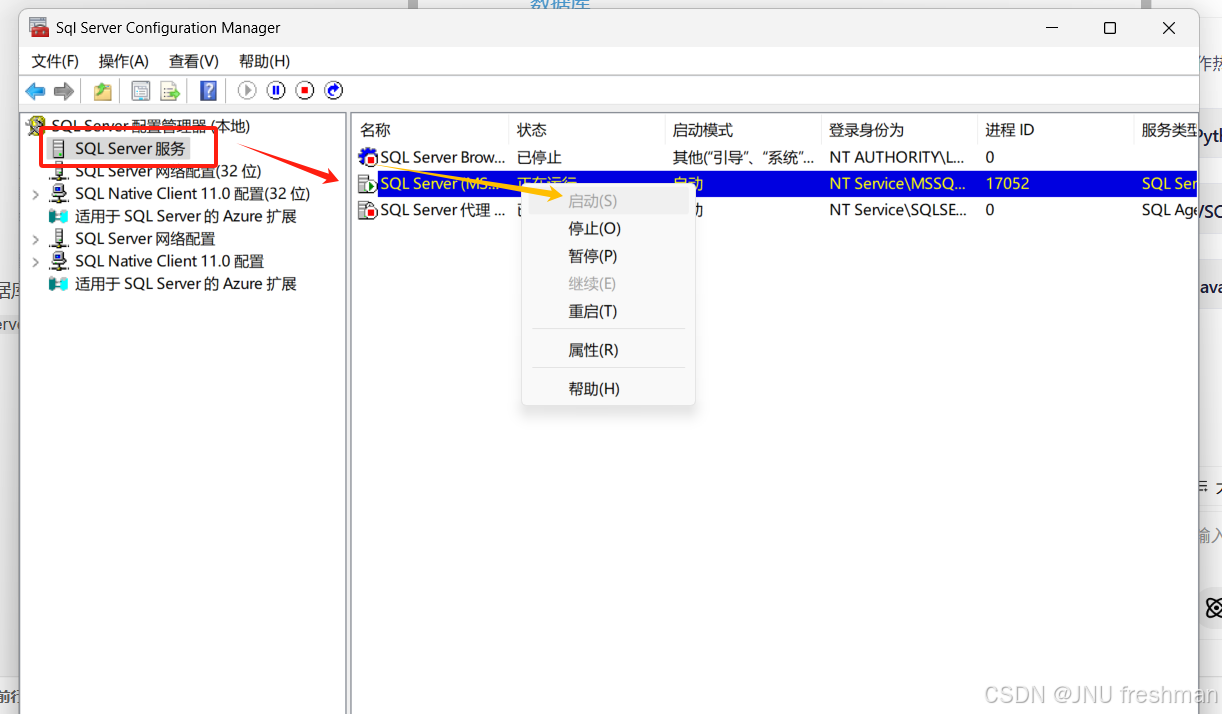
-
视图->SQL Server 对象资源管理器
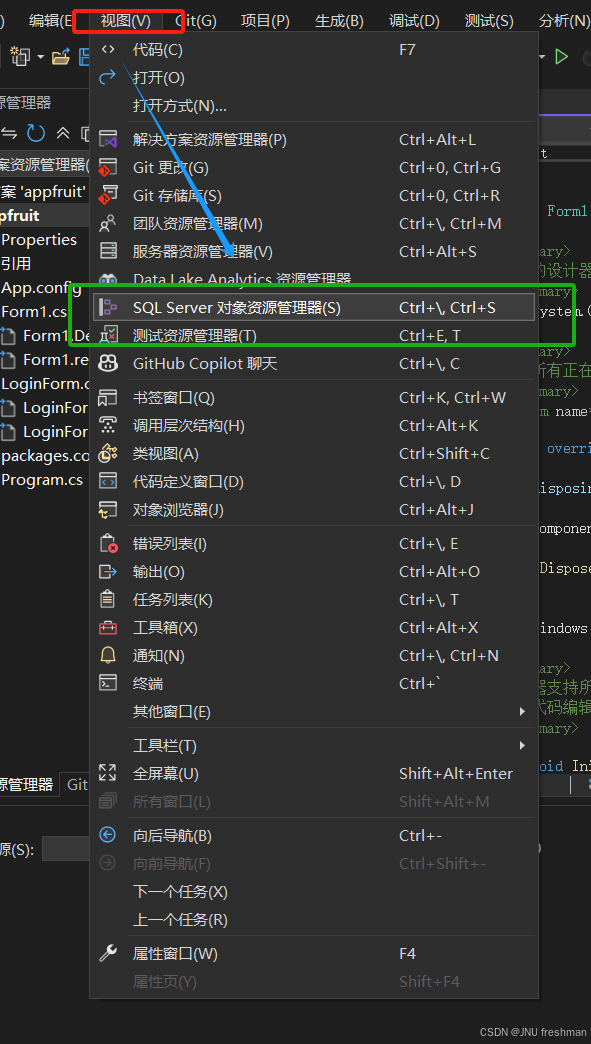
-
对于你想要连接的数据库,
属性->连接字符串
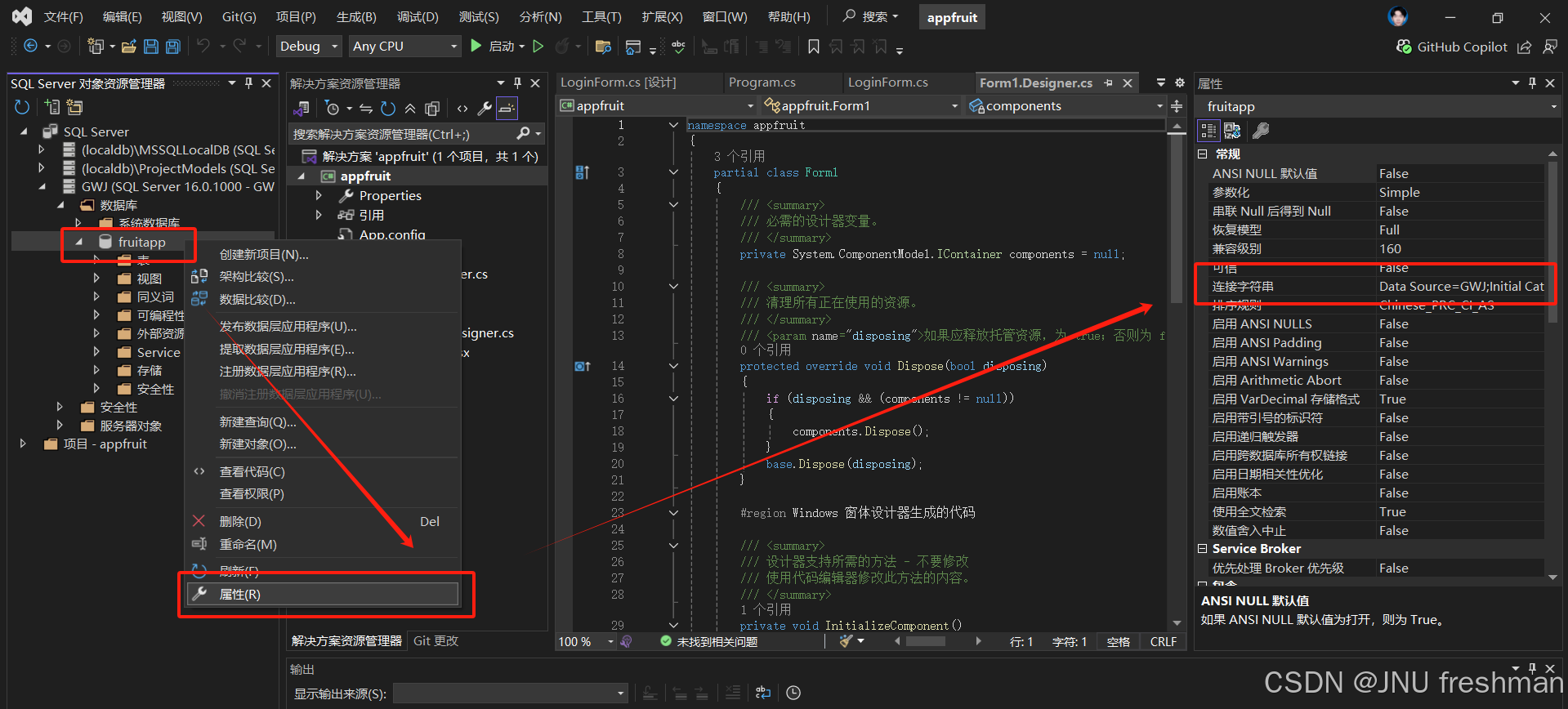
- 然后就是去配置
App.config文件
需要在现有的 app.config 文件中添加数据库连接字符串。以下是修改后的完整配置文件内容:
xml
<?xml version="1.0" encoding="utf-8" ?>
<configuration>
    <startup>
        <supportedRuntime version="v4.0" sku=".NETFramework,Version=v4.7.2" />
    </startup>
    <connectionStrings>
        <add name="FruitAppConnection"
             connectionString="Data Source=GWJ;Initial Catalog=fruitapp;Integrated Security=True;Connect Timeout=30;Encrypt=False;Trust Server Certificate=True;Application Intent=ReadWrite;Multi Subnet Failover=False"
             providerName="System.Data.SqlClient" />
    </connectionStrings>
</configuration>
关键修改说明:
-
添加
<connectionStrings>节点:- 在
<configuration>节点下新增该节点,用于存放数据库连接信息。
- 在
-
配置连接字符串:
name="FruitAppConnection":自定义连接字符串的名称,在代码中通过此名称引用。connectionString:使用你提供的完整连接字符串。providerName="System.Data.SqlClient":指定使用 SQL Server 数据提供程序。
在代码中使用该连接字符串:
在 C# 代码中,可以通过以下方式获取并使用这个连接字符串:
csharp
using System.Configuration; // 需要添加对 System.Configuration 的引用

// 获取连接字符串
string connStr = ConfigurationManager.ConnectionStrings["FruitAppConnection"].ConnectionString;

// 使用 SqlSugar 示例
var db = new SqlSugarClient(new ConnectionConfig
{
    ConnectionString = connStr,
    DbType = DbType.SqlServer,
    IsAutoCloseConnection = true
});
注意事项:
- 确保 SQL Server 实例名称(
Data Source=GWJ)与你本地环境一致。 - 如果使用 Windows 身份验证(
Integrated Security=True),确保运行程序的用户账户有权限访问fruitapp数据库。 - 如果数据库需要特殊权限,可改用 SQL Server 身份验证(添加
User ID和Password参数)。
实际使用
- 实际上,我们在具体的
.cs文件对于数据库进行操作的时候,还需要引入这个System.Data.SqlClient命名空间,以便使用SQL Server数据库连接和操作的相关类
csharp
using System;
using System.Configuration;
using System.Data.SqlClient;
using System.Windows.Forms;

namespace appfruit
{
    public partial class LoginForm : Form
    {
        public LoginForm()
        {
            InitializeComponent();
        }

        private void btnLogin_Click(object sender, EventArgs e)
        {
            string username = txtUsername.Text;
            string password = txtPassword.Text;

            // 从 App.config 中读取数据库连接字符串
            string connectionString = ConfigurationManager.ConnectionStrings["FruitAppConnection"].ConnectionString;

            using (SqlConnection connection = new SqlConnection(connectionString))
            {
                try
                {
                    // 打开数据库连接
                    connection.Open();

                    // 编写 SQL 查询语句,假设用户信息存储在名为 Users 的表中
                    string query = "SELECT COUNT(*) FROM Users WHERE Username = @Username AND Password = @Password";
                    SqlCommand command = new SqlCommand(query, connection);
                    command.Parameters.AddWithValue("@Username", username);
                    command.Parameters.AddWithValue("@Password", password);

                    // 执行查询并获取结果
                    int count = (int)command.ExecuteScalar();

                    if (count > 0)
                    {
                        MessageBox.Show("登录成功!");
                        this.DialogResult = DialogResult.OK;
                        this.Close();
                    }
                    else
                    {
                        MessageBox.Show("用户名或密码错误,请重试。");
                    }
                }
                catch (Exception ex)
                {
                    MessageBox.Show("数据库连接或查询出错:" + ex.Message);
                }
            }
        }
    }
}