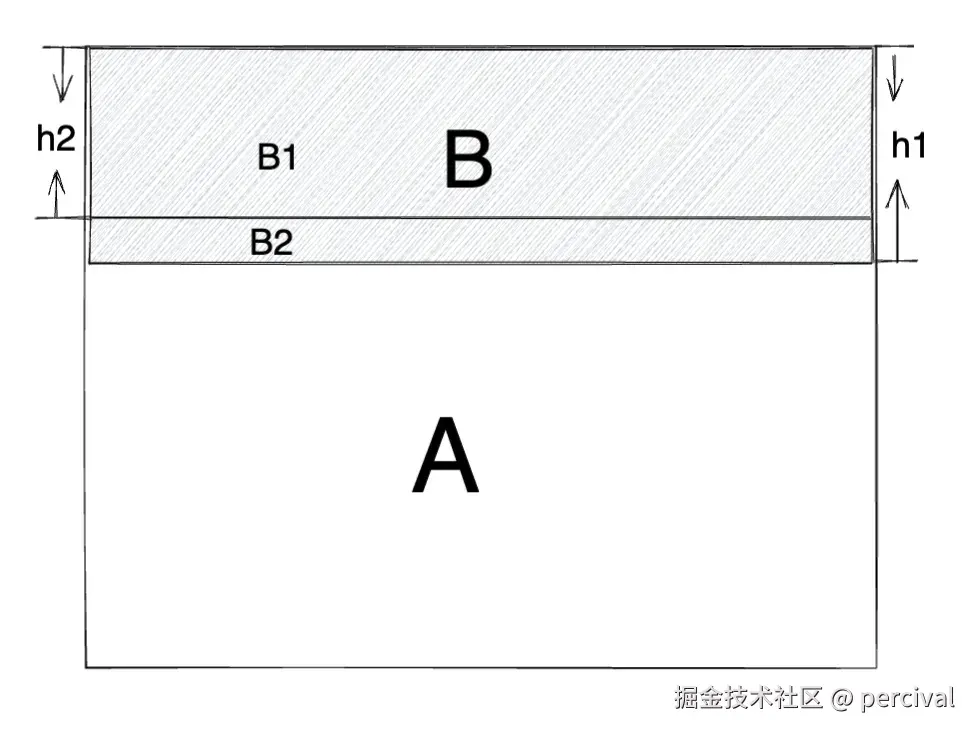
有没有小伙伴遇到这种场景的,在一个页面A中放置一个PageView(B), 但是Pageview中卡片的布局是动态布局高度的,有时候是h1的高度,有时候是h2的高度
正常情况下,滑动时,Pageview的高度默认是由最大高度的那个卡片决定的,即为h1,当卡片实际高度为h2时,即占据图中B1面积时,B2面积也是实际上被Pageview占据的,此时针对B2面积的各种手势都会被Pageview吸收掉
这时会出现一个问题,B2部分看起来是背景页A的内容,但是点击等手势却不生效
那么,怎么解决这个问题呢?
首先我们来看下,解决后的效果 ,图中点击了相同位置,见上图中的B2

解决方案
思路
可以监听卡片滑动,在滑动停止时,根据当前卡片的高度调整整个PageView的高度,设置clipBehavior为none
less
Widget _buildPageView() {
    return Container(
      width: MediaQuery.of(context).size.width,
      height: cardHeight,
      color: Colors.transparent,
      child: NotificationListener<ScrollNotification>(
        onNotification: (ScrollNotification notification) {
          if (notification is ScrollEndNotification) {
            // 滚动停止时的操作
            onPageViewScrollEndListener();
          }
          return true; // 返回 true 表示事件已处理
        },
        child: PageView.builder(
          clipBehavior: Clip.none,
          scrollDirection: Axis.horizontal,
          itemBuilder: (_, index) {
            return _pageItemView(index);
          },
          itemCount: listData.length,
          controller: pageController,
        ),
      ),
    );
  }
那么,该如何获取当前动态布局卡片的高度呢?
可以创建一个继承自SingleChildRenderObjectWidget的类,布局完成后获取高度
设置一个Map记录卡片的高度,并在刷新时获取高度给PageView和卡片
scala
class CustomLayoutSizedBox extends SingleChildRenderObjectWidget {
  const CustomLayoutSizedBox({
    super.key,
    super.child,
    required this.onPerformLayout,
  });

  final void Function(double height)? onPerformLayout;

  @override
  RenderObject createRenderObject(BuildContext context) {
    return CustomRenderConstrainedBox(onPerformLayout: onPerformLayout);
  }
}

class CustomRenderConstrainedBox extends RenderProxyBox {
  CustomRenderConstrainedBox({required this.onPerformLayout});

  final void Function(double height)? onPerformLayout;

  @override
  void performLayout() {
    super.performLayout();
    onPerformLayout?.call(child?.size.height ?? 0);
  }
}
设置一个Map记录卡片的高度,并在刷新时获取高度给PageView和卡片
less
/// 卡片渲染完成时,记录当前卡片高度
Map<int, double> cardHeightMap = {};
......
......
Widget _buildPageView() {
    double cardHeight = 200.0; // 默认卡片最大高度
    if (listData.length > currentPageIndex) {
      cardHeight = cardHeightMap[currentPageIndex] ?? 200;
    }
    return Container(
      ......
      );
  }
......
......
Widget _pageItemView(int index) {
    double width = MediaQuery.of(context).size.width - 100;
    Widget child = Container(
        width: width,
        decoration: BoxDecoration(
          color: Colors.blueAccent,
          borderRadius: BorderRadius.circular(8.0),
        ),
        alignment: Alignment.center,
        child: Column(
          mainAxisSize: MainAxisSize.min,
          children: List.generate(
            listData[index],
            (i) => SizedBox(
              width: double.infinity,
              height: 40,
            ),
          ),
        ),
      );
    child = CustomLayoutSizedBox(
      child: child,
      onPerformLayout: (height) {
        cardHeightMap[index] = height;
      },
    );
    double height = 0.1; // 设置一个默认最低高度
    if (listData.length > currentPageIndex) {
      height = cardHeightMap[currentPageIndex] ?? 0.1;
    }
    child = Container(
      alignment: Alignment.topLeft,
      child: Stack(
        clipBehavior: Clip.none,
        children: [
          SizedBox(
            width: width,
            height: height,
          ),
          Positioned(
            left: 0,
            right: 0,
            top: 0,
            child: child,
          ),
        ],
      ),
    );

    return child;
  }
在首屏渲染完成后以及列表停止滑动时,记得刷新视图
scss
@override
  void initState() {
    super.initState();
    WidgetsBinding.instance.addPostFrameCallback((_) {
      if (mounted) {
        return;
      }
      setState(() {});
    });
  }

// 列表滑动停止
  void onPageViewScrollEndListener() {
    currentPageIndex = pageController.page?.toInt() ?? 0;
    setState(() {});
}Demo地址:github.com/percival888...
若有收获,就点个赞吧