看了网上的一些文件下载博客讲的太多了,我只想要完成这个事情,所以写一篇简洁一点的教程
我这里的代码是针对 Excel表格的,如果你是其它类型的文件就要看详细一点,如果你也是Excel
直接复制去用即可
我是把文件直接放到项目的 resources 文件夹下的
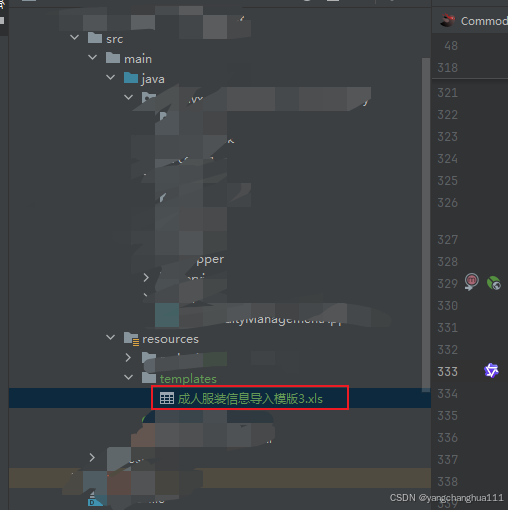
首先是后端,直接用流的方式把数据传给前端
java
    @GetMapping("/downloadExcel2")
    public void downloadExcelTemplate2(HttpServletResponse response) throws IOException {
        ClassPathResource resource = new ClassPathResource("templates/成人服装信息导入模版3.xlsx");
        // 指定 xlsx 的 MIME
        response.setContentType("application/vnd.openxmlformats-officedocument.spreadsheetml.sheet");

        // 按 RFC5987 编码中文文件名
        String filename = resource.getFilename();  // "成人服装信息导入模版3.xlsx"
        String encoded = URLEncoder.encode(filename, "UTF-8").replace("+", "%20");
        response.setHeader(
                "Content-Disposition",
                "attachment; filename*=UTF-8''" + encoded
        );

        try (InputStream in = resource.getInputStream(); OutputStream out = response.getOutputStream()) {
            byte[] buffer = new byte[8192];
            int len;
            while ((len = in.read(buffer)) != -1) {
                out.write(buffer, 0, len);
            }
            // out.flush();  // 可选
        }
    }
返回类型直接用void,不用自己的统一返回格式
response.setContentType("application/vnd.openxmlformats-officedocument.spreadsheetml.sheet");
上面这行的意思是这一行代码的作用是告诉浏览器(或任何客户端)------响应体中传输的数据属于哪种类型的文件,以便浏览器能正确地处理它。如果你是其他文件,你就搜一下某某文件的MIME 类型是什么,你自己修改一下即可,或者你可用通用的
// 内容类型为通用类型,表示二进制数据流
response.setContentType("application/octet-stream");
response.setHeader("Content-Disposition", "attachment; filename*=UTF-8''" + fileName);
上面这行的作用是浏览器在收到这个头后就会弹出下载对话框,并且默认的保存文件名就是你通过
fileName给定的名字(包括中文也能正确显示)。
attachment;告诉浏览器:不要尝试把响应当作页面内容渲染,而是触发"另存为"下载对话框。
filename*=UTF-8''是 RFC 5987 对非 ASCII 文件名(比如中文名)的一种标准编码方式。
+ fileName就是你拼好的、已经 percent‑encode(%xx)过的 UTF‑8 文件名字符串。因为我的文件名是中文的所以才这么写,如果你的是英文的可以直接用那两行注释里面的其中一行
前端:
java
  return axios({
    url,//接口地址,或者还需要携带token的你可以自己加,一般都会封装有,我这里就是说个大概
    method: 'get',
    params,
    responseType: 'blob',          // 关键点:告诉 axios 返回 blob
  }).then(response => {
       // 处理文件下载响应
        const blob = new Blob([response], { type: 'application/octet-stream' });
        const downloadUrl = window.URL.createObjectURL(blob);
        const link = document.createElement('a');
        link.href = downloadUrl;
        link.setAttribute('download', '服装信息导入模版.xlsx');
        document.body.appendChild(link);
        link.click();
        window.URL.revokeObjectURL(downloadUrl);
        document.body.removeChild(link);
        this.$message.success('下载成功');
      }).catch(error => {
        this.$message.error('下载失败: ' + (error.message || '未知错误'));
      });
      });
axios里面的请求的东西,重要的就是 responseType: 'blob',
then()返回的东西还是重点,直接复制过去修改一下就好了,
主要修改两处地方,改成你自己设置的
const blob = new Blob(response, { type: 'application/vnd.ms-excel' });
link.setAttribute('download', '成人服装信息导入模版.xls');
如果出现内容乱码的话
我建议文件名改用英文的,反正前端才是设置用户下载文件时的名字
后端就可以改成如下
    @GetMapping("/downloadExcel2")
    public void downloadExcelTemplate2(HttpServletResponse response) throws IOException {
        // 使用ClassPathResource替代ResourceUtils.getFile(),这样打包后也能正常工作
        ClassPathResource resource = new ClassPathResource("/templates/recc.xlsx");

        // 检查资源是否存在
        if (!resource.exists()) {
            response.setStatus(HttpServletResponse.SC_NOT_FOUND);
            return;
        }
        // 获取文件名
        String filename = "recc.xlsx";

        // 设置响应头信息
        response.setHeader("Content-Disposition", "attachment; filename=\"" + filename + "\"");

        // 内容类型为通用类型,表示二进制数据流
        response.setContentType("application/vnd.openxmlformats-officedocument.spreadsheetml.sheet");

        // 循环,边读取边输出,可避免大文件时OOM
        try (InputStream inputStream = resource.getInputStream();
             OutputStream os = response.getOutputStream()) {

            byte[] bytes = new byte[1024];
            int readLength;
            while ((readLength = inputStream.read(bytes)) != -1) {
                os.write(bytes, 0, readLength);
            }
            os.flush(); // 确保数据完全写入
        }
    }