开门见山 🔥

酷暑难耐,学点源码降降火。有时候写业务代码久了,很多基础的东西觉得理所当然,需要静下心来梳理一下项目的底座。项目中使用的主要是类组件的用法,所以全文都是类组件相关的 api。
看源码是学习一些设计思路和一些问题的处理方案。如果 react-redux 是我们自己设计,我们需要处理哪些问题?
- 如何把状态和单个组件绑定?
- 如何做状态对比,不做额外刷新?
- 如何对状态变更做监听?并且自动刷新当前组件
- 如何处理一些错误场景和边界条件?
所以本文没有去纠结版本新旧,到底是用 hooks 还是 classComponent,api 不重要,重要的是底层的设计思路和解决问题的方法。
react-redux 的基础使用 🧊
什么是 redux?这个在很久之前的一篇文章(『React』从零开始整个 redux 中间件)中已经介绍过了,这里不再赘述。
什么是 React-Redux? react-redux 是官方推荐的 Redux 绑定库,用于将 Redux 状态管理与 React 应用集成。它的核心作用是:
- 将 Redux 的状态注入 React 组件中
- 触发 Redux 的 action 改变状态
- 自动响应 Redux 状态变化并重新渲染组件
通俗理解,就是把 redux 中的 store 进行组件级的注入,并且在状态变更的时候做响应。
在类组件中,React-Redux 主要依靠两个 API:
connect(mapStateToProps, mapDispatchToProps)<Provider store={store}>提供上下文
举个栗子🌰
javascript
// store.js
import { createStore } from 'redux';

const initialState = { count: 0 };
function reducer(state = initialState, action) {
  switch (action.type) {
    case 'INCREMENT':
      return { count: state.count + 1 };
    default:
      return state;
  }
}
export const store = createStore(reducer);
javascript
// Counter.js
import React, { Component } from 'react';
import { connect } from 'react-redux';

class Counter extends Component {
  render() {
    const { count, increment } = this.props;
    return (
      <div>
        <p>Count: {count}</p>
        <button onClick={increment}>+1</button>
      </div>
    );
  }
}

// 把 Redux 的状态映射到组件 props
const mapStateToProps = state => ({
  count: state.count,
});

// 把 dispatch 映射到组件 props
const mapDispatchToProps = dispatch => ({
  increment: () => dispatch({ type: 'INCREMENT' }),
});

// 用 connect 包装类组件
export default connect(mapStateToProps, mapDispatchToProps)(Counter);
javascript
// App.js
import React from 'react';
import { Provider } from 'react-redux';
import { store } from './store';
import Counter from './Counter';

function App() {
  return (
    <Provider store={store}>
      <Counter />
    </Provider>
  );
}
怎么做到的?❓
看完基础使用可能好奇,为什么可以直接在 props 中拿到store 中的状态?mapStateToProps和mapDispatchToProps是通过什么方式把状态和状态变更的 action 注入到组件中的?
Provider ❄️
直接贴代码:
js
export default class Provider extends Component {
  getChildContext() {
    return { store: this.store }
  }

  constructor(props, context) {
    super(props, context)
    this.store = props.store
  }

  render() {
    return Children.only(this.props.children)
  }

  Provider.childContextTypes = {
  store: storeShape.isRequired
}
}
Provider 中使用 getChildContext() 把 store 放到 React context 中,并且声明了childContextTypes。
随后在connect包裹的组件中,使用contextTypes 声明了需要获取的数据。这样子组件就可以通过props中直接拿到store了。
js
...
Connect.contextTypes = {
  store: storeShape
}
Connect.propTypes = {
  store: storeShape
}
...
connect整体结构 ❄️
我们可以看看 connect 的源码,看看它主要做了什么事情。 connect 是一个高阶函数,接受四个参数:
mapStateToPropsmapDispatchToPropsmergePropsoptions
返回一个包裹组件的函数,大概的结构如下:
js
return function wrapWithConnect(WrappedComponent) {
  ...
  class Connect extends Component {
    ...
  }
  return hoistStatics(Connect, WrappedComponent)
}connect返回wrapWithConnect,它接受你要包裹的组件WrappedComponent。wrapWithConnect内部定义了一个新的类组件Connect,它负责逻辑处理(如订阅 Redux store、合并 props 等)。Connect的render方法会渲染传入的WrappedComponent,并传递处理好的 props。- 其中
hoistStatics的作用是让高阶组件"保留"原组件上的自定义静态属性和方法,保证功能不丢失,比如在自己的 component 上定义了一个 static 方法,需要用这个函数包裹,保证从外层能拿到。
javascript
class MyComponent extends React.Component {
  static someStaticMethod() {
    // ...
  }
}

const Connected = connect(...)(MyComponent)

Connected.someStaticMethod // ✅ 依然存在!
connect 默认值处理❄️
顶部定义了一些默认值:
javascript
const defaultMapStateToProps = state => ({})

const defaultMapDispatchToProps = dispatch => ({ dispatch })

const defaultMergeProps = (stateProps, dispatchProps, parentProps) => ({
  ...parentProps,
  ...stateProps,
  ...dispatchProps
})- defaultMapStateToProps:如果没有传 mapStateToProps,则默认不从 state 取任何数据。
- defaultMapDispatchToProps:如果没有传 mapDispatchToProps,则默认只传递 dispatch 方法。
- defaultMergeProps:合并 stateProps、dispatchProps 和父组件传来的 props。
connect 参数处理❄️
connect 方法本身内部的工作流程:
javascript
    const shouldSubscribe = Boolean(mapStateToProps)
    const mapState = mapStateToProps || defaultMapStateToProps

    let mapDispatch
    if (typeof mapDispatchToProps === 'function') {
    mapDispatch = mapDispatchToProps
    } else if (!mapDispatchToProps) {
    mapDispatch = defaultMapDispatchToProps
    } else {
    mapDispatch = wrapActionCreators(mapDispatchToProps)
    }

    const finalMergeProps = mergeProps || defaultMergeProps
    const { pure = true, withRef = false } = options
    const checkMergedEquals = pure && finalMergeProps !== defaultMergeProps

    // Helps track hot reloading.
const version = nextVersion++- 参数处理 :如果没传,使用默认实现;mapDispatchToProps 还可以是对象形式,会自动 wrap 成 dispatch 调用。
- options 解析:如 pure、withRef。
- 生成一个唯一 version:用于热更新区分。
wrapWithConnect❄️
connect 返回的函数,包裹你传进来的组件(WrappedComponent),生成一个新组件Connect,最后使用 hoistStatics处理一下静态函数。
Connect 组件内部机制❄️
-
构造函数:
- 获取 Redux store(从 props 或 context)。
- 校验 store 存在。
- 初始化 state 和内部缓存。
-
属性和方法说明:
- computeStateProps/computeDispatchProps:计算 stateProps 或 dispatchProps,决定是否依赖组件自身的 props。
- updateStatePropsIfNeeded/updateDispatchPropsIfNeeded:使用 shallowEqual 对比两次的状态,只有在对应的 props 发生变化时才会重新计算,避免无效渲染。
- updateMergedPropsIfNeeded:合并 props,决定是否更新。
- clearCache:清空内部缓存(热更新或卸载时会用到)。
trySubscribe/tryUnsubscribe:订阅/取消订阅 Redux store 的变化。
javascript// 使用 redux 的 store 中的 subscribe 方法订阅 store 的变化 if (shouldSubscribe && !this.unsubscribe) { this.unsubscribe = this.store.subscribe(this.handleChange.bind(this)) this.handleChange() }- handleChange:Redux store 更新后响应回调,决定是否重新渲染。
-
生命周期方法:
componentDidMount:初始化订阅。componentWillReceiveProps:props 变化时标记需要重新计算。componentWillUnmount:组件卸载时取消订阅。- 开发模式下加了
componentWillUpdate,支持热更新。
-
shouldComponentUpdate:决定是否需要渲染,优化性能。
-
render :最终渲染 WrappedComponent,传入合并后的 props。如果在 options 配置中添加了
withRef配置,会加上 ref。
talk is cheap show me the code❄️
使用 create-react-app 创建一个简单的 demo,结构如下:
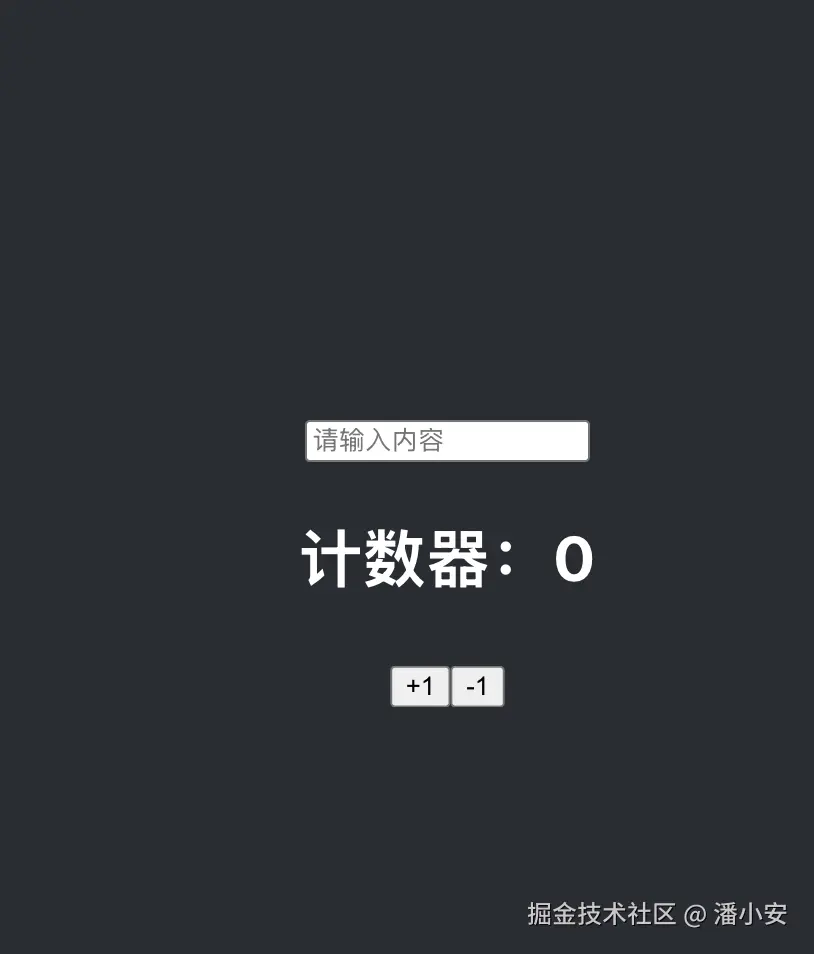
js
// 入口组件
import React, { Component } from 'react';
import './App.css';
import InputBox from './InputBox';
import Counter from './Counter';

class App extends Component {
  render() {
    return (
      <div className="App">
        <header className="App-header">
          <InputBox />
          <Counter />
        </header>
      </div>
    );
  }
}

export default App;
js
// inputBox
import React, { Component } from 'react';
import { connect } from 'react-redux';

class InputBox extends Component {
    handleChange = (e) => {
        this.props.setInput(e.target.value);
    };

    shouldComponentUpdate(nextProps) {
        // 只在 inputValue 变化时才更新
        return nextProps.inputValue !== this.props.inputValue;
    }

    render() {
        return (
            <input
                type="text"
                value={this.props.inputValue}
                onChange={this.handleChange}
                placeholder="请输入内容"
            />
        );
    }
}

const mapStateToProps = (state) => ({
    inputValue: state.inputValue,
});

const mapDispatchToProps = (dispatch) => ({
    setInput: (value) => dispatch({ type: 'SET_INPUT', value }),
});

export default connect(mapStateToProps, mapDispatchToProps)(InputBox);
js
// Counter
import React, { Component } from 'react';
import { connect } from 'react-redux';

class Counter extends Component {
  shouldComponentUpdate(nextProps) {
    // 只在 count 变化时才更新
    return nextProps.count !== this.props.count;
  }

  render() {
    const { count, increment, decrement } = this.props;
    return (
      <div>
        <h2>计数器:{count}</h2>
        <button onClick={increment}>+1</button>
        <button onClick={decrement}>-1</button>
      </div>
    );
  }
}

const mapStateToProps = (state) => ({
  count: state.count,
});

const mapDispatchToProps = (dispatch) => ({
  increment: () => dispatch({ type: 'INCREMENT' }),
  decrement: () => dispatch({ type: 'DECREMENT' }),
});

export default connect(mapStateToProps, mapDispatchToProps)(Counter);
挂载阶段
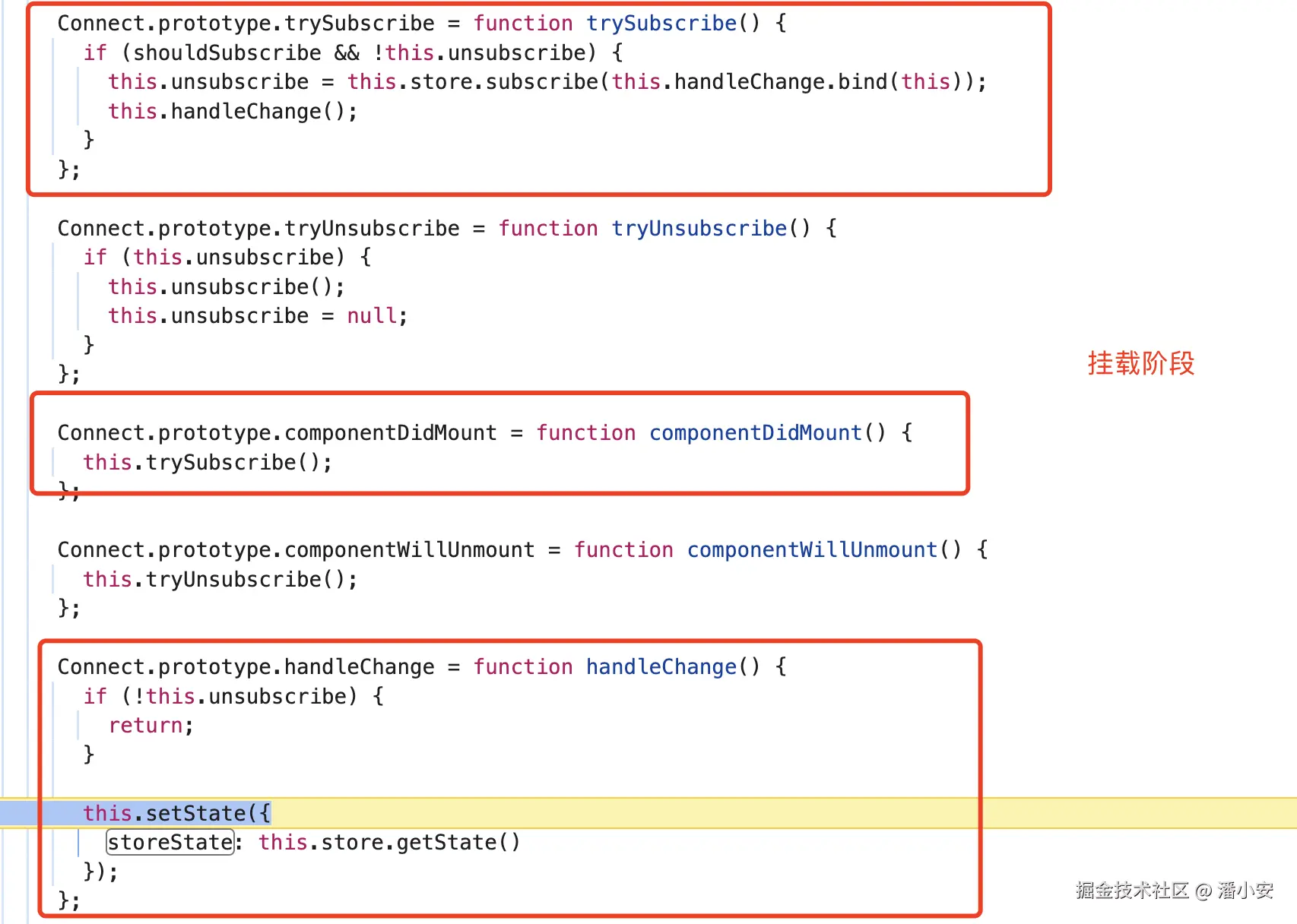 组件挂载阶段,Connect 内会 做一次 store 的状态同步。
值更新阶段
当我们在页面上对 input 进行 change 操作的时候,从空值变成 1,此时 debug InputBox 组件的逻辑如下:
- dispatch 一个新的状态到reducer 中处理
 store 更新后,由于在挂载阶段做了 store 的监听,此时会触发监听的回调。因为 inputBox 和 Counter 组件都使用 subscribe 做了监听,此时 inputBox 的 change 两边都会监听到。
 关键的点在于内部的 shouldComponentUpdate 周期。
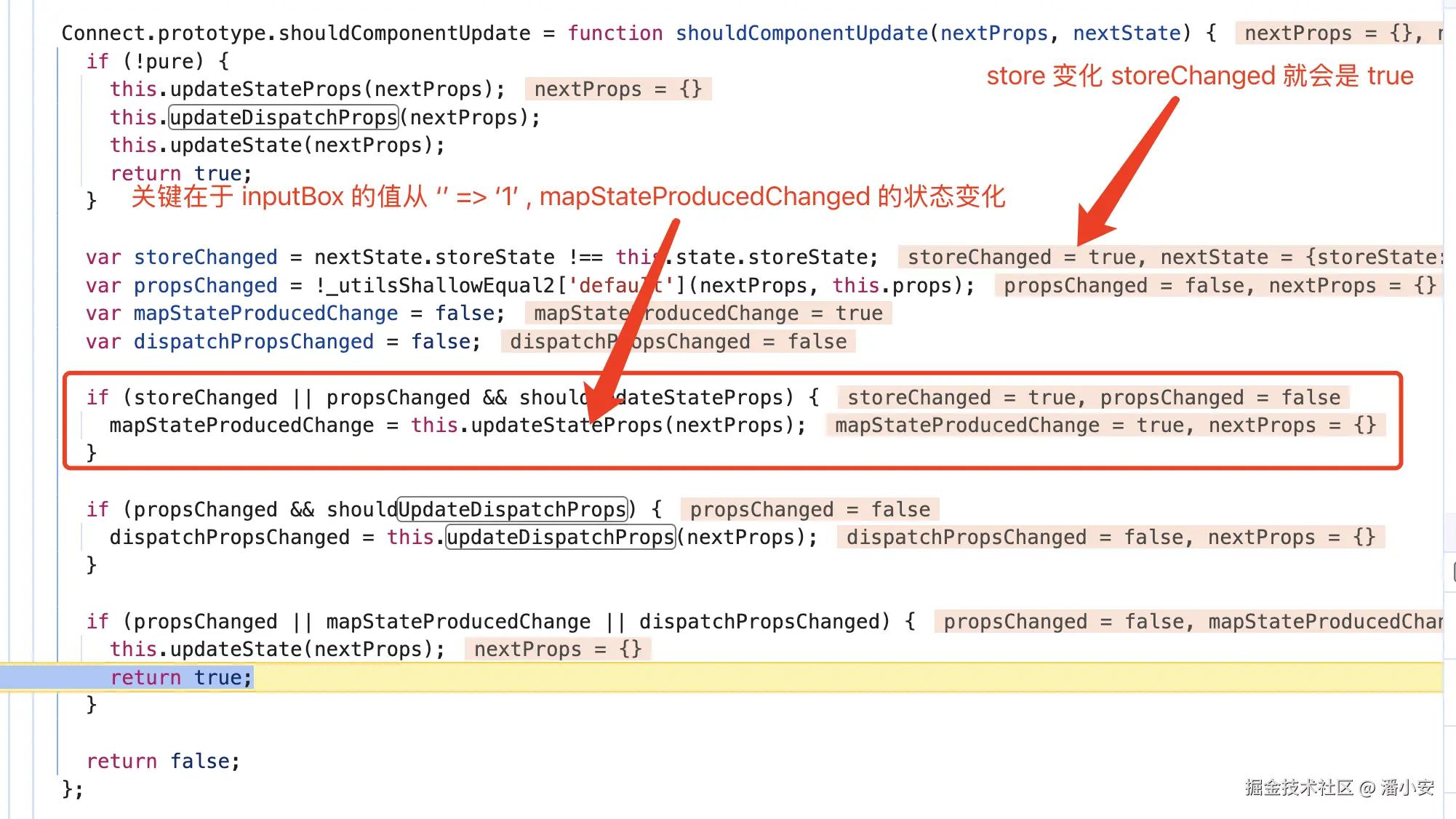
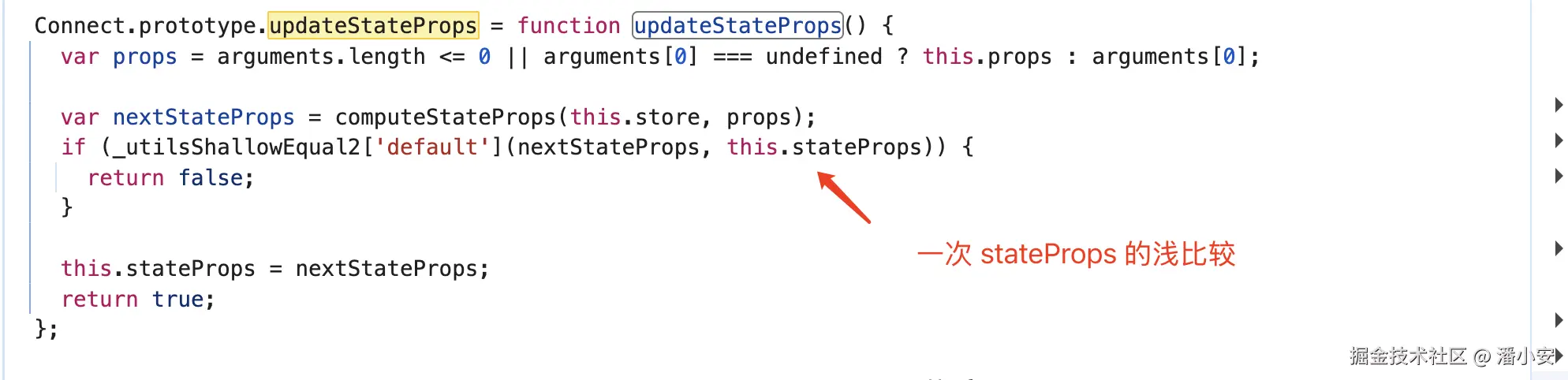 可以看到,当我们把数据框的值从空字符串变成'1'的时候,两个 子组件都会进入 shouldComponentUpdate 进行判断。在 inputBox 中,由于 stateProps(mapStateToProps 传入的对象) 的变化,shouldComponentUpdate 就会返回 true,而 Counter 中,虽然 store 变化了(inputValue 从'' => '1'),但是 stateProps 是没有变化的,所以 Counter 组件并不会重新渲染。
 我们可以看到,判断组件是否重刷的三个状态,分别对应的是:
- 组件自己的 props 有没有刷新
- mapStateToProps 中的对象有没有刷新
- mapDispatchToProps中的对象有没有刷新
至此,我们就理清楚了组件挂载和更新过程中 react-redux 的内部逻辑,也搞清楚了react-redux 是通过什么方式做到了状态隔离盒局部刷新的。没有黑魔法,只有淳朴的高阶组件和状态的钱比较。
卸载阶段
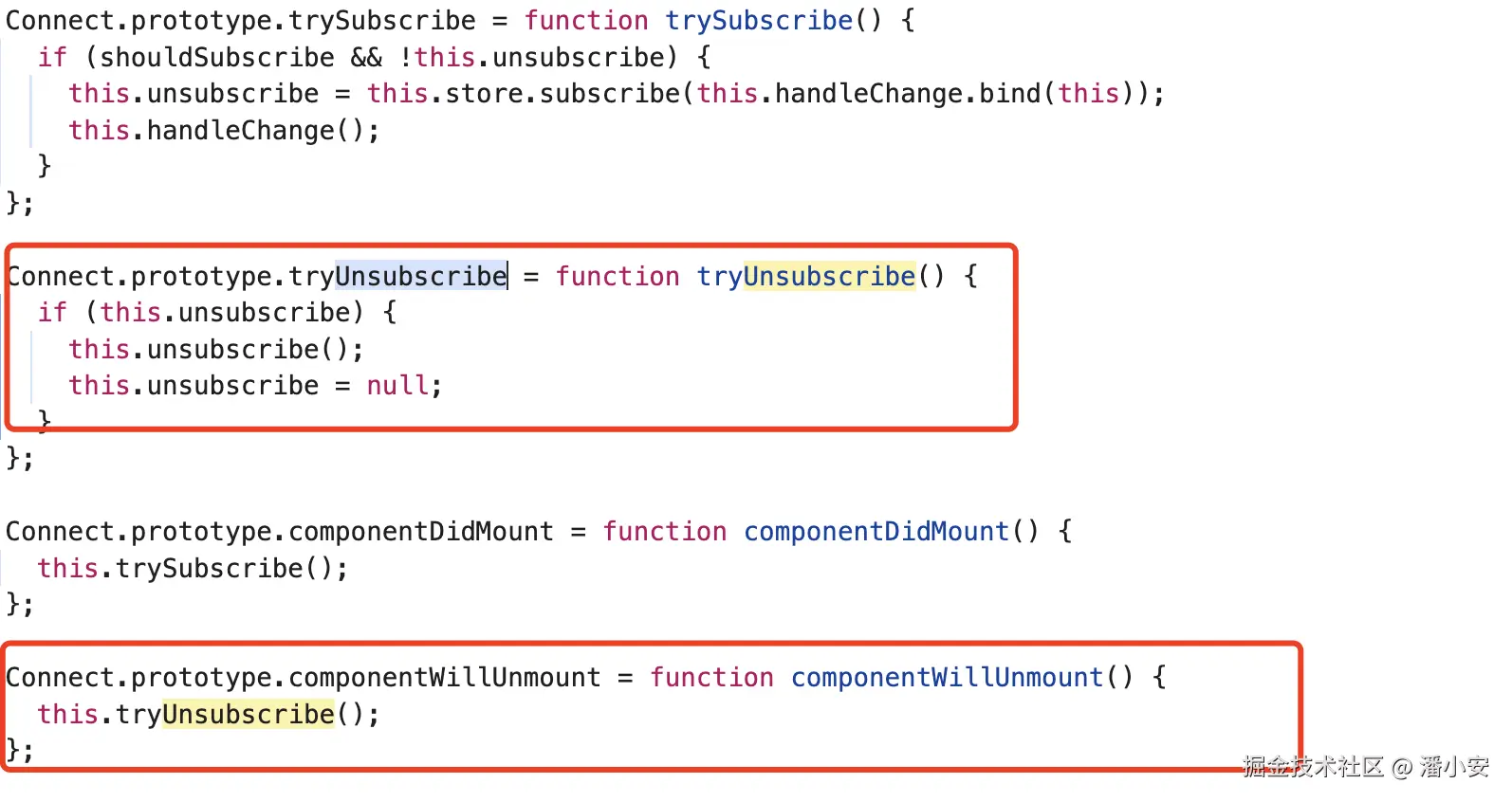 卸载阶段,组件内把挂载阶段绑定的 store 订阅取消,清除了 store 内的订阅。
结尾 🧊
看完本文内容可以学到:
- connect 本质上是一个 HOC 的语法糖。
- 优秀的库,会判断清楚所有的边界条件 connect 给了很多变量去判断一些边界条件。比如 shouldSubscribe,shouldUpdateStateProps等,都是为了兜底兼容一些错误用法。
- redux 库里面为什么要定义 subscribe 方法,为了是给一些其他的库做一些订阅回调逻辑。
当一个三方库是一个黑盒的时候,总会觉得它里面是不是有什么魔法,用了什么非常高级的编码技巧。实际耐心看下来,是一些简单的东西进行堆砌,一大串小问题的解决方案的总和。
小声 BB❄️
最近在阅读《每周工作四小时》这本书,有点刷新自己对工作这件事情的认知。
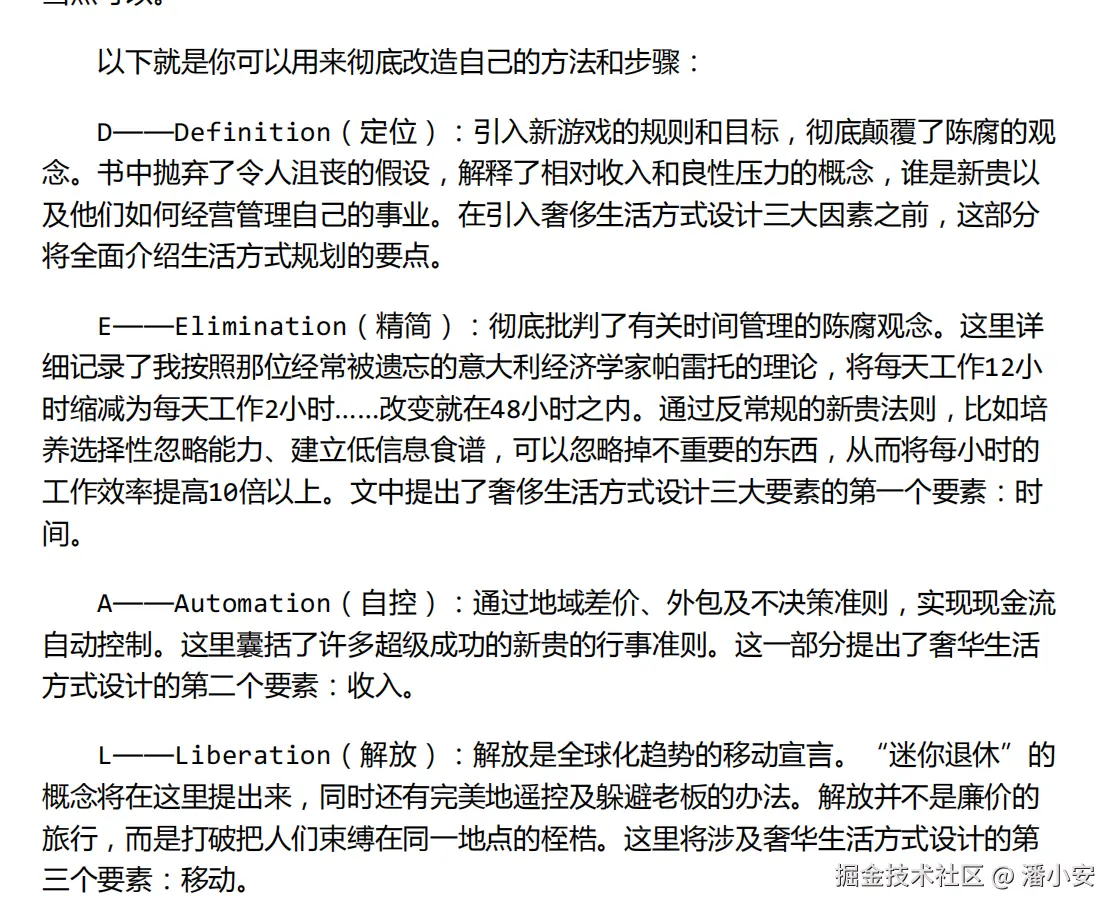
多看,多学,多交流。
愿大家在这个节奏快速,信息爆炸的时代,可以多静下心来,慢慢走。