项目简介
本项目是一个基于 Vue 3 + TypeScript 的纯前端沙箱编辑器,支持多文件,支持 .vue、.ts、.js、.css、.scss 等文件的在线编辑,仅是个人在该方面探索的一个尝试与记录。
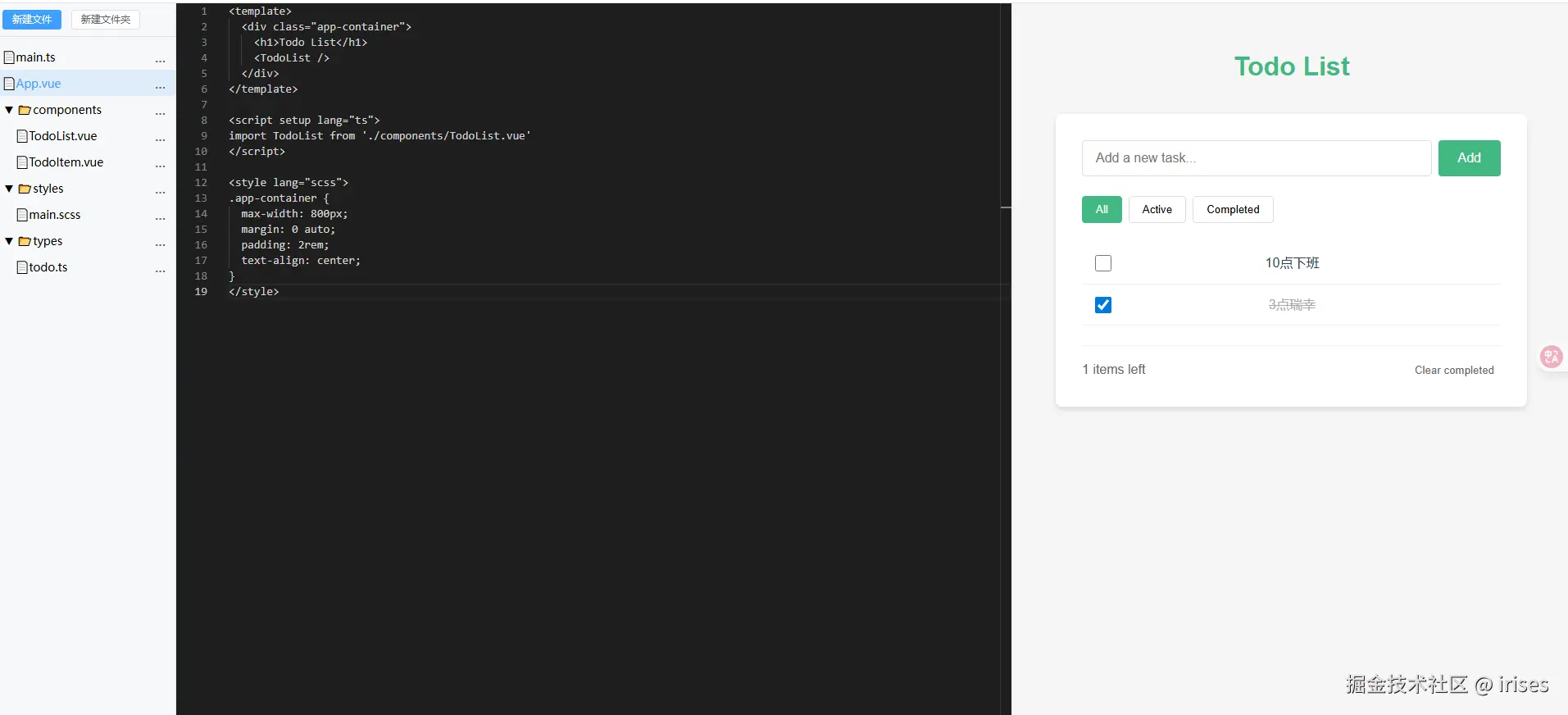
实现方式与核心技术
1. 虚拟文件系统
由于是纯前端的实现,因此不存在真正的文件系统,多文件的管理需要在内存中处理,这部分涉及:1.文件树导航,2.文件编辑器,3.基于状态管理的文件内存存储,4.持久化存储等
这一部分不过多赘述,简单实现如下:
typescript
// src/types/filesystem.ts
export type FileNode = {
  id: string;
  name: string;
  type: 'file' | 'dir';
  content?: string;
  children?: FileNode[];
  parentId?: string;
  isRoot?: boolean;
};
typescript
// src/store/filesystem.ts
import { defineStore } from 'pinia';
import { ref } from 'vue';
import type { FileNode, FileSystem, FileType } from '../types/filesystem';
import { FileType as FileTypeEnum } from '../types/filesystem';
import { nanoid } from 'nanoid';
import cache from '../utils/cache';
// 初始文件系统结构
const initialFileSystem: FileSystem = {
root: {
id: 'root',
name: 'root',
type: FileTypeEnum.Directory,
isRoot: true,
children: []
},
};
const CACHE_KEY = 'vfs-data';
// 初始化文件系统,优先从本地缓存加载
function loadInitialFileSystem(): FileSystem {
const cached = cache.get<FileSystem>(CACHE_KEY);
return cached || initialFileSystem;
}
export const useFileSystemStore = defineStore('filesystem', () => {
// 文件系统状态
const fileSystem = ref<FileSystem>(loadInitialFileSystem());
// 当前选中文件 id
const currentFileId = ref<string>('');
// 查找节点(递归)
function findNodeById(node: FileNode, id: string): FileNode | null {
// 省略
}
function saveToCache() {
cache.set(CACHE_KEY, fileSystem.value);
}
// 新增文件/文件夹
function addNode(parentId: string, node: Omit<FileNode, 'id'>) {
// 省略
}
// 删除节点
function deleteNode(id: string) {
// 省略
}
// 重命名节点
function renameNode(id: string, newName: string) {
// 省略
}
// 更新文件内容
function updateFileContent(id: string, content: string) {
// 省略
}
// 选择当前文件
function selectFile(id: string) {
// 省略
}
// 收集文件
function collectFiles(node: FileNode, base = '', files: Record<string, FileNode> = {}, isRoot = true) {
const currentPath = isRoot ? '' : (base ? base + '/' + node.name : '/' + node.name);
const normalizedPath = currentPath.replace(/\/g, '/').replace(//+/g, '/');
if (node.type === 'file') files[normalizedPath || '/' + node.name] = node;
if (node.children) node.children.forEach(child => collectFiles(child, normalizedPath, files, false));
return files;
}
return {
fileSystem,
currentFileId,
findNodeById,
addNode,
deleteNode,
renameNode,
updateFileContent,
selectFile,
collectFiles
};
});
2. 依赖与 node_modules 处理
1)本地依赖
通过虚拟文件系统中模拟的相对路径引用获取,同时需要实现类似于commonJS的虚拟模块化,这部分将在下文的bundlder的构建中体现。
2)node_modules
其可实现方式有:
- 基于
CDN动态加载
这一类型比较简单,也是当前采用的方案,将对node_modules的依赖直接改为从cdn引入。不过可能存在加载缓慢、特殊依赖包不存在等等情况。
- 基于
wasm的完整环境模拟
对于wasm实现的虚拟文件系统和虚拟的nodejs环境个人目前暂不了解,WebContainers和Codespaces采用了该种方案。
- 服务端+浏览器
服务端完成构建,浏览器环境仅作运行,这种类型应该可以模拟真正的环境。
- 混合方案
简单实现:
typescript
const CDN_MAP: Record<string, string> = {
// vue: 'https://cdn.jsdelivr.net/npm/vue@3/dist/vue.esm-browser.js',
vue: '/vue.esm-browser.js',
'vue-router': 'https://cdn.jsdelivr.net/npm/vue-router@4/dist/vue-router.esm-browser.js',
pinia: 'https://cdn.jsdelivr.net/npm/pinia@2/dist/pinia.esm-browser.js',
};
function rewriteImportsToRequire(code: string, filePath: string): string {
// 省略...
// 替换所有 CDN_MAP 里的裸模块 import('xxx')
Object.entries(CDN_MAP).forEach(([mod, url]) => {
result = result.replace(new RegExp(`import\(['"]${mod}['"]\)`, 'g'), `import('${url}')`);
});
return result;
}3. ts/vue/scss 文件的转译
.vue文件用@vue/compiler-sfc编译。
typescript
// src/utils/bundler.ts
async function compileVue(file, path) {
const { descriptor } = vueCompiler.parse(file.content || '');
let js = '';
let scriptBlock = '';
let bindingMetadata = undefined;
if (descriptor.script || descriptor.scriptSetup) {
const compiled = vueCompiler.compileScript(descriptor, { id: file.name });
bindingMetadata = compiled.bindings;
let content = compiled.content;
// 处理lang="ts"
const isTS = (descriptor.script && descriptor.script.lang === 'ts') ||
(descriptor.scriptSetup && descriptor.scriptSetup.lang === 'ts');
if (isTS) {
content = await compileTS(content);
}
scriptBlock = content;
}
let renderBlock = '';
const scopeAttr = descriptor.styles.some((s: any) => s.scoped) ? genScopeAttr(file.name) : '';
if (descriptor.template) {
const templateOptions: any = {
source: descriptor.template.content,
filename: file.name,
id: scopeAttr ? scopeAttr.replace('data-v-', '') : file.name,
compilerOptions: {
...(bindingMetadata ? { bindingMetadata } : {}),
}
};
const res = vueCompiler.compileTemplate(templateOptions);
renderBlock = res.code;
}
const css = await handleVueStyles(descriptor, scopeAttr);
js = scriptBlock + (scriptBlock && renderBlock ? '\n' : '') + renderBlock + (scopeAttr ? `\nexports.default.__scopeId = "${scopeAttr}"` : '');
return { js, css };
}
vue组件对于scopeId的注入,经过尝试与和官方sfc对比发现是来自于最后导出的__scopeId,而templateOptions中的scoped参数似乎只在vue2中生效,本人对于vue的编译还是不够了解。
.ts文件用esbuild-wasm转译为ESM。
typescript
async function compileTS(code: string) {
  await ensureEsbuildInitialized();
  let result = await esbuild.transform(code, { loader: 'ts', format: 'esm' });
  result.code = fixAsDestructuring(result.code);
  return result.code;
}.scss文件用sass.js(WebAssembly) 编译,需要处理@import递归依赖,sass.js对于@import的解析由于不存在真实文件系统会产生错误,因此需要自行处理。
typescript
// 递归收集css/scss文件的@import依赖
async function collectCssWithImports(path: string, files: Record<string, FileNode>, visited = new Set<string>()): Promise<string> {
if (visited.has(path)) return '';
visited.add(path);
const file = files[path];
if (!file) return '';
let css = await handleStyleFile(file, path);
// 匹配 @import 语句
const importRegex = /@import\s+['"]([^'"]+)['"];?/g;
let match;
let importCss = '';
while ((match = importRegex.exec(css))) {
let importPath = match[1];
// 解析相对路径
if (importPath.startsWith('.')) {
let resolved = resolvePath(path, importPath);
if (!/.(css|scss)$/.test(resolved)) resolved += '.css'; // 默认补全
importCss += await collectCssWithImports(resolved, files, visited);
}
}
// 移除 @import 语句,防止重复注入
css = css.replace(importRegex, '');
return importCss + css;
}
/**
* 处理 .css/.scss 文件,返回css字符串
* @param file 文件节点
* @param path 路径
* @returns Promise<string> css内容
*/
export async function handleStyleFile(file: FileNode, path: string): Promise<string> {
if (path.endsWith('.css')) {
return file.content || '';
} else if (path.endsWith('.scss')) {
await loadSassJS();
return new Promise<string>((resolve, reject) => {
Sass.compile(file.content || '', (result: any) => {
if (result.status === 1) {
reject(result.formatted)
}
resolve(result.text);
});
});
}
return '';
}对于vue文件中也需要支持lang="scss"
typescript
/**
 * 处理Vue SFC的style块,支持lang="scss"和scoped,使用官方compileStyle
 * @param descriptor SFC解析结果
 * @param scopeAttr 作用域属性
 * @returns Promise<string> css内容
 */
export async function handleVueStyles(descriptor: any, scopeAttr: string): Promise<string> {
  let cssResult = '';
  for (const styleBlock of descriptor.styles) {
    let css = styleBlock.content;

    // 1. 先处理预处理器(如SCSS)
    if (styleBlock.lang === 'scss') {
      await loadSassJS();
      css = await new Promise<string>((resolve) => {
        Sass.compile(styleBlock.content, (result: any) => {
          resolve(result.text);
        });
      });
    }

    // 2. 使用官方compileStyle处理
    const result = compileStyle({
      source: css,
      id: scopeAttr.replace('data-v-', ''),
      scoped: styleBlock.scoped,
      filename: 'component.vue',
    });

    cssResult += result.code + '\n';
  }
  return cssResult;
}
4. 虚拟模块系统
- 自定义 define/require 运行时,兼容多模块、组件、全局依赖。
- 所有模块统一打包为 define/require 格式,支持异步加载与缓存。
- 运行时核心代码:
typescript
// 修改bundleAll,收集所有css和js,最终返回{ js, css }
export async function bundleAll(root: FileNode, entry: string = '/main.ts') {
const files = collectFiles(root, '', {}, true); // 收集文件
const order = getModuleOrder(entry, files); // 收集依赖
let modules: Record<string, string> = {};
let cssCollection: string[] = []; // css样式需要单独收集
for (const path of order) {
const file = files[path];
if (!file) continue;
let code = file.content || '';
// 处理css文件
if (path.endsWith('.css')) {
const css = await collectCssWithImports(path, files);
if (css) cssCollection.push(css);
continue;
}
// 处理scss文件
if (path.endsWith('.scss')) {
const scss = await collectScssWithImports(path, files);
await (await import('./styleUtils')).loadSassJS();
const Sass = (window as any).Sass;
const css = await new Promise<string>((resolve) => {
Sass.compile(scss, (result: any) => {
resolve(result.text);
});
});
if (css) cssCollection.push(css);
continue;
}
// 处理vue
if (path.endsWith('.vue')) {
const { js, css } = await compileVue(file, path);
code = js;
if (css) cssCollection.push(css);
} else if (path.endsWith('.ts') || path.endsWith('.js')) {
code = await compileTS(code);
}
code = rewriteImportsToRequire(code, path); // 模块化导入方式转义
code = fixAsDestructuringAndExport(code); // 兼容在该模块化下的解构与导出问题
modules[path] = code;
}
// 生成 define/require 运行时和所有模块
const runtime = `
const modules = {};
const cache = {};
function define(path, factory) { modules[path] = factory; }
async function require(path) {
if (cache[path]) return cache[path];
if (!modules[path]) throw new Error('Module not found: ' + path);
const mod = { exports: {} };
cache[path] = mod.exports;
await modules[path](mod, mod.exports, require);
return mod.exports;
}
`;
const defines = order.map(path => modules[path] ? `define('${path}', async function(module, exports, require) {\n${modules[path]}\n});` : '').filter(Boolean).join('\n\n');
const entryExec = `await require('${entry}');`;
// js、css代码进行分别拼接,传递给预览的iframe组件进行注入
const js = `${runtime}\n${defines}\n${entryExec}`;
const css = cssCollection.join('\n');
return { js, css };
}
5. iframe 沙箱注入
- 预览区采用
iframe沙箱,隔离运行环境,防止主页面污染。 - 所有
js/css动态注入iframe。
简单实现:
html
<iframe ref="iframeRef" class="iframe" sandbox="allow-scripts allow-modals allow-forms allow-same-origin"></iframe>
typescript
function injectToIframe() {
const iframe = iframeRef.value;
if (!iframe) return;
const doc = iframe.contentDocument;
if (!doc) return;
// 清空iframe内容
doc.open();
doc.write('<!DOCTYPE html><html><head><meta charset="UTF-8"><title>Preview</title></head><body><div id="app"></div></body></html>');
doc.close();
// 注入css
if (props.css) {
const style = doc.createElement('style');
style.innerHTML = props.css;
doc.head.appendChild(style);
}
// 注入js
if (props.js) {
const script = doc.createElement('script');
script.type = 'module';
script.textContent = `
try {
${props.js}
} catch(e) {
document.body.innerHTML = '<pre style="color:red">' + e + '</pre>';
}
`;
doc.body.appendChild(script);
}
}当前已实现
- 多文件/目录虚拟文件系统,支持本地缓存
- 代码编辑区(Monaco Editor)与文件树联动
- 预览区
iframe沙箱,支持热更新(全量重新编译) .vue、.ts、.js文件递归依赖编译与运行.css文件动态注入- 依赖自动注入(
CDN或本地资源) - 虚拟 define/require 模块系统
.scss文件编译与注入Vue SFC内 支持
vue或者sass的高级特性可能存在问题node_modules依赖处理比较局限- 缺少沙箱内部错误、编译错误等的通信展示
- 目前对于本地静态资源无法处理
- 代码高亮未适配,代码提示不支持
lint不支持- ...
这是一个复杂且庞大的方向,存在大量的细节问题、兼容性问题等等,目前个人作为体验和探索,浅尝辄止已经足够,后续有机会再进行生牛乳研究。