小程序名称: 速用百宝箱
嘿,最近我搞了个Java刷题的小程序,用Vue写的,界面和功能都还挺完整的。今天就来跟大家聊聊这个小程序是怎么实现的,代码里都藏着哪些小细节。
先看整体结构,我把整个页面分成了几个大块:顶部导航栏、题目内容区、底部按钮栏,还有一个完成后的弹窗。这种布局应该挺符合大家做题库类应用的习惯吧?
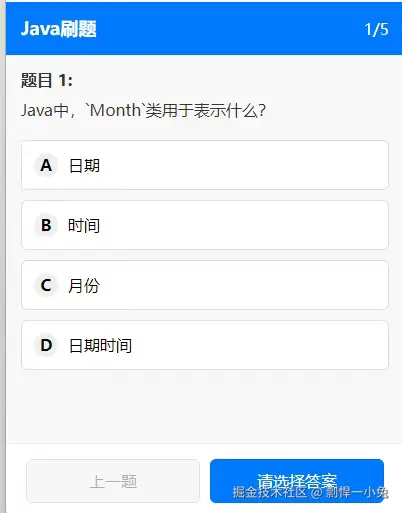
顶部导航栏
html
<view class="navbar">
  <text class="nav-title">Java刷题</text>
  <text class="nav-progress">{{ currentIndex + 1 }}/{{ totalCount }}</text>
</view>这块很简单,左边是标题,右边显示当前进度,比如"3/10"这种。用currentIndex + 1是因为数组索引是从0开始的,加1才符合我们平时的计数习惯。
题目内容区
这部分是核心,我分了题干、选项列表和答案解析三个部分。
首先是题干:
html
<view class="question-content">
  <text class="question-title">题目 {{ currentIndex + 1 }}:</text>
  <text class="question-text">{{ currentQuestion.questionContent }}</text>
</view>这里用了v-if="currentQuestion"来确保数据加载完成后才显示,避免页面闪烁。
然后是选项列表,这块有点意思:
html
<view class="options-list">
  <view
    class="option-item"
    v-for="(option, idx) in parsedOptions"
    :key="idx"
    :class="{
      'selected': selectedIndex === idx,
      'correct': showExplanation && isCorrectOption(idx),
      'incorrect': showExplanation && selectedIndex === idx && !isCorrectOption(idx)
    }"
    @click="handleSelectOption(idx)"
  >
    <text class="option-letter">{{ String.fromCharCode(65 + idx) }}</text>
    <text class="option-text">{{ option }}</text>
  </view>
</view>我用了v-for来循环渲染选项,parsedOptions是处理过的选项数组。这里有个小技巧,选项字母A、B、C、D是通过String.fromCharCode(65 + idx)生成的,65对应的就是字母A的ASCII码,这样就不用手动写每个选项的字母了。
样式方面,我用了动态class:
- 选中状态:
selected类 - 正确答案:
correct类(只有在显示解析时才生效) - 错误答案:
incorrect类(选中的答案不对时才显示)
这样用户选完答案提交后,就能清楚地看到自己选的对不对,正确答案是哪个。
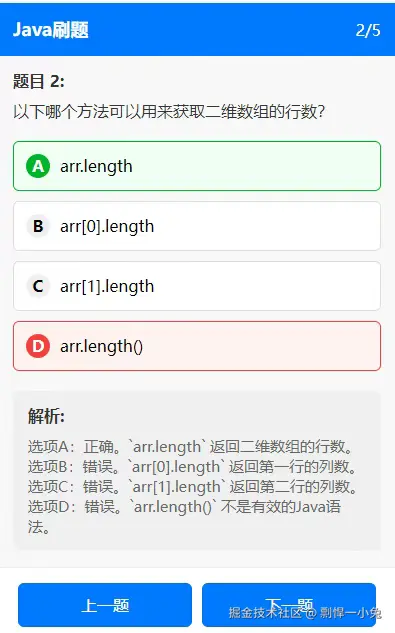
接下来是答案解析,只有提交答案后才会显示:
html
<view class="explanation" v-if="showExplanation">
  <text class="explanation-title">解析:</text>
  <text class="explanation-content">{{ currentQuestion.answerExplanation }}</text>
</view>
底部导航按钮
html
<view class="bottom-bar">
  <button
    class="btn-prev"
    @click="prevQuestion"
    :disabled="currentIndex === 0"
  >
    上一题
  </button>

  <button
    class="btn-next"
    @click="nextQuestion"
    :disabled="!hasSelected && currentIndex === totalCount - 1"
  >
    {{ currentIndex === totalCount - 1 ? '完成练习' : (hasSelected ? '下一题' : '请选择答案') }}
  </button>
</view>
这里的按钮文本会根据当前状态动态变化:
- 如果是最后一题,显示"完成练习"
- 否则,如果已经选了答案,显示"下一题"
- 还没选答案的话,显示"请选择答案"
disabled属性也做了处理,第一题时上一题按钮禁用,最后一题没选答案时,完成按钮也会禁用,防止用户跳过题目。
完成弹窗
html
<view class="result-popup" v-if="showResult">
  <view class="popup-content">
    <text class="popup-title">练习完成!</text>
    <text class="popup-score">得分: {{ correctCount }}/{{ totalCount }}</text>
    <button class="popup-button" @click="restart">重新开始</button>
    <button class="popup-button" style="margin-top: 10px;" @click="restart2">再战错题</button>
  </view>
</view>
全部做完后会弹出这个弹窗,显示得分,还有两个按钮:重新开始和再战错题。这个再战错题功能我觉得还挺实用的,能针对性地巩固薄弱点。
脚本部分
接下来看看逻辑实现,我用的是Vue 3的setup语法。
首先定义了一些状态变量:
javascript
const currentIndex = ref(0) // 当前题目索引
const currentQuestion = ref(null) // 当前题目数据
const selectedIndex = ref(-1) // 选中的选项索引,-1表示未选择
const showExplanation = ref(false) // 是否显示解析
const totalCount = ref(0) // 总题数
const correctCount = ref(0) // 做对的题数
const showResult = ref(false) // 是否显示结果弹窗
然后是一些计算属性:
javascript
// 解析选项,把字符串分割成数组
const parsedOptions = computed(() => {
  if (!currentQuestion.value?.options) return []
  return currentQuestion.value.options.split('\n')
    .filter(option => option.trim())
    .map(option => option.replace(/^[A-Z]\./, '').trim())
})

// 是否已选择答案
const hasSelected = computed(() => selectedIndex.value !== -1)parsedOptions会把后端返回的选项字符串(可能是用换行分隔的)转换成数组,还会去掉每个选项前面的A.、B.这种前缀,让显示更干净。
处理选择选项的方法:
javascript
const handleSelectOption = (idx) => {
  if (showExplanation.value) return // 已显示解析,禁止修改
  selectedIndex.value = idx
}
这里加了个判断,如果已经显示解析了,就不能再改答案了,避免用户反复修改。
上一题和下一题的逻辑:
javascript
const prevQuestion = () => {
  if (currentIndex.value > 0) {
    currentIndex.value--
    loadCurrentQuestion()
  }
}

const nextQuestion = () => {
  if (!hasSelected.value) return // 未选择答案

  // 检查答案是否正确
  if (!showExplanation.value) {
    const userAnswer = String.fromCharCode(65 + selectedIndex.value)
    if (userAnswer === currentQuestion.value.correctAnswer) {
      correctCount.value++
      reportCorrect(currentQuestion.value.id); // 上报正确答案
    } else {
      reportIncorrect(currentQuestion.value.id); // 上报错误答案
    }
    showExplanation.value = true
    return
  }

  // 跳转到下一题
  if (currentIndex.value < totalCount.value - 1) {
    currentIndex.value++
    loadCurrentQuestion()
  } else {
    // 完成所有题目
    showResult.value = true
  }
}
下一题的逻辑稍微复杂点:
- 首先检查是否已经选择答案,如果没有就直接返回
- 如果还没显示解析,就先判断答案是否正确,更新正确题数,然后显示解析
- 如果已经显示解析了,就跳到下一题,或者如果是最后一题,就显示结果弹窗
加载当前题目的方法:
javascript
const loadCurrentQuestion = () => {
  currentQuestion.value = questionData.value[currentIndex.value]
  selectedIndex.value = -1 // 重置选择状态
  showExplanation.value = false // 隐藏解析
}
每次切换题目时,都会重置选择状态和解析显示状态。
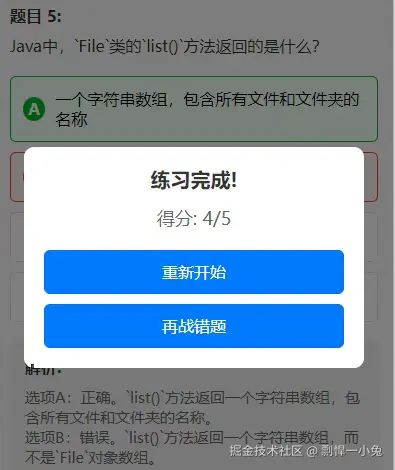
重新开始和再战错题的功能:
javascript
const restart = () => {
  currentIndex.value = 0
  correctCount.value = 0
  showResult.value = false
  uni.redirectTo({
    url:"/pages/aaa/aaa"
  })
}

const restart2 = async () => {
  let resData = await expendPoint('java刷题',20)
  if (resData.code !== 200) {
    uni.showModal({
      title: '提示',
      content: resData.message,
    });
    return
  }

  showResult.value = false
  currentIndex.value = 0
  correctCount.value = 0
  uni.showLoading({
    title:"加载中",
    mask: true
  });
  const tms = await selectError(); // 获取错题
  uni.hideLoading();
  questionData.value = tms;
  totalCount.value = tms.length;
  loadCurrentQuestion()
}这里的expendPoint是个能量消耗的接口,可能是我这个小程序里的一个积分系统,做错题练习需要消耗20点能量。
最后是页面加载时的初始化:
javascript
onMounted(async () => {
  let resData = await expendPoint('java刷题',20)
  if (resData.code !== 200) {
    uni.showModal({
      title: '提示',
      content: resData.message,
    });
    return
  }

  uni.showLoading({
    title:"加载中",
    mask: true
  });
  const tms = await randomTm(); // 获取随机题目
  uni.hideLoading();
  questionData.value = tms;
  totalCount.value = tms.length;
  loadCurrentQuestion()
})
页面一加载就会调用接口获取题目数据,同时显示加载中提示,让用户知道正在加载。
样式部分
样式我用了scoped属性,确保不会污染其他组件。主要处理了各种状态的显示效果,比如选中、正确、错误的样式区分,还有弹窗的遮罩效果等。
总的来说,这个小程序虽然简单,但功能还挺完整的,用户体验上也做了不少细节处理。比如:
- 清晰的进度显示
- 直观的答案反馈(正确/错误)
- 详细的解析说明
- 错题重练功能
- 合理的按钮状态控制
代码结构也比较清晰,把UI和逻辑分离,方便后续维护和扩展。如果想加新功能,比如收藏题目、难度筛选什么的,也很容易在这个基础上扩展。
大家觉得这个小程序怎么样?有什么可以改进的地方欢迎一起讨论~