[3.1 后端代码](#3.1 后端代码)
[3.2 前端代码](#3.2 前端代码)
一、前言
Spring AI详解:【Spring AI详解】开启Java生态的智能应用开发新时代(附不同功能的Spring AI实战项目)-CSDN博客
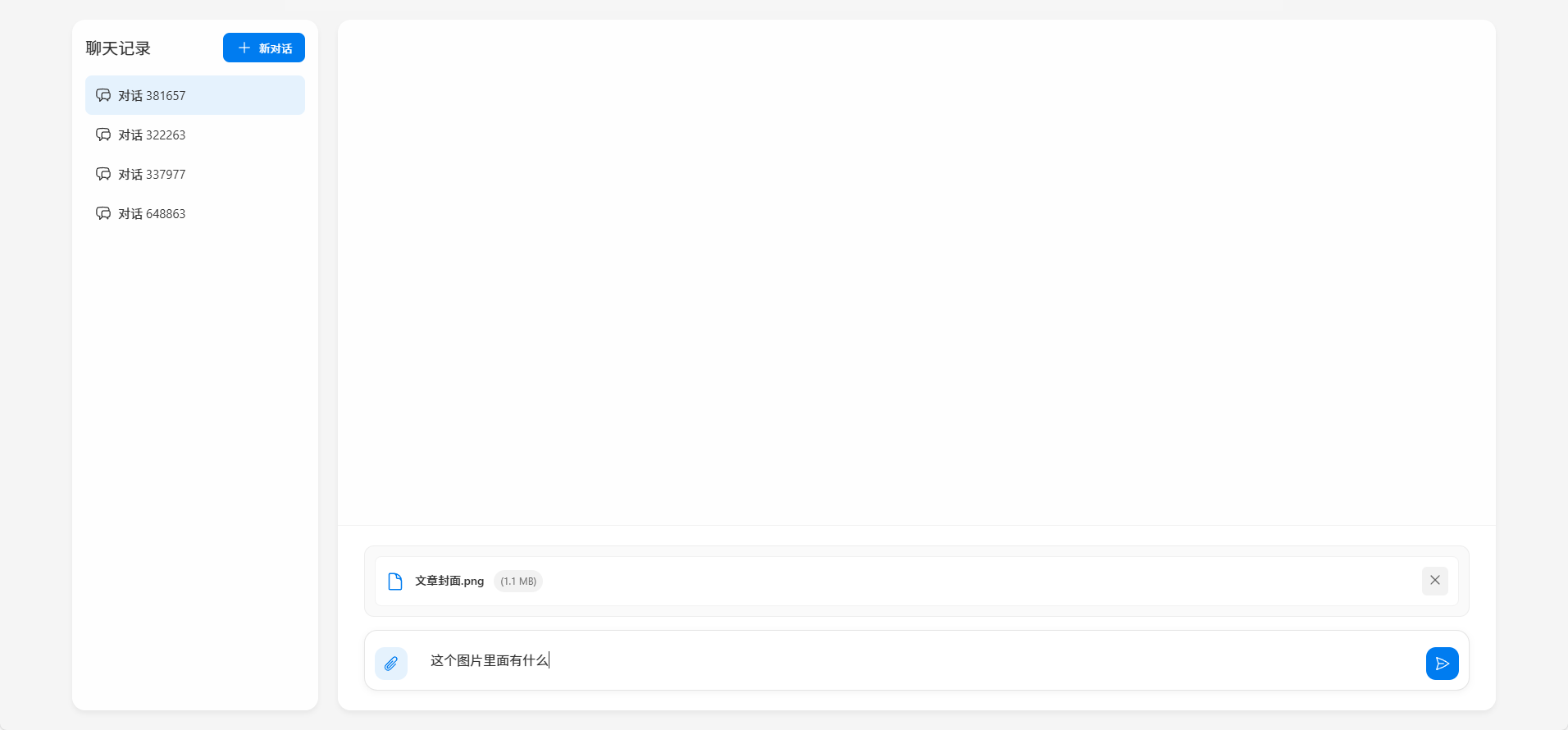
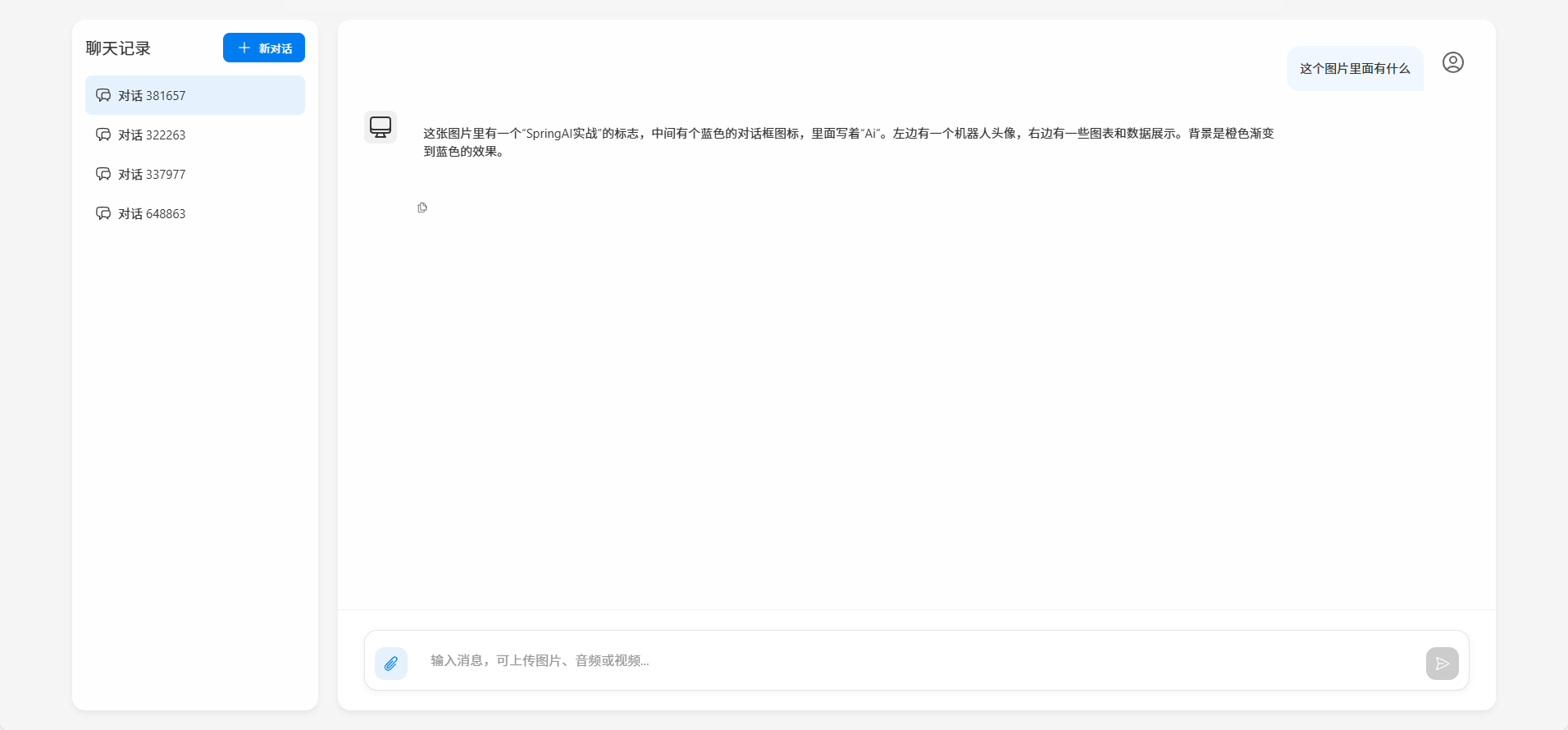
二、实现效果
可上传图片或音频数据给大模型分析
三、代码实现
3.1 后端代码
pom.xml
XML
    <!-- 继承Spring Boot父POM,提供默认依赖管理 -->
    <parent>
        <groupId>org.springframework.boot</groupId>
        <artifactId>spring-boot-starter-parent</artifactId>
        <version>3.4.3</version> <!-- Spring Boot版本 -->
        <relativePath/> <!-- 优先从本地仓库查找 -->
    </parent>
    <!-- 自定义属性 -->
    <properties>
        <java.version>17</java.version> <!-- JDK版本要求 -->
        <spring-ai.version>1.0.0-M6</spring-ai.version> <!-- Spring AI里程碑版本 -->
    </properties>
    <!-- 项目依赖 -->
    <dependencies>
        <!-- Spring Boot Web支持 -->
        <dependency>
            <groupId>org.springframework.boot</groupId>
            <artifactId>spring-boot-starter-web</artifactId>
        </dependency>
        <!-- AI相关依赖 -->
        <dependency>
            <groupId>org.springframework.ai</groupId>
            <artifactId>spring-ai-ollama-spring-boot-starter</artifactId> <!-- Ollama集成 -->
        </dependency>
        <dependency>
            <groupId>org.springframework.ai</groupId>
            <artifactId>spring-ai-openai-spring-boot-starter</artifactId> <!-- OpenAI集成 -->
        </dependency>
        <!-- 开发工具 -->
        <dependency>
            <groupId>org.projectlombok</groupId>
            <artifactId>lombok</artifactId>
            <version>1.18.22</version> <!-- 注解简化代码 -->
            <scope>provided</scope> <!-- 编译期使用 -->
        </dependency>
    </dependencies>

    <!-- 依赖管理(统一Spring AI家族版本) -->
    <dependencyManagement>
        <dependencies>
            <dependency>
                <groupId>org.springframework.ai</groupId>
                <artifactId>spring-ai-bom</artifactId>
                <version>${spring-ai.version}</version>
                <type>pom</type>
                <scope>import</scope> <!-- 导入BOM管理版本 -->
            </dependency>
        </dependencies>
    </dependencyManagement>
application.ymal
可选择ollama或者openai其一进行大模型配置
XML
server:
  tomcat:
    max-swallow-size: -1     # 禁用Tomcat的请求大小限制(或设为足够大的值,如100MB)
spring:
  application:
    name: heima-ai
  servlet:
    multipart:
      max-file-size: 50MB    # 单个文件限制
      max-request-size: 100MB # 单次请求总限制

  # AI服务配置(多引擎支持)
  ai:
    # Ollama配置(本地大模型引擎)
    ollama:
      base-url: http://localhost:11434  # Ollama服务地址(默认端口11434)
      chat:
        model: deepseek-r1:7b  # 使用的模型名称(7B参数的本地模型)

    # 阿里云OpenAI兼容模式配置
    openai:
      base-url: https://dashscope.aliyuncs.com/compatible-mode  # 阿里云兼容API端点
      api-key: ${OPENAI_API_KEY}  # 从环境变量读取API密钥(安全建议)
      chat:
        options:
          model: qwen-max-latest  # 通义千问最新版本模型

# 日志级别配置
logging:
  level:
    org.springframework.ai: debug  # 打印Spring AI框架调试日志
    com.itheima.ai: debug         # 打印业务代码调试日志
特别注意:在SpringAI的当前版本(1.0.0-m6)中,qwen-omni与SpringAI中的OpenAI模块的兼容性有问题,目前仅支持文本和图片两种模态。音频会有数据格式错误问题,视频完全不支持。音频识别中的数据格式,阿里云百炼的qwen-omni模型要求的参数格式为data:;base64,${media-data},而OpenAI是直接{media-data}。
目前的解决方案有两种:
-
一是使用spring-ai-alibaba来替代。
-
二是重写OpenAIModel的实现。
接下来,我们就用重写OpenAiModel的方式,来实现多模态效果。
自实现 AlibabaOpenAiChatModel (仿照OpenAiModel来写)
主要修改了buildGeneration、fromAudioData方法
java
public class AlibabaOpenAiChatModel extends AbstractToolCallSupport implements ChatModel {
private static final Logger logger = LoggerFactory.getLogger(AlibabaOpenAiChatModel.class);
private static final ChatModelObservationConvention DEFAULT_OBSERVATION_CONVENTION = new DefaultChatModelObservationConvention();
private static final ToolCallingManager DEFAULT_TOOL_CALLING_MANAGER = ToolCallingManager.builder().build();
/**
* The default options used for the chat completion requests.
*/
private final OpenAiChatOptions defaultOptions;
/**
* The retry template used to retry the OpenAI API calls.
*/
private final RetryTemplate retryTemplate;
/**
* Low-level access to the OpenAI API.
*/
private final OpenAiApi openAiApi;
/**
* Observation registry used for instrumentation.
*/
private final ObservationRegistry observationRegistry;
private final ToolCallingManager toolCallingManager;
/**
* Conventions to use for generating observations.
*/
private ChatModelObservationConvention observationConvention = DEFAULT_OBSERVATION_CONVENTION;
/**
* Creates an instance of the AlibabaOpenAiChatModel.
* @param openAiApi The OpenAiApi instance to be used for interacting with the OpenAI
* Chat API.
* @throws IllegalArgumentException if openAiApi is null
* @deprecated Use AlibabaOpenAiChatModel.Builder.
*/
@Deprecated
public AlibabaOpenAiChatModel(OpenAiApi openAiApi) {
this(openAiApi, OpenAiChatOptions.builder().model(OpenAiApi.DEFAULT_CHAT_MODEL).temperature(0.7).build());
}
/**
* Initializes an instance of the AlibabaOpenAiChatModel.
* @param openAiApi The OpenAiApi instance to be used for interacting with the OpenAI
* Chat API.
* @param options The OpenAiChatOptions to configure the chat model.
* @deprecated Use AlibabaOpenAiChatModel.Builder.
*/
@Deprecated
public AlibabaOpenAiChatModel(OpenAiApi openAiApi, OpenAiChatOptions options) {
this(openAiApi, options, null, RetryUtils.DEFAULT_RETRY_TEMPLATE);
}
/**
* Initializes a new instance of the AlibabaOpenAiChatModel.
* @param openAiApi The OpenAiApi instance to be used for interacting with the OpenAI
* Chat API.
* @param options The OpenAiChatOptions to configure the chat model.
* @param functionCallbackResolver The function callback resolver.
* @param retryTemplate The retry template.
* @deprecated Use AlibabaOpenAiChatModel.Builder.
*/
@Deprecated
public AlibabaOpenAiChatModel(OpenAiApi openAiApi, OpenAiChatOptions options,
@Nullable FunctionCallbackResolver functionCallbackResolver, RetryTemplate retryTemplate) {
this(openAiApi, options, functionCallbackResolver, List.of(), retryTemplate);
}
/**
* Initializes a new instance of the AlibabaOpenAiChatModel.
* @param openAiApi The OpenAiApi instance to be used for interacting with the OpenAI
* Chat API.
* @param options The OpenAiChatOptions to configure the chat model.
* @param functionCallbackResolver The function callback resolver.
* @param toolFunctionCallbacks The tool function callbacks.
* @param retryTemplate The retry template.
* @deprecated Use AlibabaOpenAiChatModel.Builder.
*/
@Deprecated
public AlibabaOpenAiChatModel(OpenAiApi openAiApi, OpenAiChatOptions options,
@Nullable FunctionCallbackResolver functionCallbackResolver,
@Nullable List<FunctionCallback> toolFunctionCallbacks, RetryTemplate retryTemplate) {
this(openAiApi, options, functionCallbackResolver, toolFunctionCallbacks, retryTemplate,
ObservationRegistry.NOOP);
}
/**
* Initializes a new instance of the AlibabaOpenAiChatModel.
* @param openAiApi The OpenAiApi instance to be used for interacting with the OpenAI
* Chat API.
* @param options The OpenAiChatOptions to configure the chat model.
* @param functionCallbackResolver The function callback resolver.
* @param toolFunctionCallbacks The tool function callbacks.
* @param retryTemplate The retry template.
* @param observationRegistry The ObservationRegistry used for instrumentation.
* @deprecated Use AlibabaOpenAiChatModel.Builder or AlibabaOpenAiChatModel(OpenAiApi,
* OpenAiChatOptions, ToolCallingManager, RetryTemplate, ObservationRegistry).
*/
@Deprecated
public AlibabaOpenAiChatModel(OpenAiApi openAiApi, OpenAiChatOptions options,
@Nullable FunctionCallbackResolver functionCallbackResolver,
@Nullable List<FunctionCallback> toolFunctionCallbacks, RetryTemplate retryTemplate,
ObservationRegistry observationRegistry) {
this(openAiApi, options,
LegacyToolCallingManager.builder()
.functionCallbackResolver(functionCallbackResolver)
.functionCallbacks(toolFunctionCallbacks)
.build(),
retryTemplate, observationRegistry);
logger.warn("This constructor is deprecated and will be removed in the next milestone. "
+ "Please use the AlibabaOpenAiChatModel.Builder or the new constructor accepting ToolCallingManager instead.");
}
public AlibabaOpenAiChatModel(OpenAiApi openAiApi, OpenAiChatOptions defaultOptions, ToolCallingManager toolCallingManager,
RetryTemplate retryTemplate, ObservationRegistry observationRegistry) {
// We do not pass the 'defaultOptions' to the AbstractToolSupport,
// because it modifies them. We are using ToolCallingManager instead,
// so we just pass empty options here.
super(null, OpenAiChatOptions.builder().build(), List.of());
Assert.notNull(openAiApi, "openAiApi cannot be null");
Assert.notNull(defaultOptions, "defaultOptions cannot be null");
Assert.notNull(toolCallingManager, "toolCallingManager cannot be null");
Assert.notNull(retryTemplate, "retryTemplate cannot be null");
Assert.notNull(observationRegistry, "observationRegistry cannot be null");
this.openAiApi = openAiApi;
this.defaultOptions = defaultOptions;
this.toolCallingManager = toolCallingManager;
this.retryTemplate = retryTemplate;
this.observationRegistry = observationRegistry;
}
@Override
public ChatResponse call(Prompt prompt) {
// Before moving any further, build the final request Prompt,
// merging runtime and default options.
Prompt requestPrompt = buildRequestPrompt(prompt);
return this.internalCall(requestPrompt, null);
}
public ChatResponse internalCall(Prompt prompt, ChatResponse previousChatResponse) {
OpenAiApi.ChatCompletionRequest request = createRequest(prompt, false);
ChatModelObservationContext observationContext = ChatModelObservationContext.builder()
.prompt(prompt)
.provider(OpenAiApiConstants.PROVIDER_NAME)
.requestOptions(prompt.getOptions())
.build();
ChatResponse response = ChatModelObservationDocumentation.CHAT_MODEL_OPERATION
.observation(this.observationConvention, DEFAULT_OBSERVATION_CONVENTION, () -> observationContext,
this.observationRegistry)
.observe(() -> {
ResponseEntity<OpenAiApi.ChatCompletion> completionEntity = this.retryTemplate
.execute(ctx -> this.openAiApi.chatCompletionEntity(request, getAdditionalHttpHeaders(prompt)));
var chatCompletion = completionEntity.getBody();
if (chatCompletion == null) {
logger.warn("No chat completion returned for prompt: {}", prompt);
return new ChatResponse(List.of());
}
List<OpenAiApi.ChatCompletion.Choice> choices = chatCompletion.choices();
if (choices == null) {
logger.warn("No choices returned for prompt: {}", prompt);
return new ChatResponse(List.of());
}
List<Generation> generations = choices.stream().map(choice -> {
// @formatter:off
Map<String, Object> metadata = Map.of(
"id", chatCompletion.id() != null ? chatCompletion.id() : "",
"role", choice.message().role() != null ? choice.message().role().name() : "",
"index", choice.index(),
"finishReason", choice.finishReason() != null ? choice.finishReason().name() : "",
"refusal", StringUtils.hasText(choice.message().refusal()) ? choice.message().refusal() : "");
// @formatter:on
return buildGeneration(choice, metadata, request);
}).toList();
RateLimit rateLimit = OpenAiResponseHeaderExtractor.extractAiResponseHeaders(completionEntity);
// Current usage
OpenAiApi.Usage usage = completionEntity.getBody().usage();
Usage currentChatResponseUsage = usage != null ? getDefaultUsage(usage) : new EmptyUsage();
Usage accumulatedUsage = UsageUtils.getCumulativeUsage(currentChatResponseUsage, previousChatResponse);
ChatResponse chatResponse = new ChatResponse(generations,
from(completionEntity.getBody(), rateLimit, accumulatedUsage));
observationContext.setResponse(chatResponse);
return chatResponse;
});
if (ToolCallingChatOptions.isInternalToolExecutionEnabled(prompt.getOptions()) && response != null
&& response.hasToolCalls()) {
var toolExecutionResult = this.toolCallingManager.executeToolCalls(prompt, response);
if (toolExecutionResult.returnDirect()) {
// Return tool execution result directly to the client.
return ChatResponse.builder()
.from(response)
.generations(ToolExecutionResult.buildGenerations(toolExecutionResult))
.build();
}
else {
// Send the tool execution result back to the model.
return this.internalCall(new Prompt(toolExecutionResult.conversationHistory(), prompt.getOptions()),
response);
}
}
return response;
}
@Override
public Flux<ChatResponse> stream(Prompt prompt) {
// Before moving any further, build the final request Prompt,
// merging runtime and default options.
Prompt requestPrompt = buildRequestPrompt(prompt);
return internalStream(requestPrompt, null);
}
public Flux<ChatResponse> internalStream(Prompt prompt, ChatResponse previousChatResponse) {
return Flux.deferContextual(contextView -> {
OpenAiApi.ChatCompletionRequest request = createRequest(prompt, true);
if (request.outputModalities() != null) {
if (request.outputModalities().stream().anyMatch(m -> m.equals("audio"))) {
logger.warn("Audio output is not supported for streaming requests. Removing audio output.");
throw new IllegalArgumentException("Audio output is not supported for streaming requests.");
}
}
if (request.audioParameters() != null) {
logger.warn("Audio parameters are not supported for streaming requests. Removing audio parameters.");
throw new IllegalArgumentException("Audio parameters are not supported for streaming requests.");
}
Flux<OpenAiApi.ChatCompletionChunk> completionChunks = this.openAiApi.chatCompletionStream(request,
getAdditionalHttpHeaders(prompt));
// For chunked responses, only the first chunk contains the choice role.
// The rest of the chunks with same ID share the same role.
ConcurrentHashMap<String, String> roleMap = new ConcurrentHashMap<>();
final ChatModelObservationContext observationContext = ChatModelObservationContext.builder()
.prompt(prompt)
.provider(OpenAiApiConstants.PROVIDER_NAME)
.requestOptions(prompt.getOptions())
.build();
Observation observation = ChatModelObservationDocumentation.CHAT_MODEL_OPERATION.observation(
this.observationConvention, DEFAULT_OBSERVATION_CONVENTION, () -> observationContext,
this.observationRegistry);
observation.parentObservation(contextView.getOrDefault(ObservationThreadLocalAccessor.KEY, null)).start();
// Convert the ChatCompletionChunk into a ChatCompletion to be able to reuse
// the function call handling logic.
Flux<ChatResponse> chatResponse = completionChunks.map(this::chunkToChatCompletion)
.switchMap(chatCompletion -> Mono.just(chatCompletion).map(chatCompletion2 -> {
try {
@SuppressWarnings("null")
String id = chatCompletion2.id();
List<Generation> generations = chatCompletion2.choices().stream().map(choice -> { // @formatter:off
if (choice.message().role() != null) {
roleMap.putIfAbsent(id, choice.message().role().name());
}
Map<String, Object> metadata = Map.of(
"id", chatCompletion2.id(),
"role", roleMap.getOrDefault(id, ""),
"index", choice.index(),
"finishReason", choice.finishReason() != null ? choice.finishReason().name() : "",
"refusal", StringUtils.hasText(choice.message().refusal()) ? choice.message().refusal() : "");
return buildGeneration(choice, metadata, request);
}).toList();
// @formatter:on
OpenAiApi.Usage usage = chatCompletion2.usage();
Usage currentChatResponseUsage = usage != null ? getDefaultUsage(usage) : new EmptyUsage();
Usage accumulatedUsage = UsageUtils.getCumulativeUsage(currentChatResponseUsage,
previousChatResponse);
return new ChatResponse(generations, from(chatCompletion2, null, accumulatedUsage));
}
catch (Exception e) {
logger.error("Error processing chat completion", e);
return new ChatResponse(List.of());
}
// When in stream mode and enabled to include the usage, the OpenAI
// Chat completion response would have the usage set only in its
// final response. Hence, the following overlapping buffer is
// created to store both the current and the subsequent response
// to accumulate the usage from the subsequent response.
}))
.buffer(2, 1)
.map(bufferList -> {
ChatResponse firstResponse = bufferList.get(0);
if (request.streamOptions() != null && request.streamOptions().includeUsage()) {
if (bufferList.size() == 2) {
ChatResponse secondResponse = bufferList.get(1);
if (secondResponse != null && secondResponse.getMetadata() != null) {
// This is the usage from the final Chat response for a
// given Chat request.
Usage usage = secondResponse.getMetadata().getUsage();
if (!UsageUtils.isEmpty(usage)) {
// Store the usage from the final response to the
// penultimate response for accumulation.
return new ChatResponse(firstResponse.getResults(),
from(firstResponse.getMetadata(), usage));
}
}
}
}
return firstResponse;
});
// @formatter:off
Flux<ChatResponse> flux = chatResponse.flatMap(response -> {
if (ToolCallingChatOptions.isInternalToolExecutionEnabled(prompt.getOptions()) && response.hasToolCalls()) {
var toolExecutionResult = this.toolCallingManager.executeToolCalls(prompt, response);
if (toolExecutionResult.returnDirect()) {
// Return tool execution result directly to the client.
return Flux.just(ChatResponse.builder().from(response)
.generations(ToolExecutionResult.buildGenerations(toolExecutionResult))
.build());
} else {
// Send the tool execution result back to the model.
return this.internalStream(new Prompt(toolExecutionResult.conversationHistory(), prompt.getOptions()),
response);
}
}
else {
return Flux.just(response);
}
})
.doOnError(observation::error)
.doFinally(s -> observation.stop())
.contextWrite(ctx -> ctx.put(ObservationThreadLocalAccessor.KEY, observation));
// @formatter:on
return new MessageAggregator().aggregate(flux, observationContext::setResponse);
});
}
private MultiValueMap<String, String> getAdditionalHttpHeaders(Prompt prompt) {
Map<String, String> headers = new HashMap<>(this.defaultOptions.getHttpHeaders());
if (prompt.getOptions() != null && prompt.getOptions() instanceof OpenAiChatOptions chatOptions) {
headers.putAll(chatOptions.getHttpHeaders());
}
return CollectionUtils.toMultiValueMap(
headers.entrySet().stream().collect(Collectors.toMap(Map.Entry::getKey, e -> List.of(e.getValue()))));
}
private Generation buildGeneration(OpenAiApi.ChatCompletion.Choice choice, Map<String, Object> metadata, OpenAiApi.ChatCompletionRequest request) {
List<AssistantMessage.ToolCall> toolCalls = choice.message().toolCalls() == null ? List.of()
: choice.message()
.toolCalls()
.stream()
.map(toolCall -> new AssistantMessage.ToolCall(toolCall.id(), "function",
toolCall.function().name(), toolCall.function().arguments()))
.reduce((tc1, tc2) -> new AssistantMessage.ToolCall(tc1.id(), "function", tc1.name(), tc1.arguments() + tc2.arguments()))
.stream()
.toList();
String finishReason = (choice.finishReason() != null ? choice.finishReason().name() : "");
var generationMetadataBuilder = ChatGenerationMetadata.builder().finishReason(finishReason);
List<Media> media = new ArrayList<>();
String textContent = choice.message().content();
var audioOutput = choice.message().audioOutput();
if (audioOutput != null) {
String mimeType = String.format("audio/%s", request.audioParameters().format().name().toLowerCase());
byte[] audioData = Base64.getDecoder().decode(audioOutput.data());
Resource resource = new ByteArrayResource(audioData);
Media.builder().mimeType(MimeTypeUtils.parseMimeType(mimeType)).data(resource).id(audioOutput.id()).build();
media.add(Media.builder()
.mimeType(MimeTypeUtils.parseMimeType(mimeType))
.data(resource)
.id(audioOutput.id())
.build());
if (!StringUtils.hasText(textContent)) {
textContent = audioOutput.transcript();
}
generationMetadataBuilder.metadata("audioId", audioOutput.id());
generationMetadataBuilder.metadata("audioExpiresAt", audioOutput.expiresAt());
}
var assistantMessage = new AssistantMessage(textContent, metadata, toolCalls, media);
return new Generation(assistantMessage, generationMetadataBuilder.build());
}
private ChatResponseMetadata from(OpenAiApi.ChatCompletion result, RateLimit rateLimit, Usage usage) {
Assert.notNull(result, "OpenAI ChatCompletionResult must not be null");
var builder = ChatResponseMetadata.builder()
.id(result.id() != null ? result.id() : "")
.usage(usage)
.model(result.model() != null ? result.model() : "")
.keyValue("created", result.created() != null ? result.created() : 0L)
.keyValue("system-fingerprint", result.systemFingerprint() != null ? result.systemFingerprint() : "");
if (rateLimit != null) {
builder.rateLimit(rateLimit);
}
return builder.build();
}
private ChatResponseMetadata from(ChatResponseMetadata chatResponseMetadata, Usage usage) {
Assert.notNull(chatResponseMetadata, "OpenAI ChatResponseMetadata must not be null");
var builder = ChatResponseMetadata.builder()
.id(chatResponseMetadata.getId() != null ? chatResponseMetadata.getId() : "")
.usage(usage)
.model(chatResponseMetadata.getModel() != null ? chatResponseMetadata.getModel() : "");
if (chatResponseMetadata.getRateLimit() != null) {
builder.rateLimit(chatResponseMetadata.getRateLimit());
}
return builder.build();
}
/**
* Convert the ChatCompletionChunk into a ChatCompletion. The Usage is set to null.
* @param chunk the ChatCompletionChunk to convert
* @return the ChatCompletion
*/
private OpenAiApi.ChatCompletion chunkToChatCompletion(OpenAiApi.ChatCompletionChunk chunk) {
List<OpenAiApi.ChatCompletion.Choice> choices = chunk.choices()
.stream()
.map(chunkChoice -> new OpenAiApi.ChatCompletion.Choice(chunkChoice.finishReason(), chunkChoice.index(), chunkChoice.delta(),
chunkChoice.logprobs()))
.toList();
return new OpenAiApi.ChatCompletion(chunk.id(), choices, chunk.created(), chunk.model(), chunk.serviceTier(),
chunk.systemFingerprint(), "chat.completion", chunk.usage());
}
private DefaultUsage getDefaultUsage(OpenAiApi.Usage usage) {
return new DefaultUsage(usage.promptTokens(), usage.completionTokens(), usage.totalTokens(), usage);
}
Prompt buildRequestPrompt(Prompt prompt) {
// Process runtime options
OpenAiChatOptions runtimeOptions = null;
if (prompt.getOptions() != null) {
if (prompt.getOptions() instanceof ToolCallingChatOptions toolCallingChatOptions) {
runtimeOptions = ModelOptionsUtils.copyToTarget(toolCallingChatOptions, ToolCallingChatOptions.class,
OpenAiChatOptions.class);
}
else if (prompt.getOptions() instanceof FunctionCallingOptions functionCallingOptions) {
runtimeOptions = ModelOptionsUtils.copyToTarget(functionCallingOptions, FunctionCallingOptions.class,
OpenAiChatOptions.class);
}
else {
runtimeOptions = ModelOptionsUtils.copyToTarget(prompt.getOptions(), ChatOptions.class,
OpenAiChatOptions.class);
}
}
// Define request options by merging runtime options and default options
OpenAiChatOptions requestOptions = ModelOptionsUtils.merge(runtimeOptions, this.defaultOptions,
OpenAiChatOptions.class);
// Merge @JsonIgnore-annotated options explicitly since they are ignored by
// Jackson, used by ModelOptionsUtils.
if (runtimeOptions != null) {
requestOptions.setHttpHeaders(
mergeHttpHeaders(runtimeOptions.getHttpHeaders(), this.defaultOptions.getHttpHeaders()));
requestOptions.setInternalToolExecutionEnabled(
ModelOptionsUtils.mergeOption(runtimeOptions.isInternalToolExecutionEnabled(),
this.defaultOptions.isInternalToolExecutionEnabled()));
requestOptions.setToolNames(ToolCallingChatOptions.mergeToolNames(runtimeOptions.getToolNames(),
this.defaultOptions.getToolNames()));
requestOptions.setToolCallbacks(ToolCallingChatOptions.mergeToolCallbacks(runtimeOptions.getToolCallbacks(),
this.defaultOptions.getToolCallbacks()));
requestOptions.setToolContext(ToolCallingChatOptions.mergeToolContext(runtimeOptions.getToolContext(),
this.defaultOptions.getToolContext()));
}
else {
requestOptions.setHttpHeaders(this.defaultOptions.getHttpHeaders());
requestOptions.setInternalToolExecutionEnabled(this.defaultOptions.isInternalToolExecutionEnabled());
requestOptions.setToolNames(this.defaultOptions.getToolNames());
requestOptions.setToolCallbacks(this.defaultOptions.getToolCallbacks());
requestOptions.setToolContext(this.defaultOptions.getToolContext());
}
ToolCallingChatOptions.validateToolCallbacks(requestOptions.getToolCallbacks());
return new Prompt(prompt.getInstructions(), requestOptions);
}
private Map<String, String> mergeHttpHeaders(Map<String, String> runtimeHttpHeaders,
Map<String, String> defaultHttpHeaders) {
var mergedHttpHeaders = new HashMap<>(defaultHttpHeaders);
mergedHttpHeaders.putAll(runtimeHttpHeaders);
return mergedHttpHeaders;
}
/**
* Accessible for testing.
*/
OpenAiApi.ChatCompletionRequest createRequest(Prompt prompt, boolean stream) {
List<OpenAiApi.ChatCompletionMessage> chatCompletionMessages = prompt.getInstructions().stream().map(message -> {
if (message.getMessageType() == MessageType.USER || message.getMessageType() == MessageType.SYSTEM) {
Object content = message.getText();
if (message instanceof UserMessage userMessage) {
if (!CollectionUtils.isEmpty(userMessage.getMedia())) {
List<OpenAiApi.ChatCompletionMessage.MediaContent> contentList = new ArrayList<>(List.of(new OpenAiApi.ChatCompletionMessage.MediaContent(message.getText())));
contentList.addAll(userMessage.getMedia().stream().map(this::mapToMediaContent).toList());
content = contentList;
}
}
return List.of(new OpenAiApi.ChatCompletionMessage(content,
OpenAiApi.ChatCompletionMessage.Role.valueOf(message.getMessageType().name())));
}
else if (message.getMessageType() == MessageType.ASSISTANT) {
var assistantMessage = (AssistantMessage) message;
List<OpenAiApi.ChatCompletionMessage.ToolCall> toolCalls = null;
if (!CollectionUtils.isEmpty(assistantMessage.getToolCalls())) {
toolCalls = assistantMessage.getToolCalls().stream().map(toolCall -> {
var function = new OpenAiApi.ChatCompletionMessage.ChatCompletionFunction(toolCall.name(), toolCall.arguments());
return new OpenAiApi.ChatCompletionMessage.ToolCall(toolCall.id(), toolCall.type(), function);
}).toList();
}
OpenAiApi.ChatCompletionMessage.AudioOutput audioOutput = null;
if (!CollectionUtils.isEmpty(assistantMessage.getMedia())) {
Assert.isTrue(assistantMessage.getMedia().size() == 1,
"Only one media content is supported for assistant messages");
audioOutput = new OpenAiApi.ChatCompletionMessage.AudioOutput(assistantMessage.getMedia().get(0).getId(), null, null, null);
}
return List.of(new OpenAiApi.ChatCompletionMessage(assistantMessage.getText(),
OpenAiApi.ChatCompletionMessage.Role.ASSISTANT, null, null, toolCalls, null, audioOutput));
}
else if (message.getMessageType() == MessageType.TOOL) {
ToolResponseMessage toolMessage = (ToolResponseMessage) message;
toolMessage.getResponses()
.forEach(response -> Assert.isTrue(response.id() != null, "ToolResponseMessage must have an id"));
return toolMessage.getResponses()
.stream()
.map(tr -> new OpenAiApi.ChatCompletionMessage(tr.responseData(), OpenAiApi.ChatCompletionMessage.Role.TOOL, tr.name(),
tr.id(), null, null, null))
.toList();
}
else {
throw new IllegalArgumentException("Unsupported message type: " + message.getMessageType());
}
}).flatMap(List::stream).toList();
OpenAiApi.ChatCompletionRequest request = new OpenAiApi.ChatCompletionRequest(chatCompletionMessages, stream);
OpenAiChatOptions requestOptions = (OpenAiChatOptions) prompt.getOptions();
request = ModelOptionsUtils.merge(requestOptions, request, OpenAiApi.ChatCompletionRequest.class);
// Add the tool definitions to the request's tools parameter.
List<ToolDefinition> toolDefinitions = this.toolCallingManager.resolveToolDefinitions(requestOptions);
if (!CollectionUtils.isEmpty(toolDefinitions)) {
request = ModelOptionsUtils.merge(
OpenAiChatOptions.builder().tools(this.getFunctionTools(toolDefinitions)).build(), request,
OpenAiApi.ChatCompletionRequest.class);
}
// Remove `streamOptions` from the request if it is not a streaming request
if (request.streamOptions() != null && !stream) {
logger.warn("Removing streamOptions from the request as it is not a streaming request!");
request = request.streamOptions(null);
}
return request;
}
private OpenAiApi.ChatCompletionMessage.MediaContent mapToMediaContent(Media media) {
var mimeType = media.getMimeType();
if (MimeTypeUtils.parseMimeType("audio/mp3").equals(mimeType) || MimeTypeUtils.parseMimeType("audio/mpeg").equals(mimeType)) {
return new OpenAiApi.ChatCompletionMessage.MediaContent(
new OpenAiApi.ChatCompletionMessage.MediaContent.InputAudio(fromAudioData(media.getData()), OpenAiApi.ChatCompletionMessage.MediaContent.InputAudio.Format.MP3));
}
if (MimeTypeUtils.parseMimeType("audio/wav").equals(mimeType)) {
return new OpenAiApi.ChatCompletionMessage.MediaContent(
new OpenAiApi.ChatCompletionMessage.MediaContent.InputAudio(fromAudioData(media.getData()), OpenAiApi.ChatCompletionMessage.MediaContent.InputAudio.Format.WAV));
}
else {
return new OpenAiApi.ChatCompletionMessage.MediaContent(
new OpenAiApi.ChatCompletionMessage.MediaContent.ImageUrl(this.fromMediaData(media.getMimeType(), media.getData())));
}
}
private String fromAudioData(Object audioData) {
if (audioData instanceof byte[] bytes) {
return String.format("data:;base64,%s", Base64.getEncoder().encodeToString(bytes));
}
throw new IllegalArgumentException("Unsupported audio data type: " + audioData.getClass().getSimpleName());
}
private String fromMediaData(MimeType mimeType, Object mediaContentData) {
if (mediaContentData instanceof byte[] bytes) {
// Assume the bytes are an image. So, convert the bytes to a base64 encoded
// following the prefix pattern.
return String.format("data:%s;base64,%s", mimeType.toString(), Base64.getEncoder().encodeToString(bytes));
}
else if (mediaContentData instanceof String text) {
// Assume the text is a URLs or a base64 encoded image prefixed by the user.
return text;
}
else {
throw new IllegalArgumentException(
"Unsupported media data type: " + mediaContentData.getClass().getSimpleName());
}
}
private List<OpenAiApi.FunctionTool> getFunctionTools(List<ToolDefinition> toolDefinitions) {
return toolDefinitions.stream().map(toolDefinition -> {
var function = new OpenAiApi.FunctionTool.Function(toolDefinition.description(), toolDefinition.name(),
toolDefinition.inputSchema());
return new OpenAiApi.FunctionTool(function);
}).toList();
}
@Override
public ChatOptions getDefaultOptions() {
return OpenAiChatOptions.fromOptions(this.defaultOptions);
}
@Override
public String toString() {
return "AlibabaOpenAiChatModel [defaultOptions=" + this.defaultOptions + "]";
}
/**
* Use the provided convention for reporting observation data
* @param observationConvention The provided convention
*/
public void setObservationConvention(ChatModelObservationConvention observationConvention) {
Assert.notNull(observationConvention, "observationConvention cannot be null");
this.observationConvention = observationConvention;
}
public static AlibabaOpenAiChatModel.Builder builder() {
return new AlibabaOpenAiChatModel.Builder();
}
public static final class Builder {
private OpenAiApi openAiApi;
private OpenAiChatOptions defaultOptions = OpenAiChatOptions.builder()
.model(OpenAiApi.DEFAULT_CHAT_MODEL)
.temperature(0.7)
.build();
private ToolCallingManager toolCallingManager;
private FunctionCallbackResolver functionCallbackResolver;
private List<FunctionCallback> toolFunctionCallbacks;
private RetryTemplate retryTemplate = RetryUtils.DEFAULT_RETRY_TEMPLATE;
private ObservationRegistry observationRegistry = ObservationRegistry.NOOP;
private Builder() {
}
public AlibabaOpenAiChatModel.Builder openAiApi(OpenAiApi openAiApi) {
this.openAiApi = openAiApi;
return this;
}
public AlibabaOpenAiChatModel.Builder defaultOptions(OpenAiChatOptions defaultOptions) {
this.defaultOptions = defaultOptions;
return this;
}
public AlibabaOpenAiChatModel.Builder toolCallingManager(ToolCallingManager toolCallingManager) {
this.toolCallingManager = toolCallingManager;
return this;
}
@Deprecated
public AlibabaOpenAiChatModel.Builder functionCallbackResolver(FunctionCallbackResolver functionCallbackResolver) {
this.functionCallbackResolver = functionCallbackResolver;
return this;
}
@Deprecated
public AlibabaOpenAiChatModel.Builder toolFunctionCallbacks(List<FunctionCallback> toolFunctionCallbacks) {
this.toolFunctionCallbacks = toolFunctionCallbacks;
return this;
}
public AlibabaOpenAiChatModel.Builder retryTemplate(RetryTemplate retryTemplate) {
this.retryTemplate = retryTemplate;
return this;
}
public AlibabaOpenAiChatModel.Builder observationRegistry(ObservationRegistry observationRegistry) {
this.observationRegistry = observationRegistry;
return this;
}
public AlibabaOpenAiChatModel build() {
if (toolCallingManager != null) {
Assert.isNull(functionCallbackResolver,
"functionCallbackResolver cannot be set when toolCallingManager is set");
Assert.isNull(toolFunctionCallbacks,
"toolFunctionCallbacks cannot be set when toolCallingManager is set");
return new AlibabaOpenAiChatModel(openAiApi, defaultOptions, toolCallingManager, retryTemplate,
observationRegistry);
}
if (functionCallbackResolver != null) {
Assert.isNull(toolCallingManager,
"toolCallingManager cannot be set when functionCallbackResolver is set");
List<FunctionCallback> toolCallbacks = this.toolFunctionCallbacks != null ? this.toolFunctionCallbacks
: List.of();
return new AlibabaOpenAiChatModel(openAiApi, defaultOptions, functionCallbackResolver, toolCallbacks,
retryTemplate, observationRegistry);
}
return new AlibabaOpenAiChatModel(openAiApi, defaultOptions, DEFAULT_TOOL_CALLING_MANAGER, retryTemplate,
observationRegistry);
}
}
}ChatConfiguration配置类
InMemoryChatMemory实现本地聊天记录存储
java
/**
 * AI核心配置类
 *
 * 核心组件:
 * 1. 聊天记忆管理(ChatMemory)
 * 2. 多种场景的ChatClient实例
 */
@Configuration
public class ChatConfiguration {

    /**
     * 内存式聊天记忆存储
     * @return InMemoryChatMemory 实例
     *
     * 作用:保存对话上下文,实现多轮对话能力
     * 实现原理:基于ConcurrentHashMap的线程安全实现
     */
    @Bean
    public ChatMemory chatMemory() {
        return new InMemoryChatMemory();
    }

    /**
     * 通用聊天客户端
     * @param model 阿里云OpenAI模型
     * @param chatMemory 聊天记忆
     * @return 配置好的ChatClient
     *
     * 默认配置:
     * - 使用qwen-omni-turbo模型
     * - 设定AI人格为"小小"
     * - 启用日志记录和记忆功能
     */
    @Bean
    public ChatClient chatClient(AlibabaOpenAiChatModel model, ChatMemory chatMemory) {
        return ChatClient
                .builder(model)
                .defaultOptions(ChatOptions.builder().model("qwen-omni-turbo").build()) // 自定义模型不与配置文件的冲突
                .defaultSystem("你是一个热心、聪明、全知的智能助手,你的名字叫小小,请以小小的身份和语气回答问题。")
                .defaultAdvisors(
                        new SimpleLoggerAdvisor(),  // 日志记录
                        new MessageChatMemoryAdvisor(chatMemory)  // 记忆功能
                )
                .build();
    }

    /**
     * 定制化阿里云OpenAI模型
     * @return AlibabaOpenAiChatModel 实例
     *
     * 配置要点:
     * 1. 支持多级参数继承(chatProperties > commonProperties)
     * 2. 自动配置HTTP客户端(RestClient/WebClient)
     * 3. 集成可观测性体系
     */
    @Bean
    public AlibabaOpenAiChatModel alibabaOpenAiChatModel(
            OpenAiConnectionProperties commonProperties,
            OpenAiChatProperties chatProperties,
            ObjectProvider<RestClient.Builder> restClientBuilderProvider,
            ObjectProvider<WebClient.Builder> webClientBuilderProvider,
            ToolCallingManager toolCallingManager,
            RetryTemplate retryTemplate,
            ResponseErrorHandler responseErrorHandler,
            ObjectProvider<ObservationRegistry> observationRegistry,
            ObjectProvider<ChatModelObservationConvention> observationConvention) {

        // 参数优先级处理
        String baseUrl = StringUtils.hasText(chatProperties.getBaseUrl())
                ? chatProperties.getBaseUrl()
                : commonProperties.getBaseUrl();

        String apiKey = StringUtils.hasText(chatProperties.getApiKey())
                ? chatProperties.getApiKey()
                : commonProperties.getApiKey();

        // 组织头信息配置
        Map<String, List<String>> connectionHeaders = new HashMap<>();
        Optional.ofNullable(chatProperties.getProjectId())
                .filter(StringUtils::hasText)
                .ifPresent(projectId ->
                        connectionHeaders.put("OpenAI-Project", List.of(projectId)));

        Optional.ofNullable(chatProperties.getOrganizationId())
                .filter(StringUtils::hasText)
                .ifPresent(orgId ->
                        connectionHeaders.put("OpenAI-Organization", List.of(orgId)));

        // 构建OpenAI API客户端
        OpenAiApi openAiApi = OpenAiApi.builder()
                .baseUrl(baseUrl)
                .apiKey(new SimpleApiKey(apiKey))
                .headers(CollectionUtils.toMultiValueMap(connectionHeaders))
                .completionsPath(chatProperties.getCompletionsPath())
                .embeddingsPath("/v1/embeddings")
                .restClientBuilder(restClientBuilderProvider.getIfAvailable(RestClient::builder))
                .webClientBuilder(webClientBuilderProvider.getIfAvailable(WebClient::builder))
                .responseErrorHandler(responseErrorHandler)
                .build();

        // 构建定制化聊天模型
        AlibabaOpenAiChatModel chatModel = AlibabaOpenAiChatModel.builder()
                .openAiApi(openAiApi)
                .defaultOptions(chatProperties.getOptions())
                .toolCallingManager(toolCallingManager)
                .retryTemplate(retryTemplate)
                .observationRegistry(observationRegistry.getIfUnique(() -> ObservationRegistry.NOOP))
                .build();

        // 配置可观测性约定
        observationConvention.ifAvailable(chatModel::setObservationConvention);

        return chatModel;
    }

}
ChatController对话类
会话id由前端进行生成并传输过来,当然也可后端自己生成并且存入数据库,不过这里由于是简单的实现,由本地Map实现会话及信息的存储
根据前端是否传过来files来判断是否为多模态调用,有文件则走multiModalChat方法
java
import lombok.RequiredArgsConstructor;
import org.springframework.ai.chat.client.ChatClient;
import org.springframework.ai.model.Media;
import org.springframework.util.MimeType;
import org.springframework.web.bind.annotation.RequestMapping;
import org.springframework.web.bind.annotation.RequestParam;
import org.springframework.web.bind.annotation.RestController;
import org.springframework.web.multipart.MultipartFile;
import reactor.core.publisher.Flux;
import java.util.List;
import java.util.Objects;
import static org.springframework.ai.chat.client.advisor.AbstractChatMemoryAdvisor.CHAT_MEMORY_CONVERSATION_ID_KEY;

@RequiredArgsConstructor // 构造方式自动注入
@RestController
@RequestMapping("/ai")
public class ChatController {

    private final ChatClient chatClient;

    private final ChatHistoryRepository chatHistoryRepository;

    @RequestMapping(value = "/chat", produces = "text/html;charset=utf-8")
    public Flux<String> chat(
            @RequestParam("prompt") String prompt,
            @RequestParam("chatId") String chatId,
            @RequestParam(value = "files", required = false) List<MultipartFile> files) {
        // 1.保存会话id
        chatHistoryRepository.save("chat", chatId);
        // 2.请求模型
        if (files == null || files.isEmpty()) {
            // 没有附件,纯文本聊天
            return textChat(prompt, chatId);
        } else {
            // 有附件,多模态聊天
            return multiModalChat(prompt, chatId, files);
        }

    }

    private Flux<String> multiModalChat(String prompt, String chatId, List<MultipartFile> files) {
        // 1.遍历解析多媒体,转为Media对象
        List<Media> medias = files.stream()
                .map(file -> new Media(
                                MimeType.valueOf(Objects.requireNonNull(file.getContentType())),
                                file.getResource()
                        )
                )
                .toList();
        // 2.请求模型
        return chatClient.prompt()
                .user(p -> p.text(prompt).media(medias.toArray(Media[]::new)))
                .advisors(a -> a.param(CHAT_MEMORY_CONVERSATION_ID_KEY, chatId))
                .stream()
                .content();
    }

    private Flux<String> textChat(String prompt, String chatId) {
        return chatClient.prompt()
                .user(prompt)
                .advisors(a -> a.param(CHAT_MEMORY_CONVERSATION_ID_KEY, chatId))
                .stream()
                .content();
    }
}
ChatHistoryController会话历史类
实现本地Map存储chat类型与所有会话历史的对应关系,找到会话后就可用根据聊天记忆ChatMemory找到聊天历史
java
import lombok.RequiredArgsConstructor;
import org.springframework.ai.chat.memory.ChatMemory;
import org.springframework.ai.chat.messages.Message;
import org.springframework.web.bind.annotation.GetMapping;
import org.springframework.web.bind.annotation.PathVariable;
import org.springframework.web.bind.annotation.RequestMapping;
import org.springframework.web.bind.annotation.RestController;
import java.util.List;

@RequiredArgsConstructor
@RestController
@RequestMapping("/ai/history")
public class ChatHistoryController {

    private final ChatHistoryRepository chatHistoryRepository;

    private final ChatMemory chatMemory;

    @GetMapping("/{type}")
    public List<String> getChatIds(@PathVariable("type") String type) {
        return chatHistoryRepository.getChatIds(type);
    }

    @GetMapping("/{type}/{chatId}")
    public List<MessageVO> getChatHistory(@PathVariable("type") String type, @PathVariable("chatId") String chatId) {
        List<Message> messages = chatMemory.get(chatId, Integer.MAX_VALUE);
        if(messages == null) {
            return List.of();
        }

        // 转换成VO
        return messages.stream().map(MessageVO::new).toList();
    }
}
ChatHistoryRepository 会话历史业务接口
java
import java.util.List;

public interface ChatHistoryRepository {

    /**
     * 保存会话记录
     * @param type 业务类型,如:chat、service、pdf
     * @param chatId 会话ID
     */
    void save(String type, String chatId);

    /**
     * 获取会话ID列表
     * @param type 业务类型,如:chat、service、pdf
     * @return 会话ID列表
     */
    List<String> getChatIds(String type);
}
InMemoryChatHistoryRepository实现类
java
@Slf4j
@Component
@RequiredArgsConstructor
public class InMemoryChatHistoryRepository implements ChatHistoryRepository {

    // 会话chatId存储Map
    private Map<String, List<String>> chatHistory;

    private final ChatMemory chatMemory;

    // 保存会话ID
    @Override
    public void save(String type, String chatId) {
        /*if (!chatHistory.containsKey(type)) {
            chatHistory.put(type, new ArrayList<>());
        }
        List<String> chatIds = chatHistory.get(type);*/
        List<String> chatIds = chatHistory.computeIfAbsent(type, k -> new ArrayList<>());
        if (chatIds.contains(chatId)) {
            return;
        }
        chatIds.add(chatId);
    }

    // 获取所有会话id
    @Override
    public List<String> getChatIds(String type) {
        /*List<String> chatIds = chatHistory.get(type);
        return chatIds == null ? List.of() : chatIds;*/
        return chatHistory.getOrDefault(type, List.of());
    }

}
MessageVO返回实体类
根据ChatMemory中存储的Message可知有四种类型,则根据Message来示例VO对象
USER("user"),
ASSISTANT("assistant"),
SYSTEM("system"),
TOOL("tool");
java
import lombok.Data;
import lombok.NoArgsConstructor;
import org.springframework.ai.chat.messages.Message;

@NoArgsConstructor
@Data
public class MessageVO {
    private String role;
    private String content;

    public MessageVO(Message message) {
        switch (message.getMessageType()) {
            case USER:
                role = "user";
                break;
            case ASSISTANT:
                role = "assistant";
                break;
            default:
                role = "";
                break;
        }
        this.content = message.getText();
    }
}
3.2 前端代码
可以根据这些代码与接口让Cursor生成一个仿deepseek页面即可实现,或者根据下列Vue项目代码修改实现(实现效果中的代码)
AIChat.vue
html
<template>
  <div class="ai-chat" :class="{ 'dark': isDark }">
    <div class="chat-container">
      <div class="sidebar">
        <div class="history-header">
          <h2>聊天记录</h2>
          <button class="new-chat" @click="startNewChat">
            <PlusIcon class="icon" />
            新对话
          </button>
        </div>
        <div class="history-list">
          <div
            v-for="chat in chatHistory"
            :key="chat.id"
            class="history-item"
            :class="{ 'active': currentChatId === chat.id }"
            @click="loadChat(chat.id)"
          >
            <ChatBubbleLeftRightIcon class="icon" />
            <span class="title">{{ chat.title || '新对话' }}</span>
          </div>
        </div>
      </div>

      <div class="chat-main">
        <div class="messages" ref="messagesRef">
          <ChatMessage
            v-for="(message, index) in currentMessages"
            :key="index"
            :message="message"
            :is-stream="isStreaming && index === currentMessages.length - 1"
          />
        </div>

        <div class="input-area">
          <div v-if="selectedFiles.length > 0" class="selected-files">
            <div v-for="(file, index) in selectedFiles" :key="index" class="file-item">
              <div class="file-info">
                <DocumentIcon class="icon" />
                <span class="file-name">{{ file.name }}</span>
                <span class="file-size">({{ formatFileSize(file.size) }})</span>
              </div>
              <button class="remove-btn" @click="removeFile(index)">
                <XMarkIcon class="icon" />
              </button>
            </div>
          </div>

          <div class="input-row">
            <div class="file-upload">
              <input
                type="file"
                ref="fileInput"
                @change="handleFileUpload"
                accept="image/*,audio/*,video/*"
                multiple
                class="hidden"
              >
              <button
                class="upload-btn"
                @click="triggerFileInput"
                :disabled="isStreaming"
              >
                <PaperClipIcon class="icon" />
              </button>
            </div>

            <textarea
              v-model="userInput"
              @keydown.enter.prevent="sendMessage"
              :placeholder="getPlaceholder()"
              rows="1"
              ref="inputRef"
            ></textarea>
            <button
              class="send-button"
              @click="sendMessage"
              :disabled="isStreaming || (!userInput.trim() && !selectedFiles.length)"
            >
              <PaperAirplaneIcon class="icon" />
            </button>
          </div>
        </div>
      </div>
    </div>
  </div>
</template>

<script setup>
import { ref, onMounted, nextTick } from 'vue'
import { useDark } from '@vueuse/core'
import {
  ChatBubbleLeftRightIcon,
  PaperAirplaneIcon,
  PlusIcon,
  PaperClipIcon,
  DocumentIcon,
  XMarkIcon
} from '@heroicons/vue/24/outline'
import ChatMessage from '../components/ChatMessage.vue'
import { chatAPI } from '../services/api'

const isDark = useDark()
const messagesRef = ref(null)
const inputRef = ref(null)
const userInput = ref('')
const isStreaming = ref(false)
const currentChatId = ref(null)
const currentMessages = ref([])
const chatHistory = ref([])
const fileInput = ref(null)
const selectedFiles = ref([])

// 自动调整输入框高度
const adjustTextareaHeight = () => {
  const textarea = inputRef.value
  if (textarea) {
    textarea.style.height = 'auto'
    textarea.style.height = textarea.scrollHeight + 'px'
  }else{
    textarea.style.height = '50px'
  }
}

// 滚动到底部
const scrollToBottom = async () => {
  await nextTick()
  if (messagesRef.value) {
    messagesRef.value.scrollTop = messagesRef.value.scrollHeight
  }
}

// 文件类型限制
const FILE_LIMITS = {
  image: {
    maxSize: 10 * 1024 * 1024,  // 单个文件 10MB
    maxFiles: 3,                 // 最多 3 个文件
    description: '图片文件'
  },
  audio: {
    maxSize: 10 * 1024 * 1024,  // 单个文件 10MB
    maxDuration: 180,           // 3分钟
    maxFiles: 3,                // 最多 3 个文件
    description: '音频文件'
  },
  video: {
    maxSize: 150 * 1024 * 1024, // 单个文件 150MB
    maxDuration: 40,            // 40秒
    maxFiles: 3,                // 最多 3 个文件
    description: '视频文件'
  }
}

// 触发文件选择
const triggerFileInput = () => {
  fileInput.value?.click()
}

// 检查文件是否符合要求
const validateFile = async (file) => {
  const type = file.type.split('/')[0]
  const limit = FILE_LIMITS[type]

  if (!limit) {
    return { valid: false, error: '不支持的文件类型' }
  }

  if (file.size > limit.maxSize) {
    return { valid: false, error: `文件大小不能超过${limit.maxSize / 1024 / 1024}MB` }
  }

  if ((type === 'audio' || type === 'video') && limit.maxDuration) {
    try {
      const duration = await getMediaDuration(file)
      if (duration > limit.maxDuration) {
        return {
          valid: false,
          error: `${type === 'audio' ? '音频' : '视频'}时长不能超过${limit.maxDuration}秒`
        }
      }
    } catch (error) {
      return { valid: false, error: '无法读取媒体文件时长' }
    }
  }

  return { valid: true }
}

// 获取媒体文件时长
const getMediaDuration = (file) => {
  return new Promise((resolve, reject) => {
    const element = file.type.startsWith('audio/') ? new Audio() : document.createElement('video')
    element.preload = 'metadata'

    element.onloadedmetadata = () => {
      resolve(element.duration)
      URL.revokeObjectURL(element.src)
    }

    element.onerror = () => {
      reject(new Error('无法读取媒体文件'))
      URL.revokeObjectURL(element.src)
    }

    element.src = URL.createObjectURL(file)
  })
}

// 修改文件上传处理函数
const handleFileUpload = async (event) => {
  const files = Array.from(event.target.files || [])
  if (!files.length) return

  // 检查所有文件类型是否一致
  const firstFileType = files[0].type.split('/')[0]
  const hasInconsistentType = files.some(file => file.type.split('/')[0] !== firstFileType)

  if (hasInconsistentType) {
    alert('请选择相同类型的文件(图片、音频或视频)')
    event.target.value = ''
    return
  }

  // 验证所有文件
  for (const file of files) {
    const { valid, error } = await validateFile(file)
    if (!valid) {
      alert(error)
      event.target.value = ''
      selectedFiles.value = []
      return
    }
  }

  // 检查文件总大小
  const totalSize = files.reduce((sum, file) => sum + file.size, 0)
  const limit = FILE_LIMITS[firstFileType]
  if (totalSize > limit.maxSize * 3) { // 允许最多3个文件的总大小
    alert(`${firstFileType === 'image' ? '图片' : firstFileType === 'audio' ? '音频' : '视频'}文件总大小不能超过${(limit.maxSize * 3) / 1024 / 1024}MB`)
    event.target.value = ''
    selectedFiles.value = []
    return
  }

  selectedFiles.value = files
}

// 修改文件输入提示
const getPlaceholder = () => {
  if (selectedFiles.value.length > 0) {
    const type = selectedFiles.value[0].type.split('/')[0]
    const desc = FILE_LIMITS[type].description
    return `已选择 ${selectedFiles.value.length} 个${desc},可继续输入消息...`
  }
  return '输入消息,可上传图片、音频或视频...'
}

// 修改发送消息函数
const sendMessage = async () => {
  if (isStreaming.value) return
  if (!userInput.value.trim() && !selectedFiles.value.length) return

  const messageContent = userInput.value.trim()

  // 添加用户消息
  const userMessage = {
    role: 'user',
    content: messageContent,
    timestamp: new Date()
  }
  currentMessages.value.push(userMessage)

  // 清空输入
  userInput.value = ''
  adjustTextareaHeight()
  await scrollToBottom()

  // 准备发送数据
  const formData = new FormData()
  if (messageContent) {
    formData.append('prompt', messageContent)
  }
  selectedFiles.value.forEach(file => {
    formData.append('files', file)
  })

  // 添加助手消息占位
  const assistantMessage = {
    role: 'assistant',
    content: '',
    timestamp: new Date()
  }
  currentMessages.value.push(assistantMessage)
  isStreaming.value = true

  try {
    const reader = await chatAPI.sendMessage(formData, currentChatId.value)
    const decoder = new TextDecoder('utf-8')
    let accumulatedContent = ''  // 添加累积内容变量

    while (true) {
      try {
        const { value, done } = await reader.read()
        if (done) break

        // 累积新内容
        accumulatedContent += decoder.decode(value)  // 追加新内容

        await nextTick(() => {
          // 更新消息,使用累积的内容
          const updatedMessage = {
            ...assistantMessage,
            content: accumulatedContent  // 使用累积的内容
          }
          const lastIndex = currentMessages.value.length - 1
          currentMessages.value.splice(lastIndex, 1, updatedMessage)
        })
        await scrollToBottom()
      } catch (readError) {
        console.error('读取流错误:', readError)
        break
      }
    }
  } catch (error) {
    console.error('发送消息失败:', error)
    assistantMessage.content = '抱歉,发生了错误,请稍后重试。'
  } finally {
    isStreaming.value = false
    selectedFiles.value = [] // 清空已选文件
    fileInput.value.value = '' // 清空文件输入
    await scrollToBottom()
  }
}

// 加载特定对话
const loadChat = async (chatId) => {
  currentChatId.value = chatId
  try {
    const messages = await chatAPI.getChatMessages(chatId, 'chat')
    currentMessages.value = messages
  } catch (error) {
    console.error('加载对话消息失败:', error)
    currentMessages.value = []
  }
}

// 加载聊天历史
const loadChatHistory = async () => {
  try {
    const history = await chatAPI.getChatHistory('chat')
    chatHistory.value = history || []
    if (history && history.length > 0) {
      await loadChat(history[0].id)
    } else {
      startNewChat()
    }
  } catch (error) {
    console.error('加载聊天历史失败:', error)
    chatHistory.value = []
    startNewChat()
  }
}

// 开始新对话
const startNewChat = () => {
  const newChatId = Date.now().toString()
  currentChatId.value = newChatId
  currentMessages.value = []

  // 添加新对话到聊天历史列表
  const newChat = {
    id: newChatId,
    title: `对话 ${newChatId.slice(-6)}`
  }
  chatHistory.value = [newChat, ...chatHistory.value] // 将新对话添加到列表开头
}

// 格式化文件大小
const formatFileSize = (bytes) => {
  if (bytes < 1024) return bytes + ' B'
  if (bytes < 1024 * 1024) return (bytes / 1024).toFixed(1) + ' KB'
  return (bytes / (1024 * 1024)).toFixed(1) + ' MB'
}

// 移除文件
const removeFile = (index) => {
  selectedFiles.value = selectedFiles.value.filter((_, i) => i !== index)
  if (selectedFiles.value.length === 0) {
    fileInput.value.value = ''  // 清空文件输入
  }
}

onMounted(() => {
  loadChatHistory()
  adjustTextareaHeight()
})
</script>

<style scoped lang="scss">
.ai-chat {
  position: fixed;  // 修改为固定定位
  top: 64px;       // 导航栏高度
  left: 0;
  right: 0;
  bottom: 0;
  display: flex;
  background: var(--bg-color);
  overflow: hidden; // 防止页面滚动

  .chat-container {
    flex: 1;
    display: flex;
    max-width: 1800px;
    width: 100%;
    margin: 0 auto;
    padding: 1.5rem 2rem;
    gap: 1.5rem;
    height: 100%;    // 确保容器占满高度
    overflow: hidden; // 防止容器滚动
  }

  .sidebar {
    width: 300px;
    display: flex;
    flex-direction: column;
    background: rgba(255, 255, 255, 0.95);
    backdrop-filter: blur(10px);
    border-radius: 1rem;
    box-shadow: 0 4px 6px rgba(0, 0, 0, 0.05);

    .history-header {
      flex-shrink: 0;  // 防止头部压缩
      padding: 1rem;
      display: flex;
      justify-content: space-between;
      align-items: center;

      h2 {
        font-size: 1.25rem;
      }

      .new-chat {
        display: flex;
        align-items: center;
        gap: 0.5rem;
        padding: 0.5rem 1rem;
        border-radius: 0.5rem;
        background: #007CF0;
        color: white;
        border: none;
        cursor: pointer;
        transition: background-color 0.3s;

        &:hover {
          background: #0066cc;
        }

        .icon {
          width: 1.25rem;
          height: 1.25rem;
        }
      }
    }

    .history-list {
      flex: 1;
      overflow-y: auto;  // 允许历史记录滚动
      padding: 0 1rem 1rem;

      .history-item {
        display: flex;
        align-items: center;
        gap: 0.5rem;
        padding: 0.75rem;
        border-radius: 0.5rem;
        cursor: pointer;
        transition: background-color 0.3s;

        &:hover {
          background: rgba(255, 255, 255, 0.1);
        }

        &.active {
          background: rgba(0, 124, 240, 0.1);
        }

        .icon {
          width: 1.25rem;
          height: 1.25rem;
        }

        .title {
          flex: 1;
          overflow: hidden;
          text-overflow: ellipsis;
          white-space: nowrap;
        }
      }
    }
  }

  .chat-main {
    flex: 1;
    display: flex;
    flex-direction: column;
    background: rgba(255, 255, 255, 0.95);
    backdrop-filter: blur(10px);
    border-radius: 1rem;
    box-shadow: 0 4px 6px rgba(0, 0, 0, 0.05);
    overflow: hidden;  // 防止内容溢出

    .messages {
      flex: 1;
      overflow-y: auto;  // 只允许消息区域滚动
      padding: 2rem;
    }

    .input-area {
      flex-shrink: 0;
      padding: 1.5rem 2rem;
      background: rgba(255, 255, 255, 0.98);
      border-top: 1px solid rgba(0, 0, 0, 0.05);
      display: flex;
      flex-direction: column;
      gap: 1rem;

      .selected-files {
        background: rgba(0, 0, 0, 0.02);
        border-radius: 0.75rem;
        padding: 0.75rem;
        border: 1px solid rgba(0, 0, 0, 0.05);

        .file-item {
          display: flex;
          align-items: center;
          justify-content: space-between;
          padding: 0.75rem;
          background: #fff;
          border-radius: 0.5rem;
          margin-bottom: 0.75rem;
          border: 1px solid rgba(0, 0, 0, 0.05);
          transition: all 0.2s ease;

          &:last-child {
            margin-bottom: 0;
          }

          &:hover {
            background: rgba(0, 124, 240, 0.02);
            border-color: rgba(0, 124, 240, 0.2);
          }

          .file-info {
            display: flex;
            align-items: center;
            gap: 0.75rem;

            .icon {
              width: 1.5rem;
              height: 1.5rem;
              color: #007CF0;
            }

            .file-name {
              font-size: 0.875rem;
              color: #333;
              font-weight: 500;
            }

            .file-size {
              font-size: 0.75rem;
              color: #666;
              background: rgba(0, 0, 0, 0.05);
              padding: 0.25rem 0.5rem;
              border-radius: 1rem;
            }
          }

          .remove-btn {
            padding: 0.375rem;
            border: none;
            background: rgba(0, 0, 0, 0.05);
            color: #666;
            cursor: pointer;
            border-radius: 0.375rem;
            transition: all 0.2s ease;

            &:hover {
              background: #ff4d4f;
              color: #fff;
            }

            .icon {
              width: 1.25rem;
              height: 1.25rem;
            }
          }
        }
      }

      .input-row {
        display: flex;
        gap: 1rem;
        align-items: flex-end;
        background: #fff;
        padding: 0.75rem;
        border-radius: 1rem;
        border: 1px solid rgba(0, 0, 0, 0.1);
        box-shadow: 0 2px 8px rgba(0, 0, 0, 0.05);

        .file-upload {
          .hidden {
            display: none;
          }

          .upload-btn {
            width: 2.5rem;
            height: 2.5rem;
            display: flex;
            align-items: center;
            justify-content: center;
            border: none;
            border-radius: 0.75rem;
            background: rgba(0, 124, 240, 0.1);
            color: #007CF0;
            cursor: pointer;
            transition: all 0.2s ease;

            &:hover:not(:disabled) {
              background: rgba(0, 124, 240, 0.2);
            }

            &:disabled {
              opacity: 0.5;
              cursor: not-allowed;
            }

            .icon {
              width: 1.25rem;
              height: 1.25rem;
            }
          }
        }

        textarea {
          flex: 1;
          resize: none;
          border: none;
          background: transparent;
          padding: 0.75rem;
          color: inherit;
          font-family: inherit;
          font-size: 1rem;
          line-height: 1.5;
          max-height: 150px;

          &:focus {
            outline: none;
          }

          &::placeholder {
            color: #999;
          }
        }

        .send-button {
          width: 2.5rem;
          height: 2.5rem;
          display: flex;
          align-items: center;
          justify-content: center;
          border: none;
          border-radius: 0.75rem;
          background: #007CF0;
          color: white;
          cursor: pointer;
          transition: all 0.2s ease;

          &:hover:not(:disabled) {
            background: #0066cc;
            transform: translateY(-1px);
          }

          &:disabled {
            background: #ccc;
            cursor: not-allowed;
          }

          .icon {
            width: 1.25rem;
            height: 1.25rem;
          }
        }
      }
    }
  }
}

.dark {
  .sidebar {
    background: rgba(40, 40, 40, 0.95);
    box-shadow: 0 4px 6px rgba(0, 0, 0, 0.2);
  }

  .chat-main {
    background: rgba(40, 40, 40, 0.95);
    box-shadow: 0 4px 6px rgba(0, 0, 0, 0.2);

    .input-area {
      background: rgba(30, 30, 30, 0.98);
      border-top: 1px solid rgba(255, 255, 255, 0.05);

      .selected-files {
        background: rgba(255, 255, 255, 0.02);
        border-color: rgba(255, 255, 255, 0.05);

        .file-item {
          background: rgba(255, 255, 255, 0.02);
          border-color: rgba(255, 255, 255, 0.05);

          &:hover {
            background: rgba(0, 124, 240, 0.1);
            border-color: rgba(0, 124, 240, 0.3);
          }

          .file-info {
            .icon {
              color: #007CF0;
            }

            .file-name {
              color: #fff;
            }

            .file-size {
              color: #999;
              background: rgba(255, 255, 255, 0.1);
            }
          }

          .remove-btn {
            background: rgba(255, 255, 255, 0.1);
            color: #999;

            &:hover {
              background: #ff4d4f;
              color: #fff;
            }
          }
        }
      }

      .input-row {
        background: rgba(255, 255, 255, 0.02);
        border-color: rgba(255, 255, 255, 0.05);
        box-shadow: none;

        textarea {
          color: #fff;

          &::placeholder {
            color: #666;
          }
        }

        .file-upload .upload-btn {
          background: rgba(0, 124, 240, 0.2);
          color: #007CF0;

          &:hover:not(:disabled) {
            background: rgba(0, 124, 240, 0.3);
          }
        }
      }
    }
  }

  .history-item {
    &:hover {
      background: rgba(255, 255, 255, 0.05) !important;
    }

    &.active {
      background: rgba(0, 124, 240, 0.2) !important;
    }
  }

  textarea {
    background: rgba(255, 255, 255, 0.05) !important;

    &:focus {
      background: rgba(255, 255, 255, 0.1) !important;
    }
  }

  .input-area {
    .file-upload {
      .upload-btn {
        background: rgba(255, 255, 255, 0.1);
        color: #999;

        &:hover:not(:disabled) {
          background: rgba(255, 255, 255, 0.2);
          color: #fff;
        }
      }
    }
  }
}

@media (max-width: 768px) {
  .ai-chat {
    .chat-container {
      padding: 0;
    }

    .sidebar {
      display: none; // 在移动端隐藏侧边栏
    }

    .chat-main {
      border-radius: 0;
    }
  }
}
</style>
ChatMessage.vue
html
<template>
  <div class="message" :class="{ 'message-user': isUser }">
    <div class="avatar">
      <UserCircleIcon v-if="isUser" class="icon" />
      <ComputerDesktopIcon v-else class="icon" :class="{ 'assistant': !isUser }" />
    </div>
    <div class="content">
      <div class="text-container">
        <button v-if="isUser" class="user-copy-button" @click="copyContent" :title="copyButtonTitle">
          <DocumentDuplicateIcon v-if="!copied" class="copy-icon" />
          <CheckIcon v-else class="copy-icon copied" />
        </button>
        <div class="text" ref="contentRef" v-if="isUser">
          {{ message.content }}
        </div>
        <div class="text markdown-content" ref="contentRef" v-else v-html="processedContent"></div>
      </div>
      <div class="message-footer" v-if="!isUser">
        <button class="copy-button" @click="copyContent" :title="copyButtonTitle">
          <DocumentDuplicateIcon v-if="!copied" class="copy-icon" />
          <CheckIcon v-else class="copy-icon copied" />
        </button>
      </div>
    </div>
  </div>
</template>

<script setup>
import { computed, onMounted, nextTick, ref, watch } from 'vue'
import { marked } from 'marked'
import DOMPurify from 'dompurify'
import { UserCircleIcon, ComputerDesktopIcon, DocumentDuplicateIcon, CheckIcon } from '@heroicons/vue/24/outline'
import hljs from 'highlight.js'
import 'highlight.js/styles/github-dark.css'

const contentRef = ref(null)
const copied = ref(false)
const copyButtonTitle = computed(() => copied.value ? '已复制' : '复制内容')

// 配置 marked
marked.setOptions({
  breaks: true,
  gfm: true,
  sanitize: false
})

// 处理内容
const processContent = (content) => {
  if (!content) return ''

  // 分析内容中的 think 标签
  let result = ''
  let isInThinkBlock = false
  let currentBlock = ''

  // 逐字符分析,处理 think 标签
  for (let i = 0; i < content.length; i++) {
    if (content.slice(i, i + 7) === '<think>') {
      isInThinkBlock = true
      if (currentBlock) {
        // 将之前的普通内容转换为 HTML
        result += marked.parse(currentBlock)
      }
      currentBlock = ''
      i += 6 // 跳过 <think>
      continue
    }

    if (content.slice(i, i + 8) === '</think>') {
      isInThinkBlock = false
      // 将 think 块包装在特殊 div 中
      result += `<div class="think-block">${marked.parse(currentBlock)}</div>`
      currentBlock = ''
      i += 7 // 跳过 </think>
      continue
    }

    currentBlock += content[i]
  }

  // 处理剩余内容
  if (currentBlock) {
    if (isInThinkBlock) {
      result += `<div class="think-block">${marked.parse(currentBlock)}</div>`
    } else {
      result += marked.parse(currentBlock)
    }
  }

  // 净化处理后的 HTML
  const cleanHtml = DOMPurify.sanitize(result, {
    ADD_TAGS: ['think', 'code', 'pre', 'span'],
    ADD_ATTR: ['class', 'language']
  })

  // 在净化后的 HTML 中查找代码块并添加复制按钮
  const tempDiv = document.createElement('div')
  tempDiv.innerHTML = cleanHtml

  // 查找所有代码块
  const preElements = tempDiv.querySelectorAll('pre')
  preElements.forEach(pre => {
    const code = pre.querySelector('code')
    if (code) {
      // 创建包装器
      const wrapper = document.createElement('div')
      wrapper.className = 'code-block-wrapper'

      // 添加复制按钮
      const copyBtn = document.createElement('button')
      copyBtn.className = 'code-copy-button'
      copyBtn.title = '复制代码'
      copyBtn.innerHTML = `
        <svg xmlns="http://www.w3.org/2000/svg" class="code-copy-icon" fill="none" viewBox="0 0 24 24" stroke="currentColor">
          <path stroke-linecap="round" stroke-linejoin="round" stroke-width="2" d="M8 16H6a2 2 0 01-2-2V6a2 2 0 012-2h8a2 2 0 012 2v2m-6 12h8a2 2 0 002-2v-8a2 2 0 00-2-2h-8a2 2 0 00-2 2v8a2 2 0 002 2z" />
        </svg>
      `

      // 添加成功消息
      const successMsg = document.createElement('div')
      successMsg.className = 'copy-success-message'
      successMsg.textContent = '已复制!'

      // 组装结构
      wrapper.appendChild(copyBtn)
      wrapper.appendChild(pre.cloneNode(true))
      wrapper.appendChild(successMsg)

      // 替换原始的 pre 元素
      pre.parentNode.replaceChild(wrapper, pre)
    }
  })

  return tempDiv.innerHTML
}

// 修改计算属性
const processedContent = computed(() => {
  if (!props.message.content) return ''
  return processContent(props.message.content)
})

// 为代码块添加复制功能
const setupCodeBlockCopyButtons = () => {
  if (!contentRef.value) return;

  const codeBlocks = contentRef.value.querySelectorAll('.code-block-wrapper');
  codeBlocks.forEach(block => {
    const copyButton = block.querySelector('.code-copy-button');
    const codeElement = block.querySelector('code');
    const successMessage = block.querySelector('.copy-success-message');

    if (copyButton && codeElement) {
      // 移除旧的事件监听器
      const newCopyButton = copyButton.cloneNode(true);
      copyButton.parentNode.replaceChild(newCopyButton, copyButton);

      // 添加新的事件监听器
      newCopyButton.addEventListener('click', async (e) => {
        e.preventDefault();
        e.stopPropagation();
        try {
          const code = codeElement.textContent || '';
          await navigator.clipboard.writeText(code);

          // 显示成功消息
          if (successMessage) {
            successMessage.classList.add('visible');
            setTimeout(() => {
              successMessage.classList.remove('visible');
            }, 2000);
          }
        } catch (err) {
          console.error('复制代码失败:', err);
        }
      });
    }
  });
}

// 在内容更新后手动应用高亮和设置复制按钮
const highlightCode = async () => {
  await nextTick()
  if (contentRef.value) {
    contentRef.value.querySelectorAll('pre code').forEach((block) => {
      hljs.highlightElement(block)
    })

    // 设置代码块复制按钮
    setupCodeBlockCopyButtons()
  }
}

const props = defineProps({
  message: {
    type: Object,
    required: true
  }
})

const isUser = computed(() => props.message.role === 'user')

// 复制内容到剪贴板
const copyContent = async () => {
  try {
    // 获取纯文本内容
    let textToCopy = props.message.content;

    // 如果是AI回复,需要去除HTML标签
    if (!isUser.value && contentRef.value) {
      // 创建临时元素来获取纯文本
      const tempDiv = document.createElement('div');
      tempDiv.innerHTML = processedContent.value;
      textToCopy = tempDiv.textContent || tempDiv.innerText || '';
    }

    await navigator.clipboard.writeText(textToCopy);
    copied.value = true;

    // 3秒后重置复制状态
    setTimeout(() => {
      copied.value = false;
    }, 3000);
  } catch (err) {
    console.error('复制失败:', err);
  }
}

// 监听内容变化
watch(() => props.message.content, () => {
  if (!isUser.value) {
    highlightCode()
  }
})

// 初始化时也执行一次
onMounted(() => {
  if (!isUser.value) {
    highlightCode()
  }
})

const formatTime = (timestamp) => {
  if (!timestamp) return ''
  return new Date(timestamp).toLocaleTimeString()
}
</script>

<style scoped lang="scss">
.message {
  display: flex;
  margin-bottom: 1.5rem;
  gap: 1rem;

  &.message-user {
    flex-direction: row-reverse;

    .content {
      align-items: flex-end;

      .text-container {
        position: relative;

        .text {
          background: #f0f7ff; // 浅色背景
          color: #333;
          border-radius: 1rem 1rem 0 1rem;
        }

        .user-copy-button {
          position: absolute;
          left: -30px;
          top: 50%;
          transform: translateY(-50%);
          background: transparent;
          border: none;
          width: 24px;
          height: 24px;
          display: flex;
          align-items: center;
          justify-content: center;
          cursor: pointer;
          opacity: 0;
          transition: opacity 0.2s;

          .copy-icon {
            width: 16px;
            height: 16px;
            color: #666;

            &.copied {
              color: #4ade80;
            }
          }
        }

        &:hover .user-copy-button {
          opacity: 1;
        }
      }

      .message-footer {
        flex-direction: row-reverse;
      }
    }
  }

  .avatar {
    width: 40px;
    height: 40px;
    flex-shrink: 0;

    .icon {
      width: 100%;
      height: 100%;
      color: #666;
      padding: 4px;
      border-radius: 8px;
      transition: all 0.3s ease;

      &.assistant {
        color: #333;
        background: #f0f0f0;

        &:hover {
          background: #e0e0e0;
          transform: scale(1.05);
        }
      }
    }
  }

  .content {
    display: flex;
    flex-direction: column;
    gap: 0.25rem;
    max-width: 80%;

    .text-container {
      position: relative;
    }

    .message-footer {
      display: flex;
      align-items: center;
      margin-top: 0.25rem;

      .time {
        font-size: 0.75rem;
        color: #666;
      }

      .copy-button {
        display: flex;
        align-items: center;
        gap: 0.25rem;
        background: transparent;
        border: none;
        font-size: 0.75rem;
        color: #666;
        padding: 0.25rem 0.5rem;
        border-radius: 4px;
        cursor: pointer;
        margin-right: auto;
        transition: background-color 0.2s;

        &:hover {
          background-color: rgba(0, 0, 0, 0.05);
        }

        .copy-icon {
          width: 14px;
          height: 14px;

          &.copied {
            color: #4ade80;
          }
        }

        .copy-text {
          font-size: 0.75rem;
        }
      }
    }

    .text {
      padding: 1rem;
      border-radius: 1rem 1rem 1rem 0;
      line-height: 1.5;
      white-space: pre-wrap;
      color: var(--text-color);

      .cursor {
        animation: blink 1s infinite;
      }

      :deep(.think-block) {
        position: relative;
        padding: 0.75rem 1rem 0.75rem 1.5rem;
        margin: 0.5rem 0;
        color: #666;
        font-style: italic;
        border-left: 4px solid #ddd;
        background-color: rgba(0, 0, 0, 0.03);
        border-radius: 0 0.5rem 0.5rem 0;

        // 添加平滑过渡效果
        opacity: 1;
        transform: translateX(0);
        transition: opacity 0.3s ease, transform 0.3s ease;

        &::before {
          content: '思考';
          position: absolute;
          top: -0.75rem;
          left: 1rem;
          padding: 0 0.5rem;
          font-size: 0.75rem;
          background: #f5f5f5;
          border-radius: 0.25rem;
          color: #999;
          font-style: normal;
        }

        // 添加进入动画
        &:not(:first-child) {
          animation: slideIn 0.3s ease forwards;
        }
      }

      :deep(pre) {
        background: #f6f8fa;
        padding: 1rem;
        border-radius: 0.5rem;
        overflow-x: auto;
        margin: 0.5rem 0;
        border: 1px solid #e1e4e8;

        code {
          background: transparent;
          padding: 0;
          font-family: ui-monospace, SFMono-Regular, SF Mono, Menlo, Consolas, Liberation Mono, monospace;
          font-size: 0.9rem;
          line-height: 1.5;
          tab-size: 2;
        }
      }

      :deep(.hljs) {
        color: #24292e;
        background: transparent;
      }

      :deep(.hljs-keyword) {
        color: #d73a49;
      }

      :deep(.hljs-built_in) {
        color: #005cc5;
      }

      :deep(.hljs-type) {
        color: #6f42c1;
      }

      :deep(.hljs-literal) {
        color: #005cc5;
      }

      :deep(.hljs-number) {
        color: #005cc5;
      }

      :deep(.hljs-regexp) {
        color: #032f62;
      }

      :deep(.hljs-string) {
        color: #032f62;
      }

      :deep(.hljs-subst) {
        color: #24292e;
      }

      :deep(.hljs-symbol) {
        color: #e36209;
      }

      :deep(.hljs-class) {
        color: #6f42c1;
      }

      :deep(.hljs-function) {
        color: #6f42c1;
      }

      :deep(.hljs-title) {
        color: #6f42c1;
      }

      :deep(.hljs-params) {
        color: #24292e;
      }

      :deep(.hljs-comment) {
        color: #6a737d;
      }

      :deep(.hljs-doctag) {
        color: #d73a49;
      }

      :deep(.hljs-meta) {
        color: #6a737d;
      }

      :deep(.hljs-section) {
        color: #005cc5;
      }

      :deep(.hljs-name) {
        color: #22863a;
      }

      :deep(.hljs-attribute) {
        color: #005cc5;
      }

      :deep(.hljs-variable) {
        color: #e36209;
      }
    }
  }
}

@keyframes blink {
  0%,
  100% {
    opacity: 1;
  }

  50% {
    opacity: 0;
  }
}

@keyframes slideIn {
  from {
    opacity: 0;
    transform: translateX(-10px);
  }

  to {
    opacity: 1;
    transform: translateX(0);
  }
}

.dark {
  .message {
    .avatar .icon {
      &.assistant {
        color: #fff;
        background: #444;

        &:hover {
          background: #555;
        }
      }
    }

    &.message-user {
      .content .text-container {
        .text {
          background: #1a365d; // 暗色模式下的浅蓝色背景
          color: #fff;
        }

        .user-copy-button {
          .copy-icon {
            color: #999;

            &.copied {
              color: #4ade80;
            }
          }
        }
      }
    }

    .content {
      .message-footer {
        .time {
          color: #999;
        }

        .copy-button {
          color: #999;

          &:hover {
            background-color: rgba(255, 255, 255, 0.1);
          }
        }
      }

      .text {
        :deep(.think-block) {
          background-color: rgba(255, 255, 255, 0.03);
          border-left-color: #666;
          color: #999;

          &::before {
            background: #2a2a2a;
            color: #888;
          }
        }

        :deep(pre) {
          background: #161b22;
          border-color: #30363d;

          code {
            color: #c9d1d9;
          }
        }

        :deep(.hljs) {
          color: #c9d1d9;
          background: transparent;
        }

        :deep(.hljs-keyword) {
          color: #ff7b72;
        }

        :deep(.hljs-built_in) {
          color: #79c0ff;
        }

        :deep(.hljs-type) {
          color: #ff7b72;
        }

        :deep(.hljs-literal) {
          color: #79c0ff;
        }

        :deep(.hljs-number) {
          color: #79c0ff;
        }

        :deep(.hljs-regexp) {
          color: #a5d6ff;
        }

        :deep(.hljs-string) {
          color: #a5d6ff;
        }

        :deep(.hljs-subst) {
          color: #c9d1d9;
        }

        :deep(.hljs-symbol) {
          color: #ffa657;
        }

        :deep(.hljs-class) {
          color: #f2cc60;
        }

        :deep(.hljs-function) {
          color: #d2a8ff;
        }

        :deep(.hljs-title) {
          color: #d2a8ff;
        }

        :deep(.hljs-params) {
          color: #c9d1d9;
        }

        :deep(.hljs-comment) {
          color: #8b949e;
        }

        :deep(.hljs-doctag) {
          color: #ff7b72;
        }

        :deep(.hljs-meta) {
          color: #8b949e;
        }

        :deep(.hljs-section) {
          color: #79c0ff;
        }

        :deep(.hljs-name) {
          color: #7ee787;
        }

        :deep(.hljs-attribute) {
          color: #79c0ff;
        }

        :deep(.hljs-variable) {
          color: #ffa657;
        }
      }

      &.message-user .content .text {
        background: #0066cc;
        color: white;
      }
    }
  }
}

.markdown-content {
  :deep(p) {
    margin: 0.5rem 0;

    &:first-child {
      margin-top: 0;
    }

    &:last-child {
      margin-bottom: 0;
    }
  }

  :deep(ul),
  :deep(ol) {
    margin: 0.5rem 0;

    padding-left: 1.5rem;
  }

  :deep(li) {
    margin: 0.25rem 0;

  }

  :deep(code) {
    background: rgba(0, 0, 0, 0.05);
    padding: 0.2em 0.4em;
    border-radius: 3px;
    font-size: 0.9em;
    font-family: ui-monospace, monospace;
  }

  :deep(pre code) {
    background: transparent;
    padding: 0;
  }

  :deep(table) {
    border-collapse: collapse;
    margin: 0.5rem 0;
    width: 100%;
  }

  :deep(th),
  :deep(td) {
    border: 1px solid #ddd;
    padding: 0.5rem;
    text-align: left;
  }

  :deep(th) {
    background: rgba(0, 0, 0, 0.05);
  }

  :deep(blockquote) {
    margin: 0.5rem 0;
    padding-left: 1rem;
    border-left: 4px solid #ddd;
    color: #666;
  }

  :deep(.code-block-wrapper) {
    position: relative;
    margin: 1rem 0;
    border-radius: 6px;
    overflow: hidden;

    .code-copy-button {
      position: absolute;
      top: 0.5rem;
      right: 0.5rem;
      background: rgba(255, 255, 255, 0.1);
      border: none;
      color: #e6e6e6;
      cursor: pointer;
      padding: 0.25rem;
      border-radius: 4px;
      display: flex;
      align-items: center;
      justify-content: center;
      opacity: 0;
      transition: opacity 0.2s, background-color 0.2s;
      z-index: 10;

      &:hover {
        background-color: rgba(255, 255, 255, 0.2);
      }

      .code-copy-icon {
        width: 16px;
        height: 16px;
      }
    }

    &:hover .code-copy-button {
      opacity: 0.8;
    }

    pre {
      margin: 0;
      padding: 1rem;
      background: #1e1e1e;
      overflow-x: auto;

      code {
        background: transparent;
        padding: 0;
        font-family: ui-monospace, monospace;
      }
    }

    .copy-success-message {
      position: absolute;
      top: 0.5rem;
      right: 0.5rem;
      background: rgba(74, 222, 128, 0.9);
      color: white;
      padding: 0.25rem 0.5rem;
      border-radius: 4px;
      font-size: 0.75rem;
      opacity: 0;
      transform: translateY(-10px);
      transition: opacity 0.3s, transform 0.3s;
      pointer-events: none;
      z-index: 20;

      &.visible {
        opacity: 1;
        transform: translateY(0);
      }
    }
  }
}

.dark {
  .markdown-content {
    :deep(.code-block-wrapper) {
      .code-copy-button {
        background: rgba(255, 255, 255, 0.05);

        &:hover {
          background-color: rgba(255, 255, 255, 0.1);
        }
      }

      pre {
        background: #0d0d0d;
      }
    }

    :deep(code) {
      background: rgba(255, 255, 255, 0.1);
    }

    :deep(th),
    :deep(td) {
      border-color: #444;
    }

    :deep(th) {
      background: rgba(255, 255, 255, 0.1);
    }

    :deep(blockquote) {
      border-left-color: #444;
      color: #999;
    }
  }
}
</style>
api.js 接口调用js
javascript
const BASE_URL = 'http://localhost:8080'

export const chatAPI = {
  // 发送聊天消息
  async sendMessage(data, chatId) {
    try {
      const url = new URL(`${BASE_URL}/ai/chat`)
      if (chatId) {
        url.searchParams.append('chatId', chatId)
      }

      const response = await fetch(url, {
        method: 'POST',
        body: data instanceof FormData ? data :
          new URLSearchParams({ prompt: data })
      })

      if (!response.ok) {
        throw new Error(`HTTP error! status: ${response.status}`)
      }

      return response.body.getReader()
    } catch (error) {
      console.error('API Error:', error)
      throw error
    }
  },

  // 获取聊天历史列表
  async getChatHistory(type = 'chat') {  // 添加类型参数
    try {
      const response = await fetch(`${BASE_URL}/ai/history/${type}`)
      if (!response.ok) {
        throw new Error(`HTTP error! status: ${response.status}`)
      }
      const chatIds = await response.json()
      // 转换为前端需要的格式
      return chatIds.map(id => ({
        id,
        title: type === 'pdf' ? `PDF对话 ${id.slice(-6)}` :
               type === 'service' ? `咨询 ${id.slice(-6)}` :
               `对话 ${id.slice(-6)}`
      }))
    } catch (error) {
      console.error('API Error:', error)
      return []
    }
  },

  // 获取特定对话的消息历史
  async getChatMessages(chatId, type = 'chat') {  // 添加类型参数
    try {
      const response = await fetch(`${BASE_URL}/ai/history/${type}/${chatId}`)
      if (!response.ok) {
        throw new Error(`HTTP error! status: ${response.status}`)
      }
      const messages = await response.json()
      // 添加时间戳
      return messages.map(msg => ({
        ...msg,
        timestamp: new Date() // 由于后端没有提供时间戳,这里临时使用当前时间
      }))
    } catch (error) {
      console.error('API Error:', error)
      return []
    }
  },
如果有什么疑问或者建议欢迎评论区留言讨论!