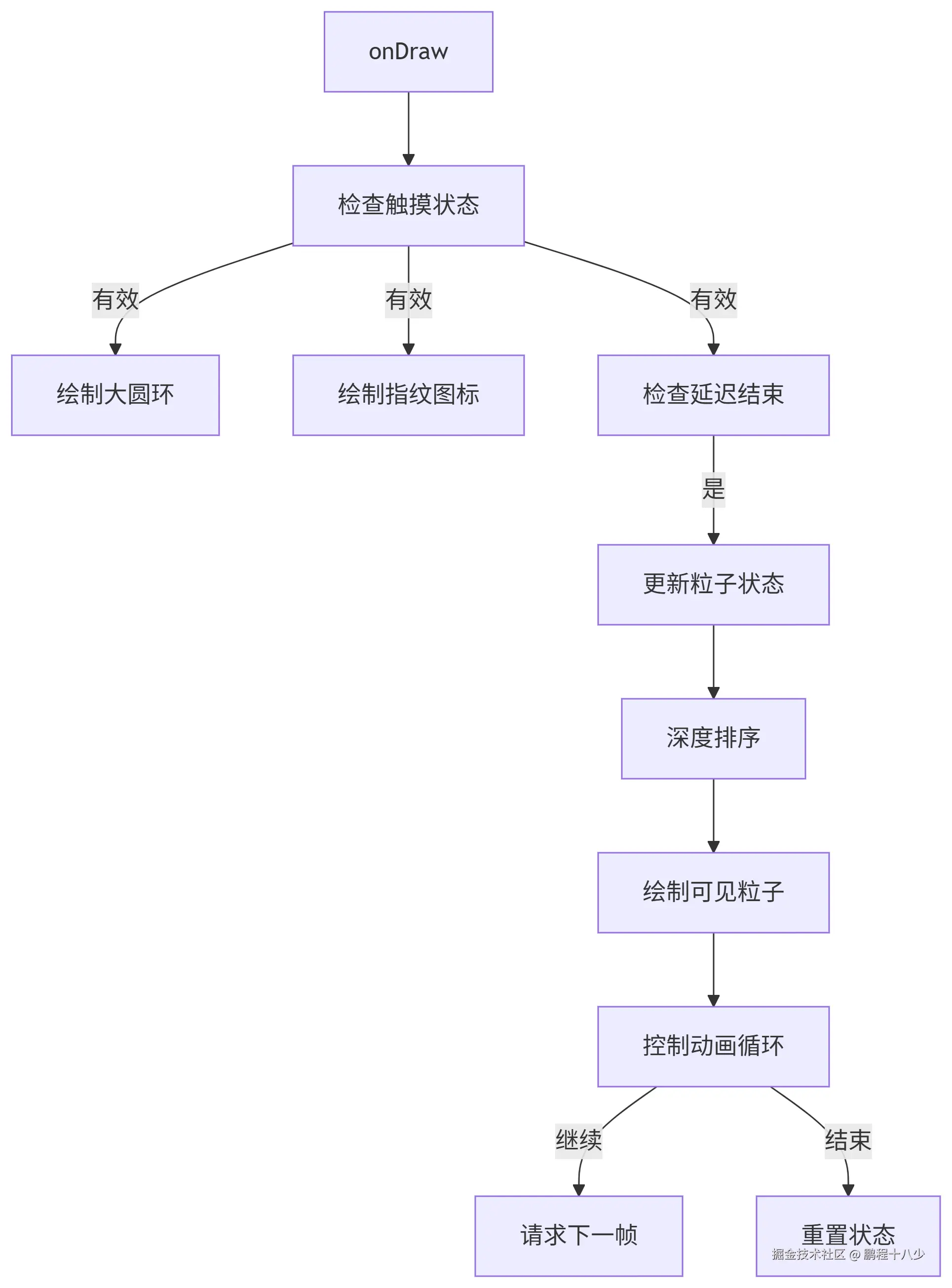
最近换了个新手机,看了下指纹解锁动画还是挺炫丽的! 网上找了下没有,于是自己写了个
做动画的核心: 就是录制视频,用剪映工具,放慢看效果,分成几个步骤进行实现!最后 一帧一帧
1.效果图

2.功能需求
- 指纹识别等待界面(如支付验证、手机解锁)。
手放上去,围绕手指产生一个圆,然后向上漂移,最后消失
3.实现思路
第一步:手指触摸,计算轨迹
csharp
/**
 * 处理触摸事件
 */
@Override
public boolean onTouchEvent(MotionEvent event) {
    Log.d(TAG, "onTouchEvent");
    switch (event.getAction()) {
        case MotionEvent.ACTION_DOWN:
            handleTouchDown(event.getX(), event.getY()); // 处理按下事件
            return true;
        case MotionEvent.ACTION_UP:
        case MotionEvent.ACTION_CANCEL:
            isTouching = false; // 结束触摸状态
            return true;
    }
    return super.onTouchEvent(event);
}
scss
private void handleTouchDown(float x, float y) {
    Log.d(TAG, "handleTouchDown start");  // 调试日志:开始处理触摸事件

    // ===== 1. 初始化触摸状态 =====
    touchPoint = new PointF(x, y);        // 记录当前触摸坐标(动画中心点)
    isTouching = true;                    // 设置触摸状态标志(激活后续绘制)
    touchStartTime = System.currentTimeMillis(); // 记录触摸开始时间(动画计时基准)
    smallCircles.clear();                 // 清空之前的小圆点(确保全新动画)

    // ===== 2. 生成24个粒子 =====
    // 计算角度增量(360°/24=15°→弧度值)
    float angleStep = (float) (2 * Math.PI / SMALL_CIRCLE_COUNT);

    for (int i = 0; i < SMALL_CIRCLE_COUNT; i++) {
        SmallCircle circle = new SmallCircle();  // 创建粒子对象
        float angle = angleStep * i;             // 当前粒子的角度(弧度制)

        // ===== 3. 计算粒子初始位置 =====
        // 使用三角函数计算圆环边缘坐标:
        // x + cos(θ)*半径 → 水平坐标
        // y + sin(θ)*半径 → 垂直坐标
        circle.startX = x + (float) Math.cos(angle) * BASE_CIRCLE_RADIUS;
        circle.startY = y + (float) Math.sin(angle) * BASE_CIRCLE_RADIUS;

        // 设置粒子当前位置(初始时与起始位置相同)
        circle.currentX = circle.startX;
        circle.currentY = circle.startY;

        // ===== 4. 设置随机参数 =====
        // 半径随机:6 + [0-4) → 6-10像素
        circle.baseRadius = 6 + random.nextFloat() * 4;
        circle.currentRadius = circle.baseRadius;  // 当前半径=初始半径

        // 透明度随机:220 + [0-35) → 220-255
        circle.baseAlpha = 220 + random.nextInt(35);
        circle.currentAlpha = circle.baseAlpha;    // 当前透明度=初始透明度

        // 水平漂移方向:(0-1随机 - 0.5)*2 → [-1,1]区间
        // 负值:向左漂移,正值:向右漂移
        circle.xDrift = (random.nextFloat() - 0.5f) * 2f;

        // 添加到粒子集合
        smallCircles.add(circle);
    }

    Log.d(TAG, "handleTouchDown end");  // 调试日志:结束处理
    invalidate();  // ===== 5. 触发首次绘制 =====
}
主要涉及到核心的计算: 圆圈的位置和漂移的轨迹路线
粒子分布算法(极坐标→直角坐标)
scss
circle.startX = x + cos(angle) * BASE_CIRCLE_RADIUS
circle.startY = y + sin(angle) * BASE_CIRCLE_RADIUS- 数学原理:将360°圆环等分为24份(每15°一个粒子)
- 视觉效果:粒子均匀分布在圆环边缘
- 动态基础:这些位置将作为动画的起始点
arduino
/**
 * 小圆点数据容器
 */
private static class SmallCircle {
    float startX, startY;     // 起始位置(圆环上的点)
    float currentX, currentY; // 实时位置
    float baseRadius;         // 初始半径
    float currentRadius;      // 实时半径
    int baseAlpha;            // 初始透明度
    int currentAlpha;         // 实时透明度
    float xDrift;             // 水平漂移系数(决定左右方向)
}
随机参数设计
| 参数 | 范围 | 作用 | 实现方式 |
|---|---|---|---|
| 半径 | 6-10像素 | 粒子大小差异 | 6 + random.nextFloat() * 4 |
| 透明度 | 220-255 | 粒子亮度差异 | 220 + random.nextInt(35) |
| 水平漂移 | -1, 1 | 粒子水平运动方向随机性 | (random.nextFloat()-0.5f)*2f |
第二步:绘制 手指触摸的一圈形成小圆圈
arduino
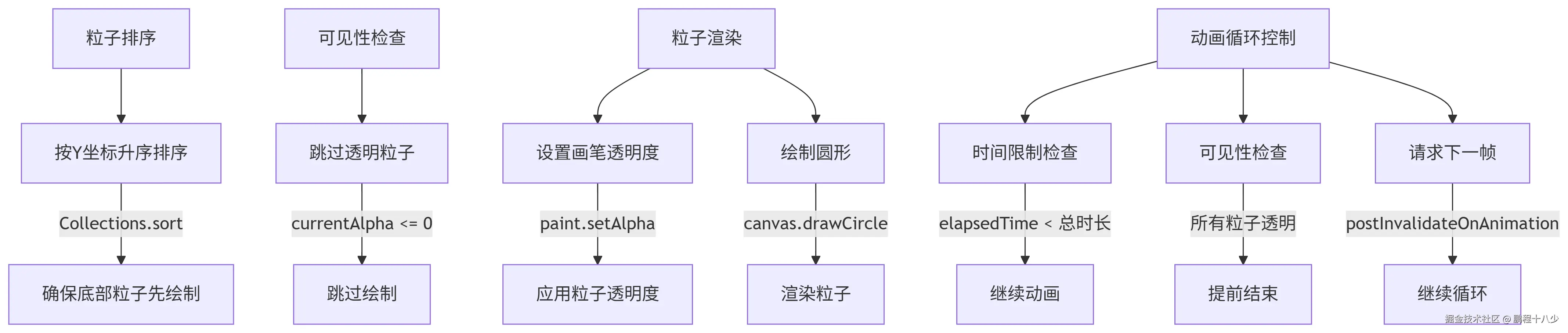
protected void onDraw(Canvas canvas) {
    super.onDraw(canvas);  // 调用父类的绘制方法

    // 仅在触摸状态下进行绘制(当用户触摸屏幕且触摸点坐标有效时)
    if (isTouching && touchPoint != null) {
        // 获取当前时间戳并计算从触摸开始经过的时间(毫秒)
        long currentTime = System.currentTimeMillis();
        long elapsedTime = currentTime - touchStartTime;

        // ===== 1. 绘制核心视觉元素 =====
        // 绘制大圆环(作为动画的基础框架)
        canvas.drawCircle(touchPoint.x, touchPoint.y, BASE_CIRCLE_RADIUS, baseCirclePaint);

        // 绘制指纹图标(居中放置在触摸点位置)
        canvas.drawBitmap(
                fingerprintIcon,
                touchPoint.x - FINGERPRINT_ICON_SIZE / 2f,  // X坐标:图标中心对齐触摸点
                touchPoint.y - FINGERPRINT_ICON_SIZE / 2f,  // Y坐标:图标中心对齐触摸点
                null  // 不使用额外的Paint参数
        );

        // ===== 2. 小圆点动画处理 =====
        // 检查是否已超过动画开始前的延迟时间(400ms)
        if (elapsedTime > DELAY_BEFORE_ANIMATION) {
            // 计算动画进度(0.0~1.0):
            // 减去延迟时间,确保动画从0开始
            // 除以总动画时长(2000ms)得到标准化进度
            float animationProgress = (elapsedTime - DELAY_BEFORE_ANIMATION) / (float) ANIMATION_DURATION;

            // 确保进度不超过1.0(防止动画超限)
            animationProgress = Math.min(animationProgress, 1.0f);

            // 遍历所有小圆点并更新它们的状态
            for (SmallCircle circle : smallCircles) {
                // 基于当前动画进度更新圆点位置、大小和透明度
                updateCirclePosition(circle, animationProgress);
            }
        }

        // ===== 3. 绘制小圆点 =====
        // 遍历所有小圆点进行绘制
        for (SmallCircle circle : smallCircles) {
            // 设置画笔的实时透明度(随动画变化)
            smallCirclePaint.setAlpha(circle.currentAlpha);

            // 绘制小圆点(使用更新后的位置和大小)
            canvas.drawCircle(
                    circle.currentX,        // 当前X坐标
                    circle.currentY,        // 当前Y坐标
                    circle.currentRadius,   // 当前半径
                    smallCirclePaint        // 配置好的画笔
            );
        }

        // ===== 4. 动画循环控制 =====
        // 计算动画总时长(延迟时间+动画时间)
        long totalAnimationTime = DELAY_BEFORE_ANIMATION + ANIMATION_DURATION;

        if (elapsedTime < totalAnimationTime) {
            // 动画未完成:请求下一帧刷新
            // 使用postInvalidateOnAnimation确保与显示刷新率同步
            postInvalidateOnAnimation();
        } else {
            // 动画已完成:重置触摸状态
            // 下次绘制将不再进入此逻辑块
            isTouching = false;
        }
    }
}
为什么会不停的调ondraw?
postInvalidateOnAnimation
动画进度计算(核心逻辑) 进度标准化:将时间转换为0.0-1.0范围
ini
// 计算动画进度(0.0~1.0)
float animationProgress = (elapsedTime - DELAY_BEFORE_ANIMATION) / (float) ANIMATION_DURATION;
Log.d("peng","animationProgress: "+animationProgress);
animationProgress = Math.min(animationProgress, 1.0f); // 限制最大值
粒子系统更新
scss
/**
 * 更新小圆点状态(基于动画进度)
 * @param circle 目标圆点对象
 * @param progress 线性进度(0.0~1.0)
 */
private void updateCirclePosition(SmallCircle circle, float progress) {
    // 应用缓动函数(先快后慢)
    float animatedProgress = easeOutQuad(progress);

    // 位置变化:垂直上浮 + 水平随机漂移
    circle.currentY = circle.startY - 300 * animatedProgress; // 上浮300像素
    circle.currentX = circle.startX + (circle.xDrift * animatedProgress * 100); // 水平漂移

    // 大小变化:半径增大50%
    circle.currentRadius = circle.baseRadius * (1 + animatedProgress * 0.5f);

    // 透明度变化:完全淡出
    circle.currentAlpha = (int) (circle.baseAlpha * (1 - animatedProgress));
}-
遍历所有24个小圆点
-
调用
updateCirclePosition基于当前进度更新每个粒子的:- 位置(X/Y坐标)
- 大小(半径)
- 透明度
第二部:移动 所有的小圆开始移动,移动的轨迹,2边的往2边移动,中间的往上移动,然后全部消失
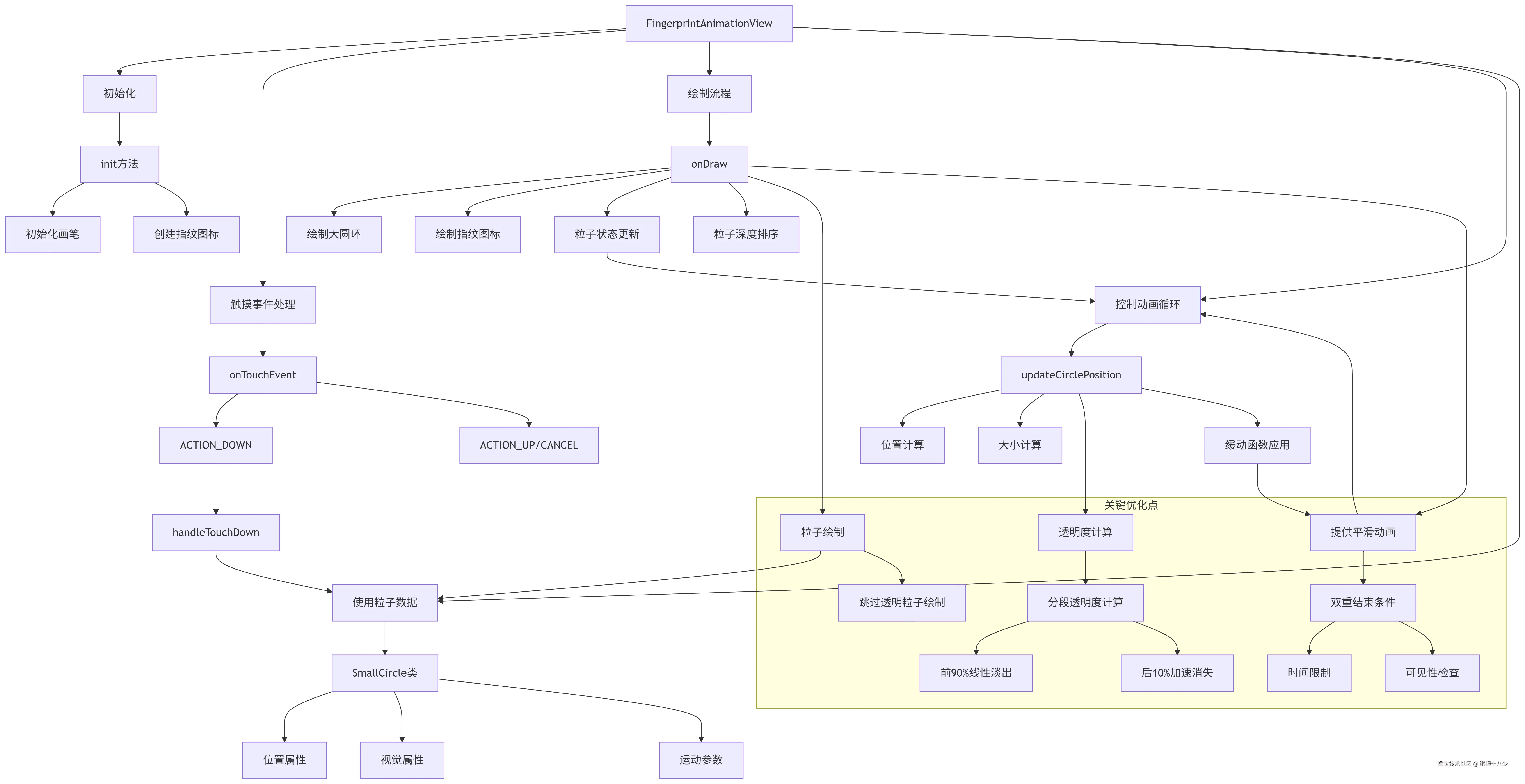
4.架构图
5.总结
5.1 计算静态时候的小圆坐标
5.2 动画时间换算成变化值,因为它是多个粒子运动变化(区别普通的属性动画)
5.3 粒子的漂移轨迹
先要看简单版本的轨迹
scss
protected void onDraw(Canvas canvas) {
    super.onDraw(canvas);

    long currentTime = System.currentTimeMillis();

    // Spawn new circles if finger is down
    if (touchPoint != null && currentTime - lastSpawnTime > CIRCLE_SPAWN_RATE) {
        spawnCircles();
        lastSpawnTime = currentTime;
    }

    // Draw and update circles
    Iterator<Circle> iterator = circles.iterator();
    while (iterator.hasNext()) {
        Circle circle = iterator.next();

        // Update position
        circle.y -= circle.speed;

        // Update alpha based on lifetime
        float progress = (currentTime - circle.birthTime) / (float)CIRCLE_LIFETIME;
        if (progress >= 1) {
            iterator.remove();
            continue;
        }

        // Draw the circle
        paint.setColor(Color.argb((int)(255 * (1 - progress)), 255, 0, 0));
        canvas.drawCircle(circle.x, circle.y, circle.radius, paint);
    }

    // Redraw if there are circles to animate
    if (!circles.isEmpty()) {
        postInvalidateOnAnimation();
    }
}
ini
private void spawnCircles() {
    if (touchPoint == null || circles.size() >= MAX_CIRCLES) {
        return;
    }

    int circleCount = random.nextInt(3) + 1; // 1-3 circles at a time

    for (int i = 0; i < circleCount; i++) {
        Circle circle = new Circle();
        circle.birthTime = System.currentTimeMillis();

        // Random position around touch point
        float angle = random.nextFloat() * 2 * (float)Math.PI;
        float distance = random.nextFloat() * 50;
        circle.x = touchPoint.x + (float)Math.cos(angle) * distance;
        circle.y = touchPoint.y + (float)Math.sin(angle) * distance;

        // Random properties
        circle.radius = random.nextFloat() * 10 + 5; // 5-15px
        circle.speed = random.nextFloat() * 3 + 1; // 1-4px/frame

        circles.add(circle);
    }
}
5.4 核心的计算
5.4.1. 位置计算算法:
ini
// 输入:动画进度progress
centerY = baseY - 80 * progress;  // 垂直上浮
dynamicRadius = baseRadius * (1 + 0.15 * progress);  // 轻微扩散
rotatedAngle = startAngle + rotationFactor * progress;  // 添加旋转
x = centerX + cos(rotatedAngle) * dynamicRadius;  // 最终X
y = centerY + sin(rotatedAngle) * dynamicRadius;  // 最终Y
5.4.2 . 透明度分段算法:
ini
if (progress < 0.9f) {
    alphaFactor = 1 - progress;  // 线性淡出
} else {
    float finalProgress = (progress - 0.9f) * 10f;  // 映射到0-1
    alphaFactor = 1 - progress - finalProgress * 0.5f;  // 加速消失
}
alphaFactor = max(0, alphaFactor);  // 边界保护
5.4.3 . 深度排序算法:
scss
Collections.sort(particles, (p1, p2) ->
     Float.compare(p1.currentY, p2.currentY));
5.4.4 . 动画循环控制:
scss
if (time < totalTime && hasVisibleParticles) {
    requestNextFrame();
} else {
    endAnimation();