效果:
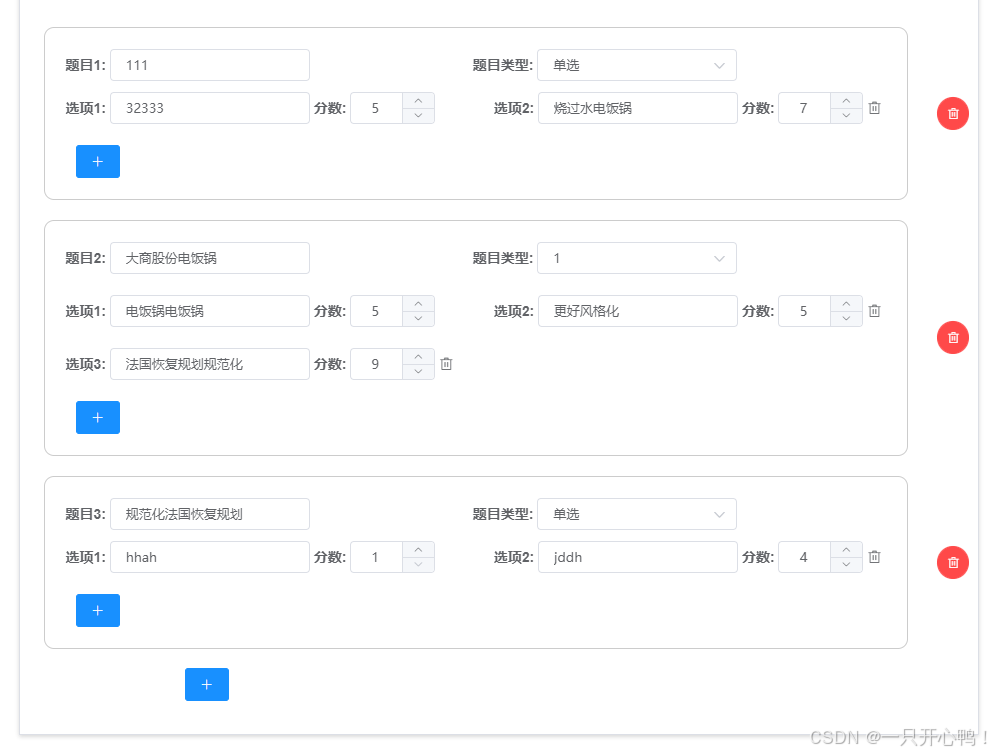
javascript
<template>
<div>
 <el-form :inline="true" :model="form" :rules="rules" ref="ruleForm">
<el-tabs type="border-card" v-model="cardType">
          <el-tab-pane name="1" label="问卷配置">
            <el-form-item label=" ">
              <div
                class="tiSty"
                v-for="(item, index) in diagnosticContent"
                :key="index"
              >
                <div
                  style="
  padding: 21px;
  border-radius: 10px;
  padding-right: 20px;
  border: 1px solid #ccc;
  width: 100%;
"
                >
                  <label>题目{{ index + 1 }}:</label>
                  <el-input
                    class="labelWith"
                    v-model="item.question"
                    placeholder="请输入标题"
                  ></el-input>
                  <label style="margin-left: 159PX">题目类型:</label>
                  <el-select
                    @change="changeSelect($event, index)"
                    class="labelWith"
                    clearable
                    v-model="item.type"
                    placeholder="题目类型:"
                  >
                    <el-option
                      v-for="(item, index) in infoTypeList"
                      :key="index"
                      :label="item.label"
                      :value="item.value"
                    ></el-option> </el-select
                  ><br />
                  <!-- 解答题 -->
                  <!-- 单选 -->
                  <div v-if="item.type === 0">
                    <div class="checkbox">
                      <div
                        v-for="(val, inde) in item.delinProblemsAnswer"
                        :key="inde"
                        style="margin-top: 10px"
                      >
                        <label style="">选项{{ inde + 1 }}:</label>
                        <el-input
                          class="labelWith"
                          v-model="val.answer"
                          autocomplete="off"
                          placeholder="请输入"
                        ></el-input>
                        <label style="">分数:</label>
                        <el-input-number
                          v-model="val.score"
                          @change="handleChange"
                          controls-position="right"
                          :min="1"
                          :max="10000"
                          style="width: 85px;"
                          @input="forceInteger(val, inde, index, $event)"
                          placeholder="分数"
                        ></el-input-number>
                        <div style="display:inline-block;width:20px">
                          <i
                            v-if="inde != 0"
                            class="el-icon-delete"
                            @click="delItem(1, index, inde)"
                          ></i>
                        </div>
                      </div>
                    </div>
                    <div style="margin-top: 10px">
                      <el-button
                        @click="radioaddInfo(item, index)"
                        style="margin-top: 10px; position: relative; left: 10px"
                        type="primary"
                        icon="el-icon-plus"
                      ></el-button>
                    </div>
                  </div>
                  <!-- 多选 -->
                  <div v-else-if="item.type === 1" style="margin-top: 10px">
                    <div class="checkbox">
                      <div
                        style="margin: 10px 0"
                        v-for="(val1, inde1) in item.delinProblemsAnswer"
                        :key="inde1"
                      >
                        <label style="">选项{{ inde1 + 1 }}:</label>
                        <el-input
                          class="labelWith"
                          v-model="val1.answer"
                          autocomplete="off"
                          placeholder="请输入"
                        ></el-input>
                        <label style="">分数:</label>
                        <el-input-number
                          v-model="val1.score"
                          @change="handleChange"
                          controls-position="right"
                          :min="0"
                          :max="10"
                          style="width: 85px;"
                          placeholder="分数"
                          @input="forceInteger(val1, inde1, index, $event)"
                        ></el-input-number>
                        <div style="display:inline-block;width:20px">
                          <!-- inde1!=0 -->
                          <i
                            v-if="inde1 != 0"
                            class="el-icon-delete"
                            @click="delItem(2, index, inde1)"
                          ></i>
                        </div>
                      </div>
                    </div>
                    <div>
                      <el-button
                        @click="addInfoAns(index)"
                        style="margin-top: 10px; position: relative; left: 10px"
                        type="primary"
                        icon="el-icon-plus"
                      ></el-button>
                    </div>
                  </div>
                </div>
                <!-- 删除 -->
                <div
                  style="
  display: flex;
  justify-content: center;
  align-items: center;
  width: 100px;
"
                >
                  <!-- index != 0  -->
                  <div>
                    <el-button
                      v-if="diagnosticContent.length > 1"
                      @click="delInfo(item, index)"
                      style=""
                      type="danger"
                      icon="el-icon-delete"
                      circle
                    ></el-button>
                  </div>
                </div>
              </div>
            </el-form-item>
            <!-- 添加 -->
            <el-form-item
              label=" "
              label-width="80px"
              style="margin-top: -29px"
            >
              <div style="width: 800px; padding-left: 70px">
                <el-button
                  @click="addInfo"
                  style=""
                  type="primary"
                  icon="el-icon-plus"
                ></el-button>
              </div>
            </el-form-item>
          </el-tab-pane>

        </el-tabs>
        </el-form>
</div>
</template>
<script>
export default {
  components: { uploadImg },
  data() {
    return {
     infoTypeList: [
        {
          label: "单选",
          value: 0
        }
        {
          label: "多选题",
          value: 1
        },
         {
           label: "简答",
           value: 2
         }
      ],
      diagnosticContent: [
        {
          question: "",
          type: "",
          delinProblemsAnswer: [
            {
              answer: "标题",
              score: 1 //分数
            }
          ]
        }
      ],}
    },
    methods:{
      //添加
    addInfoAns(index) {
      let obj = {
        answer: "",
        score: 1 //分数
      };
      this.diagnosticContent[index].delinProblemsAnswer.push(obj);
      // console.log("总的1111", this.form);
    },
       //删除题目
    delInfo(val, inde) {
      this.diagnosticContent.splice(inde, 1);
    },
      //单选新增
    radioaddInfo(item, index) {
      let obj = {
        answer: "",
        score: 1 //分数
      };
      this.diagnosticContent[index].delinProblemsAnswer.push(obj);
    },
       //删除项目
    delItem(type, index, inde) {
      this.diagnosticContent[index].delinProblemsAnswer.splice(inde, 1);
    },
     //分数验证  只能输入正整数
    // 强制整数转换
    forceInteger(item, inde1, index, e) {
      if (e === null || e === "") return;
      // 立即更新模型值(注意这里要用$nextTick确保DOM更新)
      this.$nextTick(() => {
        this.diagnosticContent[index].delinProblemsAnswer[
          inde1
        ].score = Math.max(1, Math.min(10, Math.abs(Math.round(e))));
      });
    },
     handleChange(value) {
      console.log(value);
    },
      //题目类型更换
    changeSelect(e, index) {
      console.log(e);
      this.diagnosticContent[index].delinProblemsAnswer = [
        {
          answer: "",
          score: 1 //分数, programmeList: []
        }
      ];
    },
    }
    }
    </script>
    <style lang="scss" scoped="scoped">
.labelWith {
  width: 200px;
}
.tiSty {
  margin: 10px 9px;
  position: relative;
  bottom: 10px;
  padding-bottom: 10px;
  width: 955px;
  display: flex;
  justify-content: space-between;
}
.checkbox {
  display: flex;
  justify-content: space-between;
  align-content: center;
  flex-wrap: wrap;
  // border: 1px solid;
}
.checkbox_item {
  position: relative;
  right: 10px;
}
.titleSty {
  font-weight: bold;
  width: 88%;
  text-align: center;
}
.titleSty1 {
  width: 960px;
  font-weight: bold;
  text-align: center;
}
.resultSty {
  width: 97%;
  display: flex;
  justify-content: space-around;
  align-items: center;
  // border: 1px solid red;
  // display: flex;
  // justify-content: space-around;
  // align-items: center;
}
.resultSty_item {
  border-radius: 10px;
  display: flex;
  flex-wrap: wrap; /* 允许换行 */
  justify-content: flex-start;
  align-items: center;
  display: flex;
  border: 1px solid #ccc;
  box-sizing: border-box;
  margin-top: 14px;
  padding-left: 20px;
  padding-bottom: 10px;
  // gap: 10px; /* 现代浏览器间隙 */
}
.resultSty_item_title {
  font-weight: bold;
  text-align: center;
  box-sizing: border-box;
  padding: 5px 0;
  color: red;
}
.resultSty_item_content {
  line-height: 50px;
  // text-align: center;
}
.items {
  flex: 0 0 calc(50% - 10px); /* 关键:固定宽度且不允许伸缩 */
  margin: 5px; /* 项间距 */
  box-sizing: border-box; /* 防止边框影响计算 */
  text-align: left;
}
</style>