LogicFlow流程编排组件封装分享
1. 引言
在现代的低代码平台、工作流引擎、业务流程管理系统中,流程编排功能是核心组件之一。本文将分享开发流程编排功能时的技术选型、架构设计和关键实现细节。
2. 技术选型
在项目中,我们选择了 LogicFlow 作为流程图底层引擎,它是由滴滴开源的流程图编辑框架,具有以下优势:
- 轻量且性能优秀
- 插件化架构,易于扩展
- 支持多种图形元素和自定义节点
- 完善的文档和社区支持
从 package.json 中可以看到我们使用了以下相关依赖:
perl
json
"@logicflow/core": "^2.0.16",
"@logicflow/extension": "^2.0.21"
3. 项目架构设计
通过查看 src/pages/pc/les/logicflow 目录结构,我们的流程编排模块采用了清晰的组件化设计:
bash
logicflow/
├── components/           # UI 组件
│   ├── attributePanel.vue   # 属性面板
│   ├── componentsSet.vue    # 组件面板
│   ├── edgeSet.vue          # 边设置面板
│   ├── globalSet.vue        # 全局设置面板
│   └── testDialog.vue       # 测试对话框
├── constants/            # 常量定义
│   └── index.ts
├── extension/            # LogicFlow 扩展
│   └── index.ts
├── nodes/                # 自定义节点
│   ├── CommonNode.ts        # 通用节点
│   ├── IfNode.ts            # 条件节点
│   ├── SwitchNode.ts        # 开关节点
│   └── index.ts             # 节点注册
├── utils/                # 工具函数
│   └── index.ts
└── index.vue             # 主入口文件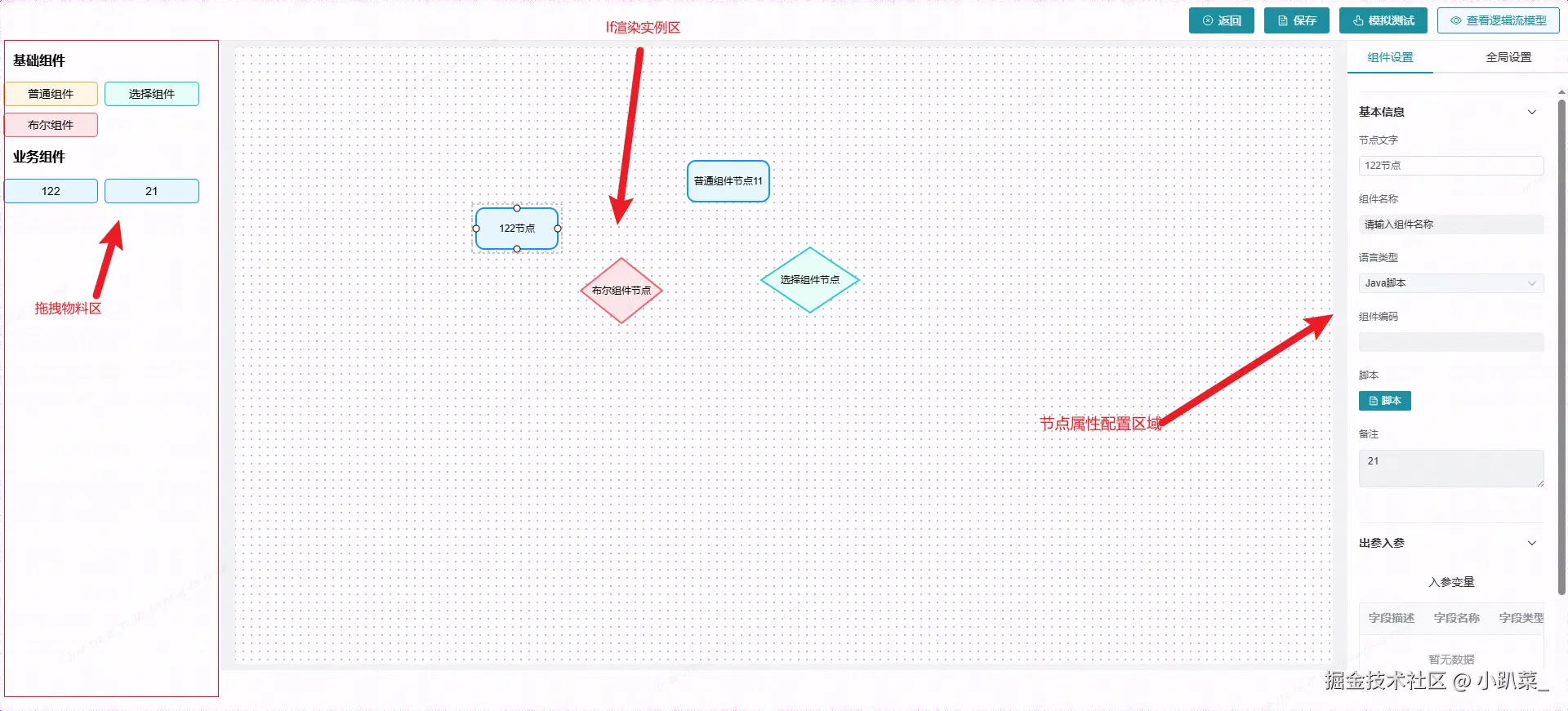
4. 核心功能实现
4.1 自定义节点设计
在 nodes/ 目录中,我们实现了多种自定义节点类型:
- CommonNode.ts:通用节点
- IfNode.ts:条件判断节点
- SwitchNode.ts:开关节点
这些节点的注册通过 nodes/index.ts 文件完成。
4.2 组件面板实现
在 components/componentsSet.vue 中,我们实现了左侧的组件选择面板,用户可以通过拖拽方式将节点添加到画布中。
4.3 属性面板设计
通过 components/attributePanel.vue 实现右侧属性面板,用户可以对选中的节点或连线进行详细配置。
4.4 扩展功能
在 extension/index.ts 中,我们可能引入了 LogicFlow 的一些扩展功能,比如:
- 数据格式转换
- 小地图等
代码和文件太多,只展示flow 实例化部分的代码,有需要的评论MMMM
TS
<script setup lang="ts">
import { ref, onMounted, onUnmounted, reactive, useTemplateRef, computed, nextTick } from "vue";
import { useRouter, useRoute } from "vue-router";
import { ElMessage, ElMessageBox } from "element-plus";
import { Document, View, CircleClose, Pointer } from "@element-plus/icons-vue";
import AttributePanel from "./components/attributePanel.vue";
import TestDialog from "./components/testDialog.vue";

import LogicFlow from "@logicflow/core";
import "@logicflow/core/lib/style/index.css";
import { Menu, MiniMap } from "@logicflow/extension";
import "@logicflow/extension/lib/style/index.css";
// logicflow 拓展属性
import { pluginsOptions } from "./extension";
import registerNode from "./nodes";

import usePost from "@/hooks/usePost";
import { defaultProperties, ComponentType, Properties, ClickType, PanelType } from "./constants";
import { hasEmptyValues } from "./utils";

const router = useRouter();
const route = useRoute();

const id = computed(() => route.query.id);
// 加载插件
LogicFlow.use(Menu);
LogicFlow.use(MiniMap);

const { runAsync: fetchLists } = usePost("GET", "/api/list");
// 获取EL表达式
const { runAsync: fetchElStr, loading: btnLoading } = usePost("POST", "/v1/api/getElStr");
// 保存
const { runAsync: fetchSaveChain, loading } = usePost("POST", "/v1/api/saveChain");
// 获取流程详情
const { runAsync: fetchFlowChain, loading: pageLoading } = usePost("POST", "/v1/api/getFlowChain");
// 全局配置数据
const { runAsync: fetchDtail } = usePost("POST", "/v1/detail");

// 容器
const container = ref<HTMLElement | null>(null);
// 逻辑画布实例
let lf: LogicFlow;

const globalFormData = ref<any>({});
const flowData = ref<any>({});
// 属性面板数据传参
const attributeProps = reactive<Partial<Properties>>({});
// 线段数据传参
const edgeProps = reactive<any>({});
// 属性面板ref
const attributePanelRef = useTemplateRef("attributePanelRef");
// 点击类型
const clickType = ref<ClickType>("node");

const testDialog = ref(false);
// 基础组件
const Basic = [
	{ name: "普通组件", type: "COMMON", properties: { ...defaultProperties, componentType: "common" } },
	{ name: "选择组件", type: "SWITCH", properties: { ...defaultProperties, componentType: "switch" } },
	{ name: "布尔组件", type: "IF", properties: { ...defaultProperties, componentType: "boolean" } }
];

const dragForm = reactive({
	Basic: {
		title: "基础组件",
		type: "Basic",
		list: Basic
	},
	Business: {
		title: "业务组件",
		type: "Business",
		list: []
	}
});

onMounted(() => {
	nextTick(async () => {
		if (container.value) {
			// 初始化实例
			lf = new LogicFlow({
				container: container.value,
				grid: true,
				plugins: [MiniMap],
				pluginsOptions
				// 其他配置
			});
			try {
				await getFlowChain();
			} catch (error) {
				console.log(error);
			}
			registerNode(lf);
			lf.render(flowData.value);
			// 定义导出数据转换函数
			lf.adapterOut = data => {
				const { nodes, edges } = data;
				return {
					nodes: nodes.map(node => {
						const { properties, text } = node;
						return {
							...properties,
							...text
						};
					}),
					edges: edges.map(edge => {
						const { properties, sourceNodeId, targetNodeId } = edge;
						return {
							properties,
							sourceNodeId,
							targetNodeId
						};
					})
				};
			};
			//节点点击事件
			lf.on("node:click", ({ data }: any) => {
				const clickNodeData = { ...defaultProperties };
				Object.keys(clickNodeData).forEach(key => {
					clickNodeData[key] = data.properties[key];
				});
				clickNodeData.id = data.id;
				clickNodeData.type = data.type;
				clickNodeData.text = data.text.value;

				Object.assign(attributeProps, clickNodeData);

				changeTabs("componentsSet", "node");
			});
			lf.on("blank:click", e => {
				changeTabs("globalSet");
			});

			//线点击事件
			lf.on("edge:click", ({ data }) => {
				Object.assign(edgeProps, data);
				if (!edgeProps.text) {
					edgeProps.text = { value: "" };
				}
				changeTabs("componentsSet", "edge");
			});
		}
	});
});
const changeTabs = (val: PanelType, type?: ClickType) => {
	if (attributePanelRef.value) {
		attributePanelRef.value.activeName = val;
	}
	if (type) {
		clickType.value = type;
	}
};
//  拖拽动作
const startDrag = item => {
	lf.dnd.startDrag({
		type: item.type,
		text: `${item.name}节点`,
		properties: {
			...item.properties
		}
	});
};

const previewEl = async () => {
	const flowData = lf.getGraphRawData();

	if (!flowData.nodes.length) {
		ElMessage.warning("请添加节点");
		return;
	}
	const { ok, data } = await fetchElStr({ chainFlow: JSON.stringify(flowData) });

	if (ok) {
		ElMessage.success(data);
	}
};
const onBack = () => {
	router.go(-1);
};
const onTest = () => {
	const currentData = JSON.stringify(lf.getGraphRawData());
	const initData = JSON.stringify(flowData.value);
	if (currentData !== initData) {
		ElMessageBox.confirm("逻辑流模型改变了,是否保存并测试?", "提示", {
			confirmButtonText: "确认",
			cancelButtonText: "取消",
			type: "warning"
		})
			.then(async () => {
				await onSave(false);
				testDialog.value = true;
			})
			.catch(() => {
				console.error("取消");
			});
	} else {
		testDialog.value = true;
	}
};
const onSave = async (isBack: boolean = true) => {
	// 原始数据格式
	const data = lf.getGraphRawData();
	// 校验的数据格式
	const verifyData: any = lf.getGraphData();
	const flag = hasEmptyValues(verifyData.nodes);
	if (!flag) return;

	const { ok } = await fetchSaveChain({ chainFlow: JSON.stringify(data), id: id.value });
	if (ok) {
		ElMessage.success("保存成功!");
		isBack && onBack();
	}
};
//  节点注册,获取业务组件
const initComponets = async () => {
	const { ok, data } = await fetchLists();
	if (ok) {
		const BusinessLists = data.map((item: Properties) => {
			const properties = { ...defaultProperties };
			Object.keys(properties).forEach(key => {
				properties[key] = item[key];
			});
			properties.isDisable = true;
			return {
				name: item.cmpNm || "组件名称",
				type: ComponentType[item.cmpType] || "COMMON",
				properties: properties
			};
		});
		dragForm.Business.list = BusinessLists;
	}
};

// 获取流程数据
const getFlowChain = async () => {
	const { ok, data } = await fetchFlowChain({ id: id.value });
	if (ok) {
		try {
			flowData.value = JSON.parse(data.chainFlow || "{}");
		} catch (error) {
			console.error(error);
		}
	}
};
const getDtail = async () => {
	const { data, ok } = await fetchDtail({
		id: id.value,
	});
	if (ok) {
		globalFormData.value = data || {};
	}
};
// 获取全局组件数据
getDtail();
initComponets();
onUnmounted(() => {
	// 销毁lf
	lf.destroy();
});
</script>

<template>
	<div class="flowHome" v-loading="pageLoading || loading">
		<div class="control">
			<el-button type="primary" :icon="CircleClose" @click="onBack">返回</el-button>
			<el-button type="primary" :icon="Document" @click="onSave">保存</el-button>
			<el-button type="primary" :icon="Pointer" @click="onTest">模拟测试</el-button>
			<el-button :icon="View" @click="previewEl" :loading="btnLoading">查看逻辑流模型</el-button>
		</div>
		<div class="flowContainer">
			<!-- 拖拽面板 -->
			<div class="dragPanel">
				<div v-for="comp in dragForm" :key="comp.title">
					<div class="title">{{ comp.title }}</div>
					<div class="palette-node">
						<div
							v-for="item in comp.list"
							class="node-item"
							:title="item.name"
							:class="{
								'base-node': comp.type === 'Basic',
								'business-node': comp.type === 'Business',
								[item.properties.componentType + '-node']: true
							}"
							@mousedown="startDrag(item)"
						>
							{{ item.name }}
						</div>
					</div>
				</div>
			</div>
			<!-- 画布 -->
			<div id="container" ref="container" class="container w-80vw h-80vh"></div>
			<!-- 属性面板 -->
			<AttributePanel
				:attributeProps="attributeProps"
				:lf="lf"
				:clickType="clickType"
				:edgeProps="edgeProps"
				:globalFormData="globalFormData"
				ref="attributePanelRef"
			/>
		</div>
		<TestDialog v-model="testDialog" :lf="lf" :globalFormData="globalFormData" v-if="testDialog" />
	</div>
</template>