Android四大组件之Service
1. Service概念
Service服务是一个后台运行的组件,执行长时间运行且不需要用户交互的任务。即使应用被销毁也依然可以工作。服务可以在后台执行任务,如播放音乐、下载文件、处理网络请求等。服务可以在应用组件之间进行通信,如发送广播、使用AIDL进行进程间通信等。服务可以分为两种类型:Started和Bound。
| 状态 | 说明描述 |
|---|---|
| Started | Android的应用程序组件,如活动,通过startService()启动了服务,则服务是Started状态。一旦启动,服务可以在后台无限期运行,即使启动它的组件已经被销毁。 |
| Bound | 当Android的应用程序组件通过bindService()绑定了服务,则服务是Bound状态。Bound状态的服务提供了一个客户服务器接口来允许组件与服务进行交互,如发送请求,获取结果,甚至通过IPC来进行跨进程通信。 |
Service的特点
- 运行在主线程中,不会自动创建新线程
- 没有用户界面
- 优先级高于后台Activity
- 可以被其他组件启动和绑定
- 适合执行长时间的后台任务
2. 创建与启动Service
2.1 创建Service
创建一个Service需要继承Service类并重写关键方法,示例代码如下:
java
public class MyService extends Service {
    private static final String TAG = "MyService";

    @Override
    public void onCreate() {
        super.onCreate();
        Log.d(TAG, "Service onCreate");
    }

    @Override
    public int onStartCommand(Intent intent, int flags, int startId) {
        Log.d(TAG, "Service onStartCommand");
        // 执行后台任务
        return START_STICKY; // 服务被杀死后会重新创建
    }

    @Override
    public IBinder onBind(Intent intent) {
        Log.d(TAG, "Service onBind");
        return null; // 不支持绑定则返回null
    }

    @Override
    public void onDestroy() {
        super.onDestroy();
        Log.d(TAG, "Service onDestroy");
    }
}
2.2 在AndroidManifest.xml中注册
xml
<service
    android:name=".MyService"
    android:enabled="true"
    android:exported="false" />
2.3 启动Service的方式
启动Service有两种方式:startService()和bindService()。
方式一:startService()
java
// 启动服务
Intent serviceIntent = new Intent(this, MyService.class);
startService(serviceIntent);

// 停止服务
stopService(serviceIntent);
// 或在Service内部调用
stopSelf();
方式二:bindService()
java
private ServiceConnection serviceConnection = new ServiceConnection() {
    @Override
    public void onServiceConnected(ComponentName name, IBinder service) {
        Log.d(TAG, "Service connected");
    }

    @Override
    public void onServiceDisconnected(ComponentName name) {
        Log.d(TAG, "Service disconnected");
    }
};

// 绑定服务
Intent bindIntent = new Intent(this, MyService.class);
bindService(bindIntent, serviceConnection, BIND_AUTO_CREATE);

// 解绑服务
unbindService(serviceConnection);
3. Service中的线程处理
3.1 Service运行在主线程
Service默认运行在主线程中,执行耗时操作会阻塞UI,需要手动创建子线程:
java
public class MyService extends Service {
    private Thread workThread;
    private boolean isRunning = false;

    @Override
    public int onStartCommand(Intent intent, int flags, int startId) {
        isRunning = true;
        workThread = new Thread(new Runnable() {
            @Override
            public void run() {
                while (isRunning) {
                    try {
                        // 执行耗时任务
                        Thread.sleep(1000);
                        Log.d(TAG, "Background task running...");
                    } catch (InterruptedException e) {
                        e.printStackTrace();
                    }
                }
            }
        });
        workThread.start();
        return START_STICKY;
    }

    @Override
    public void onDestroy() {
        super.onDestroy();
        isRunning = false;
        if (workThread != null) {
            workThread.interrupt();
        }
    }
}
3.2 使用IntentService
IntentService自动在子线程中处理任务:
java
public class MyIntentService extends IntentService {
    public MyIntentService() {
        super("MyIntentService");
    }

    @Override
    protected void onHandleIntent(Intent intent) {
        // 在子线程中执行
        String action = intent.getStringExtra("action");
        if ("download".equals(action)) {
            performDownload();
        }
    }

    private void performDownload() {
        // 执行下载任务
        for (int i = 0; i < 10; i++) {
            try {
                Thread.sleep(1000);
                Log.d(TAG, "Download progress: " + (i + 1) * 10 + "%");
            } catch (InterruptedException e) {
                e.printStackTrace();
            }
        }
    }
}
4. Service与Activity间的通信
4.1 通过Binder实现通信
java
public class LocalService extends Service {
    private final IBinder binder = new LocalBinder();
    private int count = 0;

    public class LocalBinder extends Binder {
        LocalService getService() {
            return LocalService.this;
        }
    }

    @Override
    public IBinder onBind(Intent intent) {
        return binder;
    }

    public int getCount() {
        return count;
    }

    public void incrementCount() {
        count++;
    }
}
Activity中使用:
java
public class MainActivity extends AppCompatActivity {
    private LocalService localService;
    private boolean isBound = false;

    private ServiceConnection serviceConnection = new ServiceConnection() {
        @Override
        public void onServiceConnected(ComponentName name, IBinder service) {
            LocalService.LocalBinder binder = (LocalService.LocalBinder) service;
            localService = binder.getService();
            isBound = true;
        }

        @Override
        public void onServiceDisconnected(ComponentName name) {
            isBound = false;
        }
    };

    @Override
    protected void onStart() {
        super.onStart();
        Intent intent = new Intent(this, LocalService.class);
        bindService(intent, serviceConnection, Context.BIND_AUTO_CREATE);
    }

    @Override
    protected void onStop() {
        super.onStop();
        if (isBound) {
            unbindService(serviceConnection);
            isBound = false;
        }
    }

    public void onButtonClick(View view) {
        if (isBound) {
            localService.incrementCount();
            int count = localService.getCount();
            Log.d(TAG, "Current count: " + count);
        }
    }
}
4.2 通过广播实现通信
java
// Service中发送广播
public class BroadcastService extends Service {
    private static final String ACTION_UPDATE = "com.example.UPDATE";

    private void sendUpdateBroadcast(String data) {
        Intent intent = new Intent(ACTION_UPDATE);
        intent.putExtra("data", data);
        sendBroadcast(intent);
    }
}

// Activity中接收广播
public class MainActivity extends AppCompatActivity {
    private BroadcastReceiver updateReceiver = new BroadcastReceiver() {
        @Override
        public void onReceive(Context context, Intent intent) {
            String data = intent.getStringExtra("data");
            // 更新UI
            updateUI(data);
        }
    };

    @Override
    protected void onResume() {
        super.onResume();
        IntentFilter filter = new IntentFilter("com.example.UPDATE");
        registerReceiver(updateReceiver, filter);
    }

    @Override
    protected void onPause() {
        super.onPause();
        unregisterReceiver(updateReceiver);
    }
}
5. Service的高级应用
5.1 前台Service
前台Service具有更高的优先级,不容易被系统杀死:
java
public class ForegroundService extends Service {
    private static final int NOTIFICATION_ID = 1;
    private static final String CHANNEL_ID = "ForegroundServiceChannel";

    @Override
    public void onCreate() {
        super.onCreate();
        createNotificationChannel();
    }

    @Override
    public int onStartCommand(Intent intent, int flags, int startId) {
        createNotification();
        // 执行后台任务
        return START_STICKY;
    }

    private void createNotificationChannel() {
        if (Build.VERSION.SDK_INT >= Build.VERSION_CODES.O) {
            NotificationChannel channel = new NotificationChannel(
                CHANNEL_ID,
                "Foreground Service Channel",
                NotificationManager.IMPORTANCE_LOW
            );
            NotificationManager manager = getSystemService(NotificationManager.class);
            manager.createNotificationChannel(channel);
        }
    }

    private void createNotification() {
        Notification notification = new NotificationCompat.Builder(this, CHANNEL_ID)
            .setContentTitle("前台服务运行中")
            .setContentText("正在执行后台任务...")
            .setSmallIcon(R.drawable.ic_service)
            .build();

        startForeground(NOTIFICATION_ID, notification);
    }

    @Override
    public IBinder onBind(Intent intent) {
        return null;
    }
}
5.2 跨进程Service (AIDL)
定义AIDL接口:
aidl
// IRemoteService.aidl
interface IRemoteService {
    int add(int a, int b);
    String getMessage();
}
实现远程Service:
java
public class RemoteService extends Service {
    private final IRemoteService.Stub binder = new IRemoteService.Stub() {
        @Override
        public int add(int a, int b) throws RemoteException {
            return a + b;
        }

        @Override
        public String getMessage() throws RemoteException {
            return "Hello from remote service";
        }
    };

    @Override
    public IBinder onBind(Intent intent) {
        return binder;
    }
}
客户端调用:
java
public class ClientActivity extends AppCompatActivity {
    private IRemoteService remoteService;

    private ServiceConnection serviceConnection = new ServiceConnection() {
        @Override
        public void onServiceConnected(ComponentName name, IBinder service) {
            remoteService = IRemoteService.Stub.asInterface(service);
        }

        @Override
        public void onServiceDisconnected(ComponentName name) {
            remoteService = null;
        }
    };

    private void callRemoteService() {
        if (remoteService != null) {
            try {
                int result = remoteService.add(5, 3);
                String message = remoteService.getMessage();
                Log.d(TAG, "Result: " + result + ", Message: " + message);
            } catch (RemoteException e) {
                e.printStackTrace();
            }
        }
    }
}
6. Service生命周期管理
Service作为Android四大组件之一,具有一系列生命周期回调函数,用于监测状态变化并执行相应工作。 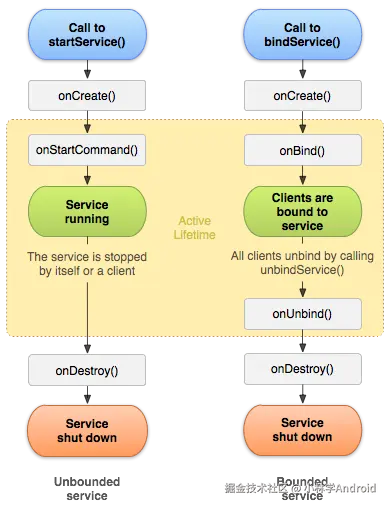
6.1生命周期方法说明
| 方法名 | 调用时机 |
|---|---|
| onCreate() | 首次创建服务时调用。如果服务已在运行,不会调用此方法。 |
| onStartCommand() | 通过startService()启动服务时调用。 |
| onDestroy() | 服务销毁时调用。 |
| onBind() | 通过bindService()绑定服务时调用。 |
| onUnbind() | 通过unbindService()解绑服务时调用。 |
| onRebind() | onUnbind()返回true后,重新绑定时调用。 |
生命周期调用流程
| 调用方式 | 生命周期方法调用顺序 |
|---|---|
| 启动Service | startService() → onCreate() → onStartCommand() |
| 停止Service | stopService() → onDestroy() |
| 绑定Service | bindService() → onCreate() → onBind() |
| 解绑Service | unbindService() → onUnbind() → onDestroy() |
| 重新绑定Service | bindService() → onRebind() |
示例代码
java
public class LifecycleService extends Service {
    @Override
    public void onCreate() {
        super.onCreate();
        Log.d(TAG, "Service Created");
    }

    @Override
    public int onStartCommand(Intent intent, int flags, int startId) {
        Log.d(TAG, "Service Started");
        return START_STICKY;
    }

    @Override
    public IBinder onBind(Intent intent) {
        Log.d(TAG, "Service Bound");
        return null;
    }

    @Override
    public boolean onUnbind(Intent intent) {
        Log.d(TAG, "Service Unbound");
        return true; // 允许onRebind
    }

    @Override
    public void onRebind(Intent intent) {
        Log.d(TAG, "Service Rebound");
    }

    @Override
    public void onDestroy() {
        super.onDestroy();
        Log.d(TAG, "Service Destroyed");
    }
}
6.2 Service最佳实践
性能优化
- 避免在Service中执行耗时操作,使用子线程
- 及时停止不需要的Service
- 使用IntentService处理一次性任务
- 合理使用前台Service
内存管理
- 避免内存泄漏,及时释放资源
- 在onDestroy()中清理线程和监听器
- 使用弱引用避免循环引用
权限配置
xml
<!-- 前台服务权限 -->
<uses-permission android:name="android.permission.FOREGROUND_SERVICE" />

<!-- 网络权限 -->
<uses-permission android:name="android.permission.INTERNET" />

<!-- 唤醒锁权限 -->
<uses-permission android:name="android.permission.WAKE_LOCK" />
6.3总结
- 被启动服务的生命周期: 通过startService()启动,onCreate()调用一次,onStartCommand()可多次调用,服务后台运行直到stopService()或stopSelf()。
- 被绑定服务的生命周期: 通过bindService()启动,onStartCommand()不调用,服务运行直到unbindService()或Context销毁。
- 混合模式: 先启动后绑定,需分别调用stopService()和unbindService()来停止。
- 在onDestroy()中清理资源,如停止线程。
- 服务的优先级: 前台服务优先级高,系统内存不足时不会被kill。
- 服务的权限: 配置合适的权限,避免安全问题。
实操Demo
以下是一个简单的音乐播放器示例,使用Service在后台播放音乐。Activity提供播放/暂停按钮,即使应用退到后台,音乐继续播放。
1. MusicService (后台音乐服务)
java
// MusicService.java
public class MusicService extends Service {
    private static final String TAG = "MusicService";  // 日志标签
    private MediaPlayer mediaPlayer;  // 媒体播放器
    private static final int NOTIFICATION_ID = 1;  // 通知ID
    private static final String CHANNEL_ID = "MusicChannel";  // 通知通道ID

    @Override
    public void onCreate() {
        super.onCreate();
        Log.d(TAG, "MusicService created");  // 服务创建
        mediaPlayer = MediaPlayer.create(this, R.raw.music);  // 初始化MediaPlayer,假设raw/music是音频文件
        createNotificationChannel();  // 创建通知通道(Android 8.0+)
    }

    @Override
    public int onStartCommand(Intent intent, int flags, int startId) {
        String action = intent.getStringExtra("action");  // 获取动作
        if ("play".equals(action)) {
            if (!mediaPlayer.isPlaying()) {
                mediaPlayer.start();  // 开始播放
                Log.d(TAG, "Music started");
            }
            startForeground(NOTIFICATION_ID, createNotification());  // 启动前台服务
        } else if ("pause".equals(action)) {
            if (mediaPlayer.isPlaying()) {
                mediaPlayer.pause();  // 暂停播放
                Log.d(TAG, "Music paused");
                stopForeground(true);  // 停止前台服务
            }
        } else if ("reset".equals(action)) {
            mediaPlayer.seekTo(0);  // 重置播放进度
            Log.d(TAG, "Music reset");
        }
        return START_STICKY;  // 服务被杀后自动重启
    }

    @Override
    public void onDestroy() {
        super.onDestroy();
        if (mediaPlayer != null) {
            mediaPlayer.release();  // 释放资源
            mediaPlayer = null;
        }
        Log.d(TAG, "MusicService destroyed");
    }

    @Override
    public IBinder onBind(Intent intent) {
        return null;  // 不支持绑定
    }

    private void createNotificationChannel() {
        if (Build.VERSION.SDK_INT >= Build.VERSION_CODES.O) {
            NotificationChannel channel = new NotificationChannel(
                    CHANNEL_ID,
                    "Music Service Channel",
                    NotificationManager.IMPORTANCE_LOW
            );
            NotificationManager manager = getSystemService(NotificationManager.class);
            manager.createNotificationChannel(channel);
        }
    }

    private Notification createNotification() {
        return new NotificationCompat.Builder(this, CHANNEL_ID)
                .setContentTitle("音乐播放中")
                .setContentText("正在播放背景音乐")
                .setSmallIcon(R.drawable.ic_music)  // 假设有图标
                .build();
    }
}
2. MainActivity (用户界面)
java
// MainActivity.java
public class MainActivity extends AppCompatActivity {
    private Button playButton;
    private Button pauseButton;
    private Button resetButton;
    private TextView progressText;
    private boolean isPlaying = false;  // 播放状态

    @Override
    protected void onCreate(Bundle savedInstanceState) {
        super.onCreate(savedInstanceState);
        setContentView(R.layout.day2_demo_activity_main);  // 假设布局文件

        playButton = findViewById(R.id.playButton);  // 播放按钮
        pauseButton = findViewById(R.id.pauseButton);  // 暂停按钮
        resetButton = findViewById(R.id.resetButton);  // 重置按钮
        progressText = findViewById(R.id.progressText);  // 显示播放进度

        playButton.setOnClickListener(new View.OnClickListener() {
            @Override
            public void onClick(View v) {
                startMusicService("play");  // 启动播放
                isPlaying = true;
                updateButtonStates();
            }
        });

        pauseButton.setOnClickListener(new View.OnClickListener() {
            @Override
            public void onClick(View v) {
                startMusicService("pause");  // 暂停播放
                isPlaying = false;
                updateButtonStates();
            }
        });

        resetButton.setOnClickListener(new View.OnClickListener() {
            @Override
            public void onClick(View v) {
                startMusicService("reset");  // 重置播放
                isPlaying = false;
                updateButtonStates();
            }
        });

        updateButtonStates();  // 初始化按钮状态
    }

    private void startMusicService(String action) {
        Intent intent = new Intent(this, MusicService.class);
        intent.putExtra("action", action);  // 传递动作
        startService(intent);  // 启动服务
    }

    private void updateButtonStates() {
        playButton.setEnabled(!isPlaying);
        pauseButton.setEnabled(isPlaying);
        resetButton.setEnabled(true);
    }

    @Override
    protected void onDestroy() {
        super.onDestroy();
        stopService(new Intent(this, MusicService.class));  // 停止服务
    }
}
3. MainActivity.xml配置
xml
// MainActivity.xml
<?xml version="1.0" encoding="utf-8"?>
<androidx.constraintlayout.widget.ConstraintLayout
    xmlns:android="http://schemas.android.com/apk/res/android"
    xmlns:app="http://schemas.android.com/apk/res-auto"
    xmlns:tools="http://schemas.android.com/tools"
    android:layout_width="match_parent"
    android:layout_height="match_parent"
    android:padding="24dp"
    tools:context="Day2_Demo.MainActivity">

    <TextView
        android:id="@+id/welcomeText"
        android:layout_width="wrap_content"
        android:layout_height="wrap_content"
        android:text="欢迎使用音乐播放器"
        android:textColor="@android:color/black"
        android:textSize="24sp"
        android:textStyle="bold"
        app:layout_constraintTop_toTopOf="parent"
        app:layout_constraintStart_toStartOf="parent"
        app:layout_constraintEnd_toEndOf="parent" />

    <com.google.android.material.button.MaterialButton
        android:id="@+id/playButton"
        android:layout_width="0dp"
        android:layout_height="wrap_content"
        android:layout_marginTop="16dp"
        android:text="播放"
        android:textSize="16sp"
        app:cornerRadius="8dp"
        app:layout_constraintTop_toBottomOf="@id/welcomeText"
        app:layout_constraintStart_toStartOf="parent"
        app:layout_constraintEnd_toEndOf="parent" />

    <com.google.android.material.button.MaterialButton
        android:id="@+id/pauseButton"
        android:layout_width="0dp"
        android:layout_height="wrap_content"
        android:layout_marginTop="16dp"
        android:text="暂停"
        android:textSize="16sp"
        app:cornerRadius="8dp"
        app:layout_constraintTop_toBottomOf="@id/playButton"
        app:layout_constraintStart_toStartOf="parent"
        app:layout_constraintEnd_toEndOf="parent" />

    <com.google.android.material.button.MaterialButton
        android:id="@+id/resetButton"
        android:layout_width="0dp"
        android:layout_height="wrap_content"
        android:layout_marginTop="16dp"
        android:text="重置"
        android:textSize="16sp"
        app:cornerRadius="8dp"
        app:layout_constraintTop_toBottomOf="@id/pauseButton"
        app:layout_constraintStart_toStartOf="parent"
        app:layout_constraintEnd_toEndOf="parent" />

    <TextView
        android:id="@+id/progressText"
        android:layout_width="wrap_content"
        android:layout_height="wrap_content"
        android:layout_marginTop="16dp"
        android:text="播放进度: 00:00"
        android:textColor="@android:color/black"
        android:textSize="16sp"
        app:layout_constraintTop_toBottomOf="@id/resetButton"
        app:layout_constraintStart_toStartOf="parent"
        app:layout_constraintEnd_toEndOf="parent" />

</androidx.constraintlayout.widget.ConstraintLayout>
4. AndroidManifest.xml 配置
xml
<uses-permission android:name="android.permission.FOREGROUND_SERVICE" />
<service
    android:name=".MusicService"
    android:enabled="true"
    android:exported="false">
    <!-- 前台服务权限 -->
</service>
说明
- Service使用START_STICKY确保被杀后重启。
- 前台服务防止系统杀死,确保后台播放。
- Activity退出后,Service继续运行音乐。
- 需在res/raw添加音乐文件,并准备布局和图标。