记录一下barrier的卡顿问题解决过程
在自己家里有一台老旧的笔记本(使用了固态,和安装了ubuntu 24.04, 在焕发第二春) 另外有一个台式机(win 11),使用了小米的24英寸的显示器
两台电脑之间希望可以使用barrier来共享键盘和鼠标
因为barrier属于开源软件,所以出现问题可以在社区中寻找答案。
在使用两台设备共享键盘和鼠标时,发现在移动到client端的屏幕时,总是出现了鼠标不跟手的情况,看起来一卡一卡的。
开启调试日志
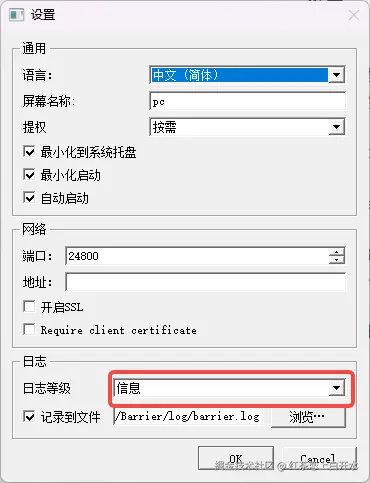
查看日志中的信息发现
shell
[2025-08-07T22:23:51] DEBUG2: event: MotionNotify 924,568
[2025-08-07T22:23:51] DEBUG2: warped to 960,540
[2025-08-07T22:23:51] DEBUG2: event: MotionNotify 924,568
[2025-08-07T22:23:51] DEBUG2: warped to 960,540
[2025-08-07T22:23:51] DEBUG2: event: MotionNotify 960,540
[2025-08-07T22:23:51] DEBUG2: onMouseMoveSecondary -5,+5
[2025-08-07T22:23:51] DEBUG2: move on pc to 538,451
发现触发的鼠标移动事件,多个事件触发,才发送了一次给远端,所以问题的根因肯定在这里。
根据代码寻找根因:
cpp
void
XWindowsScreen::onMouseMove(const XMotionEvent& xmotion)
{
	LOG((CLOG_DEBUG2 "event: MotionNotify %d,%d", xmotion.x_root, xmotion.y_root));

	// compute motion delta (relative to the last known
	// mouse position)
	SInt32 x = xmotion.x_root - m_xCursor;
	SInt32 y = xmotion.y_root - m_yCursor;

	// save position to compute delta of next motion
	m_xCursor = xmotion.x_root;
	m_yCursor = xmotion.y_root;

	if (xmotion.send_event) {
		// we warped the mouse.  discard events until we
		// find the matching sent event.  see
		// warpCursorNoFlush() for where the events are
		// sent.  we discard the matching sent event and
		// can be sure we've skipped the warp event.
		XEvent xevent;
		char cntr = 0;
		do {
            m_impl->XMaskEvent(m_display, PointerMotionMask, &xevent);
			if (cntr++ > 10) {
				LOG((CLOG_WARN "too many discarded events! %d", cntr));
				break;
			}
		} while (!xevent.xany.send_event);
		cntr = 0;
	}
	else if (m_isOnScreen) {
		// motion on primary screen
		sendEvent(m_events->forIPrimaryScreen().motionOnPrimary(),
							MotionInfo::alloc(m_xCursor, m_yCursor));
	}
发现上方有一些判断条件,核心与warpCursorNoFlush相关
cpp
void
MSWindowsScreen::warpCursorNoFlush(SInt32 x, SInt32 y)
{
    // send an event that we can recognize before the mouse warp
    PostThreadMessage(GetCurrentThreadId(), BARRIER_MSG_PRE_WARP, x, y);

    // warp mouse.  hopefully this inserts a mouse motion event
    // between the previous message and the following message.
    SetCursorPos(x, y);

    // check to see if the mouse pos was set correctly
    POINT cursorPos;
    GetCursorPos(&cursorPos);

    // there is a bug or round error in SetCursorPos and GetCursorPos on
    // a high DPI setting. The check here is for Vista/7 login screen.
    // since this feature is mainly for client, so only check on client.
    if (!isPrimary()) {
        if ((cursorPos.x != x) && (cursorPos.y != y)) {
            LOG((CLOG_DEBUG "SetCursorPos did not work; using fakeMouseMove instead"));
            LOG((CLOG_DEBUG "cursor pos %d, %d expected pos %d, %d", cursorPos.x, cursorPos.y, x, y));
            // when at Vista/7 login screen, SetCursorPos does not work (which could be
            // an MS security feature). instead we can use fakeMouseMove, which calls
            // mouse_event.
            // IMPORTANT: as of implementing this function, it has an annoying side
            // effect; instead of the mouse returning to the correct exit point, it
            // returns to the center of the screen. this could have something to do with
            // the center screen warping technique used (see comments for onMouseMove
            // definition).
            fakeMouseMove(x, y);
        }
    }

    // yield the CPU.  there's a race condition when warping:
    //   a hardware mouse event occurs
    //   the mouse hook is not called because that process doesn't have the CPU
    //   we send PRE_WARP, SetCursorPos(), send POST_WARP
    //   we process all of those events and update m_x, m_y
    //   we finish our time slice
    //   the hook is called
    //   the hook sends us a mouse event from the pre-warp position
    //   we get the CPU
    //   we compute a bogus warp
    // we need the hook to process all mouse events that occur
    // before we warp before we do the warp but i'm not sure how
    // to guarantee that.  yielding the CPU here may reduce the
    // chance of undesired behavior.  we'll also check for very
    // large motions that look suspiciously like about half width
    // or height of the screen.
    ARCH->sleep(0.0);

    // send an event that we can recognize after the mouse warp
    PostThreadMessage(GetCurrentThreadId(), BARRIER_MSG_POST_WARP, 0, 0);
}
我们看到了核心的关键问题,BUG
cpp
    // there is a bug or round error in SetCursorPos and GetCursorPos on
    // a high DPI setting. The check here is for Vista/7 login screen.
    // since this feature is mainly for client, so only check on client.
所以属于高DPI的设置中,这个SetCursorPos可能不准确,那么我们需要设置兼容性
在windows上右击barrier, 找到属性,兼容性,更改高DPI设置

选中替代高DPI缩放行为, 切换为系统增强 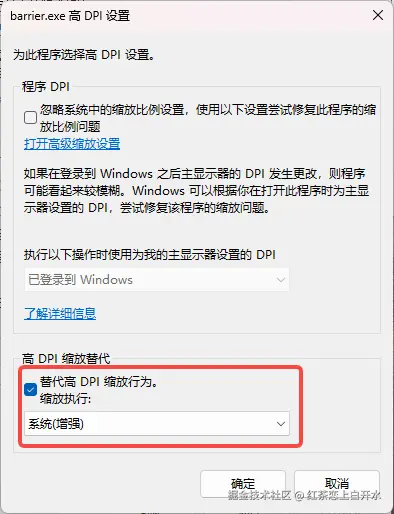
恢复正常.