在当今快速发展的技术领域,AI辅助编程正逐渐改变开发者的工作方式。Trae(假设为AI编程助手)可以帮助开发者快速生成代码、优化逻辑,甚至完成整个项目的构建。本文将通过一个具体的AI编程实践案例------使用Trae开发一个简单的HTML小游戏,展示AI在编程中的应用,并探讨其优势和局限性。
1. 项目概述
1.1 游戏概念
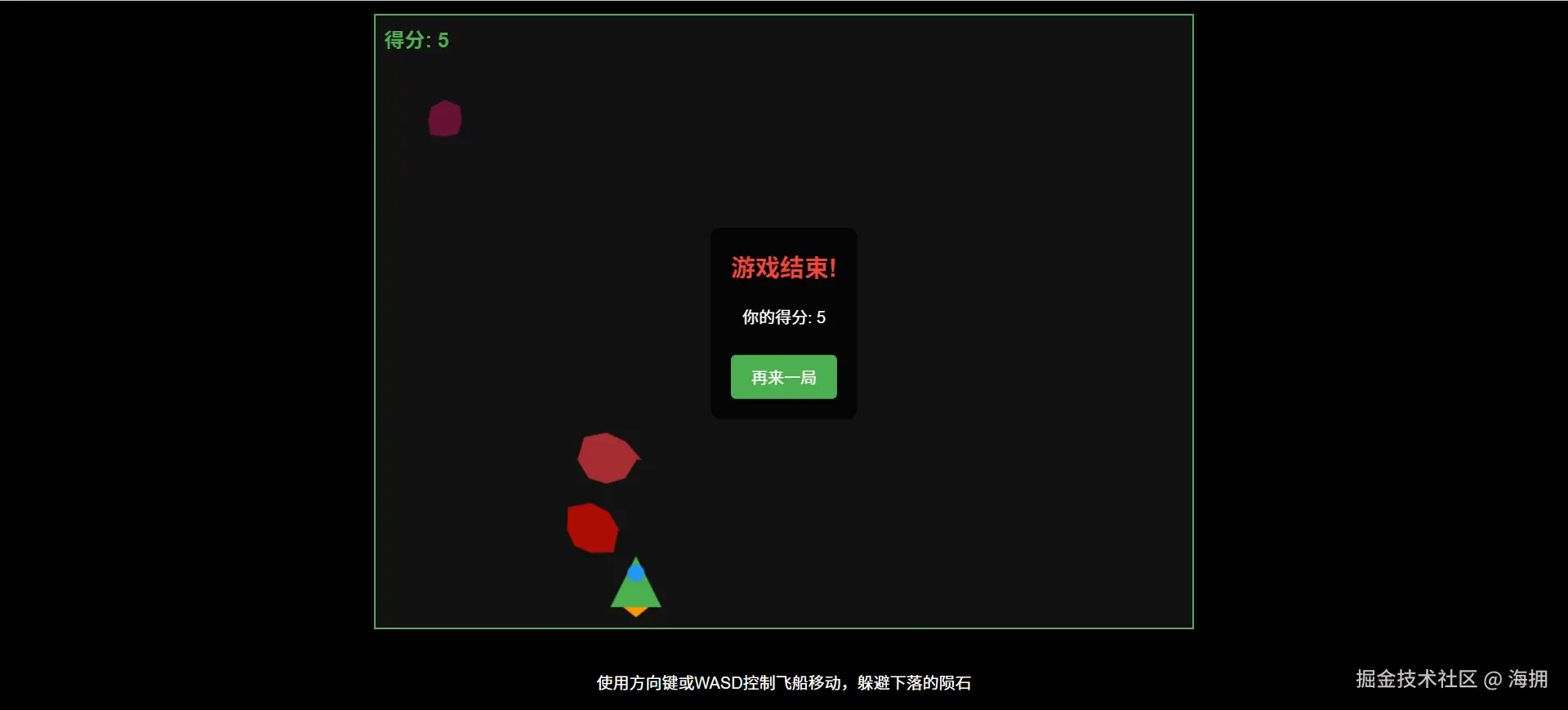
我们将开发一个简单的"躲避陨石"HTML5小游戏,玩家控制一艘飞船在屏幕上移动,躲避随机下落的陨石。游戏包含以下功能:
- 玩家使用键盘(WASD或方向键)控制飞船移动。
- 陨石从屏幕顶部随机位置生成并下落。
- 碰撞检测:如果飞船被陨石击中,游戏结束。
- 计分系统:玩家每成功躲避一颗陨石,得分增加。
1.2 技术栈
- HTML5:搭建游戏界面。
- CSS3:美化游戏元素。
- JavaScript:实现游戏逻辑。
- Trae(AI辅助):生成基础代码、优化算法、调试。
2. 开发过程
2.1 使用Trae生成HTML框架
首先,我们可以让Trae生成一个基本的HTML结构:
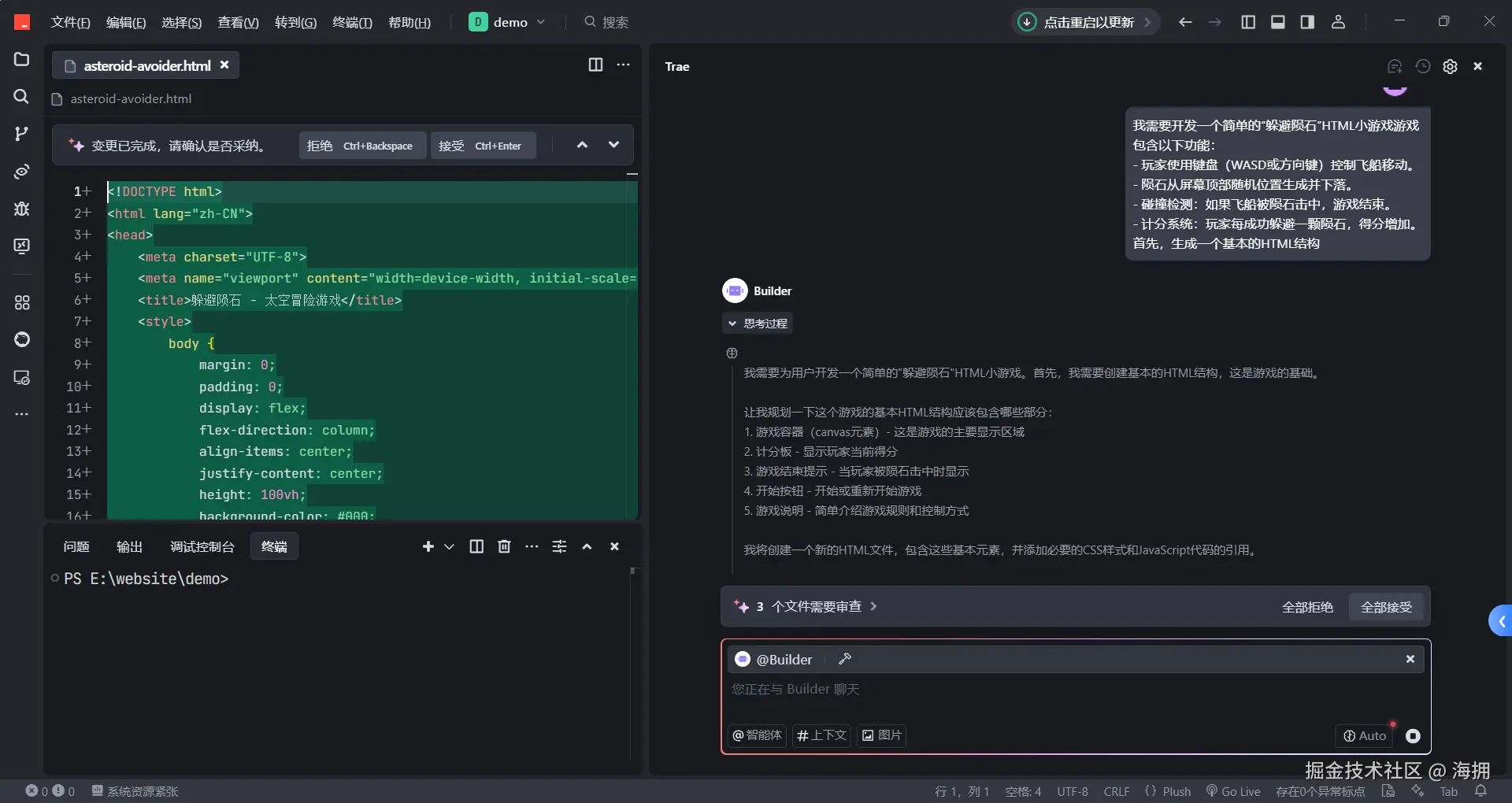
html
<!DOCTYPE html>
<html lang="zh-CN">
<head>
    <meta charset="UTF-8">
    <meta name="viewport" content="width=device-width, initial-scale=1.0">
    <title>躲避陨石 - 太空冒险游戏</title>
    <style>
    </style>
</head>
<body>
    <h1>躲避陨石</h1>
    <div id="game-container">
        <canvas id="gameCanvas" width="800" height="600"></canvas>
        <div id="score-board">得分: 0</div>
        <div id="game-over">
            <h2>游戏结束!</h2>
            <p>你的得分: <span id="final-score">0</span></p>
            <button id="restart-btn">再来一局</button>
        </div>
    </div>
    <div id="controls">
        <p>使用方向键或WASD控制飞船移动,躲避下落的陨石</p>
        <button id="start-btn">开始游戏</button>
    </div>
    <script>
    </script>
</body>
</html>
Trae自动提供了响应式画布设置,确保游戏适应不同屏幕尺寸。
2.2 使用Trae生成JavaScript游戏逻辑
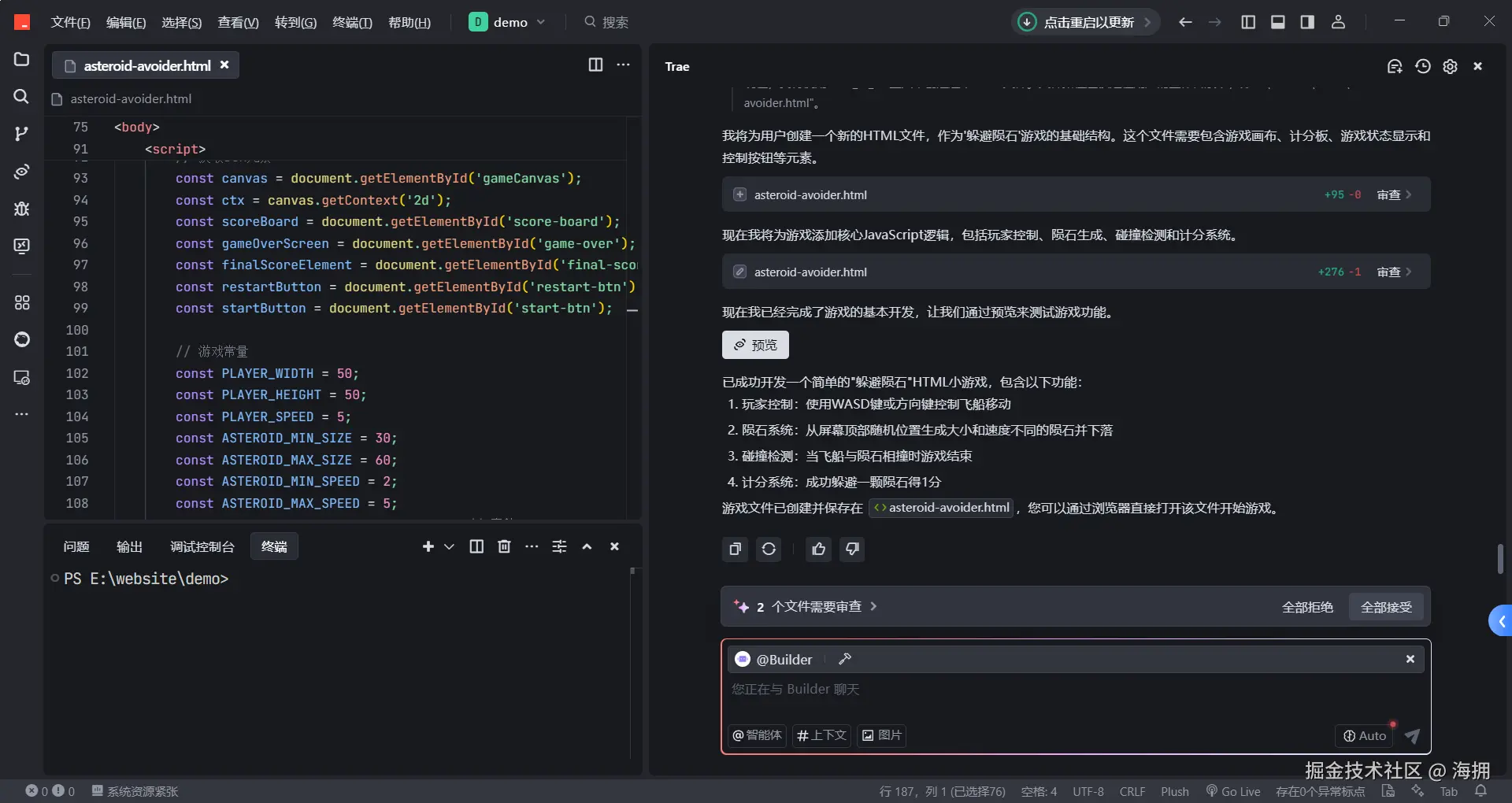
接下来,让Trae生成核心游戏逻辑:
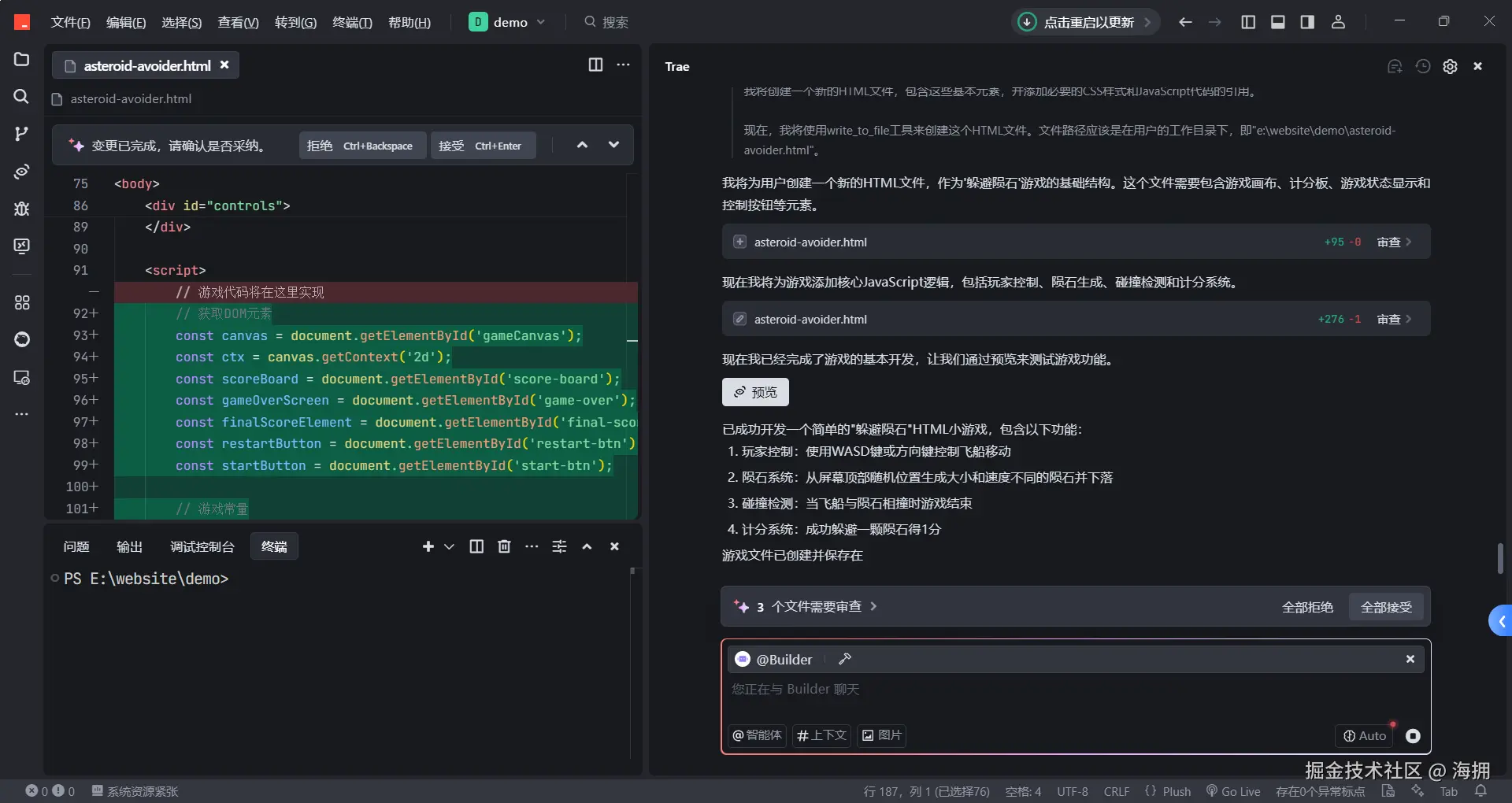
javascript
// 获取DOM元素
const canvas = document.getElementById('gameCanvas');
const ctx = canvas.getContext('2d');
const scoreBoard = document.getElementById('score-board');
const gameOverScreen = document.getElementById('game-over');
const finalScoreElement = document.getElementById('final-score');
const restartButton = document.getElementById('restart-btn');
const startButton = document.getElementById('start-btn');

// 游戏常量
const PLAYER_WIDTH = 50;
const PLAYER_HEIGHT = 50;
const PLAYER_SPEED = 5;
const ASTEROID_MIN_SIZE = 30;
const ASTEROID_MAX_SIZE = 60;
const ASTEROID_MIN_SPEED = 2;
const ASTEROID_MAX_SPEED = 5;
const ASTEROID_SPAWN_INTERVAL = 1000; // 毫秒

// 游戏变量
let player = {
    x: canvas.width / 2 - PLAYER_WIDTH / 2,
    y: canvas.height - PLAYER_HEIGHT - 20,
    width: PLAYER_WIDTH,
    height: PLAYER_HEIGHT,
    speed: PLAYER_SPEED,
    dx: 0,
    dy: 0
};

let asteroids = [];
let score = 0;
let gameActive = false;
let lastAsteroidSpawn = 0;
let animationId;

// 键盘控制
const keys = {
    ArrowUp: false,
    ArrowDown: false,
    ArrowLeft: false,
    ArrowRight: false,
    w: false,
    s: false,
    a: false,
    d: false
};

// 事件监听
document.addEventListener('keydown', (e) => {
    if (e.key in keys) {
        keys[e.key] = true;
    }
});

document.addEventListener('keyup', (e) => {
    if (e.key in keys) {
        keys[e.key] = false;
    }
});

startButton.addEventListener('click', startGame);
restartButton.addEventListener('click', startGame);

// 开始游戏
function startGame() {
    // 重置游戏状态
    player = {
        x: canvas.width / 2 - PLAYER_WIDTH / 2,
        y: canvas.height - PLAYER_HEIGHT - 20,
        width: PLAYER_WIDTH,
        height: PLAYER_HEIGHT,
        speed: PLAYER_SPEED,
        dx: 0,
        dy: 0
    };

    asteroids = [];
    score = 0;
    gameActive = true;
    lastAsteroidSpawn = 0;

    // 隐藏游戏结束界面
    gameOverScreen.style.display = 'none';
    startButton.style.display = 'none';

    // 更新得分板
    updateScore();

    // 开始游戏循环
    if (animationId) {
        cancelAnimationFrame(animationId);
    }
    gameLoop();
}

// 游戏结束
function gameOver() {
    gameActive = false;
    cancelAnimationFrame(animationId);
    finalScoreElement.textContent = score;
    gameOverScreen.style.display = 'block';
    startButton.style.display = 'block';
}

// 更新玩家位置
function updatePlayer() {
    // 重置移动方向
    player.dx = 0;
    player.dy = 0;

    // 检测按键并设置移动方向
    if (keys.ArrowLeft || keys.a) {
        player.dx = -player.speed;
    }
    if (keys.ArrowRight || keys.d) {
        player.dx = player.speed;
    }
    if (keys.ArrowUp || keys.w) {
        player.dy = -player.speed;
    }
    if (keys.ArrowDown || keys.s) {
        player.dy = player.speed;
    }

    // 确保玩家不会移出画布
    if (player.x + player.dx > 0 && player.x + player.dx + player.width < canvas.width) {
        player.x += player.dx;
    }
    if (player.y + player.dy > 0 && player.y + player.dy + player.height < canvas.height) {
        player.y += player.dy;
    }
}

// 创建新陨石
function createAsteroid() {
    const size = Math.random() * (ASTEROID_MAX_SIZE - ASTEROID_MIN_SIZE) + ASTEROID_MIN_SIZE;
    const x = Math.random() * (canvas.width - size);
    const speed = Math.random() * (ASTEROID_MAX_SPEED - ASTEROID_MIN_SPEED) + ASTEROID_MIN_SPEED;

    asteroids.push({
        x: x,
        y: -size,
        width: size,
        height: size,
        speed: speed,
        color: `rgb(${Math.random() * 100 + 100}, ${Math.random() * 50}, ${Math.random() * 50})`
    });
}

// 更新陨石位置
function updateAsteroids(timestamp) {
    // 生成新陨石
    if (timestamp - lastAsteroidSpawn > ASTEROID_SPAWN_INTERVAL) {
        createAsteroid();
        lastAsteroidSpawn = timestamp;
    }

    // 更新所有陨石的位置
    for (let i = asteroids.length - 1; i >= 0; i--) {
        asteroids[i].y += asteroids[i].speed;

        // 检查陨石是否超出画布底部
        if (asteroids[i].y > canvas.height) {
            // 移除陨石并增加分数
            asteroids.splice(i, 1);
            score++;
            updateScore();
        }
    }
}

// 更新得分板
function updateScore() {
    scoreBoard.textContent = `得分: ${score}`;
}

// 检测碰撞
function checkCollisions() {
    for (const asteroid of asteroids) {
        if (
            player.x < asteroid.x + asteroid.width &&
            player.x + player.width > asteroid.x &&
            player.y < asteroid.y + asteroid.height &&
            player.y + player.height > asteroid.y
        ) {
            // 发生碰撞,游戏结束
            gameOver();
            return;
        }
    }
}

// 绘制玩家
function drawPlayer() {
    // 绘制飞船主体
    ctx.fillStyle = '#4CAF50';
    ctx.beginPath();
    ctx.moveTo(player.x + player.width / 2, player.y);
    ctx.lineTo(player.x, player.y + player.height);
    ctx.lineTo(player.x + player.width, player.y + player.height);
    ctx.closePath();
    ctx.fill();

    // 绘制飞船窗户
    ctx.fillStyle = '#2196F3';
    ctx.beginPath();
    ctx.arc(
        player.x + player.width / 2,
        player.y + player.height / 3,
        player.width / 6,
        0,
        Math.PI * 2
    );
    ctx.fill();

    // 绘制飞船推进器
    ctx.fillStyle = '#FF9800';
    ctx.beginPath();
    ctx.moveTo(player.x + player.width / 4, player.y + player.height);
    ctx.lineTo(player.x + player.width / 2, player.y + player.height + 10);
    ctx.lineTo(player.x + (player.width * 3) / 4, player.y + player.height);
    ctx.closePath();
    ctx.fill();
}

// 绘制陨石
function drawAsteroids() {
    for (const asteroid of asteroids) {
        ctx.fillStyle = asteroid.color;
        ctx.beginPath();
        // 绘制不规则形状的陨石
        const points = 8; // 陨石的角数
        const radius = asteroid.width / 2;
        const centerX = asteroid.x + radius;
        const centerY = asteroid.y + radius;

        ctx.moveTo(
            centerX + radius * Math.cos(0),
            centerY + radius * Math.sin(0)
        );

        for (let i = 1; i <= points; i++) {
            // 随机调整每个点的半径,使陨石形状不规则
            const randomRadius = radius * (0.8 + Math.random() * 0.4);
            const angle = (i * 2 * Math.PI) / points;
            ctx.lineTo(
                centerX + randomRadius * Math.cos(angle),
                centerY + randomRadius * Math.sin(angle)
            );
        }

        ctx.closePath();
        ctx.fill();
    }
}

// 清空画布
function clearCanvas() {
    ctx.fillStyle = '#111';
    ctx.fillRect(0, 0, canvas.width, canvas.height);
}

// 游戏循环
function gameLoop(timestamp = 0) {
    if (!gameActive) return;

    clearCanvas();
    updatePlayer();
    updateAsteroids(timestamp);
    checkCollisions();
    drawPlayer();
    drawAsteroids();

    animationId = requestAnimationFrame(gameLoop);
}
Trae不仅生成了完整的游戏逻辑,还优化了碰撞检测和随机陨石生成算法。
2.3 调试与优化
AI生成的代码虽然高效,但仍需人工优化:
- 性能优化 :减少
requestAnimationFrame的冗余计算。 - 难度调整:陨石生成速度和大小可动态变化,提高游戏挑战性。
- UI改进:增加开始/结束界面,提升用户体验。
3. AI编程的优势与挑战
优势
✅ 快速原型开发 :Trae能在几分钟内生成可运行的游戏框架。
✅ 减少重复劳动 :自动生成基础代码,让开发者专注于核心逻辑。
✅ 学习辅助:新手可借助AI理解游戏开发流程。
挑战
❌ 逻辑不完美 :AI可能生成低效代码(如碰撞检测优化不足)。
❌ 调试依赖人工:复杂Bug仍需开发者手动修复。
4. 总结
本次实践展示了AI(Trae)在游戏开发中的强大辅助能力:
- 高效生成代码,减少开发时间。
- 提供学习参考,帮助新手理解游戏逻辑。
- 仍需人工优化,AI无法完全替代开发者。
未来,随着AI技术的发展,编程助手将更智能,甚至能独立完成复杂项目。但目前,AI+人工协作仍是最佳开发模式。
附:CSS代码
css
body {
    margin: 0;
    padding: 0;
    display: flex;
    flex-direction: column;
    align-items: center;
    justify-content: center;
    height: 100vh;
    background-color: #000;
    color: #fff;
    font-family: Arial, sans-serif;
    overflow: hidden;
}
h1 {
    margin-bottom: 20px;
    color: #4CAF50;
}
#game-container {
    position: relative;
}
canvas {
    background-color: #111;
    border: 2px solid #4CAF50;
}
#score-board {
    position: absolute;
    top: 10px;
    left: 10px;
    font-size: 20px;
    font-weight: bold;
    color: #4CAF50;
}
#game-over {
    position: absolute;
    top: 50%;
    left: 50%;
    transform: translate(-50%, -50%);
    text-align: center;
    background-color: rgba(0, 0, 0, 0.7);
    padding: 20px;
    border-radius: 10px;
    display: none;
}
#game-over h2 {
    color: #f44336;
    margin-top: 0;
}
button {
    background-color: #4CAF50;
    color: white;
    border: none;
    padding: 10px 20px;
    font-size: 16px;
    cursor: pointer;
    border-radius: 5px;
    margin-top: 10px;
    transition: background-color 0.3s;
}
button:hover {
    background-color: #45a049;
}
#controls {
    margin-top: 20px;
    text-align: center;
}