商品下单
[9. 商品下单](#9. 商品下单)
[9.1 页面布局](#9.1 页面布局)
[9.2 顾客登录](#9.2 顾客登录)
[9.3 商品下单](#9.3 商品下单)
[9.4 购物车详情与结算](#9.4 购物车详情与结算)
[9.5 订单详情管理](#9.5 订单详情管理)
9. 商品下单
9.1 页面布局
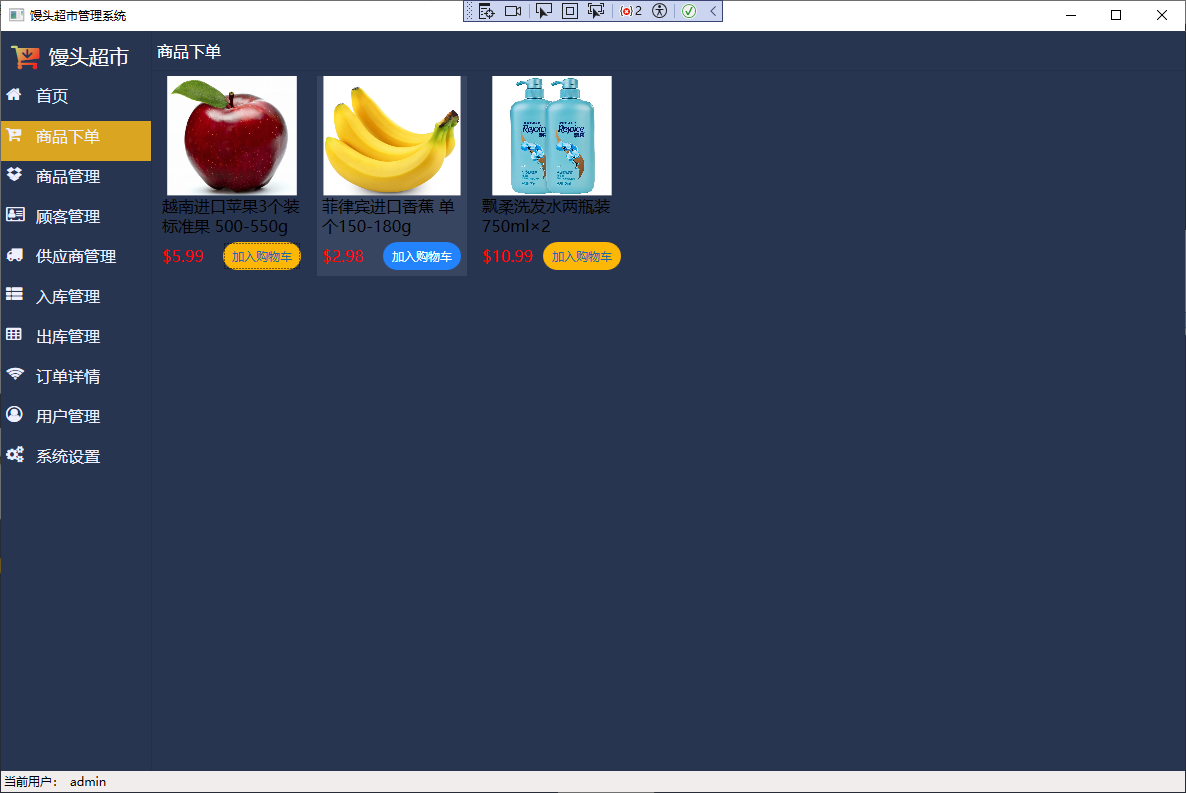
页面布局仿照京东商品布局,在ItemControl控件内分为3行,分别是图片,标题,价格和加购物车按钮
数据库Product表新增列Title,类型为nvarchar(50) 。在Button.xaml中新增加入购物车样式OrderButtonStyle
<!--商品下单按钮样式-->
<Style x:Key="OrderButtonStyle" TargetType="Button">
    <Setter Property="Height" Value="30"/>
    <Setter Property="Width" Value="80"/>
    <Setter Property="VerticalAlignment" Value="Center"/>
    <Setter Property="FontSize" Value="12"/>
    <Setter Property="Foreground" Value="#196BA3"/>
    <Setter Property="Background" Value="#FDB706"/>
    <Setter Property="Template">
        <Setter.Value>
            <ControlTemplate TargetType="Button">
                <Border Background="{TemplateBinding Background}"
                        Height="{TemplateBinding Height}"
                        Width="{TemplateBinding Width}"
                        BorderBrush="Transparent"
                        BorderThickness="1"
                        CornerRadius="15">
                    <TextBlock x:Name="textblock"
                               Text="{TemplateBinding Content}"
                               Foreground="{TemplateBinding Foreground}"
                               FontSize="{TemplateBinding FontSize}"
                               HorizontalAlignment="Center"
                               VerticalAlignment="Center"
                               Margin="5"/>
                </Border>
                <ControlTemplate.Triggers>
                    <Trigger Property="IsMouseOver" Value="True">
                        <Setter Property="Background" Value="#2383FC"/>
                        <Setter Property="Foreground" Value="White"/>
                    </Trigger>
                </ControlTemplate.Triggers>
            </ControlTemplate>
        </Setter.Value>
    </Setter>
</Style>
在商品管理界面为增加和修改功能增加Title属性,如苹果添加的标题为 越南进口苹果3个装 标准果 500-550g 。
将ItemControl的布局方式设置为瀑布流WrapPanel。
设置选中后的改变样式,鼠标移入显示商品框。
<UserControl x:Class="超市管理系统.View.OrderView"
             xmlns="http://schemas.microsoft.com/winfx/2006/xaml/presentation"
             xmlns:x="http://schemas.microsoft.com/winfx/2006/xaml"
             xmlns:mc="http://schemas.openxmlformats.org/markup-compatibility/2006"
             xmlns:d="http://schemas.microsoft.com/expression/blend/2008"
             xmlns:local="clr-namespace:超市管理系统.View" xmlns:i="http://schemas.microsoft.com/expression/2010/interactivity"
             mc:Ignorable="d"
             Background="{Binding AppData.Background}"
             DataContext="{Binding Source={StaticResource Locator}, Path=OrderViewModel}"
             d:DesignHeight="450" d:DesignWidth="800">
    <i:Interaction.Triggers>
        <i:EventTrigger EventName ="Loaded">
            <i:InvokeCommandAction Command="{Binding LoadedCommand}" CommandParameter="{Binding RelativeSource={RelativeSource Mode=FindAncestor, AncestorType=UserControl}}"/>
        </i:EventTrigger>
    </i:Interaction.Triggers>
    <Grid>
        <Grid.RowDefinitions>
            <RowDefinition Height="40"/>
            <RowDefinition/>
        </Grid.RowDefinitions>
        <Border BorderBrush="#22304B" BorderThickness="0 0 0 1">
            <TextBlock Text="商品下单" VerticalAlignment="center" Margin="5 0 0 0" Foreground="{Binding AppData.Foreground}" FontSize="16"/>
        </Border>

        <Grid Grid.Row="1">
            <ItemsControl ItemsSource="{Binding ProductList}" d:ItemsSource="{Binding ProductList}">
                <ItemsControl.ItemsPanel>
                    <ItemsPanelTemplate>
                        <WrapPanel/>
                    </ItemsPanelTemplate>
                </ItemsControl.ItemsPanel>
                <ItemsControl.ItemTemplate>
                    <DataTemplate>
                        <Grid Width="150" Height="200" Margin="5">
                            <Grid.Style>
                                <Style TargetType="Grid">
                                    <Style.Triggers>
                                        <Trigger Property="IsMouseOver" Value="True">
                                            <Setter Property="Background" Value="#384560"/>
                                        </Trigger>
                                    </Style.Triggers>
                                </Style>
                            </Grid.Style>

                            <Grid.RowDefinitions>
                                <RowDefinition/>
                                <RowDefinition Height="auto"/>
                                <RowDefinition Height="auto"/>
                            </Grid.RowDefinitions>
                            <Image Source="{Binding BitmapImage}" ToolTip="Name" Stretch="Uniform"/>
                            <TextBlock Grid.Row="1" Text="{Binding Title}"  FontSize="16" TextWrapping="Wrap" Margin="5 0 5 0"/>
                            <TextBlock Grid.Row="2" Text="{Binding Price, StringFormat={}{0:C2}}"  FontSize="16" HorizontalAlignment="Left" VerticalAlignment="Center" Foreground="Red" Margin="5 5 5 5"/>
                            <Button Grid.Row="2" Content="加入购物车" Style="{DynamicResource OrderButtonStyle}" HorizontalAlignment="Right" Width="80" BorderThickness="1" Margin="5 5 5 5"/>
                        </Grid>
                    </DataTemplate>
                </ItemsControl.ItemTemplate>
            </ItemsControl>
        </Grid>
    </Grid>
</UserControl>
实现效果如下图:
9.2 顾客登录
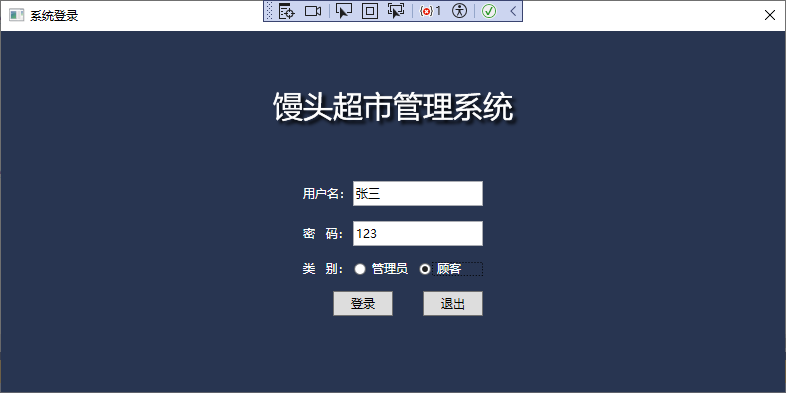
由于原设计人员表分为了Customer表和Member表,此处需要在数据库中为Customer表人员增加Password列,默认设置密码为1。在Visual Studio中更新Customer表。
修改登录页面,在密码下新增顾客类别。在Appdata中新增属性public Customer CurrentCustomer { get; set; } = new Customer();
在Entity→Model中新增CurrentUserType
namespace 超市管理系统.Entity.Model
{
    public enum CurrentUserType
    {
        管理员,
        顾客
    }
}
为在Debug模式下免除输入密码和用户名的繁琐,此处采用# if debug # end if模式来实现输入用户命和密码仅在if debug下,当程序release时,该区域代码不生效。
为实现TextBox绑定内容随radiobutton的选择而改变,此处采用扩展方式,扩展属性NameEx和PasswordEx。在界面加载时默认为admin。
namespace 超市管理系统.Entity
{
    public partial class Member:BaseModel
    {
        public string NameEx
        {
            get
            {
                return Name;
            }
            set
            {
                Name = value;
                RaisePropertyChanged();
            }
        }

        public string PasswordEx
        {
            get
            {
                return Password;
            }
            set
            {
                Password = value;
                RaisePropertyChanged();
            }
        }
    }
}
LoginView界面增加LoadedCommand触发器,和类别选择。修改了两个Textbox的绑定属性,实现界面代码如下:
<Window x:Class="超市管理系统.View.LoginView"
        x:Name="loginView"
        xmlns="http://schemas.microsoft.com/winfx/2006/xaml/presentation"
        xmlns:x="http://schemas.microsoft.com/winfx/2006/xaml"
        xmlns:d="http://schemas.microsoft.com/expression/blend/2008"
        xmlns:mc="http://schemas.openxmlformats.org/markup-compatibility/2006"
        xmlns:local="clr-namespace:超市管理系统.View" xmlns:i="http://schemas.microsoft.com/expression/2010/interactivity"
        mc:Ignorable="d"
        Background="{Binding AppData.Background}"
        WindowStartupLocation="CenterScreen"
        ResizeMode="NoResize"
        DataContext="{Binding Source={StaticResource Locator}, Path=LoginViewModel}"
        Title="系统登录" Height="400" Width="800">
    <i:Interaction.Triggers>
        <i:EventTrigger EventName ="Loaded">
            <i:InvokeCommandAction Command="{Binding LoadedCommand}" CommandParameter="{Binding RelativeSource={RelativeSource Mode=FindAncestor, AncestorType=UserControl}}"/>
        </i:EventTrigger>
    </i:Interaction.Triggers>


    <Grid>
        <Grid.RowDefinitions >
            <RowDefinition Height="150"/>
            <RowDefinition/>
        </Grid.RowDefinitions>

        <TextBlock Grid.Row="0" Text="{Binding AppData.FullTitle}" VerticalAlignment="Center" HorizontalAlignment="Center" Foreground="White" FontSize="30">
            <TextBlock.Effect>
                <DropShadowEffect/>
            </TextBlock.Effect>
        </TextBlock>
        <StackPanel Grid.Row="1"  HorizontalAlignment="Center" VerticalAlignment="Top" >
        <DockPanel>
            <TextBlock Text="用户名:" Width="50" VerticalAlignment="Center" Foreground="{Binding AppData.Foreground}"  />
            <TextBox x:Name="userNameTextBox" Text="{Binding Member.NameEx, Mode=TwoWay, UpdateSourceTrigger=PropertyChanged}" VerticalContentAlignment="Center" Height="25" Width="130"/>
        </DockPanel>

        <DockPanel Margin="0 15 0 0">
                <TextBlock Text="密   码:" Width="50" VerticalAlignment="Center" Foreground="{Binding AppData.Foreground}" />
                <TextBox x:Name="passwordTextBox" Text="{Binding Member.PasswordEx, Mode=TwoWay, UpdateSourceTrigger=PropertyChanged}" VerticalContentAlignment="Center" Height="25" Width="130"/>
        </DockPanel>

            <DockPanel Margin="0 15 0 0">
                <TextBlock Text="类   别:" Width="50" VerticalAlignment="Center" Foreground="{Binding AppData.Foreground}" />
                <RadioButton x:Name="adminRB" Content="管理员" Tag="管理员" Width="65" VerticalAlignment="Center" Foreground="{Binding AppData.Foreground}" IsChecked="True">
                    <i:Interaction.Triggers>
                        <i:EventTrigger EventName ="Checked">
                            <i:InvokeCommandAction Command="{Binding CheckedCommand}" CommandParameter="{Binding RelativeSource={RelativeSource Mode=FindAncestor, AncestorType=RadioButton}}"/>
                        </i:EventTrigger>
                    </i:Interaction.Triggers>
                </RadioButton>
                <RadioButton  Content="顾客" Tag="顾客" Width="65" VerticalAlignment="Center" Foreground="{Binding AppData.Foreground}" >
                    <i:Interaction.Triggers>
                        <i:EventTrigger EventName ="Checked">
                            <i:InvokeCommandAction Command="{Binding CheckedCommand}" CommandParameter="{Binding RelativeSource={RelativeSource Mode=FindAncestor, AncestorType=RadioButton}}"/>
                        </i:EventTrigger>
                    </i:Interaction.Triggers>
                </RadioButton>
            </DockPanel>
            <StackPanel Orientation="Horizontal" HorizontalAlignment="Right" Margin="0 15 0 0">
            <Button x:Name="dengLu" Command="{Binding LoginCommand}"
                    CommandParameter="{Binding ElementName=loginView}"
                    Content="登录" Width="60" Height="25"/>
            <Button x:Name="tuiChu" Command="{Binding ExitCommand}"
                    CommandParameter="{Binding ElementName=loginView}"
                    Content="退出" Width="60" Height="25" Margin="30 0 0 0"/>
        </StackPanel>
    </StackPanel>
    </Grid>
</Window>
using GalaSoft.MvvmLight;
using GalaSoft.MvvmLight.Command;
using System;
using System.Collections.Generic;
using System.Linq;
using System.Text;
using System.Threading.Tasks;
using System.Windows;
using System.Windows.Controls;
using 超市管理系统.Entity;
using 超市管理系统.Entity.Model;
using 超市管理系统.View;

namespace 超市管理系统.ViewModel
{
    public class LoginViewModel : ViewModelBase2
    {
        public MemberProvider memberProvider = new MemberProvider();
        public CustomerProvider customerProvider = new CustomerProvider();

        /// <summary>
        /// 用户实体
        /// </summary>
        private Member member = new Member();
        public Member Member
        {
            get { return member; }
            set
            {
                member = value;
                RaisePropertyChanged();
            }
        }

        #region commands
        public RelayCommand<Window> LoadedCommand
        {
            get
            {
                return new RelayCommand<Window>((view) =>
                {
#if DEBUG
                        Member.NameEx = "admin";
                        Member.PasswordEx = "123";
#endif
                });
            }
        }
        public RelayCommand<LoginView> LoginCommand
        {
            get
            {
                //传入参数CommandParameter
                return new RelayCommand<LoginView>((view) =>
                {
                    if (string.IsNullOrEmpty(Member.NameEx) && string.IsNullOrEmpty(Member.Password))
                    {
                        return;
                    }

                    if (AppData.UserType == CurrentUserType.管理员)
                    {
                        var list = memberProvider.GetAll();
                        var model = list.FirstOrDefault(t => t.Name == Member.NameEx && t.Password == Member.Password);
                        if (model != null)
                        {
                            AppData.CurrentUser = model;
                            new MainWindow().Show();
                            view.Close();
                        }
                        else
                        {
                            MessageBox.Show("用户名或密码错误!");
                        }
                    }
                    else
                    {
                        var list = customerProvider.GetAll();
                        //Member.NameEx为绑定的文本框内容,与用户同样都有Name和Password选项,此处无需修改
                        var model = list.FirstOrDefault(t => t.Name == Member.NameEx && t.Password == Member.Password);
                        if (model != null)
                        {
                            AppData.CurrentCustomer = model;
                            new MainWindow().Show();
                            view.Close();
                        }
                        else
                        {
                            MessageBox.Show("用户名或密码错误!");
                        }
                    }


                });
            }
        }

        public RelayCommand<LoginView> ExitCommand
        {
            get
            {
                return new RelayCommand<LoginView>((view) =>
                {
                    view.Close();
                    //终止进程,退出当前代码
                    //Environment.Exit(0);
                });
            }
            set;
        }

        public RelayCommand<RadioButton> CheckedCommand
        {
            get
            {
                return new RelayCommand<RadioButton>((button) =>
                {
                    if (button == null) { return; }
                    //RadioButton radioButton = button as RadioButton;
                    //if (radioButton != null)
                    //或者
                    //if (button is RadioButton)
                    //{ RadioButton radioButton = (RadioButton)button; }
                    if (button is RadioButton radioButton)
                    {
                        if (radioButton.Tag == null)
                        {
                            return;
                        }
                        if (Enum.TryParse(radioButton.Tag.ToString(), false, out CurrentUserType result))
                        {
                            AppData.UserType = result;
#if DEBUG
                            if (result == CurrentUserType.顾客)
                            {
                                Member.NameEx = "张三";
                            }
                            else
                            {
                                Member.NameEx = "admin";
                            }
#endif
                        }
                    }

                });
            }
            set;
        }
        #endregion
    }
}
9.3 商品下单
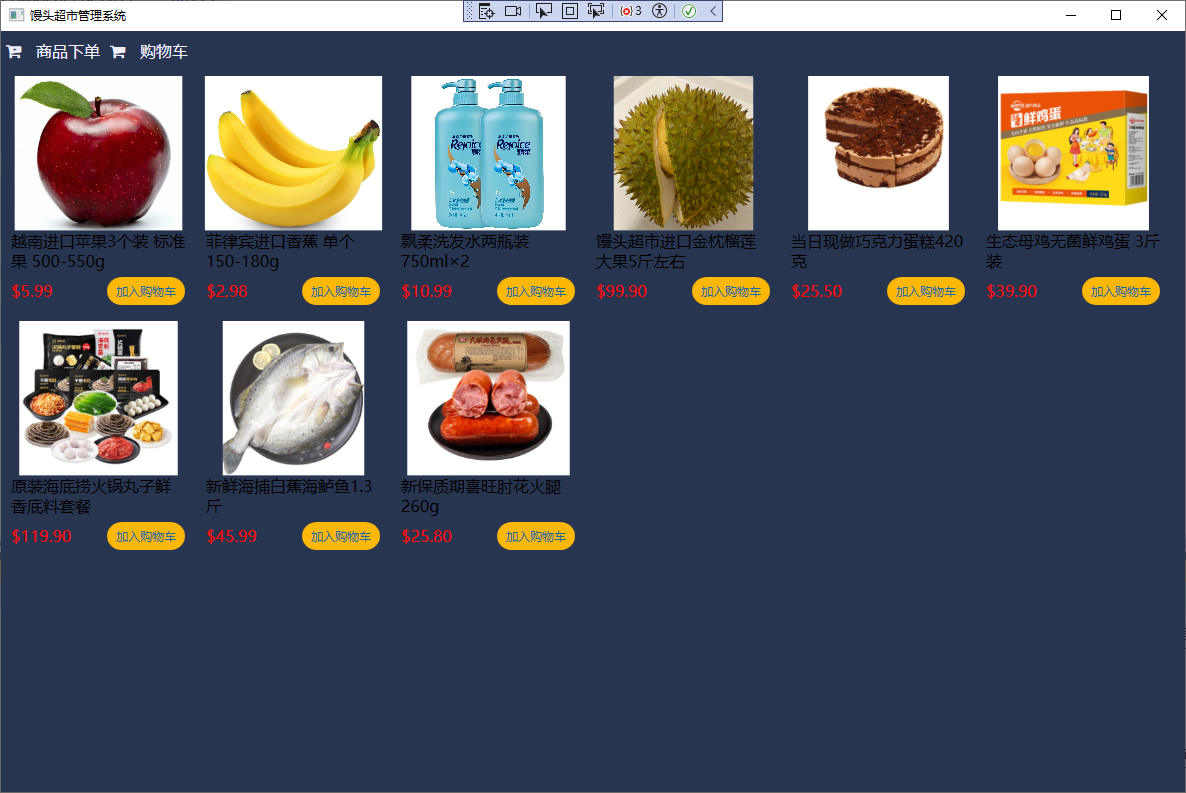
新建CustomerWindow.xaml和CustomerWindowViewModel为顾客登录界面和功能实现。
顶部设计商品浏览、购物车 等按钮功能,复用radiobutton样式和写法。
数据库为Order表新增SN nvarchar(50) 、Paydate datetime 两个字段。
采用ContentControl控件,直接展示商品浏览界面。
全局变量设置当前订单购物车public Order CurrentOrder { get; set; } = null;
为Order建立部分类,扩展订单详情列表,用以加载购物车的订单详情,如下:
using GalaSoft.MvvmLight;
using System.Collections.Generic;
using 超市管理系统.Entity.Model;

namespace 超市管理系统.Entity
{
    public partial class Order : BaseModel
    {
		private List<OrderDetail> children = new List<OrderDetail>();
		/// <summary>
		/// 订单详情
		/// </summary>
		public List<OrderDetail> Children
		{
			get { return children ; }
			set { children = value; RaisePropertyChanged(); }
		}
	}
}
CustomerWindow.xaml实现代码如下:
<Window x:Class="超市管理系统.View.CustomerWindow"
xmlns="http://schemas.microsoft.com/winfx/2006/xaml/presentation"
xmlns:x="http://schemas.microsoft.com/winfx/2006/xaml"
xmlns:d="http://schemas.microsoft.com/expression/blend/2008"
xmlns:mc="http://schemas.openxmlformats.org/markup-compatibility/2006"
xmlns:local="clr-namespace:超市管理系统.View"
xmlns:i="http://schemas.microsoft.com/expression/2010/interactivity"
mc:Ignorable="d"
Title="馒头超市管理系统" Height="800" Width="1200"
Background="{Binding AppData.Background}"
WindowStartupLocation="CenterScreen"
DataContext="{Binding Source={StaticResource Locator}, Path=Main}">
<i:Interaction.Triggers>
<i:EventTrigger EventName ="Loaded">
<i:InvokeCommandAction Command="{Binding LoadedCommand}" CommandParameter="{Binding RelativeSource={RelativeSource Mode=FindAncestor, AncestorType=UserControl}}"/>
</i:EventTrigger>
</i:Interaction.Triggers>
<Grid>
<Grid.RowDefinitions>
<RowDefinition Height="40"/>
<RowDefinition/>
</Grid.RowDefinitions>
<Grid Grid.Row="0">
<Grid.ColumnDefinitions>
<ColumnDefinition/>
<ColumnDefinition/>
</Grid.ColumnDefinitions>
<StackPanel Grid.Row="0" Grid.Column="0" Orientation="Horizontal" VerticalAlignment="Center">
<RadioButton x:Name="OrderView" Style="{StaticResource MenuRadioButtonStyle}" VerticalAlignment="Center" Content="商品下单" Tag="" Checked="View_Checked"/>
<RadioButton x:Name="ShoppingCarView" Style="{StaticResource MenuRadioButtonStyle}" VerticalAlignment="Center" Content="购物车" Tag="" Checked="View_Checked"/>
<RadioButton x:Name="CustomerOrderView" Style="{StaticResource MenuRadioButtonStyle}" VerticalAlignment="Center" Content="订单详情" Tag="" Checked="View_Checked"/>
</StackPanel>
</Grid>
<Grid Grid.Row="1">
<ContentControl x:Name="container" >
<local:OrderView/>
</ContentControl>
</Grid>
</Grid>
</Window>
CustomerWindow.xaml.cs实现代码如下:
using System;
using System.Collections.Generic;
using System.Linq;
using System.Text;
using System.Threading.Tasks;
using System.Windows;
using System.Windows.Controls;
using System.Windows.Data;
using System.Windows.Documents;
using System.Windows.Input;
using System.Windows.Media;
using System.Windows.Media.Imaging;
using System.Windows.Shapes;

namespace 超市管理系统.View
{
    /// <summary>
    /// CustomerWindowView.xaml 的交互逻辑
    /// </summary>
    public partial class CustomerWindow : Window
    {
        public CustomerWindow()
        {
            InitializeComponent();
        }

        private void View_Checked(object sender, RoutedEventArgs e)
        {
            //第二种方法 通过反射进行导航
            if (sender is RadioButton radioButton)
            {
                if (string.IsNullOrEmpty(radioButton.Name)) return;

                //第二种方法 通过反射进行导航
                Type type = Type.GetType("超市管理系统.View." + radioButton.Name);
                container.Content = Activator.CreateInstance(type);
            }
        }
    }
}
CustomerWindowViewModel实现了界面加载时查询购物车,购物车实现逻辑为:界面加载时查询该顾客Id,且状态未完成的Order。若存在,则加入购物车时为增加一条数据或修改有同样产品时的数量;若不存在,则创造一条数据。由于在界面加载时已查询购物车,因此在 点击加入购物车按钮时,可省略查询,直接查询购物车中是否有次物品,有则增加数量,无则新增一条数据 。
using GalaSoft.MvvmLight.Command;
using System;
using System.Collections.Generic;
using System.Linq;
using System.Text;
using System.Threading.Tasks;
using System.Windows;
using System.Windows.Controls;
using 超市管理系统.Entity;
using 超市管理系统.Entity.Model;

namespace 超市管理系统.ViewModel
{
    public class OrderViewModel : ViewModelBase2
    {
        private OrderProvider orderProvider = new OrderProvider();
        private OrderDetailProvider orderDetailProvider = new OrderDetailProvider();

        private List<Product> productList = new List<Product>();
        //private List<Order> orderList = new List<Order>();
        public List<Product> ProductList
        {
            get { return productList; }
            set
            {
                productList = value;
                RaisePropertyChanged();
            }
        }
        //当前选中的顾客实体
        private Product selectedProduct;
        public Product SelectedProduct
        {
            get { return selectedProduct; }
            set
            {
                selectedProduct = value;
                RaisePropertyChanged();
            }
        }

        #region command
        public RelayCommand<UserControl> LoadedCommand
        {
            get
            {
                return new RelayCommand<UserControl>((view) =>
                {
                    ProductList = ProductViewModel.productProvider.GetAll();
                    //加载当前用户购物车
                    var tmpOrder = orderProvider.GetAll().FirstOrDefault(t => t.CustomerId == AppData.CurrentCustomer.Id && t.OrderState == OrderState.未完成.ToString());
                    //购物车为空则创建新的购物车
                    if (tmpOrder == null)
                    {
                        Order order = new Order();
                        order.CustomerId = AppData.CurrentCustomer.Id;
                        order.OrderDate = DateTime.Now;
                        order.OrderState = OrderState.未完成.ToString();
                        order.SN = Guid.NewGuid().ToString();

                        int count = orderProvider.Insert(order);
                        if (count > 0)
                        {
                            AppData.CurrentOrder = order;
                        }
                    }
                    else
                    {
                        AppData.CurrentOrder = tmpOrder;
                        //查询当前购物车详情
                        AppData.CurrentOrder.Children = orderDetailProvider.GetAll().Where(t => t.OrderId == tmpOrder.Id).ToList();
                    }
                });
            }
        }

        /// <summary>
        /// 加入购物车,没有的添加,有的修改
        /// </summary>
        public RelayCommand<Product> OrderCommand
        {
            get
            {
                return new RelayCommand<Product>((product) =>
                {
                    //在进入界面时已加载购物车详情,此时可继续寻找
                    var tmpOrderDetail = AppData.CurrentOrder.Children.FirstOrDefault(t => t.OrderId == AppData.CurrentOrder.Id && t.ProductId == product.Id);
                    int count;
                    if (tmpOrderDetail == null)
                    {
                        OrderDetail orderDetail = new OrderDetail();
                        orderDetail.ProductId = product.Id;
                        orderDetail.OrderId = AppData.CurrentOrder.Id;
                        orderDetail.InsertDate = DateTime.Now;
                        orderDetail.Price = product.Price;
                        orderDetail.Quantity = 1;

                        count = orderDetailProvider.Insert(orderDetail);
                        AppData.CurrentOrder.Children.Add(orderDetail);
                    }
                    else
                    {
                        tmpOrderDetail.Quantity += 1;
                        count = orderDetailProvider.Update(tmpOrderDetail);
                    }

                    if (count > 0)
                    {
                        MessageBox.Show("加入购物车成功!");
                    }
                });
            }
        }
        #endregion
    }
}
9.4 购物车详情与结算
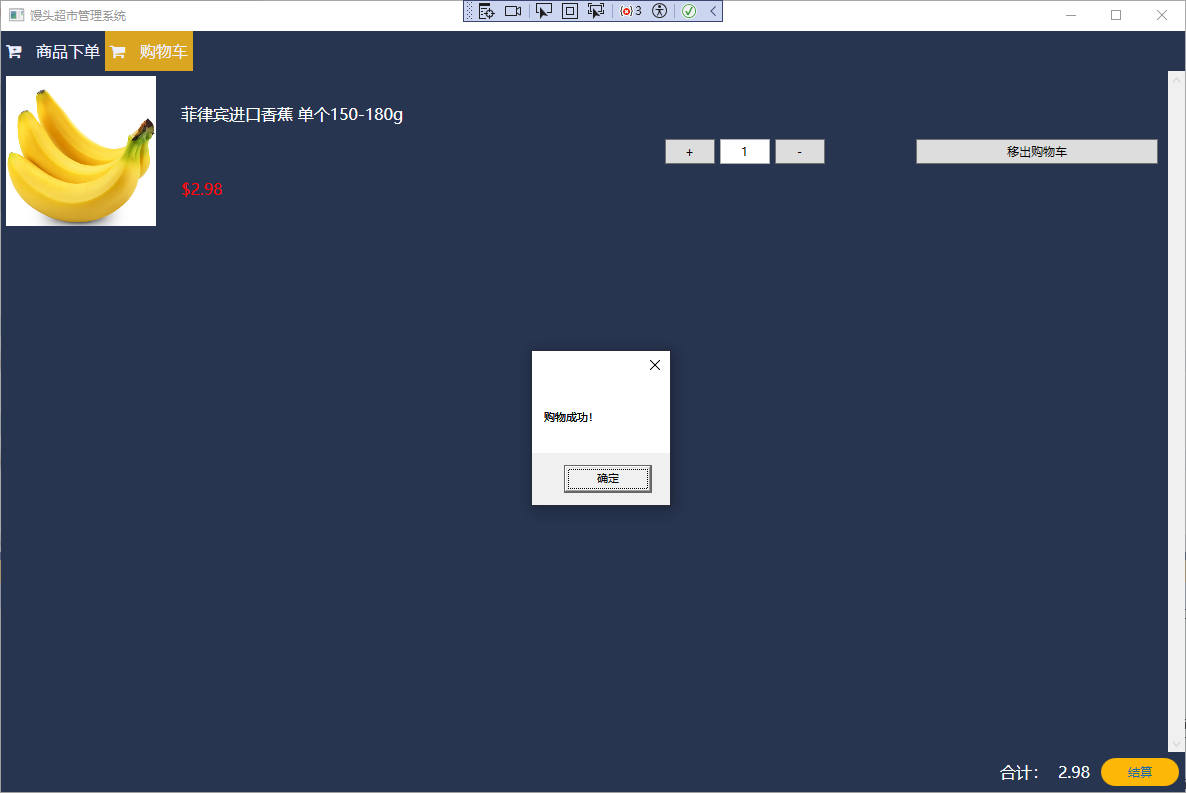
购物车界面主体分为两行,第一行为详情,第二行为合计金额与支付按钮
第一行分为三列,第一列为图片,第二列为标题与价格,第三列数量的显示与加减按钮、移除购物车按钮。
购物车需实现增加、减少、库存同步更新、移除购物车、结算等命令。界面如下:
<UserControl x:Class="超市管理系统.View.ShoppingCarView"
             xmlns="http://schemas.microsoft.com/winfx/2006/xaml/presentation"
             xmlns:x="http://schemas.microsoft.com/winfx/2006/xaml"
             xmlns:mc="http://schemas.openxmlformats.org/markup-compatibility/2006"
             xmlns:d="http://schemas.microsoft.com/expression/blend/2008"
             xmlns:local="clr-namespace:超市管理系统.View"
             xmlns:i="http://schemas.microsoft.com/expression/2010/interactivity"
             DataContext="{Binding Source={StaticResource Locator}, Path=ShoppingCarViewModel}"
             mc:Ignorable="d"
             Background="{Binding AppData.Background}"
             d:DesignHeight="450" d:DesignWidth="800">
    <i:Interaction.Triggers>
        <i:EventTrigger EventName ="Loaded">
            <i:InvokeCommandAction Command="{Binding LoadedCommand}" CommandParameter="{Binding RelativeSource={RelativeSource Mode=FindAncestor, AncestorType=UserControl}}"/>
        </i:EventTrigger>
    </i:Interaction.Triggers>
    <Grid>
        <Grid.RowDefinitions>
            <RowDefinition/>
            <RowDefinition Height="40"/>
        </Grid.RowDefinitions>
        <ScrollViewer>
            <ItemsControl Grid.Row="0" ItemsSource="{Binding AppData.CurrentOrder.Children}" >
                <ItemsControl.ItemsPanel>
                    <ItemsPanelTemplate>
                        <StackPanel/>
                    </ItemsPanelTemplate>
                </ItemsControl.ItemsPanel>

                <ItemsControl.ItemTemplate>
                    <DataTemplate>
                        <Grid Height="150" Margin="5">
                            <Grid.Style>
                                <Style TargetType="Grid">
                                    <Style.Triggers>
                                        <Trigger Property="IsMouseOver" Value="True">
                                            <Setter Property="Background" Value="#384560"/>
                                        </Trigger>
                                    </Style.Triggers>
                                </Style>
                            </Grid.Style>
                            <Grid.ColumnDefinitions>
                                <ColumnDefinition Width="auto"/>
                                <ColumnDefinition/>
                                <ColumnDefinition/>
                            </Grid.ColumnDefinitions>
                            <!--image-->
                            <Image Grid.Column="0" Source="{Binding BitmapImage}" ToolTip="Name" Stretch="Fill" Width="150" HorizontalAlignment="Left"/>
                            <!--Title-->
                            <Grid Grid.Column="1" Grid.Row="1" Margin="20 0 0 0">
                                <Grid.RowDefinitions>
                                    <RowDefinition/>
                                    <RowDefinition/>
                                </Grid.RowDefinitions>
                                <TextBlock Grid.Row="0" Text="{Binding ProductTitle}" Foreground="White" HorizontalAlignment="Left" VerticalAlignment="Center"   FontSize="16" TextWrapping="Wrap" Margin="5 0 5 0"/>
                                <TextBlock Grid.Row="1" Text="{Binding Price, StringFormat={}{0:C2}}"  FontSize="16" HorizontalAlignment="Left" VerticalAlignment="Center" Foreground="Red" Margin="5 5 5 5"/>
                                <!--操作区域-->
                            </Grid>
                            <Grid Grid.Column="2">
                                <Grid.ColumnDefinitions>
                                    <ColumnDefinition/>
                                    <ColumnDefinition/>
                                </Grid.ColumnDefinitions>
                                <StackPanel Grid.Column="0" Orientation="Horizontal">
                                    <Button Content="+" Height="25" Width="50" Margin="5"
                                        Command="{Binding RelativeSource={RelativeSource Mode=FindAncestor, AncestorType=ItemsControl}, Path=DataContext.AddCommand}"
                                        CommandParameter="{Binding .}"/>
                                    <TextBox Text="{Binding QuantityEx, Mode=TwoWay, UpdateSourceTrigger=PropertyChanged}" HorizontalContentAlignment="Center" VerticalContentAlignment="Center" Height="25" Width="50"/>
                                    <Button Content="-" Height="25" Width="50" Margin="5"
                                        Command="{Binding RelativeSource={RelativeSource Mode=FindAncestor, AncestorType=ItemsControl}, Path=DataContext.DecCommand}"
                                        CommandParameter="{Binding .}"/>
                                </StackPanel>
                                <Button Grid.Column="1" Content="移出购物车" Height="25" Width="auto" Margin="5"
                                    Command="{Binding RelativeSource={RelativeSource Mode=FindAncestor, AncestorType=ItemsControl}, Path=DataContext.RemoveCommand}"
                                    CommandParameter="{Binding .}"/>
                            </Grid>
                        </Grid>
                    </DataTemplate>
                </ItemsControl.ItemTemplate>
            </ItemsControl>
        </ScrollViewer>

        <StackPanel Grid.Row="1"  Orientation="Horizontal" HorizontalAlignment="Right">
            <TextBlock Text="合计:" VerticalAlignment="Center" FontSize="16" Foreground="White" Margin="5"/>
            <TextBlock Text="{Binding SumPrice}" VerticalAlignment="Center" FontSize="16" Foreground="White" Margin="5"/>
            <Button Content="结算" Style="{DynamicResource OrderButtonStyle}"
                Command="{Binding PayCommand}"
                HorizontalAlignment="Right" Width="80" BorderThickness="1" Margin="5"/>
        </StackPanel>
    </Grid>
</UserControl>
ShoppingCarViewModel.cs 功能代码实现如下:
using GalaSoft.MvvmLight.Command;
using System;
using System.Collections.Generic;
using System.Linq;
using System.Text;
using System.Threading.Tasks;
using System.Windows;
using System.Windows.Controls;
using 超市管理系统.Entity;
using 超市管理系统.Entity.Model;


namespace 超市管理系统.ViewModel
{
    public class ShoppingCarViewModel : ViewModelBase2
    {
        public double sumPrice;
        /// <summary>
        /// 扩展属性,合计金额
        /// </summary>
        public double SumPrice
        {
            get { return sumPrice; }
            set
            {
                sumPrice = value; RaisePropertyChanged();
            }
        }
        public RelayCommand<UserControl> LoadedCommand
        {
            get
            {
                return new RelayCommand<UserControl>((view) =>
                {
                    if (AppData.CurrentOrder != null)
                    { SumPrice = (double)AppData.CurrentOrder.Children.Sum(x => x.Price * x.Quantity); }
                    else SumPrice = 0;
                });
            }
        }

        /// <summary>
        /// 数量增加
        /// </summary>
        public RelayCommand<OrderDetail> AddCommand
        {
            get
            {
                return new RelayCommand<OrderDetail>((orderDetail) =>
                {
                    var product = ProductViewModel.productProvider.GetAll().FirstOrDefault(t => t.Id == orderDetail.ProductId);
                    if (product != null)
                    {
                        if (product.Quantity <= orderDetail.QuantityEx)
                        {
                            MessageBox.Show("库存不足!");
                            return;
                        }
                    }
                    orderDetail.QuantityEx += 1;
                    OrderDetailViewModel.orderDetailProvider.Update(orderDetail);
                    SumPrice = (double)AppData.CurrentOrder.Children.Sum(x => x.Price * x.Quantity);
                });
            }
        }
        /// <summary>
        /// 数量减少
        /// </summary>
        public RelayCommand<OrderDetail> DecCommand
        {
            get
            {
                return new RelayCommand<OrderDetail>((orderDetail) =>
                {
                    if (orderDetail.QuantityEx == 1) return;
                    orderDetail.QuantityEx -= 1;
                    OrderDetailViewModel.orderDetailProvider.Update(orderDetail);
                    SumPrice = (double)AppData.CurrentOrder.Children.Sum(x => x.Price * x.Quantity);
                });
            }
        }
        /// <summary>
        /// 移除购物车
        /// </summary>
        public RelayCommand<OrderDetail> RemoveCommand
        {
            get
            {
                return new RelayCommand<OrderDetail>((orderDetail) =>
                {
                    AppData.CurrentOrder.Children.Remove(orderDetail);
                    OrderDetailViewModel.orderDetailProvider.Delete(orderDetail);
                    SumPrice = (double)AppData.CurrentOrder.Children.Sum(x => x.Price * x.Quantity);
                });
            }
        }
        /// <summary>
        /// 购物车结算
        /// </summary>
        public RelayCommand PayCommand
        {
            get
            {
                return new RelayCommand(() =>
                {
                    if (AppData.CurrentOrder.Children.Count == 0)
                    {
                        MessageBox.Show("请加入购物车!");
                        return;
                    }

                    int count = 0;
                    foreach (var item in AppData.CurrentOrder.Children)
                    {
                        //增加出库记录
                        StockRecord stock = new StockRecord();
                        stock.ProductId = item.ProductId;
                        stock.Type = StockType.出库.ToString();
                        stock.StockDate = DateTime.Now;
                        stock.Quantity = item.Quantity;
                        count += InstorageViewModel.stockRecordProvider.Insert(stock);

                        //减少库存
                        var product = ProductViewModel.productProvider.GetAll().FirstOrDefault(t => t.Id == item.ProductId);
                        if (product != null)
                        {
                            product.Quantity -= item.Quantity;
                            ProductViewModel.productProvider.Update(product);
                        }
                    }

                    AppData.CurrentOrder.PayDate = DateTime.Now;
                    AppData.CurrentOrder.OrderState = OrderState.已完成.ToString();
                    count += OrderViewModel.orderProvider.Update(AppData.CurrentOrder);
                    if (count == AppData.CurrentOrder.Children.Count + 1)
                    {
                        MessageBox.Show("购物成功!");
                        AppData.CurrentOrder.Children.Clear();
                        AppData.CurrentOrder = null;
                        return;
                    }
                });
            }
        }
    }
}
9.5 订单详情管理
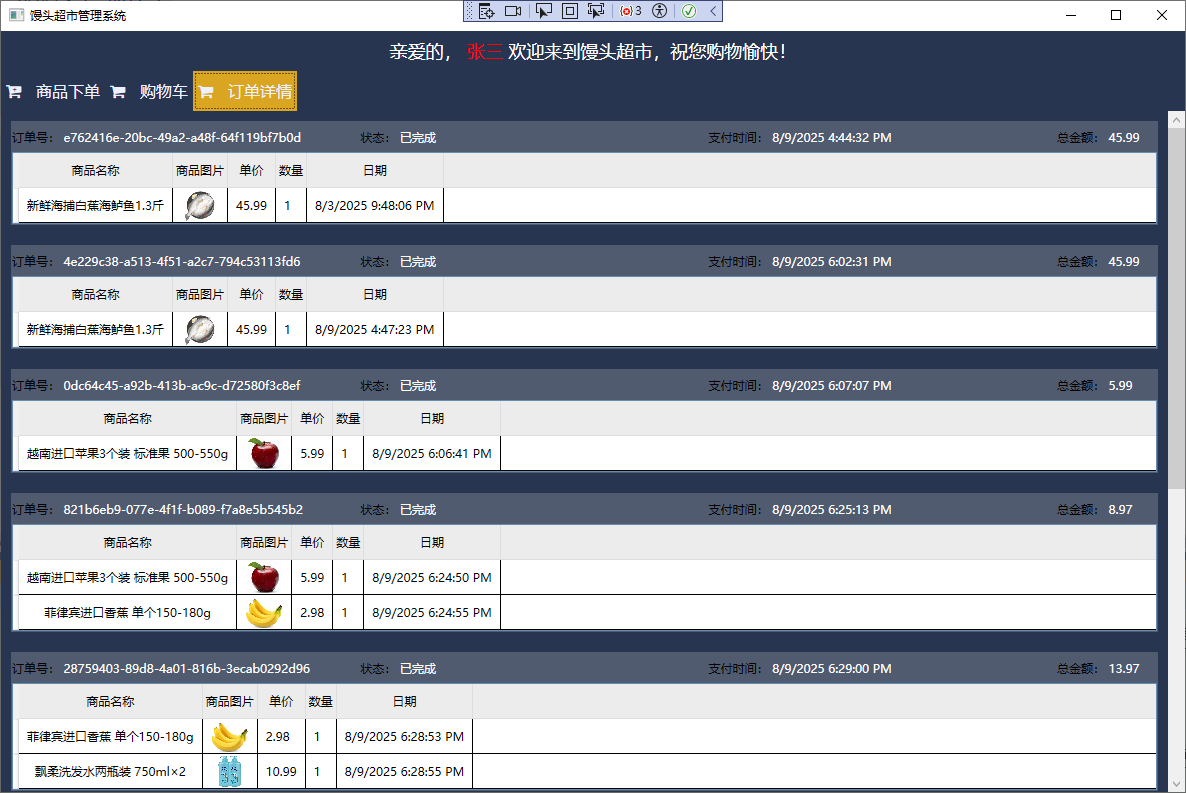
run 可以实现textblock同一行字不同的样式为Order类增加总金额属性SumPrice.
新建顾客订单详情页CustomerOrderView.xaml,绑定订单list,表头分为四个部分,分别为order类的SN、状态、date和SumPrice
<UserControl x:Class="超市管理系统.View.CustomerOrderView"
             xmlns="http://schemas.microsoft.com/winfx/2006/xaml/presentation"
             xmlns:x="http://schemas.microsoft.com/winfx/2006/xaml"
             xmlns:mc="http://schemas.openxmlformats.org/markup-compatibility/2006"
             xmlns:d="http://schemas.microsoft.com/expression/blend/2008"
             xmlns:local="clr-namespace:超市管理系统.View"
             xmlns:i="http://schemas.microsoft.com/expression/2010/interactivity"
             mc:Ignorable="d"
             Background="{Binding AppData.Background}"
             DataContext="{Binding Source={StaticResource Locator}, Path=CustomerOrderViewModel}"
             d:DesignHeight="450" d:DesignWidth="800">
    <i:Interaction.Triggers>
        <i:EventTrigger EventName ="Loaded">
            <i:InvokeCommandAction Command="{Binding LoadedCommand}" CommandParameter="{Binding RelativeSource={RelativeSource Mode=FindAncestor, AncestorType=UserControl}}"/>
        </i:EventTrigger>
    </i:Interaction.Triggers>
    <Grid>
        <ScrollViewer>
            <ItemsControl ItemsSource="{Binding OrderList}" >
                <ItemsControl.ItemsPanel>
                    <ItemsPanelTemplate>
                        <StackPanel/>
                    </ItemsPanelTemplate>
                </ItemsControl.ItemsPanel>

                <ItemsControl.ItemTemplate>
                    <DataTemplate>
                        <Border BorderBrush="#505B70" BorderThickness="1" Margin="10">
                            <Grid >
                                <Grid.RowDefinitions>
                                    <RowDefinition />
                                    <RowDefinition/>
                                </Grid.RowDefinitions>
                                <Border Grid.Row="0" Height="30" Background="#505B70">
                                    <Grid>
                                        <Grid.ColumnDefinitions>
                                            <ColumnDefinition/>
                                            <ColumnDefinition/>
                                            <ColumnDefinition/>
                                            <ColumnDefinition Width="100"/>
                                        </Grid.ColumnDefinitions>
                                        <TextBlock Grid.Column="0" HorizontalAlignment="Left" VerticalAlignment="Center">
                                                    <Run Text="订单号:"/>
                                                    <Run Text="{Binding SN}" Foreground="White"/>
                                        </TextBlock>
                                        <TextBlock Grid.Column="1" HorizontalAlignment="Left" VerticalAlignment="Center">
                                                   <Run Text="状态:"/>
                                                   <Run Text="{Binding OrderState}" Foreground="White"/>
                                        </TextBlock>
                                        <TextBlock Grid.Column="2" HorizontalAlignment="Left" VerticalAlignment="Center">
                                                    <Run Text="支付时间:"/>
                                                    <Run Text="{Binding PayDate}" Foreground="White"/>
                                        </TextBlock>
                                        <TextBlock Grid.Column="3" HorizontalAlignment="Left" VerticalAlignment="Center">
                                                    <Run Text="总金额:"/>
                                                    <Run Text="{Binding SumPrice }" Foreground="White"/>
                                        </TextBlock>
                                    </Grid>
                                </Border>
                                <Border Grid.Row="1">
                                    <DataGrid ItemsSource="{Binding Children}" Style="{StaticResource DataGridStyle}">
                                        <DataGrid.Columns>
                                            <!--数据模板写法-->
                                           <DataGridTemplateColumn Width="auto" Header="商品名称">
                                                <DataGridTemplateColumn.CellTemplate>
                                                    <DataTemplate>
                                                        <Grid>
                                                            <TextBox Text="{Binding ProductTitle, Mode=OneWay, UpdateSourceTrigger=PropertyChanged}" Style="{StaticResource DataGridTextBoxStyle}"/>
                                                        </Grid>
                                                    </DataTemplate>
                                                </DataGridTemplateColumn.CellTemplate>
                                            </DataGridTemplateColumn>

                                            <DataGridTemplateColumn Width="auto" Header="商品图片">
                                                <DataGridTemplateColumn.CellTemplate>
                                                    <DataTemplate>
                                                        <Grid>
                                                            <Image Source="{Binding BitmapImage}" >
                                                                <Image.ToolTip>
                                                                    <Grid>
                                                                        <Image Source="{Binding BitmapImage}"/>
                                                                    </Grid>
                                                                </Image.ToolTip>
                                                            </Image>
                                                        </Grid>
                                                    </DataTemplate>
                                                </DataGridTemplateColumn.CellTemplate>
                                            </DataGridTemplateColumn>

                                            <DataGridTemplateColumn Width="auto" Header="单价">
                                                <DataGridTemplateColumn.CellTemplate>
                                                    <DataTemplate>
                                                        <Grid>
                                                            <TextBox Text="{Binding Price, Mode=OneWay, UpdateSourceTrigger=LostFocus}" Style="{StaticResource DataGridTextBoxStyle}" HorizontalAlignment="Left"/>
                                                        </Grid>
                                                    </DataTemplate>
                                                </DataGridTemplateColumn.CellTemplate>
                                            </DataGridTemplateColumn>
                                            <DataGridTemplateColumn Width="auto" Header="数量">
                                                <DataGridTemplateColumn.CellTemplate>
                                                    <DataTemplate>
                                                        <Grid>
                                                            <TextBox Text="{Binding QuantityEx, Mode=OneWay, UpdateSourceTrigger=PropertyChanged}" Style="{StaticResource DataGridTextBoxStyle}" HorizontalAlignment="Left"/>
                                                        </Grid>
                                                    </DataTemplate>
                                                </DataGridTemplateColumn.CellTemplate>
                                            </DataGridTemplateColumn>

                                            <DataGridTemplateColumn Width="auto" Header="日期">
                                                <DataGridTemplateColumn.CellTemplate>
                                                    <DataTemplate>
                                                        <Grid>
                                                            <TextBox Text="{Binding InsertDate, Mode=OneWay, UpdateSourceTrigger=PropertyChanged}" Style="{StaticResource DataGridTextBoxStyle}" HorizontalAlignment="Left"/>
                                                        </Grid>
                                                    </DataTemplate>
                                                </DataGridTemplateColumn.CellTemplate>
                                            </DataGridTemplateColumn>
                                        </DataGrid.Columns>
                                    </DataGrid>
                                </Border>
                            </Grid>
                        </Border>
                    </DataTemplate>
                </ItemsControl.ItemTemplate>
            </ItemsControl>
        </ScrollViewer>
    </Grid>
</UserControl>
在CustomerOrderViewModel实现,界面加载订单详情内容
using GalaSoft.MvvmLight.Command;
using System;
using System.Collections.Generic;
using System.Collections.ObjectModel;
using System.Linq;
using System.Text;
using System.Threading.Tasks;
using System.Windows.Controls;
using 超市管理系统.Entity;
using 超市管理系统.Entity.Model;

namespace 超市管理系统.ViewModel
{
    public class CustomerOrderViewModel : ViewModelBase2
    {
        private ObservableCollection<Order> orders = new ObservableCollection<Order>();

        public ObservableCollection<Order> OrderList
        {
            get { return orders; }
            set { orders = value; RaisePropertyChanged(); }
        }


        public RelayCommand<UserControl> LoadedCommand
        {
            get
            {
                return new RelayCommand<UserControl>((view) =>
                {
                    var _orders = OrderViewModel.orderProvider.GetAll().Where( t => t.CustomerId == AppData.CurrentCustomer.Id && t.OrderState == OrderState.已完成.ToString());
                    if( _orders != null )
                    {
                        OrderList.Clear();
                        foreach (var order in _orders)
                        {
                            OrderList.Add(order);

                            var details = OrderDetailViewModel.orderDetailProvider.GetAll().Where(t => t.OrderId == order.Id );
                            if ( details != null )
                            {
                                order.Children.Clear();
                                foreach (var detail in details)
                                {
                                    order.Children.Add(detail);
                                    order.SumPrice += (double)(detail.Price * detail.QuantityEx);
                                }
                            }
                        }
                    }
                });
            }
        }
    }
}