需求是:
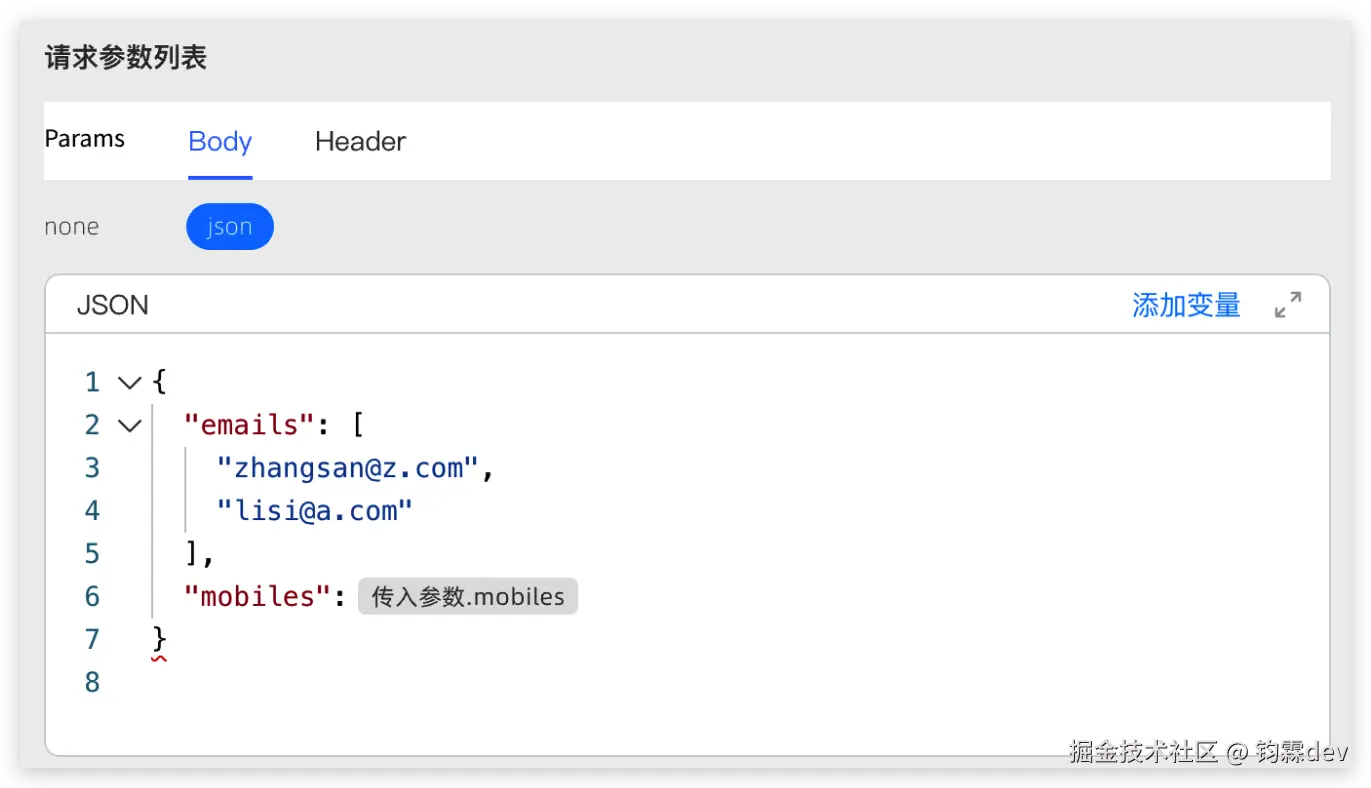
在低代码中配置外部服务过程,需要插入变量占位符,最终由后端发送请求时,将变量替换为实际值,要求如下:
- 插入变量块时,变量块不可编辑
- 删除变量块时,整块删除
- 光标跳过变量块
- 自定义变量块的样式
ui要求效果如下:
前端后端商定数据格式为:
json
{ label: '配置参数.appId', value: '{{configParam.appId}}' },
{ label: '配置参数.用户名', value: '{{configParam.username}}' },
{ label: '配置参数.密码', value: '{{configParam.password}}' },
{ label: '用户信息.姓名', value: '{{userInfo.name}}' },
{ label: '用户信息.邮箱', value: '{{userInfo.email}}' },
{ label: '系统设置.主题', value: '{{systemSettings.theme}}' },
{ label: '系统设置.语言', value: '{{systemSettings.language}}' }
方案
实现参数块编辑功能的三种方案:
方案一:自定义编辑器组件方案 核心思路:基于Monaco Editor或CodeMirror等专业代码编辑器进行深度定制。
实现细节:
使用编辑器提供的装饰器(decorations)或小部件(widgets)API 将特定格式的文本(如{{configParam.appId}})替换为自定义渲染的块 拦截键盘和鼠标事件,实现整块删除的效果 通过特殊按钮或命令触发参数插入功能 优势:
保留了代码编辑器的高级功能(语法高亮、自动补全等) 性能表现优秀 用户体验接近原生编辑器 挑战:
开发难度较高,需要深入理解编辑器API 需要处理多种边缘情况(如复制粘贴时的块行为) 方案二:虚拟DOM渲染方案 核心思路:使用React/Vue等框架构建自定义JSON编辑器。
实现细节:
将JSON解析为AST(抽象语法树) 针对普通文本和参数块使用不同的渲染组件 参数块组件具有特殊的样式和交互行为 提供参数选择界面,便于用户插入预设参数 维护内部数据结构,实现参数块的整体操作 优势:
界面定制自由度高 组件化设计便于维护 可实现复杂的交互效果 挑战:
需要自行处理光标位置、选择区域等细节 可能需要较多工作来模拟编辑器体验 方案三:分层编辑模型方案 核心思路:将视图层和数据层分离,使用特殊标记标识参数位置。
实现细节:
维护两层模型:一层是实际JSON数据,另一层是显示模型 使用特殊标记(如UUID)在实际JSON中标识参数位置 编辑器显示时,将特殊标记替换为可视化的参数块 当用户编辑时,对显示模型进行操作,然后同步到数据模型 提供参数管理面板,实现参数的添加和移除 优势:
实现相对简单,概念清晰 便于序列化和持久化 可以与多种编辑器技术结合 挑战:
需要保持两层模型的一致性 复杂操作(如撤销/重做)的实现较困难
上面的三种方案,方案一没法实现过了,发现最终给到后端的数据是 {{systemSettings.language}} 但是前端要求的是显示文字 系统设置.语言 ,这会导致显示的长度和实际长度不一致,所以方案一没法实现
方案二当前需求只为了插入变量块,没必要使用到AST内容
方案三:刚刚说过方案一的问题是显示的长度和实际长度不一致,方案三提供了一种思路:json中的内容可以不是实际数据,而只是一种占位的字符,通过map数据记录真实数据和占位字符的映射关系,即:{{systemSettings.language}}(真实数据) 在json编辑器中(Monaco)中,可以显示为 Pabcdefght(占位字符),然后参数块显示为 系统设置.语言 ,保证占位字符的长度与显示文字长度一致,这样就解决了显示的长度和实际长度不一致的问题。
编辑器显示内容:
json
{
  "emails": [
    "zhangsan@z.com",
    "lisi@a.com"
  ],
  "mobiles": "P10hx1tr0w01pxxxxxx",
  "config": {
    "appId": "Phxr7fnbc93xxx",
    "username": "P308w6qtjl3fxabc"
  }
}
转换后的真实内容:
json
{
  "emails": [
    "zhangsan@z.com",
    "lisi@a.com"
  ],
  "mobiles": "{{configParam.mobiles}}",
  "config": {
    "appId": "{{configParam.appId}}",
    "username": "{{userInfo.name}}abc"
  }
}
理论上可行
实现如下:
实现
效果如图:
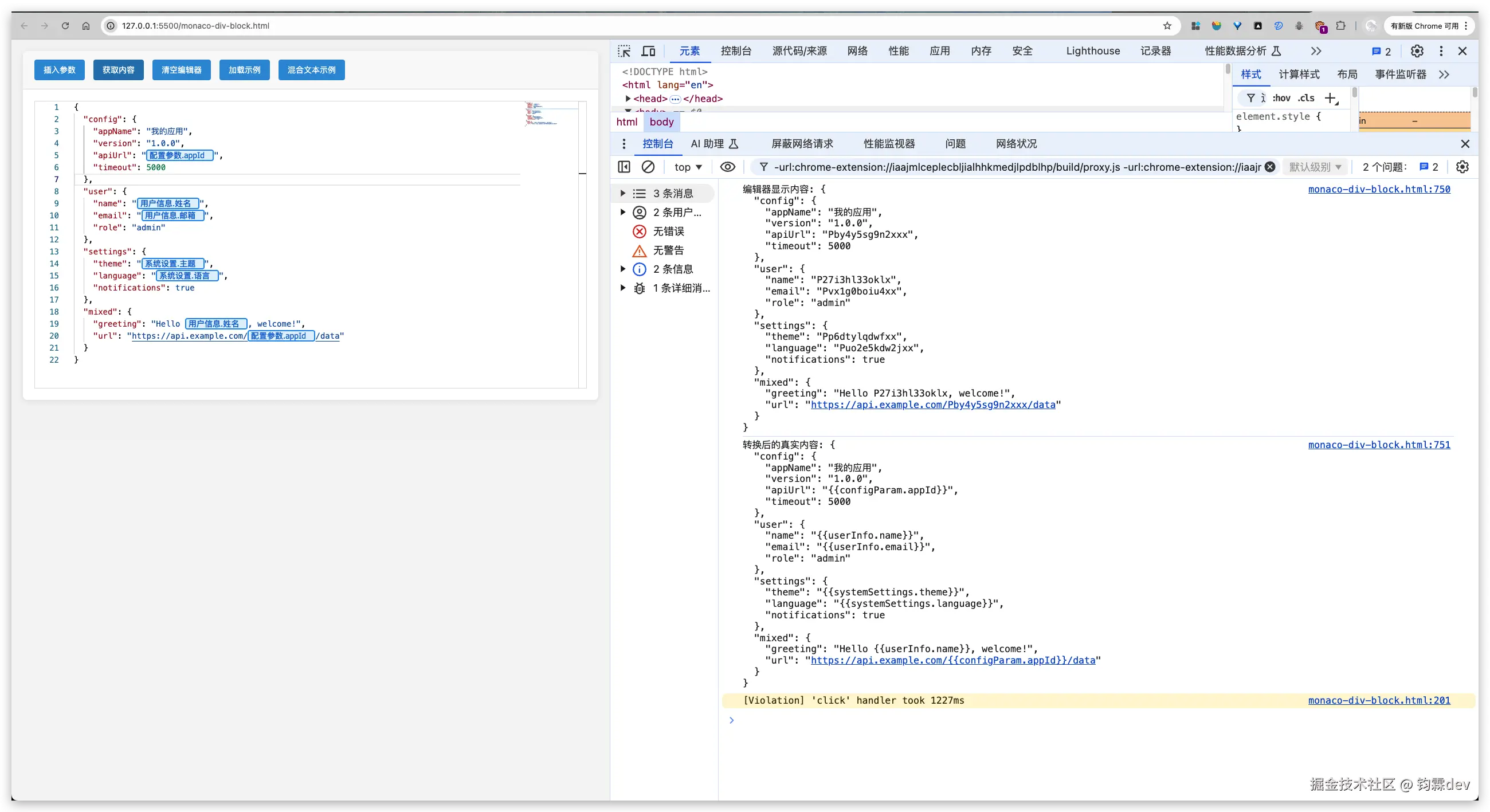
删除、光标跳过、整块删除、整块不可编辑 都能正常实现
代码:
html
<!DOCTYPE html>
<html lang="en">
<head>
<meta charset="UTF-8" />
<meta name="viewport" content="width=device-width, initial-scale=1.0" />
<style>
body {
margin: 0;
padding: 20px;
font-family: 'Segoe UI', Tahoma, Geneva, Verdana, sans-serif;
background: #f5f5f5;
}
.container {
max-width: 1200px;
margin: 0 auto;
background: white;
border-radius: 8px;
box-shadow: 0 2px 10px rgba(0, 0, 0, 0.1);
overflow: hidden;
}
.header {
background: #2c3e50;
color: white;
padding: 15px 20px;
border-bottom: 1px solid #34495e;
}
.toolbar {
padding: 15px 20px;
border-bottom: 1px solid #e0e0e0;
background: #fafafa;
}
.param-button {
background: #3498db;
color: white;
border: none;
padding: 8px 16px;
border-radius: 4px;
cursor: pointer;
margin-right: 10px;
font-size: 14px;
transition: background 0.3s;
}
.param-button:hover {
background: #2980b9;
}
.editor-container {
height: 500px;
border: 1px solid #e0e0e0;
margin: 20px;
}
.param-block {
/* 隐藏占位符文本,但保持布局 */
color: transparent !important;
background-color: transparent !important;
border: none !important;
padding: 0 !important;
margin: 0 !important;
display: inline !important;
opacity: 0.1 !important;
}
.param-overlay {
font-family: 'Segoe UI', Tahoma, Geneva, Verdana, sans-serif !important;
/* 确保覆盖层完全覆盖占位符 */
display: flex !important;
align-items: center !important;
justify-content: flex-start !important;
}
.param-overlay:hover {
background: #bbdefb !important;
border-color: #1976d2 !important;
/* box-shadow: 0 2px 4px rgba(0, 0, 0, 0.1) !important; */
transform: translateY(-1px) !important;
transition: all 0.2s ease !important;
}
/* 编辑器容器需要相对定位 */
.editor-container {
height: 500px;
border: 1px solid #e0e0e0;
margin: 20px;
position: relative;
}
.param-block-label {
background: #e3f2fd !important;
border: 2px solid #2196f3 !important;
border-radius: 4px !important;
padding: 2px 8px !important;
margin: 0 2px !important;
color: #1976d2 !important;
font-weight: 500 !important;
cursor: pointer !important;
user-select: none !important;
position: relative !important;
}
.param-block-label::before {
content: '' !important;
margin-right: 4px !important;
}
.param-block-label:hover {
background: #bbdefb !important;
/* border-color: #1976d2 !important; */
}
.param-block-hidden {
opacity: 0 !important;
width: 0 !important;
height: 0 !important;
overflow: hidden !important;
}
.param-selector {
position: fixed;
top: 50%;
left: 50%;
transform: translate(-50%, -50%);
background: white;
border-radius: 8px;
box-shadow: 0 4px 20px rgba(0, 0, 0, 0.3);
padding: 20px;
z-index: 1000;
min-width: 400px;
display: none;
}
.param-selector h3 {
margin-top: 0;
color: #2c3e50;
}
.param-list {
max-height: 300px;
overflow-y: auto;
}
.param-item {
padding: 10px;
border: 1px solid #e0e0e0;
margin: 5px 0;
border-radius: 4px;
cursor: pointer;
transition: all 0.3s;
}
.param-item:hover {
background: #f0f0f0;
/* border-color: #3498db; */
}
.param-item-label {
font-weight: 500;
color: #2c3e50;
}
.param-item-value {
color: #7f8c8d;
font-size: 12px;
margin-top: 4px;
}
.modal-overlay {
position: fixed;
top: 0;
left: 0;
width: 100%;
height: 100%;
background: rgba(0, 0, 0, 0.5);
z-index: 999;
display: none;
}
.close-btn {
position: absolute;
top: 10px;
right: 15px;
background: none;
border: none;
font-size: 24px;
cursor: pointer;
color: #999;
}
</style>
</head>
<body>
<div class="container">
<div class="toolbar">
<button class="param-button" onclick="insertParameter()">插入参数</button>
<button class="param-button" onclick="getEditorContent()">获取内容</button>
<button class="param-button" onclick="clearEditor()">清空编辑器</button>
<button class="param-button" onclick="loadSampleData()">加载示例</button>
<button class="param-button" onclick="loadMixedTextExample()">混合文本示例</button>
</div>
<div class="editor-container" id="editor"></div>
</div>
<!-- 参数选择器 -->
<div class="modal-overlay" id="modalOverlay" onclick="closeParameterSelector()"></div>
<div class="param-selector" id="paramSelector">
<button class="close-btn" onclick="closeParameterSelector()">×</button>
<h3>选择参数</h3>
<div class="param-list" id="paramList"></div>
</div>
<!-- Monaco Editor -->
<script src="https://cdn.jsdelivr.net/npm/monaco-editor@0.34.1/min/vs/loader.js"></script>
<script>
let editor;
let decorations = [];
// 预设参数数据
const availableParams = [
{ label: '配置参数.appId', value: '{{configParam.appId}}' },
{ label: '配置参数.用户名', value: '{{configParam.username}}' },
{ label: '配置参数.密码', value: '{{configParam.password}}' },
{ label: '用户信息.姓名', value: '{{userInfo.name}}' },
{ label: '用户信息.邮箱', value: '{{userInfo.email}}' },
{ label: '系统设置.主题', value: '{{systemSettings.theme}}' },
{ label: '系统设置.语言', value: '{{systemSettings.language}}' }
];
// 占位符映射系统
const placeholderMappings = {
placeholderToValue: new Map(), // 占位符 -> 真实参数值
valueToPlaceholder: new Map(), // 真实参数值 -> 占位符
placeholderToLabel: new Map(), // 占位符 -> 显示标签
usedPlaceholders: new Set() // 已使用的占位符集合
};
// 生成与标签长度匹配的占位符(不包含引号)
function generatePlaceholder(label) {
// 计算标签的显示长度(考虑中文字符)
const displayLength = getDisplayLength(label);
let placeholder;
do {
// 生成固定长度的占位符,使用字母和数字,不包含引号
placeholder = 'P' + Math.random().toString(36).substring(2, displayLength).padEnd(displayLength - 1, 'x');
} while (placeholderMappings.usedPlaceholders.has(placeholder));
placeholderMappings.usedPlaceholders.add(placeholder);
return placeholder;
}
// 计算字符串的显示长度(中文字符算2个单位)
function getDisplayLength(str) {
let length = 0;
for (let i = 0; i < str.length; i++) {
// 简单判断中文字符(更精确的方法可以使用Unicode范围)
if (str.charCodeAt(i) > 127) {
length += 2;
} else {
length += 1;
}
}
// 至少保证4个字符长度
return Math.max(4, length);
}
// 初始化参数映射
function initializeParameterMappings() {
availableParams.forEach(param => {
const placeholder = generatePlaceholder(param.label);
placeholderMappings.placeholderToValue.set(placeholder, param.value);
placeholderMappings.valueToPlaceholder.set(param.value, placeholder);
placeholderMappings.placeholderToLabel.set(placeholder, param.label);
});
}
// 将真实JSON转换为编辑器显示的JSON(使用占位符)
function realToEditor(realContent) {
let editorContent = realContent;
placeholderMappings.valueToPlaceholder.forEach((placeholder, realValue) => {
// 只替换 {{...}} 部分,不影响引号和其他文本
const regex = new RegExp(escapeRegExp(realValue), 'g');
editorContent = editorContent.replace(regex, placeholder);
});
return editorContent;
}
// 将编辑器JSON转换为真实JSON(恢复真实参数值)
function editorToReal(editorContent) {
let realContent = editorContent;
placeholderMappings.placeholderToValue.forEach((realValue, placeholder) => {
// 只替换占位符为真实参数值
const regex = new RegExp(escapeRegExp(placeholder), 'g');
realContent = realContent.replace(regex, realValue);
});
return realContent;
}
// 转义正则表达式特殊字符
function escapeRegExp(string) {
return string.replace(/[.*+?^${}()|[\]\\]/g, '\\$&');
}
// 创建参数值到标签的映射(用于显示)
const paramValueToLabel = {};
const paramLabelToValue = {};
availableParams.forEach(param => {
paramValueToLabel[param.value] = param.label;
paramLabelToValue[param.label] = param.value;
});
// 初始化映射系统
initializeParameterMappings();
// 初始化 Monaco Editor
require.config({ paths: { 'vs': 'https://cdn.jsdelivr.net/npm/monaco-editor@0.34.1/min/vs' } });
require(['vs/editor/editor.main'], function () {
// 准备编辑器的初始内容(转换为占位符版本)
const realInitialContent = `{
"emails": [
"zhangsan@z.com",
"lisi@a.com"
],
"mobiles": "{{configParam.mobiles}}",
"config": {
"appId": "{{configParam.appId}}",
"username": "{{userInfo.name}}abc"
}
}`;
// 为初始内容中未映射的参数创建映射
const unmappedParams = extractUnmappedParams(realInitialContent);
unmappedParams.forEach(param => {
if (!placeholderMappings.valueToPlaceholder.has(param)) {
// 为未知参数生成标签和占位符
const label = param.replace(/[{}]/g, ''); // 简单处理,移除大括号
const placeholder = generatePlaceholder(label);
placeholderMappings.placeholderToValue.set(placeholder, param);
placeholderMappings.valueToPlaceholder.set(param, placeholder);
placeholderMappings.placeholderToLabel.set(placeholder, label);
}
});
const editorInitialContent = realToEditor(realInitialContent);
// 创建编辑器实例
editor = monaco.editor.create(document.getElementById('editor'), {
value: editorInitialContent,
language: 'json',
theme: 'vs',
fontSize: 14,
lineNumbers: 'on',
roundedSelection: false,
scrollBeyondLastLine: false,
minimap: { enabled: true },
automaticLayout: true
});
// 监听内容变化,更新装饰器
editor.onDidChangeModelContent(() => {
updateParameterDecorations();
});
// 监听滚动事件,更新覆盖层位置
editor.onDidScrollChange(() => {
createParameterOverlays();
});
// 监听布局变化,更新覆盖层
editor.onDidLayoutChange(() => {
setTimeout(() => createParameterOverlays(), 100);
});
// 监听键盘事件,实现整块删除和光标跳跃
editor.onKeyDown((e) => {
if (e.keyCode === monaco.KeyCode.Backspace || e.keyCode === monaco.KeyCode.Delete) {
// 如果处理了参数块删除,则返回true表示已处理,阻止默认事件
if (handleParameterDeletion(e)) {
e.preventDefault();
e.stopPropagation();
return false; // 阻止默认行为
}
} else if (e.keyCode === monaco.KeyCode.LeftArrow || e.keyCode === monaco.KeyCode.RightArrow) {
handleCursorMovement(e);
}
});
// 监听鼠标点击,处理参数块选择和智能定位
editor.onMouseDown((e) => {
const position = e.target.position;
if (position) {
handleMouseClick(position, e);
}
});
// 初始化装饰器
updateParameterDecorations();
});
// 提取内容中未映射的参数
function extractUnmappedParams(content) {
const paramRegex = /\{\{[^}]+\}\}/g;
const params = [];
let match;
while ((match = paramRegex.exec(content)) !== null) {
if (!placeholderMappings.valueToPlaceholder.has(match[0])) {
params.push(match[0]);
}
}
return params;
}
// 更新参数装饰器(现在基于占位符工作)
function updateParameterDecorations() {
const model = editor.getModel();
const content = model.getValue();
const newDecorations = [];
// 查找所有占位符并添加装饰器
placeholderMappings.placeholderToLabel.forEach((label, placeholder) => {
const regex = new RegExp(escapeRegExp(placeholder), 'g');
let match;
while ((match = regex.exec(content)) !== null) {
const startPos = model.getPositionAt(match.index);
const endPos = model.getPositionAt(match.index + match[0].length);
const realValue = placeholderMappings.placeholderToValue.get(placeholder);
newDecorations.push({
range: new monaco.Range(startPos.lineNumber, startPos.column, endPos.lineNumber, endPos.column),
options: {
inlineClassName: 'param-block',
hoverMessage: {
value: `**参数标签:** ${label}\n\n**实际值:** ${realValue}\n\n**占位符:** ${placeholder}`
},
stickiness: monaco.editor.TrackedRangeStickiness.NeverGrowsWhenTypingAtEdges
}
});
}
});
decorations = editor.deltaDecorations(decorations, newDecorations);
createParameterOverlays();
}
// 创建参数覆盖层显示友好标签
function createParameterOverlays() {
// 移除旧的覆盖层
document.querySelectorAll('.param-overlay').forEach(el => el.remove());
const model = editor.getModel();
const content = model.getValue();
// 为每个占位符创建覆盖层
placeholderMappings.placeholderToLabel.forEach((label, placeholder) => {
const regex = new RegExp(escapeRegExp(placeholder), 'g');
let match;
while ((match = regex.exec(content)) !== null) {
const startPos = model.getPositionAt(match.index);
const endPos = model.getPositionAt(match.index + match[0].length);
// 获取参数在屏幕上的位置
const startPixel = editor.getScrolledVisiblePosition(startPos);
const endPixel = editor.getScrolledVisiblePosition(endPos);
if (startPixel && endPixel) {
// 创建覆盖层元素
const overlay = document.createElement('div');
overlay.className = 'param-overlay';
overlay.textContent = `${label}`;
overlay.style.cssText = `
position: absolute;
left: ${startPixel.left}px;
top: ${startPixel.top}px;
width: ${endPixel.left - startPixel.left}px;
height: ${endPixel.top - startPixel.top + 14}px;
background: #e3f2fd;
border: 2px solid #2196f3;
border-radius: 4px;
padding: 8px 4px;
color: #1976d2;
font-weight: 500;
font-size: 14px;
cursor: pointer;
user-select: none;
z-index: 100;
white-space: nowrap;
pointer-events: auto;
overflow: hidden;
text-overflow: ellipsis;
box-sizing: border-box;
display: flex;
align-items: center;
justify-content: center;
line-height: 1;
`;
// 添加点击事件
overlay.addEventListener('click', () => {
selectParameterBlock(startPos);
});
// 添加到编辑器容器
document.getElementById('editor').appendChild(overlay);
}
}
});
}
// 处理光标移动(左右箭头键)
function handleCursorMovement(e) {
const position = editor.getPosition();
const model = editor.getModel();
const offset = model.getOffsetAt(position);
if (e.keyCode === monaco.KeyCode.LeftArrow) {
// 向左移动时,检查光标前面是否有参数块
const paramInfo = findParameterBlockAt(offset - 1);
if (paramInfo && offset > paramInfo.start && offset <= paramInfo.end) {
e.preventDefault();
// 跳到参数块开始位置
const newPos = model.getPositionAt(paramInfo.start + 1);
editor.setPosition(newPos);
}
} else if (e.keyCode === monaco.KeyCode.RightArrow) {
// 向右移动时,检查光标位置是否在参数块内
const paramInfo = findParameterBlockAt(offset);
if (paramInfo && offset >= paramInfo.start && offset < paramInfo.end) {
e.preventDefault();
// 跳到参数块结束位置
const newPos = model.getPositionAt(paramInfo.end - 1);
editor.setPosition(newPos);
}
}
}
// 处理鼠标点击
function handleMouseClick(position, e) {
const paramInfo = isInParameterBlock(position);
if (paramInfo) {
// 如果点击在参数块内,智能定位光标
e.preventDefault?.();
const model = editor.getModel();
const clickOffset = model.getOffsetAt(position);
const blockStart = paramInfo.start;
const blockEnd = paramInfo.end;
const blockMiddle = blockStart + Math.floor((blockEnd - blockStart) / 2);
targetOffset = blockEnd;
const targetPos = model.getPositionAt(targetOffset);
editor.setPosition(targetPos);
// 短暂选择整个参数块以提供视觉反馈
// setTimeout(() => {
// const startPos = model.getPositionAt(blockStart);
// const endPos = model.getPositionAt(blockEnd);
// editor.setSelection(new monaco.Range(
// startPos.lineNumber, startPos.column,
// endPos.lineNumber, endPos.column
// ));
// // 200ms后取消选择
// setTimeout(() => {
// editor.setPosition(targetPos);
// }, 200);
// }, 10);
}
}
// 检查位置是否在参数块内(基于占位符)
function isInParameterBlock(position) {
const model = editor.getModel();
const offset = model.getOffsetAt(position);
return findParameterBlockAt(offset);
}
// 查找指定偏移位置的参数块信息
function findParameterBlockAt(offset) {
const model = editor.getModel();
const content = model.getValue();
// 检查是否在任何占位符内或边界上
for (const [placeholder, label] of placeholderMappings.placeholderToLabel) {
const regex = new RegExp(escapeRegExp(placeholder), 'g');
let match;
while ((match = regex.exec(content)) !== null) {
if (offset >= match.index && offset <= match.index + match[0].length) {
return {
start: match.index,
end: match.index + match[0].length,
text: placeholder,
realValue: placeholderMappings.placeholderToValue.get(placeholder),
label: label
};
}
}
}
return null;
}
// 选择整个参数块
function selectParameterBlock(position) {
const paramInfo = isInParameterBlock(position);
if (paramInfo) {
const model = editor.getModel();
const startPos = model.getPositionAt(paramInfo.start);
const endPos = model.getPositionAt(paramInfo.end);
editor.setSelection(new monaco.Range(
startPos.lineNumber, startPos.column,
endPos.lineNumber, endPos.column
));
}
}
// 处理参数块删除
function handleParameterDeletion(e) {
const model = editor.getModel();
const position = editor.getPosition();
const offset = model.getOffsetAt(position);
// 优先:如果光标在块内(包含边界),删整块
let paramInfo = findParameterBlockAt(offset);
// 针对 Backspace:若不在块内,但紧邻块右侧(offset === block.end),也删整块
if (!paramInfo && e.keyCode === monaco.KeyCode.Backspace) {
const leftInfo = findParameterBlockAt(Math.max(0, offset - 1));
if (leftInfo && offset === leftInfo.end) {
paramInfo = leftInfo;
}
}
// 针对 Delete:若不在块内,但紧邻块左侧(offset === block.start),也删整块
if (!paramInfo && e.keyCode === monaco.KeyCode.Delete) {
const rightInfo = findParameterBlockAt(offset);
if (rightInfo && offset === rightInfo.start) {
paramInfo = rightInfo;
}
}
if (paramInfo) {
// 避免在事件处理程序中多次阻止事件
// e.preventDefault();
const startPos = model.getPositionAt(paramInfo.start);
const endPos = model.getPositionAt(paramInfo.end);
// 仅删除占位符本身,避免影响引号/逗号
editor.executeEdits('delete-parameter', [{
range: new monaco.Range(
startPos.lineNumber, startPos.column,
endPos.lineNumber, endPos.column
),
text: ''
}]);
// 返回true表示已处理删除事件
return true;
}
// 返回false表示未处理,允许默认删除行为
return false;
}
// 插入参数
function insertParameter() {
showParameterSelector();
}
// 显示参数选择器
function showParameterSelector() {
const paramList = document.getElementById('paramList');
paramList.innerHTML = '';
availableParams.forEach(param => {
const paramItem = document.createElement('div');
paramItem.className = 'param-item';
paramItem.innerHTML = `
<div class="param-item-label">${param.label}</div>
<div class="param-item-value">${param.value}</div>
`;
paramItem.onclick = () => {
insertParameterAtCursor(param.value);
closeParameterSelector();
};
paramList.appendChild(paramItem);
});
document.getElementById('modalOverlay').style.display = 'block';
document.getElementById('paramSelector').style.display = 'block';
}
// 关闭参数选择器
function closeParameterSelector() {
document.getElementById('modalOverlay').style.display = 'none';
document.getElementById('paramSelector').style.display = 'none';
}
// 在光标位置插入参数
function insertParameterAtCursor(paramValue) {
const position = editor.getPosition();
// 获取对应的占位符
const placeholder = placeholderMappings.valueToPlaceholder.get(paramValue);
if (placeholder) {
editor.executeEdits('insert-parameter', [{
range: new monaco.Range(position.lineNumber, position.column, position.lineNumber, position.column),
text: placeholder
}]);
// 移动光标到参数后面
const newPosition = new monaco.Position(
position.lineNumber,
position.column + placeholder.length
);
editor.setPosition(newPosition);
}
// 聚焦编辑器
editor.focus();
}
// 获取编辑器内容(返回实际的参数值)
function getEditorContent() {
const editorContent = editor.getValue();
const realContent = editorToReal(editorContent);
console.log('编辑器显示内容:', editorContent);
console.log('转换后的真实内容:', realContent);
// 创建一个显示友好版本的内容用于展示
let displayContent = realContent;
const paramRegex = /\{\{[^}]+\}\}/g;
let match;
// 替换所有参数为友好显示
while ((match = paramRegex.exec(realContent)) !== null) {
const paramValue = match[0];
const paramLabel = paramValueToLabel[paramValue] || paramValue;
displayContent = displayContent.replace(paramValue, `[${paramLabel}]`);
}
alert(`编辑器内容:\n\n编辑器显示版本:\n${editorContent}\n\n实际保存数据:\n${realContent}\n\n友好显示版本:\n${displayContent}`);
return realContent;
}
// 设置编辑器内容(从真实数据转换)
function setEditorContent(realContent) {
// 提取新的未映射参数
const unmappedParams = extractUnmappedParams(realContent);
unmappedParams.forEach(param => {
if (!placeholderMappings.valueToPlaceholder.has(param)) {
const label = param.replace(/[{}]/g, '');
const placeholder = generatePlaceholder(label);
placeholderMappings.placeholderToValue.set(placeholder, param);
placeholderMappings.valueToPlaceholder.set(param, placeholder);
placeholderMappings.placeholderToLabel.set(placeholder, label);
}
});
const editorContent = realToEditor(realContent);
editor.setValue(editorContent);
}
// 清空编辑器
function clearEditor() {
if (confirm('确定要清空编辑器内容吗?')) {
editor.setValue('');
}
}
// 测试功能:加载示例数据
function loadSampleData() {
const sampleRealData = `{
"config": {
"appName": "我的应用",
"version": "1.0.0",
"apiUrl": "{{configParam.appId}}",
"timeout": 5000
},
"user": {
"name": "{{userInfo.name}}",
"email": "{{userInfo.email}}",
"role": "admin"
},
"settings": {
"theme": "{{systemSettings.theme}}",
"language": "{{systemSettings.language}}",
"notifications": true
},
"mixed": {
"greeting": "Hello {{userInfo.name}}, welcome!",
"url": "https://api.example.com/{{configParam.appId}}/data"
}
}`;
setEditorContent(sampleRealData);
}
// 在工具栏添加测试按钮的功能
window.loadSampleData = loadSampleData;
// 混合文本示例
function loadMixedTextExample() {
const mixedTextData = `{
"welcome": "欢迎 {{userInfo.name}} 使用系统",
"apiEndpoint": "https://{{configParam.appId}}.api.com/v1",
"message": "您好{{userInfo.name}},当前主题是{{systemSettings.theme}}模式",
"config": {
"title": "{{configParam.appId}} - 管理后台",
"description": "这是{{userInfo.name}}的专属配置页面"
}
}`;
setEditorContent(mixedTextData);
}
window.loadMixedTextExample = loadMixedTextExample;
</script>
</body>
</html>总结
AI模型迅猛发展下,解决问题的思路尤为重要,提出好问题,才能找到好答案