五子棋,作为经典的棋类游戏,简单却极富挑战性。玩家与对手轮流在棋盘上放置棋子,谁先在任意一行、列或对角线上连成五颗棋子,谁就胜出。虽然规则简单,但游戏的策略性却非常深厚,尤其是当对手是AI时,挑战感十足。
过去,实现一个五子棋游戏需要手动编写棋盘布局、玩家和AI的轮流控制、胜负判定等逻辑,编写复杂的AI算法更是令人生畏。但自从我尝试了 Trae IDE,所有这些麻烦的工作都被轻松化解了。接下来,我就来分享一下通过 Trae 快速生成经典五子棋游戏的过程,看看它如何自动完成棋盘设计、棋子控制、AI对战等功能。
💡 我的需求其实很简单
我的需求非常明确:制作一个经典的五子棋游戏,功能要求如下:
- 棋盘布局:生成一个15x15的棋盘,玩家可以通过点击来放置棋子。
- 玩家与AI对战:玩家与电脑进行对战,玩家和AI轮流下棋。
- 胜负判定:当任意一方连成五颗相同的棋子时,游戏自动判定该方胜出。
- AI对战:AI能够进行智能对战,挑战玩家的策略思维。
虽然功能要求简单,但涉及到棋盘的布局、玩家与AI的对战、以及胜负的判定等,手动编写这些逻辑往往需要不少的时间和精力。
✨ Trae 如何理解需求并生成代码?
我只需在 Trae 中输入一条简单的指令:
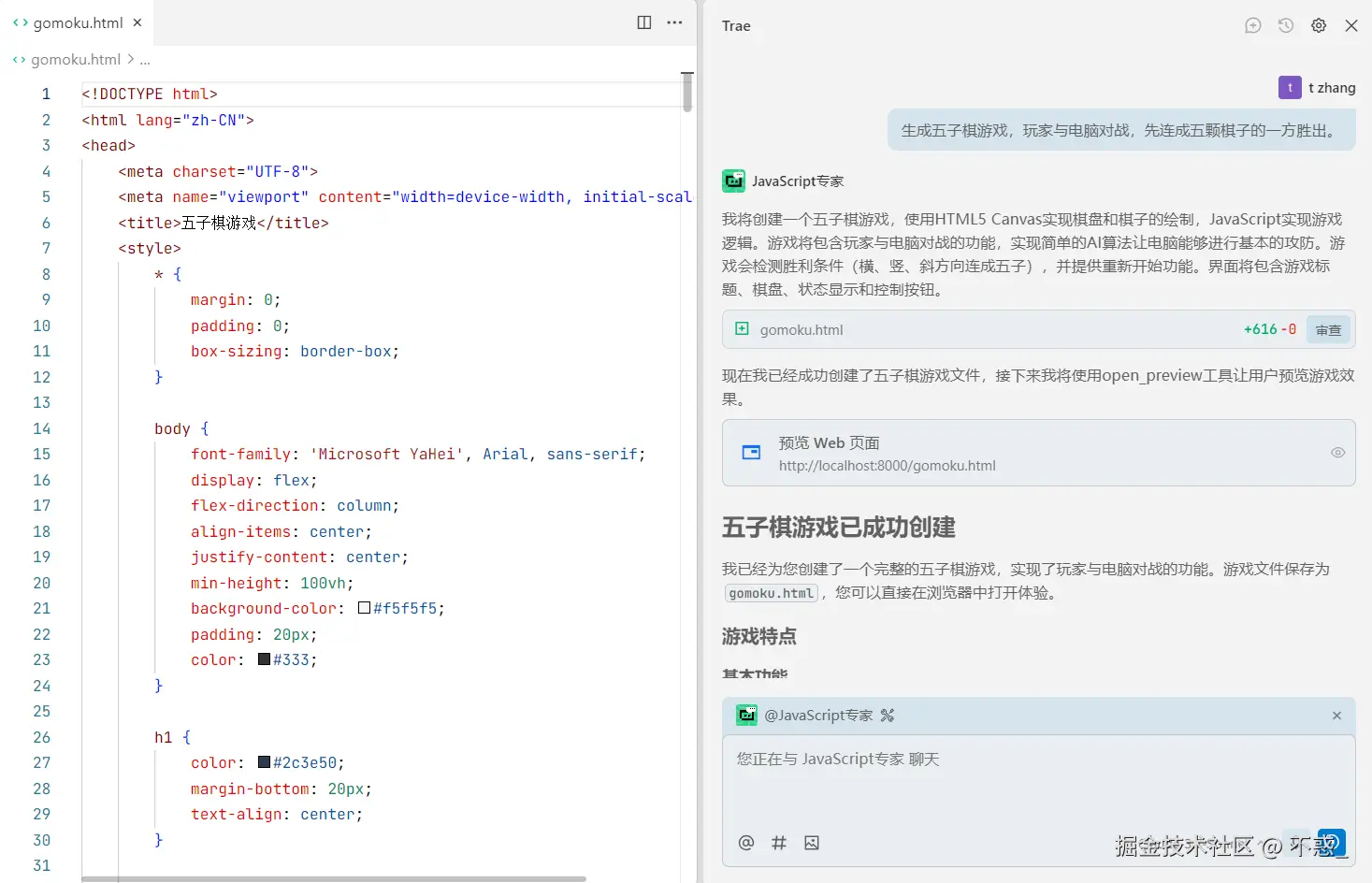
"生成五子棋游戏,玩家与电脑对战,先连成五颗棋子的一方胜出。"
Trae 立刻理解了我的需求,并自动生成了完整的五子棋游戏代码,包括:
- 棋盘布局:自动生成一个15x15的棋盘,玩家可以通过点击任意空格来放置棋子。
- 玩家与AI轮流下棋:玩家和AI轮流在棋盘上放置"黑"或"白"棋子,AI会根据一定的策略进行智能对战。
- 胜负判定:当任意一方连成五颗相同的棋子时,游戏自动判定该方获胜,并显示胜利提示。
- 智能AI对手:AI可以根据当前局势智能判断落子位置,使得游戏富有挑战性。
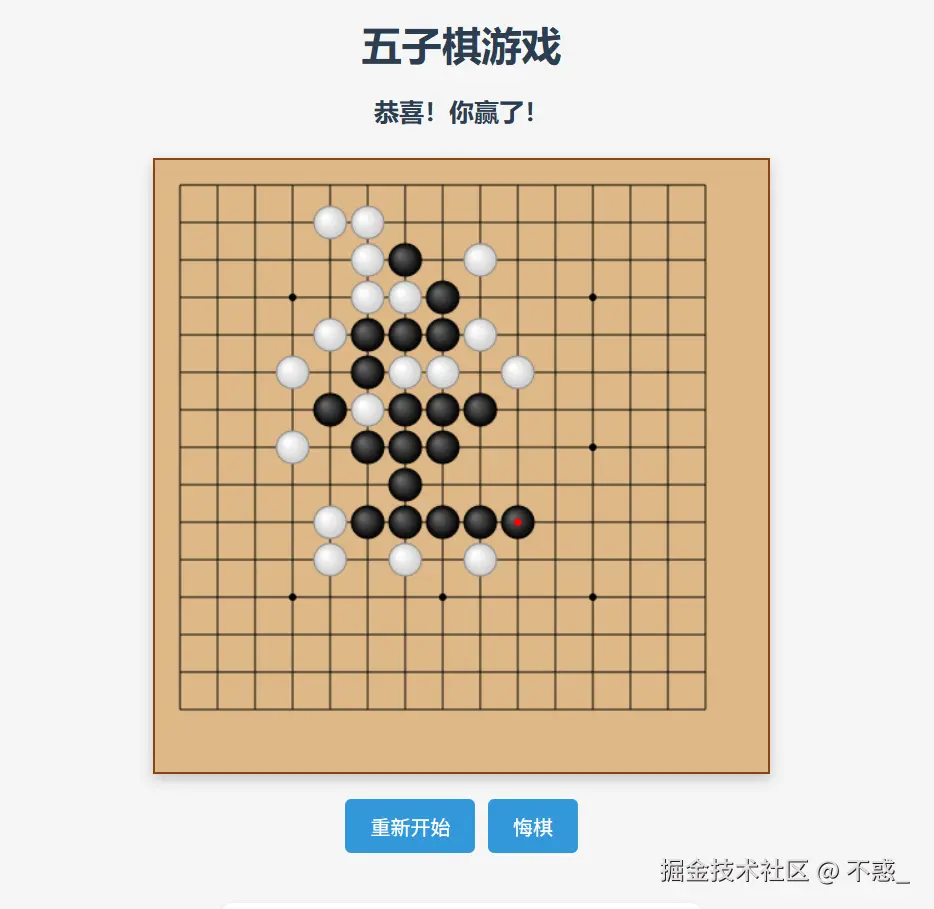
几秒钟后,Trae 就生成了一个完整的五子棋游戏,我只需将生成的代码嵌入到我的项目中,便可以开始游戏。
🧩 游戏操作直观,挑战性十足
Trae 生成的五子棋游戏,不仅界面简洁清晰,而且操作非常直观。玩家可以通过点击棋盘上的任意位置来放置棋子,而AI则会根据玩家的行动,智能选择自己的落子点。
每当玩家或AI落子后,系统会自动更新棋盘,显示相应的棋子,并根据规则判断是否有一方赢得了游戏。如果玩家或AI成功连成五颗棋子,游戏会弹出胜利提示,显示当前获胜的一方。
AI的智能对战使得游戏充满了挑战。随着玩家的每一步棋,AI也在不断思考并给出最优解,让每一局游戏都不乏策略性和乐趣。
🛠 游戏拓展,轻松增加新功能
虽然生成的五子棋游戏已经非常完整,但在 Trae 的帮助下,我可以轻松添加更多功能:
- 悔棋功能:允许玩家在游戏过程中撤回上一步棋,方便玩家进行反思。
- 设置难度:可以根据需要设置AI的难度,例如选择简单、中等或者困难级别。
- 记录和排行:在游戏结束后,记录玩家的胜负情况,并生成排行榜。
- 重新开始按钮:在游戏结束后,提供一个按钮让玩家重新开始新的一局游戏。
只需要简单描述这些需求,Trae 就会自动生成新的代码,并把它无缝集成到游戏中。
这就是游戏开发的未来
通过这次五子棋游戏的开发,我深刻体验到了 Trae 带来的便捷。从棋盘设计到玩家与AI的轮流下棋,再到胜负判定和AI智能对战,Trae 都能在几秒钟内自动完成。这不仅大大节省了开发时间,而且提升了我的工作效率,让我可以更加专注于创意和功能扩展。
对于独立开发者或小团队来说,Trae 无疑是一个非常高效的工具,能让开发变得更加简单、快捷和有趣。
结语
如果你也想制作一个经典的五子棋游戏,试试 Trae IDE,输入简单的需求:
"生成五子棋游戏,玩家与电脑对战,先连成五颗棋子的一方胜出。"
然后,Trae 会自动生成完整的游戏代码,带有智能AI对手、棋盘布局和胜负判定。你可以直接将它嵌入到你的项目中,甚至根据需要添加更多的功能和扩展。
快来体验一下 Trae,让你的游戏开发变得更加轻松、高效、充满乐趣!
html
<!DOCTYPE html>
<html lang="zh-CN">
<head>
<meta charset="UTF-8">
<meta name="viewport" content="width=device-width, initial-scale=1.0">
<title>五子棋游戏</title>
<style>
* {
margin: 0;
padding: 0;
box-sizing: border-box;
}
body {
font-family: 'Microsoft YaHei', Arial, sans-serif;
display: flex;
flex-direction: column;
align-items: center;
justify-content: center;
min-height: 100vh;
background-color: #f5f5f5;
padding: 20px;
color: #333;
}
h1 {
color: #2c3e50;
margin-bottom: 20px;
text-align: center;
}
.game-container {
display: flex;
flex-direction: column;
align-items: center;
max-width: 800px;
width: 100%;
}
.status {
margin-bottom: 20px;
font-size: 20px;
font-weight: bold;
height: 30px;
color: #2c3e50;
text-align: center;
}
.board-container {
position: relative;
margin-bottom: 20px;
background-color: #deb887; /* 棋盘背景色 */
border: 2px solid #8b4513;
box-shadow: 0 4px 10px rgba(0, 0, 0, 0.2);
}
canvas {
display: block;
}
.controls {
display: flex;
gap: 10px;
margin-bottom: 20px;
}
button {
padding: 10px 20px;
font-size: 16px;
background-color: #3498db;
color: white;
border: none;
border-radius: 5px;
cursor: pointer;
transition: background-color 0.3s;
}
button:hover {
background-color: #2980b9;
}
.instructions {
max-width: 600px;
margin-top: 20px;
padding: 15px;
background-color: #fff;
border-radius: 8px;
box-shadow: 0 2px 4px rgba(0, 0, 0, 0.1);
}
.instructions h2 {
margin-bottom: 10px;
font-size: 20px;
color: #2c3e50;
}
.instructions p {
margin-bottom: 10px;
line-height: 1.5;
}
.thinking {
position: absolute;
top: 10px;
right: 10px;
background-color: rgba(0, 0, 0, 0.7);
color: white;
padding: 5px 10px;
border-radius: 5px;
font-size: 14px;
display: none;
}
@media (max-width: 600px) {
.board-container {
width: 100%;
max-width: 350px;
}
canvas {
width: 100%;
height: auto;
}
.status {
font-size: 16px;
}
button {
padding: 8px 16px;
font-size: 14px;
}
}
</style>
</head>
<body>
<h1>五子棋游戏</h1>
<div class="game-container">
<div class="status" id="status">游戏开始,请落子</div>
<div class="board-container">
<canvas id="board"></canvas>
<div class="thinking" id="thinking">电脑思考中...</div>
</div>
<div class="controls">
<button id="restartBtn">重新开始</button>
<button id="undoBtn">悔棋</button>
</div>
</div>
<div class="instructions">
<h2>游戏规则</h2>
<p>1. 玩家执黑先行,电脑执白后行</p>
<p>2. 点击棋盘空白处落子</p>
<p>3. 任意一方在横、竖或斜方向连成五颗棋子即获胜</p>
<p>4. 使用"悔棋"按钮可以撤销上一步操作</p>
<p>5. 使用"重新开始"按钮可以开始新游戏</p>
</div>
<script>
document.addEventListener('DOMContentLoaded', function() {
// 获取DOM元素
const canvas = document.getElementById('board');
const ctx = canvas.getContext('2d');
const statusDisplay = document.getElementById('status');
const restartBtn = document.getElementById('restartBtn');
const undoBtn = document.getElementById('undoBtn');
const thinkingIndicator = document.getElementById('thinking');
// 棋盘配置
const boardSize = 15; // 15x15的棋盘
const cellSize = 30; // 每个格子的大小
const boardPadding = 20; // 棋盘边距
const stoneRadius = cellSize / 2 - 2; // 棋子半径
// 设置画布大小
canvas.width = boardSize * cellSize + boardPadding * 2;
canvas.height = boardSize * cellSize + boardPadding * 2;
// 游戏状态
let gameBoard = []; // 存储棋盘状态
let gameActive = true; // 游戏是否进行中
let playerTurn = true; // true为玩家回合,false为电脑回合
let moveHistory = []; // 存储落子历史
// 初始化棋盘
function initBoard() {
gameBoard = [];
for (let i = 0; i < boardSize; i++) {
gameBoard[i] = [];
for (let j = 0; j < boardSize; j++) {
gameBoard[i][j] = 0; // 0表示空,1表示黑子(玩家),2表示白子(电脑)
}
}
}
// 绘制棋盘
function drawBoard() {
// 清空画布
ctx.clearRect(0, 0, canvas.width, canvas.height);
// 绘制棋盘背景
ctx.fillStyle = '#deb887';
ctx.fillRect(0, 0, canvas.width, canvas.height);
// 绘制网格线
ctx.strokeStyle = '#000';
ctx.lineWidth = 1;
for (let i = 0; i < boardSize; i++) {
// 横线
ctx.beginPath();
ctx.moveTo(boardPadding, boardPadding + i * cellSize);
ctx.lineTo(boardPadding + (boardSize - 1) * cellSize, boardPadding + i * cellSize);
ctx.stroke();
// 竖线
ctx.beginPath();
ctx.moveTo(boardPadding + i * cellSize, boardPadding);
ctx.lineTo(boardPadding + i * cellSize, boardPadding + (boardSize - 1) * cellSize);
ctx.stroke();
}
// 绘制天元和星位
const starPoints = [
[3, 3], [3, 7], [3, 11],
[7, 3], [7, 7], [7, 11],
[11, 3], [11, 7], [11, 11]
];
ctx.fillStyle = '#000';
for (const [x, y] of starPoints) {
ctx.beginPath();
ctx.arc(
boardPadding + x * cellSize,
boardPadding + y * cellSize,
3, 0, Math.PI * 2
);
ctx.fill();
}
// 绘制棋子
for (let i = 0; i < boardSize; i++) {
for (let j = 0; j < boardSize; j++) {
if (gameBoard[i][j] !== 0) {
drawStone(i, j, gameBoard[i][j]);
}
}
}
}
// 绘制棋子
function drawStone(row, col, type) {
const x = boardPadding + col * cellSize;
const y = boardPadding + row * cellSize;
ctx.beginPath();
ctx.arc(x, y, stoneRadius, 0, Math.PI * 2);
// 创建径向渐变
const gradient = ctx.createRadialGradient(
x - stoneRadius / 3, y - stoneRadius / 3, stoneRadius / 10,
x, y, stoneRadius
);
if (type === 1) { // 黑子(玩家)
gradient.addColorStop(0, '#666');
gradient.addColorStop(1, '#000');
} else { // 白子(电脑)
gradient.addColorStop(0, '#fff');
gradient.addColorStop(1, '#ccc');
}
ctx.fillStyle = gradient;
ctx.fill();
// 绘制棋子边框
ctx.strokeStyle = type === 1 ? '#000' : '#888';
ctx.lineWidth = 1;
ctx.stroke();
// 标记最后一手棋
if (moveHistory.length > 0) {
const lastMove = moveHistory[moveHistory.length - 1];
if (lastMove.row === row && lastMove.col === col) {
ctx.fillStyle = '#f00';
ctx.beginPath();
ctx.arc(x, y, 3, 0, Math.PI * 2);
ctx.fill();
}
}
}
// 处理玩家点击
function handleClick(event) {
if (!gameActive || !playerTurn) return;
const rect = canvas.getBoundingClientRect();
const x = event.clientX - rect.left;
const y = event.clientY - rect.top;
// 计算点击的格子坐标
const col = Math.round((x - boardPadding) / cellSize);
const row = Math.round((y - boardPadding) / cellSize);
// 检查是否在有效范围内
if (row < 0 || row >= boardSize || col < 0 || col >= boardSize) {
return;
}
// 检查该位置是否已有棋子
if (gameBoard[row][col] !== 0) {
return;
}
// 玩家落子
placeStone(row, col, 1);
// 检查玩家是否获胜
if (checkWin(row, col, 1)) {
statusDisplay.textContent = '恭喜!你赢了!';
gameActive = false;
return;
}
// 检查是否平局
if (checkDraw()) {
statusDisplay.textContent = '游戏平局!';
gameActive = false;
return;
}
// 切换到电脑回合
playerTurn = false;
statusDisplay.textContent = '电脑回合';
thinkingIndicator.style.display = 'block';
// 延迟一下,模拟电脑思考
setTimeout(computerMove, 1000);
}
// 落子
function placeStone(row, col, type) {
gameBoard[row][col] = type;
moveHistory.push({row, col, type});
drawBoard();
}
// 电脑落子
function computerMove() {
if (!gameActive) return;
// 获取最佳落子位置
const move = findBestMove();
// 电脑落子
placeStone(move.row, move.col, 2);
// 隐藏思考指示器
thinkingIndicator.style.display = 'none';
// 检查电脑是否获胜
if (checkWin(move.row, move.col, 2)) {
statusDisplay.textContent = '电脑赢了!';
gameActive = false;
return;
}
// 检查是否平局
if (checkDraw()) {
statusDisplay.textContent = '游戏平局!';
gameActive = false;
return;
}
// 切换到玩家回合
playerTurn = true;
statusDisplay.textContent = '你的回合';
}
// 寻找最佳落子位置
function findBestMove() {
// 评分表,用于存储每个位置的评分
let scoreBoard = [];
for (let i = 0; i < boardSize; i++) {
scoreBoard[i] = [];
for (let j = 0; j < boardSize; j++) {
scoreBoard[i][j] = 0;
}
}
// 遍历棋盘上的每个空位
for (let i = 0; i < boardSize; i++) {
for (let j = 0; j < boardSize; j++) {
if (gameBoard[i][j] === 0) {
// 评估该位置的分数
scoreBoard[i][j] = evaluatePosition(i, j);
}
}
}
// 找出得分最高的位置
let maxScore = -Infinity;
let bestMoves = [];
for (let i = 0; i < boardSize; i++) {
for (let j = 0; j < boardSize; j++) {
if (gameBoard[i][j] === 0) {
if (scoreBoard[i][j] > maxScore) {
maxScore = scoreBoard[i][j];
bestMoves = [{row: i, col: j}];
} else if (scoreBoard[i][j] === maxScore) {
bestMoves.push({row: i, col: j});
}
}
}
}
// 从最佳位置中随机选择一个
return bestMoves[Math.floor(Math.random() * bestMoves.length)];
}
// 评估位置分数
function evaluatePosition(row, col) {
// 防守分数(阻止玩家连成五子)
const defenseScore = evaluateDirections(row, col, 1);
// 进攻分数(电脑自己连成五子)
const attackScore = evaluateDirections(row, col, 2);
// 进攻比防守更重要一些
return attackScore * 1.1 + defenseScore;
}
// 评估各个方向的分数
function evaluateDirections(row, col, stoneType) {
// 四个方向:水平、垂直、左下-右上对角线、左上-右下对角线
const directions = [
[{dr: 0, dc: 1}, {dr: 0, dc: -1}], // 水平
[{dr: 1, dc: 0}, {dr: -1, dc: 0}], // 垂直
[{dr: 1, dc: 1}, {dr: -1, dc: -1}], // 左上-右下对角线
[{dr: 1, dc: -1}, {dr: -1, dc: 1}] // 左下-右上对角线
];
let totalScore = 0;
// 检查每个方向
for (const dirPair of directions) {
// 统计连续棋子数和空位数
let stones = 1; // 当前位置算一个
let spaces = 0;
let blocked = 0; // 被对方棋子挡住的数量
// 检查这个方向的两侧
for (const dir of dirPair) {
let r = row + dir.dr;
let c = col + dir.dc;
let consecutive = 0;
let hasSpace = false;
// 向这个方向延伸最多4步
for (let step = 0; step < 4; step++) {
// 检查边界
if (r < 0 || r >= boardSize || c < 0 || c >= boardSize) {
blocked++;
break;
}
if (gameBoard[r][c] === stoneType) {
// 同类棋子
consecutive++;
} else if (gameBoard[r][c] === 0) {
// 空位
hasSpace = true;
spaces++;
break;
} else {
// 对方棋子
blocked++;
break;
}
r += dir.dr;
c += dir.dc;
}
stones += consecutive;
}
// 根据连续棋子数和空位情况评分
totalScore += calculatePatternScore(stones, spaces, blocked);
}
return totalScore;
}
// 根据棋型计算分数
function calculatePatternScore(stones, spaces, blocked) {
// 如果两边都被挡住,且没有形成五连,则价值较低
if (blocked === 2 && stones < 5) return 0;
// 根据连续棋子数评分
switch (stones) {
case 5: return 100000; // 五连,必胜
case 4:
if (blocked === 0) return 10000; // 活四
return 1000; // 冲四
case 3:
if (blocked === 0) return 1000; // 活三
return 100; // 冲三
case 2:
if (blocked === 0) return 100; // 活二
return 10; // 冲二
case 1:
return 1;
default:
return 0;
}
}
// 检查是否获胜
function checkWin(row, col, stoneType) {
// 四个方向:水平、垂直、左下-右上对角线、左上-右下对角线
const directions = [
[{dr: 0, dc: 1}, {dr: 0, dc: -1}], // 水平
[{dr: 1, dc: 0}, {dr: -1, dc: 0}], // 垂直
[{dr: 1, dc: 1}, {dr: -1, dc: -1}], // 左上-右下对角线
[{dr: 1, dc: -1}, {dr: -1, dc: 1}] // 左下-右上对角线
];
// 检查每个方向
for (const dirPair of directions) {
let count = 1; // 当前位置算一个
// 检查这个方向的两侧
for (const dir of dirPair) {
let r = row + dir.dr;
let c = col + dir.dc;
// 向这个方向延伸,计算连续同色棋子
while (r >= 0 && r < boardSize && c >= 0 && c < boardSize && gameBoard[r][c] === stoneType) {
count++;
r += dir.dr;
c += dir.dc;
}
}
// 如果有五个或更多连续同色棋子,则获胜
if (count >= 5) {
return true;
}
}
return false;
}
// 检查是否平局
function checkDraw() {
for (let i = 0; i < boardSize; i++) {
for (let j = 0; j < boardSize; j++) {
if (gameBoard[i][j] === 0) {
return false; // 还有空位,不是平局
}
}
}
return true; // 棋盘已满,平局
}
// 悔棋
function undoMove() {
if (moveHistory.length === 0) return;
// 如果是电脑回合,需要撤销两步(玩家和电脑的各一步)
const stepsToUndo = playerTurn ? 2 : 1;
for (let i = 0; i < stepsToUndo; i++) {
if (moveHistory.length === 0) break;
const lastMove = moveHistory.pop();
gameBoard[lastMove.row][lastMove.col] = 0;
}
// 重置游戏状态
gameActive = true;
playerTurn = true;
statusDisplay.textContent = '你的回合';
// 重绘棋盘
drawBoard();
}
// 重新开始游戏
function restartGame() {
initBoard();
moveHistory = [];
gameActive = true;
playerTurn = true;
statusDisplay.textContent = '游戏开始,请落子';
thinkingIndicator.style.display = 'none';
drawBoard();
}
// 添加事件监听器
canvas.addEventListener('click', handleClick);
restartBtn.addEventListener('click', restartGame);
undoBtn.addEventListener('click', undoMove);
// 初始化游戏
initBoard();
drawBoard();
});
</script>
</body>
</html>