文章提供了两种方案, 及相关消息用例供大家参考
- 通过
员工打卡事件实现 - 通过
审批实例开始, 结束结合审批单详情接口实现
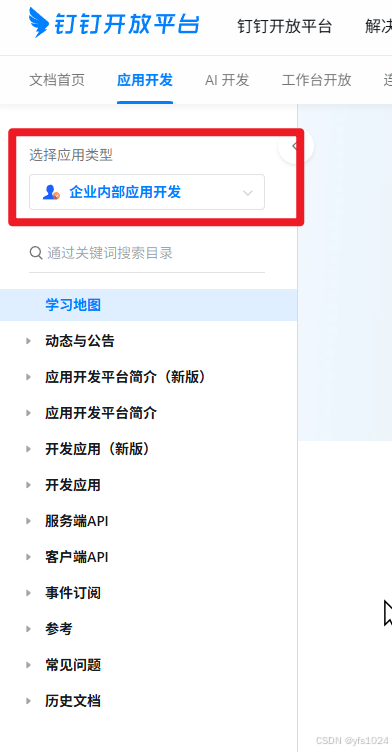
注: 下方操作的应用类型为
企业内部应用开发
一, 员工打卡事件实现
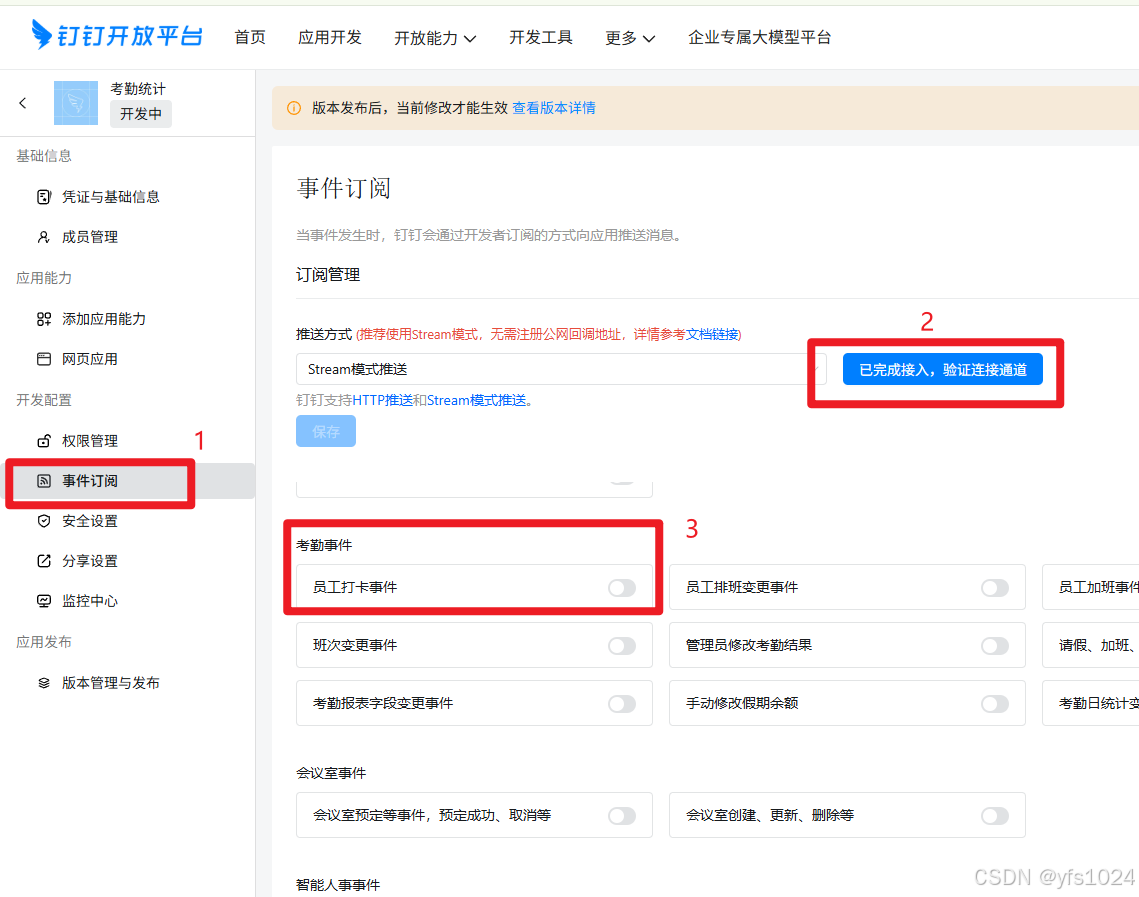
首先需要订阅员工打卡事件, 如图
钉钉 Stream 模式SpringBoot接入配置与事件监听_钉钉stream依赖添加-CSDN博客
平台对员工打卡事件的描述文档如下:
员工打卡事件文档
官方推送消息示例(data部分):
json
{
    "eventId": "3b15cb8159204bfe9e60f4f276fdc29c",
    "dataList": [
        {
            "checkTime": 1756083600000,
            "corpId": "dinged281b9ee2134221a39a90f97fcb1e09",
            "locationResult": "Normal",
            "groupId": "8901A759EB795D24C8A1FBEA24FE5CC7",
            "bizId": "23244E2D4ADBBC2BBFA475EBA6303735",
            "locationMethod": "OTHER",
            "checkByUser": true,
            "userId": "02253726682920171716"
        }
    ]
}通过官方推送的消息可以知道打卡(补卡)时间checkTime (也就可以知道是上班还是下班), 可知道用户userId, 知道修改的状态locationResult, 通过这三个值即可对补卡做处理
注:
这里有一个问题, 这里会把所有的消息都推送过来, 打卡, 补卡等, 所以比较消耗
Webhook 和 Stream 用量一个月只有5000次, 可以根据实际情况算一下, 如果够用, 这种方案肯定最简便
二.通过审批实例开始, 结束事件 和 审批单详情接口实现
首先需要订阅审批实例开始,结束, 如图
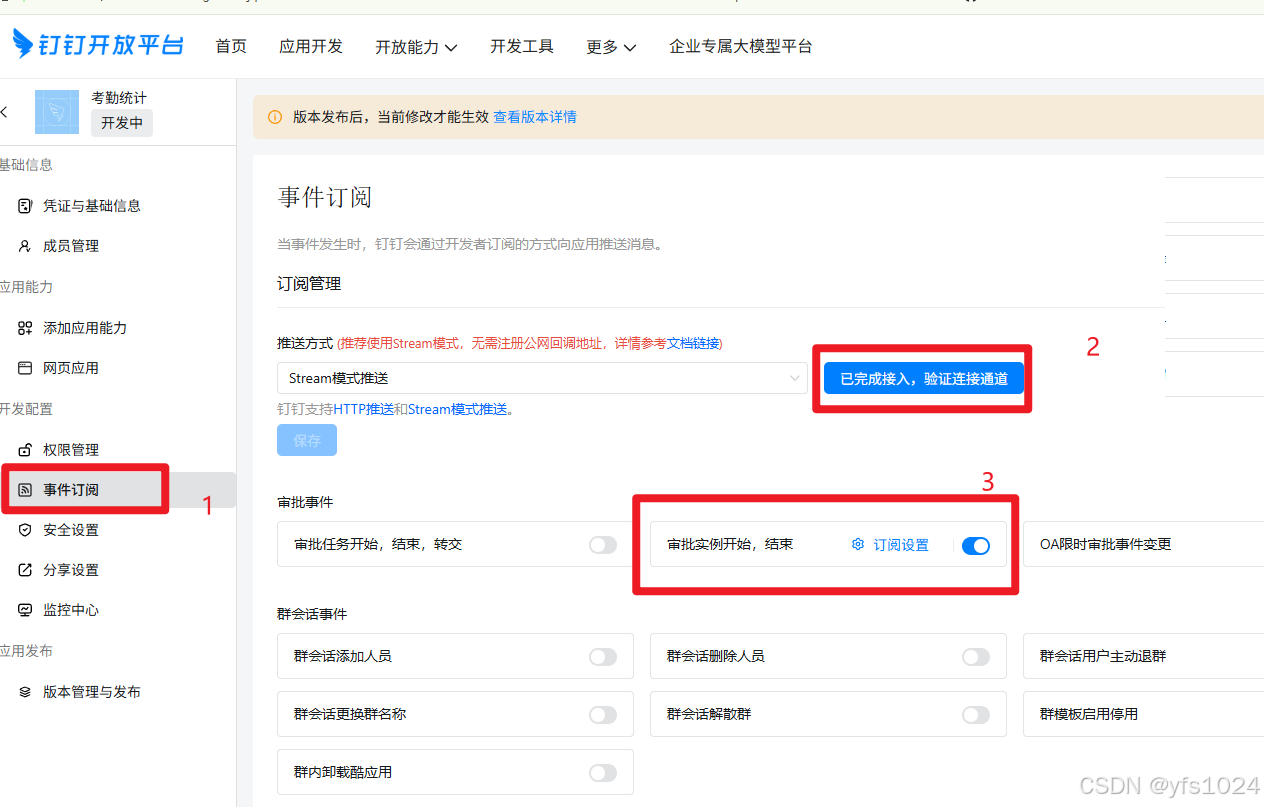
然后通过, 上一篇文章中介绍的接入进行配置及开发,后面就是处理消息的部分, 根据自己的业务逻辑就行处理即可
钉钉 Stream 模式SpringBoot接入配置与事件监听_钉钉stream依赖添加-CSDN博客
官方说明: 审批实例开始、结束、终止、删除钉钉文档地址
官方推送消息示例(data部分):
json
{
    "processInstanceId": "qWU68--WSIasZMhIzLHxuA04431756109057",
    "eventId": "eff61099a455461b81b3d9229e980b33",
    "finishTime": 1756110624000,
    "resource": "/v1.0/event/bpms_instance_change/bizCategoryId/attendance.supply/processCode/PROC-8A8DFDCF-12B4-4CC7-9983-A91DD2F1D2D0/type/finish",
    "businessId": "202508251604000176498",
    "title": "大帅哥提交的补卡申请",
    "type": "finish",
    "url": "https://aflow.dingtalk.com/dingtalk/mobile/homepage.htm?corpid=dinged281b9ee2134221a39a90f97fcb1e09&dd_share=false&showmenu=false&dd_progress=false&back=native&procInstId=qWU68--WSIasZMhIzLHxuA04431756109057&taskId=&swfrom=isv&dinghash=approval&dtaction=os&dd_from=#approval",
    "result": "agree",
    "createTime": 1756109058000,
    "processCode": "PROC-8A8DFDCF-12B4-4CC7-9983-A91DD2F1D2D0",
    "bizCategoryId": "attendance.supply",
    "staffId": "02253726682920171716"
}
当看到这个json的时候可以看到没有明确的打卡时间, 经查阅可以通过审批单ID.再调用审批单详情接口来获取 补卡时间, 如下:
官方文档地址:
获取单个审批实例详情
java代码如下:
java
    /**
     * 获取钉钉工作流客户端
     *
     * @return 钉钉工作流客户端
     */
    public static com.aliyun.dingtalkworkflow_1_0.Client createClient2() {
        com.aliyun.teaopenapi.models.Config config = new com.aliyun.teaopenapi.models.Config();
        config.protocol = "https";
        config.regionId = "central";
        try {
            return new com.aliyun.dingtalkworkflow_1_0.Client(config);
        } catch (Exception e) {
            log.error("初始化钉钉工作流Client 失败, 原因: {}", e.getMessage());
        }
        return null;
    }


	/**
     * 获取补卡时间
     *
     * @return 补卡时间 yyyy-MM-dd HH:mm
     */
    public String getReplacementCardDate(String processInstanceId) {
        com.aliyun.dingtalkworkflow_1_0.Client client = createClient2();
        if (Objects.isNull(client)) {
            return null;
        }
        com.aliyun.dingtalkworkflow_1_0.models.GetProcessInstanceHeaders getProcessInstanceHeaders = new com.aliyun.dingtalkworkflow_1_0.models.GetProcessInstanceHeaders();
        getProcessInstanceHeaders.xAcsDingtalkAccessToken = getAccessToken();
        com.aliyun.dingtalkworkflow_1_0.models.GetProcessInstanceRequest getProcessInstanceRequest = new com.aliyun.dingtalkworkflow_1_0.models.GetProcessInstanceRequest()
                .setProcessInstanceId(processInstanceId);
        try {
            GetProcessInstanceResponse processInstanceWithOptions = client.getProcessInstanceWithOptions(getProcessInstanceRequest, getProcessInstanceHeaders, new RuntimeOptions());
            GetProcessInstanceResponseBody.GetProcessInstanceResponseBodyResult result = processInstanceWithOptions.getBody().getResult();
            log.info("事件标题:{}", result.getTitle());

            GetProcessInstanceResponseBody.GetProcessInstanceResponseBodyResultFormComponentValues dateFieldComponentValue = new GetProcessInstanceResponseBody.GetProcessInstanceResponseBodyResultFormComponentValues();
            for (GetProcessInstanceResponseBody.GetProcessInstanceResponseBodyResultFormComponentValues formComponentValue : result.getFormComponentValues()) {
                if ("DDDateField".equals(formComponentValue.getComponentType())) {
                    dateFieldComponentValue = formComponentValue;
                    break;
                }
            }

            // 补卡时间
            // 时间格式: yyyy-MM-dd HH:mm  示例: 2025-08-25 12:00
            return dateFieldComponentValue.getValue();
        } catch (TeaException err) {
            if (!com.aliyun.teautil.Common.empty(err.code) && !com.aliyun.teautil.Common.empty(err.message)) {
                log.error("code:{},  message:{}", err.code, err.message);
            }

        } catch (Exception _err) {
            TeaException err = new TeaException(_err.getMessage(), _err);
            if (!com.aliyun.teautil.Common.empty(err.code) && !com.aliyun.teautil.Common.empty(err.message)) {
                log.error("code:{}, message:{}", err.code, err.message);
            }
        }
        return null;
    }
现在就可以知道, 补卡时间示例: 2025-08-25 09:00, 用户ID, 然后做修改补卡操作
这里可能会问一个问题, 为什么一定是成功, 按照逻辑来说, 只要能提交补卡审批, 就说明还有补交次数, 只要系统能收到消息, 就说明肯定的是成功了, 这是其一, 其二就是可以看到通过"result": "agree",这个参数判断, 表示通过, 通过则状态就是Normal.
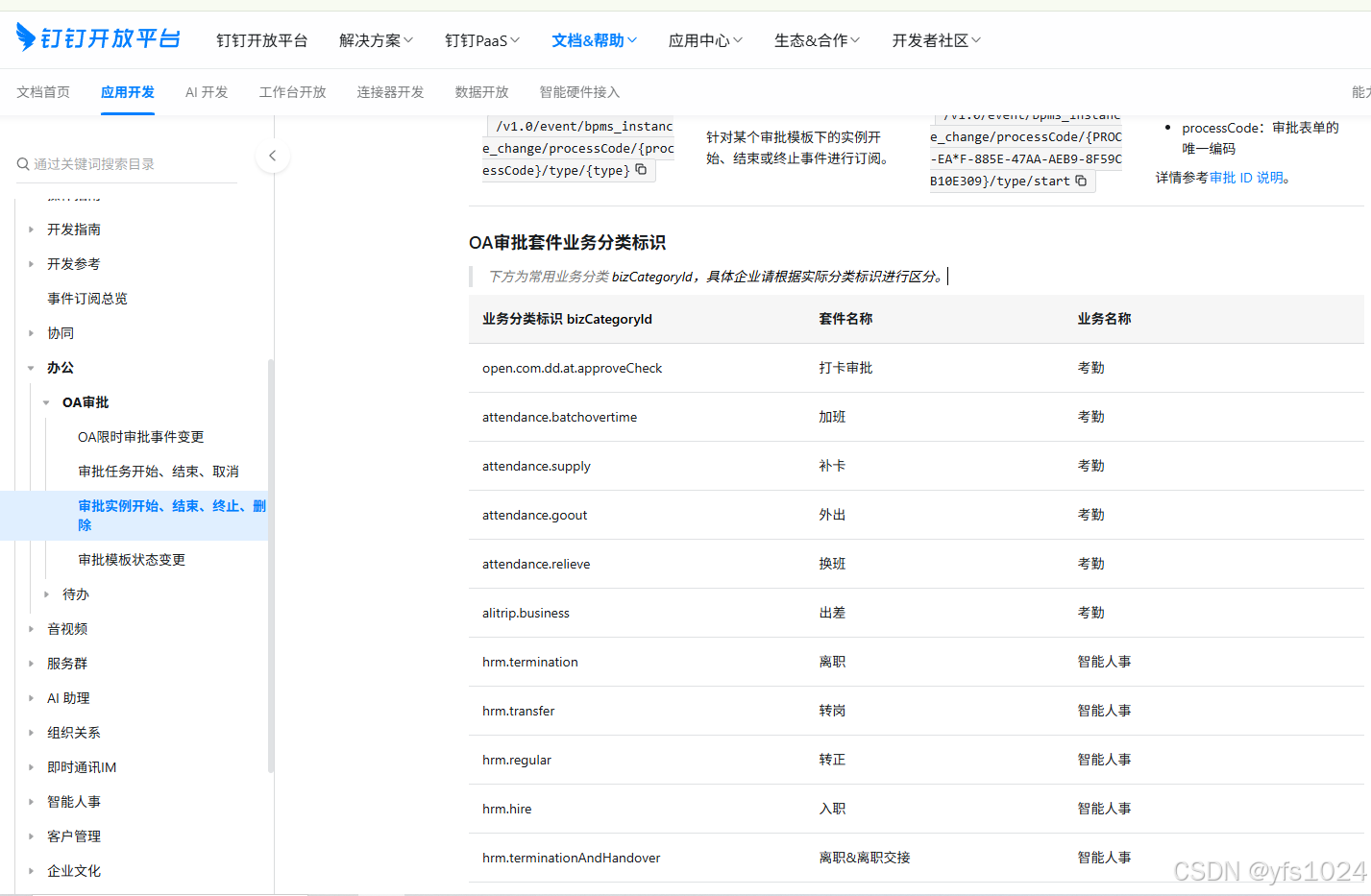
最后还有一点需要注意和修改的, 可以指定订阅的地址, 因为钉钉中的审批单有很多很多, 如果没有配置, 会接收到很多暂时没有用的数据(审批单), 同时也会消耗Webhook 和 Stream 用量, 所以可以通过通配符, 或者指定所需审批中的确定事件
补卡事件订阅地址:
json
/v1.0/event/bpms_instance_change/bizCategoryId/attendance.supply/processCode/{processCode}/type/finish

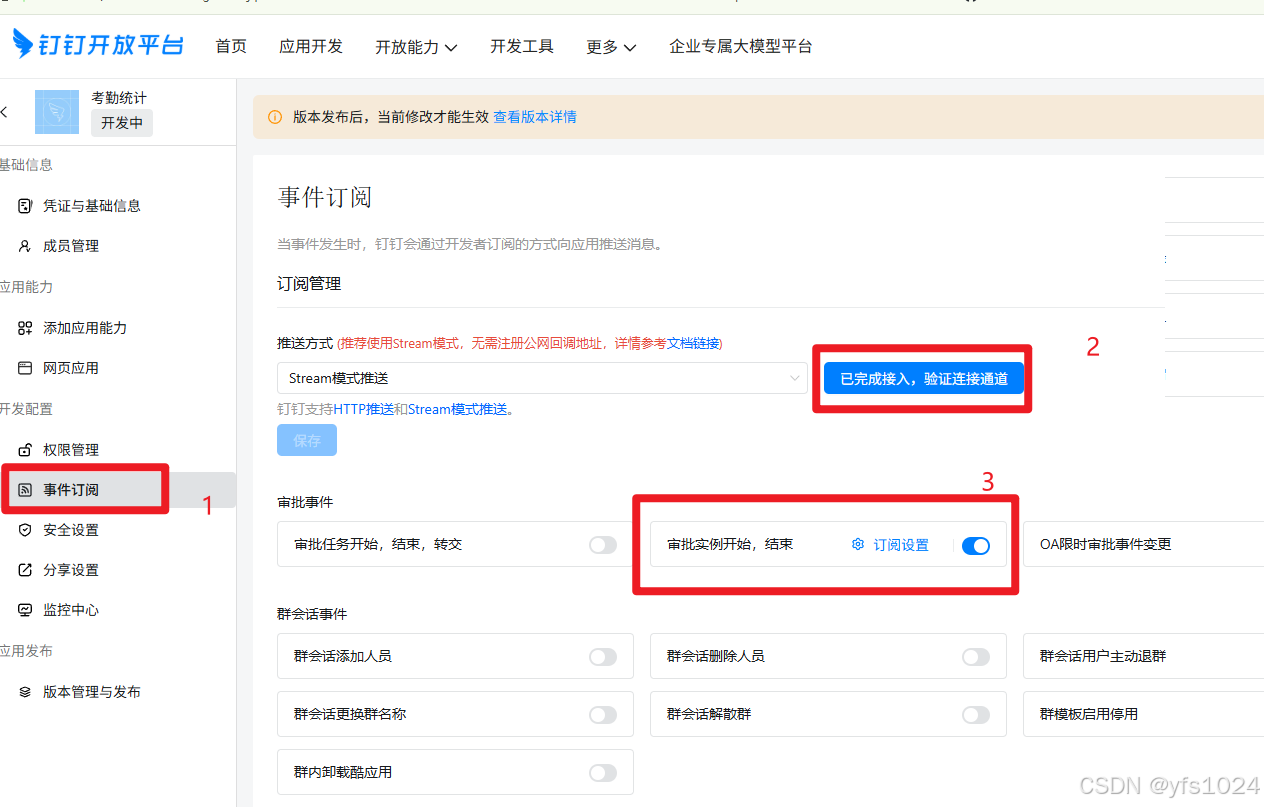
// 这里只订阅通过的事件事件订阅的匹配规则采用Glob语法进行模式匹配可以在图片中的5点击查阅, 或点击下方链接
具体的可以在官方文档中查看
附:
自定义工作类:
java
package com.gkl.attendance.utils.aliyun;

import com.aliyun.dingtalkcontact_1_0.models.SearchUserResponse;
import com.aliyun.dingtalkworkflow_1_0.models.GetProcessInstanceResponse;
import com.aliyun.dingtalkworkflow_1_0.models.GetProcessInstanceResponseBody;
import com.aliyun.tea.TeaException;
import com.aliyun.teautil.models.RuntimeOptions;
import com.dingtalk.api.DefaultDingTalkClient;
import com.dingtalk.api.DingTalkClient;
import com.dingtalk.api.request.OapiAttendanceListRequest;
import com.dingtalk.api.request.OapiGettokenRequest;
import com.dingtalk.api.response.OapiAttendanceListResponse;
import com.dingtalk.api.response.OapiGettokenResponse;
import com.taobao.api.ApiException;
import lombok.extern.slf4j.Slf4j;
import org.springframework.beans.factory.annotation.Value;
import org.springframework.stereotype.Component;

import java.util.Collections;
import java.util.List;
import java.util.Objects;

/**
 * @author : Cookie
 * date : 2025/8/22
 * desc: 钉钉API工具类
 */
@Slf4j
@Component
public class DingDingAPIUtils {

    @Value("${dingtalk.appKey}")
    private String appKey;

    @Value("${dingtalk.appSecret}")
    private String appSecret;

    /**
     * 通过appKey和appSecret获取access_token
     *
     * @return access_token
     */
    public String getAccessToken() {
        try {
            DingTalkClient client = new DefaultDingTalkClient("https://oapi.dingtalk.com/gettoken");
            OapiGettokenRequest req = new OapiGettokenRequest();
            req.setAppkey(appKey);
            req.setAppsecret(appSecret);
            req.setHttpMethod("GET");
            OapiGettokenResponse rsp = client.execute(req);
            return rsp.getAccessToken();
        } catch (ApiException e) {
            log.error(e.getErrMsg());
        }
        return null;
    }

    /**
     * 获取指定时间打卡结果
     *
     * @param dingDingIdList 钉钉用户ID 列表
     * @param checkDateFrom  开始日期
     * @param checkDateTo    结束日期
     */
    public OapiAttendanceListResponse getCheckRecord(List<String> dingDingIdList, String checkDateFrom, String checkDateTo) {
        DingTalkClient client = new DefaultDingTalkClient("https://oapi.dingtalk.com/attendance/list");
        OapiAttendanceListRequest req = new OapiAttendanceListRequest();
        req.setWorkDateFrom(checkDateFrom);
        req.setWorkDateTo(checkDateTo);
        req.setUserIdList(dingDingIdList);
        req.setOffset(0L);
        req.setLimit(50L);
        try {
            OapiAttendanceListResponse rsp = client.execute(req, getAccessToken());
            log.info("获取考勤记录响应结果:{}", rsp.getBody());
            return rsp;
        } catch (ApiException e) {
            log.error("获取考勤记录失败, 原因: {}", e.getErrMsg());
            throw new RuntimeException(e);
        }
    }

    /**
     * 获取钉钉连接客户端
     *
     * @return 钉钉连接客户端
     */
    public com.aliyun.dingtalkcontact_1_0.Client createClient() {
        com.aliyun.teaopenapi.models.Config config = new com.aliyun.teaopenapi.models.Config();
        config.protocol = "https";
        config.regionId = "central";

        try {
            return new com.aliyun.dingtalkcontact_1_0.Client(config);
        } catch (Exception e) {
            log.error("初始化钉钉Client 失败, 原因: {}", e.getMessage());
        }
        return null;
    }

    /**
     * 根据用户昵称模糊/精确查询钉钉用户ID列表
     *
     * @param nickName 用户昵称(模糊/精确匹配)
     * @return 钉钉用户ID列表,如果查询失败返回 null
     */
    public List<String> getDingIdListByNickName(String nickName) {
        com.aliyun.dingtalkcontact_1_0.Client client = createClient();
        if (Objects.isNull(client)) {
            return Collections.emptyList();
        }

        com.aliyun.dingtalkcontact_1_0.models.SearchUserHeaders searchUserHeaders =
                new com.aliyun.dingtalkcontact_1_0.models.SearchUserHeaders();
        // 设置 AccessToken
        searchUserHeaders.xAcsDingtalkAccessToken = getAccessToken();

        // 构造查询请求
        com.aliyun.dingtalkcontact_1_0.models.SearchUserRequest searchUserRequest =
                new com.aliyun.dingtalkcontact_1_0.models.SearchUserRequest()
                        .setQueryWord(nickName)
                        .setOffset(1)
                        .setSize(10)
                        .setFullMatchField(1);

        try {
            SearchUserResponse searchUserResponse =
                    client.searchUserWithOptions(searchUserRequest, searchUserHeaders, new RuntimeOptions());

            log.info("钉钉用户昵称查询结果:{}", searchUserResponse.getBody().getList());
            return searchUserResponse.getBody().getList();

        } catch (TeaException err) {
            if (!com.aliyun.teautil.Common.empty(err.code) && !com.aliyun.teautil.Common.empty(err.message)) {
                log.error("通过用户名获取用户钉钉ID 失败, code:{}, message:{}", err.code, err.message);
            }
        } catch (Exception _err) {
            TeaException err = new TeaException(_err.getMessage(), _err);
            if (!com.aliyun.teautil.Common.empty(err.code) && !com.aliyun.teautil.Common.empty(err.message)) {
                log.error("通过用户名获取用户钉钉ID失败, code:{}, message:{}", err.code, err.message);
            }
        }
        return Collections.emptyList();
    }

    /**
     * 获取钉钉工作流客户端
     *
     * @return 钉钉工作流客户端
     */
    public static com.aliyun.dingtalkworkflow_1_0.Client createClient2() {
        com.aliyun.teaopenapi.models.Config config = new com.aliyun.teaopenapi.models.Config();
        config.protocol = "https";
        config.regionId = "central";
        try {
            return new com.aliyun.dingtalkworkflow_1_0.Client(config);
        } catch (Exception e) {
            log.error("初始化钉钉工作流Client 失败, 原因: {}", e.getMessage());
        }
        return null;
    }

    /**
     * 获取补卡时间
     *
     * @return 补卡时间
     */
    public String getReplacementCardDate(String processInstanceId) {
        com.aliyun.dingtalkworkflow_1_0.Client client = createClient2();
        if (Objects.isNull(client)) {
            return null;
        }
        com.aliyun.dingtalkworkflow_1_0.models.GetProcessInstanceHeaders getProcessInstanceHeaders = new com.aliyun.dingtalkworkflow_1_0.models.GetProcessInstanceHeaders();
        getProcessInstanceHeaders.xAcsDingtalkAccessToken = getAccessToken();
        com.aliyun.dingtalkworkflow_1_0.models.GetProcessInstanceRequest getProcessInstanceRequest = new com.aliyun.dingtalkworkflow_1_0.models.GetProcessInstanceRequest()
                .setProcessInstanceId(processInstanceId);
        try {
            GetProcessInstanceResponse processInstanceWithOptions = client.getProcessInstanceWithOptions(getProcessInstanceRequest, getProcessInstanceHeaders, new RuntimeOptions());
            GetProcessInstanceResponseBody.GetProcessInstanceResponseBodyResult result = processInstanceWithOptions.getBody().getResult();
            log.info("事件标题:{}", result.getTitle());

            GetProcessInstanceResponseBody.GetProcessInstanceResponseBodyResultFormComponentValues dateFieldComponentValue = new GetProcessInstanceResponseBody.GetProcessInstanceResponseBodyResultFormComponentValues();
            for (GetProcessInstanceResponseBody.GetProcessInstanceResponseBodyResultFormComponentValues formComponentValue : result.getFormComponentValues()) {
                if ("DDDateField".equals(formComponentValue.getComponentType())) {
                    dateFieldComponentValue = formComponentValue;
                    break;
                }
            }

            // 补卡时间
            // 时间格式: yyyy-MM-dd HH:mm  示例: 2025-08-25 12:00
            return dateFieldComponentValue.getValue();
        } catch (TeaException err) {
            if (!com.aliyun.teautil.Common.empty(err.code) && !com.aliyun.teautil.Common.empty(err.message)) {
                log.error("code:{},  message:{}", err.code, err.message);
            }

        } catch (Exception _err) {
            TeaException err = new TeaException(_err.getMessage(), _err);
            if (!com.aliyun.teautil.Common.empty(err.code) && !com.aliyun.teautil.Common.empty(err.message)) {
                log.error("code:{}, message:{}", err.code, err.message);
            }
        }
        return null;
    }
}