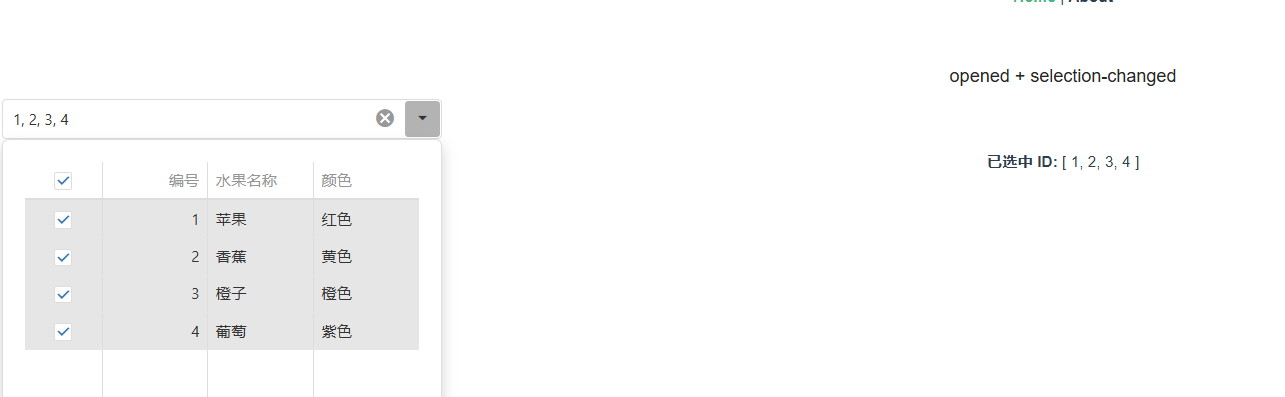
<template>
  <div style="padding: 20px">
    <h3>opened + selection-changed </h3>

    <DxDropDownBox
      v-model="selectedItems"
      :show-clear-button="true"
      placeholder="请选择水果..."
      display-expr="name"
      value-expr="id"
      @opened="onOpened"
      width="400"
    >
      <template #content>
        <DxDataGrid
          ref="dataGrid"
          :data-source="dataSource"
          :hover-state-enabled="true"
          :height="250"
          :show-borders="false"
          @selection-changed="onSelectionChanged"
        >
          <DxColumn data-field="id" caption="编号" />
          <DxColumn data-field="name" caption="水果名称" />
          <DxColumn data-field="color" caption="颜色" />
          <DxSelection mode="multiple" />
        </DxDataGrid>
      </template>
    </DxDropDownBox>

    <div style="margin-top: 10px;">
      <strong>已选中 ID:</strong> {{ selectedItems }}
    </div>
  </div>
</template>

<script>
import { DxDropDownBox } from 'devextreme-vue/drop-down-box';
import { DxDataGrid, DxColumn, DxSelection } from 'devextreme-vue/data-grid';

export default {
  components: {
    DxDropDownBox,
    DxDataGrid,
    DxColumn,
    DxSelection,
  },
  data() {
    return {
      selectedItems: [],
      dataSource: [
        { id: 1, name: '苹果', color: '红色' },
        { id: 2, name: '香蕉', color: '黄色' },
        { id: 3, name: '橙子', color: '橙色' },
        { id: 4, name: '葡萄', color: '紫色' },
      ],
    };
  },
  methods: {
    onOpened() {
      const grid = this.$refs.dataGrid?.instance;
      if (grid) {
        grid.clearSelection(); // (可选,顺序会重排)清除当前选择,再全选
        grid.selectAll();  // 注意:selectAll() 会触发 @selection-changed,所以 selectedItems 会由 onSelectionChanged 自动更新
      }
    },

    onSelectionChanged(e) {
      this.selectedItems = e.selectedRowKeys.map(item =>item.id);
    },
  },
};
</script>