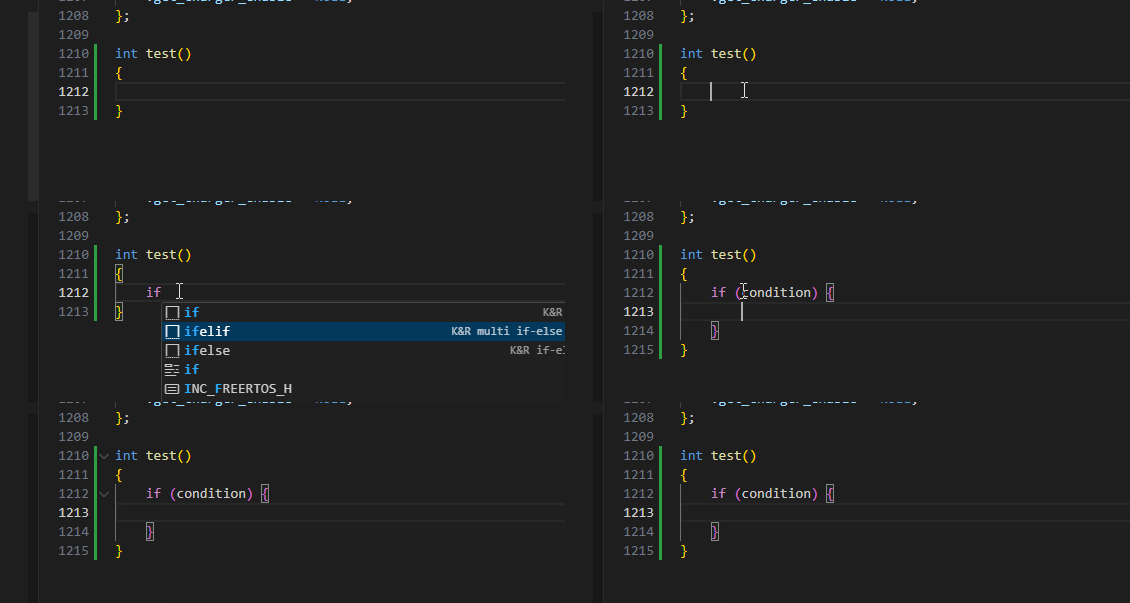
由于生产需求,需要将编码风格改为K&R,为了方便,决定直接去修改vscode来满足
主要需要修改如下两个文件 settings.json 和 c.json
bash
#settings.json
{
    "workbench.settings.applyToAllProfiles": [
        "C_Cpp.suggestSnippets",
        "editor.snippetSuggestions"
    ],
    "[c]": {
    "editor.snippetSuggestions": "top"
	},
	"C_Cpp.suggestSnippets": false
}
bash
#c.json
{
  // ===== 基础控制结构 =====
  "K&R if": {
    "prefix": "if",
    "body": [
      "if (${1:condition}) {",
      "\t${0}",
      "}"
    ],
    "description": "K&R style if statement"
  },
  "K&R if-else": {
    "prefix": "ifelse",
    "body": [
      "if (${1:condition}) {",
      "\t${2}",
      "} else {",
      "\t${0}",
      "}"
    ],
    "description": "K&R style if-else"
  },
    "K&R multi if-else if": {
    "prefix": "ifelif",
    "body": [
      "if (${1:condition1}) {",
      "\t${2}",
      "} else if (${3:condition2}) {",
      "\t${4}",
      "} else {",
      "\t${0}",
      "}"
    ],
    "description": "K&R style multi-condition if-else if"
  },
  "K&R for loop": {
    "prefix": "for",
    "body": [
      "for (${1:int i = 0}; ${2:i < N}; ${3:i++}) {",
      "\t${0}",
      "}"
    ],
    "description": "K&R style for loop"
  },
  "K&R while loop": {
    "prefix": "while",
    "body": [
      "while (${1:condition}) {",
      "\t${0}",
      "}"
    ],
    "description": "K&R style while loop"
  },
  "K&R do-while": {
    "prefix": "do",
    "body": [
      "do {",
      "\t${0}",
      "} while (${1:condition});"
    ],
    "description": "K&R style do-while loop"
  },
  "K&R switch": {
    "prefix": "switch",
    "body": [
      "switch (${1:variable}) {",
      "\tcase ${2:value}:",
      "\t\t${3}",
      "\t\tbreak;",
      "\t",
      "\tdefault:",
      "\t\t${0}",
      "}"
    ],
    "description": "K&R style switch statement"
  },

  // ===== 函数定义 =====
  "K&R function": {
    "prefix": "func",
    "body": [
      "${1:void} ${2:function_name}(${3}) {",
      "\t${0}",
      "}"
    ],
    "description": "K&R style function definition"
  },
  "K&R main function": {
    "prefix": "main",
    "body": [
      "int main(int argc, char *argv[]) {",
      "\t${0}",
      "\treturn 0;",
      "}"
    ],
    "description": "K&R style main function"
  },

  // ===== 复合结构 =====
  "K&R struct": {
    "prefix": "struct",
    "body": [
      "struct ${1:name} {",
      "\t${0}",
      "};"
    ],
    "description": "K&R style struct definition"
  },
  "K&R typedef struct": {
    "prefix": "tstruct",
    "body": [
      "typedef struct {",
      "\t${0}",
      "} ${1:name};"
    ],
    "description": "K&R style typedef struct"
  },
  "K&R enum": {
    "prefix": "enum",
    "body": [
      "enum ${1:name} {",
      "\t${2:FIRST},",
      "\t${3:SECOND},",
      "\t${0}",
      "};"
    ],
    "description": "K&R style enum definition"
  },

  // ===== 错误处理 =====
  "K&R error check": {
    "prefix": "check",
    "body": [
      "if (${1:error_condition}) {",
      "\t${2:/* Handle error */}",
      "\t${0}",
      "}"
    ],
    "description": "K&R style error checking"
  },
  "K&R return error": {
    "prefix": "returnerr",
    "body": [
      "if (${1:error_condition}) {",
      "\treturn ${2:error_code};",
      "}"
    ],
    "description": "K&R style return on error"
  },

  // ===== 内存管理 =====
  "K&R malloc": {
    "prefix": "malloc",
    "body": [
      "${1:type} *${2:ptr} = malloc(sizeof(${1}) * ${3:count});",
      "if (${2} == NULL) {",
      "\t${4:/* Handle allocation error */}",
      "\t${0}",
      "}"
    ],
    "description": "K&R style malloc with error check"
  },

  // ===== 文件操作 =====
  "K&R file open": {
    "prefix": "fopen",
    "body": [
      "FILE *${1:fp} = fopen(${2:\"filename\"}, ${3:\"r\"});",
      "if (${1} == NULL) {",
      "\tperror(\"Error opening file\");",
      "\t${0}",
      "}"
    ],
    "description": "K&R style file open with error check"
  },

  // ===== 其他常用结构 =====
  "K&R ternary": {
    "prefix": "tern",
    "body": [
      "(${1:condition}) ? ${2:true_value} : ${3:false_value}"
    ],
    "description": "K&R style ternary operator"
  },
  "K&R function pointer": {
    "prefix": "fptr",
    "body": [
      "${1:return_type} (*${2:func_ptr})(${3:params}) = ${4:function};"
    ],
    "description": "K&R style function pointer"
  }
}
效果如下: