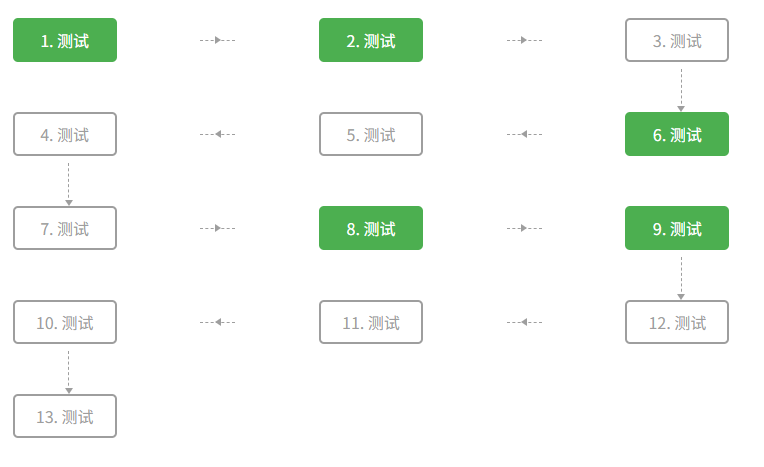
<template>
  <div class="container" :style="gridStyle">
    <div v-for="(item, index) in stepList" :key="index" class="grid-item" :class="[
      isOddRow(index) ? 'odd-row' : 'even-row',
      shouldShowDownArrow(index) ? 'has-down-arrow' : '',
      shouldShowRightArrow(index) ? 'has-right-arrow' : '',
      shouldShowLeftArrow(index) ? 'has-left-arrow' : ''
    ]" @click="handleStepClick(index)">
      <div class="step" :class="{ 'step-finished': item.status === 'finished' }">
        {{ item.title }}
      </div>

      <!-- 向下连接线(仅在符合条件时显示) -->
      <div v-if="shouldShowDownArrow(index)" class="vertical-connector">
        <div class="vc-line"></div>
        <div class="vc-arrow"></div>
      </div>
    </div>
  </div>
</template>

<script setup>
import { computed, onMounted, ref, onUnmounted } from 'vue';

// 示例数据
const stepList = ref([
  { title: '1. 测试', status: 'finished' },
  { title: '2. 测试', status: 'finished' },
  { title: '3. 测试', status: 'unfinished' },
  { title: '4. 测试', status: 'unfinished' },
  { title: '5. 测试', status: 'unfinished' },
  { title: '6. 测试', status: 'finished' },
  { title: '7. 测试', status: 'unfinished' },
  { title: '8. 测试', status: 'finished' },
  { title: '9. 测试', status: 'finished' },
  { title: '10. 测试', status: 'unfinished' },
  { title: '11. 测试', status: 'unfinished' },
  { title: '12. 测试', status: 'unfinished' },
  { title: '13. 测试', status: 'unfinished' },
]);

const colNum = ref(2) // 初始化默认值

// 计算列数的函数
const sieze = () => {
  const width = window.innerWidth
  if (width >= 1200) return 6
  if (width >= 992) return 5
  if (width >= 576) return 3
  return 2
}

// 更新列数
const updateColNum = () => {
  colNum.value = sieze()
  console.log('当前列数:', colNum.value)
}

onMounted(() => {
  updateColNum() // 初始设置

  // 监听窗口大小变化
  window.addEventListener('resize', updateColNum)
})
onUnmounted(() => {
  // 移除监听,防止内存泄漏
  window.removeEventListener('resize', updateColNum)
})

const gridStyle = computed(() => ({
  display: 'grid',
  width: '100%',
  padding: '30px 0',
  gridTemplateColumns: `repeat(${colNum.value}, 1fr)`,
  gap: '50px 35px'
}));

// 获取行号
const getRow = (index) => Math.floor(index / colNum.value);
const isOddRow = (index) => getRow(index) % 2 === 0; // 奇数行(正序)
const isEvenRow = (index) => !isOddRow(index);       // 偶数行(倒序)

// 是否为某行最后一个(正序视角)
const isLastInRow = (index) => (index + 1) % colNum.value === 0;
// 是否为某行第一个(正序视角)
const isFirstInRow = (index) => index % colNum.value === 0;

// 是否应显示向下箭头(行末/行首 + 非最后一项)
const shouldShowDownArrow = (index) => {
  const totalRows = Math.ceil(stepList.value.length / colNum.value);
  const currentRow = getRow(index);

  // 最后一行不显示向下箭头
  if (currentRow >= totalRows - 1) return false;

  // 当前不是整个列表的最后一项
  if (index === stepList.value.length - 1) return false;

  // 奇数行:末尾显示
  if (isOddRow(index) && isLastInRow(index)) return true;
  // 偶数行:开头显示
  if (isEvenRow(index) && isFirstInRow(index)) return true;

  return false;
};

// 是否应显示向右箭头(奇数行,非行末,非最后一项)
const shouldShowRightArrow = (index) => {
  return (
    isOddRow(index) &&
    !isLastInRow(index) &&
    index !== stepList.value.length - 1
  );
};

// 是否应显示向左箭头(偶数行,非行首,非最后一项)
const shouldShowLeftArrow = (index) => {
  return (
    isEvenRow(index) &&
    !isFirstInRow(index) &&
    index !== stepList.value.length - 1
  );
};

// 点击事件
const emit = defineEmits(['stepClick']);
const handleStepClick = (index) => {
  emit('stepClick', index);
};
</script>

<style scoped>
.container {}

.grid-item {
  position: relative;
  display: flex;
  align-items: center;
  justify-content: center;
  cursor: pointer;
}

/* --- 向右箭头(奇数行)--- */
.grid-item.has-right-arrow::before {
  content: '';
  position: absolute;
  right: -35px;
  width: 35px;
  height: 0;
  border-top: 1px dashed #9e9e9e;
}

.grid-item.has-right-arrow::after {
  content: '';
  position: absolute;
  right: -17.5px;
  transform: translateX(50%);
  border-top: 4.24px solid transparent;
  border-left: 6px solid #9e9e9e;
  border-bottom: 4.24px solid transparent;
}

/* --- 向左箭头(偶数行)--- */
.grid-item.has-left-arrow::before {
  content: '';
  position: absolute;
  left: -35px;
  width: 35px;
  height: 0;
  border-top: 1px dashed #9e9e9e;
}

.grid-item.has-left-arrow::after {
  content: '';
  position: absolute;
  left: -17.5px;
  transform: translateX(-50%);
  border-top: 4.24px solid transparent;
  border-right: 6px solid #9e9e9e;
  border-bottom: 4.24px solid transparent;
}

/* --- 向下连接线(与节点保持距离)--- */
.grid-item.has-down-arrow .vertical-connector {
  position: absolute;
  left: 50%;
  /* 从 -25px 改为 -40px,增加垂直间距 */
  bottom: -50px;
  display: flex;
  flex-direction: column;
  align-items: center;
  pointer-events: none;
}

/* 增加虚线长度,使连接更清晰 */
.vc-line {
  width: 0;
  height: 40px;
  /* 原35px → 40px */
  border-left: 1px dashed #9e9e9e;
}

/* 箭头与虚线之间留点空隙 */
.vc-arrow {
  width: 0;
  height: 0;
  border-top: 6px solid #9e9e9e;
  border-left: 4.24px solid transparent;
  border-right: 4.24px solid transparent;
  margin-top: -3px;
  /* 微调,避免紧贴虚线 */
}

/* --- 步骤样式 --- */
.step {
  position: relative;
  width: 100px;
  line-height: 40px;
  font-size: 16px;
  text-align: center;
  border-radius: 5px;
  color: #9e9e9e;
  border: 2px solid #9e9e9e;
}

.step-finished {
  background-color: #4caf50;
  color: #fff;
  border: 2px solid #4caf50;
}
</style>