1. uni-app倒计时公共组件 封装,倒计时组件
1.1. 思路
uni-app倒计时公共组件封装有使用vue文件封装和使用工厂函数设置props的默认值两种方法。
(1)使用vue文件封装
可以使用vue文件来封装倒计时组件。这个组件应该是一个负责展示的零件,展示的数据就是父组件要传递的prop,包括提示文字和左边的读秒。组件需要保持在左上角显示,所以根组件需要fixed固定定位。另外,组件在倒计时完毕后要隐藏掉,所以组件是否显示出来也应该由父组件控制。圆形的进度应该不只是倒计时读秒,弧度应该由百分比决定,所以要知道总时长百分比才可以1。
(2)使用工厂函数设置props的默认值
可以使用工厂函数来设置props的默认值。倒计时组件的核心功能是将服务器返回的时间戳转换为用户友好的时间格式,并实时更新显示剩余时间。时间戳是自1970年1月1日以来的秒数,通常由后台服务提供。在前端,我们需要将这个数字转换为年、月、日、小时。
1.2. 倒计时代码
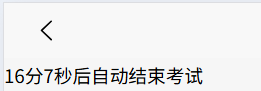
javascript
<template>
  <view>
    <view class="count-timer">
      {{ testTimeStr }}后自动结束考试
    </view>
  </view>
</template>
<script>
import CountDown from "../../../components/count-down.vue";
export default {
  components: {CountDown},
  data() {
    return {
      testTimeStr: "0分0秒",
      expire_time:'2025-10-11 23:23:23'
    }
  },
  onLoad() {
    let leftTimeStamp = 20 * 60 * 1000
    this.startCountdown(leftTimeStamp);
  },
  methods: {
    startCountdown(leftTimeStamp) {
      let that = this;
      let countMinute = 0;
      let countSecond = 0;
      // 获取当前时间
      const nowDate = new Date();
      // 定义结束时间为1小时后
      const endDate = new Date(nowDate.getTime() + leftTimeStamp);
      //// 距离结束时间的毫秒数
      //const leftTimeStamp = endDate.getTime() - nowDate.getTime();
      // 计算分钟数
      const leftMinute = Math.floor(leftTimeStamp / (1000 * 60)) % 60;
      // 计算秒数
      const leftSecond = Math.floor(leftTimeStamp / 1000) % 60;
      // 返回倒计时的分钟数
      countMinute = leftMinute;
      // 返回倒计时的秒数
      countSecond = leftSecond;
      const timer = setInterval(() => {
        // 获取当前时间
        const now = new Date();
        // 距离结束时间的毫秒数
        const left = endDate.getTime() - now.getTime();
        // 计算分钟数
        const minute = Math.floor(left / (1000 * 60)) % 60;
        // 计算秒数
        const second = Math.floor(left / 1000) % 60;
        // 更新倒计时的分钟数
        countMinute = minute;
        // 更新倒计时的秒数
        countSecond = second;
        // 倒计时结束
        if (left < 0) {
          // 清除定时器
          clearInterval(timer);
          // 显示00:00
          countMinute = countSecond = 0;
        }
        that.testTimeStr = countMinute + "分" + countSecond + "秒"
      }, 1000);
    },
  }
}
</script>
<style>
</style>
1.3. 倒计时组件封装
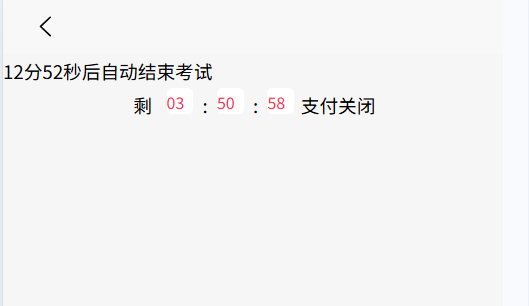
(1)count-down.vue倒计时组件
javascript
<!--公共组件内容-->
<template>
  <view class="time" :style="justifyLeft">
    <text class="red" v-if="tipText">{{ tipText }}</text>
    <text class="styleAll" :style="'background-color:'+ bgColor +';color:'+ colors +';'" v-if="isDay === true">{{ day }}</text>
    <text class="timeTxt red" v-if="dayText">{{ dayText }}</text>
    <text class="styleAll square" :style="'background-color:'+ bgColor +';color:'+ colors +';'">{{ hour }}</text>
    <text class="timeTxt red  " v-if="hourText">{{ hourText }}</text>
    <text class="styleAll square" :style="'background-color:'+ bgColor +';color:'+ colors +';'">{{ minute }}</text>
    <text class="timeTxt red " v-if="minuteText">{{ minuteText }}</text>
    <text class="styleAll square" :style="'background-color:'+ bgColor +';color:'+ colors +';'">{{ second }}</text>
    <text class="timeTxt red  " v-if="secondText">{{ secondText }}</text>
    <text>支付关闭</text>
  </view>
</template>
<script>
export default {
  name: "countDown",
  props: {
    justifyLeft: {
      type: String,
      default: ""
    },
    //距离开始提示文字
    tipText: {
      type: String,
      default: "剩"
    },
    dayText: {
      type: String,
      default: " "
    },
    hourText: {
      type: String,
      default: "时"
    },
    minuteText: {
      type: String,
      default: "分"
    },
    secondText: {
      type: String,
      default: "秒"
    },
    datatime: {
      type: Number,
      default: 0
    },
    isDay: {
      type: Boolean,
      default: false
    },
    bgColor:{
      type: String,
      default: ""
    },
    colors:{
      type: String,
      default: ""
    }
  },
  data: function() {
    return {
      day: "00",
      hour: "00",
      minute: "00",
      second: "00"
    };
  },
  created: function() {
    this.show_time();
  },
  mounted: function() {},
  methods: {
    show_time: function() {
      let that = this;

      function runTime() {
        //时间函数
        let intDiff = that.datatime - Date.parse(new Date()) / 1000; //获取数据中的时间戳的时间差;
        let day = 0,
            hour = 0,
            minute = 0,
            second = 0;
        if (intDiff > 0) {
          //转换时间
          if (that.isDay === true) {
            day = Math.floor(intDiff / (60 * 60 * 24));
          } else {
            day = 0;
          }
          hour = Math.floor(intDiff / (60 * 60)) - day * 24;
          minute = Math.floor(intDiff / 60) - day * 24 * 60 - hour * 60;
          second =
              Math.floor(intDiff) -
              day * 24 * 60 * 60 -
              hour * 60 * 60 -
              minute * 60;
          if (hour <= 9) hour = "0" + hour;
          if (minute <= 9) minute = "0" + minute;
          if (second <= 9) second = "0" + second;
          that.day = day;
          that.hour = hour;
          that.minute = minute;
          that.second = second;
        } else {
          that.day = "00";
          that.hour = "00";
          that.minute = "00";
          that.second = "00";
        }
      }
      runTime();
      setInterval(runTime, 1000);
    }
  }
};
</script>
<style>
.time{
  display: flex;
  justify-content: center;
}
.red{
  color: var(--view-theme);
  margin: 0 4rpx;
}
.square{
  width: 40rpx;
  height: 40rpx;
  background: #FFFFFF;
  border-radius: 8rpx;
  display: inline-block;
  vertical-align: middle;
  margin: 0 10rpx;
  color: #FF3255;
  font-size: 24rpx;
}
</style>
(2)使用
javascript
<template>
  <view>
    <view class="count-timer">
      {{ testTimeStr }}后自动结束考试
    </view>
    <!-- 通常调用公共组件的顺序 1.引入  2.注册 3.调用-->
    <countDown :datatime='expire_time'
               :isDay='false'
               hourText=':'
               minuteText=':'
               secondText=''>
    </countDown>
  </view>
</template>

<script>
import CountDown from "../../../components/count-down.vue";
export default {
  components: {CountDown},
  data() {
    return {
      testTimeStr: "0分0秒",
      expire_time:'2025-10-11 23:23:23'
    }
  },
  onLoad() {
    let leftTimeStamp = 20 * 60 * 1000
    this.startCountdown(leftTimeStamp);
    this.expire_time = new Date().getTime()/1000+14285;
  },

  methods: {
    startCountdown(leftTimeStamp) {
      let that = this;
      let countMinute = 0;
      let countSecond = 0;
      // 获取当前时间
      const nowDate = new Date();
      // 定义结束时间为1小时后
      const endDate = new Date(nowDate.getTime() + leftTimeStamp);
      //// 距离结束时间的毫秒数
      //const leftTimeStamp = endDate.getTime() - nowDate.getTime();
      // 计算分钟数
      const leftMinute = Math.floor(leftTimeStamp / (1000 * 60)) % 60;
      // 计算秒数
      const leftSecond = Math.floor(leftTimeStamp / 1000) % 60;
      // 返回倒计时的分钟数
      countMinute = leftMinute;
      // 返回倒计时的秒数
      countSecond = leftSecond;
      const timer = setInterval(() => {
        // 获取当前时间
        const now = new Date();
        // 距离结束时间的毫秒数
        const left = endDate.getTime() - now.getTime();
        // 计算分钟数
        const minute = Math.floor(left / (1000 * 60)) % 60;
        // 计算秒数
        const second = Math.floor(left / 1000) % 60;
        // 更新倒计时的分钟数
        countMinute = minute;
        // 更新倒计时的秒数
        countSecond = second;
        // 倒计时结束
        if (left < 0) {
          // 清除定时器
          clearInterval(timer);
          // 显示00:00
          countMinute = countSecond = 0;
        }
        that.testTimeStr = countMinute + "分" + countSecond + "秒"
      }, 1000);
    },
  }
}
</script>
<style>
</style>