在 UniApp 跨平台开发中,官方提供的 uni-calendar 日历组件是一个非常实用的选择。然而,当我们需要在应用中动态切换多语言时,官方推荐的方式是通过 **setLocale()**函数修改全局语言设置。这种方式有一个明显的痛点:切换语言会导致整个 App 重启,用户体验极差。本文将分享一种巧妙的替换方案:使用 uview-plus 的 DatetimePicker 组件替代官方原生的月份选择器,实现本地化的语言切换,彻底避免 App 重启问题。
问题回顾:官方多语言机制的缺陷
uni-calendar 组件内部使用了基于 uni-i18n 的国际化方案。它依赖于全局语言环境的动态切换,调用 setLocale() 后,整个应用会重新初始化所有页面和组件,造成明显的黑屏、重启现象。这对于追求流畅体验的应用来说是难以接受的。
更麻烦的是,日历组件中的月份选择器(用于快速切换年份/月份)原本继承了这个机制,导致用户每次切换语言,日历都会"闪一下",甚至丢失当前选择状态。
解决思路:用本地组件接管月份选择
既然全局 setLocale() 会引发重启,那就绕开它------不用官方的语言切换机制,而是自己控制月份选择器的显示文本,并且使用一个不依赖全局语言环境的第三方选择器。
我们选择 uview-plus 的 DatetimePicker 组件,将其模式设置为 year-month,这样用户点击日历顶部的年月区域时,弹出一个滚轮选择器,选择完成后直接更新日历的显示年月。整个交互完全由本地数据驱动,不受全局语言影响。当 App 切换语言时,我们只需更新当前组件内的所有静态文本(例如星期几的显示、按钮文字等),而月份选择器本身没有任何语言依赖,因此不会触发 App 重启。
核心代码改造
下面是具体修改步骤和关键代码。
1. 引入 uview-plus 的 DatetimePicker
首先确保项目中已安装并配置好 uview-plus。然后在日历组件的模板中,替换原来的 picker 部分:
html
<template>
  <view class="uni-calendar__header-content">
    <!-- 原本的年月显示,点击时弹出选择器 -->
    <view class="uni-calendar__header-text" @click="pickerShow = true">
      {{ (nowDate.year||'') + yearText + (nowDate.month||'') + monthText }}
    </view>

    <!-- 使用 uview-plus 的年月选择器 -->
    <up-datetime-picker
      :show="pickerShow"
      v-model="pickerValue"
      mode="year-month"
      closeOnClickOverlay
      @confirm="pickerConfirm"
      @cancel="pickerCancel"
      :cancelText="cancelText"
      :confirmText="confirmText">
    </up-datetime-picker>
  </view>
</template>
2. 在 data 中添加控制变量
javascript
data() {
  return {
    // ... 原有属性
    pickerValue: Number(new Date()),   // 绑定给 datetime-picker 的初始值(时间戳)
    pickerShow: false                  // 控制选择器显示/隐藏
  }
}
3. 实现选择器的确认与取消方法
javascript
methods: {
  // 确认选择年月
  pickerConfirm(e) {
    let value = e.value;      // 用户选择的时间戳
    let { year, month } = this.getYearMonth(value);
    this.nowDate.year = year;
    this.nowDate.month = month;
    this.nowDate.fullDate = `${year}-${month}`;
    // 重新设置日历显示
    this.bindDateChange(`${year}-${month}-1`);
    this.pickerShow = false;
  },
  pickerCancel(e) {
    this.pickerShow = false;
  },
  // 将时间戳转为 { year, month }
  getYearMonth(timestamp) {
    const date = new Date(timestamp);
    const year = date.getFullYear();
    const month = date.getMonth() + 1;
    return { year, month };
  }
}
4. 动态切换星期和按钮文本
原来的日历组件依赖 i18nT 方法从全局获取语言包,现在我们可以改成从 props 接收当前语言标识,然后动态计算出对应的文本(例如 SUNText, MONText, confirmText 等)。这些计算属性不再调用 setLocale,而是根据传入的 currentLang 直接返回缓存的字符串。这样刷新视图时,所有文本都会改变,但 App 并不会重启。
javascript
computed: {
  SUNText() {
    return this.langData[this.currentLang].sun;
  },
  // ... 其他星期和按钮文本
}
效果与优势
经过上述改造后:
-
App 不重启:月份选择器完全由本地组件控制,语言切换仅刷新当前页面的文本,不会触发全局
setLocale。 -
交互更流畅:原生日历的月份切换有时会出现延迟,uview-plus 的滚轮选择器响应迅速,用户体验更好。
-
可维护性高:所有语言相关的数据都集中在本地,方便后续添加更多语言或自定义文案。
-
兼容性好:uview-plus 支持多端(App、H5、各平台小程序),与原日历组件的其他功能无冲突。
完整示例代码
你可以直接参考文首提供的完整组件代码(已集成 uview-plus 的 DatetimePicker),将其复制到你的项目中,并根据需要调整 currentLang 的传入逻辑。只需确保 uview-plus 已正确安装即可。
html
<template>
	<view class="uni-calendar" @mouseleave="leaveCale">

		<view v-if="!insert && show" class="uni-calendar__mask" :class="{ 'uni-calendar--mask-show': aniMaskShow }"
			@click="maskClick"></view>

		<view v-if="insert || show" class="uni-calendar__content"
			:class="{ 'uni-calendar--fixed': !insert, 'uni-calendar--ani-show': aniMaskShow, 'uni-calendar__content-mobile': aniMaskShow }">
			<view class="uni-calendar__header" :class="{ 'uni-calendar__header-mobile': !insert }">

				<view class="uni-calendar__header-content">
					<view class="uni-calendar__header-btn-box" @click.stop="changeMonth('pre')">
						<view class="uni-calendar__header-btn uni-calendar--left"></view>
					</view>

					<view class="uni-calendar__header-text" @click="pickerShow = true">{{ (nowDate.year||'') + yearText + ( nowDate.month||'') + monthText}}</view>

					<up-datetime-picker :show="pickerShow" v-model="pickerValue" mode="year-month" closeOnClickOverlay
						@confirm="pickerConfirm" @cancel="pickerCancel" :cancelText="cancelText" :confirmText="confirmText">
					</up-datetime-picker>

					<view class="uni-calendar__header-btn-box" @click.stop="changeMonth('next')">
						<view class="uni-calendar__header-btn uni-calendar--right"></view>
					</view>
				</view>

				<view v-if="!insert" class="dialog-close" @click="maskClick">
					<view class="dialog-close-plus" data-id="close"></view>
					<view class="dialog-close-plus dialog-close-rotate" data-id="close"></view>
				</view>
			</view>
			<view class="uni-calendar__box">

				<view v-if="showMonth" class="uni-calendar__box-bg">
					<text class="uni-calendar__box-bg-text">{{ nowDate.month }}</text>
				</view>

				<view class="uni-calendar__weeks" style="padding-bottom: 7px;">
					<view class="uni-calendar__weeks-day">
						<text class="uni-calendar__weeks-day-text">{{ SUNText }}</text>
					</view>
					<view class="uni-calendar__weeks-day">
						<text class="uni-calendar__weeks-day-text">{{ MONText }}</text>
					</view>
					<view class="uni-calendar__weeks-day">
						<text class="uni-calendar__weeks-day-text">{{ TUEText }}</text>
					</view>
					<view class="uni-calendar__weeks-day">
						<text class="uni-calendar__weeks-day-text">{{ WEDText }}</text>
					</view>
					<view class="uni-calendar__weeks-day">
						<text class="uni-calendar__weeks-day-text">{{ THUText }}</text>
					</view>
					<view class="uni-calendar__weeks-day">
						<text class="uni-calendar__weeks-day-text">{{ FRIText }}</text>
					</view>
					<view class="uni-calendar__weeks-day">
						<text class="uni-calendar__weeks-day-text">{{ SATText }}</text>
					</view>
				</view>

				<view class="uni-calendar__weeks" v-for="(item, weekIndex) in weeks" :key="weekIndex">
					<view class="uni-calendar__weeks-item" v-for="(weeks, weeksIndex) in item" :key="weeksIndex">
						<calendar-item class="uni-calendar-item--hook" :weeks="weeks" :calendar="calendar"
							:selected="selected" :checkHover="range" @change="choiceDate" @handleMouse="handleMouse">
						</calendar-item>
					</view>
				</view>
			</view>

			<view v-if="!insert && !range && hasTime" class="uni-date-changed uni-calendar--fixed-top"
				style="padding: 0 80px;">
				<view class="uni-date-changed--time-date">{{ tempSingleDate ? tempSingleDate : selectDateText }}</view>
				<time-picker type="time" :start="timepickerStartTime" :end="timepickerEndTime" v-model="time"
					:disabled="!tempSingleDate" :border="false" :hide-second="hideSecond" class="time-picker-style">
				</time-picker>
			</view>

			<view v-if="!insert && range && hasTime" class="uni-date-changed uni-calendar--fixed-top">
				<view class="uni-date-changed--time-start">
					<view class="uni-date-changed--time-date">{{ tempRange.before ? tempRange.before : startDateText }}
					</view>
					<time-picker type="time" :start="timepickerStartTime" v-model="timeRange.startTime" :border="false"
						:hide-second="hideSecond" :disabled="!tempRange.before" class="time-picker-style">
					</time-picker>
				</view>
				<view style="line-height: 50px;">
					<uni-icons type="arrowthinright" color="#999"></uni-icons>
				</view>
				<view class="uni-date-changed--time-end">
					<view class="uni-date-changed--time-date">{{ tempRange.after ? tempRange.after : endDateText }}</view>
					<time-picker type="time" :end="timepickerEndTime" v-model="timeRange.endTime" :border="false"
						:hide-second="hideSecond" :disabled="!tempRange.after" class="time-picker-style">
					</time-picker>
				</view>
			</view>

			<view v-if="!insert" class="uni-date-changed uni-date-btn--ok">
				<view class="uni-datetime-picker--btn" @click="confirm">{{ confirmText }}</view>
			</view>
		</view>
	</view>
</template>

<script>
import {
	Calendar,
	getDate,
	getTime
} from './util.js';
import calendarItem from './calendar-item.vue'
import timePicker from './time-picker.vue'

import {
	initVueI18n
} from '@dcloudio/uni-i18n'
import i18nMessages from './i18n/index.js'
// const {
// 	t
// } = initVueI18n('rus', i18nMessages)

/**
 * Calendar 日历
 * @description 日历组件可以查看日期,选择任意范围内的日期,打点操作。常用场景如:酒店日期预订、火车机票选择购买日期、上下班打卡等
 * @tutorial https://ext.dcloud.net.cn/plugin?id=56
 * @property {String} date 自定义当前时间,默认为今天
 * @property {String} startDate 日期选择范围-开始日期
 * @property {String} endDate 日期选择范围-结束日期
 * @property {Boolean} range 范围选择
 * @property {Boolean} insert = [true|false] 插入模式,默认为false
 * 	@value true 弹窗模式
 * 	@value false 插入模式
 * @property {Boolean} clearDate = [true|false] 弹窗模式是否清空上次选择内容
 * @property {Array} selected 打点,期待格式[{date: '2019-06-27', info: '签到', data: { custom: '自定义信息', name: '自定义消息头',xxx:xxx... }}]
 * @property {Boolean} showMonth 是否选择月份为背景
 * @property {[String} defaultValue 选择器打开时默认显示的时间
 * @event {Function} change 日期改变,`insert :ture` 时生效
 * @event {Function} confirm 确认选择`insert :false` 时生效
 * @event {Function} monthSwitch 切换月份时触发
 * @example <uni-calendar :insert="true" :start-date="'2019-3-2'":end-date="'2019-5-20'"@change="change" />
 */
export default {
	components: {
		calendarItem,
		timePicker
	},

	options: {
		// #ifdef MP-TOUTIAO
		virtualHost: false,
		// #endif
		// #ifndef MP-TOUTIAO
		virtualHost: true
		// #endif
	},
	props: {
		date: {
			type: String,
			default: ''
		},
		defTime: {
			type: [String, Object],
			default: ''
		},
		selectableTimes: {
			type: [Object],
			default() {
				return {}
			}
		},
		selected: {
			type: Array,
			default() {
				return []
			}
		},
		startDate: {
			type: String,
			default: ''
		},
		endDate: {
			type: String,
			default: ''
		},
		startPlaceholder: {
			type: String,
			default: ''
		},
		endPlaceholder: {
			type: String,
			default: ''
		},
		range: {
			type: Boolean,
			default: false
		},
		hasTime: {
			type: Boolean,
			default: false
		},
		insert: {
			type: Boolean,
			default: true
		},
		showMonth: {
			type: Boolean,
			default: true
		},
		clearDate: {
			type: Boolean,
			default: true
		},
		checkHover: {
			type: Boolean,
			default: true
		},
		hideSecond: {
			type: [Boolean],
			default: false
		},
		pleStatus: {
			type: Object,
			default() {
				return {
					before: '',
					after: '',
					data: [],
					fulldate: ''
				}
			}
		},
		defaultValue: {
			type: [String, Object, Array],
			default: ''
		},
		currentLang: {
			type: String,
			default: 'zh-Hans'
		}
	},
	data() {
		return {
			show: false,
			weeks: [],
			calendar: {},
			nowDate: {},
			aniMaskShow: false,
			firstEnter: true,
			time: '',
			timeRange: {
				startTime: '',
				endTime: ''
			},
			tempSingleDate: '',
			tempRange: {
				before: '',
				after: ''
			},
			i18nT: () => { },
			pickerValue: Number(new Date()),
			pickerShow: false
		}
	},
	watch: {
		date: {
			immediate: true,
			handler(newVal) {
				if (!this.range) {
					this.tempSingleDate = newVal
					setTimeout(() => {
						this.init(newVal)
					}, 100)
				}
			}
		},
		defTime: {
			immediate: true,
			handler(newVal) {
				if (!this.range) {
					this.time = newVal
				} else {
					this.timeRange.startTime = newVal.start
					this.timeRange.endTime = newVal.end
				}
			}
		},
		startDate(val) {
			// 字节小程序 watch 早于 created
			if (!this.cale) {
				return
			}
			this.cale.setStartDate(val)
			this.cale.setDate(this.nowDate.fullDate)
			this.weeks = this.cale.weeks
		},
		endDate(val) {
			// 字节小程序 watch 早于 created
			if (!this.cale) {
				return
			}
			this.cale.setEndDate(val)
			this.cale.setDate(this.nowDate.fullDate)
			this.weeks = this.cale.weeks
		},
		selected(newVal) {
			// 字节小程序 watch 早于 created
			if (!this.cale) {
				return
			}
			this.cale.setSelectInfo(this.nowDate.fullDate, newVal)
			this.weeks = this.cale.weeks
		},
		pleStatus: {
			immediate: true,
			handler(newVal) {
				const {
					before,
					after,
					fulldate,
					which
				} = newVal
				this.tempRange.before = before
				this.tempRange.after = after
				setTimeout(() => {
					if (fulldate) {
						this.cale.setHoverMultiple(fulldate)
						if (before && after) {
							this.cale.lastHover = true
							if (this.rangeWithinMonth(after, before)) return
							this.setDate(before)
						} else {
							this.cale.setMultiple(fulldate)
							this.setDate(this.nowDate.fullDate)
							this.calendar.fullDate = ''
							this.cale.lastHover = false
						}
					} else {
						// 字节小程序 watch 早于 created
						if (!this.cale) {
							return
						}

						this.cale.setDefaultMultiple(before, after)
						if (which === 'left' && before) {
							this.setDate(before)
							this.weeks = this.cale.weeks
						} else if (after) {
							this.setDate(after)
							this.weeks = this.cale.weeks
						}
						this.cale.lastHover = true
					}
				}, 16)
			}
		},
		currentLang: {
			immediate: true,
			handler(newVal) {
				let langs = {
					'zh': 'zh-Hans',
					'en': 'en',
					'rus': 'rus',
				}
				this.initI18nT(langs[newVal]);
			}
		}
	},
	computed: {
		timepickerStartTime() {
			const activeDate = this.range ? this.tempRange.before : this.calendar.fullDate
			return activeDate === this.startDate ? this.selectableTimes.start : ''
		},
		timepickerEndTime() {
			const activeDate = this.range ? this.tempRange.after : this.calendar.fullDate
			return activeDate === this.endDate ? this.selectableTimes.end : ''
		},
		/**
		 * for i18n
		 */
		selectDateText() {
			return this.i18nT("uni-datetime-picker.selectDate")
		},
		startDateText() {
			return this.startPlaceholder || this.i18nT("uni-datetime-picker.startDate")
		},
		endDateText() {
			return this.endPlaceholder || this.i18nT("uni-datetime-picker.endDate")
		},
		okText() {
			return this.i18nT("uni-datetime-picker.ok")
		},
		yearText() {
			return this.i18nT("uni-datetime-picker.year")
		},
		monthText() {
			return this.i18nT("uni-datetime-picker.month")
		},
		MONText() {
			return this.i18nT("uni-calender.MON")
		},
		TUEText() {
			return this.i18nT("uni-calender.TUE")
		},
		WEDText() {
			return this.i18nT("uni-calender.WED")
		},
		THUText() {
			return this.i18nT("uni-calender.THU")
		},
		FRIText() {
			return this.i18nT("uni-calender.FRI")
		},
		SATText() {
			return this.i18nT("uni-calender.SAT")
		},
		SUNText() {
			return this.i18nT("uni-calender.SUN")
		},
		confirmText() {
			return this.i18nT("uni-calender.confirm")
		},
		cancelText() {
			return this.i18nT("uni-calender.cancel")
		},
	},
	created() {
		this.initI18nT()
		// 获取日历方法实例
		this.cale = new Calendar({
			selected: this.selected,
			startDate: this.startDate,
			endDate: this.endDate,
			range: this.range,
		})
		// 选中某一天
		this.init(this.date)
	},
	methods: {
		pickerConfirm(e) {
			// 获取选择的时间
			let value = e.value;
			let time = this.getYearMonth(value);
			let { year, month } = time;
			this.nowDate.year = year;
			this.nowDate.month = month;
			this.nowDate.fullDate = `${year}-${month}`;

			this.bindDateChange(`${year}-${month}-1`)
			// 关闭时间选择器
			this.pickerShow = false;
		},
		pickerCancel(e) {
			this.pickerShow = false;
		},
		getYearMonth(timestamp) {
			const date = new Date(timestamp);
			const year = date.getFullYear();
			const month = date.getMonth() + 1;
			return { year, month };
		},
		initI18nT(lang = this.currentLang) {
			const vueI18n = initVueI18n(lang, i18nMessages)
			this.i18nT = vueI18n.t
		},
		leaveCale() {
			this.firstEnter = true
		},
		handleMouse(weeks) {
			if (weeks.disable) return
			if (this.cale.lastHover) return
			let {
				before,
				after
			} = this.cale.multipleStatus
			if (!before) return
			this.calendar = weeks
			// 设置范围选
			this.cale.setHoverMultiple(this.calendar.fullDate)
			this.weeks = this.cale.weeks
			// hover时,进入一个日历,更新另一个
			if (this.firstEnter) {
				this.$emit('firstEnterCale', this.cale.multipleStatus)
				this.firstEnter = false
			}
		},
		rangeWithinMonth(A, B) {
			const [yearA, monthA] = A.split('-')
			const [yearB, monthB] = B.split('-')
			return yearA === yearB && monthA === monthB
		},
		// 蒙版点击事件
		maskClick() {
			this.close()
			this.$emit('maskClose')
		},

		clearCalender() {
			if (this.range) {
				this.timeRange.startTime = ''
				this.timeRange.endTime = ''
				this.tempRange.before = ''
				this.tempRange.after = ''
				this.cale.multipleStatus.before = ''
				this.cale.multipleStatus.after = ''
				this.cale.multipleStatus.data = []
				this.cale.lastHover = false
			} else {
				this.time = ''
				this.tempSingleDate = ''
			}
			this.calendar.fullDate = ''
			this.setDate(new Date())
		},

		bindDateChange(selectTime) {
			if(!selectTime) return
			this.setDate(selectTime);
		},
		/**
		 * 初始化日期显示
		 * @param {Object} date
		 */
		init(date) {
			// 字节小程序 watch 早于 created
			if (!this.cale) {
				return
			}
			this.cale.setDate(date || new Date())
			this.weeks = this.cale.weeks
			this.nowDate = this.cale.getInfo(date)
			this.calendar = {
				...this.nowDate
			}
			if (!date) {
				// 优化date为空默认不选中今天
				this.calendar.fullDate = ''
				if (this.defaultValue && !this.range) {
					// 暂时只支持移动端非范围选择
					const defaultDate = new Date(this.defaultValue)
					const fullDate = getDate(defaultDate)
					const year = defaultDate.getFullYear()
					const month = defaultDate.getMonth() + 1
					const date = defaultDate.getDate()
					const day = defaultDate.getDay()
					this.calendar = {
						fullDate,
						year,
						month,
						date,
						day
					},
						this.tempSingleDate = fullDate
					this.time = getTime(defaultDate, this.hideSecond)
				}
			}
		},
		/**
		 * 打开日历弹窗
		 */
		open() {
			// 弹窗模式并且清理数据
			if (this.clearDate && !this.insert) {
				this.cale.cleanMultipleStatus()
				this.init(this.date)
			}
			this.show = true
			this.$nextTick(() => {
				setTimeout(() => {
					this.aniMaskShow = true
				}, 50)
			})
		},
		/**
		 * 关闭日历弹窗
		 */
		close() {
			this.aniMaskShow = false
			this.$nextTick(() => {
				setTimeout(() => {
					this.show = false
					this.$emit('close')
				}, 300)
			})
		},
		/**
		 * 确认按钮
		 */
		confirm() {
			this.setEmit('confirm')
			this.close()
		},
		/**
		 * 变化触发
		 */
		change(isSingleChange) {
			if (!this.insert && !isSingleChange) return
			this.setEmit('change')
		},
		/**
		 * 选择月份触发
		 */
		monthSwitch() {
			let {
				year,
				month
			} = this.nowDate
			this.$emit('monthSwitch', {
				year,
				month: Number(month)
			})
		},
		/**
		 * 派发事件
		 * @param {Object} name
		 */
		setEmit(name) {
			if (!this.range) {
				if (!this.calendar.fullDate) {
					this.calendar = this.cale.getInfo(new Date())
					this.tempSingleDate = this.calendar.fullDate
				}
				if (this.hasTime && !this.time) {
					this.time = getTime(new Date(), this.hideSecond)
				}
			}
			let {
				year,
				month,
				date,
				fullDate,
				extraInfo
			} = this.calendar
			this.$emit(name, {
				range: this.cale.multipleStatus,
				year,
				month,
				date,
				time: this.time,
				timeRange: this.timeRange,
				fulldate: fullDate,
				extraInfo: extraInfo || {}
			})
		},
		/**
		 * 选择天触发
		 * @param {Object} weeks
		 */
		choiceDate(weeks) {
			if (weeks.disable) return
			this.calendar = weeks
			this.calendar.userChecked = true
			// 设置多选
			this.cale.setMultiple(this.calendar.fullDate, true)
			this.weeks = this.cale.weeks
			this.tempSingleDate = this.calendar.fullDate
			const beforeDate = new Date(this.cale.multipleStatus.before).getTime()
			const afterDate = new Date(this.cale.multipleStatus.after).getTime()
			if (beforeDate > afterDate && afterDate) {
				this.tempRange.before = this.cale.multipleStatus.after
				this.tempRange.after = this.cale.multipleStatus.before
			} else {
				this.tempRange.before = this.cale.multipleStatus.before
				this.tempRange.after = this.cale.multipleStatus.after
			}
			this.change(true)
		},
		changeMonth(type) {
			let newDate
			if (type === 'pre') {
				newDate = this.cale.getPreMonthObj(this.nowDate.fullDate).fullDate
			} else if (type === 'next') {
				newDate = this.cale.getNextMonthObj(this.nowDate.fullDate).fullDate
			}

			this.setDate(newDate)
			this.monthSwitch()
		},
		/**
		 * 设置日期
		 * @param {Object} date
		 */
		setDate(date) {
			this.cale.setDate(date)
			this.weeks = this.cale.weeks
			this.nowDate = this.cale.getInfo(date)
		}
	}
}
</script>

<style lang="scss">
$uni-primary: #06ABA6 !default;

.uni-calendar {
	/* #ifndef APP-NVUE */
	display: flex;
	/* #endif */
	flex-direction: column;
}

.uni-calendar__mask {
	position: fixed;
	bottom: 0;
	top: 0;
	left: 0;
	right: 0;
	background-color: rgba(0, 0, 0, 0.4);
	transition-property: opacity;
	transition-duration: 0.3s;
	opacity: 0;
	/* #ifndef APP-NVUE */
	z-index: 99;
	/* #endif */
}

.uni-calendar--mask-show {
	opacity: 1
}

.uni-calendar--fixed {
	position: fixed;
	bottom: calc(var(--window-bottom));
	left: 0;
	right: 0;
	transition-property: transform;
	transition-duration: 0.3s;
	transform: translateY(460px);
	/* #ifndef APP-NVUE */
	z-index: 99;
	/* #endif */
}

.uni-calendar--ani-show {
	transform: translateY(0);
}

.uni-calendar__content {
	background-color: #fff;
}

.uni-calendar__content-mobile {
	border-top-left-radius: 10px;
	border-top-right-radius: 10px;
	box-shadow: 0px 0px 5px 3px rgba(0, 0, 0, 0.1);
}

.uni-calendar__header {
	position: relative;
	/* #ifndef APP-NVUE */
	display: flex;
	/* #endif */
	flex-direction: row;
	justify-content: center;
	align-items: center;
	height: 50px;
}

.uni-calendar__header-mobile {
	padding: 10px;
	padding-bottom: 0;
}

.uni-calendar--fixed-top {
	/* #ifndef APP-NVUE */
	display: flex;
	/* #endif */
	flex-direction: row;
	justify-content: space-between;
	border-top-color: rgba(0, 0, 0, 0.4);
	border-top-style: solid;
	border-top-width: 1px;
}

.uni-calendar--fixed-width {
	width: 50px;
}

.uni-calendar__backtoday {
	position: absolute;
	right: 0;
	top: 25rpx;
	padding: 0 5px;
	padding-left: 10px;
	height: 25px;
	line-height: 25px;
	font-size: 12px;
	border-top-left-radius: 25px;
	border-bottom-left-radius: 25px;
	color: #fff;
	background-color: #f1f1f1;
}

.uni-calendar__header-text {
	text-align: center;
	width: 100px;
	font-size: 15px;
	color: #666;
}

.uni-calendar__button-text {
	text-align: center;
	width: 100px;
	font-size: 14px;
	color: $uni-primary;
	/* #ifndef APP-NVUE */
	letter-spacing: 3px;
	/* #endif */
}

.uni-calendar__header-btn-box {
	/* #ifndef APP-NVUE */
	display: flex;
	/* #endif */
	flex-direction: row;
	align-items: center;
	justify-content: center;
	width: 50px;
	height: 50px;
}

.uni-calendar__header-btn {
	width: 9px;
	height: 9px;
	border-left-color: #808080;
	border-left-style: solid;
	border-left-width: 1px;
	border-top-color: #555555;
	border-top-style: solid;
	border-top-width: 1px;
}

.uni-calendar--left {
	transform: rotate(-45deg);
}

.uni-calendar--right {
	transform: rotate(135deg);
}


.uni-calendar__weeks {
	position: relative;
	/* #ifndef APP-NVUE */
	display: flex;
	/* #endif */
	flex-direction: row;
}

.uni-calendar__weeks-item {
	flex: 1;
}

.uni-calendar__weeks-day {
	flex: 1;
	/* #ifndef APP-NVUE */
	display: flex;
	/* #endif */
	flex-direction: column;
	justify-content: center;
	align-items: center;
	height: 40px;
	border-bottom-color: #F5F5F5;
	border-bottom-style: solid;
	border-bottom-width: 1px;
}

.uni-calendar__weeks-day-text {
	font-size: 12px;
	color: #B2B2B2;
}

.uni-calendar__box {
	position: relative;
	// padding: 0 10px;
	padding-bottom: 7px;
}

.uni-calendar__box-bg {
	/* #ifndef APP-NVUE */
	display: flex;
	/* #endif */
	justify-content: center;
	align-items: center;
	position: absolute;
	top: 0;
	left: 0;
	right: 0;
	bottom: 0;
}

.uni-calendar__box-bg-text {
	font-size: 200px;
	font-weight: bold;
	color: #999;
	opacity: 0.1;
	text-align: center;
	/* #ifndef APP-NVUE */
	line-height: 1;
	/* #endif */
}

.uni-date-changed {
	padding: 0 10px;
	// line-height: 50px;
	text-align: center;
	color: #333;
	border-top-color: #DCDCDC;
	;
	border-top-style: solid;
	border-top-width: 1px;
	flex: 1;
}

.uni-date-btn--ok {
	padding: 20px 15px;
}

.uni-date-changed--time-start {
	/* #ifndef APP-NVUE */
	display: flex;
	/* #endif */
	align-items: center;
}

.uni-date-changed--time-end {
	/* #ifndef APP-NVUE */
	display: flex;
	/* #endif */
	align-items: center;
}

.uni-date-changed--time-date {
	color: #999;
	line-height: 50px;
	/* #ifdef MP-TOUTIAO */
	font-size: 16px;
	/* #endif */
	margin-right: 5px;
	// opacity: 0.6;
}

.time-picker-style {
	// width: 62px;
	/* #ifndef APP-NVUE */
	display: flex;
	/* #endif */
	justify-content: center;
	align-items: center
}

.mr-10 {
	margin-right: 10px;
}

.dialog-close {
	position: absolute;
	top: 0;
	right: 0;
	bottom: 0;
	/* #ifndef APP-NVUE */
	display: flex;
	/* #endif */
	flex-direction: row;
	align-items: center;
	padding: 0 25px;
	margin-top: 10px;
}

.dialog-close-plus {
	width: 16px;
	height: 2px;
	background-color: #737987;
	border-radius: 2px;
	transform: rotate(45deg);
}

.dialog-close-rotate {
	position: absolute;
	transform: rotate(-45deg);
}

.uni-datetime-picker--btn {
	border-radius: 100px;
	height: 40px;
	line-height: 40px;
	background-color: $uni-primary;
	color: #fff;
	font-size: 16px;
	letter-spacing: 2px;
}

/* #ifndef APP-NVUE */
.uni-datetime-picker--btn:active {
	opacity: 0.7;
}

/* #endif */

.uni-calendar__header-content {
	width: auto;
    display: flex;
    align-items: center;
    justify-content: center;
}
</style>
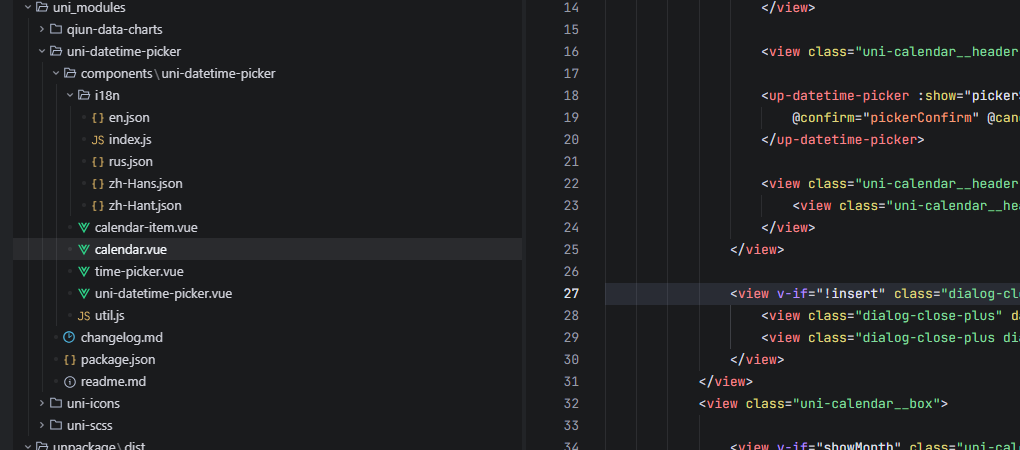
目录结构
总结
UniApp 官方组件虽然功能齐全,但某些设计(如强制重启的多语言切换)并不适合所有场景。通过使用第三方 UI 库的成熟组件进行局部替换,我们可以轻松绕过限制,提升应用品质。如果你的项目也遇到了因 setLocale 导致的重启问题,不妨试试本文的方法------用 uview-plus 的 DatetimePicker 替换原生日历的月份选择器,还用户一个丝滑的多语言切换体验。