https://catlikecoding.com/unity/tutorials/custom-srp/point-and-spot-lights/
Lights with Limited Influence
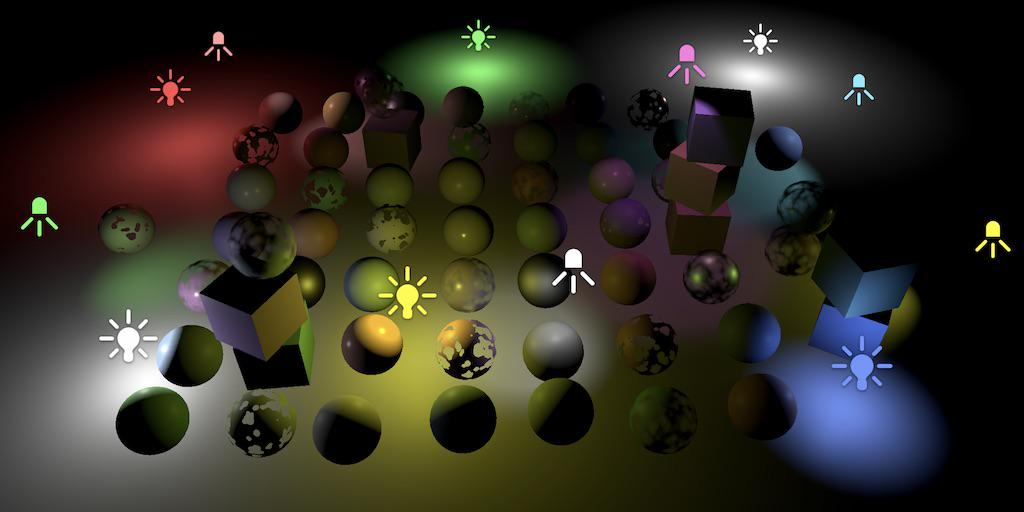
1 Point Lights
1.1 Other Light Data (Point )
同方向光一样,我们支持有限数量的 Other Light.尽管场景中可能有很多 Other Lights,可能有超过光源上限的光源时可见的,但是超过支持上限的将被忽略掉,我们将只处理64个. Untiy 会根据"重要性"为光源排序,我们就根据这个排序来排除超过上限的光源.
光源重要性是相对稳定的.但是在场景有变化时,比如摄像机移动,会导致重要性更新,这时上一帧还在渲染的光源,这一帧由于重要性下降,就不渲染了,这回造成光照效果的突然改变,十分显眼.因此我们把光源上限设置的大一点:64.
首先我们要把 Other Lights Data 收集并上传到GPU.点光源需要颜色和位置.同时为了计算范围衰减,将光源范围平方的倒数,即 1/r^2 存储到 w 中,基于

cs
/////////////// Lighting.cs

public class Lighting
{
    ...

    // Point/Spot 光源的最大数量
    const int maxOtherLightCount = 64;
    // 当前收集到了多少 Point/Spot Lights
    int otherLightCount = 0;
    // Point/Spot 光源颜色
    Vector4[] otherLightColors = new Vector4[maxOtherLightCount];
    // xyz: Point/Spot 光源位置
    // w: 衰减系数
    Vector4[] otherLightPositions = new Vector4[maxOtherLightCount];

    // Point/Spot 光源 shader 常量ID
    int otherLightCountID = Shader.PropertyToID("_OtherLightCount");
    int otherLightColorsID = Shader.PropertyToID("_OtherLightColors");
    int otherLightPositionsID = Shader.PropertyToID("_OtherLightPositions");

    ...

    public void SetupLights()
    {
        dirLightCount = 0;
        otherLightCount = 0;

        NativeArray<VisibleLight> visibleLights = cullingResults.visibleLights;
        for(int i = 0; i < visibleLights.Length; i++)
        {
            VisibleLight light = visibleLights[i];
          switch(light.lightType)
          {
          // 方向光
          case LightType.Directional:
             if(dirLightCount < maxDirLightCount)
                SetupDirectionalLight(dirLightCount++, ref light);
             break;
          // 点光源
          case LightType.Point:
             if(otherLightCount < maxOtherLightCount)
                SetupPointLight(otherLightCount++, ref light);
             break;
          }
        }

        buffer.BeginSample(bufferName);

       // 上传方向光数据
        buffer.SetGlobalInt(dirLightCountID, dirLightCount);
       if(dirLightCount > 0)
       {
            buffer.SetGlobalVectorArray(dirLightColorID, dirLightColors);
            buffer.SetGlobalVectorArray(dirLightDirectionID, dirLightDirections);
            buffer.SetGlobalVectorArray(dirLightShadowDataID, dirLightShadowData);
       }

       // 上传Point/Spot光源数据
       buffer.SetGlobalInt(otherLightCountID, otherLightCount);
       if(otherLightCount > 0)
       {
          buffer.SetGlobalVectorArray(otherLightColorsID, otherLightColors);
          buffer.SetGlobalVectorArray(otherLightPositionsID, otherLightPositions);
       }

        buffer.EndSample(bufferName);
        context.ExecuteCommandBuffer(buffer);
        buffer.Clear();
    }

    ...

    // 收集 Point 光源数据
    private void SetupPointLight(int index, ref VisibleLight light)
    {
       otherLightColors[index] = light.finalColor;
       otherLightPositions[index] = light.localToWorldMatrix.GetColumn(3);
       // 点光源衰减系数
       otherLightPositions[index].w = 1.0f / Mathf.Max(light.range * light.range, 0.000001f);
    }

    ...
}
在 shader 中,定义相应的常量,并计算累加点光源光照
cs
/////////////// Light.hlsl

#define MAX_DIR_LIGHT_COUNT 4
#define MAX_OTHER_LIGHT_COUNT 64

CBUFFER_START(_Lights)
...
// Point/Spot 光源数量
int _OtherLightCount;
float4 _OtherLightColors[MAX_OTHER_LIGHT_COUNT];
float4 _OtherLightPositions[MAX_OTHER_LIGHT_COUNT];
CBUFFER_END

int GetOtherLightCount()
{
    return _OtherLightCount;
}

Light GetOtherLight(int index, Surface surfaceWS, ShadowData shadowData)
{
    Light light;
    light.color = _OtherLightColors[index].rgb;
    float3 ray = _OtherLightPositions[index].xyz - surfaceWS.position;
    // 计算范围衰减
    float distSqr = max(dot(ray, ray), 0.000001f);
    float rangeAttenuation = Square(saturate(1.0 - Square(distSqr*_OtherLightPositions[index].w)));
    light.attenuation = rangeAttenuation / distSqr;
    light.direction = normalize(ray);
    return light;
}


/////////////// Lighting.hlsl

float3 GetLighting(Surface surfaceWS, BRDF brdf, GI gi)
{
    ...

    for(int i = 0; i < GetOtherLightCount(); ++i)
    {
       Light light = GetOtherLight(i, surfaceWS, shadowData);
       color += GetLighting(surfaceWS, brdf, light);
    }
    return color;
}
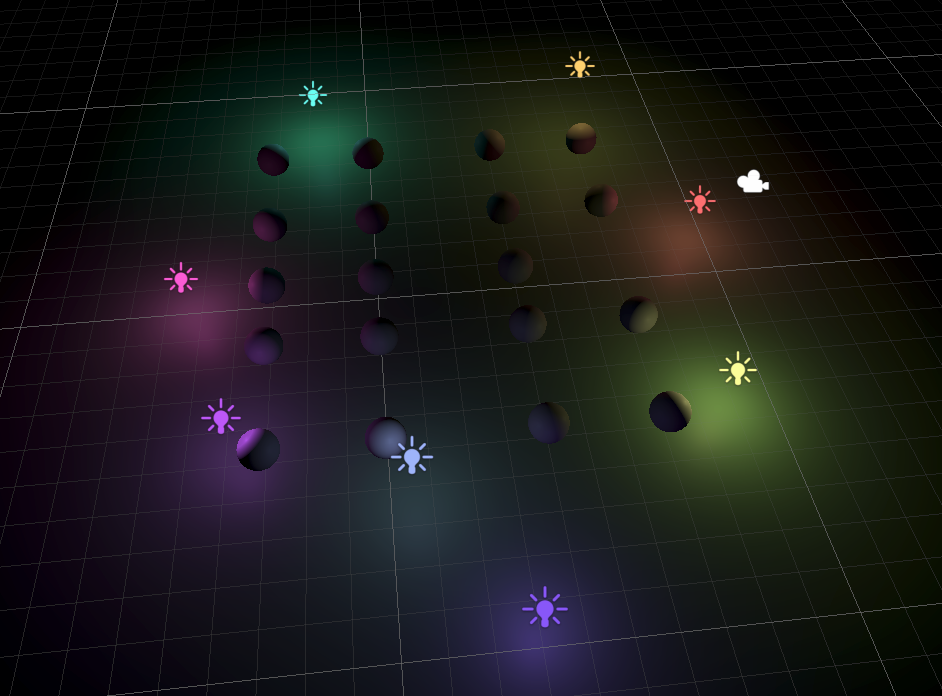
如下图,场景中只有点光源,并被点光源照亮
2 Spot Lights
与 Point Light 相比, Spot Light 需要额外的数据:
-
方向
-
内外角衰减系数 内外角是相对于方向的角度*2.光线强度从内角开始衰减,到外角衰减为0
内外角衰减用下面公式计算:
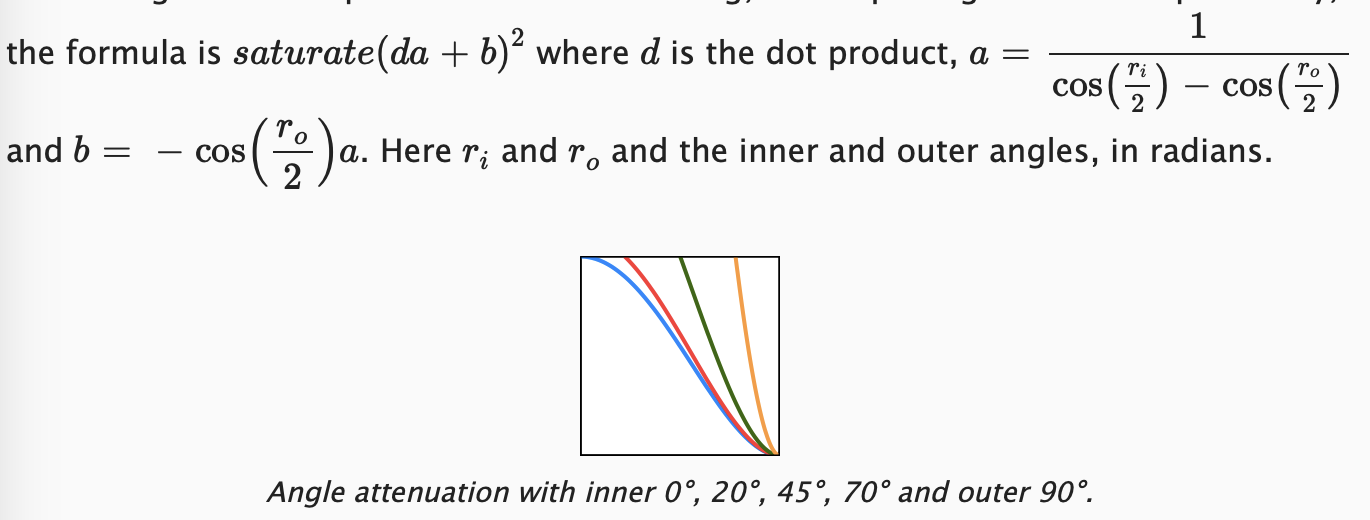
首先,定义并收集数据,上传到 shader
cs
public class Lighting
{
    // Point/Spot 光源的最大数量
    const int maxOtherLightCount = 64;
    // 当前收集到了多少 Point/Spot Lights
    int otherLightCount = 0;
    // Point/Spot 光源颜色
    Vector4[] otherLightColors = new Vector4[maxOtherLightCount];
    // xyz: Point/Spot 光源位置
    // w: 衰减系数
    Vector4[] otherLightPositions = new Vector4[maxOtherLightCount];
    Vector4[] otherLightDirections = new Vector4[maxOtherLightCount];
    Vector4[] otherLightSpotAngles = new Vector4[maxOtherLightCount];

    // Point/Spot 光源 shader 常量ID
    int otherLightCountID = Shader.PropertyToID("_OtherLightCount");
    int otherLightColorsID = Shader.PropertyToID("_OtherLightColors");
    int otherLightPositionsID = Shader.PropertyToID("_OtherLightPositions");
    int otherLightDirectionsID = Shader.PropertyToID("_OtherLightDirections");
    int otherLightSpotAnglesID = Shader.PropertyToID("_OtherLightSpotAngles");

    public void SetupLights()
    {
        dirLightCount = 0;
        otherLightCount = 0;

        NativeArray<VisibleLight> visibleLights = cullingResults.visibleLights;
        for(int i = 0; i < visibleLights.Length; i++)
        {
            VisibleLight light = visibleLights[i];
          switch(light.lightType)
          {
          // 方向光
          case LightType.Directional:
             if(dirLightCount < maxDirLightCount)
                SetupDirectionalLight(dirLightCount++, ref light);
             break;
          // 点光源
          case LightType.Point:
             if(otherLightCount < maxOtherLightCount)
                SetupPointLight(otherLightCount++, ref light);
             break;
          // 聚光灯
          case LightType.Spot:
             if(otherLightCount < maxOtherLightCount)
                SetupSpotLight(otherLightCount++, ref light);
             break;
          }
        }

        buffer.BeginSample(bufferName);
        ...

        // 上传Point/Spot光源数据
        buffer.SetGlobalInt(otherLightCountID, otherLightCount);
        if(otherLightCount > 0)
        {
           buffer.SetGlobalVectorArray(otherLightColorsID, otherLightColors);
           buffer.SetGlobalVectorArray(otherLightPositionsID, otherLightPositions);
           buffer.SetGlobalVectorArray(otherLightDirectionsID, otherLightDirections);
           buffer.SetGlobalVectorArray(otherLightSpotAnglesID, otherLightSpotAngles);
        }

        buffer.EndSample(bufferName);
        context.ExecuteCommandBuffer(buffer);
        buffer.Clear();
    }

    // 收集 Spot 光源数据
    private void SetupSpotLight(int index, ref VisibleLight light)
    {
       otherLightColors[index] = light.finalColor;
       otherLightPositions[index] = light.localToWorldMatrix.GetColumn(3);
       otherLightPositions[index].w = 1.0f / Mathf.Max(light.range * light.range, 0.000001f);
       otherLightDirections[index] = -light.localToWorldMatrix.GetColumn(2);
       // 内外角衰减系数
       float innerCos = Mathf.Cos(Mathf.Deg2Rad * 0.5f * light.light.innerSpotAngle);
       float outerCos = Mathf.Cos(Mathf.Deg2Rad * 0.5f * light.spotAngle);
       float angleRangeInv = 1f / Mathf.Max(innerCos - outerCos, 0.001f);
       otherLightSpotAngles[index] = new Vector4(angleRangeInv, -outerCos * angleRangeInv);
    }
}
在 shader 侧的 Light.hlsl 中,定义 shader 常量接收数据,并计算 spot 光源数据
cs
CBUFFER_START(_Lights)
...
// Point/Spot 光源数量
int _OtherLightCount;
float4 _OtherLightColors[MAX_OTHER_LIGHT_COUNT];
float4 _OtherLightPositions[MAX_OTHER_LIGHT_COUNT];
float4 _OtherLightDirections[MAX_OTHER_LIGHT_COUNT];
float4 _OtherLightSpotAngles[MAX_OTHER_LIGHT_COUNT];
CBUFFER_END


Light GetOtherLight(int index, Surface surfaceWS, ShadowData shadowData)
{
    Light light;
    light.color = _OtherLightColors[index].rgb;
    float3 ray = _OtherLightPositions[index].xyz - surfaceWS.position;
    // 计算光源范围衰减
    float distSqr = max(dot(ray, ray), 0.000001f);
    light.direction = normalize(ray);
    float rangeAttenuation = Square(saturate(1.0 - Square(distSqr*_OtherLightPositions[index].w)));

    // 计算聚光灯的内外角度衰减 (saturate(da+b))^2
    float4 spotAngles = _OtherLightSpotAngles[index];
    float dotProduct = dot(_OtherLightDirections[index].xyz, light.direction);
    float spotAttenuation = Square(saturate(dotProduct * spotAngles.x +spotAngles.y));

    // 总衰减
    light.attenuation = spotAttenuation * rangeAttenuation / distSqr;
    return light;
}
默认情况下, Spot Light 的内角是无法编辑的,但是我们可以通过扩展编辑器来实现编辑功能
cs
/// <summary>
/// 扩展 Light 组件面板
/// </summary>
// 允许选中多个对象进行编辑
[CanEditMultipleObjects]
// 声明该类为 CustomRenderPipelineAsset 管线的 Light 类型对象的编辑器控制类
[CustomEditorForRenderPipeline(typeof(Light), typeof(CustomRenderPipelineAsset))]
public class CustomLightEditor : LightEditor
{
    public override void OnInspectorGUI()
    {
        // 依然用默认方法绘制 Light 编辑面板
        base.OnInspectorGUI();

        // 判断选中的光源,全都是 spot 类型
        // 选中的 Light 的属性会被序列化缓存,settings 提供了访问缓存属性的接口
        if (!settings.lightType.hasMultipleDifferentValues
            && (LightType)settings.lightType.enumValueIndex == LightType.Spot)
        {
            // 绘制 inner / outer 角编辑控件
            settings.DrawInnerAndOuterSpotAngle();
            // 应用修改后的数据
            settings.ApplyModifiedProperties();
        }
    }
}
如下图,是不同的 inner/outer angle 的效果

3 Baked Light and Shadows
这篇教程不会涉及到point/spot光源的实时阴影,仅会介绍烘焙阴影,包括烘焙光照
- 首先将光源的 Mode 改为 Baked
- Shadow Type 默认是 None,如果需要烘焙阴影,则改为其它选项
场景中只有一个点光源和一个聚光灯,可以看到烘焙后到效果
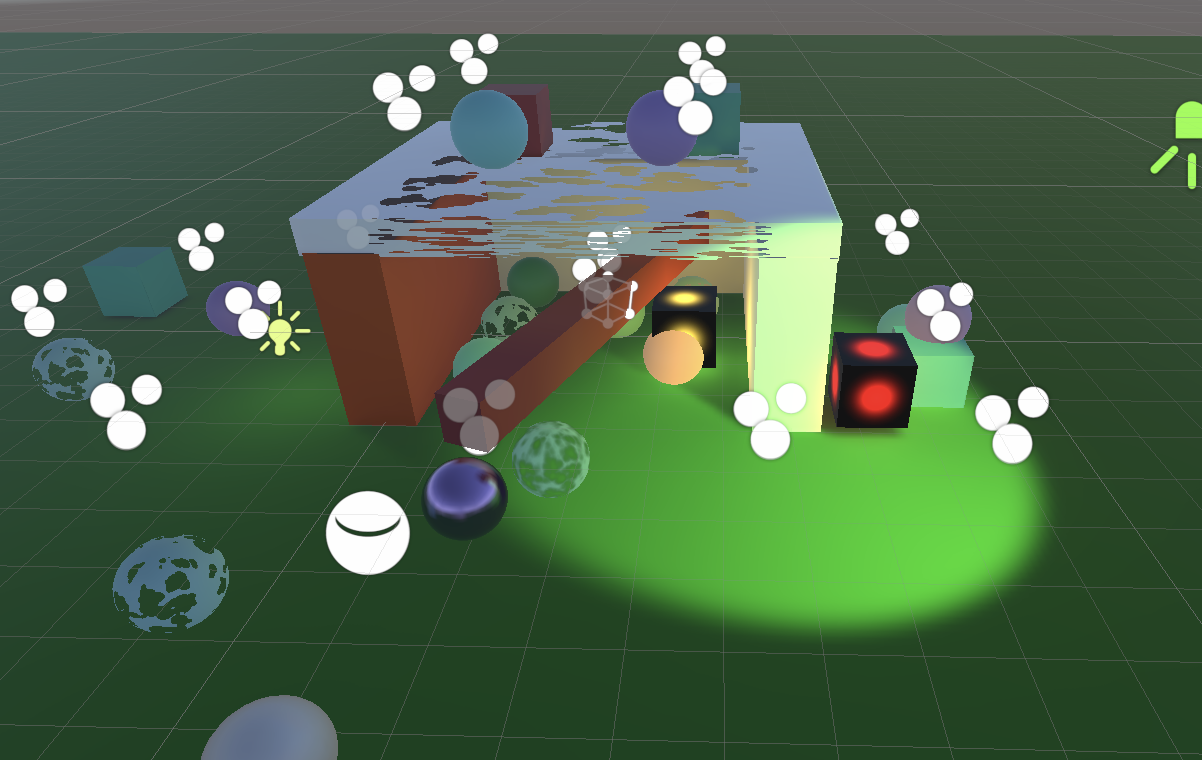
下面是实时光照效果
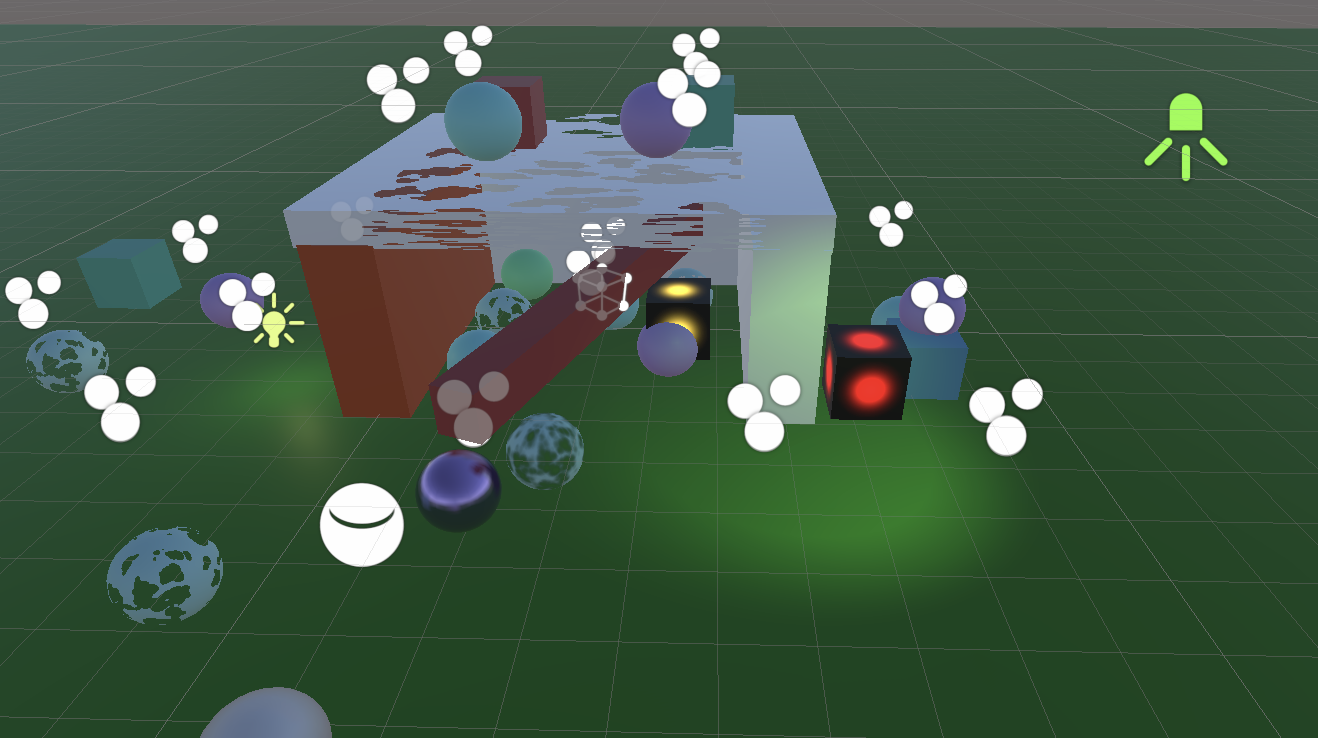
通过对比,可以发现,烘焙的效果,其亮度明显高于实时效果.这是因为 unity 为了兼容旧管线,使用了错误的衰减算法.
3.1 Light Delegate
Unity 允许我们指定衰减算法,需要通过下面的编辑器扩展来完成.核心是指定一个委托,完成构建烘焙用的光源数据的的逻辑,并在该逻辑中,指定光源烘焙的一下参数/配置,其中就包括衰减算法.
将 CustomRenderPipeline 定义为 partial 类,在同目录下定义新的 CustomRenderPipeline.Editor.cs 文件,以实现委托注册
cs
using Unity.Collections;
using UnityEngine;
using UnityEngine.Experimental.GlobalIllumination;
using LightType = UnityEngine.LightType;    // 与 Experimental 下的 LightType 类型冲突,因此需要显式声明用哪个


public partial class CustomRenderPipeline
{
    partial void InitializeForEditor();

    #if UNITY_EDITOR

    partial void InitializeForEditor()
    {
        // 设置委托
        Lightmapping.SetDelegate(requestLightsDelegate);
    }

    protected override void Dispose(bool disposing)
    {
        base.Dispose(disposing);
        // 清理委托
        Lightmapping.ResetDelegate();
    }

    private static Lightmapping.RequestLightsDelegate requestLightsDelegate =
        (Light[] lights, NativeArray<LightDataGI> output) =>
        {
            var lightData = new LightDataGI();
            for (int i = 0; i < lights.Length; i++)
            {
                Light light = lights[i];
                switch (light.type)
                {
                    case LightType.Directional:
                        var dirLight = new DirectionalLight();
                        // 从 light 提取数据
                        LightmapperUtils.Extract(light, ref dirLight);
                        lightData.Init(ref dirLight);
                        break;
                    case LightType.Point:
                        var pointLight = new PointLight();
                        LightmapperUtils.Extract(light, ref pointLight);
                        lightData.Init(ref pointLight);
                        break;
                    case LightType.Spot:
                        var spotLight = new SpotLight();
                        LightmapperUtils.Extract(light, ref spotLight);
                        // 填充角度信息
                        spotLight.innerConeAngle = light.innerSpotAngle * Mathf.Rad2Deg;
                        spotLight.angularFalloff = AngularFalloffType.AnalyticAndInnerAngle;
                        lightData.Init(ref spotLight);
                        break;
                    case LightType.Area:
                        var areaLight = new RectangleLight();
                        LightmapperUtils.Extract(light, ref areaLight);
                        areaLight.mode = LightMode.Baked;   // 仅支持烘焙,不支持实时
                        lightData.Init(ref areaLight);
                        break;
                    // 默认分支,不参与烘焙
                    default:
                        lightData.InitNoBake(light.GetInstanceID());
                        break;
                }
                // 关键点:指定以平方的反比进行衰减
                lightData.falloff = FalloffType.InverseSquared;
                output[i] = lightData;
            }
        };
#endif
}
然后在 CustomRenderPipeline.cs 中的构造函数中,调用初始化函数,完成注册
cs
public CustomRenderPipeline(bool useSRPBatcher, bool useDynamicBatching, bool useGPUInstancing, ShadowSettings shadows)
{
    ...
    // 在 partial for editor 中定义的方法
    InitializeForEditor();
}
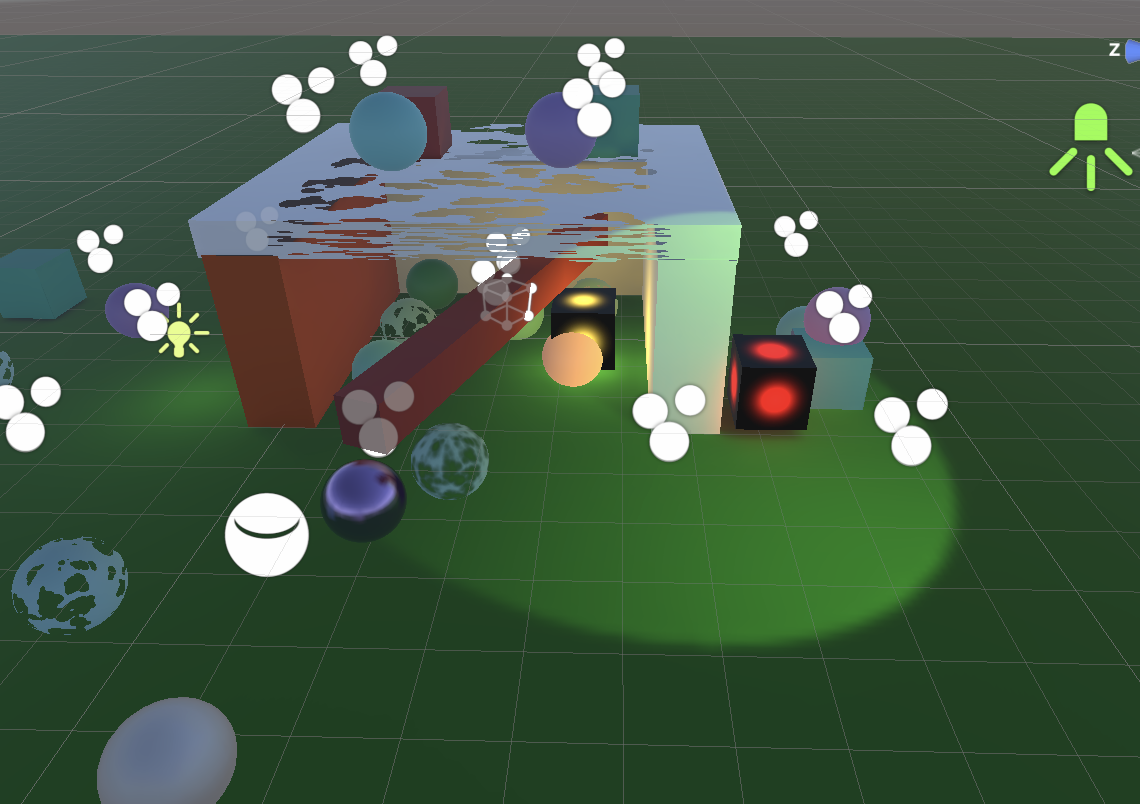
如下图,烘焙结果没有那么亮了.但是可以看到,由于没有阴影,光源会"穿过"墙壁.
3.2 Shadow Mask
Point/Spot Lights 也可以烘焙 shadow mask,只需要将它们的 mode 改为 mixed 即可.
然后,我们需要将光源的 shadow mask 参数: 阴影强度, 所在通道 上传到 GPU.在 shader 侧,获取参数,并计算衰减.
这里要想看到明显的效果,把 range intensity 设置的大一些
cs
////////////////// shadow.cs
// 首先在 shadow.cs 中,加入收集 point/spot 光源数据的接口
public Vector4 ReserveOtherShadows(Light light, int visibleLightIndex)
{
    if (light.shadows != LightShadows.None &&
        light.shadowStrength > 0f)
    {
        LightBakingOutput lightBaking =  light.bakingOutput;
        if (lightBaking.lightmapBakeType == LightmapBakeType.Mixed
            && lightBaking.mixedLightingMode == MixedLightingMode.Shadowmask)
        {
            useShadowMask = true;
            // 返回阴影强度,shadow mask 通道
            return new Vector4(light.shadowStrength, 0f, 0f, lightBaking.occlusionMaskChannel);
        }
    }

    return new Vector4(0f, 0f, 0f, -1f);
}


////////////////// lighting.cs
// 定义相关 shader id 和 buffer,收集数据

...
Vector4[] otherLightSpotAngles = new Vector4[maxOtherLightCount];
Vector4[] otherLightShadowData = new Vector4[maxOtherLightCount];
...
int otherLightSpotAnglesID = Shader.PropertyToID("_OtherLightSpotAngles");
int otherLightShadowDataID = Shader.PropertyToID("_OtherLightShadowData");

public void SetupLights()
{
    dirLightCount = 0;
    otherLightCount = 0;

    NativeArray<VisibleLight> visibleLights = cullingResults.visibleLights;
    for(int i = 0; i < visibleLights.Length; i++)
    {
        VisibleLight light = visibleLights[i];
        switch(light.lightType)
        {
        // 方向光
        case LightType.Directional:
           if(dirLightCount < maxDirLightCount)
              SetupDirectionalLight(dirLightCount++, ref light);
           break;
        // 点光源
        case LightType.Point:
           if(otherLightCount < maxOtherLightCount)
              SetupPointLight(otherLightCount++, ref light);
           break;
        // 聚光灯
        case LightType.Spot:
           if(otherLightCount < maxOtherLightCount)
              SetupSpotLight(otherLightCount++, ref light);
           break;
        }
     }

     buffer.BeginSample(bufferName);

    // 上传方向光数据
    ...

    // 上传Point/Spot光源数据
    buffer.SetGlobalInt(otherLightCountID, otherLightCount);
    if(otherLightCount > 0)
    {
        buffer.SetGlobalVectorArray(otherLightColorsID, otherLightColors);
        buffer.SetGlobalVectorArray(otherLightPositionsID, otherLightPositions);
        buffer.SetGlobalVectorArray(otherLightDirectionsID, otherLightDirections);
        buffer.SetGlobalVectorArray(otherLightSpotAnglesID, otherLightSpotAngles);
        buffer.SetGlobalVectorArray(otherLightShadowDataID, otherLightShadowData);
    }

      buffer.EndSample(bufferName);
      context.ExecuteCommandBuffer(buffer);
      buffer.Clear();
  }

// 收集 Point 光源数据
private void SetupPointLight(int index, ref VisibleLight light)
{
    otherLightColors[index] = light.finalColor;
    otherLightPositions[index] = light.localToWorldMatrix.GetColumn(3);
    // 光源距离衰减系数
    otherLightPositions[index].w = 1.0f / Mathf.Max(light.range * light.range, 0.000001f);
    // 传入下面的数值,以避免 Point Light 受到 Spot Light 算法的影响(共用算法)
    otherLightSpotAngles[index] = new Vector4(0, 1);
    otherLightShadowData[index] = shadows.ReserveOtherShadows(light.light, index);
}

// 收集 Spot 光源数据
private void SetupSpotLight(int index, ref VisibleLight light)
{
    otherLightColors[index] = light.finalColor;
    otherLightPositions[index] = light.localToWorldMatrix.GetColumn(3);
    otherLightPositions[index].w = 1.0f / Mathf.Max(light.range * light.range, 0.000001f);
    otherLightDirections[index] = -light.localToWorldMatrix.GetColumn(2);
    // 内外角衰减系数
    float innerCos = Mathf.Cos(Mathf.Deg2Rad * 0.5f * light.light.innerSpotAngle);
    float outerCos = Mathf.Cos(Mathf.Deg2Rad * 0.5f * light.spotAngle);
    float angleRangeInv = 1f / Mathf.Max(innerCos - outerCos, 0.001f);
    otherLightSpotAngles[index] = new Vector4(angleRangeInv, -outerCos * angleRangeInv);
    otherLightShadowData[index] = shadows.ReserveOtherShadows(light.light, index);
}
在 shader 侧,接收常量缓冲,采样 shadow mask
cs
/////////////// shadow.hlsl

// point / spot 光源 shadow 数据
struct OtherShadowData
{
    float strength;
    int shadowMaskChannel;
};

// 获取 point/spot 阴影衰减
float GetOtherShadowAttenuation(OtherShadowData otherShadowData, ShadowData global, Surface surfaceWS)
{
    // 材质不接收阴影
#if !defined(_RECEIVE_SHADOWS)
    return 1.0f;
#endif
    // 采样 shadow mask
    if(otherShadowData.strength > 0.0f)
       return GetBakedShadow(global.shadowMask, otherShadowData.strength, otherShadowData.shadowMaskChannel);
    return 1.0f;
}

/////////////// Light.hlsl
CBUFFER_START(_Lights)
...
float4 _OtherLightSpotAngles[MAX_OTHER_LIGHT_COUNT];
float4 _OtherLightShadowData[MAX_OTHER_LIGHT_COUNT];
CBUFFER_END

OtherShadowData GetOtherLightShadowData(int index)
{
    OtherShadowData otherShadowData;
    otherShadowData.strength = _OtherLightShadowData[index].x;
    otherShadowData.shadowMaskChannel = _OtherLightShadowData[index].w;
    return otherShadowData;
}


Light GetOtherLight(int index, Surface surfaceWS, ShadowData shadowData)
{
    Light light;
    light.color = _OtherLightColors[index].rgb;
    float3 ray = _OtherLightPositions[index].xyz - surfaceWS.position;
    // 计算光源范围衰减
    float distSqr = max(dot(ray, ray), 0.000001f);
    light.direction = normalize(ray);
    float rangeAttenuation = Square(saturate(1.0 - Square(distSqr*_OtherLightPositions[index].w)));

    // 计算聚光灯的内外角度衰减 (saturate(da+b))^2
    float4 spotAngles = _OtherLightSpotAngles[index];
    float dotProduct = dot(_OtherLightDirections[index].xyz, light.direction);
    float spotAttenuation = Square(saturate(dotProduct * spotAngles.x +spotAngles.y));

    // 获取 shadow mask
    OtherShadowData otherShadowData = GetOtherLightShadowData(index);
    float shadowMaskAttenuation = GetOtherShadowAttenuation(otherShadowData, shadowData, surfaceWS);

    // 总衰减
    light.attenuation = shadowMaskAttenuation * spotAttenuation * rangeAttenuation / distSqr;
    return light;
}
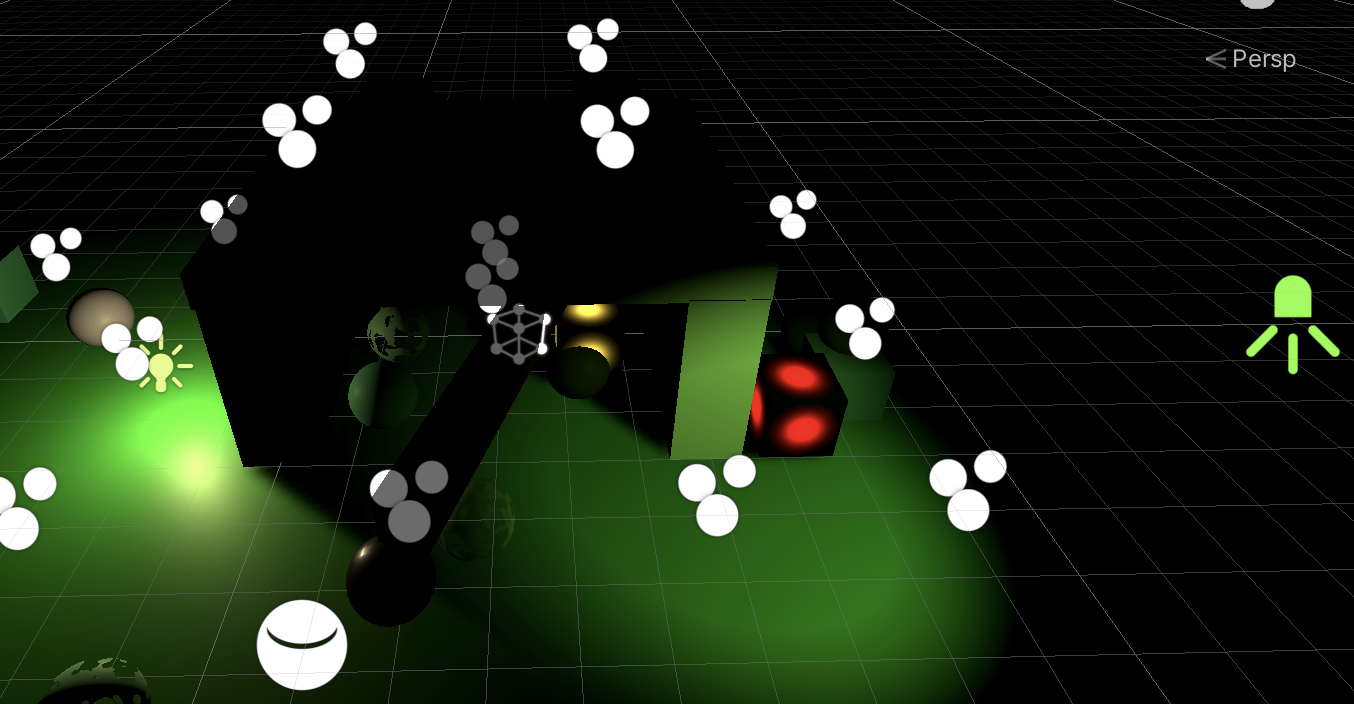
最后得到如下效果(关闭了间接光照)
4 Lights Per Object
现在,场景中的所有光源,每帧都会被渲染.对于方向光来说没问题.但是对于点光和聚光灯来说,那些距离很远,对当前画面没有贡献的光,也被收集,参与计算,但是没有效果,完全是浪费算力.为了支持更多的光源,并保证性能,需要降低每帧处理的光源的数量.有多种方法可以实现,这里使用 unity 的 per-object indices (逐对象索引).
思想是针对每个对象,仅将影响该对象的光源送到 GPU 进行计算.这种方式对于小的对象效果很好.但是对于那些很大的对象,一个光源本来只影响该对象的一部分,但是由于各种限制,忽略了同时影响该对象的其它光源,导致光照看起来不太正常.
由于该方案有时效果不好,因此将该特性作为一个选项,可以根据需要开启或关闭.
4.1 Per-Object Light Data
是否使用(上传) PerObject Light Data,依然是由 DrawingSettings 决定的,因此完善该方法,加入是否开启 PerObjectLight 的参数.
cs
///////////////////// CameraRenderer.cs

  void DrawVisibleGeometry(bool useDynamicBatching,
      bool useGPUInstancing,
      bool useLightsPerObject)
  {
    PerObjectData lightsPerObjectFlags = useLightsPerObject ?
        PerObjectData.LightData | PerObjectData.Indices : PerObjectData.None;
    // 渲染不透明物体
    var sortingSettings = new SortingSettings(camera){ criteria = SortingCriteria.CommonOpaque };
    var drawingSettings = new DrawingSettings(unlitShaderTagId, sortingSettings)
    { enableDynamicBatching = useDynamicBatching, enableInstancing = useGPUInstancing};
    // 索引是 1,因为索引为 0 的通过构造函数将 unlitShaderTagId 设置了
    drawingSettings.SetShaderPassName(1, litShaderTagId);
    drawingSettings.perObjectData = PerObjectData.Lightmaps
                                      | PerObjectData.LightProbe
                                      | PerObjectData.LightProbeProxyVolume
                                      | PerObjectData.ShadowMask
                                      | PerObjectData.OcclusionProbe
                                      | PerObjectData.OcclusionProbeProxyVolume
                                      | PerObjectData.ReflectionProbes
                                      | lightsPerObjectFlags
                                      ;
  ...
 }
在 CustomRenderPipelineAsset 中定义参数,并一路传递到 DrawVisibleGeometry 调用.
4.2 Sanitizing Light Indices 整理索引
Unity 只是简单地收集所有光源,并按照重要顺序进行排序,然后以该顺序作为每个光源的索引.当上传每个对象的光源列表时,就使用该索引.但是我们上面在提交光 OtherLight 数据时,剔除掉了方向光,同时我们只上传了64个其它光源,因此需要对索引进行调整.逻辑实现在 Lighting.SetupLights 函数中,调用该函数的相关逻辑也需要做调整.
cs
////////////////// Lighting.cs

  public void SetupLights(bool usePerObjectLights)
  {
      dirLightCount = 0;
      otherLightCount = 0;

      // 如果开启了 usePerObjectLights 则获取索引表,根据我们自己收集的光源进行重新映射索引
      NativeArray<int> indexMap = usePerObjectLights ? cullingResults.GetLightIndexMap(Allocator.Temp) : default;
      NativeArray<VisibleLight> visibleLights = cullingResults.visibleLights;
      int i = 0;
      for(i = 0; i < visibleLights.Length; i++)
      {
          int newIndex = -1;
          VisibleLight light = visibleLights[i];
        switch(light.lightType)
        {
        // 方向光
        case LightType.Directional:
           if(dirLightCount < maxDirLightCount)
              SetupDirectionalLight(dirLightCount++, ref light);
           break;
        // 点光源
        case LightType.Point:
           if(otherLightCount < maxOtherLightCount)
           {
              newIndex = otherLightCount;
              SetupPointLight(otherLightCount++, ref light);
           }
           break;
        // 聚光灯
        case LightType.Spot:
           if(otherLightCount < maxOtherLightCount)
           {
              newIndex = otherLightCount;
              SetupSpotLight(otherLightCount++, ref light);
           }
           break;
        }

        // 重新映射索引
        if(usePerObjectLights)
           indexMap[i] = newIndex;
      }

        if(usePerObjectLights)
        {
            // 不可见光,索引设置成 -1
            for(; i < indexMap.Length; ++i)
               indexMap[i] = -1;
            // 设置更新后的索引
            cullingResults.SetLightIndexMap(indexMap);
            indexMap.Dispose();

            Shader.EnableKeyword(lightsPerObjectKeyword);
        }
        else
        {
            Shader.DisableKeyword(lightsPerObjectKeyword);
        }

    ....
  }
在 shader 侧,需要定义对应的 multi_compile keyword,并跟 per-object lights 传进来的索引,引用正确光源进行光照
cs
////////////////// Lit.shader
#pragma multi_compile_instancing
#pragma multi_compile _ _LIGHTS_PER_OBJECT


////////////////// UnityInput.hlsl
CBUFFER_START(UnityPerDraw)
real4 unity_WorldTransformParams;
// per object lights 数据
// y 是影响该对象的光源数量
real4 unity_LightData;
// 存储光源索引,每个通道一个,最多8个. index = unity_LightIndices[i/4][i%4]
real4 unity_LightIndices[2];
...
CBUFFER_END


////////////////// Lighting.hlsl
float3 GetLighting(Surface surfaceWS, BRDF brdf, GI gi)
{
    ShadowData shadowData = GetShadowData(surfaceWS);
    shadowData.shadowMask = gi.shadowMask;
    // 临时返回以查看数据
    //return gi.shadowMask.shadows.rgb;
    //return float4(gi.specular, 1.0f);
    float3 color = IndirectBRDF(surfaceWS, brdf, gi.diffuse, gi.specular);
    //color = 0;   // 显示去掉间接光照的效果
    for(int i = 0; i < GetDirectionalLightCount(); ++i)
    {
        Light light = GetDirectionalLight(i, surfaceWS, shadowData);
        color += GetLighting(surfaceWS, brdf, light);
    }

#if defined(_LIGHTS_PER_OBJECT)
    // 每个对象定义了影响的光源
    // y 可能大于8,而我们最多支持8个,因此用 min 确保
    for(int i = 0; i < min(8,unity_LightData.y); ++i)
    {
       int index = unity_LightIndices[(uint)i/4][(uint)i%4];
       Light light = GetOtherLight(index, surfaceWS, shadowData);
       color += GetLighting(surfaceWS, brdf, light);
    }
#else
    // 没有每个对象光源的数据,因此处理所有
    for(int i = 0; i < GetOtherLightCount(); ++i)
    {
       Light light = GetOtherLight(i, surfaceWS, shadowData);
       color += GetLighting(surfaceWS, brdf, light);
    }
#endif

    return color;
}
需要注意的是, Per-Object Lights 会降低 GPU Instancing 的效率,因为只有受相同光源影响的对象,才能合批(增加了条件).