vue3 实现甘特图
有一个特别好用的插件,专门用来做甘特图的,分享一下。
相关资料
安装
安装的话特别简单,使用下面命令就可以了:
bash
npm install vxe-pc-ui@next vxe-table@next vxe-gantt@next安装完成之后需要单独配置一下,在 main.js 文件中:
bash
import VxeUIAll from 'vxe-pc-ui'
import 'vxe-pc-ui/es/style.css'
import VxeUITable from 'vxe-table'
import 'vxe-table/es/style.css'
import VxeUIGantt from 'vxe-gantt'
import 'vxe-gantt/lib/style.css'

createApp(App).use(VxeUIAll).use(VxeUITable).use(VxeUIGantt).mount('#app')
配置完成就可以直接使用了。
使用
在需要使用的页面,先嵌入一个div用来展示甘特图。
html
<template>
  <div class="ed-page">
    <vxe-gantt v-bind="ganttOptions"></vxe-gantt>
  </div>
</template>
然后就是通过配置他的配置项进行渲染效果了。
javascript
<script setup>
import { reactive, ref } from 'vue'

const ganttOptions = ref({
  border: true,
  height: "100%",
  rowConfig: {
    isHover: true
  },
  checkboxConfig: {
    labelField: 'title',
    highlight: true
  },
  taskBarConfig: {
    showProgress: true,
    showContent: true,
    barStyle: {
      round: true,
      bgColor: '#fca60b',
      completedBgColor: '#65c16f'
    }
  },
  taskViewConfig: {
    tableStyle: {
      width: 480
    }
  },
  columns: [
    { type: 'checkbox', title: '任务名称' },
    { field: 'start', title: '开始时间', width: 100 },
    { field: 'end', title: '结束时间', width: 100 }
  ],
  data: [
    { id: 10001, title: 'A项目', start: '2024-03-01', end: '2024-03-04', progress: 3 },
    { id: 10002, title: '城市道路修理进度', start: '2024-03-03', end: '2024-03-08', progress: 10 },
    { id: 10003, title: 'B大工程', start: '2024-03-03', end: '2024-03-11', progress: 90 },
    { id: 10004, title: '超级大工程', start: '2024-03-05', end: '2024-03-11', progress: 15 },
    { id: 10005, title: '地球净化项目', start: '2024-03-08', end: '2024-03-15', progress: 100 },
    { id: 10006, title: '一个小目标项目', start: '2024-03-10', end: '2024-03-21', progress: 5 },
    { id: 10007, title: '某某计划', start: '2024-03-15', end: '2024-03-24', progress: 70 },
    { id: 10008, title: '某某科技项目', start: '2024-03-20', end: '2024-03-29', progress: 50 },
    { id: 10009, title: '地铁建设工程', start: '2024-03-19', end: '2024-03-20', progress: 5 },
    { id: 10010, title: '铁路修建计划', start: '2024-03-12', end: '2024-03-20', progress: 50 }
  ]
})

</script>
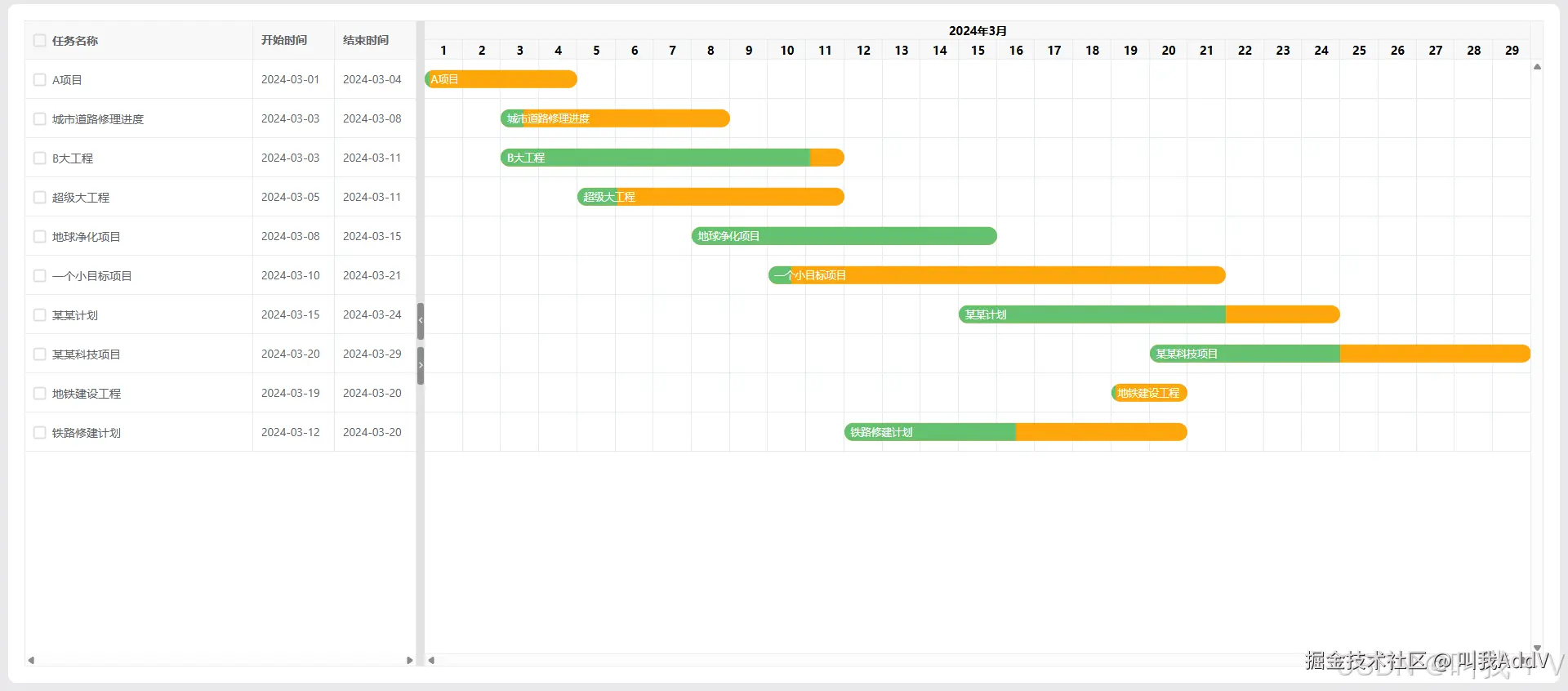
最后出现的效果就像下面的截图一样啦:
其他案例
当然还有各种各样的效果,可以参考上面的网站进行配置,下面也放几个其他效果的代码。
案例一
javascript
<template>
  <div class="ed-page">
    <vxe-gantt v-bind="ganttOptions"></vxe-gantt>
  </div>
</template>
<script setup>
// 安装
// npm install vxe-pc-ui@next vxe-table@next vxe-gantt@next

import { reactive, ref } from 'vue'

const ganttOptions = ref({
  border: true,
  columnConfig: {
    resizable: true
  },
  taskBarConfig: {
    showProgress: true
  },
  columns: [
    { field: 'title', title: '任务名称' },
    { field: 'start', title: '开始时间', width: 100 },
    { field: 'end', title: '结束时间', width: 100 }
  ],
  data: [
    { id: 10001, title: 'A项目', start: '2024-03-01', end: '2024-03-04', progress: 3 },
    { id: 10002, title: '城市道路修理进度', start: '2024-03-03', end: '2024-03-08', progress: 10 },
    { id: 10003, title: 'B大工程', start: '2024-03-03', end: '2024-03-11', progress: 90 },
    { id: 10004, title: '超级大工程', start: '2024-03-05', end: '2024-03-11', progress: 15 },
    { id: 10005, title: '地球净化项目', start: '2024-03-08', end: '2024-03-15', progress: 100 },
    { id: 10006, title: '一个小目标项目', start: '2024-03-10', end: '2024-03-21', progress: 5 },
    { id: 10007, title: '某某计划', start: '2024-03-15', end: '2024-03-24', progress: 70 },
    { id: 10008, title: '某某科技项目', start: '2024-03-20', end: '2024-03-29', progress: 50 },
    { id: 10009, title: '地铁建设工程', start: '2024-03-19', end: '2024-03-20', progress: 5 },
    { id: 10010, title: '铁路修建计划', start: '2024-03-12', end: '2024-03-20', progress: 10 },
    { id: 10011, title: '蓝天计划', start: '2024-03-02', end: '2024-03-42', progress: 0 },
    { id: 10012, title: 'C计划', start: '2024-03-05', end: '2024-03-14', progress: 90 }
  ]
})

</script>
<style scoped lang="scss"></style>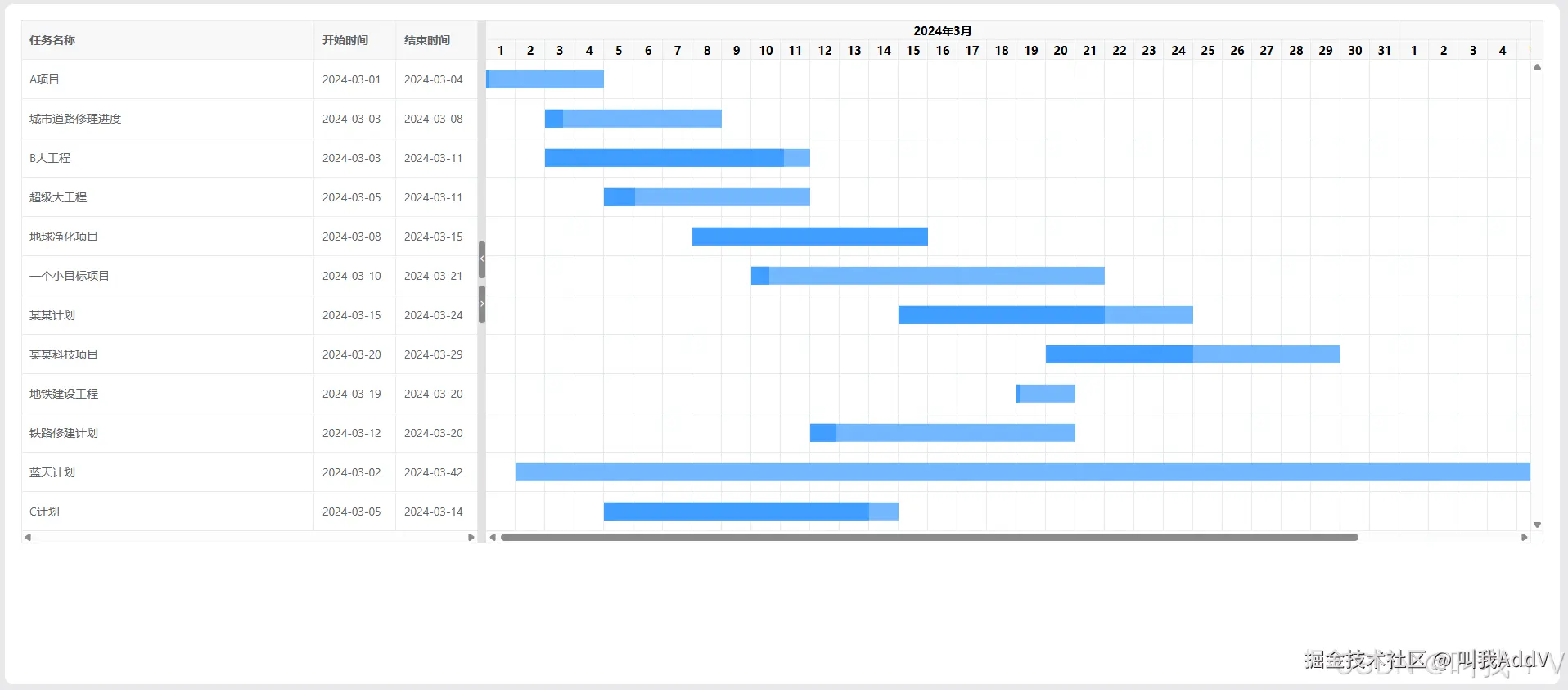
案例二
javascript
<template>
  <div class="ed-page">
    <vxe-gantt v-bind="ganttOptions"></vxe-gantt>
  </div>
</template>
<script setup>
// 安装
// npm install vxe-pc-ui@next vxe-table@next vxe-gantt@next

import { reactive, ref } from 'vue'

const ganttOptions = ref({
  showOverflow: true,
  border: 'outer',
  stripe: true,
  rowConfig: {
    useKey: true
  },
  columnConfig: {
    resizable: true
  },
  checkboxConfig: {
    labelField: 'name'
  },
  treeConfig: {
    transform: true,
    showLine: true
  },
  taskBarConfig: {
    showProgress: true,
    showContent: true
  },
  taskViewConfig: {
    tableStyle: {
      width: 480
    }
  },
  columns: [
    { field: 'title', title: '任务名称', treeNode: true },
    { field: 'start', title: '开始时间', width: 100 },
    { field: 'end', title: '结束时间', width: 100 },
    { field: 'progress', title: '进度(%)', width: 80 }
  ],
  data: [
    { id: 10001, parentId: null, title: 'A项目', start: '2024-03-01', end: '2024-03-04', progress: 3 },
    { id: 10002, parentId: 10001, title: '城市道路修理进度', start: '2024-03-03', end: '2024-03-08', progress: 10 },
    { id: 10003, parentId: null, title: 'B大工程', start: '2024-03-03', end: '2024-03-11', progress: 90 },
    { id: 10004, parentId: 10003, title: '超级大工程', start: '2024-03-05', end: '2024-03-11', progress: 15 },
    { id: 10005, parentId: 10003, title: '地球净化项目', start: '2024-03-08', end: '2024-03-15', progress: 100 },
    { id: 10006, parentId: 10003, title: '一个小目标项目', start: '2024-03-10', end: '2024-03-21', progress: 0 },
    { id: 10007, parentId: 10005, title: '某某计划', start: '2024-03-15', end: '2024-03-24', progress: 70 },
    { id: 10008, parentId: null, title: '某某科技项目', start: '2024-03-20', end: '2024-03-29', progress: 50 },
    { id: 10009, parentId: 10008, title: '地铁建设工程', start: '2024-03-19', end: '2024-03-20', progress: 5 },
    { id: 10010, parentId: 10008, title: '公寓装修计划2', start: '2024-03-12', end: '2024-03-20', progress: 30 },
    { id: 10011, parentId: 10008, title: '两个小目标工程', start: '2024-03-01', end: '2024-03-04', progress: 20 },
    { id: 10012, parentId: null, title: '蓝天计划', start: '2024-03-02', end: '2024-03-08', progress: 50 },
    { id: 10013, parentId: 10010, title: 'C大项目', start: '2024-03-08', end: '2024-03-11', progress: 10 },
    { id: 10014, parentId: 10010, title: 'H计划', start: '2024-03-12', end: '2024-03-16', progress: 100 },
    { id: 10015, parentId: 10011, title: '铁路修建计划', start: '2024-03-05', end: '2024-03-06', progress: 0 },
    { id: 10016, parentId: 10011, title: 'D项目', start: '2024-03-06', end: '2024-03-11', progress: 10 },
    { id: 10017, parentId: 10011, title: '海外改造工程', start: '2024-03-08', end: '2024-03-09', progress: 0 },
    { id: 10018, parentId: null, title: 'Z计划', start: '2024-03-24', end: '2024-03-26', progress: 80 },
    { id: 10019, parentId: 10018, title: 'F工程', start: '2024-03-20', end: '2024-03-28', progress: 10 },
    { id: 10020, parentId: 10018, title: '投资大项目', start: '2024-03-23', end: '2024-03-28', progress: 60 },
    { id: 10021, parentId: 10018, title: 'X计划', start: '2024-03-16', end: '2024-03-25', progress: 10 },
    { id: 10022, parentId: null, title: '上天计划', start: '2024-03-05', end: '2024-03-24', progress: 0 },
    { id: 10023, parentId: null, title: 'G项目', start: '2024-03-08', end: '2024-03-28', progress: 5 },
    { id: 10024, parentId: 10023, title: '下地计划', start: '2024-03-09', end: '2024-03-16', progress: 50 }
  ]
})

</script>
<style scoped lang="scss"></style>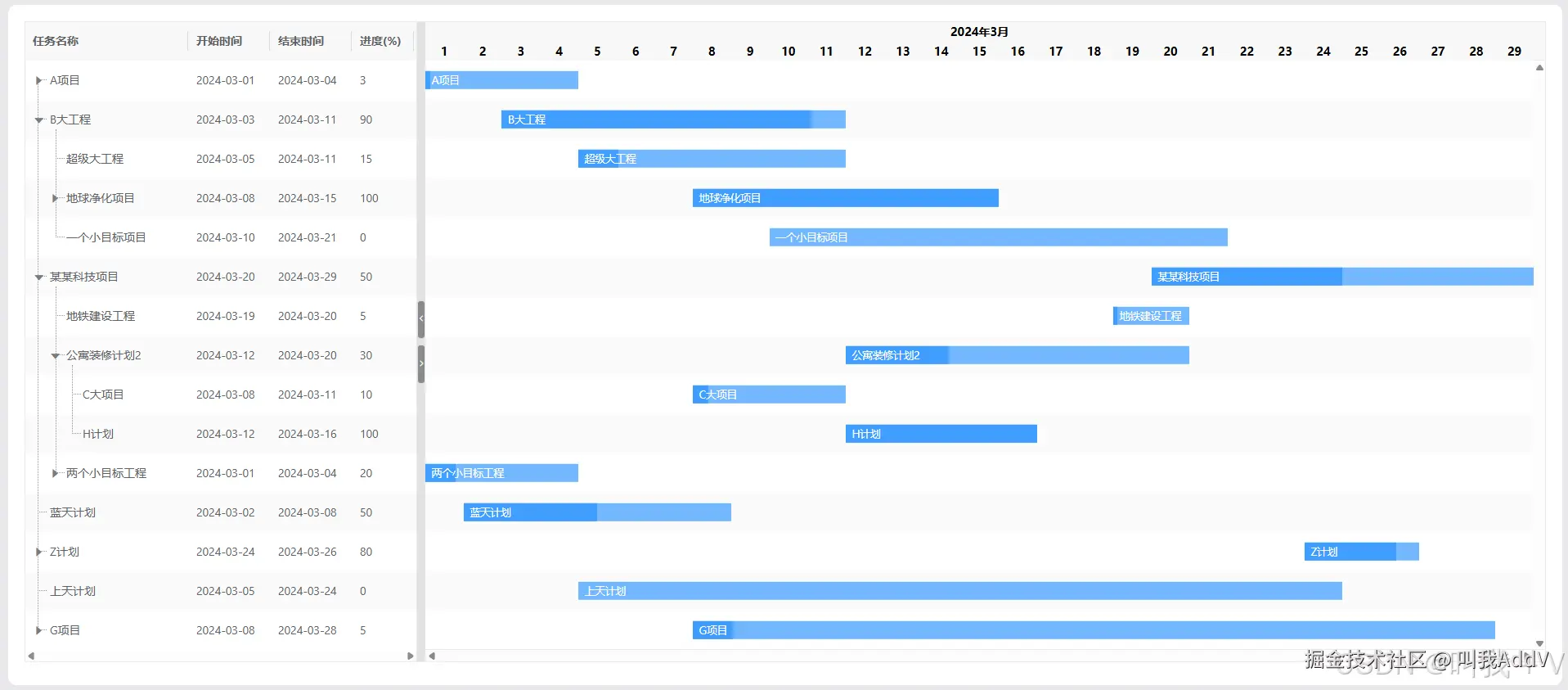
案例三
javascript
<template>
  <div class="ed-page">
    <vxe-gantt v-bind="ganttOptions"></vxe-gantt>
  </div>
</template>
<script setup>
// 安装
// npm install vxe-pc-ui@next vxe-table@next vxe-gantt@next

import { reactive, ref } from 'vue'

const ganttOptions = ref({
  border: true,
  height: 500,
  rowConfig: {
    isHover: true
  },
  checkboxConfig: {
    labelField: 'title',
    highlight: true
  },
  taskBarConfig: {
    showProgress: true,
    showContent: true,
    barStyle: {
      round: true,
      bgColor: '#fca60b',
      completedBgColor: '#65c16f'
    }
  },
  taskViewConfig: {
    tableStyle: {
      width: 480
    }
  },
  columns: [
    { type: 'checkbox', title: '任务名称' },
    { field: 'start', title: '开始时间', width: 100 },
    { field: 'end', title: '结束时间', width: 100 }
  ],
  data: [
    { id: 10001, title: 'A项目', start: '2024-03-01', end: '2024-03-04', progress: 3 },
    { id: 10002, title: '城市道路修理进度', start: '2024-03-03', end: '2024-03-08', progress: 10 },
    { id: 10003, title: 'B大工程', start: '2024-03-03', end: '2024-03-11', progress: 90 },
    { id: 10004, title: '超级大工程', start: '2024-03-05', end: '2024-03-11', progress: 15 },
    { id: 10005, title: '地球净化项目', start: '2024-03-08', end: '2024-03-15', progress: 100 },
    { id: 10006, title: '一个小目标项目', start: '2024-03-10', end: '2024-03-21', progress: 5 },
    { id: 10007, title: '某某计划', start: '2024-03-15', end: '2024-03-24', progress: 70 },
    { id: 10008, title: '某某科技项目', start: '2024-03-20', end: '2024-03-29', progress: 50 },
    { id: 10009, title: '地铁建设工程', start: '2024-03-19', end: '2024-03-20', progress: 5 },
    { id: 10010, title: '铁路修建计划', start: '2024-03-12', end: '2024-03-20', progress: 10 }
  ]
})

</script>
<style scoped lang="scss"></style>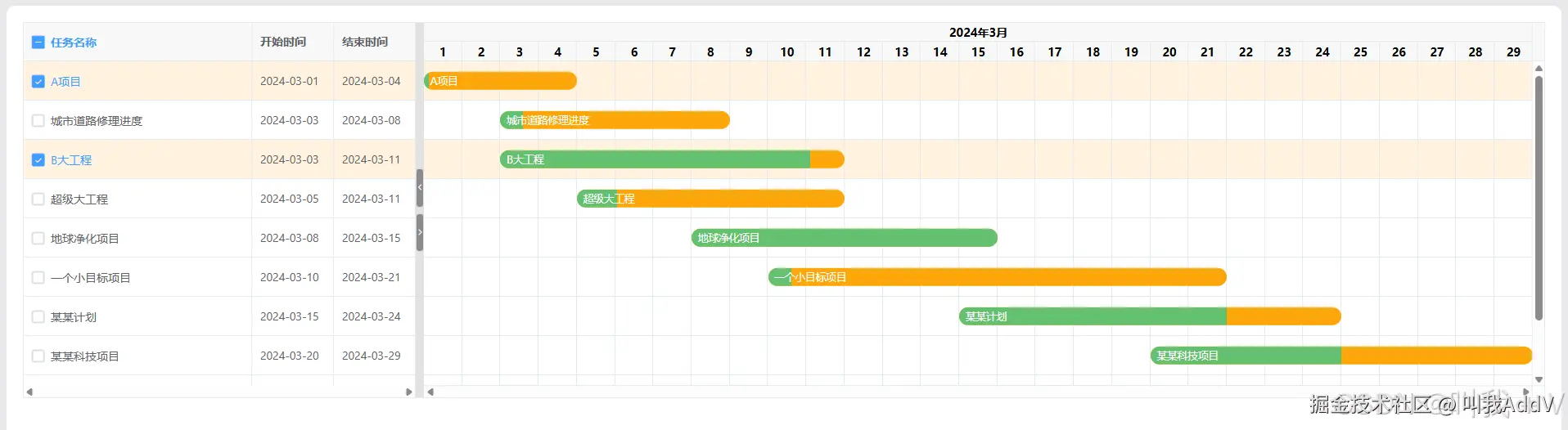
好了,上面的网站还有很多的效果,看需要实现吧!