提问
-
setState是怎么刷新页面的?
-
setState为什么有些情况下使用会带来不必要的开销?
-
flutter的渲染机制是什么?
-
带着这几个疑问读一下系统源码
- setState入手
- 补充flutter启动流程,runApp入手
- binding过程,补充window概念
- 回来以后整体看一下,然后补充Vsync概念
setState入手
typescript
@protected
void setState(VoidCallback fn) {
  final Object? result = fn() as dynamic;
  _element!.markNeedsBuild();
}
markNeedsBuild
csharp
void markNeedsBuild() {
  if (dirty) {
    return;
  }
  _dirty = true;
  owner!.scheduleBuildFor(this);
}
scheduleBuildFor
ini
void scheduleBuildFor(Element element) {
  if (element._inDirtyList) {
    _dirtyElementsNeedsResorting = true;
    return;
  }
  if (!_scheduledFlushDirtyElements && onBuildScheduled != null) {
    _scheduledFlushDirtyElements = true;
    onBuildScheduled!();
  }
  _dirtyElements.add(element);
  element._inDirtyList = true;
}
onBuildScheduled调到了哪?这个得从runApp入手
- 先补充一下window的概念,再走一下runapp流程
window
- 不管是安卓、ios、flutter,都是把操作系统抽象成一块屏幕,framework层就是和屏幕交互
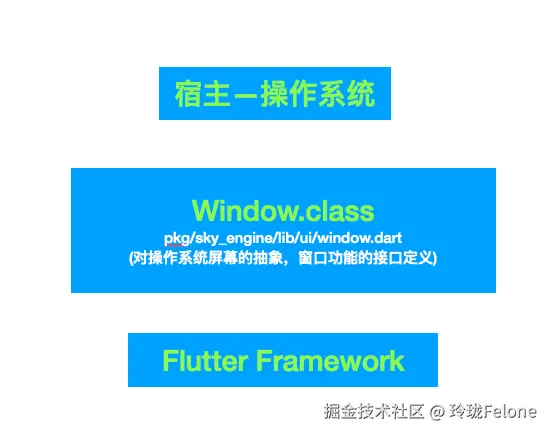
- flutter中这块屏幕对应的就是window类
dart
@Native("Window,DOMWindow")
class Window extends EventTarget  implements WindowEventHandlers,  WindowBase  GlobalEventHandlers,
        _WindowTimers, WindowBase64 {

  // 当前设备的DPI,即一个逻辑像素显示多少物理像素,数字越大,显示效果就越精细保真。
  // DPI是设备屏幕的固件属性,如Nexus 6的屏幕DPI为3.5
  double get devicePixelRatio => _devicePixelRatio;

  // Flutter UI绘制区域的大小
  Size get physicalSize => _physicalSize;

  // 当前系统默认的语言Locale
  Locale get locale;

  // 当前系统字体缩放比例。
  double get textScaleFactor => _textScaleFactor;

  // 当绘制区域大小改变回调
  VoidCallback get onMetricsChanged => _onMetricsChanged;
  // Locale发生变化回调
  VoidCallback get onLocaleChanged => _onLocaleChanged;
  // 系统字体缩放变化回调
  VoidCallback get onTextScaleFactorChanged => _onTextScaleFactorChanged;
  // 绘制前回调,一般会受显示器的垂直同步信号VSync驱动,当屏幕刷新时就会被调用
  FrameCallback get onBeginFrame => _onBeginFrame;
  // 绘制回调
  VoidCallback get onDrawFrame => _onDrawFrame;
  // 点击或指针事件回调
  PointerDataPacketCallback get onPointerDataPacket => _onPointerDataPacket;
  // 调度Frame,该方法执行后,onBeginFrame和onDrawFrame将紧接着会在合适时机被调用,
  // 此方法会直接调用Flutter engine的Window_scheduleFrame方法
  void scheduleFrame() native 'Window_scheduleFrame';
  // 更新应用在GPU上的渲染,此方法会直接调用Flutter engine的Window_render方法
  void render(Scene scene) native 'Window_render';

  // 发送平台消息
  void sendPlatformMessage(String name,
                           ByteData data,
                           PlatformMessageResponseCallback callback) ;
  // 平台通道消息处理回调
  PlatformMessageCallback get onPlatformMessage => _onPlatformMessage;

  ... //其它属性及回调

}
flutter启动时的runAapp,就是建立与window的联系
java
void runApp(Widget app) {
  final WidgetsBinding binding = WidgetsFlutterBinding.ensureInitialized();
  _runWidget(binding.wrapWithDefaultView(app), binding, 'runApp');
}
WidgetsFlutterBinding.ensureInitialized()
scala
class WidgetsFlutterBinding extends BindingBase with GestureBinding, SchedulerBinding, ServicesBinding, PaintingBinding, SemanticsBinding, RendererBinding, WidgetsBinding {
  static WidgetsBinding ensureInitialized() {
    if (WidgetsBinding._instance == null) {
      WidgetsFlutterBinding();
    }
    return WidgetsBinding.instance;
  }
}
binding中mixin过程
BindingBase:抽象基类
WidgetsBinding:绑定组件树
RendererBinding:绑定渲染树
SemanticsBinding:绑定语义树,跟无障碍模式有关,定义界面元素的功能和含义,如按钮、输入框、标题、返回等
PaintingBinding:绑定绘制操作
SchedulerBinding:绑定帧绘制回调函数,以及widget生命周期相关事件
ServicesBinding:绑定平台服务消息,注册Dart层和C++层的消息传输服务;
GestureBinding:绑定手势事件,用于检测应用的各种手势相关操作;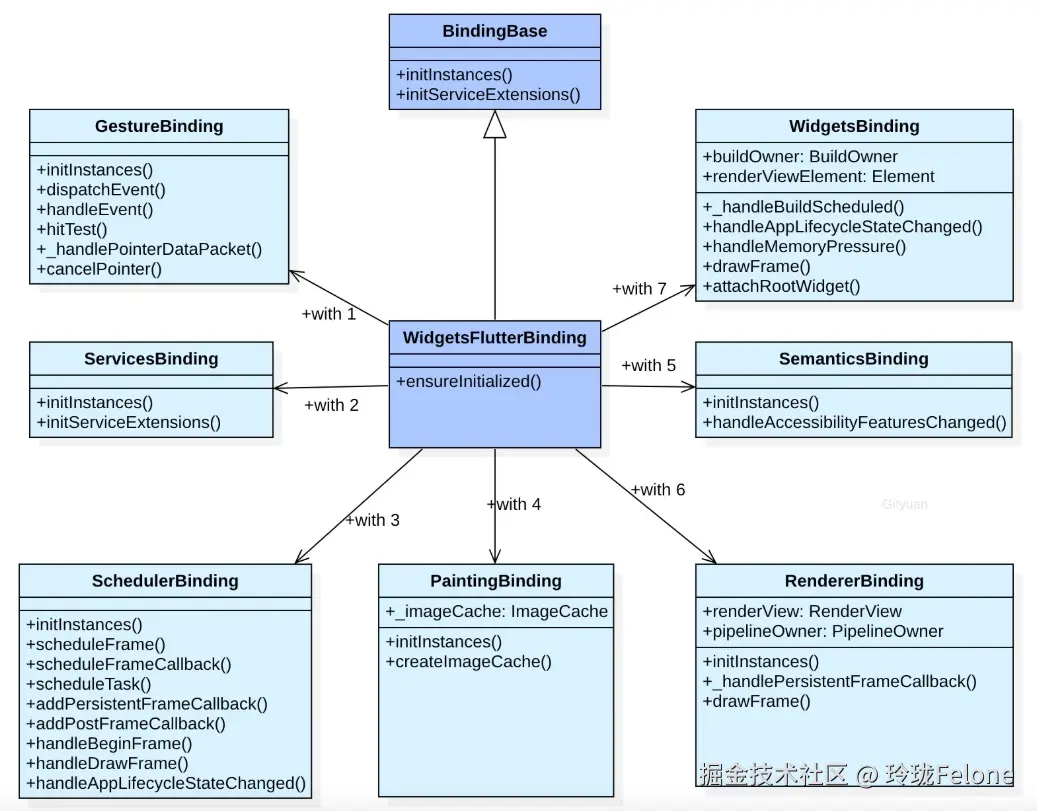
回到onBuildScheduled的调用,就注册在WidgetsBinding
ini
mixin WidgetsBinding on BindingBase, ServicesBinding, SchedulerBinding, GestureBinding, RendererBinding, SemanticsBinding {
  @override
  void initInstances() {
    super.initInstances();
    _instance = this;
    _buildOwner = BuildOwner();

    buildOwner!.onBuildScheduled = _handleBuildScheduled;

    platformDispatcher.onLocaleChanged = handleLocaleChanged;
    SystemChannels.navigation.setMethodCallHandler(_handleNavigationInvocation);
    SystemChannels.backGesture.setMethodCallHandler(
      _handleBackGestureInvocation,
    );
    platformMenuDelegate = DefaultPlatformMenuDelegate();
  }
buildOwner!.onBuildScheduled = _handleBuildScheduled;
ini
mixin WidgetsBinding on BindingBase, ServicesBinding, SchedulerBinding, GestureBinding, RendererBinding, SemanticsBinding {
  @override
  void initInstances() {
    super.initInstances();
    _instance = this;
    _buildOwner = BuildOwner();

    buildOwner!.onBuildScheduled = _handleBuildScheduled;

    platformDispatcher.onLocaleChanged = handleLocaleChanged;
    SystemChannels.navigation.setMethodCallHandler(_handleNavigationInvocation);
    SystemChannels.backGesture.setMethodCallHandler(
      _handleBackGestureInvocation,
    );
    platformMenuDelegate = DefaultPlatformMenuDelegate();
  }

  void _handleBuildScheduled() {
      ensureVisualUpdate();
  }
}
ensureVisualUpdate
csharp
void ensureVisualUpdate() {
  switch (schedulerPhase) {
    case SchedulerPhase.idle:
    case SchedulerPhase.postFrameCallbacks:
      scheduleFrame();
      return;
    case SchedulerPhase.transientCallbacks:
    case SchedulerPhase.midFrameMicrotasks:
    case SchedulerPhase.persistentCallbacks:
      return;
  }
}
scheduleFrame
ini
void scheduleFrame() {
  if (_hasScheduledFrame || !framesEnabled) {
    return;
  }
  ensureFrameCallbacksRegistered();
  platformDispatcher.scheduleFrame();
  _hasScheduledFrame = true;
}
scheduleFrame,到native了,这里补充一下Vsync的概念
csharp
void scheduleFrame() => _scheduleFrame();

@Native<Void Function()>(symbol: 'PlatformConfigurationNativeApi::ScheduleFrame')
external static void _scheduleFrame();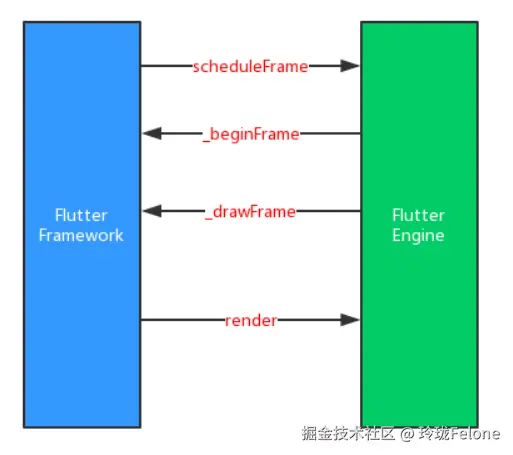
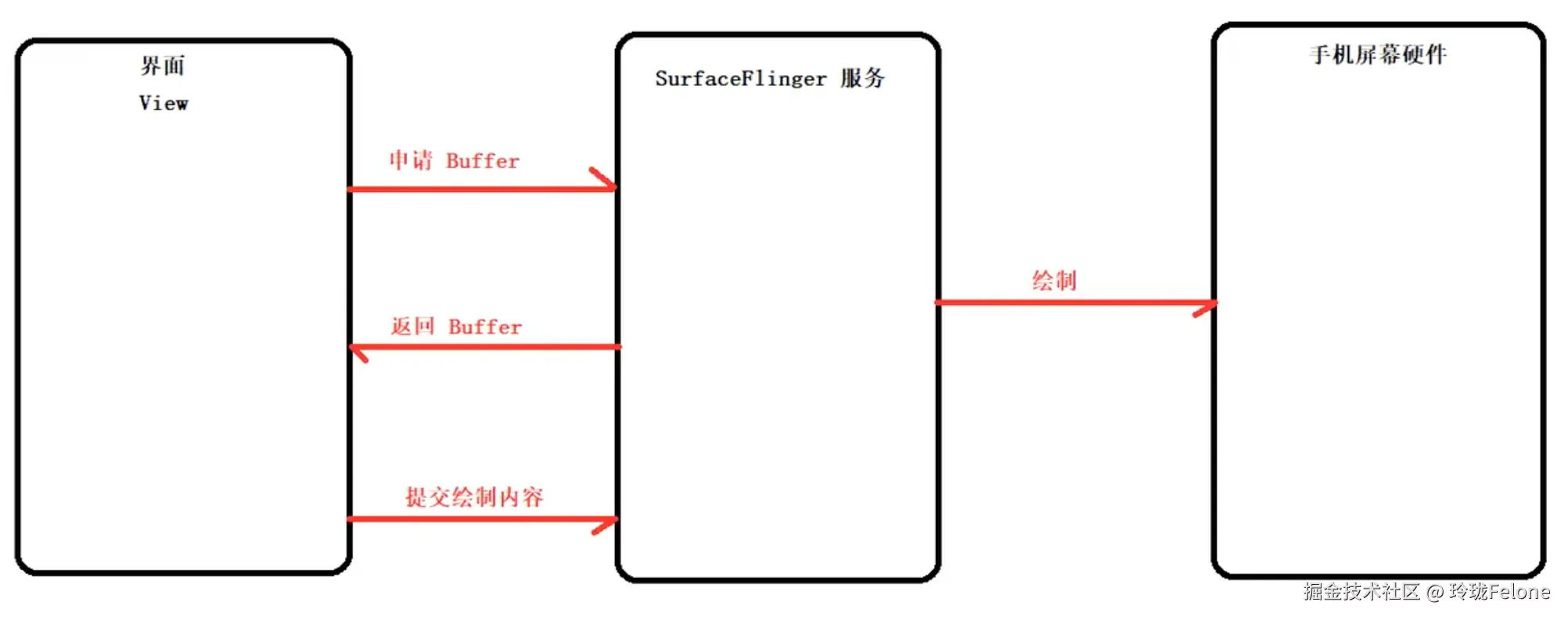
Vsync垂直同步
● buffer传递的过程是binder+共享内存,因为buffer特别大
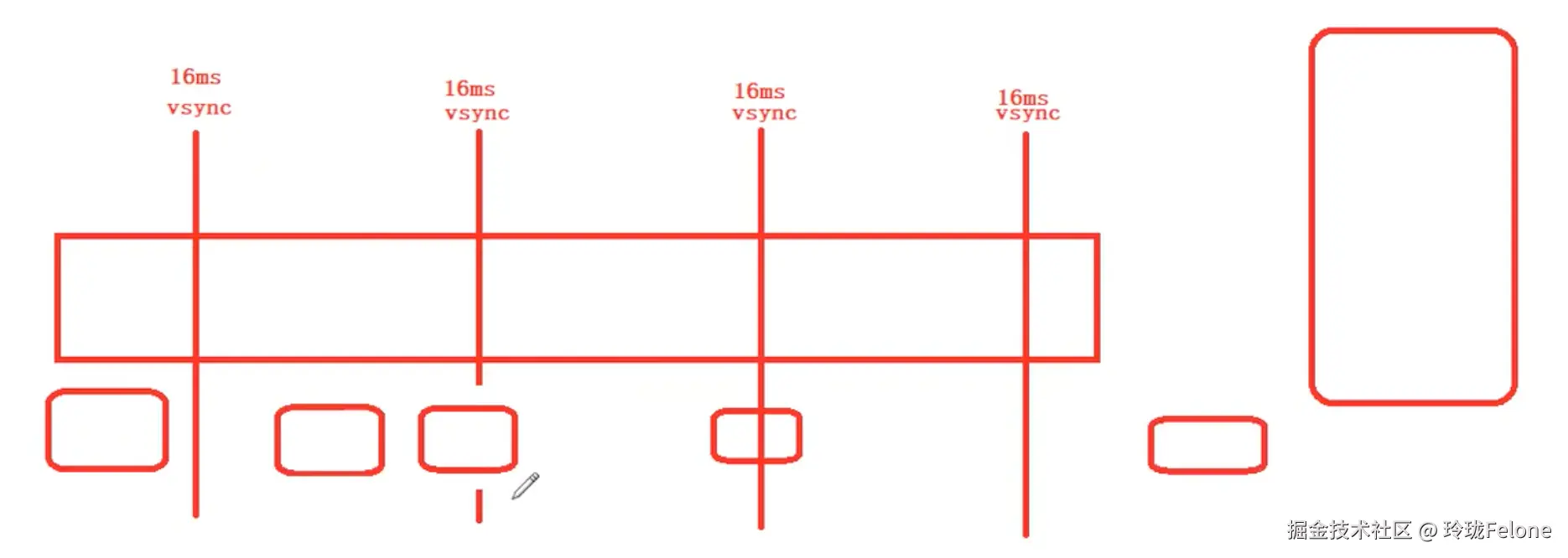
为什么不是固定16ms一次?
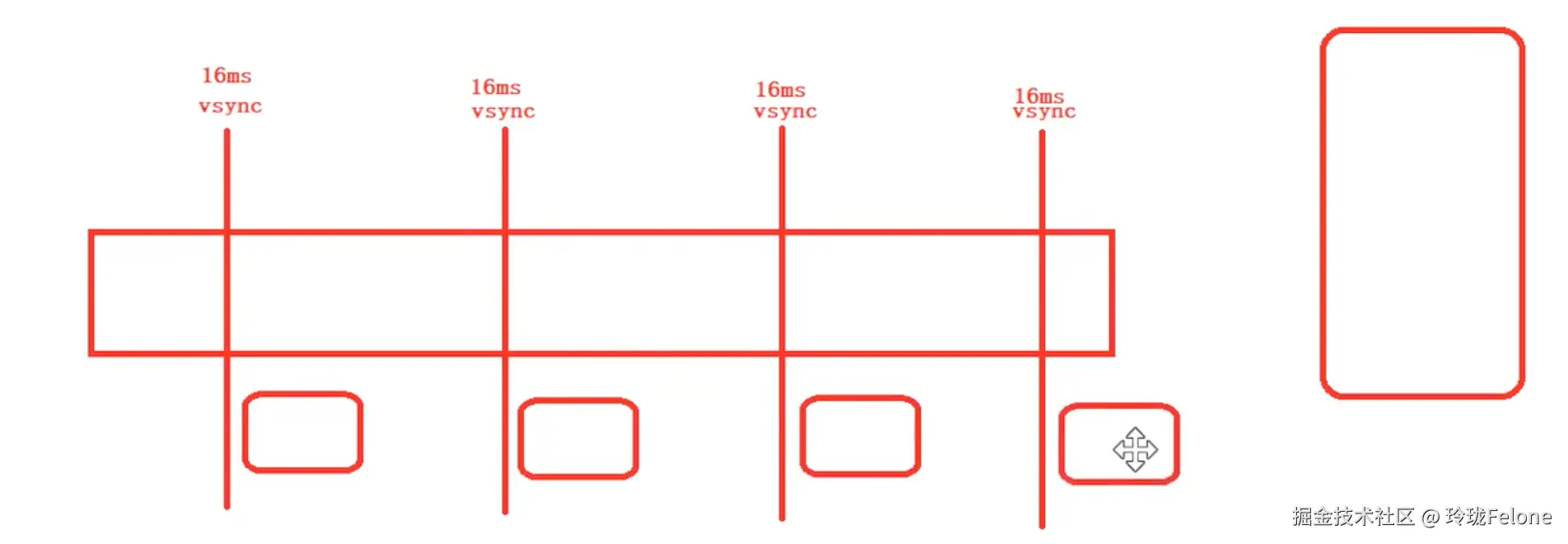
实际的Vsync是这样
ensureFrameCallbacksRegistered中注册了回调
typescript
@protected
void ensureFrameCallbacksRegistered() {
  platformDispatcher.onBeginFrame ??= _handleBeginFrame;
  platformDispatcher.onDrawFrame ??= _handleDrawFrame;
}
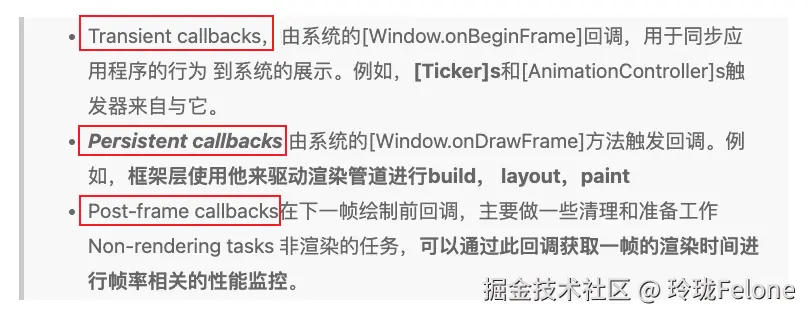
handleBeginFrame和handleDrawFrame就是处理三个回调队列
ini
void handleBeginFrame(Duration? rawTimeStamp) {
  _frameTimelineTask?.start('Frame');
  _firstRawTimeStampInEpoch ??= rawTimeStamp;
  _currentFrameTimeStamp = _adjustForEpoch(rawTimeStamp ?? _lastRawTimeStamp);
  if (rawTimeStamp != null) {
    _lastRawTimeStamp = rawTimeStamp;
  }

  _hasScheduledFrame = false;
  try {
    // TRANSIENT FRAME CALLBACKS
    _frameTimelineTask?.start('Animate');

    _schedulerPhase = SchedulerPhase.transientCallbacks;
    final Map<int, _FrameCallbackEntry> callbacks = _transientCallbacks;
    _transientCallbacks = <int, _FrameCallbackEntry>{};
    callbacks.forEach((int id, _FrameCallbackEntry callbackEntry) {
      if (!_removedIds.contains(id)) {
        _invokeFrameCallback(callbackEntry.callback, _currentFrameTimeStamp!, callbackEntry.debugStack);
      }
    });

    _removedIds.clear();
  } finally {
    _schedulerPhase = SchedulerPhase.midFrameMicrotasks;
  }
}

void handleDrawFrame() {
  _frameTimelineTask?.finish(); // end the "Animate" phase
  try {
    // PERSISTENT FRAME CALLBACKS
    _schedulerPhase = SchedulerPhase.persistentCallbacks;
    for (final FrameCallback callback in List<FrameCallback>.of(_persistentCallbacks)) {
      _invokeFrameCallback(callback, _currentFrameTimeStamp!);
    }

    // POST-FRAME CALLBACKS
    _schedulerPhase = SchedulerPhase.postFrameCallbacks;
    final List<FrameCallback> localPostFrameCallbacks =
        List<FrameCallback>.of(_postFrameCallbacks);
    _postFrameCallbacks.clear();

      for (final FrameCallback callback in localPostFrameCallbacks) {
        _invokeFrameCallback(callback, _currentFrameTimeStamp!);
      }

  } finally {
    _schedulerPhase = SchedulerPhase.idle;
    _frameTimelineTask?.finish(); // end the Frame
    _currentFrameTimeStamp = null;
  }
}

@pragma('vm:notify-debugger-on-exception')
void _invokeFrameCallback(FrameCallback callback, Duration timeStamp, [ StackTrace? callbackStack ]) {
  try {
    callback(timeStamp);
  } catch (exception, exceptionStack) {
  }
}
重点追踪一下persistentCallbacks,怎么触发渲染流程的
ini
mixin RendererBinding on BindingBase, ServicesBinding, SchedulerBinding, GestureBinding, SemanticsBinding, HitTestable {
  @override
  void initInstances() {
    super.initInstances();
    _instance = this;
    _rootPipelineOwner = createRootPipelineOwner();
    platformDispatcher
      ..onMetricsChanged = handleMetricsChanged
      ..onTextScaleFactorChanged = handleTextScaleFactorChanged
      ..onPlatformBrightnessChanged = handlePlatformBrightnessChanged;

      // 在这里add了一个回调
    addPersistentFrameCallback(_handlePersistentFrameCallback);

    initMouseTracker();
    if (kIsWeb) {
      addPostFrameCallback(_handleWebFirstFrame, debugLabel: 'RendererBinding.webFirstFrame');
    }
    rootPipelineOwner.attach(_manifold);
  }
_handlePersistentFrameCallback
scss
void _handlePersistentFrameCallback(Duration timeStamp) {
  drawFrame();
  _scheduleMouseTrackerUpdate();
}

@protected
void drawFrame() {
  rootPipelineOwner.flushLayout();
  rootPipelineOwner.flushCompositingBits();
  rootPipelineOwner.flushPaint();
  if (sendFramesToEngine) {
    for (final RenderView renderView in renderViews) {
      renderView.compositeFrame(); // this sends the bits to the GPU
    }
    rootPipelineOwner.flushSemantics(); // this sends the semantics to the OS.
    _firstFrameSent = true;
  }
}
WidgetsBinding继承RendererBinding,重写drawFrame
typescript
mixin WidgetsBinding on BindingBase, ServicesBinding, SchedulerBinding, GestureBinding, RendererBinding, SemanticsBinding {

@override
void drawFrame() {
  try {
    if (rootElement != null) {
      buildOwner!.buildScope(rootElement!);
    }
    super.drawFrame();
    buildOwner!.finalizeTree();
  } finally {
  }
}
buildScope
ini
@pragma('vm:notify-debugger-on-exception')
void buildScope(Element context, [ VoidCallback? callback ]) {
  if (callback == null && _dirtyElements.isEmpty) {
    return;
  }
  try {
    _scheduledFlushDirtyElements = true;
    if (callback != null) {
      Element? debugPreviousBuildTarget;
      _dirtyElementsNeedsResorting = false;
      try {
          // runApp时调用
        callback();
      } finally {
      }
    }
    _dirtyElements.sort(Element._sort);
    _dirtyElementsNeedsResorting = false;
    int dirtyCount = _dirtyElements.length;
    int index = 0;
    while (index < dirtyCount) {
        // 重点
      final Element element = _dirtyElements[index];
      try {
        element.rebuild();
      } catch (e, stack) {
      }
      if (isTimelineTracked) {
        FlutterTimeline.finishSync();
      }
      index += 1;
    }
  } finally {
    for (final Element element in _dirtyElements) {
      assert(element._inDirtyList);
      element._inDirtyList = false;
    }
    _dirtyElements.clear();
    _scheduledFlushDirtyElements = false;
    _dirtyElementsNeedsResorting = null;
  }
}
rebuild --> performRebuild --> build
- 查看StatelessElement和StatefulElement共同祖先CompantElement中的实现
ini
void performRebuild() {
  Widget? built;
  try {
    built = build();
  } catch (e, stack) {
    built = ErrorWidget.builder();
  }
  try {
    _child = updateChild(_child, built, slot);
  } catch (e, stack) {
    built = ErrorWidget.builder();
    _child = updateChild(null, built, slot);
  }
}
updateChild分四种情况
- 官方注释:
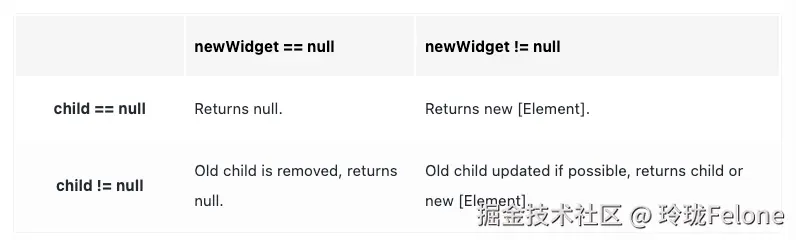
ini
Element? updateChild(Element? child, Widget? newWidget, Object? newSlot) {
  if (newWidget == null) {
    if (child != null) {
        // 移除,递归操作
      deactivateChild(child);
    }
    return null;
  }

  final Element newChild;
  if (child != null) {
    bool hasSameSuperclass = true;
    if (hasSameSuperclass && child.widget == newWidget) {
      if (child.slot != newSlot) {
          // 更新角标,比如row、column中子元素位置改变
        updateSlotForChild(child, newSlot);
      }
      newChild = child;
      // canUpdate:是否能对比更新
    } else if (hasSameSuperclass && Widget.canUpdate(child.widget, newWidget)) {
      if (child.slot != newSlot) {
        updateSlotForChild(child, newSlot);
      }
      child.update(newWidget);
      newChild = child;
    } else {
        //移除并建个新的
      deactivateChild(child);
      newChild = inflateWidget(newWidget, newSlot);
    }
  } else {
    newChild = inflateWidget(newWidget, newSlot);
  }
  return newChild;
}
update递归更新,不同element不同实现,以StatulElement为例
- 可以看出setState的一个弊端,在顶层widget更新,会递归build所有子widget,会有不小的开销
typescript
@override
void update(StatefulWidget newWidget) {
  super.update(newWidget);
  final StatefulWidget oldWidget = state._widget!;
  state._widget = widget as StatefulWidget;
  //先调用didUpdateWidget:我们可以在state中重写这个方法
  final Object? debugCheckForReturnedFuture = state.didUpdateWidget(oldWidget) as dynamic;

  rebuild(force: true);
}

void rebuild({bool force = false}) {
  try {
      //走到子widget的performRebuild,跟上面流程一样,继续递归rebuild --> performRebuild --> build
    performRebuild();
  } finally {
  }
}
还差一个render收尾
前面有个RendererBinding.class
scss
@protected
void drawFrame() {
  rootPipelineOwner.flushLayout();
  rootPipelineOwner.flushCompositingBits();
  rootPipelineOwner.flushPaint();
  if (sendFramesToEngine) {
    for (final RenderView renderView in renderViews) {
        // 将合成后的图层树提交给引擎
      renderView.compositeFrame(); // this sends the bits to the GPU
    }
    rootPipelineOwner.flushSemantics(); // this sends the semantics to the OS.
    _firstFrameSent = true;
  }
}

//应用启动时,可能需要等待一些关键资源(如初始化配置、主题数据、字体加载)准备完成后再显示第一帧,
//避免用户看到不完整的界面。
//第一帧没发,且需要延迟时不发生帧数据
bool get sendFramesToEngine => _firstFrameSent || _firstFrameDeferredCount == 0;
scss
void compositeFrame() {
  try {
      // 图层合成
    final ui.SceneBuilder builder = ui.SceneBuilder();
    final ui.Scene scene = layer!.buildScene(builder);
    if (automaticSystemUiAdjustment) {
        // 更新系统UI、状态栏导航栏等
      _updateSystemChrome();
    }
    // 发送到native
    _view.render(scene, size: configuration.toPhysicalSize(size));
    scene.dispose();
  } finally {
  }
}
sql
@Native<Void Function(Int64, Pointer<Void>, Double, Double)>(symbol: 'PlatformConfigurationNativeApi::Render')
external static void _render(int viewId, _NativeScene scene, double width, double height);
回顾一下
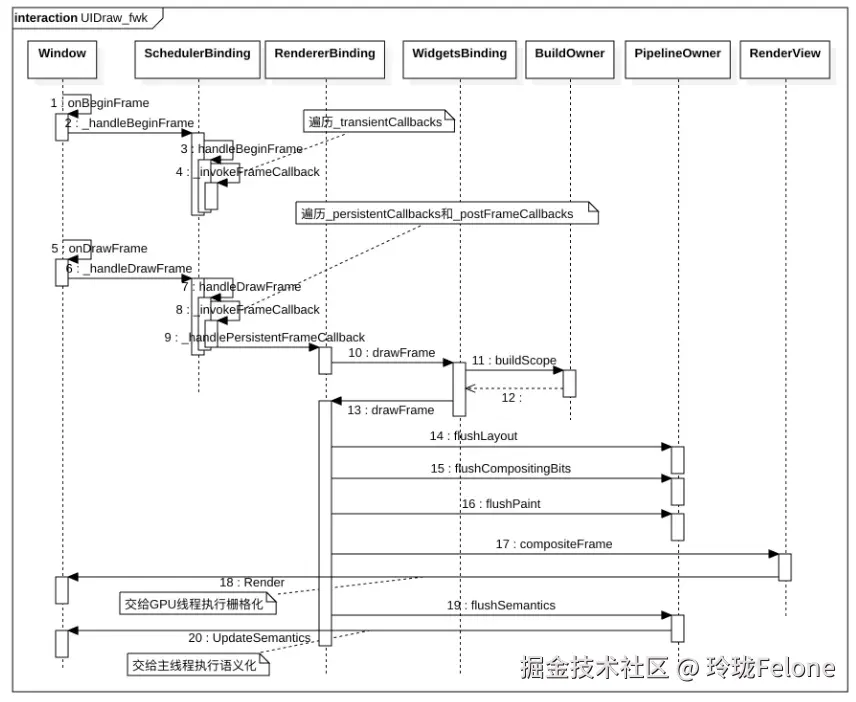
提问与收获
- renderViews什么时候构建的
- render怎么加进来的?如何保证绘制顺序
- 三棵树的形成?之间是什么样的依赖关系?
- setState的弊端?
- element复用时的diff过程是怎样的?
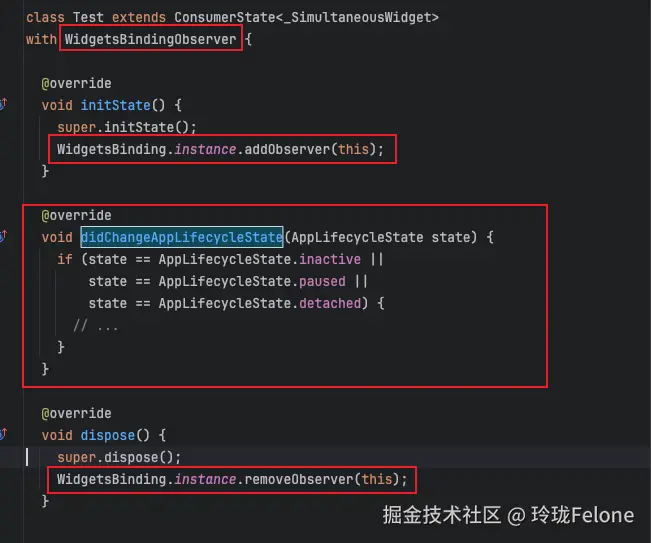
- flutter常用的页面的生命周期是的监听是哪来的?
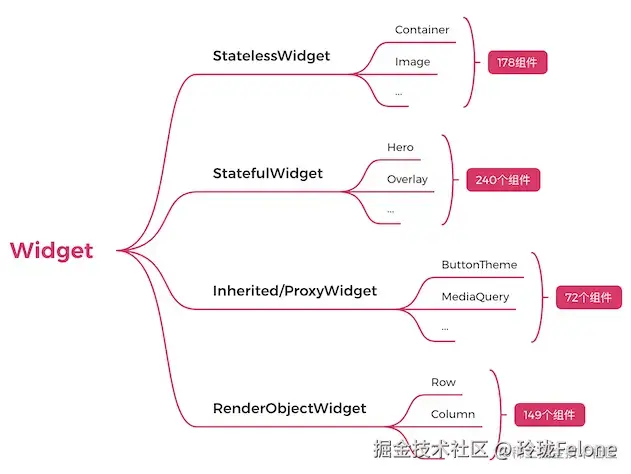
flutter三棵树建立
-
组合型widget
- stless
- stful
-
功能型widget
- 不在屏幕上画东西,但是影响在屏幕上画的东西,比如inheritwidget,用来做数据传递
-
展示型widget
- 只有renderobjectrenderwidget会创建renderobject
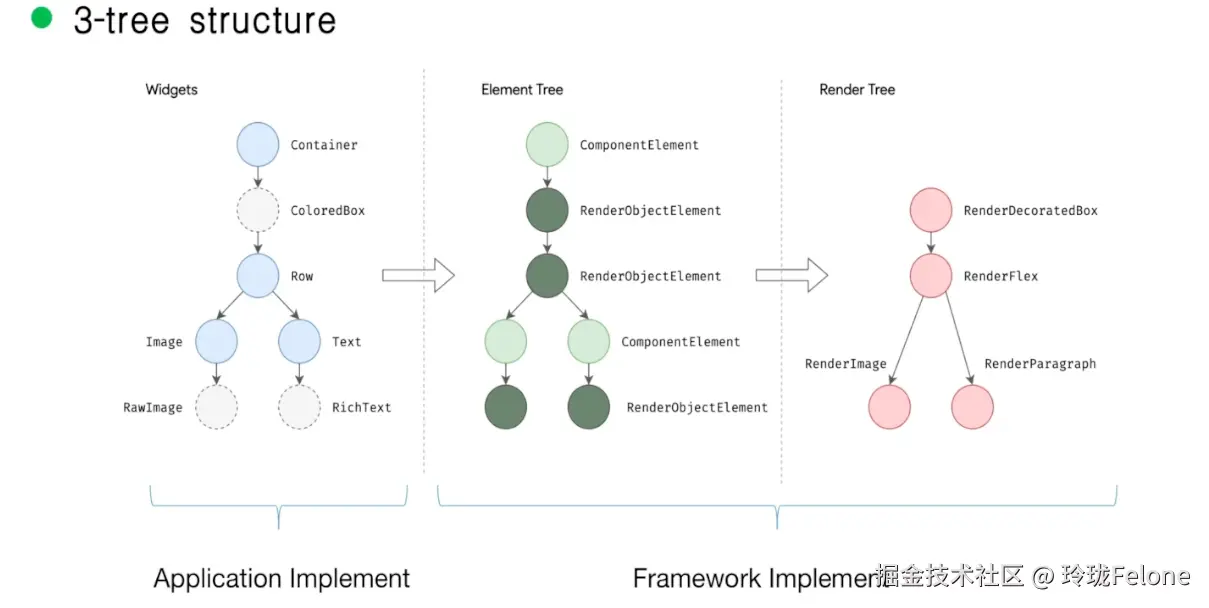
屏幕生命周期就是window传过来的