keepalived实现高可用
Keepalived软件主要是通过VRRP协议实现高可用功能的。VRRP是Virtual Router RedundancyProtocol(虚拟路由器冗余协议)的缩写,VRRP出现的目的就是为了解决静态路由单点故障问题的,它能够保证当个别节点宕机时,整个网络可以不间断地运行
keepalived 有三个重要的功能,分别是:
(1)管理LVS负载均衡软件
(2)实现LVS集群节点的健康检查
(3)作为系统网络服务的高可用性
keepalived不仅可以管理lvs,还可以作为其他服务(例如:Nginx、Haproxy、MySQL等)的高可用解决方案软件。
keepalived高可用故障转移的原理
Keepalived 高可用服务之间的故障切换转移,是通过 VRRP (Virtual Router Redundancy Protocol ,虚拟路由器冗余协议)来实现的。
在Keepalived正常工作时间,主master节点会一直向备backup节点以(组播的方式)发送心跳信息,当主master节点发生故障不再向备backup节点发送心跳信息时,备节点接收不到心跳信息,于是调用自己的接管程序接管主节点的ip资源及服务,顶替主节点对外进行服务,当主节点恢复时,备节点会释放自己接管的服务及ip,恢复到备节点,在主节点工作时,备节点不会进行任何活动。备节点可以有多个,通过优先级竞选,但一般 Keepalived系统运维工作中都是一对。
keepalived部署
| master | 192.168.100.10 |
|---|---|
| slave | 192.168.100.20 |
| vip | 192.168.100.150 |
master和slave节点关闭防火墙和selinux,配置网络yum源和epel
安装常用命令
yum -y install vim wget gcc gcc-c++安装nginx和keepalived
yum -y install nginx keepalived在master和slave中添加测试网页
[root@master ~]# cd /usr/share/nginx/html/
[root@master html]# echo "master node" > index.html

[root@slave ~]# cd /usr/share/nginx/html/
[root@slave html]# echo "slave node" > index.html

[root@master html]# systemctl restart nginx
[root@master html]# systemctl enable nginx

[root@slave ~]# systemctl restart nginx
[root@slave ~]# systemctl enable nginx
配置主keepalived
[root@master html]#  cd /etc/keepalived/
[root@master keepalived]# cp keepalived.conf keepalived.conf.bak		#做备份

[root@master keepalived]# vim keepalived.conf

! Configuration File for keepalived

global_defs {
   router_id cy01
}

vrrp_instance VI_1 {
    state MASTER
    interface ens33
    virtual_router_id 51
    priority 100
    advert_int 1
    authentication {
        auth_type PASS
        auth_pass 1111
    }
    virtual_ipaddress {
        192.168.100.150
    }
! Configuration File for keepalived

global_defs {
   router_id xy1
}

vrrp_instance VI_1 {
    state MASTER
    interface ens33
    virtual_router_id 51
    priority 100
    advert_int 1
    authentication {
        auth_type PASS
        auth_pass 1111
    }
    virtual_ipaddress {
        192.168.100.150
    }
}

virtual_server 192.168.100.150 80 {
    delay_loop 6
    lb_algo rr
    lb_kind DR
    persistence_timeout 50
    protocol TCP

    real_server 192.168.100.10 80 {
        weight 1
        TCP_CHECK {
            connect_port 80
            connect_timeout 3
            nb_get_retry 3
            delay_before_retry 3
        }
    }


    real_server 192.168.100.20 80 {
        weight 1
        TCP_CHECK {
            connect_port 80
            connect_timeout 3
            nb_get_retry 3
            delay_before_retry 3
        }
    }
}
重启keepalived,并设置下次启动生效
[root@master keepalived]# systemctl restart keepalived.service
[root@master keepalived]# systemctl enable keepalived.service
在slave节点配置
[root@slave ~]# cd /etc/keepalived/
[root@slave keepalived]# cp keepalived.conf keepalived.conf.bak
[root@slave keepalived]# scp root@192.168.100.10:/etc/keepalived/keepalived.conf .

[root@slave keepalived]# vim keepalived.conf

! Configuration File for keepalived

global_defs {
   router_id xy2
}

vrrp_instance VI_1 {
    state BACKUP
    interface ens33
    virtual_router_id 51
    priority 90
    advert_int 1
    authentication {
        auth_type PASS
        auth_pass 1111
    }
    virtual_ipaddress {
        192.168.100.150
    }
}

virtual_server 192.168.100.150 80 {
    delay_loop 6
    lb_algo rr
    lb_kind DR
    persistence_timeout 50
    protocol TCP

    real_server 192.168.100.10 80 {
        weight 1
        TCP_CHECK {
            connect_port 80
            connect_timeout 3
            nb_get_retry 3
            delay_before_retry 3
        }
    }


    real_server 192.168.100.20 80 {
        weight 1
        TCP_CHECK {
            connect_port 80
            connect_timeout 3
            nb_get_retry 3
            delay_before_retry 3
        }
    }
}
重启服务并设置下次启动生效
[root@slave keepalived]# systemctl restart keepalived.service
[root@slave keepalived]# systemctl enable keepalived.service

[root@master ~]# ip a
1: lo: <LOOPBACK,UP,LOWER_UP> mtu 65536 qdisc noqueue state UNKNOWN group default qlen 1000
    link/loopback 00:00:00:00:00:00 brd 00:00:00:00:00:00
    inet 127.0.0.1/8 scope host lo
       valid_lft forever preferred_lft forever
    inet6 ::1/128 scope host
       valid_lft forever preferred_lft forever
2: ens33: <BROADCAST,MULTICAST,UP,LOWER_UP> mtu 1500 qdisc pfifo_fast state UP group default qlen 1000
    link/ether 00:0c:29:9a:72:9a brd ff:ff:ff:ff:ff:ff
    inet 192.168.100.10/24 brd 192.168.100.255 scope global noprefixroute ens33
       valid_lft forever preferred_lft forever
    inet 192.168.100.150/32 scope global ens33
       valid_lft forever preferred_lft forever
    inet6 fe80::6dde:7fb9:b3da:5f30/64 scope link noprefixroute
       valid_lft forever preferred_lft foreve
可以看到master节点出现了vip150,而backup节点不会出现
修改内核参数,开启侦听vip
[root@slave keepalived]# vim /etc/sysctl.conf
[root@slave keepalived]# sysctl -p
net.ipv4.ip_nonlocal_bind = 1

[root@master ~]# vim /etc/sysctl.conf
[root@master ~]# sysctl -p
net.ipv4.ip_nonlocal_bind = 1
关闭backup
[root@slave keepalived]# systemctl stop nginx.service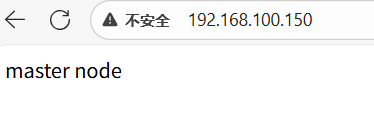
通过keepalived监控nginx负载均衡
在master上编写脚本
[root@master ~]# mkdir /scripts
[root@master ~]# cd /scripts/
[root@master scripts]# vim check.sh

#!/bin/bash
nginx_status=`ps -ef | grep -v "grep" | grep "nginx" | wc -l`
if [ $nginx_status -lt 1 ];then
        systemctl stop keepalived
fi
给执行权限
[root@master scripts]# chmod +x check.sh写一个触发脚本
[root@master scripts]# vim notify.sh

#!/bin/bash
VIP=$2
sendmail () {
        subject="${VIP}'s server keepalived state is translate"
        content="`date +'%F %T'`: `hostname`'s state change to master"
        echo $content | mail -s "$subject" root@example.com
}
case "$1" in
  master)
        nginx_status=$(ps -ef|grep -Ev "grep|$0"|grep '\bnginx\b'|wc -l)
        if [ $nginx_status -lt 1 ];then
                systemctl start nginx
        fi
        sendmail
   ;;
   backup)
        nginx_status=$(ps -ef|grep -Ev "grep|$0"|grep '\bnginx\b'|wc -l)
        if [ $nginx_status -gt 0 ];then
                systemctl stop nginx
        fi
   ;;
   *)
        echo "Usage:$0 master|backup VIP"
   ;;
esac
给执行权限
[root@master scripts]# chmod +x notify.sh然后在slave上编写脚本
[root@slave scripts]# scp root@192.168.100.10:/scripts/check.sh .
root@192.168.100.10's password:
check.sh                                                   100%  143   200.4KB/s   00:00
[root@slave scripts]# scp root@192.168.100.10:/scripts/notify.sh .
root@192.168.100.10's password:
notify.sh

[root@slave scripts]# chmod +x check.sh
[root@slave scripts]# chmod +x notify.sh
配置master的keepalived
! Configuration File for keepalived

global_defs {
   router_id xyh1
}

vrrp_script nginx_check {
    script "/scripts/check.sh"
    interval 10
    weight -20
}

vrrp_instance VI_1 {
    state MASTER
    interface ens33
    virtual_router_id 51
    priority 100
    advert_int 1
    authentication {
        auth_type PASS
        auth_pass 1111
    }
    virtual_ipaddress {
        192.168.100.150
    }
    track_script {
        nginx_check
    }
    notify_master "/scripts/notify.sh master 192.168.100.150"
    notify_backup "/scripts/notify.sh backup 192.168.100.150"
}

virtual_server 192.168.100.150 80 {
    delay_loop 6
    lb_algo rr
    lb_kind DR
    persistence_timeout 50
    protocol TCP

    real_server 192.168.100.10 80 {
        weight 1
        TCP_CHECK {
            connect_port 80
            connect_timeout 3
            nb_get_retry 3
            delay_before_retry 3
        }
    }


    real_server 192.168.100.20 80 {
        weight 1
        TCP_CHECK {
            connect_port 80
            connect_timeout 3
            nb_get_retry 3
            delay_before_retry 3
        }
    }
}
[root@master scripts]# systemctl restart keepalived.service
配置slave的keepalived
[root@slave ~]# cd /etc/keepalived/
[root@slave keepalived]# scp root@192.168.100.10:/etc/keepalived/keepalived.conf .
root@192.168.100.10's password:
keepalived.conf

[root@slave keepalived]# vim keepalived.conf

! Configuration File for keepalived

global_defs {
   router_id xyh2
}

vrrp_instance VI_1 {
    state BACKUP
    interface ens33
    virtual_router_id 51
    priority 90
    advert_int 1
    authentication {
        auth_type PASS
        auth_pass 1111
    }
    virtual_ipaddress {
        192.168.100.150
    }
    track_script {
        nginx_check
    }
    notify_master "/scripts/notify.sh master 192.168.100.150"
    notify_backup "/scripts/notify.sh backup 192.168.100.150"
}

virtual_server 192.168.100.150 80 {
    delay_loop 6
    lb_algo rr
    lb_kind DR
    persistence_timeout 50
    protocol TCP

    real_server 192.168.100.10 80 {
        weight 1
        TCP_CHECK {
            connect_port 80
            connect_timeout 3
            nb_get_retry 3
            delay_before_retry 3
        }
    }


    real_server 192.168.100.20 80 {
        weight 1
        TCP_CHECK {
            connect_port 80
            connect_timeout 3
            nb_get_retry 3
            delay_before_retry 3
        }
    }
}

[root@slave keepalived]# systemctl restart keepalived.service
模拟nginx故障,停用master节点的nginx
[root@master ~]# systemctl stop nginx.service

[root@master ~]# ss -anlt
State       Recv-Q Send-Q Local Address:Port               Peer Address:Port
LISTEN      0      128     *:111                 *:*
LISTEN      0      128     *:6000                *:*
LISTEN      0      5      192.168.122.1:53                  *:*
LISTEN      0      128     *:22                  *:*
LISTEN      0      128    127.0.0.1:631                 *:*
LISTEN      0      100    127.0.0.1:25                  *:*
LISTEN      0      128    127.0.0.1:6010                *:*
LISTEN      0      128    :::111                :::*
LISTEN      0      128    :::6000               :::*
LISTEN      0      128    :::22                 :::*
LISTEN      0      128       ::1:631                :::*
LISTEN      0      100       ::1:25                 :::*
LISTEN      0      128       ::1:6010               :::*
80端口断开
查看slave的80端口是否开启
[root@slave ~]# ss -anlt
State       Recv-Q Send-Q          Local Address:Port                         Peer Address:Port
LISTEN      0      128                         *:111                                     *:*
LISTEN      0      128                         *:80                                      *:*
LISTEN      0      128                         *:6000                                    *:*
LISTEN      0      5               192.168.122.1:53                                      *:*
LISTEN      0      128                         *:22                                      *:*
LISTEN      0      128                 127.0.0.1:631                                     *:*
LISTEN      0      100                 127.0.0.1:25                                      *:*
LISTEN      0      128                 127.0.0.1:6010                                    *:*
LISTEN      0      128                        :::111                                    :::*
LISTEN      0      128                        :::80                                     :::*
LISTEN      0      128                        :::6000                                   :::*
LISTEN      0      128                        :::22                                     :::*
LISTEN      0      128                       ::1:631                                    :::*
LISTEN      0      100                       ::1:25                                     :::*
LISTEN      0      128                       ::1:6010                                   :::*
You have new mail in /var/spool/mail/root
80端口已开启,查看是否有150的ip
[root@slave ~]# ip a
1: lo: <LOOPBACK,UP,LOWER_UP> mtu 65536 qdisc noqueue state UNKNOWN group default qlen 1000
    link/loopback 00:00:00:00:00:00 brd 00:00:00:00:00:00
    inet 127.0.0.1/8 scope host lo
       valid_lft forever preferred_lft forever
    inet6 ::1/128 scope host
       valid_lft forever preferred_lft forever
2: ens33: <BROADCAST,MULTICAST,UP,LOWER_UP> mtu 1500 qdisc pfifo_fast state UP group default qlen 1000
    link/ether 00:0c:29:2d:62:03 brd ff:ff:ff:ff:ff:ff
    inet 192.168.100.20/24 brd 192.168.100.255 scope global noprefixroute ens33
       valid_lft forever preferred_lft forever
    inet 192.168.100.150/32 scope global ens33
       valid_lft forever preferred_lft forever