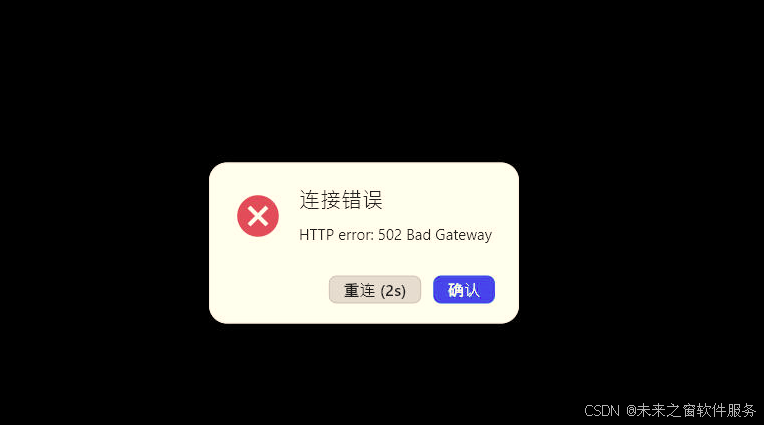
这是由于配置错误
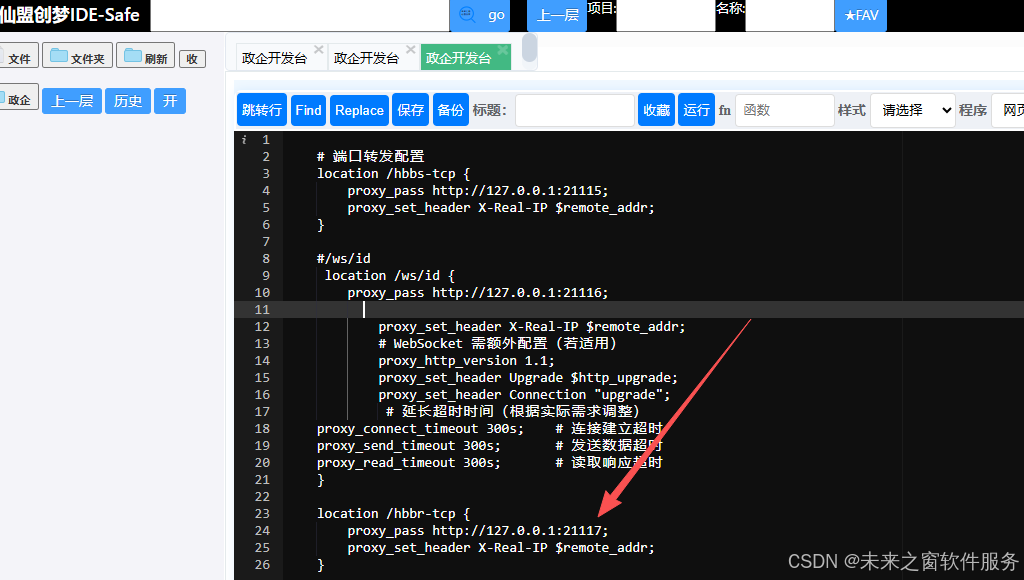
正确配置
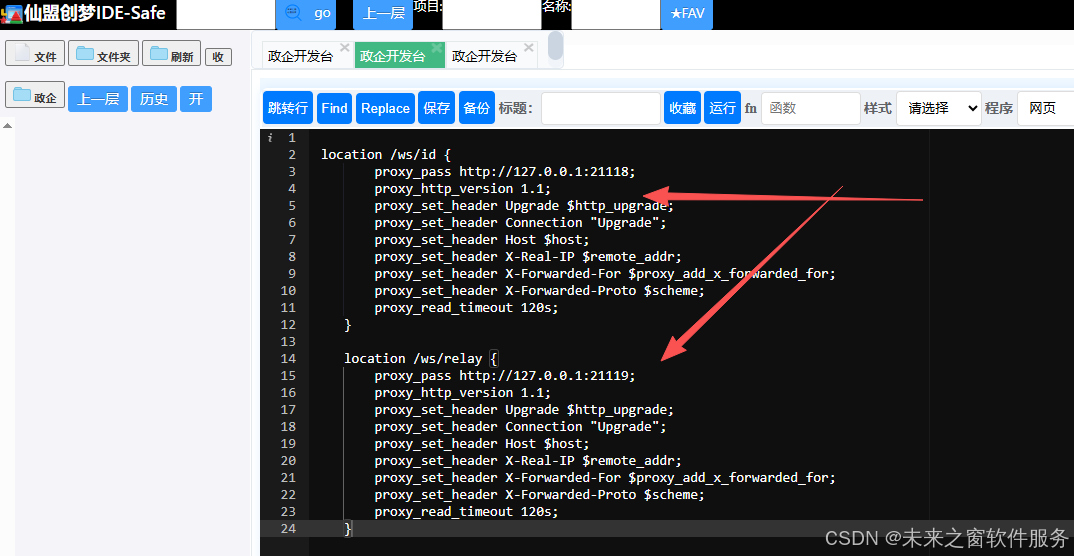
1. 控制服务器相关端口
- 21115 (hbbs - tcp):此端口主要用于 RustDesk 控制服务器的 TCP 通信。它在客户端与控制服务器之间扮演着重要的角色,负责传输控制指令、设备信息同步等关键数据。比如,当客户端启动并尝试连接远程设备时,会通过此端口向控制服务器发送连接请求,控制服务器则通过该端口响应并协调后续的连接流程,类似于远程桌面连接流程中的 "指挥中心" 通信端口。
- 21116 (hbbs - http):通常用于控制服务器的 HTTP 协议通信。它可能用于处理一些基于 HTTP 的 API 请求,例如获取服务器状态信息、更新客户端配置等操作。以客户端获取最新的服务器策略配置为例,就可能通过此端口以 HTTP 请求的方式获取相关数据。
- 21117 (hbbr - tcp):该端口也是用于 RustDesk 控制服务器的 TCP 通信,但与 21115 端口的功能侧重点可能有所不同。它可能更专注于特定类型的控制信息传输,比如在处理复杂网络环境下的连接协商,或在大规模部署中用于服务器间的控制信息交互,保障整个远程桌面服务的稳定运行。
2. 中继服务器相关端口
- 21118 (hbbs - ws):这是与 WebSocket 协议相关的端口,主要用于 RustDesk 中继服务器的通信。WebSocket 协议在实时数据传输方面具有优势,因此该端口常用于传输实时性要求较高的数据,如远程桌面的屏幕画面数据、鼠标键盘操作指令等。当用户在远程控制端移动鼠标时,相关操作指令会通过此端口以 WebSocket 协议快速传输到被控制端,实现流畅的远程控制体验。
- 21119 (hbbr - ws):同样是用于中继服务器的 WebSocket 通信端口。它可能承担着与 21118 端口类似但又有区别的功能,比如负责不同类型的数据分流,或者在高并发场景下,协助 21118 端口分担数据传输压力,确保实时数据的稳定传输,保障远程桌面服务的高效运行。
3. 其他可能涉及的端口
- 自定义端口(UDP/TCP):在一些特殊的网络环境或自定义配置下,RustDesk 客户端之间可能会直接通过 UDP 或 TCP 协议在自定义端口上进行点对点(P2P)连接。这种方式可以在不需要中继服务器中转的情况下,直接在客户端之间传输数据,提高数据传输效率和隐私性。例如,在本地局域网环境中,用户可能配置 RustDesk 使用自定义端口进行 P2P 连接,实现快速的文件传输或远程控制,减少对中继服务器的依赖。
Login to the web page
- Open
https://YOUR_DOMAINin the browser, log in using the default user name "admin" and password "test1234", then change the password to your own.
Add WebSocket Secure (WSS) support for the id server and relay server to enable secure communication for all platforms.
Add the following configuration to the first server section of the /etc/nginx/.../rustdesk.conf file, then restart the Nginx service. The web client can be accessed via https://YOUR_DOMAIN/web. Custom clients can use WebSocket by setting allow-websocket=Y in the advanced options. If the custom client with WebSocket enabled is used, it will not utilize TCP/UDP and can only connect through a relay (except for direct IP connections). If only this WebSocket-enabled client is used, the server can close ports 21114 to 21119 and only keep port 443 open.
    location /ws/id {
        proxy_pass http://127.0.0.1:21118;
        proxy_http_version 1.1;
        proxy_set_header Upgrade $http_upgrade;
        proxy_set_header Connection "Upgrade";
        proxy_set_header Host $host;
        proxy_set_header X-Real-IP $remote_addr;
        proxy_set_header X-Forwarded-For $proxy_add_x_forwarded_for;
        proxy_set_header X-Forwarded-Proto $scheme;
        proxy_read_timeout 120s;
    }

    location /ws/relay {
        proxy_pass http://127.0.0.1:21119;
        proxy_http_version 1.1;
        proxy_set_header Upgrade $http_upgrade;
        proxy_set_header Connection "Upgrade";
        proxy_set_header Host $host;
        proxy_set_header X-Real-IP $remote_addr;
        proxy_set_header X-Forwarded-For $proxy_add_x_forwarded_for;
        proxy_set_header X-Forwarded-Proto $scheme;
        proxy_read_timeout 120s;
    }
The full configuration is
server {
    server_name YOUR_DOMAIN;
    location / {
        proxy_set_header        X-Real-IP       $remote_addr;
        proxy_set_header        X-Forwarded-For $proxy_add_x_forwarded_for;
        proxy_pass http://127.0.0.1:21114/;
    }

    location /ws/id {
        proxy_pass http://127.0.0.1:21118;
        proxy_http_version 1.1;
        proxy_set_header Upgrade $http_upgrade;
        proxy_set_header Connection "Upgrade";
        proxy_set_header Host $host;
        proxy_set_header X-Real-IP $remote_addr;
        proxy_set_header X-Forwarded-For $proxy_add_x_forwarded_for;
        proxy_set_header X-Forwarded-Proto $scheme;
        proxy_read_timeout 120s;
    }

    location /ws/relay {
        proxy_pass http://127.0.0.1:21119;
        proxy_http_version 1.1;
        proxy_set_header Upgrade $http_upgrade;
        proxy_set_header Connection "Upgrade";
        proxy_set_header Host $host;
        proxy_set_header X-Real-IP $remote_addr;
        proxy_set_header X-Forwarded-For $proxy_add_x_forwarded_for;
        proxy_set_header X-Forwarded-Proto $scheme;
        proxy_read_timeout 120s;
    }

    listen 443 ssl; # managed by Certbot
    ssl_certificate /etc/letsencrypt/live/YOUR_DOMAIN/fullchain.pem; # managed by Certbot
    ssl_certificate_key /etc/letsencrypt/live/YOUR_DOMAIN/privkey.pem; # managed by Certbot
    include /etc/letsencrypt/options-ssl-nginx.conf; # managed by Certbot
    ssl_dhparam /etc/letsencrypt/ssl-dhparams.pem; # managed by Certbot
}

server {
    if ($host = YOUR_DOMAIN) {
        return 301 https://$host$request_uri;
    } # managed by Certbot

    server_name YOUR_DOMAIN;
    listen 80;
    return 404; # managed by Certbot
}
Note
If you have previously deployed for web clients and want to use it across all platforms, you need to add proxy_read_timeout.
Bypass CORS if using RustDesk public web client https://rustdesk.com/web
You need to add below in the location / section of the /etc/nginx/.../rustdesk.conf to bypass CORS limitation of browsers. Skip this step if you are using your own web client.
        if ($http_origin ~* (https?://(www\.)?rustdesk\.com)) {
            add_header 'Access-Control-Allow-Origin' "$http_origin" always;
            add_header 'Access-Control-Allow-Methods' 'GET, POST, PUT, DELETE, PATCH, OPTIONS' always;
            add_header 'Access-Control-Allow-Headers' 'Origin, Content-Type, Accept, Authorization' always;
            add_header 'Access-Control-Allow-Credentials' 'true' always;
        }
        if ($request_method = 'OPTIONS') {
            add_header 'Access-Control-Allow-Origin' "$http_origin" always;
            add_header 'Access-Control-Allow-Methods' 'GET, POST, PUT, DELETE, PATCH, OPTIONS' always;
            add_header 'Access-Control-Allow-Headers' 'Origin, Content-Type, Accept, Authorization' always;
            add_header 'Access-Control-Allow-Credentials' 'true' always;
            add_header 'Content-Length' 0;
            add_header 'Content-Type' 'text/plain charset=UTF-8';
            return 204;
        }
SELinux
If Waiting for RustDesk Relay service to become active... appears when install, it may be caused by SELinux. You can try the following commands:
sudo semanage fcontext -a -t NetworkManager_dispatcher_exec_t 'hbbs'
sudo semanage fcontext -a -t NetworkManager_dispatcher_exec_t 'hbbr'
sudo restorecon -v '/usr/bin/hbbs'
sudo restorecon -v '/usr/bin/hbbr'
阿雪技术观
让我们积极投身于技术共享的浪潮中,不仅仅是作为受益者,更要成为贡献者。无论是分享自己的代码、撰写技术博客,还是参与开源项目的维护和改进,每一个小小的举动都可能成为推动技术进步的巨大力量
Embrace open source and sharing, witness the miracle of technological progress, and enjoy the happy times of humanity! Let's actively join the wave of technology sharing. Not only as beneficiaries, but also as contributors. Whether sharing our own code, writing technical blogs, or participating in the maintenance and improvement of open source projects, every small action may become a huge force driving technological progrss.