1、前言
滑动选择日期是我们常用的一种日期选择操作。
2、参考文档
 https://developer.huawei.com/consumer/cn/doc/harmonyos-references/ts-basic-components-datepicker
3、核心代码
      DatePicker({
        start: new Date('1970-1-1'),
        end: new Date('2100-1-1'),
        selected: this.selectedDate
      })
        .lunar(this.isLunar)
        .onDateChange((value: Date) => {
          this.selectedDate = value;
          console.info('select current date is: ' + value.toString());
        })
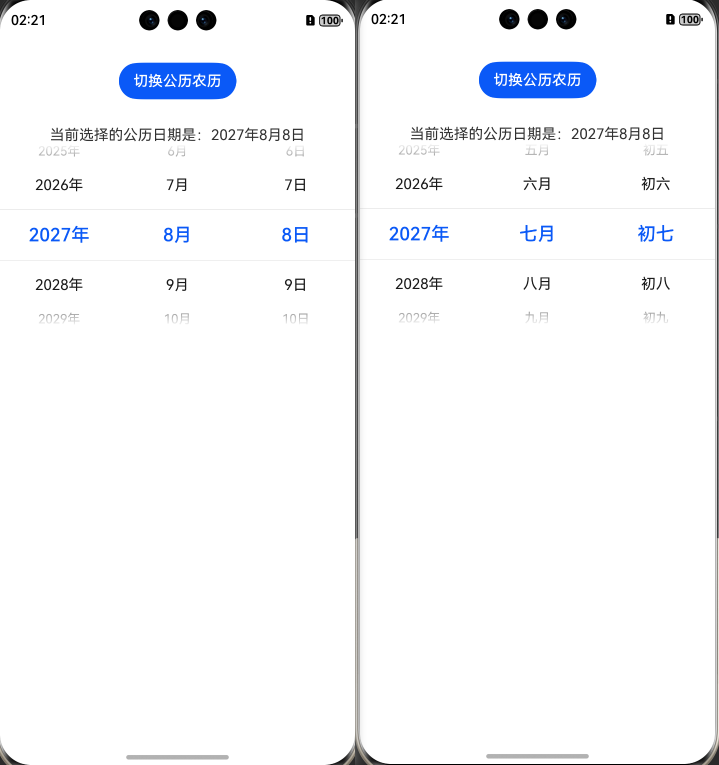
4、运行效果
5、完整代码
@Entry
@ComponentV2
struct Index {
  @Local isLunar: boolean = false;
  @Local selectedDate: Date = new Date('2021-08-08');

  build() {
    Column() {
      Button('切换公历农历')
        .margin({ top: 30, bottom: 30 })
        .onClick(() => {
          this.isLunar = !this.isLunar;
        })
      Text('当前选择的公历日期是:' + this.selectedDate.getFullYear() + "年" + (this.selectedDate.getMonth() + 1) +
        "月" +
      this.selectedDate.getDate() + "日")


      DatePicker({
        start: new Date('1970-1-1'),
        end: new Date('2100-1-1'),
        selected: this.selectedDate
      })
        .lunar(this.isLunar)
        .onDateChange((value: Date) => {
          this.selectedDate = value;
          console.info('select current date is: ' + value.toString());
        })

    }.width('100%')
  }
}
觉得有帮助可以点赞或收藏