用uniapp开发小程序,获取位置信息-地理位置授权,怎么做
大概实现样子:
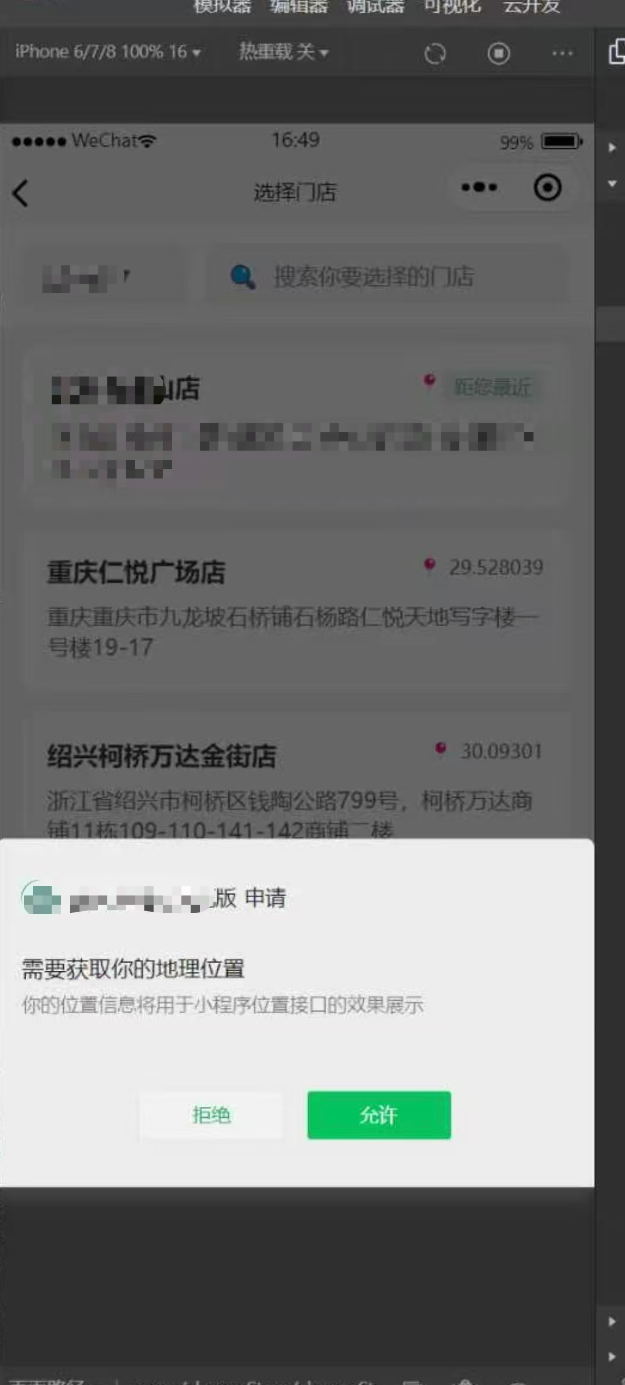
真机
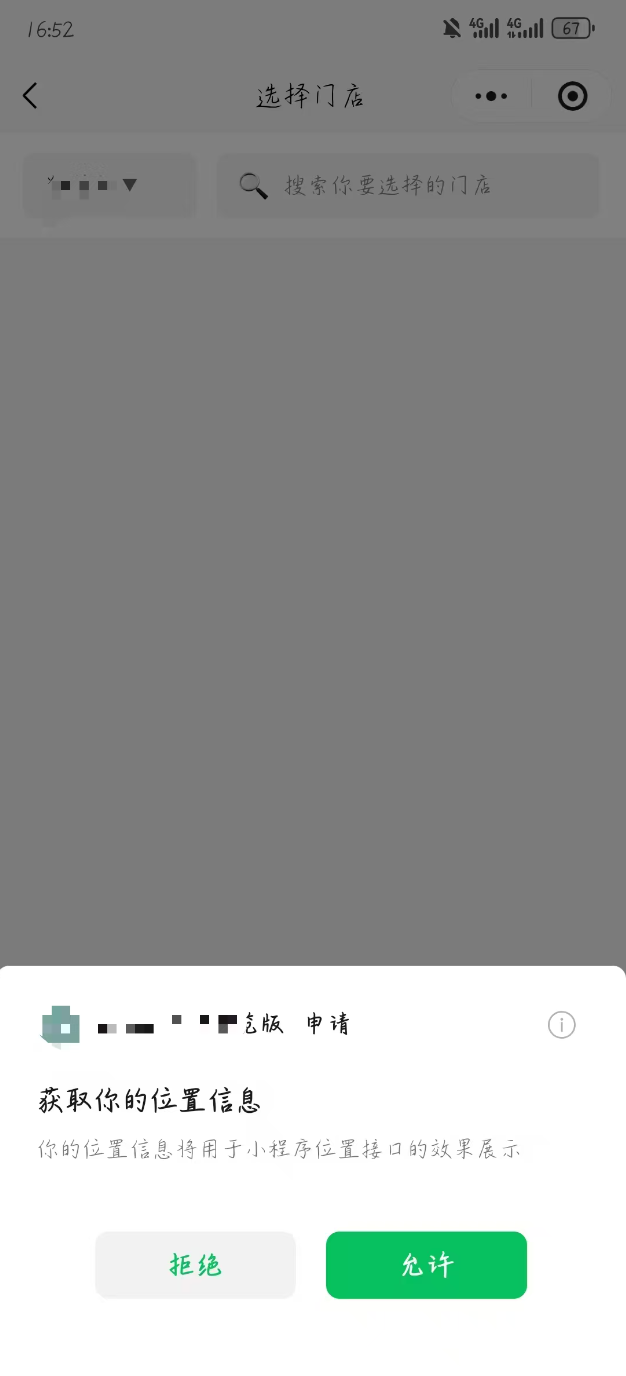
代码如下:
javascript
<template>
	<view class="choose-store-wrap">
		<view class="search-section">
			<view class="city-selector" @click="selectCity">
				<text class="city-name">{{ selectedCity }}</text>
				<text class="arrow">▼</text>
			</view>
			<view class="search-box">
				<text class="search-icon">🔍</text>
				<input
					class="search-input"
					type="text"
					placeholder="搜索你要选择的门店"
					v-model="searchKeyword"
					@input="handleSearch"
				/>
			</view>
		</view>

		<view class="store-list">
			<view
				class="store-item"
				v-for="(store, index) in filteredStores"
				:key="store.id"
				@click="selectStore(store)"
			>
				<view class="store-header">
					<text class="store-name">{{ store.outShopName }}</text>
					<view class="distance-info">
						<text class="distance-icon">📍</text>
						<text class="distance">{{ store.lat }}</text>
					</view>
				</view>
				<view class="store-tag" v-if="index === 0">距您最近</view>
				<view class="store-address">{{ store.address }}</view>
				<!-- <view class="store-room">{{ store.termNo }}</view> -->
			</view>
		</view>
	</view>
</template>

<script>
export default {
	data() {
		return {
			selectedCity: '绿藤市',
			searchKeyword: '',
			stores: [
				// {
				// 	id: 1,
				// 	outShopName: '绿藤绿地新都汇店',
				// 	address: '绿藤市时光里广场时光里广场时光里广场',
				// 	lat: '距您304m'
				// }
			]
		}
	},
	computed: {
		filteredStores() {
			if (!this.searchKeyword) {
				return this.stores
			}
			return this.stores.filter(store =>
				store.outShopName.includes(this.searchKeyword) ||
				store.address.includes(this.searchKeyword)
			)
		}
	},
	onLoad() {
		this.getNearbyStores()
		// 页面加载时请求位置权限
		this.requestLocationPermission()
	},
	methods: {
		goBack() {
			uni.navigateBack()
		},
		selectCity() {
			// 跳转到城市选择页面
			uni.navigateTo({
				url: '/pages/citySelect/citySelect'
			})
		},
		handleSearch() {
			// 搜索逻辑已在computed中处理
		},
		selectStore(store) {
			// 选择门店后返回上一页
			const pages = getCurrentPages()
			const prevPage = pages[pages.length - 2]

			if (prevPage) {
				// 将选中的门店信息传递给上一页
				prevPage.$vm.selectedStore = store
			}

			uni.navigateBack()
		},
		requestLocationPermission() {
			// 使用微信原生位置授权API
			uni.getSetting({
				success: (res) => {
					console.log('获取设置成功:', res)
					if (res.authSetting['scope.userLocation']) {
						// 已经授权,直接获取位置
						this.getUserLocation()
					} else if (res.authSetting['scope.userLocation'] === false) {
						// 用户之前拒绝过,引导用户手动开启
						this.showLocationGuide()
					} else {
						// 首次请求位置权限
						this.requestLocationAuth()
					}
				},
				fail: (err) => {
					console.error('获取设置失败:', err)
					// 如果获取设置失败,直接尝试获取位置
					this.getUserLocation()
				}
			})
		},
		requestLocationAuth() {
			// 请求位置权限
			uni.authorize({
				scope: 'scope.userLocation',
				success: () => {
					console.log('位置权限授权成功')
					this.getUserLocation()
				},
				fail: (err) => {
					console.log('位置权限授权失败:', err)
					if (err.errMsg.includes('auth deny')) {
						// 用户拒绝授权
						this.showLocationGuide()
					} else {
						uni.showToast({
							title: '位置权限获取失败',
							icon: 'none'
						})
					}
				}
			})
		},
		getUserLocation() {
			// 获取用户位置
			uni.getLocation({
				type: 'gcj02',
				success: (res) => {
					console.log('位置获取成功:', res)
					// 根据位置获取附近门店
					this.getNearbyStores(res.latitude, res.longitude)
				},
				fail: (err) => {
					console.error('位置获取失败:', err)
					if (err.errMsg.includes('auth deny')) {
						this.showLocationGuide()
					} else {
						uni.showToast({
							title: '位置获取失败,请手动选择城市',
							icon: 'none'
						})
					}
				}
			})
		},
		showLocationGuide() {
			// 引导用户手动开启位置权限
			uni.showModal({
				title: '位置权限',
				content: '需要获取您的位置信息来匹配附近门店,请在设置中开启位置权限',
				confirmText: '去设置',
				cancelText: '手动选择',
				success: (res) => {
					if (res.confirm) {
						// 跳转到设置页面
						uni.openSetting({
							success: (settingRes) => {
								if (settingRes.authSetting['scope.userLocation']) {
									// 用户开启了位置权限
									this.getUserLocation()
								}
							}
						})
					} else {
						// 用户选择手动选择城市
						uni.showToast({
							title: '请手动选择城市',
							icon: 'none'
						})
					}
				}
			})
		},
		getNearbyStores(lat, lng) {
			// 调用API获取附近门店
			// =============获取门店接口============
			console.log('获取附近门店', lat, lng)
			uni.request({
				url:'https://xxx/app/info/shop/shopList',
				method:'GET',
				data:{},
				success: (res) => {
					console.log('门店res',res);
					this.stores = res.data.data
				},
				fail: (err) => {
					console.error('获取门店列表失败:', err)
					uni.showToast({
						title: '获取门店列表失败',
						icon: 'none'
					})
				}
			})
		}
	}
}
</script>

<style>
.choose-store-wrap {
	min-height: 100vh;
	background: #f5f5f5;
}

.header {
	background: #fff;
	/* padding-top: 44px; */
}

.nav-bar {
	display: flex;
	align-items: center;
	justify-content: space-between;
	padding: 12px 16px;
	height: 44px;
}

.back-btn {
	width: 44px;
	height: 44px;
	display: flex;
	align-items: center;
	justify-content: center;
}

.back-icon {
	font-size: 24px;
	color: #333;
}

.title {
	font-size: 18px;
	font-weight: 600;
	color: #333;
}

.right-icons {
	display: flex;
	gap: 12px;
	width: 44px;
	justify-content: flex-end;
}

.icon {
	font-size: 16px;
	color: #666;
}

.search-section {
	display: flex;
	padding: 12px 16px;
	background: #fff;
	gap: 12px;
}

.city-selector {
	display: flex;
	align-items: center;
	gap: 4px;
	padding: 8px 12px;
	background: #f5f5f5;
	border-radius: 6px;
	min-width: 80px;
}

.city-name {
	font-size: 14px;
	color: #333;
}

.arrow {
	font-size: 12px;
	color: #666;
}

.search-box {
	flex: 1;
	display: flex;
	align-items: center;
	background: #f5f5f5;
	border-radius: 6px;
	padding: 8px 12px;
	gap: 8px;
}

.search-icon {
	font-size: 16px;
	color: #999;
}

.search-input {
	flex: 1;
	font-size: 14px;
	color: #333;
}

.store-list {
	padding: 12px 16px;
}

.store-item {
	background: #fff;
	border-radius: 8px;
	padding: 16px;
	margin-bottom: 12px;
	position: relative;
}

.store-header {
	display: flex;
	justify-content: space-between;
	align-items: flex-start;
	margin-bottom: 8px;
}

.store-name {
	font-size: 16px;
	font-weight: 600;
	color: #333;
	flex: 1;
}

.distance-info {
	display: flex;
	align-items: center;
	gap: 4px;
}

.distance-icon {
	font-size: 12px;
}

.distance {
	font-size: 12px;
	color: #666;
}

.store-tag {
	position: absolute;
	top: 16px;
	right: 16px;
	background: #e7f4f2;
	color: #61aea7;
	font-size: 12px;
	padding: 2px 8px;
	border-radius: 4px;
}

.store-address {
	font-size: 14px;
	color: #666;
	line-height: 1.4;
	margin-bottom: 4px;
}

.store-room {
	font-size: 14px;
	color: #999;
}
</style>
注意,会报这个:
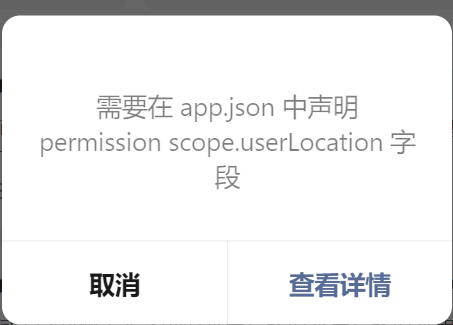
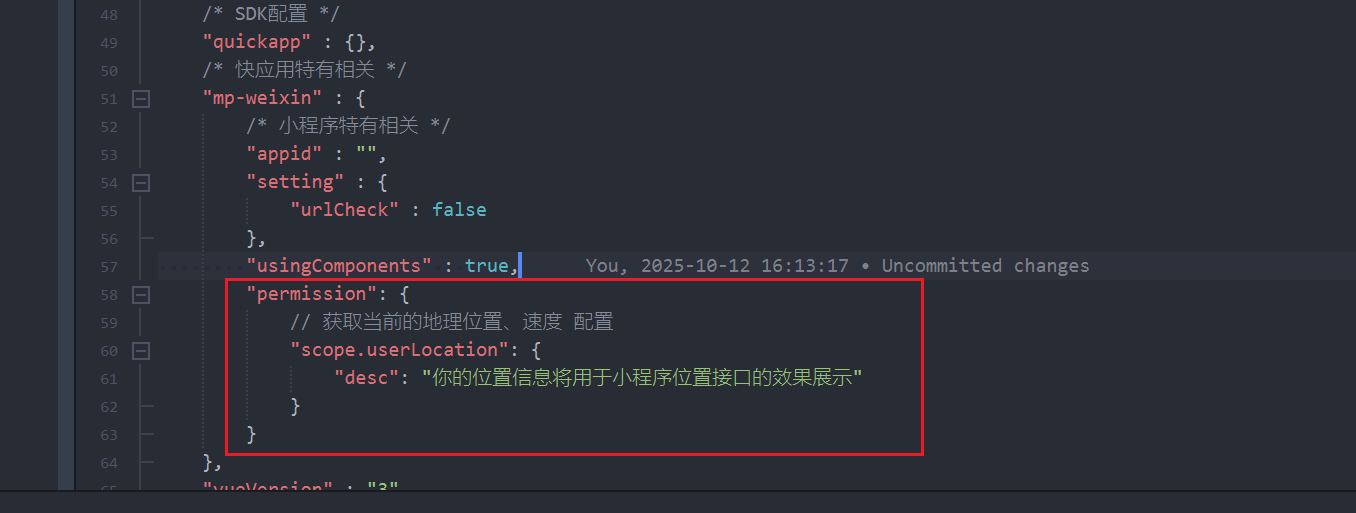
记得在manifest.json中配置: