1、config.json配置文件
json
{
    "dingtalk-webhook": "https://oapi.dingtalk.com/robot/send?access_token=XXXXXXXXXXXXXX",
    "secret": "XXXXXXXXXXXXXXXXXXXXXX",
    "domains": [
        "www.advd.tel",
        "dre.dfefer.cn:8443"
    ]
}
2、python正文
python
import json
import datetime
import time
import hmac
import hashlib
import base64
import urllib.parse
import requests
import argparse
import whois
import tldextract
import os
CONFIG_FILE = 'config.json' # 你的配置文件路径
ALERT_DAYS = 10 # 小于多少天触发告警
def load_config(config_file):
"""加载配置文件"""
if not os.path.exists(config_file):
print(f"[ERROR] 配置文件不存在: {config_file}")
sys.exit(1)
with open(config_file, 'r', encoding='utf-8') as f:
return json.load(f)
def sign_dingtalk(secret):
"""生成钉钉安全签名"""
timestamp = str(round(time.time() * 1000))
string_to_sign = f'{timestamp}\n{secret}'
hmac_code = hmac.new(secret.encode('utf-8'),
string_to_sign.encode('utf-8'),
digestmod=hashlib.sha256).digest()
sign = urllib.parse.quote_plus(base64.b64encode(hmac_code))
return timestamp, sign
def send_dingtalk_message(webhook, secret, message):
"""发送钉钉告警消息"""
timestamp, sign = sign_dingtalk(secret)
url = f"{webhook}×tamp={timestamp}&sign={sign}"
headers = {'Content-Type': 'application/json'}
data = {
"msgtype": "text",
"text": {"content": message}
}
try:
resp = requests.post(url, headers=headers, data=json.dumps(data))
resp.raise_for_status()
print(f"[+] 已发送钉钉告警: {message}")
except Exception as e:
print(f"[!] 发送钉钉失败: {e}")
def get_root_domain(domain):
"""提取顶级域名"""
ext = tldextract.extract(domain)
return f"{ext.domain}.{ext.suffix}"
def check_domain_expiry(domain):
"""获取域名过期时间"""
try:
w = whois.whois(domain)
expiry_date = w.expiration_date
if isinstance(expiry_date, list):
expiry_date = expiry_date[0]
return expiry_date
except Exception as e:
print(f"[!] 获取 {domain} 过期时间失败: {e}")
return None
def main():
# 添加命令行参数
parser = argparse.ArgumentParser(description="Domain Expiry Monitor")
parser.add_argument("--config-file", required=True, help="Path to configuration JSON file")
args = parser.parse_args()
config = load_config(args.config_file)
#config = load_config()
webhook = config["dingtalk-webhook"]
secret = config["secret"]
domains = config["domains"]
alerts = []
now = datetime.datetime.now()
for domain in domains:
root_domain = get_root_domain(domain)
expiry = check_domain_expiry(root_domain)
if not expiry:
continue
if isinstance(expiry, datetime.date):
expiry = datetime.datetime.combine(expiry, datetime.time.min)
days_left = (expiry - now).days
print(f"{domain} 到期时间: {expiry}, 剩余 {days_left} 天")
if days_left < ALERT_DAYS:
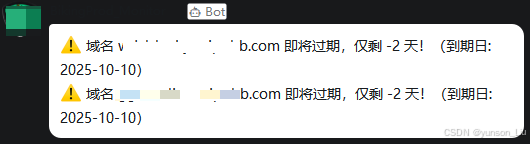
alerts.append(f"⚠️ 域名 {domain} 即将过期,仅剩 {days_left} 天!(到期日: {expiry.date()})")
if alerts:
message = "\n".join(alerts)
send_dingtalk_message(webhook, secret, message)
else:
print("✅ 所有域名都在安全期内。")
if __name__ == '__main__':
main()3、执行命令
bash
05 00 * * * cd /root/domain && /usr/bin/python3 domain_expiry_monitor.py --config-file config.json /root/domain/domain_expiry_monitor.log 2>&14、告警信息图示