效果如下:目录中带页码,点击目录标题可直接跳转到文档中对应位置。
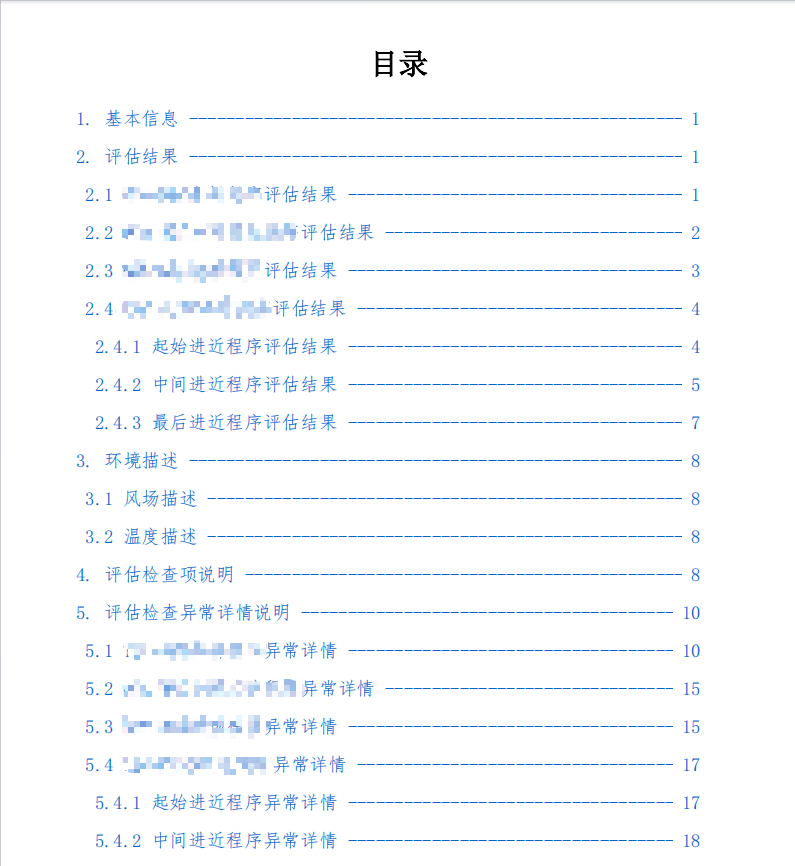
实现:
JS文件:
javascript
// 引入必要的Node.js模块
const express = require('express')          // Express框架,用于创建web服务器
const bodyParser = require('body-parser')   // 解析HTTP请求体
const puppeteer = require('puppeteer')      // 无头浏览器控制库
const { PDFDocument } = require('pdf-lib')  // PDF操作库
const path = require('path')                // 路径处理模块
const cors = require('cors')                // 跨域支持中间件
const axios = require('axios')              // HTTP请求库
const pdfParse = require('pdf-parse')       // PDF解析库
const fs = require('fs')                    // 文件系统模块

// 主函数:生成带目录的PDF
async function generatePDFWithTOC() {
    // 启动Chromium浏览器实例
    const browser = await puppeteer.launch()
    // 创建新页面标签页
    const page = await browser.newPage()

    // 获取模板HTML文件路径(__dirname表示当前脚本所在目录)
    const TEMPLATE_PATH = path.join(__dirname, 'templates/evaluation-report.html')
    // 异步读取HTML模板文件内容(UTF-8编码)
    let html = await require('fs').promises.readFile(TEMPLATE_PATH, 'utf8')

    // 准备动态数据对象(用于替换模板中的占位符)
    let data = {
        currentUser: curEvalResult.username,      // 当前用户名
        time: curEvalResult.time,                // 评估时间
        flightPlanName: curEvalResult.PlanName,  // 飞行计划名称
        basicDes,                                // 基本信息描述
        simCount: curEvalResult.simulatedCount,  // 仿真次数
        windDes,                                 // 风场描述
        tempDes,                                 // 温度描述
    }

    // 使用正则表达式替换HTML模板中的${variable}占位符
    // /\$\{(\w+)\}/g 匹配所有${...}格式的占位符
    let compiledHtml = html.replace(/\$\{(\w+)\}/g, (_, key) => data[key] || '')

    // 将编译后的HTML内容加载到页面中
    // networkidle0表示等待网络空闲(500ms内无请求)
    await page.setContent(compiledHtml, { waitUntil: 'networkidle0' })

    // 生成PDF(第一版,此时目录页码尚未修正)
    let pdf = await page.pdf({
        format: 'A4',                     // 纸张尺寸
        timeout: 500000,                  // 超时时间(500秒)
        displayHeaderFooter: false,       // 不显示默认页眉页脚
        margin: { top: '50px', bottom: '40px' }, // 页边距设置
        printBackground: true,            // 打印背景(保留CSS样式)
    })

    // 使用pdf-parse解析生成的PDF,提取文本内容
    let pdfData = await pdfParse(pdf)

    // 创建章节-页码映射表(二维数组)
    const sectionPageMap = []
    // 初始化当前页码(-3是因为前两页是封面和目录)
    let currentPage = -3

    // 按行遍历PDF文本内容
    pdfData.text.split('\n').forEach((line) => {
        // 使用正则匹配章节标题(如"1. 基本信息"或带数字编号的标题)
        const sectionMatch = line.match(
            /^(?:\d+(?:\.\d+)*)\s+[^\n\r]+$|^(?:1\. 基本信息|2\. 评估结果|3\. 环境描述|4\. 评估检查项说明|5\. 评估检查异常详情说明)$/,
        )

        if (sectionMatch) {
            // 如果匹配到章节标题,记录章节ID和当前页码
            const sectionId = sectionMatch[0]
            sectionPageMap.push([sectionId, currentPage])
        }

        // 遇到空行时增加页码计数
        if (line.trim() === '') {
            currentPage++
        }
    })

    // 将章节-页码映射表转换为对象数组(当前代码实际未转换,保留原数组)
    const sectionPageObject = sectionPageMap

    // 在页面中执行JavaScript代码(用于更新目录页码)
    await page.evaluate((sectionPageObject) => {
        // 选择所有章节元素(通过ID选择器)
        const sections = document.querySelectorAll(
            '[id^="section-"],[id^="abo-"],[id$="-abo"],[id$="-result"],[id$="-env"]'
        )

        // 遍历每个章节元素
        sections.forEach((section, index) => {
            // 获取对应页码(从映射表中获取)
            const pageNum = sectionPageObject[index][1]

            // 查找目录中对应的链接项
            const tocItem = document.querySelector(`a[href="#${section.id}"]`)

            // 修改目录项样式和内容
            tocItem.style.display = 'flex'
            tocItem.style.justifyContent = 'space-between'

            if (tocItem) {
                // 在目录项右侧添加页码(使用虚线分隔)
                tocItem.innerHTML += `
                    <div style="flex-grow: 1; margin: 0 10px; overflow: hidden; white-space: nowrap;">
                        ------------------------------------------------------------------
                    </div>
                    <span style="float:right; padding-right:20px">${pageNum}</span>`
            }
        })
    }, sectionPageObject)

    // 重新生成PDF(此时目录已包含正确页码)
    pdf = await page.pdf({
        format: 'A4',
        timeout: 500000,
        displayHeaderFooter: false,
        margin: { top: '50px', bottom: '40px' },
        printBackground: true,
    })

    // 使用pdf-lib进行PDF最终处理
    const pdfDoc = await PDFDocument.load(pdf)
    // 嵌入Helvetica字体(用于页码标注)
    const helveticaFont = await pdfDoc.embedFont('Helvetica')

    // 遍历所有PDF页面
    pdfDoc.getPages().forEach((page, index) => {
        // 跳过封面和目录页(前两页)
        if (index >= 2) {
            // 获取页面宽度
            const { width } = page.getSize()
            // 在页面底部中央添加页码(格式如"- 1 -")
            page.drawText(`- ${index - 1} -`, {
                x: width / 2 - 15,  // 水平居中(减去文本宽度的一半)
                y: 25,              // 距底部25像素
                size: 10,           // 字体大小
                font: helveticaFont, // 使用Helvetica字体
            })
        }
    })

    // 返回处理后的PDF二进制数据
    return await pdfDoc.save()
}

// 调用主函数(示例调用)
generatePDFWithTOC()
关键流程说明:
模板处理阶段:
1.读取HTML模板文件
2.使用动态数据替换模板中的占位符(如${currentUser})
首次PDF生成:
1.通过Puppeteer将HTML渲染为PDF
2.此时目录页码是临时的
页码分析阶段:
1.解析PDF文本内容
2.通过正则匹配识别章节标题
3.建立章节标题与实际页码的映射关系
目录更新阶段:
1.在浏览器环境中动态修改目录DOM
2.为每个目录项添加正确的页码
最终处理阶段:
1.重新生成包含正确页码的PDF
2.使用pdf-lib添加页面底部页码标记
3.返回最终的PDF二进制数据
注意事项:
1.正则表达式/^(?:\d+(?:\.\d+)*)\s+[^\n\r]+$/用于匹配数字编号的标题(如"1.2.3 标题")2.page.evaluate()是在浏览器上下文中执行的代码,不能直接访问Node.js变量
3.页码计算从-3开始是为了补偿封面和目录页的偏移
4.实际使用时需要确保curEvalResult等数据对象已正确定义
html
<!DOCTYPE html>
<html>
<head>
<style>
body {
margin:0 2cm;
font-family:"FangSong";
font-size: 14pt;
line-height: 1.5;
}
.cover-page {
height: 100vh;
display: flex;
flex-direction: column;
justify-content: space-between;
text-align: center;
page-break-after: always;
}
.main-title {
font-size: 26pt;
}
.main-title:first-child {
margin-top: 9.5cm;
}
.footer {
margin-bottom: 5.5cm;
}
h1 {
font-family: "SimSun";
font-size: 22pt;
}
h2 {
font-family: "SimSun";
font-size: 18pt;
}
p{
text-indent: 2em;
}
table {
width: 100%;
border-collapse: collapse;
margin-top: 20px;
}
caption{
font-family: "SimSun";
}
th,
td {
border: 1px solid #ddd;
padding: 8px;
text-align: center;
}
.table-notes{
font-size: 0.8em;
line-height: 1.1;
}
.table-notes p {
margin: 0;
text-indent: 0;
}
a[href^="#"] {
color: #0066cc;
text-decoration: none;
white-space: nowrap;
}
h1[id] {
text-align: left;
}
</style>
</head>
<body>
<div class="cover-page" >
<div>
<div class="main-title">PBN飞行程序安全评估系统</div>
<div class="main-title">
飞行计划验证评估报告
</div>
</div>
<div class="footer">
<div>
验证用户:${currentUser}
</div>
<div class="sub-title">
报告时间:${time}
</div>
</div>
</div>
<div class="toc-page" style="page-break-after: always;">
<h1 style="text-align:center; font-family:SimSun; font-size:22pt;">目录</h1>
<ul id="toc-list" style="list-style-type:none; padding-left:0; font-family:FangSong; font-size:14pt;"></ul>
</div>
<div class="content-page">
<h1 id="section-basic">1. 基本信息</h1>
<p>本次飞行计划安全评估的飞行计划名称为:${flightPlanName}。</p>
<p>涵盖飞行程序如下:</p>
<p>${basicDes}</p>
<p>本次评估过程共执行仿真${simCount}次,具体环境设置详见环境描述章节。</p>
<h1 id="section-result">2. 评估结果</h1>
//......
</div>
<script>
document.addEventListener('DOMContentLoaded', async() => {
// 1. 获取所有需要编入目录的标题
const sections = [
{ id: 'section-basic', title: '1. 基本信息' },
{ id: 'section-result', title: '2. 评估结果' }
];
sections.push({ id: 'section-env', title: '3. 环境描述' },
{ id: 'one-env', title: ' 3.1 风场描述' },
{ id: 'two-env', title: ' 3.2 温度描述' },
{ id: 'section-check', title: '4. 评估检查项说明' },
{ id: 'section-detail', title: '5. 评估检查异常详情说明' });
// 计算每部分起始页码(正文从第3页开始)
let pageCounter = 3;
const tocList = document.getElementById('toc-list');
sections.forEach(section => {
const element = document.getElementById(section.id);
if (element) {
const rect = element.getBoundingClientRect();
const pageNum = Math.floor(rect.top / 1123) + pageCounter; // 1123为A4页高度
const li = document.createElement('li');
li.style.margin = '10px 0';
li.innerHTML = `
<a href="#${section.id}" style="color:#0066cc; text-decoration:none;">
${section.title}
<span style="float:right;">${pageNum}</span>
</a>
`;
tocList.appendChild(li);
}
});
});
</script>
</body>
</html>关键技术点
动态数据绑定 :
1.使用${variable}占位符,后期通过JavaScript替换