Aosp14桌面壁纸和锁屏壁纸的设置和加载分析
系统壁纸过程分析
前面UI部分不做分析,直接找到了setting中设置壁纸的位置,DefaultWallpaperPersister
setWallPaper区别主要是设置三个不同的whichWallPaper,
WallpaperManager.FLAG_SYSTEM
WallpaperManager.FLAG_LOCK
WallpaperManager.FLAG_SYSTEM | WallpaperManager.FLAG_LOCK
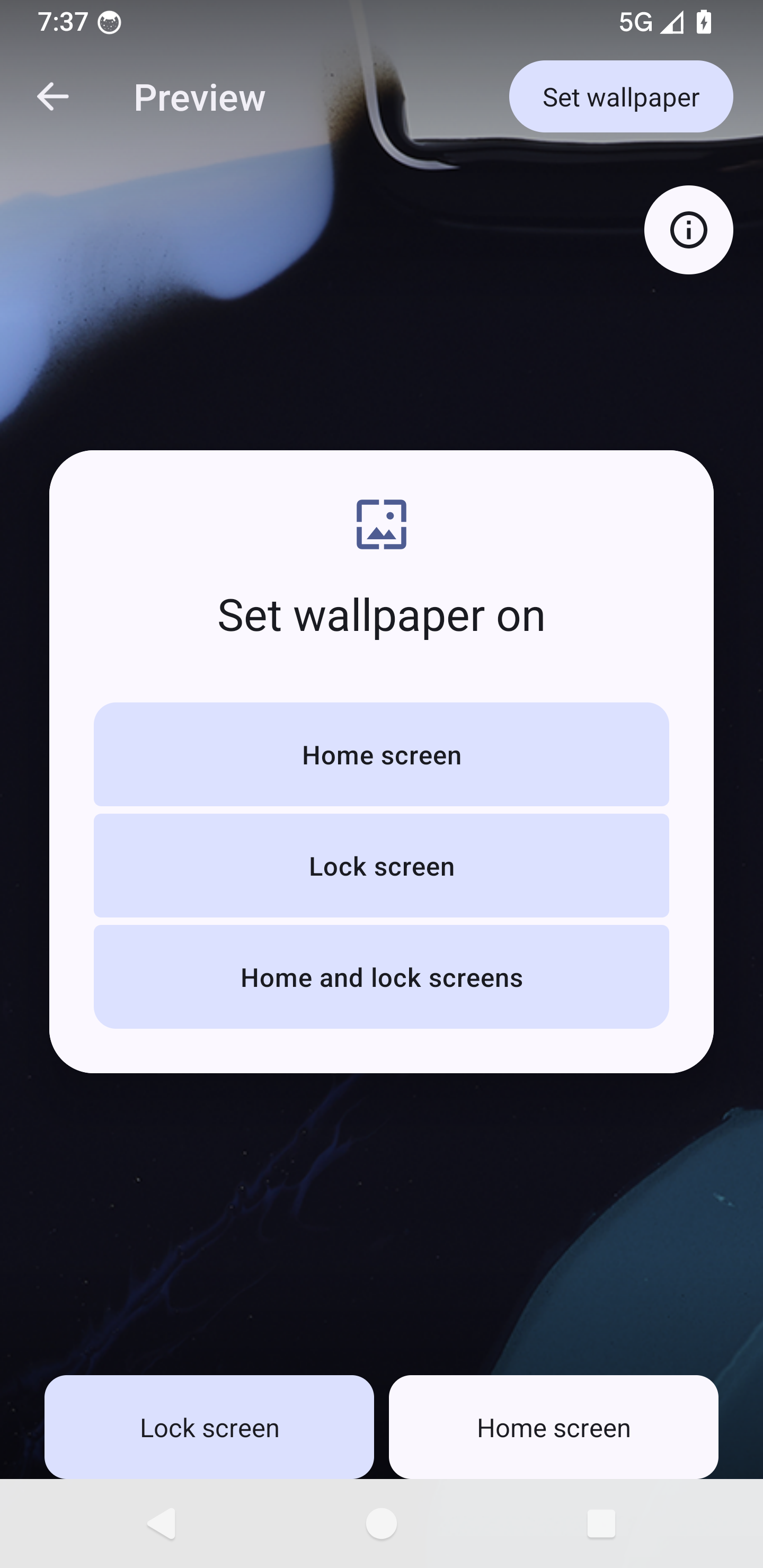
这里直接找到了设置壁纸的地方
java
DefaultWallpaperPersister中SetWallPaperTask中

private class SetWallpaperTask extends AsyncTask<Void, Void, Boolean> {
@Override
protected Boolean doInBackground(Void... unused) {
    int whichWallpaper;
    if (mDestination == DEST_HOME_SCREEN) {
        whichWallpaper = WallpaperManager.FLAG_SYSTEM;
    } else if (mDestination == DEST_LOCK_SCREEN) {
        whichWallpaper = WallpaperManager.FLAG_LOCK;
    } else { // DEST_BOTH
        whichWallpaper = WallpaperManager.FLAG_SYSTEM
                | WallpaperManager.FLAG_LOCK;
    }
    boolean wasLockWallpaperSet = mWallpaperStatusChecker.isLockWallpaperSet();
    boolean allowBackup = mWallpaper.getBackupPermission() == WallpaperInfo.BACKUP_ALLOWED;
    final int wallpaperId;
    if (mBitmap != null) {
        //调用setwallpaperManager
        wallpaperId = setBitmapToWallpaperManager(mBitmap, mCropHint, allowBackup,
                whichWallpaper);
    } else if (mInputStream != null) {
        wallpaperId = setStreamToWallpaperManager(mInputStream, mCropHint,
                allowBackup, whichWallpaper);
    }
  ...
}
再看看setBitmapToWallpaperManager里面
java
public int setBitmapToWallpaperManager(Bitmap wallpaperBitmap, Rect cropHint,
        boolean allowBackup, int whichWallpaper) {
    ByteArrayOutputStream tmpOut = new ByteArrayOutputStream();
    if (wallpaperBitmap.compress(CompressFormat.PNG, DEFAULT_COMPRESS_QUALITY, tmpOut)) {
        try {
            byte[] outByteArray = tmpOut.toByteArray();
            return mWallpaperManager.setStream(
                    new ByteArrayInputStream(outByteArray),
                    cropHint /* visibleCropHint */,
                    allowBackup,
                    whichWallpaper);
        } catch (IOException e) {
            Log.e(TAG, "unable to write stream to wallpaper manager");
            return 0;
        }
    } else {
        Log.e(TAG, "unable to compress wallpaper");
        try {
            return mWallpaperManager.setBitmap(
                    wallpaperBitmap,
                    cropHint /* visibleCropHint */,
                    allowBackup,
                    whichWallpaper);
        } catch (IOException e) {
            Log.e(TAG, "unable to set wallpaper");
            return 0;
        }
    }
}
从这里就调用到了WallpaperManager中,看看setBitmap,通过binder调用WallpaperManagerService的setWallPaper()
获取到文件的fd,将当前的bitmap复制到这个fd中,在后面的WallpaperManagerService中的WallpaperData中有一个WallpaperObserver extends FileObserver,会对文件变化进行监听
java
@RequiresPermission(android.Manifest.permission.SET_WALLPAPER)
public int setStream(InputStream bitmapData, Rect visibleCropHint,
        boolean allowBackup, @SetWallpaperFlags int which)
                throws IOException {
	.....
    try {
        //通过binder调用WallpaperManagerService的setWallPaper()
        ParcelFileDescriptor fd = sGlobals.mService.setWallpaper(null,
                mContext.getOpPackageName(), visibleCropHint, allowBackup,
                result, which, completion, mContext.getUserId());
        if (fd != null) {
            FileOutputStream fos = null;
            try {
                fos = new ParcelFileDescriptor.AutoCloseOutputStream(fd);
                copyStreamToWallpaperFile(bitmapData, fos);
                fos.close();
                completion.waitForCompletion();
            } finally {
                IoUtils.closeQuietly(fos);
            }
        }
    } catch (RemoteException e) {
        throw e.rethrowFromSystemServer();
    }

    return result.getInt(EXTRA_NEW_WALLPAPER_ID, 0);
}
下面去WallpaperManagerService里面看看
java
@Override
public ParcelFileDescriptor setWallpaper(String name, String callingPackage,
        Rect cropHint, boolean allowBackup, Bundle extras, int which,
        IWallpaperManagerCallback completion, int userId) {
    //......检查权限的不关注这里
		//通过&运算,如果设置的不是FLAG_LOCK|FLAG_SYSTEM其中的一个或者一起直接throw
    if ((which & (FLAG_LOCK|FLAG_SYSTEM)) == 0) {
        final String msg = "Must specify a valid wallpaper category to set";
        Slog.e(TAG, msg);
        throw new IllegalArgumentException(msg);
    }

    if (!isWallpaperSupported(callingPackage) || !isSetWallpaperAllowed(callingPackage)) {
        return null;
    }

	......

    synchronized (mLock) {
        if (DEBUG) Slog.v(TAG, "setWallpaper which=0x" + Integer.toHexString(which));
        WallpaperData wallpaper;
        final WallpaperData originalSystemWallpaper = mWallpaperMap.get(userId);
        final boolean systemIsStatic =
                originalSystemWallpaper != null && mImageWallpaper.equals(
                        originalSystemWallpaper.wallpaperComponent);
         //获取不到锁屏壁纸,说明是跟system是一个壁纸
        final boolean systemIsBoth = mLockWallpaperMap.get(userId) == null;

        /* 这里判断如果是FLAG_SYSTEM,并且是静态壁纸,并且一个壁纸,把系统壁纸合并给锁屏壁纸
         */
        if (which == FLAG_SYSTEM && systemIsStatic && systemIsBoth) {
            Slog.i(TAG, "Migrating current wallpaper to be lock-only before"
                    + " updating system wallpaper");
            migrateStaticSystemToLockWallpaperLocked(userId);
        }
				//主要是这个方法。
        wallpaper = getWallpaperSafeLocked(userId, which);
        if (mPendingMigrationViaStatic != null) {
            Slog.w(TAG, "Starting new static wp migration before previous migration finished");
        }
        mPendingMigrationViaStatic = new WallpaperDestinationChangeHandler(wallpaper);
        final long ident = Binder.clearCallingIdentity();
        try {
            ParcelFileDescriptor pfd = updateWallpaperBitmapLocked(name, wallpaper, extras);
            if (pfd != null) {
                wallpaper.imageWallpaperPending = true;
                wallpaper.mSystemWasBoth = systemIsBoth;
                wallpaper.mWhich = which;
                wallpaper.setComplete = completion;
                wallpaper.fromForegroundApp = isFromForegroundApp(callingPackage);
                wallpaper.cropHint.set(cropHint);
                wallpaper.allowBackup = allowBackup;
                wallpaper.mWallpaperDimAmount = getWallpaperDimAmount();
            }
            return pfd;
        } finally {
            Binder.restoreCallingIdentity(ident);
        }
    }
}
看看migrateStaticSystemToLockWallpaperLocked()
java
 private void migrateStaticSystemToLockWallpaperLocked(int userId) {
        WallpaperData sysWP = mWallpaperMap.get(userId);
        if (sysWP == null) {
            if (DEBUG) {
                Slog.i(TAG, "No system wallpaper?  Not tracking for lock-only");
            }
            return;
        }

        // We know a-priori that there is no lock-only wallpaper currently
        WallpaperData lockWP = new WallpaperData(userId, FLAG_LOCK);
        lockWP.wallpaperId = sysWP.wallpaperId;
        lockWP.cropHint.set(sysWP.cropHint);
        lockWP.allowBackup = sysWP.allowBackup;
        lockWP.primaryColors = sysWP.primaryColors;
        lockWP.mWallpaperDimAmount = sysWP.mWallpaperDimAmount;
        lockWP.mWhich = FLAG_LOCK;

        // Migrate the bitmap files outright; no need to copy
        try {
            if (sysWP.getWallpaperFile().exists()) {
                Os.rename(sysWP.getWallpaperFile().getAbsolutePath(),
                        lockWP.getWallpaperFile().getAbsolutePath());
            }
            if (sysWP.getCropFile().exists()) {
                Os.rename(sysWP.getCropFile().getAbsolutePath(),
                        lockWP.getCropFile().getAbsolutePath());
            }
            mLockWallpaperMap.put(userId, lockWP);
            SELinux.restorecon(lockWP.getWallpaperFile());
            mLastLockWallpaper = lockWP;
        } catch (ErrnoException e) {
            // can happen when migrating default wallpaper (which is not stored in wallpaperFile)
            Slog.w(TAG, "Couldn't migrate system wallpaper: " + e.getMessage());
            clearWallpaperBitmaps(lockWP);
        }
    }
主要的getWallpaperSafeLocked,
如果设置的FLAG_LOCK,就会从mLockWallpaperMap中获取出当前的wallpaperdata进行修改,
如果设置的FLAG_LOCK|FLAG_SYSTEM或者FLAG_SYSTEM,就从mWallpaperMap中取出当前的WallpaperData数据。
在这里通过userid获取,一般是不为空的。因为在系统启动时候已经有默认设置了一个wallpaperdata
//userid 和系统壁纸WallpaperData
private final SparseArray mWallpaperMap = new SparseArray();
//userid 和锁屏壁纸WallpaperData
private final SparseArray mLockWallpaperMap = new SparseArray();
java
WallpaperData getWallpaperSafeLocked(int userId, int which) {
        // We're setting either just system (work with the system wallpaper),
        // both (also work with the system wallpaper), or just the lock
        // wallpaper (update against the existing lock wallpaper if any).
        // Combined or just-system operations use the 'system' WallpaperData
        // for this use; lock-only operations use the dedicated one.
        final SparseArray<WallpaperData> whichSet =
                (which == FLAG_LOCK) ? mLockWallpaperMap : mWallpaperMap;
        WallpaperData wallpaper = whichSet.get(userId);
        if (wallpaper == null) {
            // common case, this is the first lookup post-boot of the system or
            // unified lock, so we bring up the saved state lazily now and recheck.
            // if we're loading the system wallpaper for the first time, also load the lock
            // wallpaper to determine if the system wallpaper is system+lock or system only.
            int whichLoad = (which == FLAG_LOCK) ? FLAG_LOCK : FLAG_SYSTEM | FLAG_LOCK;
            loadSettingsLocked(userId, false, whichLoad);
            wallpaper = whichSet.get(userId);
            if (wallpaper == null) {
                // if it's still null here, this is likely a lock-only operation and there is not
                // currently a lock-only wallpaper set for this user, so we need to establish
                // it now.
                if (which == FLAG_LOCK) {
                    wallpaper = new WallpaperData(userId, FLAG_LOCK);
                    mLockWallpaperMap.put(userId, wallpaper);
                } else {
                    // rationality fallback: we're in bad shape, but establishing a known
                    // valid system+lock WallpaperData will keep us from dying.
                    Slog.wtf(TAG, "Didn't find wallpaper in non-lock case!");
                    wallpaper = new WallpaperData(userId, FLAG_SYSTEM);
                    mWallpaperMap.put(userId, wallpaper);
                }
            }
        }
        return wallpaper;
    }
这里获取到WallpaperData后,通过updateWallpaperBitmapLocked拿到对应的ParcelFileDescriptor,返回给WallPaperManager,在WallpaperManager中把bitmap数据复制到当前文件。
java
ParcelFileDescriptor updateWallpaperBitmapLocked(String name, WallpaperData wallpaper,
            Bundle extras) {
        if (name == null) name = "";
        try {
            File dir = getWallpaperDir(wallpaper.userId);
            if (!dir.exists()) {
                dir.mkdir();
                FileUtils.setPermissions(
                        dir.getPath(),
                        FileUtils.S_IRWXU|FileUtils.S_IRWXG|FileUtils.S_IXOTH,
                        -1, -1);
            }
            ParcelFileDescriptor fd = ParcelFileDescriptor.open(wallpaper.getWallpaperFile(),
                    MODE_CREATE|MODE_READ_WRITE|MODE_TRUNCATE);
            if (!SELinux.restorecon(wallpaper.getWallpaperFile())) {
                Slog.w(TAG, "restorecon failed for wallpaper file: " +
                        wallpaper.getWallpaperFile().getPath());
                return null;
            }
            wallpaper.name = name;
            wallpaper.wallpaperId = makeWallpaperIdLocked();
            if (extras != null) {
                extras.putInt(WallpaperManager.EXTRA_NEW_WALLPAPER_ID, wallpaper.wallpaperId);
            }
            // Nullify field to require new computation
            wallpaper.primaryColors = null;
            Slog.v(TAG, "updateWallpaperBitmapLocked() : id=" + wallpaper.wallpaperId
                    + " name=" + name + " file=" + wallpaper.getWallpaperFile().getName());
            return fd;
        } catch (FileNotFoundException e) {
            Slog.w(TAG, "Error setting wallpaper", e);
        }
        return null;
    }
已经把bitmap存到对应的文件了,那如何生效呢,这里就用到了之前说的WallpaperObserver。
在WallpaperManagerService启动以后会调用switchUser(),在这里能看出来如果设置了FLAG_LOCK | FLAG_SYSTEM,会把systemWallPaper直接给lockwallpaper。
重点这里设置了systemWallpaper.wallpaperObserver = new WallpaperObserver(systemWallpaper);那就看看这里做了什么
java
void switchUser(int userId, IRemoteCallback reply) {
        TimingsTraceAndSlog t = new TimingsTraceAndSlog(TAG);
        t.traceBegin("Wallpaper_switch-user-" + userId);
        try {
            final WallpaperData systemWallpaper;
            final WallpaperData lockWallpaper;
            synchronized (mLock) {
                if (mCurrentUserId == userId) {
                    return;
                }
                mCurrentUserId = userId;
                systemWallpaper = getWallpaperSafeLocked(userId, FLAG_SYSTEM);
                lockWallpaper = systemWallpaper.mWhich == (FLAG_LOCK | FLAG_SYSTEM)
                        ? systemWallpaper : getWallpaperSafeLocked(userId, FLAG_LOCK);

                // Not started watching yet, in case wallpaper data was loaded for other reasons.
                if (systemWallpaper.wallpaperObserver == null) {
                    systemWallpaper.wallpaperObserver = new WallpaperObserver(systemWallpaper);
                    systemWallpaper.wallpaperObserver.startWatching();
                }
                if (lockWallpaper != systemWallpaper)  {
                    switchWallpaper(lockWallpaper, null);
                }
                switchWallpaper(systemWallpaper, reply);
            }

            // Offload color extraction to another thread since switchUser will be called
            // from the main thread.
            FgThread.getHandler().post(() -> {
                notifyWallpaperColorsChanged(systemWallpaper);
                if (lockWallpaper != systemWallpaper) notifyWallpaperColorsChanged(lockWallpaper);
                notifyWallpaperColorsChanged(mFallbackWallpaper);
            });
        } finally {
            t.traceEnd();
        }
    }
WallpaperObserver其实FileObserver,当文件发生变化会执行OnEvent()
java
class WallpaperObserver extends FileObserver {

        final int mUserId;
        final WallpaperData mWallpaper;
        final File mWallpaperDir;
        final File mWallpaperFile;
        final File mWallpaperLockFile;

        public WallpaperObserver(WallpaperData wallpaper) {
            super(getWallpaperDir(wallpaper.userId).getAbsolutePath(),
                    CLOSE_WRITE | MOVED_TO | DELETE | DELETE_SELF);
            mUserId = wallpaper.userId;
            mWallpaperDir = getWallpaperDir(wallpaper.userId);
            mWallpaper = wallpaper;
            mWallpaperFile = new File(mWallpaperDir, WALLPAPER);
            mWallpaperLockFile = new File(mWallpaperDir, WALLPAPER_LOCK_ORIG);
        }


        // Handles static wallpaper changes generated by WallpaperObserver events when
        // enableSeparateLockScreenEngine() is true.
        private void updateWallpapers(int event, String path) {
            // System and system+lock changes happen on the system wallpaper input file;
            // lock-only changes happen on the dedicated lock wallpaper input file
            final File changedFile = new File(mWallpaperDir, path);
            final boolean sysWallpaperChanged = (mWallpaperFile.equals(changedFile));
            final boolean lockWallpaperChanged = (mWallpaperLockFile.equals(changedFile));
            final WallpaperData wallpaper = dataForEvent(lockWallpaperChanged);

            ......
            synchronized (mLock) {
                ....
                if (sysWallpaperChanged) {
                    if (DEBUG) {
                        Slog.v(TAG, "Home screen wallpaper changed");
                    }
                    IRemoteCallback.Stub callback = new IRemoteCallback.Stub() {
                        @Override
                        public void sendResult(Bundle data) throws RemoteException {
                            if (DEBUG) {
                                Slog.d(TAG, "publish system wallpaper changed!");
                            }
                            notifyWallpaperChanged(wallpaper);
                        }
                    };

                    // If this was the system wallpaper, rebind...
                    bindWallpaperComponentLocked(mImageWallpaper, true, false, wallpaper,
                            callback);
                }

                if (lockWallpaperChanged) {
                    // This is lock-only, so (re)bind to the static engine.
                    if (DEBUG) {
                        Slog.v(TAG, "Lock screen wallpaper changed");
                    }
                    IRemoteCallback.Stub callback = new IRemoteCallback.Stub() {
                        @Override
                        public void sendResult(Bundle data) throws RemoteException {
                            notifyWallpaperChanged(wallpaper);
                        }
                    };

                    bindWallpaperComponentLocked(mImageWallpaper, true /* force */,
                            false /* fromUser */, wallpaper, callback);
                } else if (isAppliedToLock) {
                    final WallpaperData lockedWallpaper = mLockWallpaperMap.get(
                            mWallpaper.userId);
                    if (lockedWallpaper != null) {
                        detachWallpaperLocked(lockedWallpaper);
                    }
                    clearWallpaperBitmaps(mWallpaper.userId, FLAG_LOCK);
                    mLockWallpaperMap.remove(wallpaper.userId);
                }

                saveSettingsLocked(wallpaper.userId);
                if (localSync != null) {
                    localSync.complete();
                }
            }
					......
        }

        @Override
        public void onEvent(int event, String path) {
            if (path != null) updateWallpapers(event, path);
        }
    }
在这里通过bindWallpaperComponentLocked进行bingservice修改和显示到当前屏幕