MongoDB index overview
索引结构
MongoDB 的所有常规索引(包括单字段、复合、多键索引等)都基于 B-Tree(Balanced Tree) 实现:
- 每个节点 包含多个键值对(key-value),键是索引字段的值,值是指向文档的指针(即
_id或文档位置)。- 有序存储:键值对按顺序排列,便于范围查询和排序。
- 平衡性:所有叶子节点在同一层,插入和删除不会破坏树的平衡。
- 多路分支:每个节点可以有多个子节点,适合磁盘存储结构,减少磁盘 I/O。
以一个简单的索引为例:
db.users.createIndex({ age: 1 })

索引结构大致如下:
       [25]       [35]       [45]
       /   \      /   \      /   \
     ...   ...  ...   ...  ...   ...

每个节点存储一个或多个键(如年龄值)和指向文档的引用。
查询 { age: { $gt: 30 } } 时,MongoDB 会从根节点开始,快速定位到大于 30 的第一个节点,然后顺序扫描后续节点。
索引类型
单字段索引
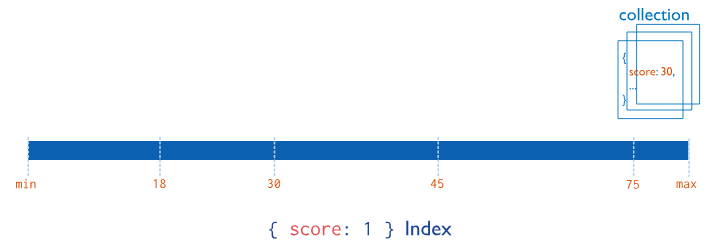
单字段索引从每个字段中的单个字段收集和排序数据 集合中的文档。
此图显示了单个字段上的索引:score
复合索引
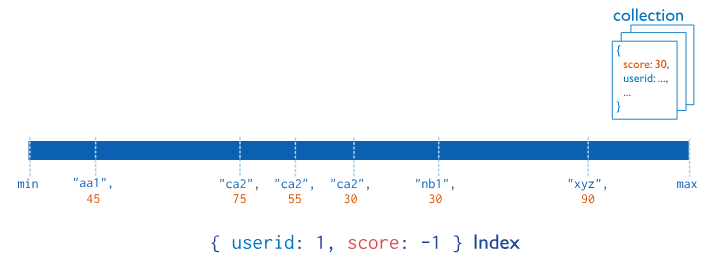
复合索引从每个字段值中收集和排序数据 集合中的文档。可以使用复合索引查询第一个 字段或索引的任何前缀字段。 复合索引中字段的顺序非常重要。创建的 B 树 by a compound index 按照索引指定的顺序存储排序后的数据 字段。
例如,下图显示了一个复合索引,其中文档 首先按升序(按字母顺序)排序。 然后,for each 按降序排序:
userid``scores``userid
查询时必须遵循最左前缀原则,才能有效利用索引。
多键索引
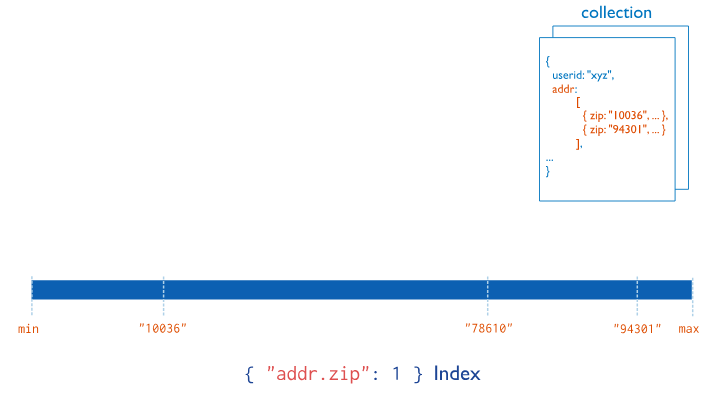
多键索引收集和排序存储在数组中的数据。
无需显式指定多键类型。当您创建 包含数组值的字段上的索引,MongoDB 自动 将索引设置为多键索引。
此图显示了字段上的多键索引:
addr.zip
- 针对数组字段,MongoDB 会为数组中的每个元素创建索引项。
- 仍然是 B-Tree,但每个文档可能对应多个索引条目。
地理空间索引
2d索引:基于平面坐标,适用于简单地图。
2dsphere索引:基于球面坐标,适用于地球坐标系统。使用 R-Tree 或 GeoHash 等结构实现。
全文索引
文本索引支持对包含字符串内容的字段进行文本搜索查询。
使用倒排索引(Inverted Index)结构,而不是 B-Tree。
每个词作为键,值是包含该词的文档列表。
索引失效的情况
MongoDB 中索引失效的情况有很多,理解这些情况有助于你写出更高效的查询语句。以下是一些常见导致索引失效的原因:
-
查询条件不满足最左前缀原则 如前所述,如果你创建了复合索引
{ name: 1, age: 1 },但查询时只使用了age,则索引不会被使用。 -
使用不支持索引的操作符
某些查询操作符无法使用索引,例如:
$not:如{ age: { $not: { $gt: 30 } } }$where:如db.users.find({ $where: "this.age > 30" })- 正则表达式未加前缀:如
{ name: /abc/ }(不能使用索引),但{ name: /^abc/ }可以使用索引。
3.字段类型不一致
如果索引字段是字符串类型,但查询时传入了数字类型,MongoDB 可能不会使用索引。
// 假设 name 是字符串类型
db.users.find({ name: 123 }) // 索引可能失效
4.排序字段不在索引中
-
使用函数或表达式查询
db.users.find({ expr: { gt: [ "$age", 30 ] } }) // 索引失效
#或者
db.users.find({ name: name.toLowerCase() }) // 索引失效
6.数据量太小,MongoDB 选择全表扫描
在某些情况下,如果集合数据量很小,MongoDB 的查询优化器可能认为全表扫描比使用索引更快,因此不会使用索引。
- 使用
skip()和limit()不当
虽然 skip() 和 limit() 本身不会导致索引失效,但如果配合不当的排序或查询条件使用,可能会导致 MongoDB 放弃使用索引。
- 使用
$ne或$nin
这些操作符通常不会使用索引,或者只能部分使用索引。
db.users.find({ age: { $ne: 30 } }) // 索引可能失效判断索引使用情况
使用 .explain("executionStats") 是最直接的方式:
查看是否有 "stage": "IXSCAN"(索引扫描)或 "COLLSCAN"(全表扫描)。
db.users.find({ name: "Alice" }).explain("executionStats")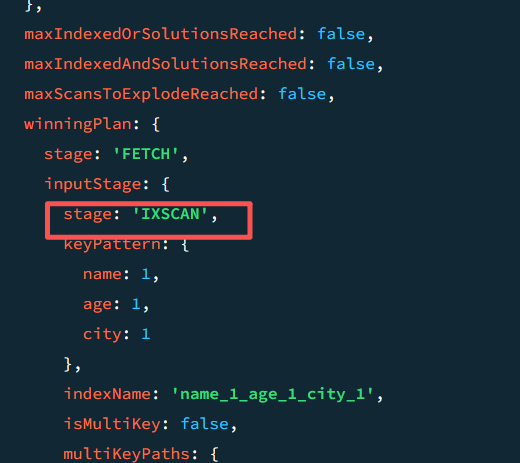
Sample
db.users.insertOne({name: "张三", age: 28, city: "上海"})
db.users.insertOne({name: "李四", age: 20, city: "北京"})
db.users.insertOne({name: "王五", age: 28, city: "深圳"})
db.users.insertOne({name: "赵六", age: 28, city: "广州"})

db.users.createIndex({ name: 1, age: 1, city: 1 })

//stage: 'IXSCAN', 命中索引
db.users.find({name: "Hanlin"}).explain("executionStats")
//stage: 'COLLSCAN', 未命中索引
db.users.find({city: "上海"}).explain("executionStats")
常用命令
// =======================
// 📁 数据库操作
// =======================
show dbs
use myDatabase
db.dropDatabase()

// =======================
// 📦 集合操作
// =======================
db.createCollection("myCollection")
show collections
db.myCollection.drop()

// =======================
// 📄 文档操作
// =======================
db.myCollection.insertOne({ name: "Alice", age: 25 })
db.myCollection.insertMany([{ name: "Bob" }, { name: "Charlie" }])

db.myCollection.find()
db.myCollection.find({ age: { $gt: 20 } })
db.myCollection.findOne({ name: "Alice" })

db.myCollection.updateOne({ name: "Alice" }, { $set: { age: 26 } })
db.myCollection.updateMany({ age: { $lt: 30 } }, { $inc: { age: 1 } })

db.myCollection.deleteOne({ name: "Bob" })
db.myCollection.deleteMany({ age: { $gt: 40 } })

// =======================
// 🔍 查询操作(复杂条件)
// =======================
db.users.find({ $or: [{ age: { $lt: 18 } }, { age: { $gt: 60 } }] })
db.users.find({ name: { $regex: /^A/i } }) // 正则匹配
db.users.find({ tags: { $in: ["admin", "editor"] } })
db.users.find({ $and: [ { age: { $gte: 18 } }, { age: { $lte: 30 } } ] })

// =======================
// 📊 聚合操作(Aggregation)
// =======================
db.orders.aggregate([
  { $match: { status: "paid" } },
  { $group: { _id: "$userId", total: { $sum: "$amount" } } },
  { $sort: { total: -1 } },
  { $limit: 5 }
])

db.users.aggregate([
  { $project: { name: 1, birthYear: { $year: "$birthDate" } } }
])

db.sales.aggregate([
  { $bucket: {
      groupBy: "$amount",
      boundaries: [0, 100, 500, 1000],
      default: "Other",
      output: { count: { $sum: 1 }, total: { $sum: "$amount" } }
  }}
])
//============
// $match过滤文档(类似 SQL 的 WHERE)
// $group分组并进行聚合计算(类似 SQL 的 GROUP BY)
// $sort排序
// $project指定输出字段(类似 SELECT)
// $limit | $skip限制或跳过结果数量$lookup连接其他集合(类似 SQL 的 JOIN)
// $unwind拆分数组字段中的元素

// =======================
// 📌 索引操作
// =======================
db.myCollection.createIndex({ name: 1 })
db.myCollection.createIndex({ name: 1, age: -1 })
db.myCollection.createIndex({ tags: 1 }) // 多键索引
db.myCollection.createIndex({ content: "text" }) // 文本索引
db.myCollection.createIndex({ location: "2dsphere" }) // 地理空间索引
db.myCollection.dropIndex("name_1")
db.myCollection.getIndexes()

// =======================
// 🧪 查询分析与性能
// =======================
db.myCollection.find({ name: "Alice" }).explain("executionStats")
db.myCollection.stats()
db.myCollection.validate()

// =======================
// 🧰 管理与工具函数
// =======================
db.version()
db.serverStatus()
db.currentOp()
db.killOp(opid)
db.getCollectionNames()
db.getSiblingDB("otherDB")