一、建表模式
-- 1. 创建本地表(存储引擎)
CREATE TABLE your_db.local_table ON CLUSTER your_cluster
(
    id UInt64,
    user_id UInt32,
    event_time DateTime,
    data String
)
ENGINE = ReplicatedMergeTree('/clickhouse/tables/{shard}/local_table', '{replica}')
ORDER BY (id, event_time)
PARTITION BY toYYYYMM(event_time);

-- 2. 创建分布式表(路由引擎)
CREATE TABLE your_db.distributed_table ON CLUSTER your_cluster
ENGINE = Distributed('your_cluster', 'your_db', 'local_table', xxHash64(id))
AS your_db.local_table;

-- 3. 写入数据(必须通过分布式表)
INSERT INTO your_db.distributed_table ...
参数说明:
1. 第一个参数:'/clickhouse/tables/{shard}/local_table'
这是一个 ZooKeeper 路径,用于在 ZooKeeper 中存储该表的数据同步、元数据、日志等信息。
-
/clickhouse/tables/:-
这是一个约定的根路径,用于存放所有与 ClickHouse 复制表相关的信息。你可以把它看作一个命名空间,方便在 ZooKeeper 中管理。
-
你可以使用任何路径,但使用这个约定俗成的路径是最佳实践。
-
-
{shard}:-
这是一个宏(macro)的占位符,不是字面字符串。
-
含义 :它代表分片的标识符 。在 ClickHouse 的配置文件中(通常是
config.xml或metrika.xml),你需要预先定义这个宏。它的值通常是一个分片编号(如shard01,01)或一个有意义的名称。 -
作用 :确保同一个分片内的不同副本使用相同的 ZooKeeper 路径。 这是实现数据复制的关键。
- 例如,分片1的两个副本,它们的
{shard}宏都会被替换为相同的值(如shard1),因此它们在 ZooKeeper 中的路径都是/clickhouse/tables/shard1/local_table。这样,它们就知道彼此是复制伙伴,并开始相互同步数据。
- 例如,分片1的两个副本,它们的
-
-
local_table:-
这是路径的最后一部分,通常建议使用本地表的表名。
-
作用:在 ZooKeeper 中唯一标识这张表。如果一个分片上有多个不同的复制表,这个名称可以防止它们的 ZooKeeper 路径冲突。
-
总结第一个参数 :它在 ZooKeeper 中定义了一个"地址",同一个分片的所有副本都必须指向这个相同的"地址",才能找到彼此并进行数据同步。
2. 第二个参数:'{replica}'
这是一个 副本标识符。
-
{replica}:-
这同样是一个宏的占位符,不是字面字符串。
-
含义 :它代表当前副本的唯一标识符。你同样需要在每个 ClickHouse 节点的配置文件中定义这个宏。
-
作用 :用于在同一个分片内区分不同的副本。 每个副本必须有唯一的标识符。
- 这个值通常是服务器的 hostname、IP 地址,或者一个自定义的字符串(如
replica_1,ch_node1)。
- 这个值通常是服务器的 hostname、IP 地址,或者一个自定义的字符串(如
-
总结第二个参数 :它给当前节点上的这个表副本一个唯一的名字,这样在同一个分片内,ZooKeeper 就能区分开哪个是副本A,哪个是副本B。
二、入门验证
1、建表测试
CREATE TABLE IF NOT EXISTS test.local_sales ON CLUSTER my_cluster
(
    id Int64,
    product String,
    amount Decimal(10,2),
    sale_date Date,
    created_at DateTime DEFAULT now(),
    customer_id Int32,
    region String
)
ENGINE = ReplicatedMergeTree('/clickhouse/tables/{shard}/test/local_sales', '{replica}')
PARTITION BY toYYYYMM(sale_date)
ORDER BY (id, sale_date, customer_id)
SETTINGS index_granularity = 8192;

CREATE TABLE IF NOT EXISTS test.distributed_sales ON CLUSTER my_cluster
AS test.local_sales
ENGINE = Distributed(my_cluster, test, local_sales, rand());


INSERT INTO test.distributed_sales
(id, product, amount, sale_date, customer_id, region) VALUES
(1, 'Laptop', 999.99, '2024-01-15', 1001, 'North'),
(2, 'Mouse', 25.50, '2024-01-16', 1002, 'South'),
(3, 'Keyboard', 75.00, '2024-01-17', 1003, 'East'),
(4, 'Monitor', 299.99, '2024-01-18', 1004, 'West'),
(5, 'Headphones', 149.99, '2024-01-19', 1005, 'North'),
(6, 'Tablet', 499.99, '2024-01-20', 1006, 'South'),
(7, 'Smartphone', 799.99, '2024-01-21', 1007, 'East'),
(8, 'Printer', 199.99, '2024-01-22', 1008, 'West');


SELECT
    product,
    SUM(amount) as total_sales,
    COUNT(*) as order_count
FROM test.distributed_sales
WHERE sale_date >= '2024-01-01'
  AND region = 'North'
GROUP BY product
ORDER BY total_sales DESC;
2、报错解决
出现报错:
 (AUTHENTICATION_FAILED) (version 25.3.4.190 (official build))
, server ClickHouseNode [uri=http://10.97.xx.xx:8123/qualityDB, options={compress=0,load_balance=random,load_balancing=random,connectTimeout=30000,socketTimeout=30000}]@512341483
	at com.clickhouse.jdbc.SqlExceptionUtils.handle(SqlExceptionUtils.java:85)
	at com.clickhouse.jdbc.SqlExceptionUtils.create(SqlExceptionUtils.java:31)
	at com.clickhouse.jdbc.SqlExceptionUtils.handle(SqlExceptionUtils.java:90)
	at com.clickhouse.jdbc.internal.ClickHouseConnectionImpl.getTableColumns(ClickHouseConnectionImpl.java:267)
	at com.clickhouse.jdbc.internal.ClickHouseConnectionImpl.prepareStatement(ClickHouseConnectionImpl.java:843)
	at com.clickhouse.jdbc.ClickHouseConnection.prepareStatement(ClickHouseConnection.java:121)
	at com.tbea.sink.DwdStckXnySalesOtbndOrderWDfBatchSink.open(DwdStckXnySalesOtbndOrderWDfBatchSink.java:157)
	at org.apache.flink.api.common.functions.util.FunctionUtils.openFunction(FunctionUtils.java:34)
	at org.apache.flink.streaming.api.operators.AbstractUdfStreamOperator.open(AbstractUdfStreamOperator.java:101)
	at org.apache.flink.streaming.api.operators.StreamSink.open(StreamSink.java:46)
	at org.apache.flink.streaming.runtime.tasks.RegularOperatorChain.initializeStateAndOpenOperators(RegularOperatorChain.java:107)
	at org.apache.flink.streaming.runtime.tasks.StreamTask.restoreGates(StreamTask.java:734)
	at org.apache.flink.streaming.runtime.tasks.StreamTaskActionExecutor$SynchronizedStreamTaskActionExecutor.call(StreamTaskActionExecutor.java:100)
	at org.apache.flink.streaming.runtime.tasks.StreamTask.restoreInternal(StreamTask.java:709)
	at org.apache.flink.streaming.runtime.tasks.StreamTask.restore(StreamTask.java:675)
	at org.apache.flink.runtime.taskmanager.Task.runWithSystemExitMonitoring(Task.java:952)
	at org.apache.flink.runtime.taskmanager.Task.restoreAndInvoke(Task.java:921)
	at org.apache.flink.runtime.taskmanager.Task.doRun(Task.java:745)
	at org.apache.flink.runtime.taskmanager.Task.run(Task.java:562)
	at java.lang.Thread.run(Thread.java:750)
查询分布式表关键报错:
worker01 :) select * from qualityDB.Distributed_dwd_stck_xny_sales_otbnd_order_w_df;

SELECT *
FROM qualityDB.Distributed_dwd_stck_xny_sales_otbnd_order_w_df

Query id: a7224f3d-82e8-4eb4-a3bc-1163e2bab7d5


Elapsed: 0.022 sec.

Received exception from server (version 25.3.4):
Code: 516. DB::Exception: Received from localhost:9000. DB::Exception: Received from worker03:9000. DB::Exception: default: Authentication failed: password is
incorrect, or there is no user with such name.

If you use ClickHouse Cloud, the password can be reset at https://clickhouse.cloud/
on the settings page for the corresponding service.

If you have installed ClickHouse and forgot password you can reset it in the configuration file.
The password for default user is typically located at /etc/clickhouse-server/users.d/default-password.xml
and deleting this file will reset the password.
See also /etc/clickhouse-server/users.xml on the server where ClickHouse is installed.

. (AUTHENTICATION_FAILED)
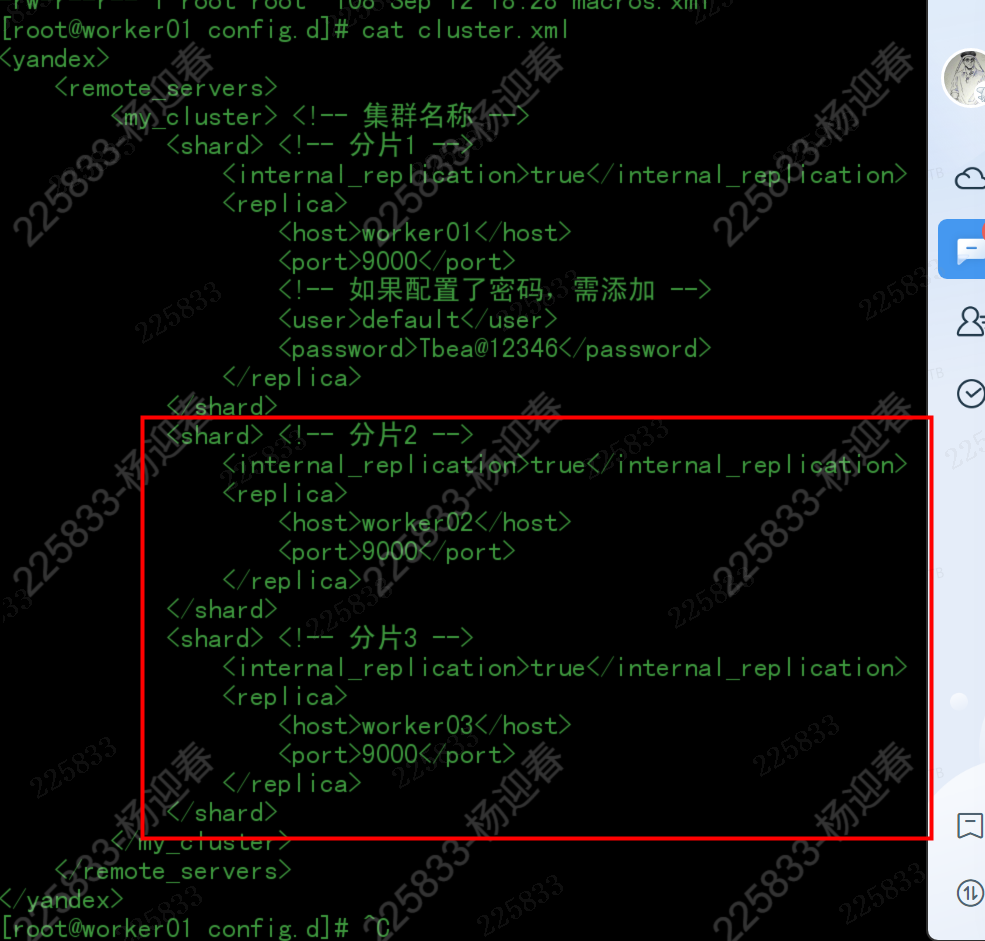
从报错上分析连接集群时感觉集群之间并不能直接联通,从worker01查询,获取worker02的数据失败,所以经过各种查看配置文件发现:
/etc/clickhouse-server/config.d/cluster.xml 中worker02\worker03的相同用户没有配置默认的账号密码
macros.xml没有配置集群名称,调整为:
<?xml version="1.0"?>
<yandex>
    <macros>
        <!-- 集群名称,所有节点相同 -->
        <cluster>my_cluster</cluster>

        <!-- 分片ID,每个分片不同 -->
        <shard>1</shard>

        <!-- 副本ID,每个副本不同 -->
        <replica>node01</replica>

        <!-- 可选:数据库名称 -->
        <database>default</database>
    </macros>
</yandex>
/etc/clickhouse-server/users.xml调整了配置
<default>
    <access_management>0</access_management>
</default>
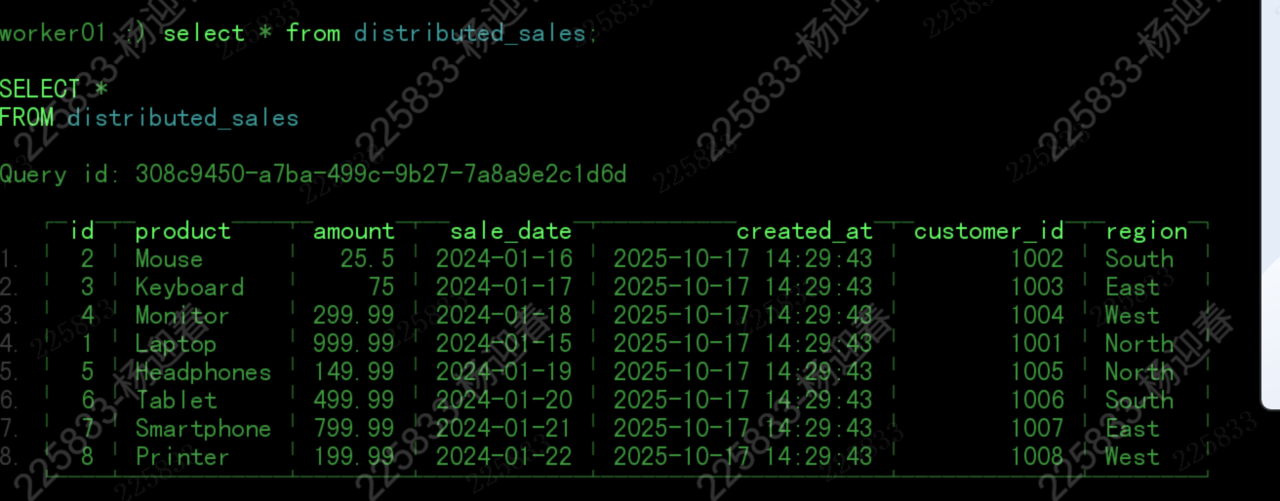
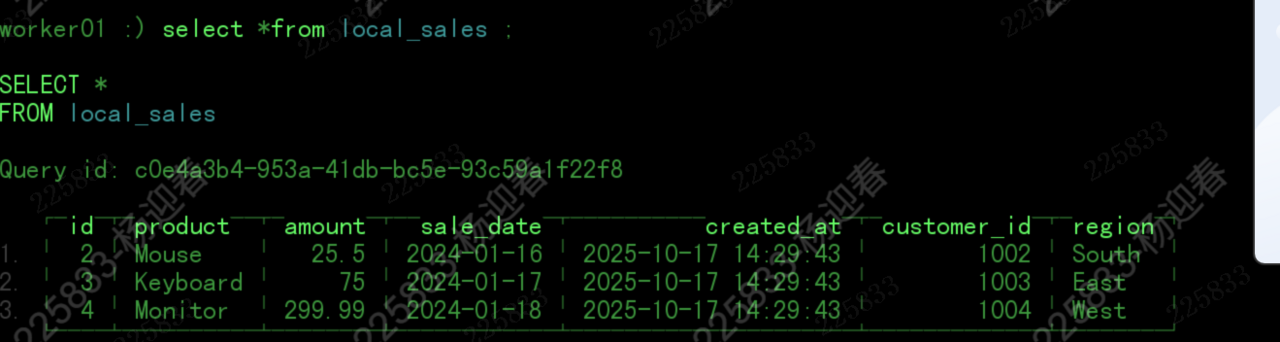
再次查询OK了,效果:
1、worker01查看分布式表
2、worker01查看本地表
3、worker02查看本地表
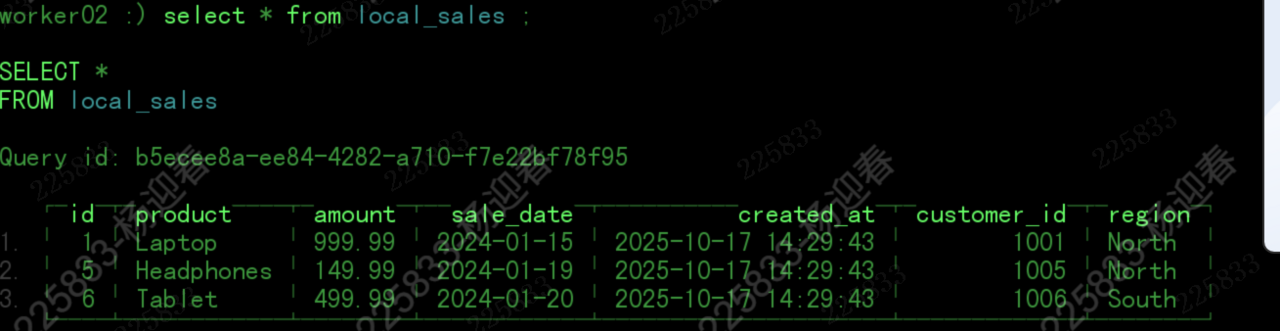
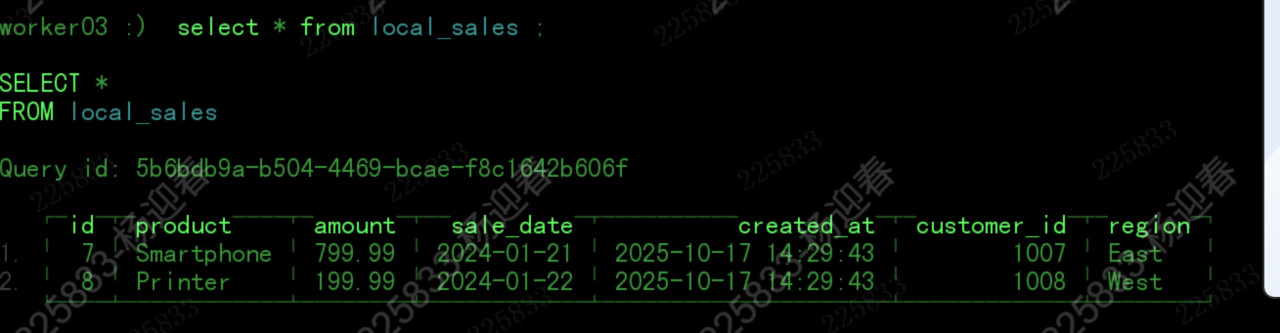
4、worker03查看本地表