最近又搞到了蓝牙通信功能,重搞,走起(看成果,上代码)。
一、先看成果
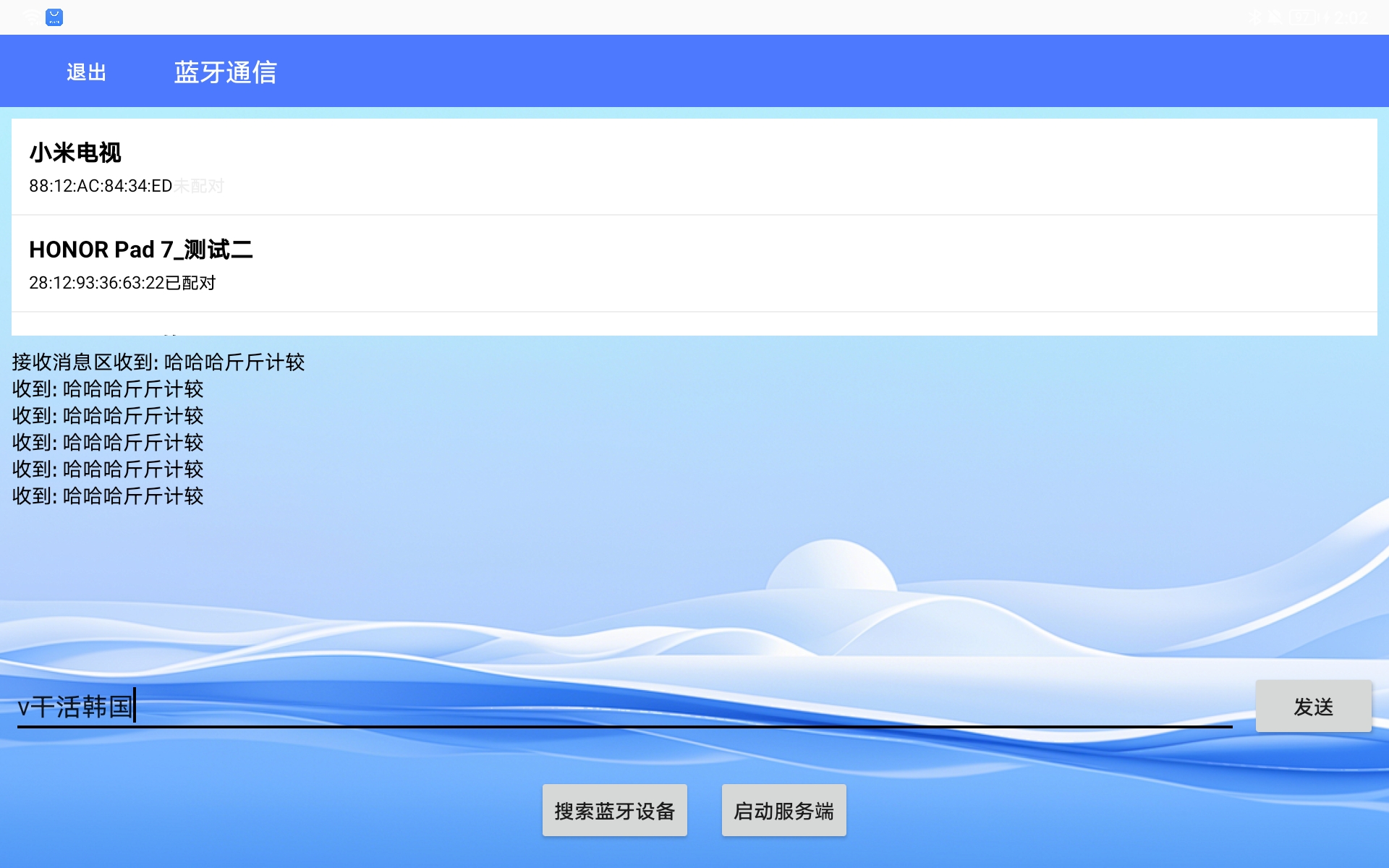
二、上代码
1、蓝牙item:bluetooth_item
<?xml version="1.0" encoding="utf-8"?>
<LinearLayout xmlns:android="http://schemas.android.com/apk/res/android"
    android:layout_width="match_parent"
    android:layout_height="wrap_content"
    android:orientation="vertical"
    android:padding="12dp">

    <TextView
        android:id="@+id/tv_device_name"
        android:layout_width="match_parent"
        android:layout_height="wrap_content"
        android:textColor="@android:color/black"
        android:textSize="16sp"
        android:textStyle="bold" />

    <LinearLayout
        android:layout_width="match_parent"
        android:layout_height="wrap_content"
        android:layout_marginTop="4dp"
        android:gravity="center_vertical"
        android:orientation="horizontal">

        <TextView
            android:id="@+id/tv_device_address"
            android:layout_width="wrap_content"
            android:layout_height="wrap_content"
            android:textColor="@color/black"
            android:textSize="12sp" />

        <TextView
            android:id="@+id/tv_pair_state"
            android:layout_width="wrap_content"
            android:layout_height="wrap_content"
            android:textSize="12sp" />
    </LinearLayout>

</LinearLayout>
2、demo主Activityxml:activity_bluetooth_demo
<?xml version="1.0" encoding="utf-8"?>
<LinearLayout xmlns:android="http://schemas.android.com/apk/res/android"
    android:layout_width="match_parent"
    android:layout_height="match_parent"
    android:background="@mipmap/sdbei"
    android:orientation="vertical">

    <!-- 标题栏 -->
    <LinearLayout
        android:layout_width="match_parent"
        android:layout_height="50dp"
        android:background="@color/colorPrimary"
        android:gravity="center_vertical"
        android:paddingHorizontal="16dp">

        <Button
            android:id="@+id/isOut"
            android:layout_width="wrap_content"
            android:layout_height="wrap_content"
            android:background="@null"
            android:text="退出"
            android:textColor="@android:color/white" />

        <TextView
            android:layout_width="wrap_content"
            android:layout_height="wrap_content"
            android:layout_marginLeft="16dp"
            android:text="蓝牙通信"
            android:textColor="@android:color/white"
            android:textSize="18sp" />
    </LinearLayout>

    <!-- 设备列表区域 -->
    <LinearLayout
        android:layout_width="match_parent"
        android:layout_height="wrap_content"
        android:orientation="vertical"
        android:padding="8dp">

        <ListView
            android:id="@+id/device_list"
            android:layout_width="match_parent"
            android:layout_height="150dp"
            android:background="@android:color/white"
            android:divider="@color/color_EEEEEE"
            android:dividerHeight="1dp" />

        <!-- 接收消息提示 -->
        <TextView
            android:id="@+id/tv_received"
            android:layout_width="match_parent"
            android:layout_height="wrap_content"
            android:layout_marginTop="8dp"
            android:text="接收消息区"
            android:textColor="@android:color/black" />
    </LinearLayout>

    <!-- 聊天消息列表 -->
    <ListView
        android:id="@+id/chatListView"
        android:layout_width="match_parent"
        android:layout_height="0dp"
        android:layout_weight="1"
        android:divider="@null"
        android:padding="8dp" />

    <!-- 输入区域 -->
    <LinearLayout
        android:layout_width="match_parent"
        android:layout_height="wrap_content"
        android:layout_margin="8dp"
        android:gravity="center_vertical"
        android:orientation="horizontal">

        <EditText
            android:id="@+id/et_message"
            android:layout_width="0dp"
            android:layout_height="wrap_content"
            android:layout_weight="1"
            android:hint="输入消息..."
            android:inputType="text"
            android:maxLines="3" />

        <Button
            android:id="@+id/btn_send"
            android:layout_width="wrap_content"
            android:layout_height="wrap_content"
            android:layout_marginLeft="8dp"
            android:text="发送" />
    </LinearLayout>

    <!-- 功能按钮区 -->
    <LinearLayout
        android:layout_width="match_parent"
        android:layout_height="wrap_content"
        android:gravity="center"
        android:orientation="horizontal"
        android:padding="16dp">

        <Button
            android:id="@+id/btn_scan"
            android:layout_width="wrap_content"
            android:layout_height="wrap_content"
            android:layout_marginRight="16dp"
            android:text="搜索蓝牙设备" />

        <Button
            android:id="@+id/btn_start_server"
            android:layout_width="wrap_content"
            android:layout_height="wrap_content"
            android:text="启动服务端" />
    </LinearLayout>

</LinearLayout>
3、BluetoothCallback
public interface BluetoothCallback {
    // 设备发现回调
    void onDeviceFound(BluetoothDevice device);
    // 连接状态变化
    void onConnectionStateChanged(boolean isConnected, BluetoothDevice device);
    // 消息接收回调
    void onMessageReceived(String message);
    // 操作结果回调
    void onOperationResult(boolean success, String message);
}
4、BluetoothManager
public class BluetoothManager {
private static final String TAG = "BluetoothManager";
private static final String SERVICE_NAME = "GlobalBluetoothService";
private static final UUID UUID_DEVICE = UUID.fromString("fa87c0d0-afac-11de-8a39-0800200c9a66");
// 单例实例
private static volatile BluetoothManager instance;
private Context mContext;
private BluetoothAdapter mBluetoothAdapter;
private BluetoothSocket mClientSocket;
private BluetoothServerSocket mServerSocket;
private ConnectedThread mConnectedThread;
private BluetoothCallback mCallback;
private List<BluetoothDevice> mFoundDevices = new ArrayList<>();
private boolean isConnected = false;
private BluetoothDevice mConnectedDevice;
// 权限请求码
public static final int PERMISSION_REQUEST_BLE_S = 100;
public static final int PERMISSION_REQUEST_BLE_LEGACY = 101;
public static final int REQUEST_OPEN_BLUETOOTH = 0;
// 广播接收器
private BroadcastReceiver mBluetoothReceiver = new BroadcastReceiver() {
@Override
public void onReceive(Context context, Intent intent) {
String action = intent.getAction();
if (action == null) return;
switch (action) {
case BluetoothDevice.ACTION_FOUND:
handleDeviceFound(intent);
break;
case BluetoothAdapter.ACTION_DISCOVERY_FINISHED:
if (mCallback != null) {
mCallback.onOperationResult(true, "扫描完成,共发现" + mFoundDevices.size() + "台设备");
}
break;
case BluetoothDevice.ACTION_BOND_STATE_CHANGED:
handleBondStateChanged(intent);
break;
case BluetoothAdapter.ACTION_STATE_CHANGED:
int state = intent.getIntExtra(BluetoothAdapter.EXTRA_STATE, BluetoothAdapter.ERROR);
if (state == BluetoothAdapter.STATE_OFF) {
disconnect();
if (mCallback != null) {
mCallback.onConnectionStateChanged(false, null);
}
}
break;
}
}
};
// 主线程Handler
private Handler mHandler = new Handler(Looper.getMainLooper());
// 私有构造函数
private BluetoothManager(Context context) {
this.mContext = context.getApplicationContext();
mBluetoothAdapter = BluetoothAdapter.getDefaultAdapter();
registerReceiver();
}
// 单例获取方法
public static BluetoothManager getInstance(Context context) {
if (instance == null) {
synchronized (BluetoothManager.class) {
if (instance == null) {
instance = new BluetoothManager(context);
}
}
}
return instance;
}
// 注册广播接收器
private void registerReceiver() {
IntentFilter filter = new IntentFilter();
filter.addAction(BluetoothDevice.ACTION_FOUND);
filter.addAction(BluetoothAdapter.ACTION_DISCOVERY_FINISHED);
filter.addAction(BluetoothDevice.ACTION_BOND_STATE_CHANGED);
filter.addAction(BluetoothAdapter.ACTION_STATE_CHANGED);
mContext.registerReceiver(mBluetoothReceiver, filter);
}
// 设置回调
public void setCallback(BluetoothCallback callback) {
this.mCallback = callback;
}
// 检查设备是否支持蓝牙
public boolean isBluetoothSupported() {
return mBluetoothAdapter != null;
}
// 检查蓝牙是否开启
public boolean isBluetoothEnabled() {
return mBluetoothAdapter != null && mBluetoothAdapter.isEnabled();
}
// 开启蓝牙
@SuppressLint("MissingPermission")
public boolean enableBluetooth() {
if (mBluetoothAdapter != null && !mBluetoothAdapter.isEnabled()) {
return mBluetoothAdapter.enable();
}
return true;
}
// 检查所有蓝牙权限
public boolean checkAllPermissions() {
if (Build.VERSION.SDK_INT >= Build.VERSION_CODES.S) {
return ActivityCompat.checkSelfPermission(mContext, Manifest.permission.BLUETOOTH_SCAN) == PackageManager.PERMISSION_GRANTED
&& ActivityCompat.checkSelfPermission(mContext, Manifest.permission.BLUETOOTH_CONNECT) == PackageManager.PERMISSION_GRANTED;
} else {
boolean hasBluetooth = ActivityCompat.checkSelfPermission(mContext, Manifest.permission.BLUETOOTH) == PackageManager.PERMISSION_GRANTED;
boolean hasBluetoothAdmin = ActivityCompat.checkSelfPermission(mContext, Manifest.permission.BLUETOOTH_ADMIN) == PackageManager.PERMISSION_GRANTED;
boolean hasLocation = ActivityCompat.checkSelfPermission(mContext, Manifest.permission.ACCESS_COARSE_LOCATION) == PackageManager.PERMISSION_GRANTED;
if (Build.VERSION.SDK_INT >= Build.VERSION_CODES.Q) {
hasLocation &= ActivityCompat.checkSelfPermission(mContext, Manifest.permission.ACCESS_FINE_LOCATION) == PackageManager.PERMISSION_GRANTED;
}
return hasBluetooth && hasBluetoothAdmin && hasLocation;
}
}
// 获取需要请求的权限列表
public String[] getRequiredPermissions() {
List<String> permissions = new ArrayList<>();
if (Build.VERSION.SDK_INT >= Build.VERSION_CODES.S) {
permissions.add(Manifest.permission.BLUETOOTH_SCAN);
permissions.add(Manifest.permission.BLUETOOTH_CONNECT);
} else {
permissions.add(Manifest.permission.BLUETOOTH);
permissions.add(Manifest.permission.BLUETOOTH_ADMIN);
permissions.add(Manifest.permission.ACCESS_COARSE_LOCATION);
if (Build.VERSION.SDK_INT >= Build.VERSION_CODES.Q) {
permissions.add(Manifest.permission.ACCESS_FINE_LOCATION);
}
}
return permissions.toArray(new String[0]);
}
// 开始扫描设备
@SuppressLint("MissingPermission")
public void startScan() {
if (!isBluetoothSupported()) {
notifyOperationResult(false, "设备不支持蓝牙");
return;
}
if (!isBluetoothEnabled()) {
notifyOperationResult(false, "蓝牙未开启");
return;
}
if (!checkAllPermissions()) {
notifyOperationResult(false, "缺少蓝牙权限");
return;
}
// 检查位置服务(Android 10及以下)
if (Build.VERSION.SDK_INT <= Build.VERSION_CODES.Q && !isLocationEnabled()) {
notifyOperationResult(false, "请开启位置服务以搜索蓝牙设备");
return;
}
// 清除之前的设备列表
mFoundDevices.clear();
// 如果正在扫描,先停止
if (mBluetoothAdapter.isDiscovering()) {
mBluetoothAdapter.cancelDiscovery();
}
// 开始扫描
boolean started = mBluetoothAdapter.startDiscovery();
if (started) {
notifyOperationResult(true, "开始扫描设备...");
// 30秒后自动停止扫描
mHandler.postDelayed(() -> {
if (mBluetoothAdapter.isDiscovering()) {
stopScan();
}
}, 30000);
} else {
notifyOperationResult(false, "扫描启动失败");
}
}
// 停止扫描
@SuppressLint("MissingPermission")
public void stopScan() {
if (mBluetoothAdapter != null && mBluetoothAdapter.isDiscovering()) {
mBluetoothAdapter.cancelDiscovery();
notifyOperationResult(true, "扫描已停止");
}
}
// 处理发现的设备
@SuppressLint("MissingPermission")
private void handleDeviceFound(Intent intent) {
BluetoothDevice device = intent.getParcelableExtra(BluetoothDevice.EXTRA_DEVICE);
if (device != null && !TextUtils.isEmpty(device.getAddress())) {
// 避免重复添加
boolean isExist = false;
for (BluetoothDevice d : mFoundDevices) {
if (TextUtils.equals(d.getAddress(), device.getAddress())) {
isExist = true;
break;
}
}
if (!isExist) {
mFoundDevices.add(device);
if (mCallback != null) {
mCallback.onDeviceFound(device);
}
}
}
}
// 处理配对状态变化
@SuppressLint("MissingPermission")
private void handleBondStateChanged(Intent intent) {
BluetoothDevice device = intent.getParcelableExtra(BluetoothDevice.EXTRA_DEVICE);
int bondState = intent.getIntExtra(BluetoothDevice.EXTRA_BOND_STATE, BluetoothDevice.ERROR);
if (bondState == BluetoothDevice.BOND_BONDED) {
notifyOperationResult(true, "配对成功,正在连接...");
connect(device); // 配对成功后自动连接
} else if (bondState == BluetoothDevice.BOND_NONE) {
notifyOperationResult(false, "配对已取消");
}
}
// 连接设备
@SuppressLint("MissingPermission")
public void connect(BluetoothDevice device) {
if (device == null) {
notifyOperationResult(false, "设备不能为空");
return;
}
// 停止扫描
stopScan();
// 如果已连接,先断开
if (isConnected) {
disconnect();
}
// 检查配对状态
if (device.getBondState() != BluetoothDevice.BOND_BONDED) {
notifyOperationResult(true, "正在与" + device.getName() + "配对...");
pairDevice(device);
} else {
// 已配对,直接连接
startClientConnect(device);
}
}
// 配对设备
private void pairDevice(BluetoothDevice device) {
try {
Method method = BluetoothDevice.class.getMethod("createBond");
method.invoke(device);
} catch (NoSuchMethodException | IllegalAccessException | InvocationTargetException e) {
Log.e(TAG, "配对失败: ", e);
notifyOperationResult(false, "配对失败: " + e.getMessage());
}
}
// 客户端连接
@SuppressLint("MissingPermission")
private void startClientConnect(BluetoothDevice device) {
new Thread(() -> {
try {
closeSocket(mClientSocket);
// 创建客户端Socket
mClientSocket = device.createRfcommSocketToServiceRecord(UUID_DEVICE);
Log.d(TAG, "开始连接设备: " + device.getName());
mClientSocket.connect();
// 连接成功
if (mClientSocket.isConnected()) {
mConnectedDevice = device;
isConnected = true;
mHandler.post(() -> {
if (mCallback != null) {
mCallback.onConnectionStateChanged(true, device);
mCallback.onOperationResult(true, "已连接到: " + device.getName());
}
});
// 启动通信线程
mConnectedThread = new ConnectedThread(mClientSocket);
mConnectedThread.start();
} else {
notifyOperationResult(false, "连接失败");
}
} catch (IOException e) {
Log.e(TAG, "连接失败: ", e);
notifyOperationResult(false, "连接失败: " + e.getMessage());
closeSocket(mClientSocket);
}
}).start();
}
// 启动服务端监听
@SuppressLint("MissingPermission")
public void startServer() {
new Thread(() -> {
try {
closeServerSocket();
// 创建服务端Socket
mServerSocket = mBluetoothAdapter.listenUsingRfcommWithServiceRecord(SERVICE_NAME, UUID_DEVICE);
notifyOperationResult(true, "服务端启动,等待连接...");
// 阻塞等待连接
BluetoothSocket socket = mServerSocket.accept();
if (socket != null && socket.isConnected()) {
closeServerSocket();
mClientSocket = socket;
mConnectedDevice = socket.getRemoteDevice();
isConnected = true;
mHandler.post(() -> {
if (mCallback != null) {
mCallback.onConnectionStateChanged(true, mConnectedDevice);
mCallback.onOperationResult(true, "已接受连接: " + mConnectedDevice.getName());
}
});
// 启动通信线程
mConnectedThread = new ConnectedThread(socket);
mConnectedThread.start();
}
} catch (IOException e) {
Log.e(TAG, "服务端启动失败: ", e);
notifyOperationResult(false, "服务端启动失败: " + e.getMessage());
closeServerSocket();
}
}).start();
}
// 发送消息
public void sendMessage(String message) {
if (!isConnected || mConnectedThread == null) {
notifyOperationResult(false, "未连接到设备");
return;
}
if (TextUtils.isEmpty(message)) {
notifyOperationResult(false, "消息不能为空");
return;
}
mConnectedThread.write(message);
}
// 断开连接
public void disconnect() {
if (!isConnected) return;
isConnected = false;
if (mConnectedThread != null) {
mConnectedThread.cancel();
mConnectedThread = null;
}
closeSocket(mClientSocket);
closeServerSocket();
mHandler.post(() -> {
if (mCallback != null) {
mCallback.onConnectionStateChanged(false, mConnectedDevice);
mCallback.onOperationResult(true, "已断开连接");
}
mConnectedDevice = null;
});
}
// 关闭Socket
private void closeSocket(BluetoothSocket socket) {
if (socket != null) {
try {
socket.close();
} catch (IOException e) {
Log.e(TAG, "关闭Socket失败: ", e);
}
}
}
// 关闭服务端Socket
private void closeServerSocket() {
if (mServerSocket != null) {
try {
mServerSocket.close();
} catch (IOException e) {
Log.e(TAG, "关闭服务端Socket失败: ", e);
}
mServerSocket = null;
}
}
// 检查位置服务是否开启
private boolean isLocationEnabled() {
if (Build.VERSION.SDK_INT >= Build.VERSION_CODES.P) {
android.location.LocationManager lm = (android.location.LocationManager) mContext.getSystemService(Context.LOCATION_SERVICE);
return lm.isLocationEnabled();
} else {
int mode = Settings.Secure.getInt(
mContext.getContentResolver(),
Settings.Secure.LOCATION_MODE,
Settings.Secure.LOCATION_MODE_OFF
);
return mode != Settings.Secure.LOCATION_MODE_OFF;
}
}
// 通知操作结果
private void notifyOperationResult(boolean success, String message) {
mHandler.post(() -> {
if (mCallback != null) {
mCallback.onOperationResult(success, message);
}
});
}
// 获取连接状态
public boolean isConnected() {
return isConnected;
}
// 获取已连接的设备
public BluetoothDevice getConnectedDevice() {
return mConnectedDevice;
}
// 数据通信线程
private class ConnectedThread extends Thread {
private final BluetoothSocket mmSocket;
private final InputStream mmInStream;
private final OutputStream mmOutStream;
private final byte[] mmBuffer;
public ConnectedThread(BluetoothSocket socket) {
mmSocket = socket;
InputStream tmpIn = null;
OutputStream tmpOut = null;
try {
tmpIn = socket.getInputStream();
tmpOut = socket.getOutputStream();
} catch (IOException e) {
Log.e(TAG, "获取流失败: ", e);
}
mmInStream = tmpIn;
mmOutStream = tmpOut;
mmBuffer = new byte[1024];
}
public void run() {
int bytes; // 读取的字节数
// 持续读取数据
while (true) {
try {
if (mmInStream == null) break;
bytes = mmInStream.read(mmBuffer);
final String message = new String(mmBuffer, 0, bytes);
// 发送到主线程
mHandler.post(() -> {
if (mCallback != null) {
mCallback.onMessageReceived(message);
}
});
} catch (IOException e) {
Log.e(TAG, "读取数据失败: ", e);
// 连接断开
mHandler.post(() -> {
disconnect();
});
break;
}
}
}
// 发送数据
public void write(String message) {
try {
byte[] bytes = message.getBytes();
mmOutStream.write(bytes);
notifyOperationResult(true, "消息发送成功");
} catch (IOException e) {
Log.e(TAG, "发送数据失败: ", e);
notifyOperationResult(false, "消息发送失败");
}
}
// 取消连接
public void cancel() {
try {
mmSocket.close();
} catch (IOException e) {
Log.e(TAG, "关闭连接失败: ", e);
}
}
}
// 释放资源
public void destroy() {
disconnect();
try {
mContext.unregisterReceiver(mBluetoothReceiver);
} catch (IllegalArgumentException e) {
Log.w(TAG, "广播接收器未注册");
}
mCallback = null;
instance = null;
}
}5、在Activity中使用
public class BluetoothDemoActivity extends AppCompatActivity implements BluetoothCallback {
    private BluetoothManager bluetoothManager;
    private ListView deviceListView;
    private DeviceAdapter deviceAdapter;
    private List<BluetoothDeviceMessage> deviceList = new ArrayList<>();

    @Override
    protected void onCreate(Bundle savedInstanceState) {
        super.onCreate(savedInstanceState);
        setContentView(R.layout.activity_bluetooth_demo);

        // 初始化蓝牙管理器
        bluetoothManager = BluetoothManager.getInstance(this);
        bluetoothManager.setCallback(this);

        // 初始化UI
        initView();

        // 检查蓝牙状态
        checkBluetoothStatus();
    }

    private void initView() {
        deviceListView = findViewById(R.id.device_list);
        deviceAdapter = new DeviceAdapter(this, deviceList);
        deviceListView.setAdapter(deviceAdapter);

        deviceListView.setOnItemClickListener((parent, view, position, id) -> {
//            BluetoothDevice device = deviceList.get(position);
            BluetoothDevice device = ((BluetoothDeviceMessage) deviceList.get(position)).getDevice();
            bluetoothManager.connect(device);
        });

        // 扫描按钮
        findViewById(R.id.btn_scan).setOnClickListener(v -> {
            deviceList.clear();
            deviceAdapter.notifyDataSetChanged();
            bluetoothManager.startScan();
        });

        // 发送消息按钮
        findViewById(R.id.btn_send).setOnClickListener(v -> {
            String message = ((EditText) findViewById(R.id.et_message)).getText().toString();
            bluetoothManager.sendMessage(message);
        });

        // 开启服务端按钮
        findViewById(R.id.btn_start_server).setOnClickListener(v -> {
            bluetoothManager.startServer();
        });
    }

    @SuppressLint("MissingPermission")
    private void checkBluetoothStatus() {
        if (!bluetoothManager.isBluetoothSupported()) {
            Toast.makeText(this, "设备不支持蓝牙", Toast.LENGTH_SHORT).show();
            return;
        }

        if (!bluetoothManager.isBluetoothEnabled()) {
            // 请求开启蓝牙
            Intent enableBtIntent = new Intent(BluetoothAdapter.ACTION_REQUEST_ENABLE);
            startActivityForResult(enableBtIntent, BluetoothManager.REQUEST_OPEN_BLUETOOTH);
        } else {
            // 检查权限
            checkPermissions();
        }
    }

    private void checkPermissions() {
        if (!bluetoothManager.checkAllPermissions()) {
            ActivityCompat.requestPermissions(
                    this,
                    bluetoothManager.getRequiredPermissions(),
                    Build.VERSION.SDK_INT >= Build.VERSION_CODES.S ?
                            BluetoothManager.PERMISSION_REQUEST_BLE_S :
                            BluetoothManager.PERMISSION_REQUEST_BLE_LEGACY
            );
        }
    }

    @SuppressLint("MissingPermission")
    @Override
    public void onDeviceFound(BluetoothDevice device) {
        BluetoothDeviceMessage deviceMsg = new BluetoothDeviceMessage(
                TextUtils.isEmpty(device.getName()) ? "未知设备" : device.getName(),
                device.getAddress()
        );
        deviceMsg.setDevice(device);
        deviceMsg.setPaired(device.getBondState() == BluetoothDevice.BOND_BONDED);
        deviceList.add(deviceMsg);

//        deviceList.add(device);
        deviceAdapter.notifyDataSetChanged();
    }

    @Override
    public void onConnectionStateChanged(boolean isConnected, BluetoothDevice device) {
        @SuppressLint("MissingPermission") String status = isConnected ? "已连接到: " + (device != null ? device.getName() : "未知设备") : "连接已断开";
        Toast.makeText(this, status, Toast.LENGTH_SHORT).show();
    }

    @Override
    public void onMessageReceived(String message) {
        // 处理接收到的消息
        runOnUiThread(() -> {
            TextView tvReceived = findViewById(R.id.tv_received);
            tvReceived.append("收到: " + message + "\n");
        });
    }

    @Override
    public void onOperationResult(boolean success, String message) {
        Toast.makeText(this, message, Toast.LENGTH_SHORT).show();
    }

    @Override
    public void onRequestPermissionsResult(int requestCode, @NonNull String[] permissions, @NonNull int[] grantResults) {
        super.onRequestPermissionsResult(requestCode, permissions, grantResults);
        boolean allGranted = true;
        for (int result : grantResults) {
            if (result != PackageManager.PERMISSION_GRANTED) {
                allGranted = false;
                break;
            }
        }

        if (!allGranted) {
            Toast.makeText(this, "缺少必要权限,无法使用蓝牙功能", Toast.LENGTH_SHORT).show();
        }
    }

    @Override
    protected void onActivityResult(int requestCode, int resultCode, Intent data) {
        super.onActivityResult(requestCode, resultCode, data);
        if (requestCode == BluetoothManager.REQUEST_OPEN_BLUETOOTH) {
            if (resultCode == RESULT_OK) {
                Toast.makeText(this, "蓝牙已开启", Toast.LENGTH_SHORT).show();
                checkPermissions();
            } else {
                Toast.makeText(this, "请开启蓝牙以使用功能", Toast.LENGTH_SHORT).show();
            }
        }
    }

    @Override
    protected void onDestroy() {
        super.onDestroy();
        bluetoothManager.disconnect();
        // 如果是全局使用,可以不调用destroy(),保持单例存在
        // bluetoothManager.destroy();
    }
}
6、打完收工,代码已全,撤退。。
不想复制,直接拖(下附下载地址):
https://download.csdn.net/download/m5157/92190699?spm=1001.2014.3001.5503