PdfPreview 类属性详细分析
概述
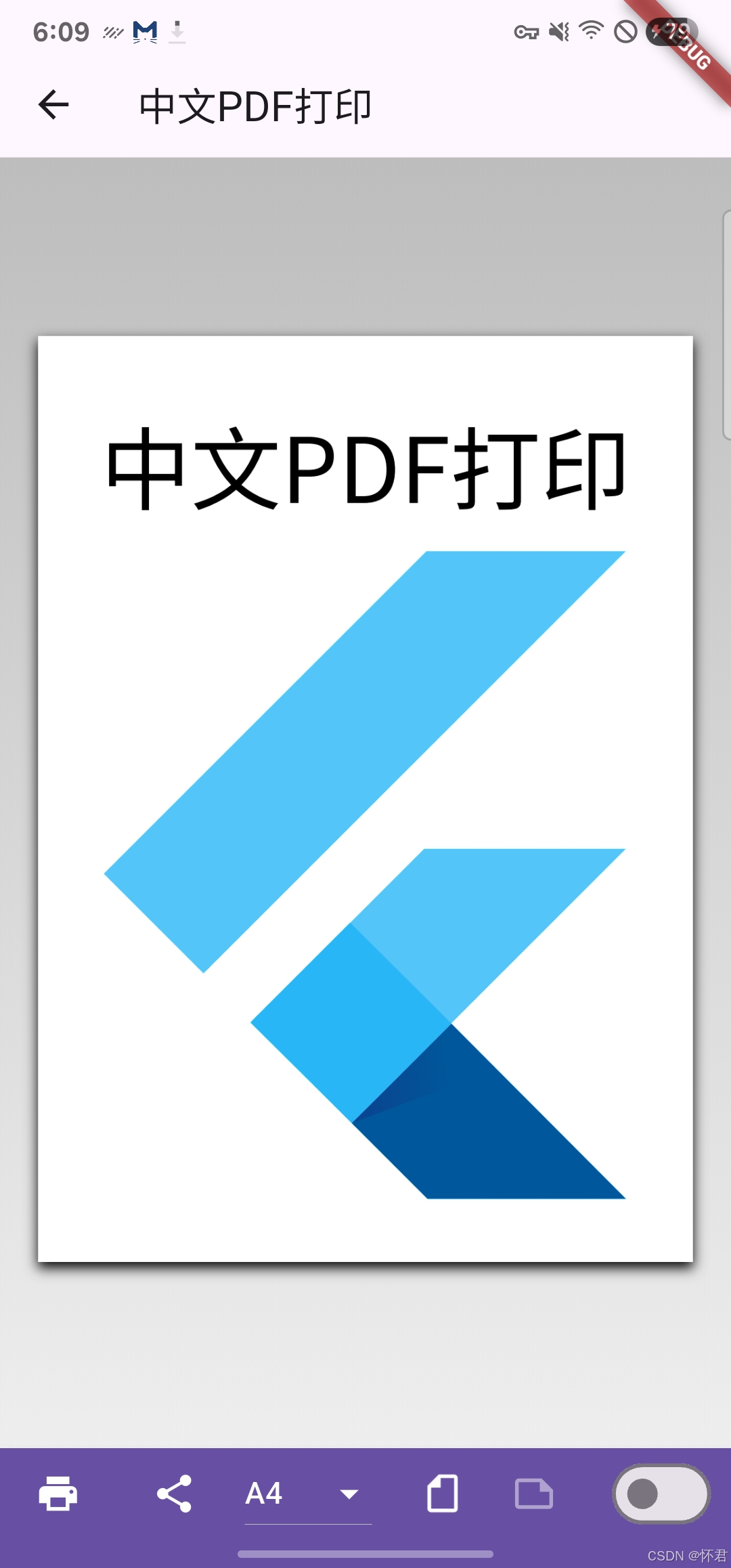
PdfPreview 是 Flutter printing 包中用于预览 PDF 文档的核心组件。它提供了丰富的配置选项来控制 PDF 的显示、打印、分享等功能。
构造函数
1. 默认构造函数
dart
const PdfPreview({
  super.key,
  required this.build,
  this.initialPageFormat,
  this.allowPrinting = true,
  this.allowSharing = true,
  this.maxPageWidth,
  this.canChangePageFormat = true,
  this.canChangeOrientation = true,
  this.canDebug = true,
  this.actions,
  this.pageFormats = _defaultPageFormats,
  this.onError,
  this.onPrinted,
  this.onPrintError,
  this.onShared,
  this.scrollViewDecoration,
  this.pdfPreviewPageDecoration,
  this.pdfFileName,
  this.useActions = true,
  this.pages,
  this.dynamicLayout = true,
  this.shareActionExtraBody,
  this.shareActionExtraSubject,
  this.shareActionExtraEmails,
  this.previewPageMargin,
  this.padding,
  this.shouldRepaint = false,
  this.loadingWidget,
  this.onPageFormatChanged,
  this.dpi,
  this.actionBarTheme = const PdfActionBarTheme(),
  this.enableScrollToPage = false,
  this.onZoomChanged,
})
2. 自定义布局构造函数
dart
const PdfPreview.builder({
  // ... 所有默认构造函数的参数
  required CustomPdfPagesBuilder pagesBuilder,
})
核心属性详解
📄 文档生成相关
build (必需)
- 类型 :
LayoutCallback - 作用: PDF 文档生成回调函数
- 示例:
dart
build: (format) => _generatePdf(format, 'PDF Title')initialPageFormat
- 类型 :
PdfPageFormat? - 作用: 初始页面格式设置
- 默认值 :
null - 示例:
dart
initialPageFormat: PdfPageFormat.a4🎛️ 功能控制
allowPrinting
- 类型 :
bool - 作用: 是否允许打印功能
- 默认值 :
true - 说明: 控制是否显示打印按钮
allowSharing
- 类型 :
bool - 作用: 是否允许分享功能
- 默认值 :
true - 说明: 控制是否显示分享按钮
useActions
- 类型 :
bool - 作用: 是否使用操作栏
- 默认值 :
true - 说明: 控制是否显示顶部的操作按钮栏
📐 页面格式控制
canChangePageFormat
- 类型 :
bool - 作用: 是否允许更改页面格式
- 默认值 :
true - 说明: 控制是否显示页面格式选择下拉菜单
canChangeOrientation
- 类型 :
bool - 作用: 是否允许更改页面方向
- 默认值 :
true - 说明: 控制是否显示页面方向切换开关
pageFormats
- 类型 :
Map<String, PdfPageFormat> - 作用: 可选择的页面格式列表
- 默认值 :
{'A4': PdfPageFormat.a4, 'Letter': PdfPageFormat.letter} - 示例:
dart
pageFormats: {
  'A4': PdfPageFormat.a4,
  'A3': PdfPageFormat.a3,
  'Letter': PdfPageFormat.letter,
  'Legal': PdfPageFormat.legal,
}
🎨 显示控制
maxPageWidth
- 类型 :
double? - 作用: PDF 文档在屏幕上的最大宽度
- 默认值 :
null - 说明: 限制 PDF 预览的最大宽度,防止在大屏幕上显示过大
pages
- 类型 :
List<int>? - 作用: 要显示的页面列表
- 默认值 :
null - 说明: 如果为 null,显示所有页面;如果指定,只显示指定页码的页面
- 示例:
dart
pages: [0, 2, 4] // 只显示第1、3、5页dynamicLayout
- 类型 :
bool - 作用: 是否启用动态布局
- 默认值 :
true - 说明: 请求页面重新布局以匹配打印机纸张和边距
🎯 调试功能
canDebug
- 类型 :
bool - 作用: 是否允许调试模式
- 默认值 :
true - 说明: 控制是否显示调试开关
shouldRepaint
- 类型 :
bool - 作用: 是否强制重新绘制 PDF 文档
- 默认值 :
false - 说明: 用于强制刷新 PDF 显示
📧 分享功能
pdfFileName
- 类型 :
String? - 作用: 分享时的 PDF 文件名
- 默认值 :
null - 说明: 必须包含文件扩展名
- 示例:
dart
pdfFileName: 'my_document.pdf'shareActionExtraSubject
- 类型 :
String? - 作用: 邮件分享时的主题
- 默认值 :
null
shareActionExtraBody
- 类型 :
String? - 作用: 分享时的额外文本内容
- 默认值 :
null
shareActionExtraEmails
- 类型 :
List<String>? - 作用: 邮件地址列表
- 默认值 :
null - 说明: 仅在 Android 平台有效,会自动填充邮件地址
🎨 样式和装饰
scrollViewDecoration
- 类型 :
Decoration? - 作用: 滚动视图的装饰
- 默认值 :
null - 示例:
dart
scrollViewDecoration: BoxDecoration(
  color: Colors.grey[100],
  borderRadius: BorderRadius.circular(8),
)
pdfPreviewPageDecoration
- 类型 :
Decoration? - 作用: PDF 预览页面的装饰
- 默认值 :
null
previewPageMargin
- 类型 :
EdgeInsets? - 作用: 文档预览页面的边距
- 默认值 :
EdgeInsets.only(left: 20, top: 8, right: 20, bottom: 12)
padding
- 类型 :
EdgeInsets? - 作用: PDF 预览组件的内边距
- 默认值 :
null
actionBarTheme
- 类型 :
PdfActionBarTheme - 作用: 操作栏的主题样式
- 默认值 :
const PdfActionBarTheme()
🔧 高级功能
actions
- 类型 :
List<Widget>? - 作用: 额外的操作按钮
- 默认值 :
null - 说明: 可以添加自定义的操作按钮到操作栏
loadingWidget
- 类型 :
Widget? - 作用: 自定义加载组件
- 默认值 :
null - 说明: PDF 生成时显示的加载组件,默认为 CircularProgressIndicator
dpi
- 类型 :
double? - 作用: 渲染的每英寸点数分辨率
- 默认值 :
null - 说明: 如果不提供,会自动计算
enableScrollToPage
- 类型 :
bool - 作用: 是否启用滚动到指定页面功能
- 默认值 :
false
📞 回调函数
onError
- 类型 :
Widget Function(BuildContext context, Object error)? - 作用: PDF 无法显示时的错误处理
- 默认值 :
null
onPrinted
- 类型 :
void Function(BuildContext context)? - 作用: 用户打印 PDF 时的回调
- 默认值 :
null
onPrintError
- 类型 :
void Function(BuildContext context, dynamic error)? - 作用: 打印出错时的回调
- 默认值 :
null
onShared
- 类型 :
void Function(BuildContext context)? - 作用: 用户分享 PDF 时的回调
- 默认值 :
null
onPageFormatChanged
- 类型 :
ValueChanged<PdfPageFormat>? - 作用: 页面格式改变时的回调
- 默认值 :
null
onZoomChanged
- 类型 :
ValueChanged<bool>? - 作用: 缩放模式改变时的回调
- 默认值 :
null
使用示例
基础用法
dart
PdfPreview(
  build: (format) => _generatePdf(format, 'My Document'),
)
完整配置示例
dart
PdfPreview(
  build: (format) => _generatePdf(format, 'Complete Document'),
  initialPageFormat: PdfPageFormat.a4,
  allowPrinting: true,
  allowSharing: true,
  canChangePageFormat: true,
  canChangeOrientation: true,
  maxPageWidth: 600,
  pdfFileName: 'complete_document.pdf',
  pageFormats: {
    'A4': PdfPageFormat.a4,
    'A3': PdfPageFormat.a3,
    'Letter': PdfPageFormat.letter,
  },
  onPrinted: (context) {
    ScaffoldMessenger.of(context).showSnackBar(
      const SnackBar(content: Text('PDF 已打印')),
    );
  },
  onShared: (context) {
    ScaffoldMessenger.of(context).showSnackBar(
      const SnackBar(content: Text('PDF 已分享')),
    );
  },
  shareActionExtraSubject: '重要文档',
  shareActionExtraBody: '请查看附件中的文档',
  loadingWidget: const Center(
    child: CircularProgressIndicator(),
  ),
)
自定义布局示例
dart
PdfPreview.builder(
  build: (format) => _generatePdf(format, 'Custom Layout'),
  pagesBuilder: (context, pages) => SingleChildScrollView(
    child: Wrap(
      spacing: 8,
      runSpacing: 8,
      children: [
        for (final page in pages)
          Container(
            color: Colors.white,
            child: Image(
              image: page.image,
              width: 300,
            ),
          )
      ],
    ),
  ),
)
注意事项
- 必需参数 :
build参数是必需的,用于生成 PDF 文档 - 页面格式 : 如果不指定
initialPageFormat,会使用默认的 A4 格式 - 平台差异: 某些功能在不同平台上可能有不同的表现
- 性能考虑: 大型 PDF 文档可能需要较长的生成时间
- 权限要求: 打印和分享功能可能需要相应的系统权限
总结
PdfPreview 是一个功能强大的 PDF 预览组件,提供了丰富的配置选项来满足不同的使用需求。通过合理配置各种属性,可以实现从简单的 PDF 预览到复杂的文档管理系统的各种功能。
- 效果图