目录
[1. 初始化](#1. 初始化)
[2. 未add直接提交](#2. 未add直接提交)
[3. 查看版本号](#3. 查看版本号)
[4. 撤销回退](#4. 撤销回退)
[(1) restore](#(1) restore)
[(2) checkout](#(2) checkout)
[1. git-server](#1. git-server)
[2. dev01](#2. dev01)
[3. dev02](#3. dev02)
[4. dev01拉取git服务器上的代码](#4. dev01拉取git服务器上的代码)
[1. 分支使用流程](#1. 分支使用流程)
[2. architect(架构师)](#2. architect(架构师))
一、概括
工作区(Working Directory) 存放git版本仓库的目录就是工作区
版本库(Repository) 工作区有一个隐藏目录.git,这个不算工作区,而是Git的版本库。
暂存区 Git的版本库里存了很多东西,其中最重要的就是称为stage(或者叫index)的暂存区,还有Git为我们自动创建的第一个分支master,以及指向master的一个指针叫HEAD。
HEAD
你的本地仓库由 git 维护的三棵"树"组成。 第一个是你的 工作目录,它持有实际文件; 第二个是 缓存区(Index),它像个缓存区域,临时保存你的改动; 第三个HEAD,指向你最近一次提交后的结果。
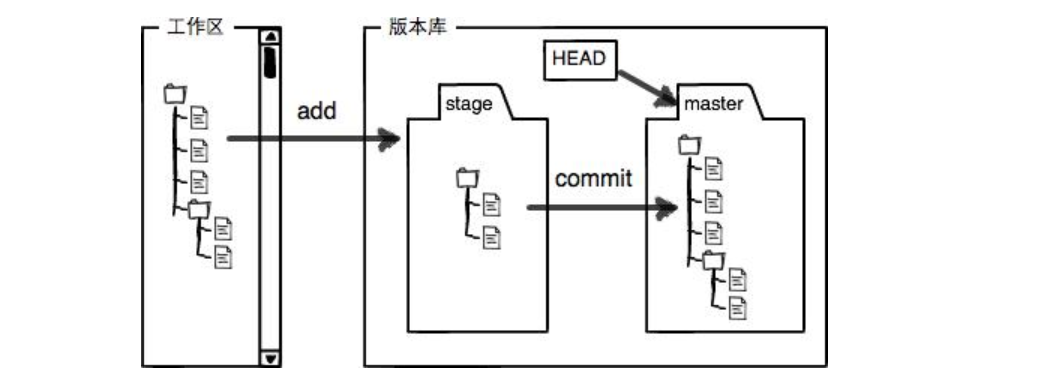
二、安装git
|------------|-----------------|--------|
| 主机名 | IP地址 | 功能 |
| git-server | 192.168.159.129 | Git服务器 |
| dev01 | 192.168.159.230 | 开发机一号 |
| dev02 | 192.168.159.239 | 开发机二号 |
| architect | 192.168.159.217 | 架构机 |
cs
[root@git-server ~]# yum install git -y

[root@git-server ~]# git --version
git version 2.47.3

[root@dev ~]# yum -y install git

[root@dev ~]# git -v
git version 2.47.3
三、本地库
1. 初始化
cs
[root@dev ~]# cd /test/

[root@dev test]# git init .
hint: Using 'master' as the name for the initial branch. This default branch name
hint: is subject to change. To configure the initial branch name to use in all
hint: of your new repositories, which will suppress this warning, call:
hint:
hint: 	git config --global init.defaultBranch <name>
hint:
hint: Names commonly chosen instead of 'master' are 'main', 'trunk' and
hint: 'development'. The just-created branch can be renamed via this command:
hint:
hint: 	git branch -m <name>
Initialized empty Git repository in /test/.git/

[root@dev test]# git config --global user.name "ink"
[root@dev test]# git config --global user.email "2126177631@qq.com"
[root@dev test]# ls -a
.  ..  .git

# 添加修改到暂存区
[root@dev test]# git add test.sh

# 从stage提交到当前master分支的HEAD
[root@dev test]# git commit -m 'v1'
[master (root-commit) 6fc37fb] v1
 1 file changed, 5 insertions(+)
 create mode 100644 test.sh
2. 未add直接提交
cs
[root@dev test]# vim test.sh
[root@dev test]# cat test.sh
#!/usr/bin/env bash
for i in 1 2 3 4 5 6
do
     echo $i
done

[root@dev test]# git commit -m "uncommited test"
On branch master
Changes not staged for commit:
  (use "git add <file>..." to update what will be committed)
  (use "git restore <file>..." to discard changes in working directory)
	modified:   test.sh

no changes added to commit (use "git add" and/or "git commit -a")

[root@dev test]# git status
On branch master
Changes not staged for commit:
  (use "git add <file>..." to update what will be committed)
  (use "git restore <file>..." to discard changes in working directory)
	modified:   test.sh

no changes added to commit (use "git add" and/or "git commit -a")

# 查看当前版本和test.sh文件内容的区别
[root@dev test]# git diff HEAD -- test.sh
diff --git a/test.sh b/test.sh
index e62af57..7905d99 100644
--- a/test.sh
+++ b/test.sh
@@ -1,5 +1,5 @@
 #!/usr/bin/env bash
-for i in 1 2 3 4 5
+for i in 1 2 3 4 5 6
 do
      echo $i
 done
add和commit连用(前题:文件已经commit,仅适用于再次修改)
root@dev test# git commit -a -m "version02:mouse02"
注意:不需要最后跟文件名
-a参数表示"自动暂存所有已跟踪文件的修改",此时 Git 不接受额外指定的文件路径。
3. 查看版本号
cs
# 查看每次的commit记录
[root@dev test]# git log
commit 3f43dcead59f03475c084872c654c160b310f807 (HEAD -> master)
Author: ink <2126177631@qq.com>
Date:   Mon Oct 27 11:27:47 2025 +0800

    commited test

commit ee2ec70d431a8194d6be9a00a42bf3be76e3ec17
Author: ink <2126177631@qq.com>
Date:   Mon Oct 27 11:09:13 2025 +0800

    commited test

commit 6fc37fbf88c6ddf488d3d0cd303c808388333b72
Author: ink <2126177631@qq.com>
Date:   Mon Oct 27 10:55:03 2025 +0800

    v1

# 显示分支
[root@dev test]# git log --graph
* commit 3f43dcead59f03475c084872c654c160b310f807 (HEAD -> master)
| Author: ink <2126177631@qq.com>
| Date:   Mon Oct 27 11:27:47 2025 +0800
|
|     commited test
|
* commit ee2ec70d431a8194d6be9a00a42bf3be76e3ec17
| Author: ink <2126177631@qq.com>
| Date:   Mon Oct 27 11:09:13 2025 +0800
|
|     commited test
|
* commit 6fc37fbf88c6ddf488d3d0cd303c808388333b72
  Author: ink <2126177631@qq.com>
  Date:   Mon Oct 27 10:55:03 2025 +0800

      v1
# 单行方式显示
[root@dev test]# git log --pretty=oneline
3f43dcead59f03475c084872c654c160b310f807 (HEAD -> master) commited test
ee2ec70d431a8194d6be9a00a42bf3be76e3ec17 commited test
6fc37fbf88c6ddf488d3d0cd303c808388333b72 v1
4. 撤销回退
(1) restore
cs
# 未建立跟踪
[root@dev test]# vim a.txt

[root@dev test]# cat a.txt
This is an a text.
[root@dev test]# git clean -f
Removing a.txt
[root@dev test]# ls

# 之前已经commit,但是此次仅仅add
[root@dev test]# echo "dog03" >> dog.txt

[root@dev test]# cat dog.txt
This is a dog.
dog02
dog03
[root@dev test]# git add dog.txt
[root@dev test]# git restore --staged dog.txt  等效于: git reset HEAD dog.txt

[root@dev test]# cat dog.txt
This is a dog.
dog02
dog03
[root@dev test]# git restore dog.txt
[root@dev test]# cat  dog.txt
This is a dog.
dog02

# 之前已经commit,但是此次未add仅仅修改了文件内容
[root@dev test]# echo "dog03" >> dog.txt
[root@dev test]# cat dog.txt
This is a dog.
dog02
dog03
[root@dev test]# git restore dog.txt
[root@dev test]# cat dog.txt
This is a dog.
dog02
(2) checkout
cs
[root@dev test]# echo "Hello World" >> test.sh
[root@dev test]# cat test.sh
#!/usr/bin/env bash
for i in 1 2 3 4 5 6
do
     echo $i
done
Hello World
[root@dev test]# git restore test.sh
[root@dev test]# cat test.sh
#!/usr/bin/env bash
for i in 1 2 3 4 5 6
do
     echo $i
done
三、远程仓库
1. git-server
cs
# 配置解析
[root@git-server ~]$ cat /etc/hosts
127.0.0.1   localhost localhost.localdomain localhost4 localhost4.localdomain4
::1         localhost localhost.localdomain localhost6 localhost6.localdomain6

192.168.159.129 git-server
192.168.159.230 dev01
192.168.159.239 dev02
192.168.159.217 architect

# 创建一个git用户,用来运行git服务
[root@git-server ~]# useradd git

[root@git-server ~]# echo "1" | passwd --stdin git

# 收集所有需要登录的用户的公钥
[git@git-server ~]$ ssh-keygen

[root@dev01 ~]# ssh-copy-id git@git-server
[root@dev01 ~]# ssh git@git-server

[git@git-server ~]$ ls .ssh/
authorized_keys  id_rsa  id_rsa.pub

# 初始化Git仓库(创建裸库)
[git@git-server ~]$ mkdir test
[git@git-server ~]$ cd test/
[git@git-server test]$ pwd
/home/git/test

[git@git-server test]$ git init --bare /home/git/test

[git@git-server test]$ chown -R git:git /home/git/test

[git@git-server test]$ ls -a
.   branches  description  hooks  objects
..  config    HEAD         info   refs
2. dev01
cs
[root@dev01 ~]# git clone git@git-server:/home/git/test

[root@dev01 ~]# ls
anaconda-ks.cfg  test

[root@dev01 ~]# ls test/ -a
.  ..  .git


[root@dev01 test]# git config --global user.email "dev0111111"
[root@dev01 test]# git config --global user.name "dev01"

[root@dev01 test]# vim num.py
[root@dev01 test]# cat num.py
#!/usr/bin/env python
for i in range(1,5):
    print(i)

[root@dev01 test]# python num.py
1
2
3
4
[root@dev01 test]# git add num.py

[root@dev01 test]# git commit -m "Version01:打印数字"
[master (root-commit) 7d01956] Version01:打印数字
 1 file changed, 3 insertions(+)
 create mode 100644 num.py


# 将本地库代码交付给git服务器
[root@dev01 test]# git push origin master

# 在git服务器上检查
[git@git-server test]$ git log
commit 7d01956b56939433b55b815763c8e3957466c1ce (HEAD -> master)
Author: dev01 <dev0111111>
Date:   Mon Oct 27 21:20:33 2025 +0800

    Version01:打印数字
3. dev02
cs
# 前面操作与dev01类似(克隆远程仓库、配置Git的全局用户信息等)

[root@dev02 test]# git add hello.sh
[root@dev02 test]# git commit -m "Version02:你好世界"
[master 191bcc8] Version02:你好世界
 1 file changed, 2 insertions(+)
 create mode 100644 hello.sh

[root@dev02 test]# git log
commit 191bcc8bc5a229e676d1ccbbcc618f2ed2d40e86 (HEAD -> master)
Author: root <dev022222>
Date:   Mon Oct 27 21:31:37 2025 +0800

    Version02:你好世界

commit 7d01956b56939433b55b815763c8e3957466c1ce (origin/master, origin/HEAD)
Author: dev01 <dev0111111>
Date:   Mon Oct 27 21:20:33 2025 +0800

    Version01:打印数字

[root@dev02 test]# git push origin master

# 将本地库代码交付给git服务器
[root@dev02 test]# git push origin master


# 在git服务器上检查
[git@git-server test]$ git log
commit 191bcc8bc5a229e676d1ccbbcc618f2ed2d40e86 (HEAD -> master)
Author: root <dev022222>
Date:   Mon Oct 27 21:31:37 2025 +0800

    Version02:你好世界

commit 7d01956b56939433b55b815763c8e3957466c1ce
Author: dev01 <dev0111111>
Date:   Mon Oct 27 21:20:33 2025 +0800

    Version01:打印数字
4. dev01拉取git服务器上的代码
cs
[root@dev01 test]# git log
commit 7d01956b56939433b55b815763c8e3957466c1ce (HEAD -> master, origin/master)
Author: dev01 <dev0111111>
Date:   Mon Oct 27 21:20:33 2025 +0800

    Version01:打印数字


[root@dev01 test]# git pull origin master
remote: Enumerating objects: 4, done.
remote: Counting objects: 100% (4/4), done.
remote: Compressing objects: 100% (2/2), done.
remote: Total 3 (delta 0), reused 0 (delta 0), pack-reused 0 (from 0)
Unpacking objects: 100% (3/3), 299 bytes | 299.00 KiB/s, done.
From git-server:/home/git/test
 * branch            master     -> FETCH_HEAD
   7d01956..191bcc8  master     -> origin/master
Updating 7d01956..191bcc8
Fast-forward
 hello.sh | 2 ++
 1 file changed, 2 insertions(+)
 create mode 100644 hello.sh

# 检查
[root@dev01 test]# ls -a
.  ..  .git  hello.sh  num.py

[root@dev01 test]# git log
commit 191bcc8bc5a229e676d1ccbbcc618f2ed2d40e86 (HEAD -> master, origin/master)
Author: root <dev022222>
Date:   Mon Oct 27 21:31:37 2025 +0800

    Version02:你好世界

commit 7d01956b56939433b55b815763c8e3957466c1ce
Author: dev01 <dev0111111>
Date:   Mon Oct 27 21:20:33 2025 +0800

    Version01:打印数字
四、分支
1. 分支使用流程
cs
[root@dev01 test]# pwd
/root/test

# 创建分支(自动跳到创建的分支上)
[root@dev01 test]# git checkout -b ink
Switched to a new branch 'ink'

[root@dev01 test]# git branch -a
* ink
  master
  remotes/origin/master

# 切换分支
[root@dev01 test]# git checkout  master   # 或者 git switch master 【推荐后者】
Switched to branch 'master'
Your branch is up to date with 'origin/master'.

[root@dev01 test]# git branch -a
  ink
* master
  remotes/origin/master

# 删除分支
[root@dev01 test]# git branch -d ink
Deleted branch ink (was 191bcc8).
[root@dev01 test]# git branch -a
* master
  remotes/origin/master


# ink分支远程推向git服务器
[root@dev01 test]# git branch -a
* ink
  master
  remotes/origin/master

[root@dev01 test]# mkdir ink

[root@dev01 test]# cd ink/

[root@dev01 ink]# vim ink.sh
[root@dev01 ink]# cat ink.sh
#!/bin/bash
echo "ink天下无敌!"
[root@dev01 ink]# bash ink.sh
ink天下无敌!


# 将本地 ink 分支推送到远程,并建立追踪关系
[root@dev01 ink]# git push -u origin ink

# git服务器上检查
[git@git-server test]$ git branch -a
  ink
* master
[git@git-server test]$ git log
commit 191bcc8bc5a229e676d1ccbbcc618f2ed2d40e86 (HEAD -> master)
Author: root <dev022222>
Date:   Mon Oct 27 21:31:37 2025 +0800

    Version02:你好世界

commit 7d01956b56939433b55b815763c8e3957466c1ce
Author: dev01 <dev0111111>
Date:   Mon Oct 27 21:20:33 2025 +0800

    Version01:打印数字

# 将本地库ink分支上的代码推给git服务器
[root@dev01 ink]# git pull origin ink
From git-server:/home/git/test
 * branch            ink        -> FETCH_HEAD
Already up to date.
2. architect(架构师)
cs
[root@architect test]# git branch -a
  ink
* master
  remotes/origin/HEAD -> origin/master
  remotes/origin/ink
  remotes/origin/master
[root@architect test]# ls -a
.  ..  .git  hello.sh  num.py
[root@architect test]# git switch ink
Switched to branch 'ink'
Your branch is up to date with 'origin/ink'.
[root@architect test]# ls -a
.  ..  .git  hello.sh  ink  num.py


# 合并分支(先切换到master分支)merge
[root@architect test]# git branch  -a
  ink
* master
  remotes/origin/HEAD -> origin/master
  remotes/origin/ink
  remotes/origin/master

[root@architect test]# git merge ink
Updating 191bcc8..49e7e7c
Fast-forward
 ink/ink.sh | 2 ++
 1 file changed, 2 insertions(+)
 create mode 100644 ink/ink.sh

[root@architect test]# ls -a
.  ..  .git  hello.sh  ink  num.py

[root@architect test]# git log
commit 49e7e7c81858b70efdd3dd5feb68d493a5d8cbfe (HEAD -> master, origin/ink, ink)
Author: dev01 <dev0111111>
Date:   Mon Oct 27 22:00:56 2025 +0800

    Version02:INK天下无敌

commit 191bcc8bc5a229e676d1ccbbcc618f2ed2d40e86 (origin/master, origin/HEAD)
Author: root <dev022222>
Date:   Mon Oct 27 21:31:37 2025 +0800

    Version02:你好世界

commit 7d01956b56939433b55b815763c8e3957466c1ce
Author: dev01 <dev0111111>
Date:   Mon Oct 27 21:20:33 2025 +0800

    Version01:打印数字
五、标签
cs
[root@dev02 test]# vim hello.sh
[root@dev02 test]# cat hello.sh
#!/usr/bin/env bash
echo "Hello World"
echo "Nice to meet you!"
[root@dev02 test]# bash hello.sh
Hello World
Nice to meet you!

# 创建标签
[root@dev02 test]# git tag 3.0.0.1 -a -m "Version03:见到你很高兴!"

# 查看本地仓库中存在的所有标签(tag)
[root@dev02 test]# git tag
3.0.0.1

# 查看特定标签(3.0.0.1)的详细信息,包括标签信息和对应的提交内容
[root@dev02 test]# git show 3.0.0.1
tag 3.0.0.1
Tagger: root <dev022222>
Date:   Mon Oct 27 22:31:41 2025 +0800

Version03:见到你很高兴!

commit 191bcc8bc5a229e676d1ccbbcc618f2ed2d40e86 (HEAD -> master, tag: 3.0.0.1, origin/master, origin/HEAD)
Author: root <dev022222>
Date:   Mon Oct 27 21:31:37 2025 +0800

    Version02:你好世界

diff --git a/hello.sh b/hello.sh
new file mode 100644
index 0000000..466d26d
--- /dev/null
+++ b/hello.sh
@@ -0,0 +1,2 @@
+#!/usr/bin/env bash
+echo "Hello World"

# 将本地标签(3.0.0.1)推送到远程仓库(origin)
[root@dev02 test]# git push origin 3.0.0.1
Enumerating objects: 1, done.
Counting objects: 100% (1/1), done.
Writing objects: 100% (1/1), 180 bytes | 180.00 KiB/s, done.
Total 1 (delta 0), reused 0 (delta 0), pack-reused 0 (from 0)
To git-server:/home/git/test
 * [new tag]         3.0.0.1 -> 3.0.0.1

# 检查远程仓库是否有该标签
[git@git-server test]$ git tag
3.0.0.1

# 一次性推送所有本地新增的标签到远程仓库
git push origin --tags