【iOS】UICollectionView
前言
UICollectionView是iOS26之后UIKit框架中引入的一个新的控件,用于实现网格布局、横向滚动列表、照片墙、轮播图等复杂布局的强大控件。
相比UITableView:
- 不再只能垂直滚动,其滚动方向可垂直、水平或自定义。
- 通过UICollectionViewLayout控制进行布局。
- 通过layout布局回调的代理方法可以动态地定制每个item的大小和collection的布局属性。
- UICollectionView中Item的大小位置可自定义。
- 更加灵活。
基础使用
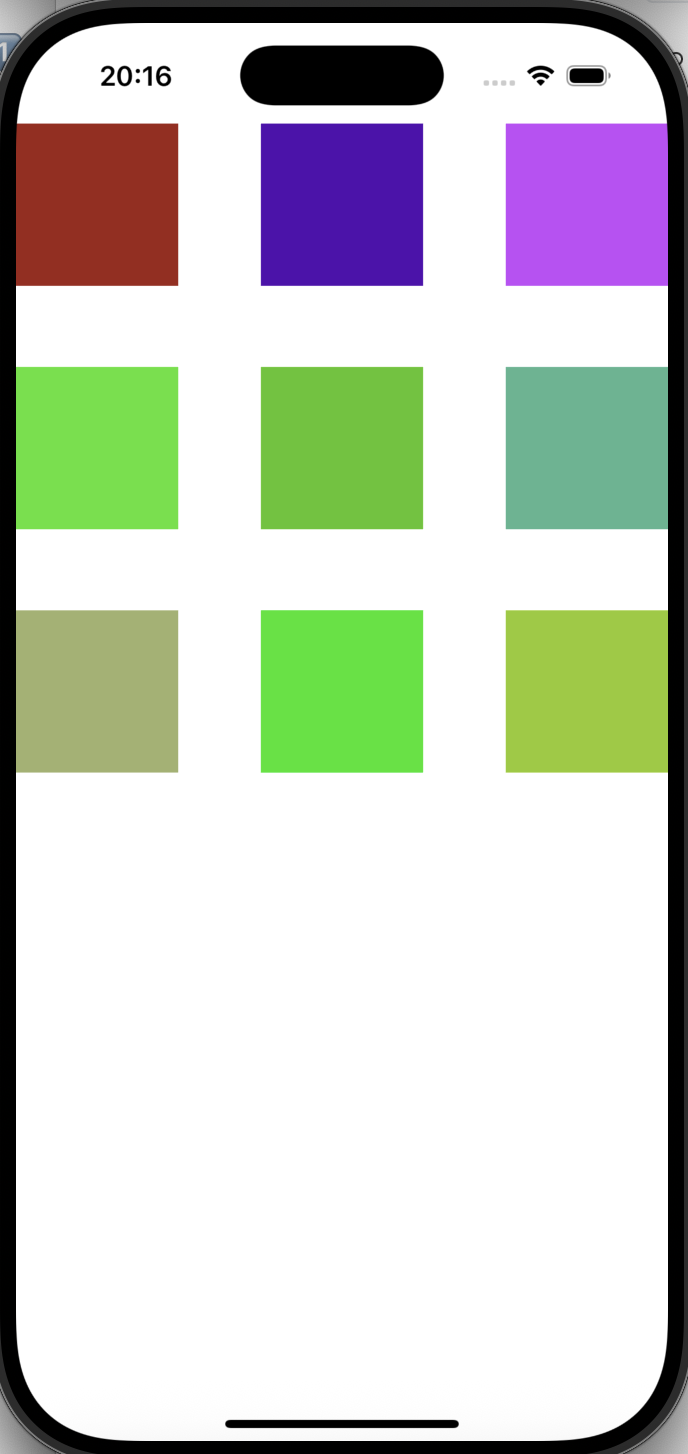
我们先实现一个简单的九宫格布局:
- 创建布局类并为其各个属性赋值
objc
UICollectionViewFlowLayout *layout = [[UICollectionViewFlowLayout alloc] init];
//设置布局方向为垂直流分布
layout.scrollDirection = UICollectionViewScrollDirectionVertical;
//行间距
layout.minimumLineSpacing = 50;
//列间距
layout.minimumInteritemSpacing = 10;
//设置每个item的大小
layout.itemSize = CGSizeMake(100, 100);- 将自定义的布局类作为参数传递给UICollectionView的初始化
objc
UICollectionView *collect = [[UICollectionView alloc] initWithFrame:self.view.frame collectionViewLayout:layout];- 设置代理
objc
collect.delegate = self;
collect.dataSource = self;- 注册item类型
objc
[collect registerClass:[UICollectionViewCell class] forCellWithReuseIdentifier:@"cell"];- 实现协议函数
与tableView类似。
objc
-(__kindof UICollectionViewCell *)collectionView:(UICollectionView *)collectionView cellForItemAtIndexPath:(NSIndexPath *)indexPath {
    UICollectionViewCell *cell = [collectionView dequeueReusableCellWithReuseIdentifier:@"cell" forIndexPath:indexPath];
    //arc4random():C语言标准库函数,随机生成数
    //arc4random() % 255 / 255.0:使得随机生成在0-1之间,避免特别大的数
    cell.backgroundColor = [UIColor colorWithRed:arc4random() % 255 / 255.0 green:arc4random() % 255 / 255.0 blue:arc4random() % 255 / 255.0 alpha:1];
    return cell;
}

-(NSInteger)collectionView:(UICollectionView *)collectionView numberOfItemsInSection:(NSInteger)section {
    return 9;
}
对比一下collectionView和tableView在复用cell时的区别:
-
UITableViewCell:
- 旧式方法:如果复用池中没有cell,可以返回nil,再临时创建即可。
objc- (nullable __kindof UITableViewCell *)dequeueReusableCellWithIdentifier:(NSString *)identifier;objcUITableViewCell *cell = [tableView dequeueReusableCellWithIdentifier:@"cell"]; if (!cell) { cell = [[UITableViewCell alloc] initWithStyle:UITableViewCellStyleDefault reuseIdentifier:@"cell"]; }- 新式方法:必须提前注册过cell。如果没有注册,系统会直接崩溃。
objc- (__kindof UITableViewCell *)dequeueReusableCellWithIdentifier:(NSString *)identifier forIndexPath:(NSIndexPath *)indexPath -
UICollectionView:
因为UICollectionView没有默认的cell类型,所以所有的cell都必须由开发者自定义并提前注册。
objc
-(__kindof UICollectionViewCell *)collectionView:(UICollectionView *)collectionView cellForItemAtIndexPath:(NSIndexPath *)indexPath {
    UICollectionViewCell *cell = [collectionView dequeueReusableCellWithReuseIdentifier:@"cell" forIndexPath:indexPath];
    return cell;
}
这样我们就实现了这个九宫格:
常用方法和属性
UICollectionViewFlowLayout属性
查看一下API,按照系统给我们的可以设置的属性依次有行间距、列间距、每个item的大小、预估大小、滚动方向、每个section头视图的尺寸、每个section尾视图的尺寸、每个section的内边距、sectionInset 的参考边界、header是否悬停、footer是否吸底。
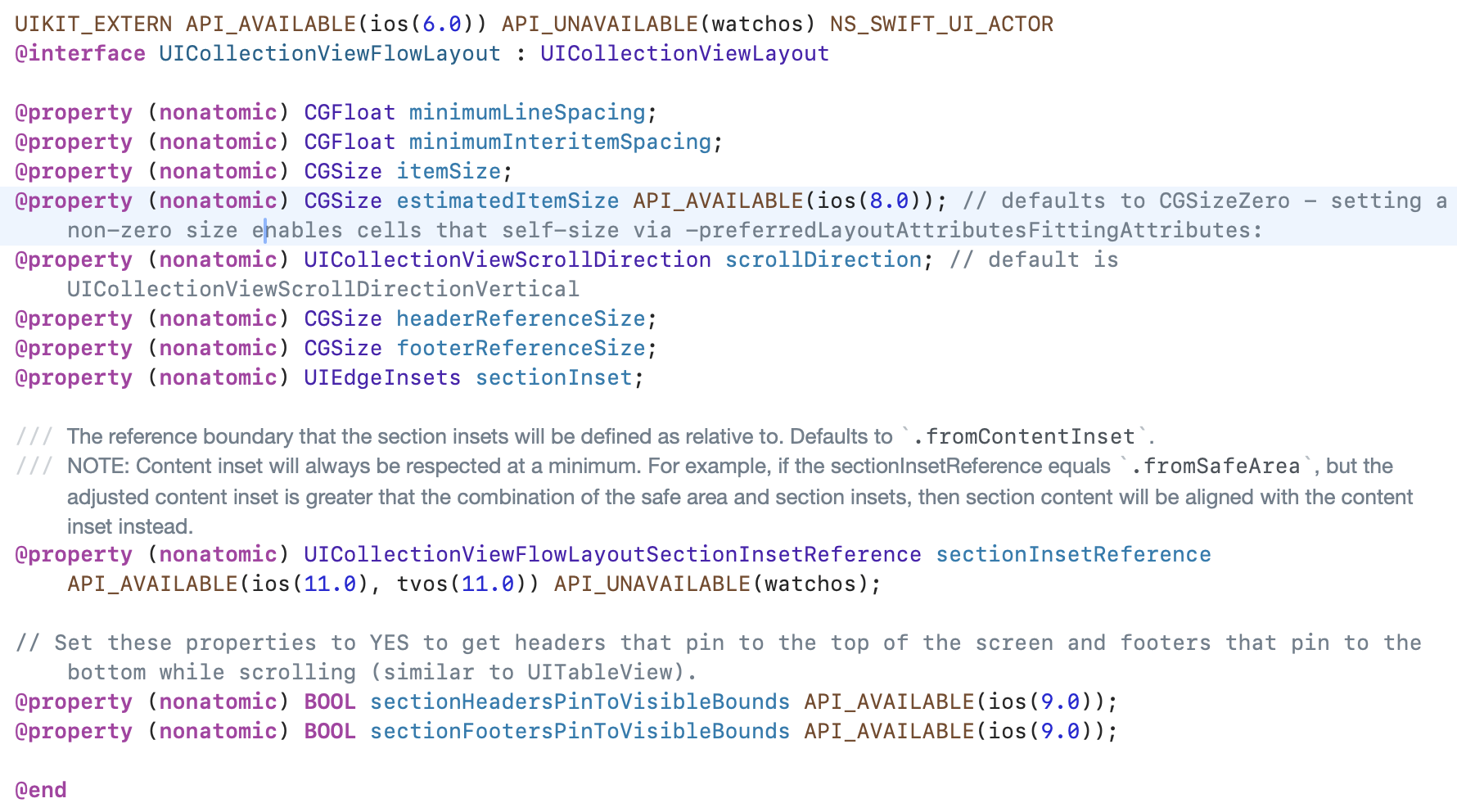
其中常用的有:
-
布局类方向
- 垂直排布
objclayout.scrollDirection = UICollectionViewScrollDirectionVertical;- 水平排布
objclayout.scrollDirection = UICollectionViewScrollDirectionHorizontal; -
设置item
objc
//item大小
layout.itemSize = CGSizeMake(100, 100);
//item行间距
layout.minimumLineSpacing = 50;
//item列间距
layout.minimumInteritemSpacing = 10;- section的内边距
objc
layout.sectionInset = UIEdgeInsetsMake(10, 10, 10, 10);每个参数分别对应:

UICollectionView属性
- 刷新对应列
objc
[collect performBatchUpdates:^{
  [collect reloadSections:[NSIndexSet indexSetWithIndex:0]];
} completion:nil];
协议代理方法
UICollectionViewDelegate
该协议中所有方法都是可选实现。
- 是否允许某个item被高亮,按下item后,系统准备高亮显示前调用,默认YES会进入高亮状态(按下前)
objc
- (BOOL)collectionView:(UICollectionView *)collectionView shouldHighlightItemAtIndexPath:(NSIndexPath *)indexPath;- 按下item后立即调用,此时手指还未松开(按下后)
objc
- (void)collectionView:(UICollectionView *)collectionView didHighlightItemAtIndexPath:(NSIndexPath *)indexPath;- 手指离开item区域(松开后)
objc
- (void)collectionView:(UICollectionView *)collectionView didUnhighlightItemAtIndexPath:(NSIndexPath *)indexPath;- 是否允许选中某个item,在item被选中前调用,默认YES允许选中(选中前)
objc
- (BOOL)collectionView:(UICollectionView *)collectionView shouldSelectItemAtIndexPath:(NSIndexPath *)indexPath;- 是否允许取消选中,当再次点击已选中的item,系统准备取消选中时调用,默认YES允许取消选中(取消选中前)
objc
- (BOOL)collectionView:(UICollectionView *)collectionView shouldDeselectItemAtIndexPath:(NSIndexPath *)indexPath; 注意:该方法必须在允许多选时才可调用
objc
collect.allowsMultipleSelection = YES;- 通知某个item已被选中,点击item后松手时调用,即真正选中时(选中后)
objc
- (void)collectionView:(UICollectionView *)collectionView didSelectItemAtIndexPath:(NSIndexPath *)indexPath;- 通知某个item已被取消选中,当取消选中某个item时调用(取消选中后)
objc
- (void)collectionView:(UICollectionView *)collectionView didDeselectItemAtIndexPath:(NSIndexPath *)indexPath;UICollectionViewDataSource
查看一下API:
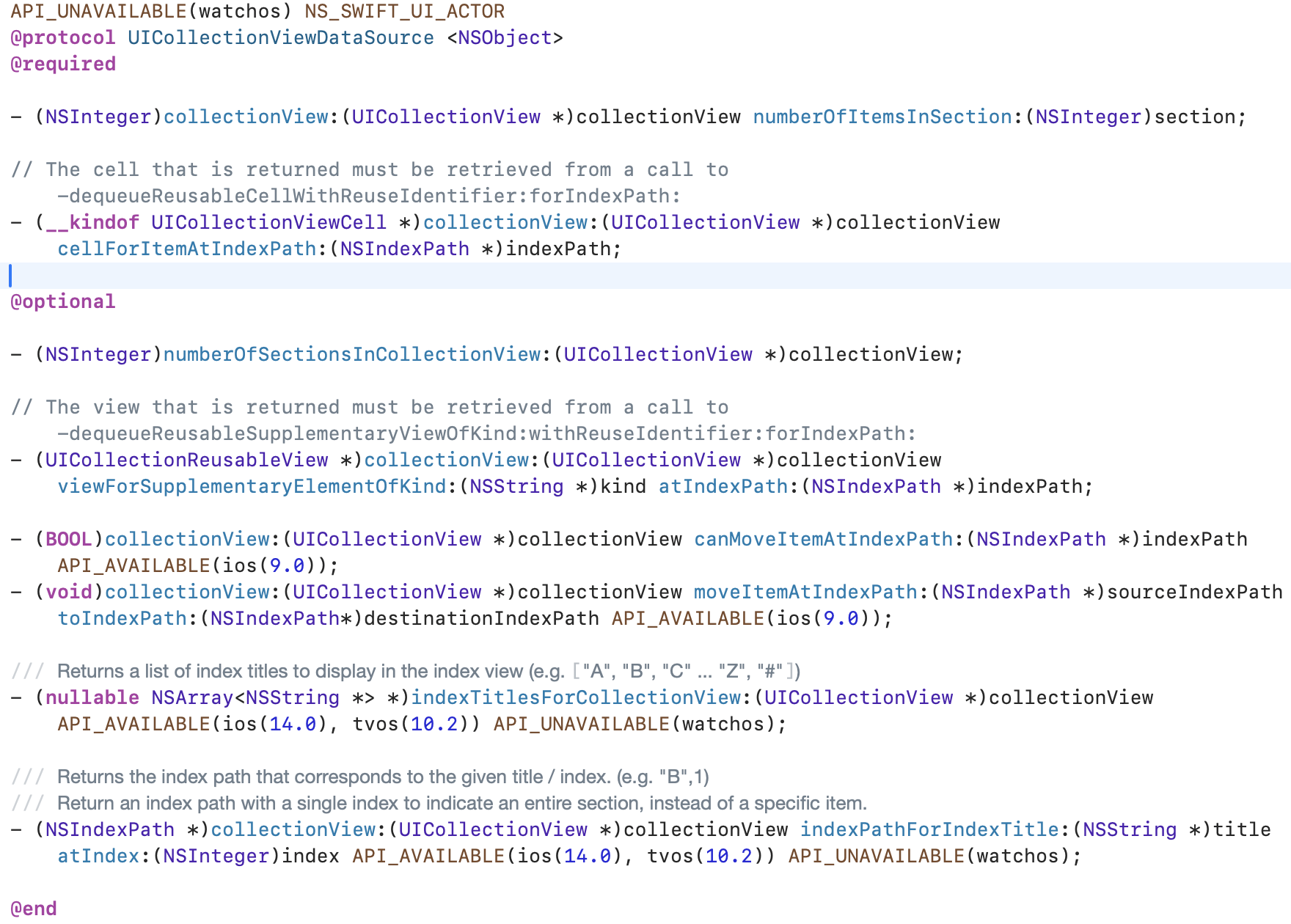
我们可以很清楚地看到以下两个方法是必须实现的:
- 设置每个section的item数量
objc
- (NSInteger)collectionView:(UICollectionView *)collectionView numberOfItemsInSection:(NSInteger)section;- 返回对应位置的cell对象
objc
- (__kindof UICollectionViewCell *)collectionView:(UICollectionView *)collectionView cellForItemAtIndexPath:(NSIndexPath *)indexPath;可选实现的:
- 设置section数量,默认有1个section
objc
-(NSInteger)numberOfSectionsInCollectionView:(UICollectionView *)collectionView;- 对头视图或尾视图进行设置
objc
//UICollectionElementKindSectionHeader头视图
//UICollectionElementKindSectionFooter尾视图
- (UICollectionReusableView *)collectionView:(UICollectionView *)collectionView viewForSupplementaryElementOfKind:(NSString *)kind atIndexPath:(NSIndexPath *)indexPath;- 某个item是否可以被移动,默认返回NO
objc
- (BOOL)collectionView:(UICollectionView *)collectionView canMoveItemAtIndexPath:(NSIndexPath *)indexPath API_AVAILABLE(ios(9.0));- 移动item时调用,只能在上述方法返回YES时调用
objc
- (void)collectionView:(UICollectionView *)collectionView moveItemAtIndexPath:(NSIndexPath *)sourceIndexPath toIndexPath:(NSIndexPath*)destinationIndexPath API_AVAILABLE(ios(9.0));UICollectionViewDelegateFlowLayout
有时我们想让每个item展现不同,我们可以通过该协议方法设置。
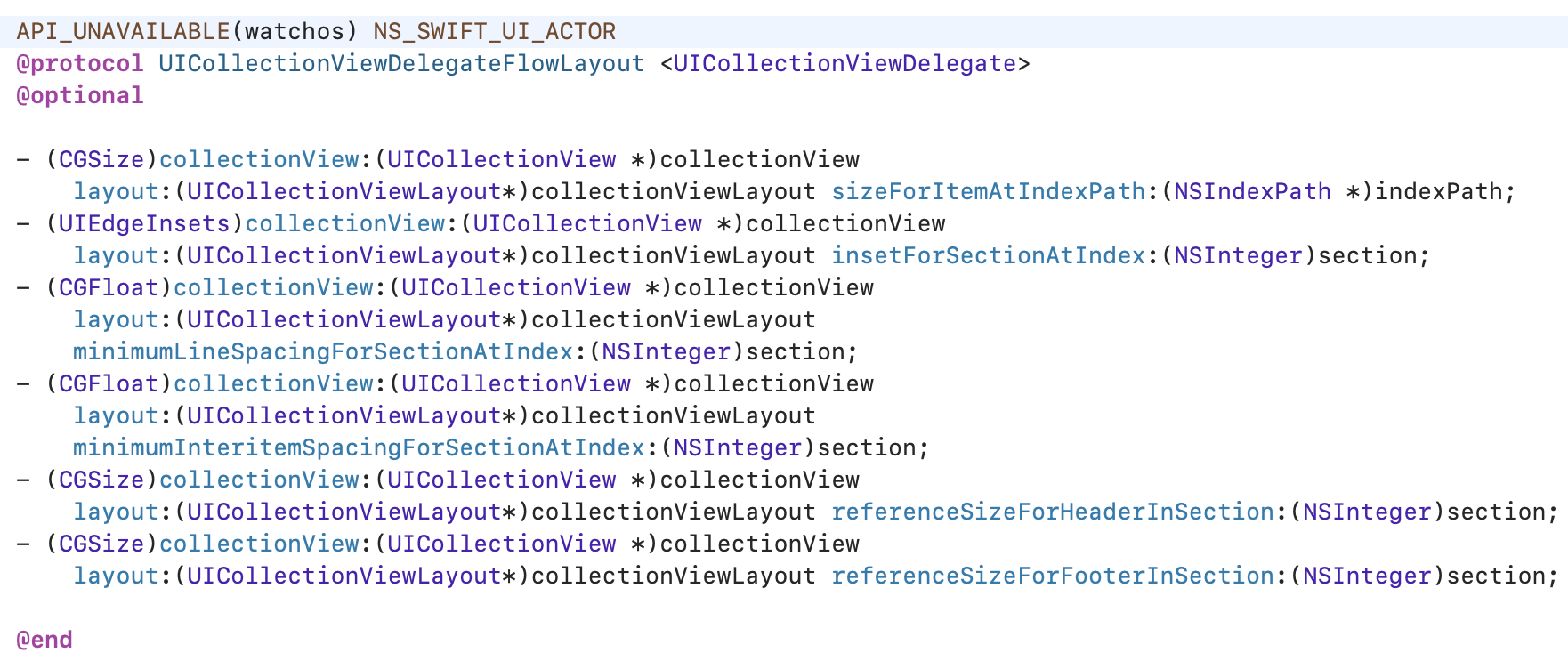
根据API中方法依次可以设置每个item大小、每个section的内边距、行间距、列间距、头视图大小、尾视图大小。
实现瀑布流
实现原理
首先,我们要知道UICollectionView的布局过程实际上是调用UICollectionViewLayout的一些函数,这些函数的执行是依据一定顺序的。
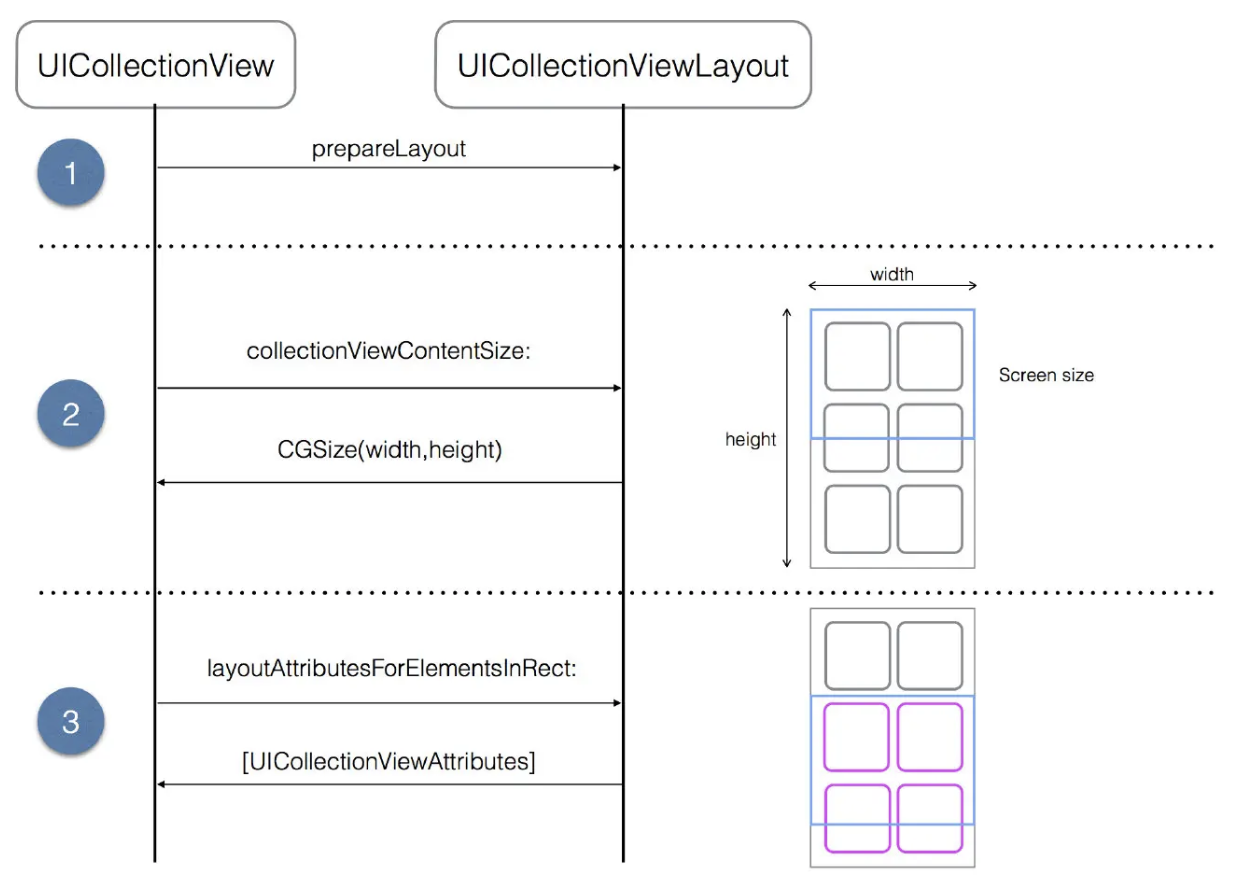
简单来说,UICollectionView的布局是由UICollectionViewLayout的子类控制的。
因此,为了实现我们的自动移瀑布流,我们需要在其子类中重写生成布局的方法,创建我们自己需要的布局。
按照顺序实现以下方法:
- 布局准备阶段调用
objc
-(void)prepareLayout;- 设置collectionView内容区域总大小
objc
-(CGSize)collectionViewContentSize;- 返回rect中所有元素的布局属性,返回一个数组
objc
-(NSArray<__kindof UICollectionViewLayoutAttributes *> *)layoutAttributesForElementsInRect:(CGRect)rect;- 返回对应indexPath位置的item的布局属性
objc
- (UICollectionViewLayoutAttributes *)layoutAttributesForItemAtIndexPath:(NSIndexPath *)indexPath
- 返回区域头或区域尾的布局属性
objc- (nullable UICollectionViewLayoutAttributes *)layoutAttributesForSupplementaryViewOfKind:(NSString *)elementKind atIndexPath:(NSIndexPath *)indexPath;
- 返回装饰视图的布局属性
objc- (nullable UICollectionViewLayoutAttributes )layoutAttributesForDecorationViewOfKind:(NSString)elementKind atIndexPath:(NSIndexPath *)indexPath;
- 当边界发生改变时,是否刷新
objc- (BOOL)shouldInvalidateLayoutForBoundsChange:(CGRect)newBounds
实现步骤
-(void)prepareLayout
该方法在布局发生变化之前调用,比如初始化、调用reloadData、invalidateLayout(重新计算item位置和尺寸)等方法。用来进行布局前的准备,其主要作用有:
- 初始化布局参数:进行初始化工作,如计算和缓存用于布局的参数,可能包括计算每个单元格的大小、计算行列的数量、初始化用于存储布局属性的数据结构等。
- 计算并布局属性:计算并缓存集合视图中所有单元格的布局属性(UICollectionViewLayoutAttributes)。这样使得集合视图需要显示或进行交互时,可以直接访问缓存的布局属性,而不需要在运行时动态计算。
objc
-(instancetype)init {
    if (self = [super init]) {
        self.columnCount = 2;
        self.columnMargin = 10;
        self.rowMargin = 10;
        self.sectionInset = UIEdgeInsetsMake(10, 10, 10, 10);
    }
    return self;
}

-(void)prepareLayout {
    [super prepareLayout];
    self.attributeArray = [NSMutableArray array];
    self.columnHeights = [NSMutableArray array];

    for (int i = 0; i < self.columnCount; i++) {
        [self.columnHeights addObject:@(self.sectionInset.top)];
    }
    //寻找最短列,保证下一个item放在当前最短列下面,使得整体布局符合瀑布流自然排列
    NSInteger itemCount = [self.collectionView numberOfItemsInSection:0];
    for (int i = 0; i < itemCount; i++) {
        NSIndexPath *indexPath = [NSIndexPath indexPathForItem:i inSection:0];
        CGFloat minColumnHeight = [self.columnHeights[0] floatValue];
        NSInteger minColumnIndex = 0;
        for (int j = 1; j < self.columnCount; j++) {
            CGFloat columnHeight = [self.columnHeights[j] floatValue];
            if (columnHeight < minColumnHeight) {
                minColumnHeight = columnHeight;
                minColumnIndex = j;
            }
        }

        CGFloat itemWidth = (CGRectGetWidth(self.collectionView.bounds) - self.sectionInset.left - self.sectionInset.right - (self.columnCount - 1) * self.columnMargin) / self.columnCount;
        CGFloat itemHeight = arc4random_uniform(100) + 100;
        CGFloat itemX = self.sectionInset.left + minColumnIndex * (itemWidth + self.columnMargin);
        CGFloat itemY = minColumnHeight;
        UICollectionViewLayoutAttributes *attributes = [UICollectionViewLayoutAttributes layoutAttributesForCellWithIndexPath:indexPath];
        attributes.frame = CGRectMake(itemX, itemY, itemWidth, itemHeight);
        [self.attributeArray addObject:attributes];
        //每次更新那一列的最新底部高度
        //CGRectGetMaxY的计算 = y + height
        self.columnHeights[minColumnIndex] = @(CGRectGetMaxY(attributes.frame) + self.rowMargin);
    }
}
我们通过API看一下我们可以设置哪些布局类对象的属性:
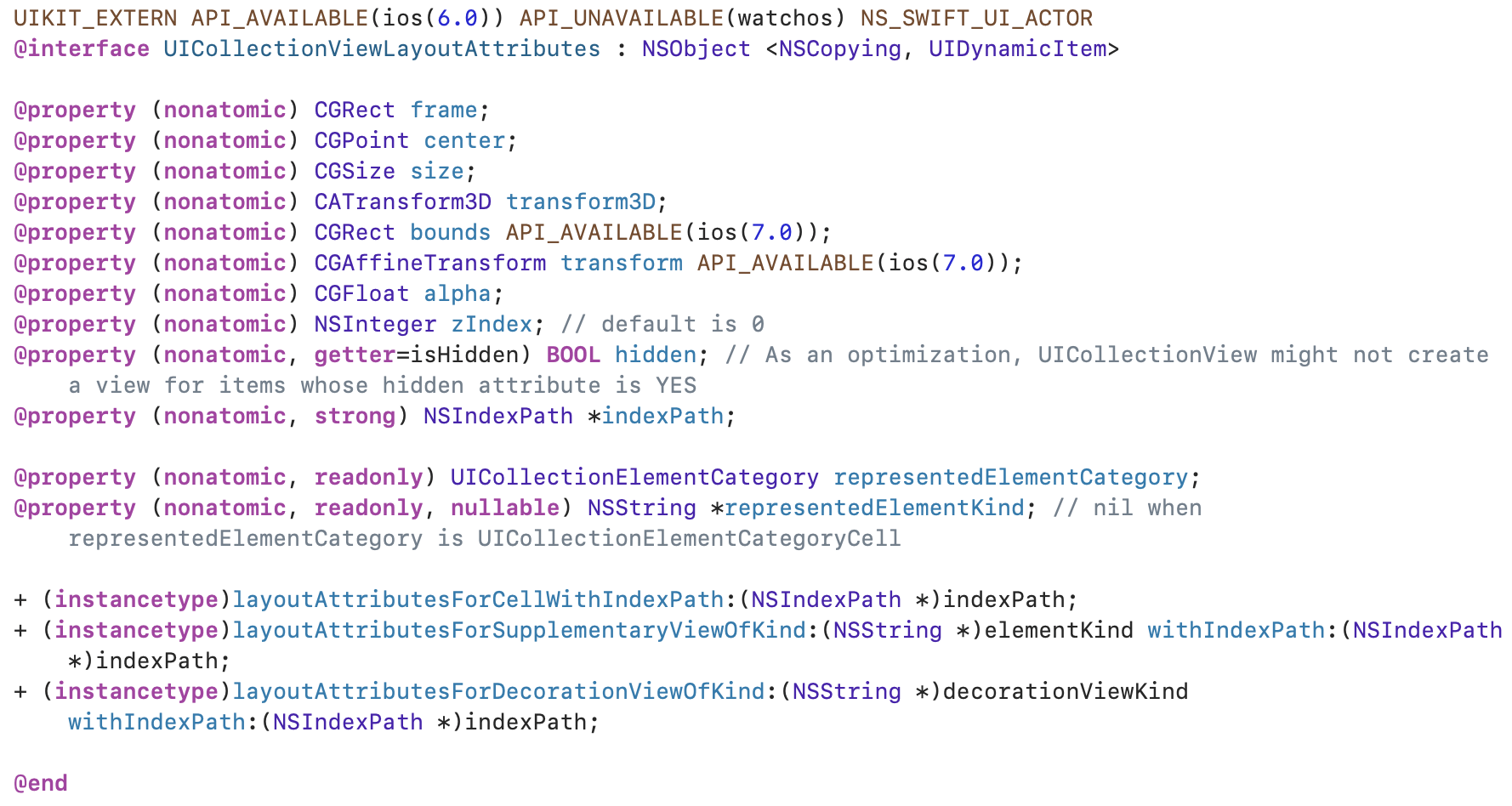
-(CGSize)collectionViewContentSize
该方法在需要计算集合视图内容尺寸时调用,比如初始化时、布局发生变化时等。决定了集合视图可以滚动的范围,即集合视图可以在其内容区域内滚动的最大范围,返回整个集合视图内容的尺寸。
objc
-(CGSize)collectionViewContentSize {
    CGFloat maxColumnHeight = [self.columnHeights[0] floatValue];
    for (int i = 1; i < self.columnCount; i++) {
        maxColumnHeight = MAX(maxColumnHeight, [self.columnHeights[i] floatValue]);
    }
    return CGSizeMake(self.collectionView.bounds.size.width, maxColumnHeight);
}
-(NSArray<__kindof UICollectionViewLayoutAttributes *> *)layoutAttributesForElementsInRect:(CGRect)rect
在需要显示或更新某个区域内视图时调用,比如滚动、布局发生变化时。传入一个rect参数,返回在给定rect区域内的所有视图的布局属性数组。
objc
-(NSArray<__kindof UICollectionViewLayoutAttributes *> *)layoutAttributesForElementsInRect:(CGRect)rect {
    return self.attributeArray;
}- 调用
-(__kindof UICollectionViewCell *)collectionView:(UICollectionView *)collectionView cellForItemAtIndexPath:(NSIndexPath *)indexPath,创建item,配置单元格。
objc
-(__kindof UICollectionViewCell *)collectionView:(UICollectionView *)collectionView cellForItemAtIndexPath:(NSIndexPath *)indexPath {
    NSLog(@"-(__kindof UICollectionViewCell *)collectionView:(UICollectionView *)collectionView cellForItemAtIndexPath:(NSIndexPath *)indexPath");
    UICollectionViewCell *cell = [collectionView dequeueReusableCellWithReuseIdentifier:@"cell" forIndexPath:indexPath];
    //arc4random():C语言标准库函数,随机生成数
    //arc4random() % 255 / 255.0:使得随机生成在0-1之间,避免特别大的数
    cell.backgroundColor = [UIColor colorWithRed:arc4random() % 255 / 255.0 green:arc4random() % 255 / 255.0 blue:arc4random() % 255 / 255.0 alpha:1];
    return cell;
}
调用顺序
我们使用NSLog打印出来每个函数,可以直观的看出:-(void)prepareLayout方法只调用一次,之后会在往下滑动UICollectionView时不断重复调用其他方法。
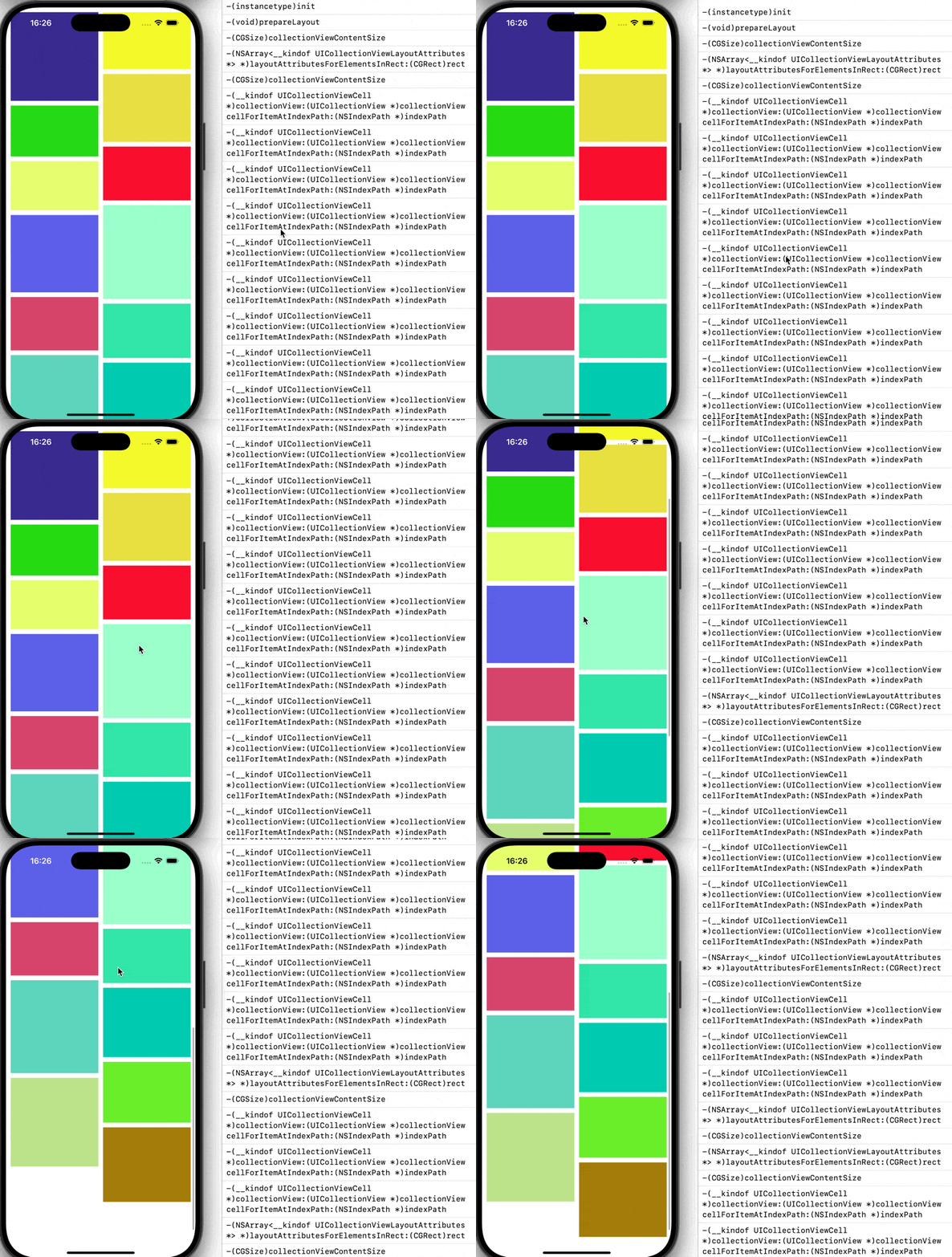
实现效果
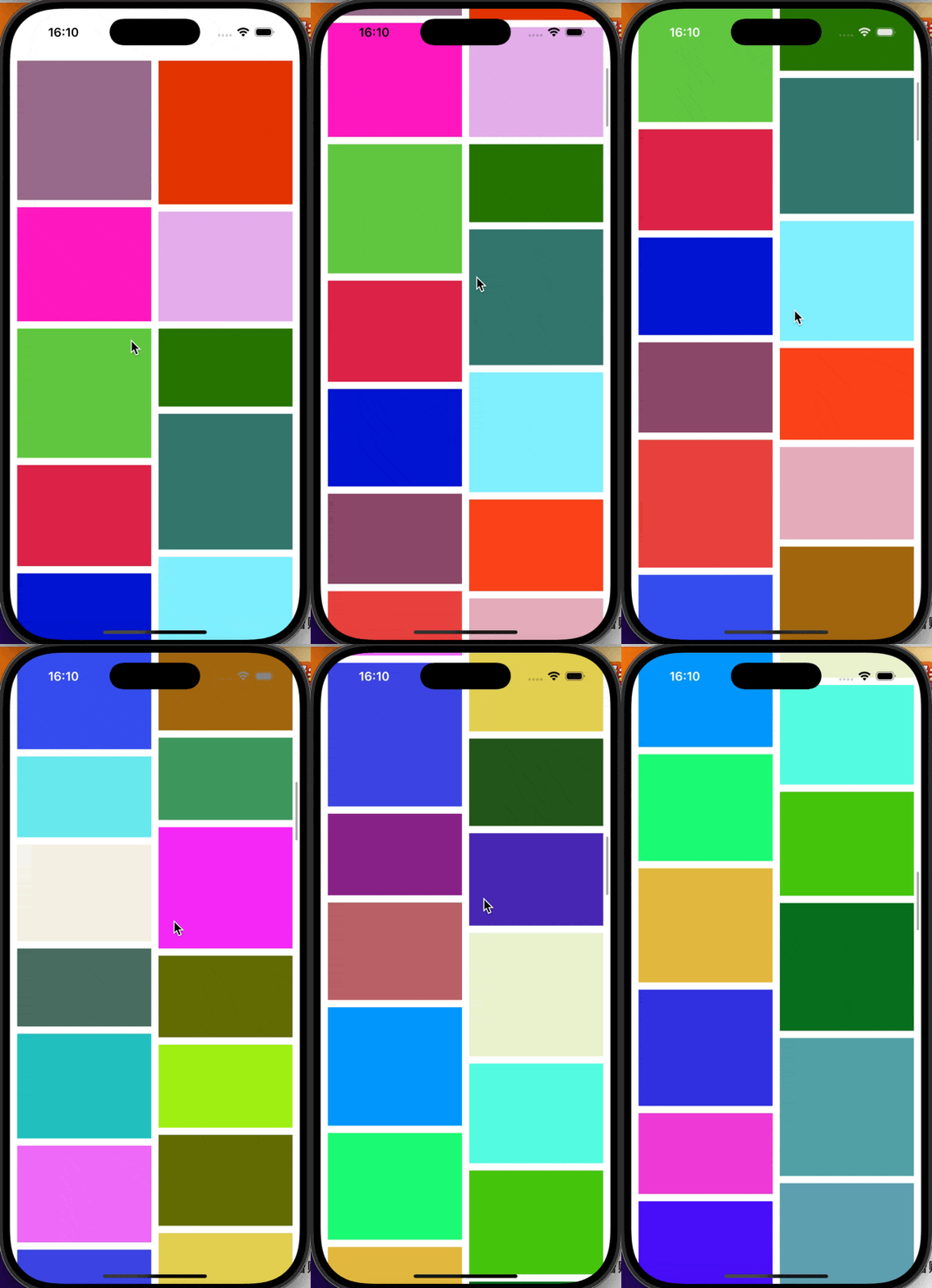
总结
相较于仅能纵向单列数据展示的tableView,collectionView允许我们进行更加自由灵活的布局。而自定义UICollectionViewFlowLayout类,且重写该类中方法可以实现我们单元格的多样布局。