授权服务(微信授权服务)搭建
目录结构
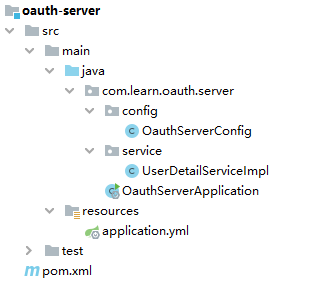
PS:启动类什么也没开启
引用依赖
XML
<dependency>
    <groupId>org.springframework.boot</groupId>
    <artifactId>spring-boot-starter-oauth2-authorization-server</artifactId>
    <version>3.2.12</version>
</dependency>
配置类
java
package com.learn.oauth.server.config;

import jakarta.annotation.Resource;
import org.springframework.context.annotation.Bean;
import org.springframework.context.annotation.Configuration;
import org.springframework.core.annotation.Order;
import org.springframework.http.MediaType;
import org.springframework.security.config.Customizer;
import org.springframework.security.config.annotation.web.builders.HttpSecurity;
import org.springframework.security.config.annotation.web.configuration.EnableWebSecurity;
import org.springframework.security.config.annotation.web.configurers.AbstractHttpConfigurer;
import org.springframework.security.core.userdetails.UserDetailsService;
import org.springframework.security.oauth2.core.AuthorizationGrantType;
import org.springframework.security.oauth2.core.ClientAuthenticationMethod;
import org.springframework.security.oauth2.core.oidc.OidcScopes;
import org.springframework.security.oauth2.server.authorization.client.InMemoryRegisteredClientRepository;
import org.springframework.security.oauth2.server.authorization.client.RegisteredClient;
import org.springframework.security.oauth2.server.authorization.client.RegisteredClientRepository;
import org.springframework.security.oauth2.server.authorization.config.annotation.web.configuration.OAuth2AuthorizationServerConfiguration;
import org.springframework.security.oauth2.server.authorization.config.annotation.web.configurers.OAuth2AuthorizationServerConfigurer;
import org.springframework.security.oauth2.server.authorization.settings.ClientSettings;
import org.springframework.security.web.SecurityFilterChain;
import org.springframework.security.web.authentication.LoginUrlAuthenticationEntryPoint;
import org.springframework.security.web.util.matcher.MediaTypeRequestMatcher;

import java.util.UUID;

@Configuration
@EnableWebSecurity
public class OauthServerConfig {

    @Resource
    private UserDetailsService userDetailsService;

    @Bean
    @Order(1)
    public SecurityFilterChain authorizationServerSecurityFilterChain(HttpSecurity http) throws Exception {
        OAuth2AuthorizationServerConfiguration.applyDefaultSecurity(http);

        http.getConfigurer(OAuth2AuthorizationServerConfigurer.class).oidc(Customizer.withDefaults());

        http.exceptionHandling((exceptions) -> exceptions
                        .defaultAuthenticationEntryPointFor(
                                new LoginUrlAuthenticationEntryPoint("/login"),
                                new MediaTypeRequestMatcher(MediaType.TEXT_HTML)
                        )
                )
                .oauth2ResourceServer((resourceServer) -> resourceServer.jwt(Customizer.withDefaults()));

        return http.build();
    }

    @Bean
    @Order(2)
    public SecurityFilterChain defaultSecurityFilterChain(HttpSecurity http) throws Exception {
        http
                .authorizeHttpRequests(authorize -> authorize.anyRequest().authenticated())
                .cors(AbstractHttpConfigurer::disable)  // 关闭cors,影响前端 bootstrap.css .js 加载速度
                .formLogin(Customizer.withDefaults())  // 使用默认表单
                .userDetailsService(userDetailsService)  // 自定义用户
        ;

        return http.build();
    }

    @Bean
    public RegisteredClientRepository registeredClientRepository() {
        RegisteredClient oidcClient = RegisteredClient.withId(UUID.randomUUID().toString())
                .clientId("client")  // 某奇艺账号
                .clientSecret("{noop}secret")  // 某奇艺密码
                .clientAuthenticationMethod(ClientAuthenticationMethod.CLIENT_SECRET_BASIC)
                .authorizationGrantType(AuthorizationGrantType.AUTHORIZATION_CODE)
                .authorizationGrantType(AuthorizationGrantType.REFRESH_TOKEN)
                .redirectUri("http://127.0.0.1:8081/login/receive-code")  // 某奇艺回调地址
                .scope(OidcScopes.OPENID)
                .scope(OidcScopes.PROFILE)
                .clientSettings(ClientSettings.builder().requireAuthorizationConsent(true).build())
                .build();

        return new InMemoryRegisteredClientRepository(oidcClient);
    }

}
java
package com.learn.oauth.server.service;

import org.springframework.security.core.userdetails.User;
import org.springframework.security.core.userdetails.UserDetails;
import org.springframework.security.core.userdetails.UserDetailsService;
import org.springframework.security.core.userdetails.UsernameNotFoundException;
import org.springframework.stereotype.Service;

import java.util.Set;

@Service
public class UserDetailServiceImpl implements UserDetailsService {

    @Override
    public UserDetails loadUserByUsername(String username) throws UsernameNotFoundException {
        // 模拟数据库查询,自己随便写
        return new User(username, "{noop}123456", Set.of());
    }
}
配置文件
java
server:
  port: 9000
客户端(某奇艺)后端服务搭建
目录结构
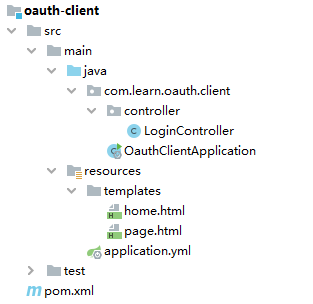
PS:启动类什么也没开启
引用依赖
XML
<dependencies>
    <dependency>
        <groupId>org.springframework.boot</groupId>
        <artifactId>spring-boot-starter-web</artifactId>
    </dependency>
    <dependency>
        <groupId>org.springframework.boot</groupId>
        <artifactId>spring-boot-starter-thymeleaf</artifactId>
    </dependency>
    <dependency>
        <groupId>cn.hutool</groupId>
        <artifactId>hutool-all</artifactId>
        <version>5.8.38</version>
    </dependency>
</dependencies>
Controller
java
package com.learn.oauth.client.controller;

import cn.hutool.core.lang.UUID;
import cn.hutool.http.HttpResponse;
import cn.hutool.http.HttpUtil;
import cn.hutool.json.JSONUtil;
import jakarta.servlet.http.HttpServletResponse;
import org.springframework.web.bind.annotation.GetMapping;
import org.springframework.web.bind.annotation.RequestMapping;
import org.springframework.web.bind.annotation.RequestParam;
import org.springframework.web.bind.annotation.RestController;
import org.springframework.web.servlet.ModelAndView;

import java.io.IOException;
import java.util.HashMap;
import java.util.Map;

@RestController
@RequestMapping("/login")
public class LoginController {

    // 模拟数据库
    private final Map<String, Map<String, String>> DB = new HashMap<>();

    /**
     * 1,进入模拟登录页面
     */
    @GetMapping("/page")
    public ModelAndView page() {
        HashMap<String, String> map = new HashMap<>();
        map.put("state", UUID.fastUUID().toString());

        return new ModelAndView("page", map);
    }

    /**
     * 2,返回授权地址,前端也能拼接,但是不安全
     */
    @GetMapping("/three-login")
    public void threeLogin(@RequestParam("type") String type, @RequestParam("state") String state, HttpServletResponse response) throws IOException {
        String url;
        switch (type) {
            case "mouyin":
                // 使用某音登录
            case "mouxin":
                // 使用某信登录
            default:
                url = "http://127.0.0.1:9000/oauth2/authorize?" +
                        "response_type=code" +
                        "&client_id=client" +
                        "&state="+ state +
                        "&scope=openid%20profile" +
                        "&redirect_uri=http://127.0.0.1:8081/login/receive-code";
        }

        response.setStatus(302);
        response.sendRedirect(url);
    }

    /**
     * 3,授权服务器回调地址
     */
    @GetMapping("/receive-code")
    public void receiveCode(@RequestParam("code") String code, @RequestParam("state") String state) {
        // 获取 token
        HttpResponse tokenResponse = HttpUtil.createPost("http://127.0.0.1:9000/oauth2/token")
                .basicAuth("client", "secret")  // 模拟服务内,定义的 client_id 和 client_secret
                .form("grant_type", "authorization_code")
                .form("code", code)
                .form("redirect_uri", "http://127.0.0.1:8081/login/receive-code")  // 和上面的保持一致,会校验
                .execute();

        String accessToken = JSONUtil.parseObj(tokenResponse.body()).getStr("access_token");

        // 获取用户信息
        HttpResponse infoResponse = HttpUtil.createGet("http://127.0.0.1:9000/userinfo").bearerAuth(accessToken).execute();

        String username = JSONUtil.parseObj(infoResponse.body()).getStr("sub");

        // 放入数据库
        DB.put(state, new HashMap<>(){{
            put("username", username);
        }});
    }

    /**
     * 4,轮询是否成功
     */
    @GetMapping("/check")
    public String check(@RequestParam("state") String state) {
        return DB.containsKey(state) ? "success" : "fail";
    }

    /**
     * 5,登录成功,跳转首页
     */
    @GetMapping("/home")
    public ModelAndView home(@RequestParam("state") String state) {
        return new ModelAndView("home", DB.get(state));
    }

}
配置文件
java
server:
  port: 8081

spring:
  thymeleaf:
    prefix: classpath:/templates/
    suffix: .html
模拟页面 page.html
html
<!DOCTYPE html>
<html lang="en" xmlns:th="http://www.thymeleaf.org">
<head>
    <meta charset="UTF-8">
    <title>登录</title>
    <style>
        #form {
            width: 175px;
            margin: 100px auto;
        }
        label {
            display: inline-block;
            width: 100%;
            margin-top: 20px;
        }
    </style>
</head>
<body>
<div id="form">
    <label>
        <span>用户名</span><br>
        <input type="text" name="username" placeholder="用户名"/>
    </label><br>
    <label>
        <span>密码</span><br>
        <input type="password" name="password" placeholder="密码"/>
    </label><br>
    <label>
        <button th:onclick="threeLogin('mouyin')" style="background-color: greenyellow">某音登录</button>
        <button th:onclick="threeLogin('mouxin')" style="background-color: darkorange">某信登录</button>
    </label>
</div>
<script th:inline="javascript">
    var window1;

    function threeLogin(type) {
        let url = "http://localhost:8081/login/three-login?type="+ type +"&state="+ [[${state}]] +"&_="+ new Date().getTime();
        window1 = window.open(url, '_blank', 'width=500,height=300,left=200,top=200');
    }

    setInterval(function () {
        fetch("http://localhost:8081/login/check?state="+ [[${state}]])
            .then(response => {
                return response.text();
            })
            .then(data => {
                if (data === "success") {
                    window1.close();
                    window.location.href = "http://localhost:8081/login/home?state="+ [[${state}]];
                }
            })
            .catch(error => {
                console.error(error);
            });
    }, 5000)
</script>
</body>
</html>
模拟页面 home.html
html
<!DOCTYPE html>
<html lang="en" xmlns:th="http://www.thymeleaf.org">
<head>
    <meta charset="UTF-8">
    <title>首页</title>
</head>
<body>
<h2>登录成功</h2>
<h3 th:text="'欢迎:'+${username}" style="color: darkorange"></h3>
</body>
</html>