前言
想必大家都知道,在 cf 上可以免费搭建 pages 静态站点,比如我的博客 https://blog.qc7.org 就是在 github 上提交,然后在 cf 上部署的
但是有些人可能还不知道,cf 还提供了免费的数据库,对大部分个人用户来说,这个免费的额度已经足够使用了,在数据库的基础上,就可以实现动态的 web 服务了
与传统的 web 服务部同,cf 提供的基于 node 的 wrangler 开发部署模式,不支持传统的 php、java、net 等语言的动态 web 服务
本地安装wrangler
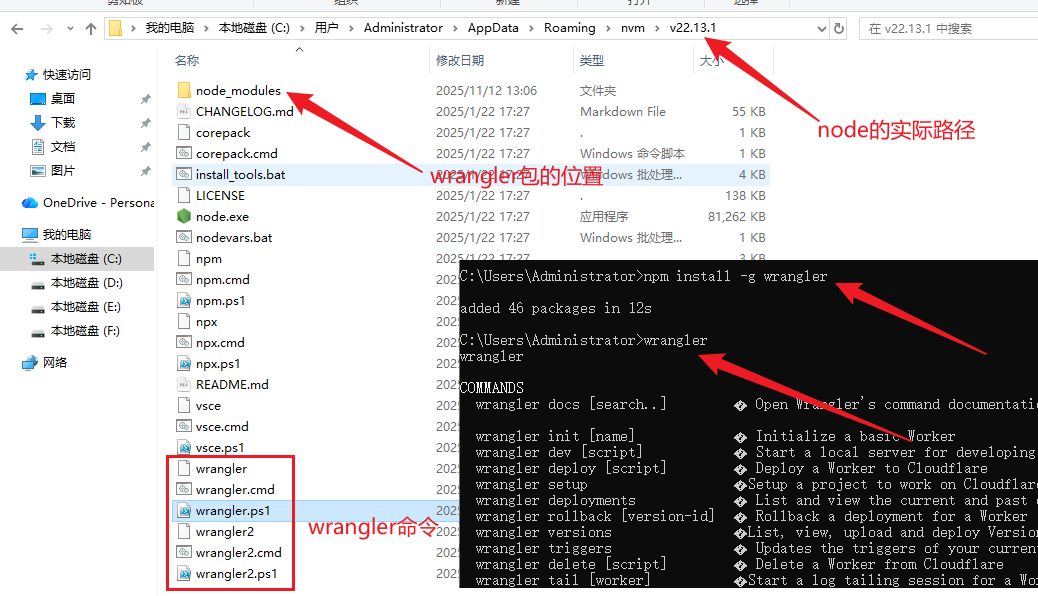
wrangler 是 cf 发布的一个 nodejs 组件包,在本地使用下面命令安装
npm install -g wrangler全局包安装到 node 路径下的 node_modules 目录中,然后在 node 路径中添加命令脚本,对于非全局包,会安装到项目下的 node_modules 目录中
安装完毕后,在本地 cmd 窗口中运行 wrnagler 命令,显示它的帮助信息,表示安装成功
wrangler项目完整流程
控制台输入 wrangler init hello 一路回车创建一个默认的 hello 项目,最后两步可以选择 No,表示不使用 git 版本控制,不自动发布到 cf (使用手动发布)
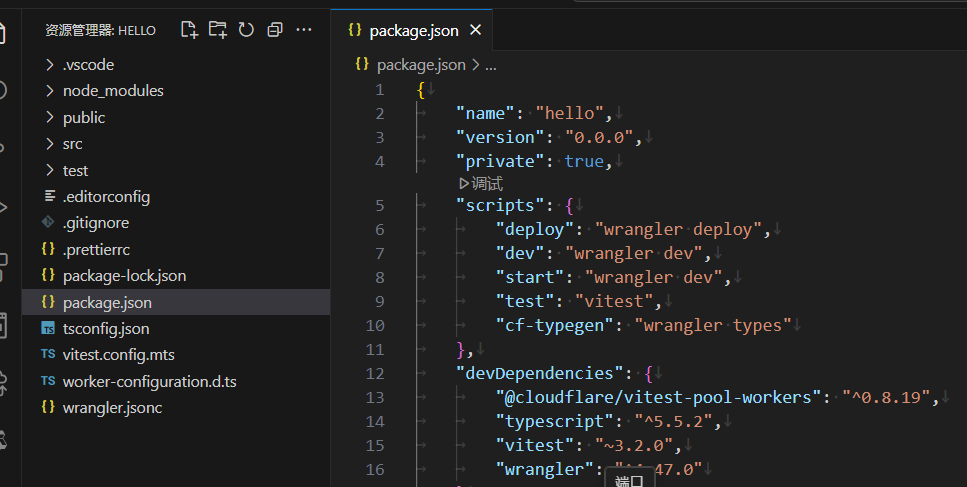
创建完毕后,使用 vscode 打开项目,显示的目录结构以及构建脚本如下
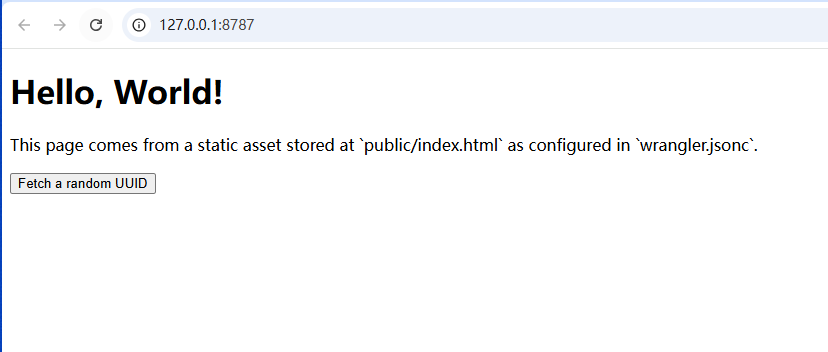
命令行中输入 npm run dev 就可以在本地运行起来了,监听在 http://127.0.0.1:8787,使用浏览器输入 url 地址进行访问
默认 wrangler 创建的 example 的页面显示如下
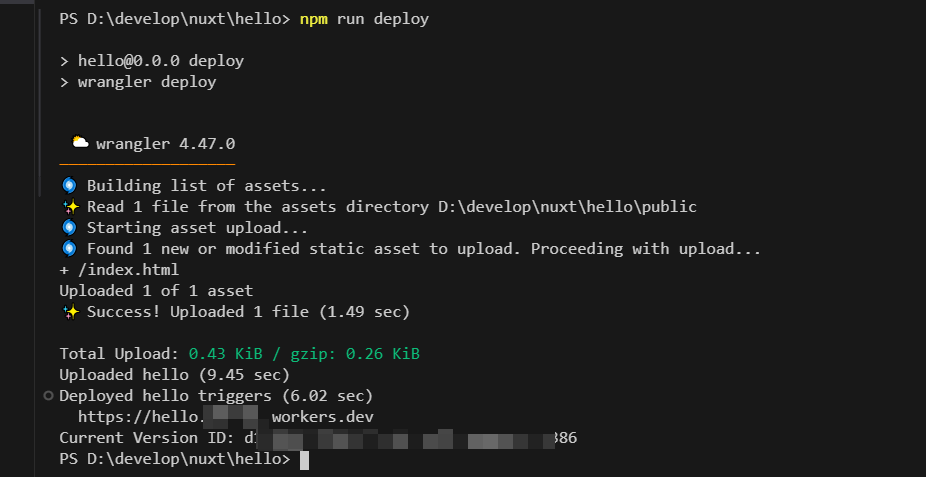
使用 npm run deploy 命令可以将项目发布到 cf 中,初次发布的时候会弹出一个授权页面,在页面上登录你的 cf 账号授权即可
发布显示的信息如下,也可以通过日志中提示的域名进行访问 https://hello.?????.workers.dev/,这和正常的 web 服务没任何区别,还能自行绑定个人域名
创建数据库和表
cf 提供多种数据库,常见的有 D1(关系数据库,类似sqlite轻量的)、Workers KV(类似redis的键值存储)、R2(类似aws s3的对象存储),其他类型的一般用不到
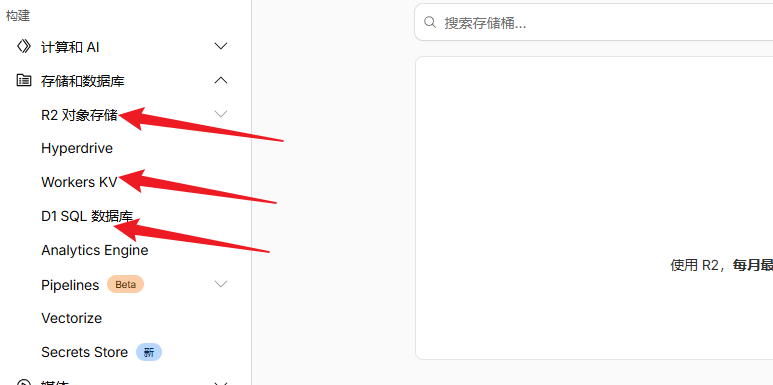
官方这里有完整的指导文档 https://developers.cloudflare.com/d1/get-started/
通过以下命令创建一个类型为 d1 名为 prod-d1-tutorial 的数据库,前面已经完成授权,这里将在 cf 中创建数据库,并将配置添加到 wrangler.jsonc 文件中
生成配置中的 remote 字段为 true 表示使用远端的数据库
shell
npx wrangler@latest d1 create prod-d1-tutorial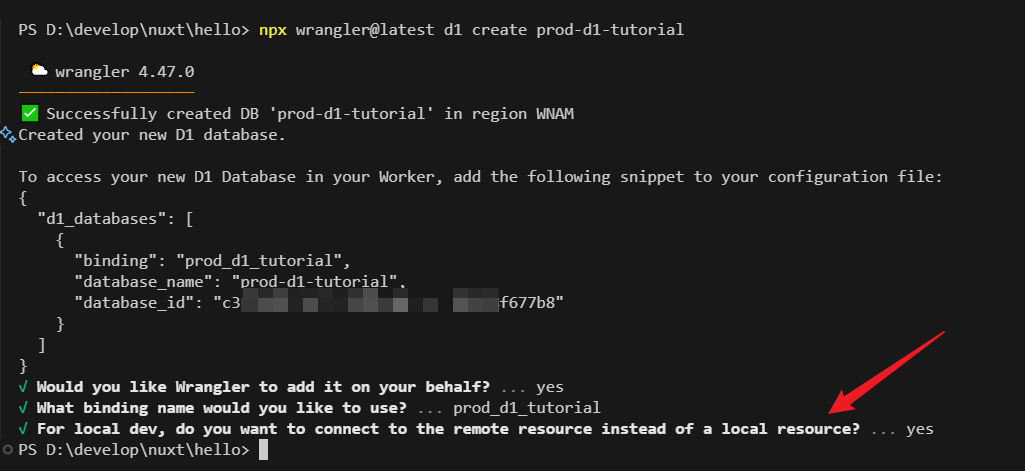
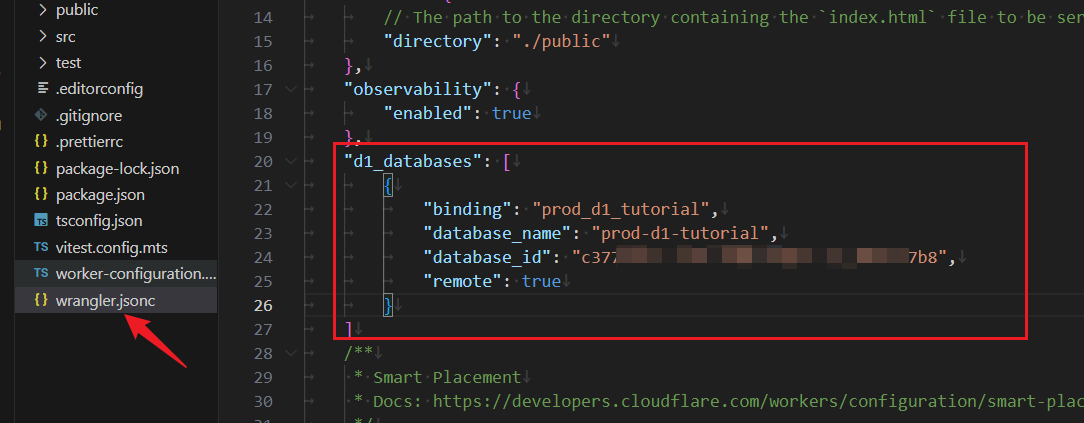
在前面创建好的数据库基础上,创建一个 Customers 表,并添加几条记录,数据库脚本如下
sql
DROP TABLE IF EXISTS Customers;
CREATE TABLE IF NOT EXISTS Customers (
    CustomerId INTEGER PRIMARY KEY AUTOINCREMENT,
    CompanyName TEXT NOT NULL,
    ContactName TEXT NOT NULL,
    Email TEXT,
    Phone TEXT,
    CreatedAt DATETIME DEFAULT CURRENT_TIMESTAMP
);

INSERT INTO Customers (CompanyName, ContactName, Email, Phone) VALUES
    ('Alfreds Futterkiste', 'Maria Anders', 'maria@alfreds.com', '123-456-7890'),
    ('Around the Horn', 'Thomas Hardy', 'thomas@around.com', '123-456-7891'),
    ('Bs Beverages', 'Victoria Ashworth', 'victoria@bsbeverages.com', '123-456-7892'),
    ('Bs Beverages', 'Random Name', 'random@bsbeverages.com', '123-456-7893');
将脚本保存为 schema.sql,然后运行以下命令,这里指示为 --remote 表示在远程运行,如果本地运行,则使用 --local
shell
npx wrangler d1 execute prod-d1-tutorial --remote --file=./schema.sql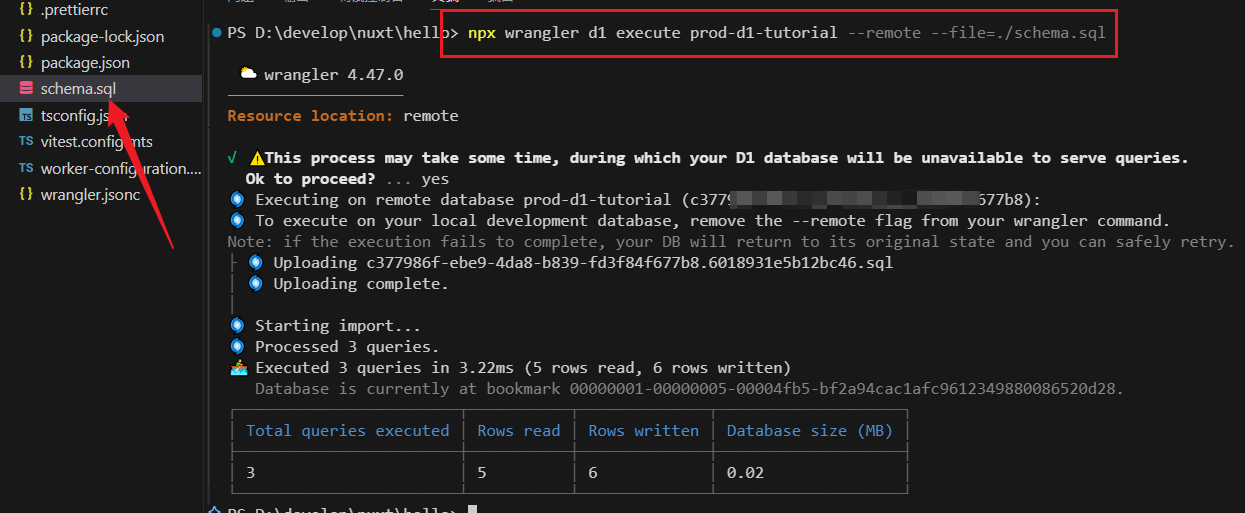
上述 sql 执行后,可以通过以下命令查看 d1 中的数据内容
shell
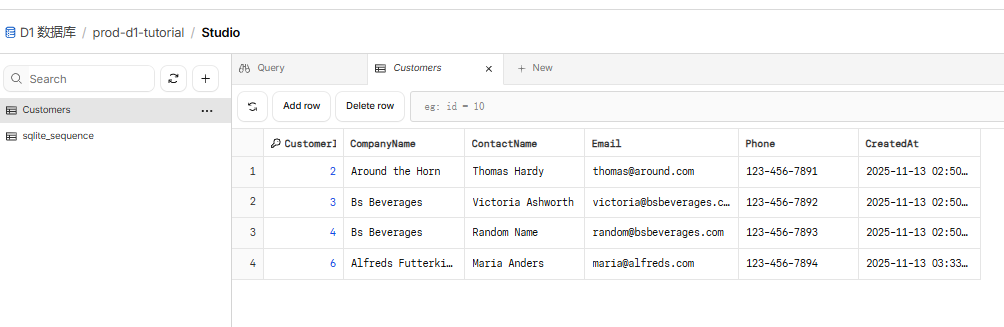
npx wrangler d1 execute prod-d1-tutorial --remote --command="SELECT * FROM Customers"` 也可以在 cf 的 web 页面上查看数据记录
代码读写表记录
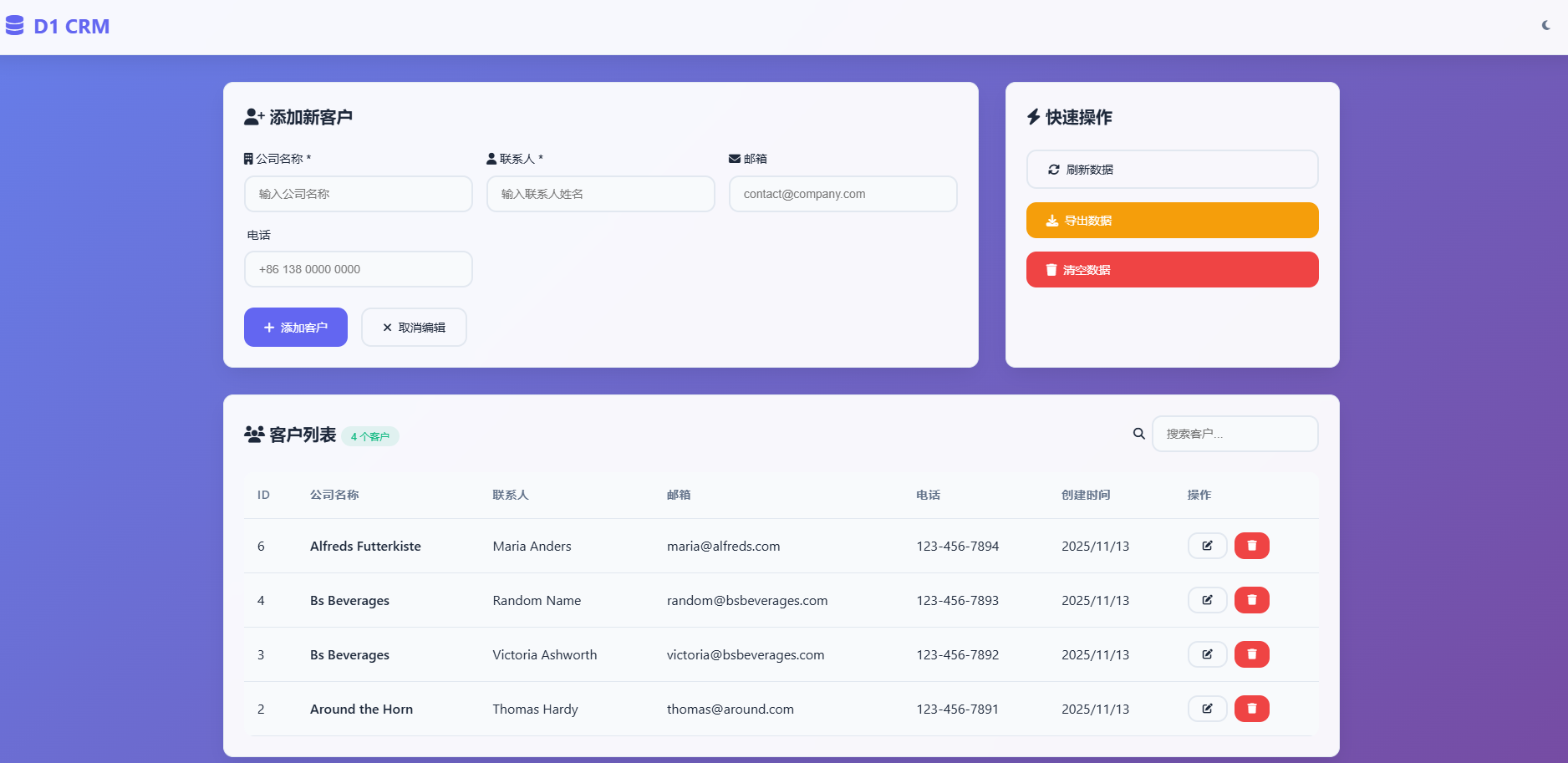
前面已经创建了数据库和表,并插入了一些数据,现在实现一个简单的页面,对数据库进行增删改用户数据,测试后将代码通过 npm run deploy 发布到 cf 中
发布的最终效果如下,可以实现新增记录、修改记录、删除记录
项目原有两个代码文件 public/index.html 和 src/index.ts,修改后最终的代码如下
html
<!DOCTYPE html>
<html lang="zh-CN" data-theme="light">
<head>
<meta charset="UTF-8">
<meta name="viewport" content="width=device-width, initial-scale=1.0">
<title>D1 CRM - 现代化客户管理系统</title>
<script src="https://unpkg.com/htmx.org@1.9.10"></script>
<script src="https://unpkg.com/hyperscript.org@0.9.11"></script>
<link href="https://cdnjs.cloudflare.com/ajax/libs/font-awesome/6.4.0/css/all.min.css" rel="stylesheet">
<style>
:root {
--primary: #6366f1;
--primary-dark: #4f46e5;
--secondary: #f8fafc;
--accent: #f59e0b;
--text: #1e293b;
--text-light: #64748b;
--border: #e2e8f0;
--success: #10b981;
--warning: #f59e0b;
--error: #ef4444;
--shadow: 0 10px 25px -5px rgba(0, 0, 0, 0.1);
--radius: 12px;
--transition: all 0.3s cubic-bezier(0.4, 0, 0.2, 1);
}
[data-theme="dark"] {
--primary: #818cf8;
--primary-dark: #6366f1;
--secondary: #1e293b;
--accent: #fbbf24;
--text: #f1f5f9;
--text-light: #94a3b8;
--border: #334155;
--shadow: 0 10px 25px -5px rgba(0, 0, 0, 0.3);
}
* {
margin: 0;
padding: 0;
box-sizing: border-box;
}
body {
font-family: 'Inter', 'Segoe UI', system-ui, sans-serif;
background: linear-gradient(135deg, #667eea 0%, #764ba2 100%);
min-height: 100vh;
color: var(--text);
line-height: 1.6;
}
.app-container {
min-height: 100vh;
display: flex;
flex-direction: column;
}
/* Header */
.header {
background: rgba(255, 255, 255, 0.95);
backdrop-filter: blur(20px);
border-bottom: 1px solid var(--border);
padding: 1rem 2rem;
display: flex;
justify-content: space-between;
align-items: center;
box-shadow: var(--shadow);
}
[data-theme="dark"] .header {
background: rgba(30, 41, 59, 0.95);
}
.logo {
display: flex;
align-items: center;
gap: 0.75rem;
font-size: 1.5rem;
font-weight: 700;
color: var(--primary);
}
.theme-toggle {
background: none;
border: none;
color: var(--text-light);
cursor: pointer;
padding: 0.5rem;
border-radius: var(--radius);
transition: var(--transition);
}
.theme-toggle:hover {
color: var(--text);
background: var(--secondary);
}
/* Main Content */
.main-content {
flex: 1;
padding: 2rem;
max-width: 1400px;
margin: 0 auto;
width: 100%;
}
.dashboard {
display: grid;
gap: 2rem;
grid-template-columns: 1fr 400px;
}
@media (max-width: 1024px) {
.dashboard {
grid-template-columns: 1fr;
}
}
/* Cards */
.card {
background: rgba(255, 255, 255, 0.95);
backdrop-filter: blur(20px);
border-radius: var(--radius);
padding: 1.5rem;
box-shadow: var(--shadow);
border: 1px solid var(--border);
transition: var(--transition);
}
[data-theme="dark"] .card {
background: rgba(30, 41, 59, 0.95);
}
.card:hover {
transform: translateY(-2px);
box-shadow: 0 20px 40px -10px rgba(0, 0, 0, 0.15);
}
.card-header {
display: flex;
justify-content: space-between;
align-items: center;
margin-bottom: 1.5rem;
}
.card-title {
font-size: 1.25rem;
font-weight: 600;
color: var(--text);
}
/* Form Styles */
.form-grid {
display: grid;
gap: 1rem;
grid-template-columns: repeat(auto-fit, minmax(250px, 1fr));
}
.form-group {
display: flex;
flex-direction: column;
gap: 0.5rem;
}
.form-label {
font-weight: 500;
color: var(--text);
font-size: 0.875rem;
}
.form-input {
padding: 0.75rem 1rem;
border: 2px solid var(--border);
border-radius: var(--radius);
background: var(--secondary);
color: var(--text);
transition: var(--transition);
font-size: 0.875rem;
}
.form-input:focus {
outline: none;
border-color: var(--primary);
box-shadow: 0 0 0 3px rgba(99, 102, 241, 0.1);
}
/* Button Styles */
.btn {
padding: 0.75rem 1.5rem;
border: none;
border-radius: var(--radius);
font-weight: 500;
font-size: 0.875rem;
cursor: pointer;
transition: var(--transition);
display: inline-flex;
align-items: center;
gap: 0.5rem;
text-decoration: none;
}
.btn-primary {
background: var(--primary);
color: white;
}
.btn-primary:hover {
background: var(--primary-dark);
transform: translateY(-1px);
}
.btn-success {
background: var(--success);
color: white;
}
.btn-warning {
background: var(--warning);
color: white;
}
.btn-danger {
background: var(--error);
color: white;
}
.btn-outline {
background: transparent;
border: 2px solid var(--border);
color: var(--text);
}
.btn-sm {
padding: 0.5rem 1rem;
font-size: 0.75rem;
}
/* Table Styles */
.table-container {
overflow-x: auto;
border-radius: var(--radius);
}
.data-table {
width: 100%;
border-collapse: collapse;
background: var(--secondary);
}
.data-table th,
.data-table td {
padding: 1rem;
text-align: left;
border-bottom: 1px solid var(--border);
}
.data-table th {
background: var(--secondary);
font-weight: 600;
font-size: 0.875rem;
color: var(--text-light);
text-transform: uppercase;
letter-spacing: 0.05em;
}
.data-table tr:hover {
background: rgba(99, 102, 241, 0.05);
}
.actions-cell {
display: flex;
gap: 0.5rem;
}
/* Status Indicators */
.status-badge {
padding: 0.25rem 0.75rem;
border-radius: 20px;
font-size: 0.75rem;
font-weight: 500;
}
.status-active {
background: rgba(16, 185, 129, 0.1);
color: var(--success);
}
/* Loading States */
.skeleton {
background: linear-gradient(90deg, #f0f0f0 25%, #e0e0e0 50%, #f0f0f0 75%);
background-size: 200% 100%;
animation: loading 1.5s infinite;
border-radius: 4px;
}
@keyframes loading {
0% { background-position: 200% 0; }
100% { background-position: -200% 0; }
}
/* Toast Notifications */
.toast-container {
position: fixed;
top: 2rem;
right: 2rem;
z-index: 1000;
}
.toast {
background: var(--secondary);
border-left: 4px solid var(--primary);
padding: 1rem;
border-radius: var(--radius);
box-shadow: var(--shadow);
margin-bottom: 1rem;
animation: slideIn 0.3s ease-out;
}
@keyframes slideIn {
from { transform: translateX(100%); opacity: 0; }
to { transform: translateX(0); opacity: 1; }
}
/* Responsive */
@media (max-width: 768px) {
.main-content {
padding: 1rem;
}
.header {
padding: 1rem;
}
.form-grid {
grid-template-columns: 1fr;
}
.actions-cell {
flex-direction: column;
}
}
</style>
</head>
<body>
<div class="app-container" id="app">
<!-- Header -->
<header class="header">
<div class="logo">
<i class="fas fa-database"></i>
<span>D1 CRM</span>
</div>
<button class="theme-toggle" onclick="toggleTheme()">
<i class="fas fa-moon"></i>
</button>
</header>
<!-- Main Content -->
<main class="main-content">
<div class="dashboard">
<!-- Customer Form -->
<div class="card">
<div class="card-header">
<h2 class="card-title" id="formTitle">
<i class="fas fa-user-plus"></i>
添加新客户
</h2>
</div>
<form id="customerForm" _="on submit halt the event then call submitCustomerForm()">
<input type="hidden" id="customerId">
<div class="form-grid">
<div class="form-group">
<label class="form-label" for="CompanyName">
<i class="fas fa-building"></i> 公司名称 *
</label>
<input type="text" id="CompanyName" class="form-input" required
placeholder="输入公司名称">
</div>
<div class="form-group">
<label class="form-label" for="ContactName">
<i class="fas fa-user"></i> 联系人 *
</label>
<input type="text" id="ContactName" class="form-input" required
placeholder="输入联系人姓名">
</div>
<div class="form-group">
<label class="form-label" for="Email">
<i class="fas fa-envelope"></i> 邮箱
</label>
<input type="Email" id="Email" class="form-input"
placeholder="contact@company.com">
</div>
<div class="form-group">
<label class="form-label" for="Phone">
<i class="fas fa-Phone"></i> 电话
</label>
<input type="tel" id="Phone" class="form-input"
placeholder="+86 138 0000 0000">
</div>
</div>
<div style="display: flex; gap: 1rem; margin-top: 1.5rem; flex-wrap: wrap;">
<button type="submit" class="btn btn-primary" id="submitBtn">
<i class="fas fa-plus"></i> 添加客户
</button>
<button type="submit" class="btn btn-success" id="updateBtn" style="display: none;">
<i class="fas fa-save"></i> 更新客户
</button>
<button type="button" class="btn btn-outline" onclick="resetForm()">
<i class="fas fa-times"></i> 取消编辑
</button>
</div>
</form>
</div>
<!-- Quick Actions -->
<div class="card">
<div class="card-header">
<h2 class="card-title">
<i class="fas fa-bolt"></i> 快速操作
</h2>
</div>
<div style="display: flex; flex-direction: column; gap: 1rem;">
<button class="btn btn-outline" onclick="loadCustomers()">
<i class="fas fa-sync-alt"></i> 刷新数据
</button>
<button class="btn btn-warning" onclick="exportData()">
<i class="fas fa-download"></i> 导出数据
</button>
<button class="btn btn-danger" onclick="confirmDeleteAll()">
<i class="fas fa-trash"></i> 清空数据
</button>
</div>
</div>
</div>
<!-- Customer Table -->
<div class="card" style="margin-top: 2rem;">
<div class="card-header">
<h2 class="card-title">
<i class="fas fa-users"></i> 客户列表
<span class="status-badge status-active" id="customerCount">加载中...</span>
</h2>
<div style="display: flex; gap: 1rem; align-items: center;">
<div class="form-group" style="flex-direction: row; align-items: center;">
<label class="form-label" for="search">
<i class="fas fa-search"></i>
</label>
<input type="text" id="search" class="form-input"
placeholder="搜索客户..." oninput="filterCustomers()"
style="width: 200px;">
</div>
</div>
</div>
<div class="table-container">
<table class="data-table" id="customersTable">
<thead>
<tr>
<th>ID</th>
<th>公司名称</th>
<th>联系人</th>
<th>邮箱</th>
<th>电话</th>
<th>创建时间</th>
<th>操作</th>
</tr>
</thead>
<tbody id="customersTableBody">
<tr>
<td colspan="7" style="text-align: center; padding: 3rem;">
<div class="skeleton" style="height: 20px; margin-bottom: 0.5rem;"></div>
<div class="skeleton" style="height: 20px; width: 60%; margin: 0 auto;"></div>
</td>
</tr>
</tbody>
</table>
</div>
</div>
</main>
<!-- Toast Container -->
<div class="toast-container" id="toastContainer"></div>
</div>
<script>
// 现代化 JavaScript 代码
class D1CRM {
constructor() {
this.currentEditingId = null;
this.customers = [];
this.init();
}
async init() {
await this.loadCustomers();
this.setupEventListeners();
this.showToast('系统初始化完成', 'success');
}
setupEventListeners() {
// 表单提交事件
document.getElementById('customerForm').addEventListener('submit', (e) => {
e.preventDefault();
this.submitCustomerForm();
});
// 实时搜索
document.getElementById('search').addEventListener('input', (e) => {
this.filterCustomers(e.target.value);
});
}
async loadCustomers() {
try {
this.showLoading();
const response = await fetch('/api/customers');
if (!response.ok) throw new Error('获取数据失败');
const result = await response.json();
if (result && result.success && Array.isArray(result.data)) {
this.customers = result.data;
} else {
this.customers = [];
console.warn('Unexpected API response format:', result);
}
this.renderCustomers();
this.updateCustomerCount();
} catch (error) {
this.showToast(`加载失败: ${error.message}`, 'error');
}
}
renderCustomers(customers = this.customers) {
const tbody = document.getElementById('customersTableBody');
if (customers.length === 0) {
tbody.innerHTML = `
<tr>
<td colspan="7" style="text-align: center; padding: 3rem; color: var(--text-light);">
<i class="fas fa-inbox" style="font-size: 3rem; margin-bottom: 1rem; opacity: 0.5;"></i>
<div>暂无客户数据</div>
</td>
</tr>
`;
return;
}
tbody.innerHTML = customers.map(customer => `
<tr>
<td>${customer.CustomerId}</td>
<td>
<div style="font-weight: 600;">${customer.CompanyName}</div>
</td>
<td>${customer.ContactName}</td>
<td>${customer.Email || '<span style="opacity: 0.5;">未设置</span>'}</td>
<td>${customer.Phone || '<span style="opacity: 0.5;">未设置</span>'}</td>
<td>${new Date(customer.CreatedAt).toLocaleDateString('zh-CN')}</td>
<td class="actions-cell">
<button class="btn btn-outline btn-sm"
onclick="app.editCustomer(${customer.CustomerId})"
title="编辑">
<i class="fas fa-edit"></i>
</button>
<button class="btn btn-danger btn-sm"
onclick="app.deleteCustomer(${customer.CustomerId})"
title="删除">
<i class="fas fa-trash"></i>
</button>
</td>
</tr>
`).join('');
}
async submitCustomerForm() {
const formData = this.getFormData();
if (!this.validateForm(formData)) return;
try {
const url = this.currentEditingId
? `/api/customers/${this.currentEditingId}`
: '/api/customers';
const method = this.currentEditingId ? 'PUT' : 'POST';
const response = await fetch(url, {
method,
headers: { 'Content-Type': 'application/json' },
body: JSON.stringify(formData)
});
if (!response.ok) throw new Error('操作失败');
const result = await response.json();
this.showToast(
this.currentEditingId ? '客户更新成功' : '客户添加成功',
'success'
);
this.resetForm();
await this.loadCustomers();
} catch (error) {
this.showToast(`操作失败: ${error.message}`, 'error');
}
}
async editCustomer(id) {
try {
const response = await fetch(`/api/customers/${id}`);
if (!response.ok) throw new Error('获取客户信息失败');
const result = await response.json();
if (!result || !result.success) {
throw new Error('客户信息格式错误');
}
const customer = result.data;
if (!customer || !customer.CompanyName) {
throw new Error('客户数据不完整');
}
this.populateForm(customer);
this.showToast(`正在编辑: ${customer.CompanyName}`, 'info');
} catch (error) {
this.showToast(`编辑失败: ${error.message}`, 'error');
}
}
async deleteCustomer(id) {
if (!confirm('确定要删除这个客户吗?此操作不可恢复!')) return;
try {
const response = await fetch(`/api/customers/${id}`, {
method: 'DELETE'
});
if (!response.ok) throw new Error('删除失败');
this.showToast('客户删除成功', 'success');
await this.loadCustomers();
} catch (error) {
this.showToast(`删除失败: ${error.message}`, 'error');
}
}
// 辅助方法
getFormData() {
return {
CompanyName: document.getElementById('CompanyName').value.trim(),
ContactName: document.getElementById('ContactName').value.trim(),
Email: document.getElementById('Email').value.trim(),
Phone: document.getElementById('Phone').value.trim()
};
}
validateForm(data) {
if (!data.CompanyName || !data.ContactName) {
this.showToast('公司名称和联系人为必填项', 'warning');
return false;
}
return true;
}
populateForm(customer) {
document.getElementById('customerId').value = customer.CustomerId;
document.getElementById('CompanyName').value = customer.CompanyName;
document.getElementById('ContactName').value = customer.ContactName;
document.getElementById('Email').value = customer.Email || '';
document.getElementById('Phone').value = customer.Phone || '';
this.currentEditingId = customer.CustomerId;
document.getElementById('submitBtn').style.display = 'none';
document.getElementById('updateBtn').style.display = 'inline-flex';
document.getElementById('formTitle').innerHTML =
'<i class="fas fa-edit"></i> 编辑客户';
}
resetForm() {
document.getElementById('customerForm').reset();
this.currentEditingId = null;
document.getElementById('submitBtn').style.display = 'inline-flex';
document.getElementById('updateBtn').style.display = 'none';
document.getElementById('formTitle').innerHTML =
'<i class="fas fa-user-plus"></i> 添加新客户';
}
filterCustomers(searchTerm = '') {
const filtered = this.customers.filter(customer =>
customer.CompanyName.toLowerCase().includes(searchTerm.toLowerCase()) ||
customer.ContactName.toLowerCase().includes(searchTerm.toLowerCase()) ||
(customer.Email && customer.Email.toLowerCase().includes(searchTerm.toLowerCase()))
);
this.renderCustomers(filtered);
}
updateCustomerCount() {
document.getElementById('customerCount').textContent =
`${this.customers.length} 个客户`;
}
showLoading() {
const tbody = document.getElementById('customersTableBody');
tbody.innerHTML = `
<tr>
<td colspan="7" style="text-align: center; padding: 2rem;">
<i class="fas fa-spinner fa-spin" style="font-size: 2rem; color: var(--primary);"></i>
<div style="margin-top: 1rem; color: var(--text-light);">加载中...</div>
</td>
</tr>
`;
}
showToast(message, type = 'info') {
const toastContainer = document.getElementById('toastContainer');
const toast = document.createElement('div');
toast.className = 'toast';
toast.innerHTML = `
<div style="display: flex; align-items: center; gap: 0.5rem;">
<i class="fas fa-${this.getToastIcon(type)}"
style="color: var(--${type});"></i>
<span>${message}</span>
</div>
`;
toastContainer.appendChild(toast);
setTimeout(() => {
toast.remove();
}, 3000);
}
getToastIcon(type) {
const icons = {
success: 'check-circle',
error: 'exclamation-circle',
warning: 'exclamation-triangle',
info: 'info-circle'
};
return icons[type] || 'info-circle';
}
}
// 全局函数
function toggleTheme() {
const currentTheme = document.documentElement.getAttribute('data-theme');
const newTheme = currentTheme === 'dark' ? 'light' : 'dark';
document.documentElement.setAttribute('data-theme', newTheme);
const icon = document.querySelector('.theme-toggle i');
icon.className = newTheme === 'dark' ? 'fas fa-sun' : 'fas fa-moon';
localStorage.setItem('theme', newTheme);
}
function confirmDeleteAll() {
if (!confirm('确定要删除所有客户数据吗?此操作不可恢复!')) return;
app.deleteAllCustomers();
}
async function exportData() {
// 简单的导出功能
const data = JSON.stringify(app.customers, null, 2);
const blob = new Blob([data], { type: 'application/json' });
const url = URL.createObjectURL(blob);
const a = document.createElement('a');
a.href = url;
a.download = `customers-${new Date().toISOString().split('T')[0]}.json`;
a.click();
URL.revokeObjectURL(url);
app.showToast('数据导出成功', 'success');
}
// 初始化应用
const app = new D1CRM();
// 设置主题
const savedTheme = localStorage.getItem('theme') || 'light';
document.documentElement.setAttribute('data-theme', savedTheme);
</script>
</body>
</html>
ts
// 类型定义
interface Customer {
	CustomerId?: number;
	CompanyName: string;
	ContactName: string;
	Email?: string;
	Phone?: string;
	CreatedAt?: string;
  }

  interface ApiResponse<T = any> {
	success: boolean;
	data?: T;
	error?: string;
	message?: string;
	metadata?: {
	  total?: number;
	  page?: number;
	  limit?: number;
	};
  }

  // 环境变量类型
  export interface Env {
	prod_d1_tutorial: D1Database;
  }

  // 错误处理类
  class AppError extends Error {
	constructor(
	  message: string,
	  public statusCode: number = 500,
	  public code?: string
	) {
	  super(message);
	  this.name = 'AppError';
	}
  }

  // 响应工具类
  class ResponseBuilder {
	static json<T>(data: T, status: number = 200, headers?: Record<string, string>): Response {
	  const response: ApiResponse<T> = {
		success: status < 400,
		data
	  };

	  return new Response(JSON.stringify(response), {
		status,
		headers: {
		  'Content-Type': 'application/json',
		  'Access-Control-Allow-Origin': '*',
		  'Access-Control-Allow-Methods': 'GET, POST, PUT, DELETE, OPTIONS',
		  'Access-Control-Allow-Headers': 'Content-Type, Authorization',
		  ...headers,
		},
	  });
	}

	static error(error: string, status: number = 500, code?: string): Response {
	  const response: ApiResponse = {
		success: false,
		error,
		...(code && { code })
	  };

	  return new Response(JSON.stringify(response), {
		status,
		headers: {
		  'Content-Type': 'application/json',
		  'Access-Control-Allow-Origin': '*',
		  'Access-Control-Allow-Methods': 'GET, POST, PUT, DELETE, OPTIONS',
		  'Access-Control-Allow-Headers': 'Content-Type, Authorization',
		},
	  });
	}

	static success(message: string, data?: any): Response {
	  const response: ApiResponse = {
		success: true,
		message,
		...(data && { data })
	  };

	  return ResponseBuilder.json(response, 200);
	}
  }

  // 验证工具类
  class Validator {
	static validateCustomer(data: any): Partial<Customer> {
	  const errors: string[] = [];

	  if (!data.CompanyName || typeof data.CompanyName !== 'string' || data.CompanyName.trim().length === 0) {
		errors.push('CompanyName is required and must be a non-empty string');
	  }

	  if (!data.ContactName || typeof data.ContactName !== 'string' || data.ContactName.trim().length === 0) {
		errors.push('ContactName is required and must be a non-empty string');
	  }

	  if (data.Email && typeof data.Email !== 'string') {
		errors.push('Email must be a string');
	  }

	  if (data.Phone && typeof data.Phone !== 'string') {
		errors.push('Phone must be a string');
	  }

	  if (errors.length > 0) {
		throw new AppError(`Validation failed: ${errors.join(', ')}`, 400, 'VALIDATION_ERROR');
	  }

	  return {
		CompanyName: data.CompanyName.trim(),
		ContactName: data.ContactName.trim(),
		Email: data.Email ? data.Email.trim() : null,
		Phone: data.Phone ? data.Phone.trim() : null,
	  };
	}
  }

  // 数据库服务类
  class CustomerService {
	constructor(private db: D1Database) {}

	async getAllCustomers(): Promise<Customer[]> {
	  try {
		const query = `
		  SELECT
			CustomerId,
			CompanyName,
			ContactName,
			Email,
			Phone,
			CreatedAt
		  FROM Customers
		  ORDER BY CustomerId DESC
		`;

		const result = await this.db.prepare(query).all();
		return result.results as Customer[];
	  } catch (error) {
		console.error('Database error in getAllCustomers:', error);
		throw new AppError('Failed to fetch customers', 500, 'DATABASE_ERROR');
	  }
	}

	async getCustomerById(id: number): Promise<Customer | null> {
	  try {
		const query = `
		  SELECT
			CustomerId,
			CompanyName,
			ContactName,
			Email,
			Phone,
			CreatedAt
		  FROM Customers
		  WHERE CustomerId = ?
		`;

		const result = await this.db.prepare(query).bind(id).all();
		return result.results.length > 0 ? result.results[0] as Customer : null;
	  } catch (error) {
		console.error('Database error in getCustomerById:', error);
		throw new AppError('Failed to fetch customer', 500, 'DATABASE_ERROR');
	  }
	}

	async createCustomer(customerData: Omit<Customer, 'CustomerId'>): Promise<{ id: number }> {
	  try {
		const query = `
		  INSERT INTO Customers (CompanyName, ContactName, Email, Phone)
		  VALUES (?, ?, ?, ?)
		`;

		const result = await this.db
		  .prepare(query)
		  .bind(
			customerData.CompanyName,
			customerData.ContactName,
			customerData.Email || null,
			customerData.Phone || null
		  )
		  .run();

		return { id: Number(result.meta.last_row_id) };
	  } catch (error) {
		console.error('Database error in createCustomer:', error);
		throw new AppError('Failed to create customer', 500, 'DATABASE_ERROR');
	  }
	}

	async updateCustomer(id: number, customerData: Partial<Customer>): Promise<{ changes: number }> {
	  try {
		const query = `
		  UPDATE Customers
		  SET CompanyName = ?, ContactName = ?, Email = ?, Phone = ?
		  WHERE CustomerId = ?
		`;

		const result = await this.db
		  .prepare(query)
		  .bind(
			customerData.CompanyName,
			customerData.ContactName,
			customerData.Email || null,
			customerData.Phone || null,
			id
		  )
		  .run();

		return { changes: result.meta.changes || 0 };
	  } catch (error) {
		console.error('Database error in updateCustomer:', error);
		throw new AppError('Failed to update customer', 500, 'DATABASE_ERROR');
	  }
	}

	async deleteCustomer(id: number): Promise<{ changes: number }> {
	  try {
		const query = 'DELETE FROM Customers WHERE CustomerId = ?';
		const result = await this.db.prepare(query).bind(id).run();
		return { changes: result.meta.changes || 0 };
	  } catch (error) {
		console.error('Database error in deleteCustomer:', error);
		throw new AppError('Failed to delete customer', 500, 'DATABASE_ERROR');
	  }
	}

	async deleteAllCustomers(): Promise<{ changes: number }> {
	  try {
		const query = 'DELETE FROM Customers';
		const result = await this.db.prepare(query).run();
		return { changes: result.meta.changes || 0 };
	  } catch (error) {
		console.error('Database error in deleteAllCustomers:', error);
		throw new AppError('Failed to delete all customers', 500, 'DATABASE_ERROR');
	  }
	}
  }

  // 路由处理器类
  class CustomerHandler {
	private service: CustomerService;

	constructor(private env: Env) {
	  this.service = new CustomerService(env.prod_d1_tutorial);
	}

	async handleRequest(request: Request, pathname: string, customerId?: number): Promise<Response> {
	  try {
		switch (request.method) {
		  case 'GET':
			if (customerId) {
			  return await this.getCustomer(customerId);
			} else {
			  return await this.getAllCustomers();
			}

		  case 'POST':
			if (!customerId) {
			  return await this.createCustomer(request);
			}
			break;

		  case 'PUT':
			if (customerId) {
			  return await this.updateCustomer(request, customerId);
			}
			break;

		  case 'DELETE':
			if (customerId) {
			  return await this.deleteCustomer(customerId);
			} else {
			  return await this.deleteAllCustomers();
			}

		  default:
			return ResponseBuilder.error('Method not allowed', 405);
		}

		return ResponseBuilder.error('Not found', 404);
	  } catch (error) {
		return this.handleError(error);
	  }
	}

	private async getAllCustomers(): Promise<Response> {
	  const customers = await this.service.getAllCustomers();
	  return ResponseBuilder.json(customers, 200, {
		'Cache-Control': 'no-cache',
	  });
	}

	private async getCustomer(id: number): Promise<Response> {
	  const customer = await this.service.getCustomerById(id);

	  if (!customer) {
		return ResponseBuilder.error('Customer not found', 404, 'NOT_FOUND');
	  }

	  return ResponseBuilder.json(customer);
	}

	private async createCustomer(request: Request): Promise<Response> {
	  let body: any;

	  try {
		body = await request.json();
	  } catch {
		return ResponseBuilder.error('Invalid JSON body', 400, 'INVALID_JSON');
	  }

	  const validatedData = Validator.validateCustomer(body);
	  const result = await this.service.createCustomer(validatedData);

	  return ResponseBuilder.success('Customer created successfully', { id: result.id });
	}

	private async updateCustomer(request: Request, id: number): Promise<Response> {
	  // 检查客户是否存在
	  const existingCustomer = await this.service.getCustomerById(id);
	  if (!existingCustomer) {
		return ResponseBuilder.error('Customer not found', 404, 'NOT_FOUND');
	  }

	  let body: any;

	  try {
		body = await request.json();
	  } catch {
		return ResponseBuilder.error('Invalid JSON body', 400, 'INVALID_JSON');
	  }

	  const validatedData = Validator.validateCustomer(body);
	  const result = await this.service.updateCustomer(id, validatedData);

	  if (result.changes === 0) {
		return ResponseBuilder.error('No changes made', 400, 'NO_CHANGES');
	  }

	  return ResponseBuilder.success('Customer updated successfully');
	}

	private async deleteCustomer(id: number): Promise<Response> {
	  // 检查客户是否存在
	  const existingCustomer = await this.service.getCustomerById(id);
	  if (!existingCustomer) {
		return ResponseBuilder.error('Customer not found', 404, 'NOT_FOUND');
	  }

	  const result = await this.service.deleteCustomer(id);

	  if (result.changes === 0) {
		return ResponseBuilder.error('Failed to delete customer', 500, 'DELETE_FAILED');
	  }

	  return ResponseBuilder.success('Customer deleted successfully');
	}

	private async deleteAllCustomers(): Promise<Response> {
	  const result = await this.service.deleteAllCustomers();
	  return ResponseBuilder.success(`Deleted ${result.changes} customers successfully`);
	}

	private handleError(error: any): Response {
	  if (error instanceof AppError) {
		return ResponseBuilder.error(error.message, error.statusCode, error.code);
	  }

	  console.error('Unhandled error:', error);
	  return ResponseBuilder.error('Internal server error', 500, 'INTERNAL_ERROR');
	}
  }

  // 静态资源服务
  class StaticAssetHandler {
	private readonly htmlContent = `<!DOCTYPE html>
  <html lang="zh-CN" data-theme="light">
  <head>
	  <meta charset="UTF-8">
	  <meta name="viewport" content="width=device-width, initial-scale=1.0">
	  <title>D1 CRM - 现代化客户管理系统</title>
	  <script src="https://unpkg.com/htmx.org@1.9.10"></script>
	  <script src="https://unpkg.com/hyperscript.org@0.9.11"></script>
	  <link href="https://cdnjs.cloudflare.com/ajax/libs/font-awesome/6.4.0/css/all.min.css" rel="stylesheet">
	  <style>
		  /* 这里包含之前提供的完整CSS样式 */
		  :root { --primary: #6366f1; --primary-dark: #4f46e5; /* ... 完整CSS样式 */ }
	  </style>
  </head>
  <body>
	  <div class="app-container" id="app">
		  <!-- 这里包含之前提供的完整HTML结构 -->
		  <header class="header">...</header>
		  <main class="main-content">...</main>
		  <div class="toast-container" id="toastContainer"></div>
	  </div>

	  <script>
		  // 这里包含之前提供的完整JavaScript代码
		  class D1CRM { /* ... 完整JavaScript代码 */ }
		  const app = new D1CRM();
	  </script>
  </body>
  </html>`;

	handleRequest(request: Request): Response {
	  const acceptHeader = request.headers.get('accept') || '';

	  if (acceptHeader.includes('text/html')) {
		return new Response(this.htmlContent, {
		  status: 200,
		  headers: {
			'Content-Type': 'text/html; charset=utf-8',
			'Cache-Control': 'no-cache',
		  },
		});
	  }

	  return ResponseBuilder.error('Not found', 404);
	}
  }

  // 主处理器
  export default {
	async fetch(request: Request, env: Env, ctx: ExecutionContext): Promise<Response> {
	  const url = new URL(request.url);
	  const pathname = url.pathname;

	  // 处理预检请求
	  if (request.method === 'OPTIONS') {
		return new Response(null, {
		  headers: {
			'Access-Control-Allow-Origin': '*',
			'Access-Control-Allow-Methods': 'GET, POST, PUT, DELETE, OPTIONS',
			'Access-Control-Allow-Headers': 'Content-Type, Authorization',
			'Access-Control-Max-Age': '86400',
		  },
		});
	  }

	  // API 路由
	  if (pathname.startsWith('/api/customers')) {
		const customerHandler = new CustomerHandler(env);

		// 提取客户ID
		const idMatch = pathname.match(/^\/api\/customers\/(\d+)$/);
		const customerId = idMatch ? parseInt(idMatch[1]) : undefined;

		return customerHandler.handleRequest(request, pathname, customerId);
	  }

	  // 静态资源路由 (根路径)
	  if (pathname === '/' || pathname === '/index.html') {
		const staticHandler = new StaticAssetHandler();
		return staticHandler.handleRequest(request);
	  }

	  // 默认返回首页
	  const staticHandler = new StaticAssetHandler();
	  return staticHandler.handleRequest(request);
	},
  } satisfies ExportedHandler<Env>;