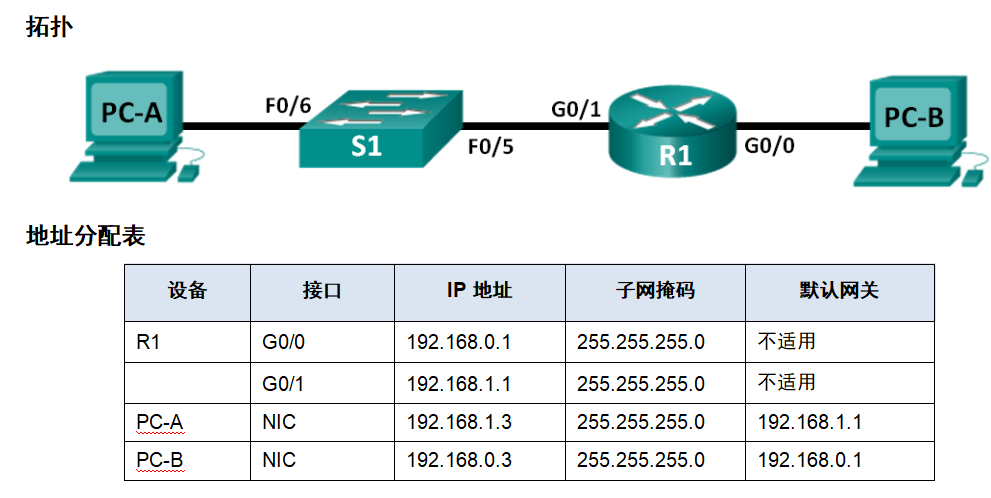
1、配置拓扑及地址表(本图基于思科网络学习文档)
2、主机地址及路由器配置
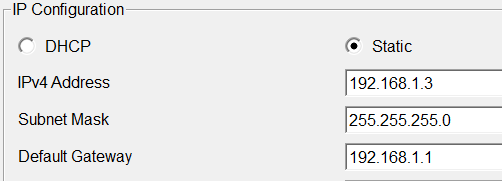
(1)PC-A地址:192.168.1.3 255.255.255.0 192.168.1.1 (网关)
(2)PC-B地址:192.168.0.3 255.255.255.0 192.168.0.1(网关)

(3)路由器配置
R1(config)#int g0/1
R1(config-if)#ip address 192.168.1.1 255.255.255.0
R1(config-if)#no shutdown
R1(config)#int g0/0R1(config-if)#ip address 192.168.0.1 255.255.255.0
R1(config-if)#no shutdown
3、路由表
(1)PC-A:
|--------------------------------|-------------|
| 网络 | 下一跳 |
| 192.168.1.0(/24,255.255.255.0) | 直连网络f0 |
| 0.0.0.0/0 | 192.168.1.1 |
(2)PC-B
|--------------------------------|-------------|
| 网络 | 下一跳 |
| 192.168.0.0(/24,255.255.255.0) | 直连网络f0 |
| 0.0.0.0/0 | 192.168.0.1 |
(3)路由器
192.168.0.0/24 is variably subnetted, 2 subnets, 2 masks
C 192.168.0.0/24 is directly connected, GigabitEthernet0/0
L 192.168.0.1/32 is directly connected, GigabitEthernet0/0
192.168.1.0/24 is variably subnetted, 2 subnets, 2 masks
C 192.168.1.0/24 is directly connected, GigabitEthernet0/1
L 192.168.1.1/32 is directly connected, GigabitEthernet0/1
|--------------------------------|-----------|
| 网络 | 下一跳 |
| 192.168.1.0(/24,255.255.255.0) | 直连网络,g0/1 |
| 192.168.0.0(/24,255.255.255.0) | 直连网络,g0/0 |
4.网络测试(PC-A ping PC-B)
|-----------------|------------------|
| 源IP:192.168.1.3 | 目的IP:192.168.0.3 |
(1)在PC-A处:用目的IP192.168.0.3 与(/24)255.255.255.0按位相与得出结果192.168.0.0,与PC-A的第一条路由不匹配,于是要把数据发送给网关(0.0.0.0/0,192.168.1.1),此时ARP请求网关的硬件地址,之后将数据封装成数据帧,发送给路由器。
(2)在路由器处,路由器收到数据后(192.168.0.3与255.255.255.0按位相与),结果与路由表进行对比,符合192.168.0.0条目,因此从接口0转发,ARP请求获取地址后将数据发送给PC-B,之后PC-B给出响应,因已经学习过硬件地址,所有回去的路上,在有效期内不要ARP。
(3)PC-B执行和(1)(2)类似的过程,将数据返回PC-A。
C:\>ping 192.168.0.3Pinging 192.168.0.3 with 32 bytes of data:
Reply from 192.168.0.3: bytes=32 time=3ms TTL=127
Reply from 192.168.0.3: bytes=32 time=1ms TTL=127
Reply from 192.168.0.3: bytes=32 time<1ms TTL=127
Reply from 192.168.0.3: bytes=32 time=1ms TTL=127
Ping statistics for 192.168.0.3:
Packets: Sent = 4, Received = 4, Lost = 0 (0% loss),
Approximate round trip times in milli-seconds:
Minimum = 0ms, Maximum = 3ms, Average = 1ms
5、路由器console密码配置
R1(config)#line console 0
R1(config-line)#password cisco12345
R1(config-line)#login
R1(config-line)#logging sy
User Access VerificationPassword:
R1>
此时我们可以看到,当在命令行敲exit,完全退出登录后(特权模式敲一次,全局配置模式两次,依次类推,更深的层次多敲一次),这时要进入普通用户模式就需要输入,console 密码。
6、路由器设置enable密码
R1(config)#enable secret cisco12345
这时当我们从普通用户模式(>),enalbe要进入特权模式(#)时需要输入该密码。
R1>enable
Password:
R1#
(备注:packet tracer中,密码不显示*,也不显示其它)
7、路由器设置远程登录密码(Telnet)
R1(config)#line vty 0 4
R1(config-line)#password cisco12345
R1(config-line)#login
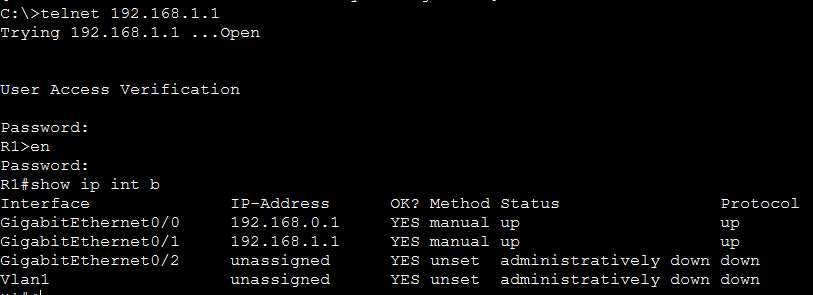
此时我们打开主机PA-C选择命令行登录(telnet 192.168.1.1),要求输入密码进入。