目前使用View的DrawerLayout+NavigationView实现抽屉似乎已经年久失修。官方已经逐渐转向compose的Drawer。本文暂时没有使用compose。
基本使用
布局如下:基本逻辑为DrawerLayout+底部你的主界面+一层遮罩+navigationView。
navigationView可以使用headerLayout和menu。自行查阅。这里我自定义一行title+recyclerView+底部登录设置样式。
xml
<?xml version="1.0" encoding="utf-8"?>
<androidx.drawerlayout.widget.DrawerLayout xmlns:android="http://schemas.android.com/apk/res/android"
    xmlns:tools="http://schemas.android.com/tools"
    xmlns:app="http://schemas.android.com/apk/res-auto"
    android:layout_width="match_parent"
    android:layout_height="match_parent"
    tools:openDrawer="start">

    <!-- 主屏幕显示内容 -->
    <include
        android:id="@+id/content"
        layout="@layout/activity_drawer_layout_content"
        android:layout_width="match_parent"
        android:layout_height="match_parent" />

    <View
        android:id="@+id/mask"
        android:alpha="0"
        android:background="#80000000"
        android:layout_width="match_parent"
        android:layout_height="match_parent"/>

    <!-- 侧滑菜单显示内容 -->
    <com.google.android.material.navigation.NavigationView
        android:id="@+id/nav"
        app:drawerLayoutCornerSize="0dp"
        android:layout_gravity="start"
        android:layout_width="match_parent"
        android:layout_height="match_parent">
        <LinearLayout
            android:orientation="vertical"
            android:layout_width="match_parent"
            android:layout_height="match_parent">
            <androidx.constraintlayout.widget.ConstraintLayout
                android:layout_width="match_parent"
                android:layout_height="48dp">
                <TextView
                    android:text="DrawerLayout-Tester"
                    app:layout_constraintTop_toTopOf="parent"
                    app:layout_constraintStart_toStartOf="parent"
                    app:layout_constraintEnd_toEndOf="parent"
                    app:layout_constraintBottom_toBottomOf="parent"
                    android:layout_width="match_parent"
                    android:layout_height="wrap_content"/>
            </androidx.constraintlayout.widget.ConstraintLayout>

            <androidx.recyclerview.widget.RecyclerView
                android:id="@+id/rcv"
                android:layout_weight="1"
                android:layout_width="match_parent"
                android:layout_height="0dp"/>

            <androidx.constraintlayout.widget.ConstraintLayout
                android:layout_width="match_parent"
                android:layout_height="64dp">
                <androidx.appcompat.widget.AppCompatImageView
                    android:id="@+id/headIcon"
                    app:layout_constraintTop_toTopOf="parent"
                    android:layout_marginStart="@dimen/ui_padding_edge"
                    app:layout_constraintStart_toStartOf="parent"
                    app:layout_constraintBottom_toBottomOf="parent"
                    android:src="@drawable/ic_floating_wrap"
                    android:tint="#111111"
                    android:layout_width="48dp"
                    android:layout_height="48dp"/>

                <TextView
                    android:text="用户abc123"
                    android:textSize="18sp"
                    app:layout_constraintTop_toTopOf="parent"
                    app:layout_constraintStart_toEndOf="@id/headIcon"
                    android:layout_marginStart="8dp"
                    app:layout_constraintBottom_toBottomOf="parent"
                    android:layout_width="wrap_content"
                    android:layout_height="wrap_content"/>

                <androidx.appcompat.widget.AppCompatImageView
                    android:id="@+id/ivTag"
                    app:layout_constraintTop_toTopOf="parent"
                    android:layout_marginEnd="8dp"
                    app:layout_constraintEnd_toStartOf="@id/ivMenu"
                    app:layout_constraintBottom_toBottomOf="parent"
                    android:src="@drawable/ic_floating_tag"
                    android:tint="#111111"
                    android:layout_width="36dp"
                    android:layout_height="36dp"/>

                <androidx.appcompat.widget.AppCompatImageView
                    android:id="@+id/ivMenu"
                    app:layout_constraintTop_toTopOf="parent"
                    android:layout_marginEnd="@dimen/ui_padding_edge"
                    app:layout_constraintEnd_toEndOf="parent"
                    app:layout_constraintBottom_toBottomOf="parent"
                    android:src="@drawable/ic_floating_menu"
                    android:tint="#111111"
                    android:layout_width="36dp"
                    android:layout_height="36dp"/>
            </androidx.constraintlayout.widget.ConstraintLayout>
        </LinearLayout>
    </com.google.android.material.navigation.NavigationView>
</androidx.drawerlayout.widget.DrawerLayout>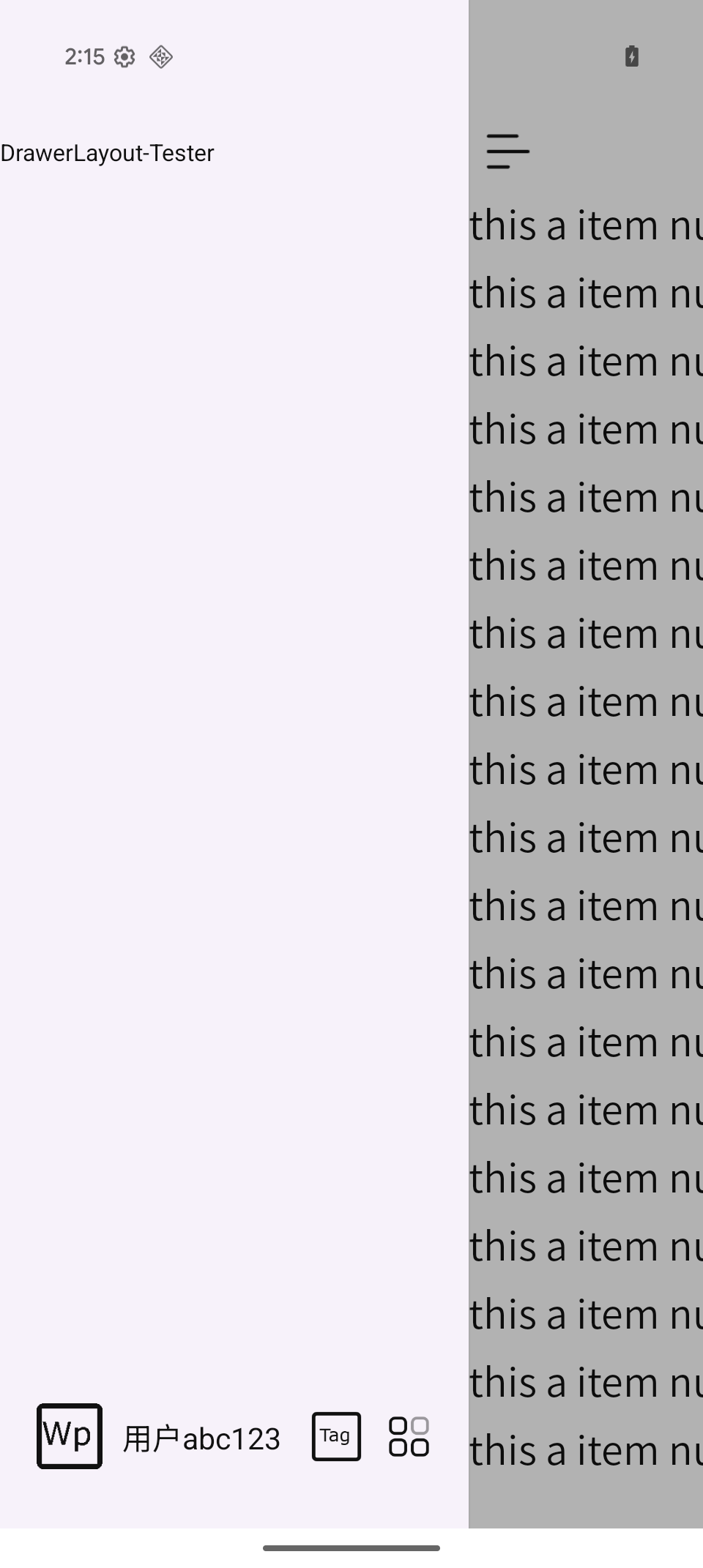
上图为目标。
于是就开始踩坑了。
不要乱加fitsSystemWindows
android:fitsSystemWindows="true" 会出现一个title栏。 不好。
主题圆角问题
如果你的activity或者application使用Theme.Material3.Light.NoActionBar 主题,抽屉打开就是圆角效果。
使用MaterialComponents(M2)就没有圆角。
可以在 NavigationView上添加 app:drawerLayoutCornerSize="0dp" 去除圆角。
沉浸式处理
现在android最难兼容的就是沉浸式。
通过如下代码获取statusBar和navBar的高度进行padding操作。
kotlin
 rootDrawer.post {
            if (rootDrawer.isAttachedToWindow) {
                val heights = this@AgentChatActivity.currentStatusBarAndNavBarHeight()
                heights?.let { pair->
                    val statusBarHeight = pair.first
                    val navBarHeight = pair.second

                    navigationView.updatePadding(top = statusBarHeight, bottom = navBarHeight)
                    navigationView.layoutParams = navigationView.layoutParams.apply {
                        width = rootDrawer.width * 2 / 3
                    }
                }
            }
        }
fun Activity.currentStatusBarAndNavBarHeight() : Pair<Int, Int>? {
    val insets = ViewCompat.getRootWindowInsets(window.decorView) ?: return null
    val nav = insets.getInsets(WindowInsetsCompat.Type.navigationBars()).bottom
    val sta = insets.getInsets(WindowInsetsCompat.Type.statusBars()).top
    return sta to nav
}
沉浸式后出现navigationView上方StatusBar遮罩
xml
<!-- 侧滑菜单显示内容 追加layout_marginTop="0.1dp" 解决status bar背景overlay-->
<com.google.android.material.navigation.NavigationView
    android:id="@+id/navigationView"
    android:layout_gravity="start"
    android:layout_marginTop="0.1dp"
发现侧滑过来,抽屉的上方被statusBar遮挡。通过尝试,给出一点点marginTop就能解决。谁知道什么原因呢。
实现推拉的效果
很多app有左右推拉效果,比如腾讯元宝,DeepSeek。
第一步移除自带的黑色遮罩 drawer.setScrimColor(Color.TRANSPARENT)
第二步 addDrawerListener mask+translation实现右侧跟随
kotlin
		rootDrawer.addDrawerListener(object : DrawerListener {
            override fun onDrawerSlide(drawerView: View, slideOffset: Float) {
                // slideOffset: 0(完全关闭)到 1(完全打开)
                // 计算主内容应该平移的距离:抽屉宽度 * 滑动比率
                val moveX = drawerView.width * slideOffset
                chatLayout.mask.alpha = slideOffset * 0.5f

                // 如果是左侧抽屉,主内容应向右平移
                if (drawerView.layoutDirection == View.LAYOUT_DIRECTION_LTR) {
                    chatLayout.translationX = moveX
                } else {
                    chatLayout.translationX = -moveX
                }
            }

            override fun onDrawerOpened(drawerView: View) {
            }

            override fun onDrawerClosed(drawerView: View) {
                // 抽屉关闭后,将主内容复位
                chatLayout.translationX = 0f
                // 清除遮罩
                chatLayout.mask.alpha = 0f
            }

            override fun onDrawerStateChanged(newState: Int) {}
        })

			//沉浸式处理
屏幕内左滑
主要就是实现在主界面上左滑能触发左边的抽屉拉出。
如果你的主界面很复杂,有一些嵌套的左滑操作就不要搞这个。
参考:
https://github.com/PureWriter/FullDraggableDrawer
实现逻辑就是touch事件检测,浏览了下代码中写了不少忽略的逻辑,避免与主界面冲突减少误触的风险。