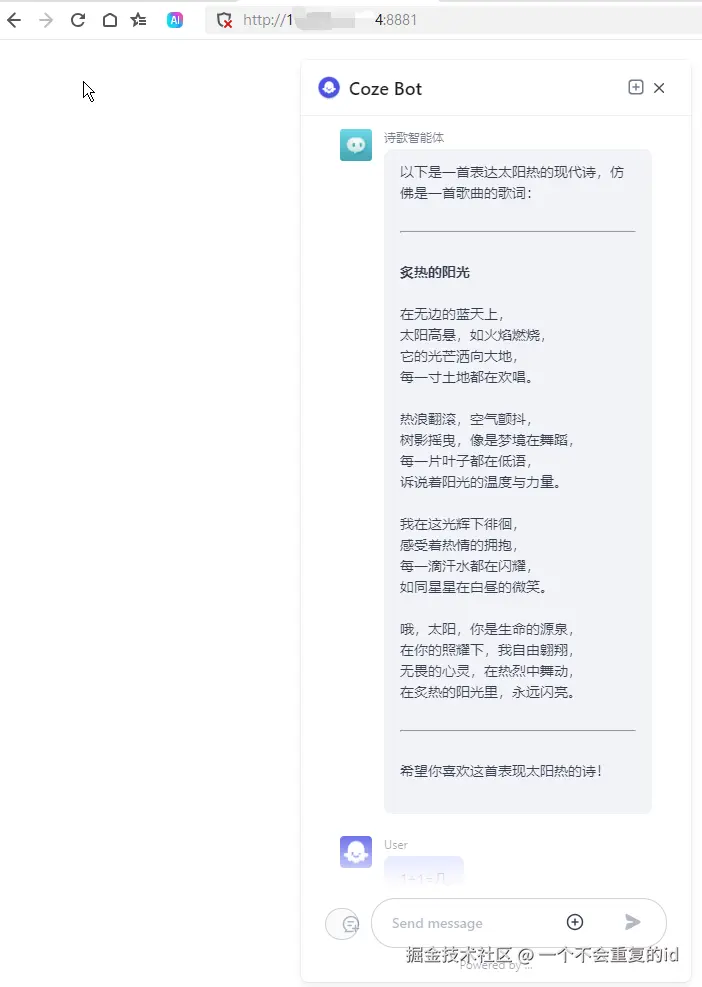
上一篇开源版扣子私有化部署,扣子已经部署到我们自己服务器上了,现在还有几个问题要解决。
- 接入私有大模型(上一篇已解决)
- 发布后能独立被其他Web嵌入,比如做个智能客服被嵌入其他网站
- 能使用其他官网插件
- 能自己开发插件
- 能接入其他智能体
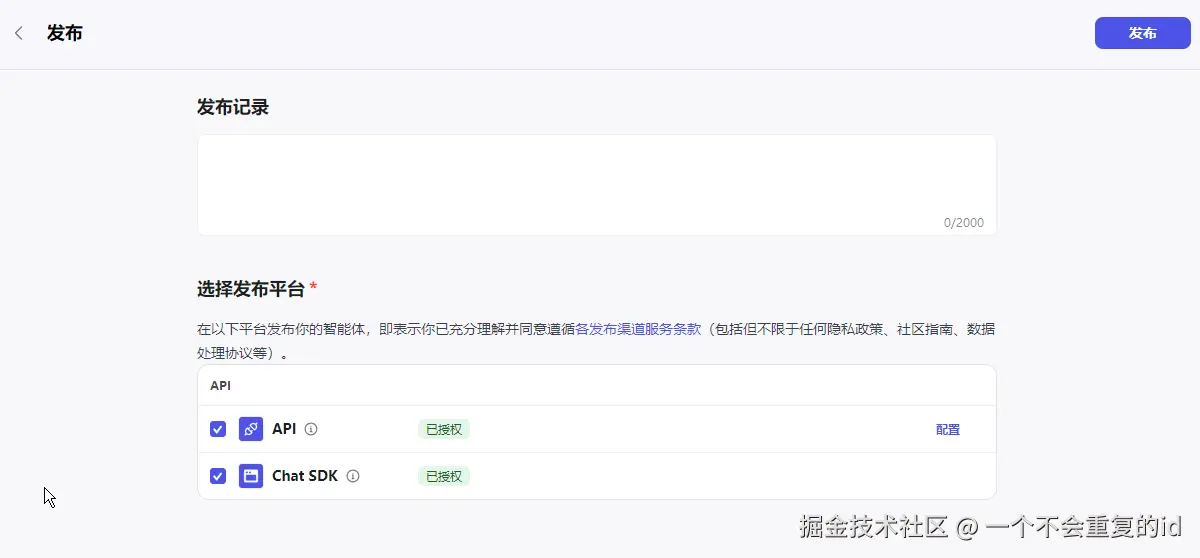
这篇文章讲第二点自己的智能体如何被其他web直接调用,有两种方式直接后端api和前端嵌入web页面。
对应发布时的 API 和 Chat SDK
开发规范
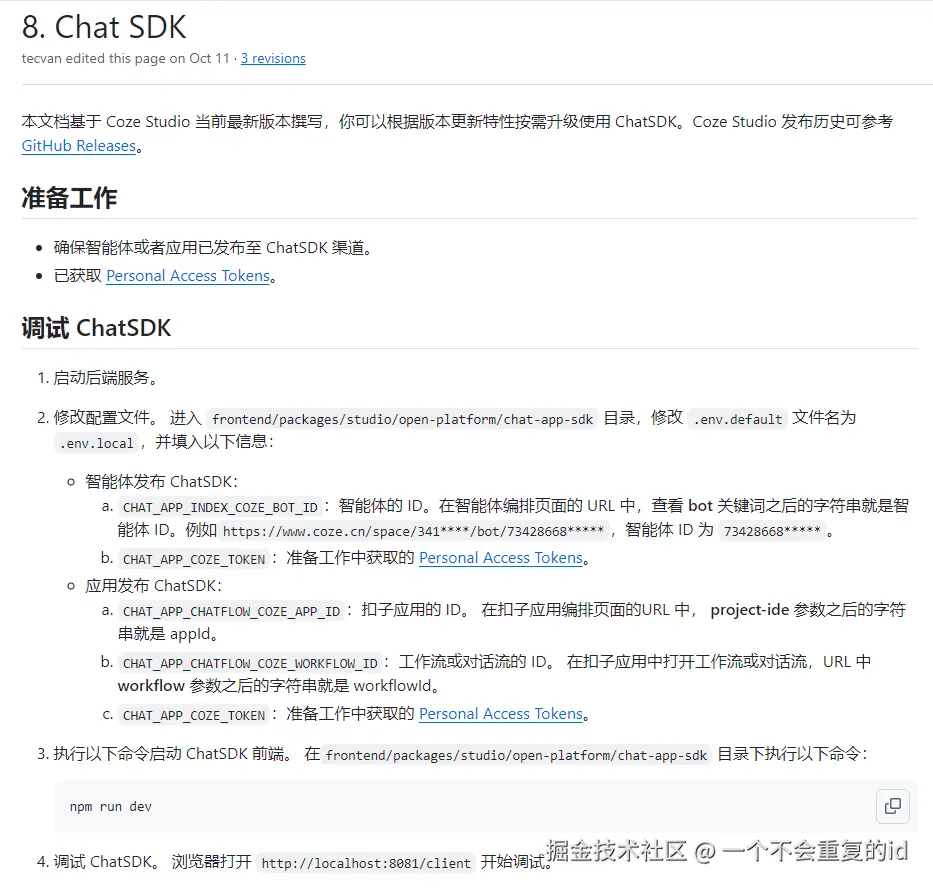
Chat SDK
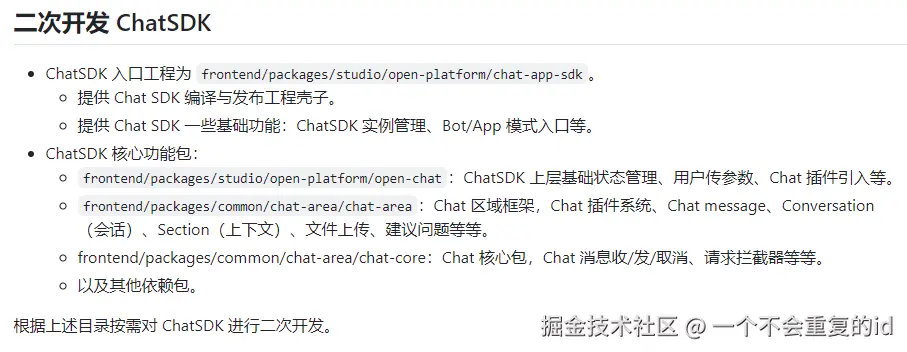
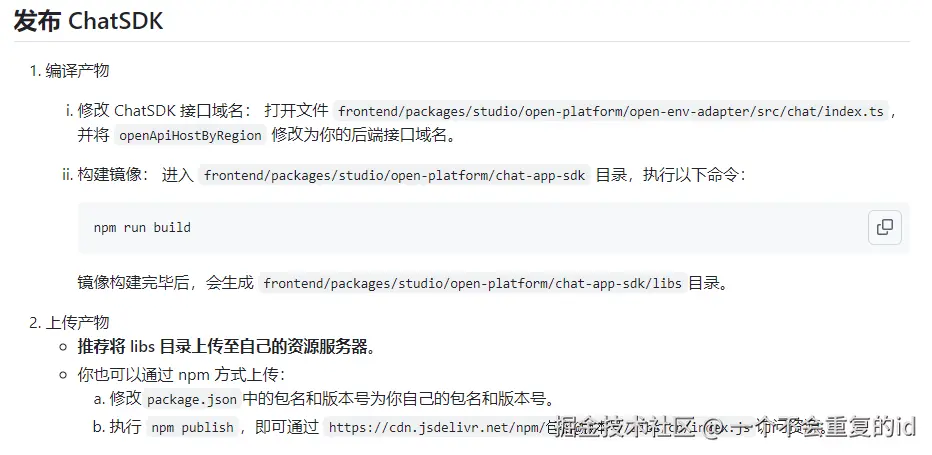

php
new CozeWebSDK.WebChatClient({
  /**
  * Agent or app settings
  * for agent
  * @param config.bot_id - Agent ID.
  * for app
  * @param config.type - To integrate a Coze app, you must set the value to app.
  * @param config.isIframe - Whether to use the iframe method to open the chat box
  * @param config.appInfo.appId - AI app ID.
  * @param config.appInfo.workflowId - Workflow or chatflow ID.
  */
  config: {
    type: 'bot',
    bot_id: 'xxxx',
    isIframe: false,
  },
  /**
  * The auth property is used to configure the authentication method.
  * @param type - Authentication method, default type is 'unauth', which means no authentication is required; it is recommended to set it to 'token', which means authentication is done through PAT (Personal Access Token) or OAuth.
  * @param token - When the type is set to 'token', you need to configure the PAT (Personal Access Token) or OAuth access key.
  * @param onRefreshToken - When the access key expires, a new key can be set as needed.
  */
  auth: {
    type: 'token',
    token: 'xxxx',
    onRefreshToken: async () => 'token'
  },
  /**
  * The userInfo parameter is used to set the display of agent user information in the chat box.
  * @param userInfo.id - ID of the agent user.
  * @param userInfo.url - URL address of the user's avatar.
  * @param userInfo.nickname - Nickname of the agent user.
  */
  userInfo: {
    id: 'user',
    url: 'https://lf-coze-web-cdn.coze.cn/obj/eden-cn/lm-lgvj/ljhwZthlaukjlkulzlp/coze/coze-logo.png',
    nickname: 'User',
  },
  ui: {
    /**
    * The ui.base parameter is used to add the overall UI effect of the chat window.
    * @param base.icon - Application icon URL.
    * @param base.layout - Layout style of the agent chat box window, which can be set as 'pc' or'mobile'.
    * @param base.lang - System language of the agent, which can be set as 'en' or 'zh-CN'.
    * @param base.zIndex - The z-index of the chat box.
    */
    base: {
      icon: 'https://lf-coze-web-cdn.coze.cn/obj/eden-cn/lm-lgvj/ljhwZthlaukjlkulzlp/coze/chatsdk-logo.png',
      layout: 'pc',
      lang: 'en',
      zIndex: 1000
    },
    /**
    * Controls whether to display the top title bar and the close button
    * @param header.isShow - Whether to display the top title bar.
    * @param header.isNeedClose - Whether to display the close button.
    */
    header: {
      isShow: true,
      isNeedClose: true,
    },
    /**
    * Controls whether to display the floating ball at the bottom right corner of the page.
    */
    asstBtn: {
      isNeed: true
    },
    /**
    * The ui.footer parameter is used to add the footer of the chat window.
    * @param footer.isShow - Whether to display the bottom copy module.
    * @param footer.expressionText - The text information displayed at the bottom.
    * @param footer.linkvars - The link copy and link address in the footer.
    */
    footer: {
      isShow: true,
      expressionText: 'Powered by ...',
    },
    /**
    * Control the UI and basic capabilities of the chat box.
    * @param chatBot.title - The title of the chatbox
    * @param chatBot.uploadable - Whether file uploading is supported.
    * @param chatBot.width - The width of the agent window on PC is measured in px, default is 460.
    * @param chatBot.el - Container for setting the placement of the chat box (Element).
    */
    chatBot: {
      title: 'Coze Bot',
      uploadable: true,
      width: 390,
    },
  },
});
开发环境
环境要求: docker、go(≥1.24)、make、node(>=22) 、npm、rush
安装nvm和node22+
bash
# 0.  安装nvm
curl -fsSL https://gitee.com/edazh/nvm/raw/master/install.sh | bash

# 1. 先删除可能冲突的镜像配置(若之前加过其他镜像)
sed -i '/NVM_NODEJS_ORG_MIRROR/d' ~/.bashrc

# 2. 重新添加淘宝镜像(更稳定,支持版本查询)
echo 'export NVM_NODEJS_ORG_MIRROR=https://mirrors.aliyun.com/nodejs-release/' >> ~/.bashrc

# 3. 激活配置(必须执行,让镜像生效)
source ~/.bashrc

# 4. 安装22的最新版
nvm install 22
下载coze-studio源码
bash
# 下载源码
git clone https://github.com/coze-dev/coze-studio.git

# 安装环境
npm install -g pnpm rush

# 安装docker
yum makecache
yum-config-manager --add-repo http://mirrors.aliyun.com/docker-ce/linux/centos/docker-ce.repo
yum install -y gcc gcc-c++ make yum-utils device-mapper-persistent-data lvm2
yum install -y docker-ce docker-ce-cli containerd.io docker-buildx-plugin docker-compose-plugin
systemctl enable docker
systemctl start docker

# 安装golang最新版,我安了是 1.24.6
dnf install -y epel-release
dnf install -y golang
go version
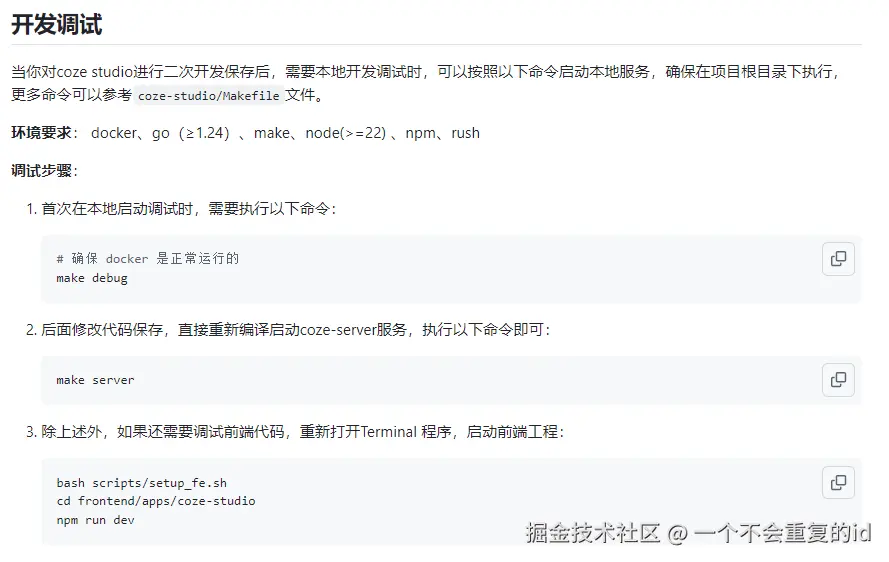
调试步骤
-
首次在本地启动调试时,需要执行以下命令:
bash# 确保 docker 是正常运行的 make debug -
后面修改代码保存,直接重新编译启动coze-server服务,执行以下命令即可:
gomake server -
除上述外,如果还需要调试前端代码,重新打开Terminal 程序,启动前端工程:
bashbash scripts/setup_fe.sh cd frontend/apps/coze-studio npm run dev
发布私有化Chat Sdk页面
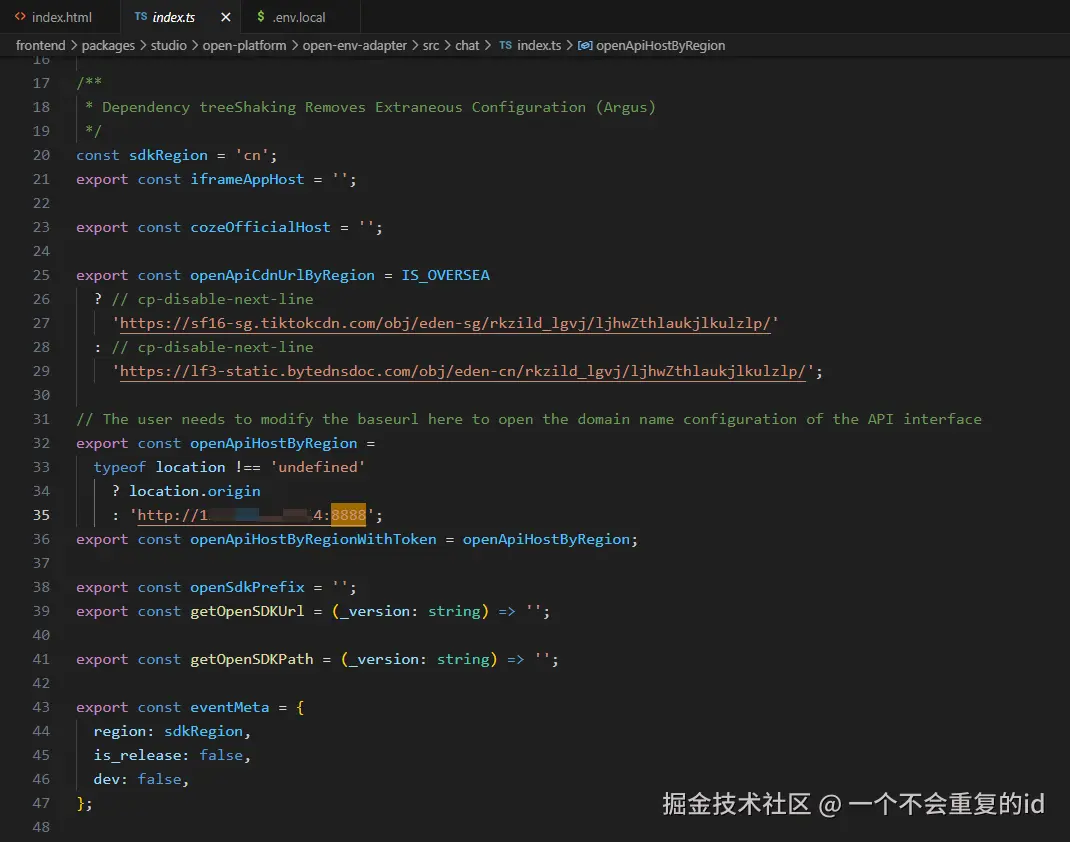
安装图上修改源码服务器地址,重新build chat sdk代码
效果
样式有问题,错位了,自己在 index.html中手动增加点样式吧
css
.semi-avatar-circle {
        border-radius: 50%;
    }
    .semi-avatar-small {
        border-radius: 3px;
        width: 32px;
        height: 32px;
    }

    .semi-avatar {
        white-space: nowrap;
        text-align: center;
        vertical-align: middle;
        justify-content: center;
        align-items: center;
        display: inline-flex;
        position: relative;
        overflow: hidden;
    }
    .semi-avatar>img {
        -o-object-fit: cover;
        object-fit: cover;
        width: 100%;
        height: 100%;
        display: block;
    }
    .semi-upload-hidden-input, .semi-upload-hidden-input-replace {
        display: none;
    }