项目数量统计+项目列表展示功能开发
前端
1. 前后端交互路径
javascript
// src/api/project.js
import request from '@/utils/request' // 您的axios实例

// 获取项目概览统计
export const getProjectOverview = () => {
  return request.get('/projects/overview')
}

// 分页查询项目列表
export const getProjectList = (params) => {
  return request.get('/projects', { params })
}

// 获取项目详情
export const getProjectDetail = (id) => {
  return request.get(`/projects/${id}`)
}

// 删除项目
export const deleteProject = (id) => {
  return request.delete(`/projects/${id}`)
}

// 导出SBOM
export const exportSBOM = (projectId, standard, format) => {
  return request.get(`/api/projects/${projectId}/sbom`, {
    params: { standard, format },
    responseType: 'blob' // 重要:用于文件下载
  })
}

// 导出漏洞报告
export const exportVulnerabilityReport = (projectId, format) => {
  return request.get(`/api/projects/${projectId}/report`, {
    params: { format },
    responseType: 'blob'
  })
}
注意:获取项目统计和获取项目列表是同时请求API,这个需要在vue里面专门写一个函数,否则不会同时请求API
2. 风险分布表前端随机数生成
utils/RiskSimulator.js
javascript
/**
 * 风险分布数据模拟器
 * 根据风险等级生成合理的随机分布数据
 */
class RiskSimulator {
  constructor() {
      this.distributionTemplates = {
          '高危': { high: { min: 30, max: 100 }, medium: { min: 50, max: 300 }, low: { min: 10, max: 70 }, info: { min: 0, max: 30 } },
          '中危': { high: { min: 20, max: 70 }, medium: { min: 30, max: 200 }, low: { min: 20, max: 60 }, info: { min: 5, max: 20 } },
          '低危': { high: { min: 0, max: 3 }, medium: { min: 50, max: 300 }, low: { min: 5, max: 30 }, info: { min: 10, max: 50 } },
          '无风险': { high: 0, medium: 0, low: 0, info: { min: 1, max: 10 } }
      };
      // 新增:兼容数字类型的 riskLevel(如 0=低危、1=中危、2=高危)
      this.riskLevelMap = {
          0: '低危',
          1: '中危',
          2: '高危',
          3: '无风险'
      };
  }

  /**
   * 生成指定范围内的随机数(兜底:确保 min ≤ max)
   */
  randomInRange(min, max) {
      // 修复:避免 min > max 导致的 NaN
      const realMin = Math.min(min, max);
      const realMax = Math.max(min, max);
      return Math.floor(Math.random() * (realMax - realMin + 1)) + realMin;
  }

  /**
   * 根据风险等级生成分布数据(核心修复)
   */
  generateDistribution(riskLevel, did) {
      // 修复1:处理 riskLevel 为数字的情况(如 0/1/2/3)
      const realRiskLevel = this.riskLevelMap[riskLevel] || riskLevel || '低危';
      // 修复2:确保模板存在,兜底为低危
      const template = this.distributionTemplates[realRiskLevel] || this.distributionTemplates['低危'];

      // 修复3:处理 did 为空的情况(避免 hashString 入参异常)
      const safeDid = did || 'default-seed-' + Date.now();
      const seed = this.hashString(safeDid);

      const distribution = {};

      // 为每种风险级别生成数据
      Object.keys(template).forEach(level => {
          const config = template[level];
          // 修复4:处理 config 为数字的情况(如无风险的 high=0)
          if (typeof config === 'number') {
              distribution[level] = Math.max(0, config); // 确保非负
              return;
          }
          // 修复5:确保 config 是包含 min/max 的对象
          if (typeof config !== 'object' || !config.min || !config.max) {
              distribution[level] = 0; // 异常配置时兜底为0
              return;
          }

          // 修复6:确保 seededRandom 返回有效数字(0-1之间)
          const seededRandom = this.seededRandom(seed + level);
          const validRandom = isNaN(seededRandom) ? Math.random() : seededRandom;

          // 计算最终值(确保非负)
          const value = Math.floor(validRandom * (config.max - config.min + 1)) + config.min;
          distribution[level] = Math.max(0, value); // 兜底:避免负数
      });

      return distribution;
  }

  /**
   * 简单的字符串哈希函数,用于生成种子(优化:避免 hash 为 0)
   */
  hashString(str) {
      let hash = 0;
      for (let i = 0; i < str.length; i++) {
          const char = str.charCodeAt(i);
          hash = ((hash << 5) - hash) + char;
          hash = hash & hash; // 转换为32位整数
      }
      // 修复:避免 hash 为 0 导致 sin(0) = 0,进而生成固定值
      return Math.abs(hash) || 1;
  }

  /**
   * 基于种子的伪随机数生成器(修复:避免返回 NaN)
   */
  seededRandom(seed) {
      // 修复:确保 seed 是有效数字,避免 sin(NaN)
      if (isNaN(seed)) seed = 1;
      // 优化:使用更大的种子偏移,避免重复
      const x = Math.sin(seed * 10000) * 10000;
      const result = x - Math.floor(x);
      // 修复:如果 result 是 NaN,返回随机数兜底
      return isNaN(result) ? Math.random() : result;
  }

  /**
   * 计算风险分数(用于排序和显示)
   */
  calculateRiskScore(distribution) {
      // 修复:处理 distribution 字段可能为 NaN 的情况
      const high = isNaN(distribution.high) ? 0 : distribution.high;
      const medium = isNaN(distribution.medium) ? 0 : distribution.medium;
      const low = isNaN(distribution.low) ? 0 : distribution.low;
      return high * 10 + medium * 3 + low * 1;
  }
}

export default new RiskSimulator();
3. 逻辑
src/api/project.js
javascript
<template>
<div class="project-dashboard">
<!-- 页面标题区域 -->
<div class="page-header">
<div class="header-content">
<div class="header-main">
<div class="header-text">
<h1>项目管理</h1>
<p class="subtitle">管理和监控项目的风险状态</p>
</div>
</div>
</div>
</div>
<!-- 项目总览 -->
<div class="content-wrapper">
<div class="overview-section">
<el-card shadow="never" class="overview-card">
<el-row :gutter="24">
<!-- 左侧统计数据 -->
<el-col :xs="24" :lg="6">
<el-row :gutter="20">
<el-col :span="24">
<el-card shadow="hover" class="stat-card">
<div class="stat-content">
<div class="stat-icon">
<el-icon><DataLine /></el-icon>
</div>
<div class="stat-info">
<span class="stat-label">项目总数</span>
<div class="stat-value">{{ totalProjects }}</div>
</div>
</div>
</el-card>
</el-col>
<el-col :span="24" style="margin-top: 20px;">
<el-card shadow="hover" class="stat-card high-risk">
<div class="stat-content">
<div class="stat-icon">
<el-icon><Warning /></el-icon>
</div>
<div class="stat-info">
<span class="stat-label">高危项目</span>
<div class="stat-value">{{ highRiskProjects }}</div>
</div>
</div>
</el-card>
</el-col>
</el-row>
</el-col>
<!-- 中间饼图 -->
<el-col :xs="24" :lg="12">
<div class="chart-wrapper">
<div ref="riskChart" class="chart-container"></div>
</div>
</el-col>
<!-- 右侧统计数据 -->
<el-col :xs="24" :lg="6">
<el-row :gutter="20">
<el-col :span="24">
<el-card shadow="hover" class="stat-card medium-risk">
<div class="stat-content">
<div class="stat-icon">
<el-icon><Warning /></el-icon>
</div>
<div class="stat-info">
<span class="stat-label">中危项目</span>
<div class="stat-value">{{ mediumRiskProjects }}</div>
</div>
</div>
</el-card>
</el-col>
<el-col :span="24" style="margin-top: 20px;">
<el-card shadow="hover" class="stat-card low-risk">
<div class="stat-content">
<div class="stat-icon">
<el-icon><Warning /></el-icon>
</div>
<div class="stat-info">
<span class="stat-label">低危项目</span>
<div class="stat-value">{{ lowRiskProjects }}</div>
</div>
</div>
</el-card>
</el-col>
</el-row>
</el-col>
</el-row>
</el-card>
</div>
<!-- 项目列表 -->
<div class="list-section">
<el-card shadow="never" class="table-card">
<template #header>
<div class="table-header">
<div class="header-left">
<el-icon :size="20"><Document /></el-icon>
<span class="header-title">项目列表</span>
</div>
<el-input
v-model="searchKeyword"
placeholder="搜索项目"
class="search-input"
:prefix-icon="Search"
/>
</div>
</template>
<el-table
:data="filteredProjects"
v-loading="loading"
style="width: 100%"
:header-cell-style="{
backgroundColor: '#f5f7fa',
fontSize: '15px',
fontWeight: 600
}"
:cell-style="{ fontSize: '14px' }"
>
<el-table-column
prop="did"
label="DID标识"
width="290"
show-overflow-tooltip
/>
<el-table-column
prop="name"
label="项目名称"
min-width="150"
show-overflow-tooltip
/>
<el-table-column
prop="riskLevel"
label="风险等级"
width="200"
>
<template #default="{ row }">
<el-tag
:type="getRiskTagType(row.riskLevel)"
style="font-size: 14px; padding: 4px 8px;"
>
{{ getRiskLevelText(row.riskLevel) }}
</el-tag>
</template>
</el-table-column>
<el-table-column
prop="riskScore"
label="风险分布"
width="400"
>
<template #default="{ row }">
<risk-distribution :data="row.riskDistribution || {}" />
</template>
</el-table-column>
<el-table-column
prop="scanTime"
label="扫描时间"
width="220"
/>
<el-table-column
label="操作"
width="200"
fixed="right"
>
<template #default="{ row }">
<div class="operation-buttons">
<el-tooltip content="查看详情" placement="top">
<el-button type="primary" link @click="viewDetails(row)">
<el-icon><View /></el-icon>
</el-button>
</el-tooltip>
<el-tooltip content="导出SBOM" placement="top">
<el-button type="primary" link @click="handleExportSBOM(row)">
<el-icon><Document /></el-icon>
</el-button>
</el-tooltip>
<el-tooltip content="导出报告" placement="top">
<el-button type="primary" link @click="handleExportReport(row)">
<el-icon><DocumentCopy /></el-icon>
</el-button>
</el-tooltip>
<el-tooltip content="删除项目" placement="top">
<el-button type="danger" link @click="deleteProject(row)">
<el-icon><Delete /></el-icon>
</el-button>
</el-tooltip>
</div>
</template>
</el-table-column>
</el-table>
</el-card>
</div>
</div>
<!-- SBOM导出对话框 -->
<el-dialog
v-model="exportDialogVisible"
title="导出SBOM"
width="500px"
align-center
class="export-dialog"
>
<div class="format-selection">
<div class="selection-section">
<h4>选择SBOM标准:</h4>
<el-radio-group v-model="selectedStandard">
<el-radio
v-for="standard in sbomStandards"
:key="standard.value"
:label="standard.value"
border
class="format-radio"
>
{{ standard.label }}
</el-radio>
</el-radio-group>
</div>
<el-divider>导出格式</el-divider>
<div class="selection-section">
<h4>选择导出格式:</h4>
<el-radio-group v-model="selectedFormat">
<el-radio
v-for="format in exportFormats"
:key="format.value"
:label="format.value"
border
class="format-radio"
>
{{ format.label }}
</el-radio>
</el-radio-group>
</div>
</div>
<template #footer>
<span class="dialog-footer">
<el-button plain @click="exportDialogVisible = false">取消</el-button>
<el-button type="primary" @click="confirmExportSBOM">
确认导出
</el-button>
</span>
</template>
</el-dialog>
<!-- 漏洞报告导出对话框 -->
<el-dialog
v-model="exportReportDialogVisible"
title="导出漏洞报告"
width="500px"
align-center
class="export-dialog"
>
<div class="format-selection">
<div class="selection-section">
<h4>选择导出格式:</h4>
<el-radio-group v-model="selectedReportFormat">
<el-radio
v-for="format in reportFormats"
:key="format.value"
:label="format.value"
border
class="format-radio"
>
{{ format.label }}
</el-radio>
</el-radio-group>
</div>
</div>
<template #footer>
<span class="dialog-footer">
<el-button plain @click="exportReportDialogVisible = false">取消</el-button>
<el-button type="primary" @click="confirmExportReport">
确认导出
</el-button>
</span>
</template>
</el-dialog>
</div>
</template>
<script setup>
import { ref, computed, onMounted, watch } from 'vue'
import * as echarts from 'echarts'
import { Search, View, Document, DocumentCopy, Delete, ArrowDown, DataLine, Warning } from '@element-plus/icons-vue'
import { ElMessage, ElMessageBox, ElLoading } from 'element-plus'
import RiskDistribution from '@/views/Function/Management/RiskDistribution.vue'
import { useRouter } from 'vue-router'
import {
getProjectOverview,
getProjectList,
deleteProject as apiDeleteProject,
exportSBOM,
exportVulnerabilityReport
} from '@/api/project'
import RiskSimulator from '@/utils/RiskSimulator'
//import RiskDistribution from '@/views/Function/Management/RiskDistribution.vue'
const router = useRouter()
// 统计数据
const totalProjects = ref(0)
const highRiskProjects = ref(0)
const mediumRiskProjects = ref(0)
const lowRiskProjects = ref(0)
const searchKeyword = ref('')
const loading = ref(false)
const projectList = ref([]) // 改为空数组,从后端获取
// 图表引用
const riskChart = ref(null)
// 导出相关的状态
const exportDialogVisible = ref(false)
const exportReportDialogVisible = ref(false)
const selectedStandard = ref('spdx')
const selectedFormat = ref('json')
const selectedReportFormat = ref('html')
// 当前操作的项目
const currentProject = ref(null)
// SBOM标准选项
const sbomStandards = [
{ label: 'SPDX', value: 'spdx' },
{ label: 'CycloneDX', value: 'cdx' },
{ label: 'SYFT', value: 'syft' }
]
// SBOM格式选项
const exportFormats = [
{ label: 'JSON', value: 'json' },
{ label: 'SPDX', value: 'spdx' },
{ label: 'XML', value: 'xml' }
]
// 报告格式选项
const reportFormats = [
{ label: 'JSON', value: 'json' },
{ label: 'XML', value: 'xml' },
{ label: 'HTML', value: 'html' },
{ label: 'CSV', value: 'csv' }
]
// 2. 饼图相关(完全独立,写死数据)
//const riskChart = ref(null);
let chartInstance = null; // 饼图实例
// 写死的饼图数据(可直接修改数值)
const fixedPieData = [
{ value: 15, name: '高危项目', itemStyle: { color: '#F56C6C' } },
{ value: 30, name: '中危项目', itemStyle: { color: '#E6A23C' } },
{ value: 60, name: '低危项目', itemStyle: { color: '#67C23A' } },
{ value: 25, name: '无风险项目', itemStyle: { color: '#909399' } }
];
// 初始化饼图(独立逻辑,不依赖任何后端数据)
const initChart = () => {
// 确保DOM已挂载
if (!riskChart.value) return;
// 创建ECharts实例(避免重复创建)
if (!chartInstance) {
chartInstance = echarts.init(riskChart.value);
}
// 饼图配置项(用写死的数据)
const option = {
title: {
text: '项目风险分布',
left: 'center',
top: '5%'
},
tooltip: {
trigger: 'item',
formatter: '{b}: {c} ({d}%)'
},
legend: {
orient: 'horizontal',
bottom: '5%',
left: 'center',
data: ['高危项目', '中危项目', '低危项目', '无风险项目']
},
series: [
{
type: 'pie',
radius: ['35%', '55%'],
center: ['50%', '50%'],
avoidLabelOverlap: false,
itemStyle: {
borderRadius: 10,
borderColor: '#fff',
borderWidth: 2
},
label: {
show: true,
position: 'outside',
formatter: '{b}: {c}'
},
emphasis: {
label: {
show: true,
fontSize: 20,
fontWeight: 'bold'
}
},
data: fixedPieData // 直接使用写死的数据
}
]
};
chartInstance.setOption(option);
};
// 模拟项目数据
/*const projectList = ref([
{
did: 'did:shieldchain:4e2d8c1f3a7b9e0d5f6c8a9b0d1e2f3a4b5c6d7e8f9a0b1c2d3e4f5a6b7c8d9e0',
name: 'OpenCV',
riskLevel: '高危',
riskDistribution: {
high: 32,
medium: 250,
low: 107,
info: 57
},
scanTime: '2024-03-18 20:51:36'
},
{
did: 'did:shieldchain:550e8400e29b41d4a716446655440000550e8400e29b41d4a716446655440000',
name: '测试项目',
riskLevel: '低危',
riskDistribution: {
high: 0,
medium: 2,
low: 15,
info: 43
},
scanTime: '2024-03-18 16:50:04'
}
])*/
// 过滤项目列表
const filteredProjects = computed(() => {
if (!searchKeyword.value) return projectList.value
const keyword = searchKeyword.value.toLowerCase()
return projectList.value.filter(project =>
project.name.toLowerCase().includes(keyword) ||
project.did.toLowerCase().includes(keyword)
)
})
// 并发加载数据函数
const loadAllData = async () => {
const loadingInstance = ElLoading.service({
lock: true,
text: '正在加载数据...',
background: 'rgba(0, 0, 0, 0.7)'
})
try {
// 并发调用两个接口[3](@ref)
const [overviewResponse, listResponse] = await Promise.all([
getProjectOverview(),
getProjectList({
page: 1,
pageSize: 100,
keyword: searchKeyword.value
})
])
// 处理响应数据
await processOverviewResponse(overviewResponse)
await processListResponse(listResponse)
ElMessage.success('数据加载完成')
} catch (error) {
console.error('数据加载失败:', error)
ElMessage.error(`数据加载失败: ${error.message}`)
} finally {
loadingInstance.close()
}
}
// 风险等级映射配置
const RISK_LEVEL_MAP = {
'0': { text: '低危', type: 'success', level: 0 },
'1': { text: '中危', type: 'warning', level: 1 },
'2': { text: '高危', type: 'danger', level: 2 },
'3': { text: '严重', type: 'danger', level: 3 }
}
// 风险等级转换函数
const convertRiskLevel = (level) => {
if (!level && level !== 0) return { text: '未知', type: 'info', level: -1 }
const levelKey = String(level)
const levelConfig = RISK_LEVEL_MAP[levelKey]
return levelConfig || { text: '未知', type: 'info', level: -1 }
}
// 修改后的风险等级标签类型函数
const getRiskTagType = (level) => {
const levelConfig = convertRiskLevel(level)
return levelConfig.type
}
// 获取风险等级显示文本
const getRiskLevelText = (level) => {
const levelConfig = convertRiskLevel(level)
return levelConfig.text
}
// 3. 后端数据请求(只给统计框赋值,不影响饼图)
// 保留你原有获取后端数据的逻辑,示例:
const fetchBackendData = async () => {
try {
// 调用后端接口获取统计数据(你的原有逻辑)
const res = await axios.get('/project/overview', {
headers: { Authorization: 'Bearer ' + localStorage.getItem('token') }
});
// 给统计框变量赋值(饼图不使用这些变量)
totalProjects.value = res.data.data.totalProjects;
highRiskProjects.value = res.data.data.highRiskProjects;
mediumRiskProjects.value = res.data.data.mediumRiskProjects;
lowRiskProjects.value = res.data.data.lowRiskProjects;
// projectList.value = res.data.data.projectList; // 按需保留
} catch (error) {
console.error('获取后端统计数据失败', error);
// 失败时给统计框设置默认值,避免显示0
totalProjects.value = 0;
highRiskProjects.value = 0;
mediumRiskProjects.value = 0;
lowRiskProjects.value = 0;
}
};
// 生命周期
onMounted(() => {
initChart()
loadProjectOverview()
loadProjectList()
})
// 初始化图表
/*const initChart = () => {
const chart = echarts.init(riskChart.value)
// 监听数据变化更新图表
watch([totalProjects, highRiskProjects, mediumRiskProjects, lowRiskProjects], () => {
updateChart(chart)
})
window.addEventListener('resize', () => {
chart.resize()
})
}
// 更新图表数据
const updateChart = (chart) => {
// 获取转换后的统计数据
const highRiskCount = projectList.value.filter(project =>
convertRiskLevel(project.originalRiskLevel).level === 2
).length
const mediumRiskCount = projectList.value.filter(project =>
convertRiskLevel(project.originalRiskLevel).level === 1
).length
const lowRiskCount = projectList.value.filter(project =>
convertRiskLevel(project.originalRiskLevel).level === 0
).length
const noRiskCount = Math.max(0, totalProjects.value - highRiskCount - mediumRiskCount - lowRiskCount)
const option = {
title: {
text: '项目风险分布',
left: 'center',
top: '5%'
},
tooltip: {
trigger: 'item',
formatter: '{b}: {c} ({d}%)'
},
legend: {
orient: 'horizontal',
bottom: '5%',
left: 'center',
data: ['高危项目', '中危项目', '低危项目', '无风险项目']
},
series: [
{
type: 'pie',
radius: ['35%', '55%'],
center: ['50%', '50%'],
avoidLabelOverlap: false,
itemStyle: {
borderRadius: 10,
borderColor: '#fff',
borderWidth: 2
},
label: {
show: true,
position: 'outside',
formatter: '{b}: {c}'
},
emphasis: {
label: {
show: true,
fontSize: 20,
fontWeight: 'bold'
}
},
data: [
{
value: highRiskCount,
name: '高危项目',
itemStyle: { color: '#F56C6C' }
},
{
value: mediumRiskCount,
name: '中危项目',
itemStyle: { color: '#E6A23C' }
},
{
value: lowRiskCount,
name: '低危项目',
itemStyle: { color: '#67C23A' }
},
{
value: noRiskCount,
name: '无风险项目',
itemStyle: { color: '#909399' }
}
]
}
]
}
chart.setOption(option)
}*/
// 获取项目概览数据
const loadProjectOverview = async () => {
loading.value = true
try {
const response = await getProjectOverview()
if (response.code === 1) {
const data = response.data
// 将后端数据绑定到前端响应式变量
totalProjects.value = data.totalProjects || 0
highRiskProjects.value = data.highRiskProjects || 0
mediumRiskProjects.value = data.mediumRiskProjects || 0
lowRiskProjects.value = data.lowRiskProjects || 0
console.log('项目概览数据加载成功:', data)
} else {
ElMessage.error(response.msg || '获取数据失败')
}
} catch (error) {
console.error('获取项目概览失败:', error)
ElMessage.error('网络错误,获取数据失败')
} finally {
loading.value = false
}
}
/*const loadProjectList = async () => {
loading.value = true
try {
const params = {
page: 1,
pageSize: 100, // 根据实际需求调整
keyword: searchKeyword.value
}
const response = await getProjectList(params)
if (response.code === 1 && response.data && Array.isArray(response.data.records)) {
// 为每个项目生成风险分布数据
projectList.value = response.data.records.map(project => ({
...project,
riskDistribution: RiskSimulator.generateDistribution(project.riskLevel, project.did)
}))
} else {
ElMessage.error('返回数据格式不正确')
}
} catch (error) {
console.error('获取项目列表失败:', error)
ElMessage.error('获取项目列表失败')
} finally {
loading.value = false
}
}*/
const loadProjectList = async () => {
loading.value = true
try {
const params = { page: 1, pageSize: 100, keyword: searchKeyword.value }
const response = await getProjectList(params)
if (response.code === 1 && response.data?.records) {
projectList.value = response.data.records.map(project => {
console.log('项目原始数据:', { riskLevel: project.riskLevel, did: project.did }) // 打印入参
const riskDistribution = RiskSimulator.generateDistribution(project.riskLevel, project.did)
console.log('生成的风险分布:', riskDistribution) // 打印出参
return { ...project, riskDistribution }
})
} else {
ElMessage.error('返回数据格式不正确')
}
} catch (error) {
console.error('获取项目列表失败:', error)
ElMessage.error('获取项目列表失败')
} finally {
loading.value = false
}
}
// 操作方法
const viewDetails = (row) => {
router.push(`/detail/${row.id}`)// 使用ID而不是DID,更标准
}
// 修改导出相关方法
const simulateExport = (fileName, type) => {
return new Promise((resolve) => {
const loading = ElLoading.service({
lock: true,
text: `正在${type}...`,
background: 'rgba(0, 0, 0, 0.7)'
})
const duration = Math.floor(Math.random() * 2000) + 1000 // 1-3秒随机时间
setTimeout(() => {
loading.close()
resolve(duration / 1000) // 返回耗时(秒)
}, duration)
})
}
// 修改SBOM导出方法
const confirmExportSBOM = async () => {
try {
exportDialogVisible.value = false
const duration = await simulateExport('sbom', '生成SBOM清单')
// 加载测试数据
const response = await fetch('/mock/Test.json')
const mockData = await response.json()
let content = ''
let filename = ''
let type = ''
// 根据选择的标准和格式处理数据
if (selectedStandard.value === 'spdx' && selectedFormat.value === 'json') {
content = JSON.stringify(mockData, null, 2)
filename = 'sbom-spdx.json'
type = 'application/json'
} else {
// 处理其他格式...
content = JSON.stringify(mockData, null, 2)
filename = `sbom-${selectedStandard.value}.${selectedFormat.value}`
type = 'application/json'
}
// 创建 Blob 对象并下载
const blob = new Blob([content], { type: `${type};charset=utf-8` })
const link = document.createElement('a')
link.href = URL.createObjectURL(blob)
link.download = filename
document.body.appendChild(link)
link.click()
document.body.removeChild(link)
URL.revokeObjectURL(link.href)
ElMessage.success(`成功导出SBOM清单(${selectedStandard.value.toUpperCase()} ${selectedFormat.value.toUpperCase()}格式),共花费 ${duration} 秒`)
} catch (error) {
console.error('Export failed:', error)
ElMessage.error('导出失败')
}
}
// 修改漏洞报告导出方法
const confirmExportReport = async () => {
try {
exportReportDialogVisible.value = false
const duration = await simulateExport('report', '生成漏洞报告')
if (selectedReportFormat.value === 'html') {
// 获取HTML模板
const templateResponse = await fetch('/templates/Test.html')
const template = await templateResponse.text()
// 创建并下载文件
const blob = new Blob([template], { type: 'text/html;charset=utf-8' })
const link = document.createElement('a')
link.href = URL.createObjectURL(blob)
link.download = 'vulnerability-report.html'
document.body.appendChild(link)
link.click()
document.body.removeChild(link)
URL.revokeObjectURL(link.href)
ElMessage.success(`成功导出漏洞报告(HTML格式),共花费 ${duration} 秒`)
}
} catch (error) {
console.error('Export failed:', error)
ElMessage.error('导出失败')
}
}
const deleteProject = (row) => {
ElMessageBox.confirm(
`确定要删除项目 "${row.name}" 吗?`,
'警告',
{
confirmButtonText: '确定',
cancelButtonText: '取消',
type: 'warning',
}
)
.then(() => {
// 实现删除逻辑
ElMessage.success(`已删除项目 ${row.name}`)
})
.catch(() => {
ElMessage.info('已取消删除')
})
}
// 修改导出处理方法
const handleExportSBOM = (row) => {
selectedStandard.value = 'spdx' // 重置默认选择
selectedFormat.value = 'json' // 重置默认选择
exportDialogVisible.value = true
}
const handleExportReport = (row) => {
selectedReportFormat.value = 'html' // 重置默认选择
exportReportDialogVisible.value = true
}
// 初始化图表
onMounted(() => {
const chart = echarts.init(riskChart.value)
const option = {
title: {
text: '漏洞分布统计',
left: 'center',
top: '5%'
},
tooltip: {
trigger: 'item',
formatter: '{b}: {c} ({d}%)'
},
legend: {
orient: 'horizontal',
bottom: '5%',
left: 'center',
data: ['高危漏洞', '中危漏洞', '低危漏洞', '信息']
},
series: [
{
type: 'pie',
radius: ['35%', '55%'],
center: ['50%', '50%'],
avoidLabelOverlap: false,
itemStyle: {
borderRadius: 10,
borderColor: '#fff',
borderWidth: 2
},
label: {
show: true,
position: 'outside',
formatter: '{b}: {c}'
},
emphasis: {
label: {
show: true,
fontSize: 20,
fontWeight: 'bold'
}
},
data: [
{ value: 32, name: '高危漏洞', itemStyle: { color: '#F56C6C' } },
{ value: 252, name: '中危漏洞', itemStyle: { color: '#E6A23C' } },
{ value: 122, name: '低危漏洞', itemStyle: { color: '#67C23A' } },
{ value: 100, name: '信息', itemStyle: { color: '#909399' } }
]
}
]
}
chart.setOption(option)
// 添加响应式调整
window.addEventListener('resize', () => {
chart.resize()
})
})
</script>
<style lang="scss" scoped>
.project-dashboard {
min-height: 100vh;
background-color: #f8fafc;
padding: 0;
}
.page-header {
background: white;
padding: 24px 32px;
margin-bottom: 24px;
border-bottom: 1px solid #eaedf1;
.header-content {
max-width: 1400px;
margin: 0;
padding: 0;
.header-main {
display: flex;
align-items: flex-start;
}
.header-text {
h1 {
font-size: 24px;
color: #2c3e50;
margin: 0 0 8px 0;
font-weight: 600;
}
.subtitle {
color: #6b7c93;
font-size: 18px;
margin: 0;
}
}
}
}
.content-wrapper {
max-width: 2000px;
margin: 0 auto;
padding: 0 24px;
}
.overview-section {
margin: 0 auto;
.overview-card {
background: white;
border-radius: 8px;
box-shadow: 0 2px 12px rgba(0, 0, 0, 0.05);
margin-bottom: 24px;
padding: 32px;
.el-row {
min-height: 360px;
}
}
.chart-wrapper {
height: 100%;
display: flex;
align-items: center;
justify-content: center;
padding: 0;
}
.chart-container {
width: 100%;
max-width: 800px;
height: 360px;
margin: 0 auto;
}
.stat-card {
height: 175px;
margin-bottom: 20px;
transition: all 0.3s ease;
border-radius: 12px;
overflow: hidden;
&:hover {
transform: translateY(-4px);
box-shadow: 0 12px 24px rgba(0, 0, 0, 0.06);
}
.stat-content {
padding: 20px;
text-align: center;
display: flex;
align-items: center;
gap: 16px;
.stat-icon {
width: 56px;
height: 56px;
border-radius: 12px;
display: flex;
align-items: center;
justify-content: center;
background: rgba(64, 158, 255, 0.1);
.el-icon {
font-size: 32px !important;
color: #409EFF;
}
}
.stat-info {
flex: 1;
}
.stat-label {
font-size: 22px !important;
color: #606266;
display: block;
margin-bottom: 8px;
}
.stat-value {
font-size: 32px !important;
font-weight: 600;
color: #303133;
}
}
&.high-risk .stat-icon {
background: rgba(245, 108, 108, 0.1);
.el-icon { color: #F56C6C; }
}
&.medium-risk .stat-icon {
background: rgba(230, 162, 60, 0.1);
.el-icon { color: #E6A23C; }
}
&.low-risk .stat-icon {
background: rgba(103, 194, 58, 0.1);
.el-icon { color: #67C23A; }
}
}
}
.table-card {
margin-top: 24px;
border-radius: 12px;
.table-header {
display: flex;
justify-content: space-between;
align-items: center;
padding: 16px 20px;
.header-left {
display: flex;
align-items: center;
gap: 8px;
.el-icon {
color: #409EFF;
font-size: 24px;
}
.header-title {
font-size: 20px;
font-weight: 500;
color: #303133;
}
}
.search-input {
width: 250px;
:deep(.el-input__inner) {
font-size: 18px;
}
}
}
:deep(.el-table) {
font-size: 18px !important;
.el-table__header-wrapper {
th {
font-size: 20px !important;
font-weight: 600;
padding: 18px 0;
}
}
.el-table__body-wrapper {
td {
font-size: 18px !important;
padding: 18px 0;
}
}
.el-tag {
font-size: 16px !important;
padding: 8px 14px;
}
.cell {
font-size: 18px !important;
line-height: 1.5;
}
}
}
.operation-buttons {
display: flex;
align-items: center;
gap: 8px;
.el-button {
padding: 4px;
margin: 0;
.el-icon {
font-size: 18px;
}
&:hover {
transform: scale(1.1);
transition: transform 0.2s ease;
}
}
}
@media (max-width: 992px) {
.overview-section {
.chart-container {
height: 350px;
margin: 20px 0;
}
}
}
@media (max-width: 768px) {
.page-header {
padding: 24px 16px;
.header-content {
h1 {
font-size: 1.8rem;
}
.subtitle {
font-size: 1rem;
}
}
}
.overview-section {
padding: 16px;
.chart-container {
height: 250px;
}
}
}
// 添加响应式阴影效果
.el-card {
transition: box-shadow 0.3s ease;
&:hover {
box-shadow: 0 8px 16px rgba(0, 0, 0, 0.08);
}
}
// 添加新的样式
.dialog-footer {
display: flex;
justify-content: flex-end;
gap: 12px;
}
:deep(.el-radio) {
height: 40px;
display: flex;
align-items: center;
margin-left: 0;
padding: 0 15px;
}
// 添加新的对话框样式
.export-dialog {
.format-selection {
padding: 24px;
.selection-section {
margin-bottom: 20px;
&:last-child {
margin-bottom: 0;
}
h4 {
margin: 0 0 16px 0;
color: #303133;
font-size: 16px;
font-weight: 500;
}
}
.el-radio-group {
display: flex;
flex-direction: column;
gap: 12px;
.format-radio {
margin: 0;
padding: 12px 20px;
width: 100%;
text-align: center;
&.is-bordered {
border-radius: 8px;
}
}
}
}
.el-divider {
margin: 24px 0;
:deep(.el-divider__text) {
font-size: 14px;
color: #909399;
background-color: #f7f9fc;
}
}
}
:deep(.el-dialog) {
border-radius: 12px;
box-shadow: 0 20px 40px rgba(0, 0, 0, 0.1);
.el-dialog__header {
background: #f7f9fc;
border-radius: 12px 12px 0 0;
padding: 20px 24px;
margin: 0;
border-bottom: 1px solid #eaedf1;
.el-dialog__title {
font-size: 1.2rem;
font-weight: 500;
color: #303133;
}
}
.el-dialog__body {
padding: 0;
}
.el-dialog__footer {
padding: 20px 24px;
background: #ffffff;
border-top: 1px solid #eaedf1;
border-radius: 0 0 12px 12px;
}
}
.dialog-footer {
display: flex;
justify-content: flex-end;
gap: 12px;
.el-button {
padding: 8px 24px;
font-size: 0.95rem;
}
}
</style>后端
1. 在WebMvcConfiguration注册新路径
java
protected void addInterceptors(InterceptorRegistry registry){
        log.info("开始注册自定义拦截器...");
        registry.addInterceptor(jwtTokenInterceptor)
                .addPathPatterns("/user/**")
                .addPathPatterns("/software/**")
                .addPathPatterns("/message/**")
                .addPathPatterns("/sbom-vuln/**")
                .addPathPatterns("/projects/**")
                .excludePathPatterns("/user/login");
    }
2. VO和DTO
ProjectOverviewVO
java
package com.sky.vo;

import io.swagger.annotations.ApiModel;
import io.swagger.annotations.ApiModelProperty;
import lombok.AllArgsConstructor;
import lombok.Builder;
import lombok.Data;
import lombok.NoArgsConstructor;

import java.io.Serializable;

@Data
@Builder
@NoArgsConstructor
@AllArgsConstructor
@ApiModel(description = "项目风险概览的数据格式")
public class ProjectOverviewVO implements Serializable {
    @ApiModelProperty("总项目数量")
    private Integer totalProjects;

    @ApiModelProperty("高风险项目数量")
    private Integer highRiskProjects;

    @ApiModelProperty("中风险项目数量")
    private Integer mediumRiskProjects;

    @ApiModelProperty("低风险项目数量")
    private Integer lowRiskProjects;
}RiskDistributionVO
java
package com.sky.vo;

import io.swagger.annotations.ApiModel;
import io.swagger.annotations.ApiModelProperty;
import lombok.AllArgsConstructor;
import lombok.Builder;
import lombok.Data;
import lombok.NoArgsConstructor;

import java.io.Serializable;

@Data
@Builder
@NoArgsConstructor
@AllArgsConstructor
@ApiModel(description = "项目风险值分布对象的数据格式")
public class RiskDistributionVO implements Serializable {
    @ApiModelProperty("高危漏洞数量")
    private Integer high;
    @ApiModelProperty("中危漏洞数量")
    private Integer medium;
    @ApiModelProperty("低危漏洞数量")
    private Integer low;
    private Integer info;
}ProjectVO
java
package com.sky.vo;

import io.swagger.annotations.ApiModel;
import lombok.AllArgsConstructor;
import lombok.Builder;
import lombok.Data;
import lombok.NoArgsConstructor;

import java.io.Serializable;
import java.time.LocalDateTime;
import java.util.Collections;

@Data
@Builder
@NoArgsConstructor
@AllArgsConstructor
@ApiModel(description = "项目视图对象的数据格式")
public class ProjectVO implements Serializable {
    private Integer id;
    private String did;
    private String name;
    private String riskLevel;
    // 风险分布: 前端随机数生成
    private RiskDistributionVO riskDistribution;
    private LocalDateTime scanTime;
    private String sbomLocalPath;
    private String vulnListLocalPath;
}
3. controller
修改Software,新增字段risk_level用于风险统计
java
package com.sky.controller;

import com.sky.context.BaseContext;
import com.sky.dto.ProjectListPageQueryDTO;
import com.sky.exception.AccountNotFoundException;
import com.sky.result.PageResult;
import com.sky.result.Result;
import com.sky.service.ProjectService;
import com.sky.service.SbomVulnService;
import com.sky.vo.ProjectOverviewVO;
import com.sky.vo.ProjectVO;
import io.swagger.annotations.Api;
import io.swagger.annotations.ApiOperation;
import lombok.extern.slf4j.Slf4j;
import org.springframework.beans.factory.annotation.Autowired;
import org.springframework.web.bind.annotation.GetMapping;
import org.springframework.web.bind.annotation.RequestMapping;
import org.springframework.web.bind.annotation.RequestParam;
import org.springframework.web.bind.annotation.RestController;

@RestController
@RequestMapping("/projects")
@Slf4j
@Api(tags = "项目管理接口")
public class ProjectController {

    @Autowired
    private ProjectService projectService;

    /**
     * 获取项目概览统计
     */
    @GetMapping("/overview")
    @ApiOperation(value = "获取项目概览统计")
    public Result<ProjectOverviewVO> getProjectOverview() {
        log.info("获取项目概览统计...");
        Integer currentId = BaseContext.getCurrentId();
        try {
            ProjectOverviewVO overview = projectService.getProjectOverview(currentId);
            return Result.success(overview);
        } catch (Exception e) {
            log.error("获取项目概览失败", e);
            return Result.error("获取项目概览失败: " + e.getMessage());
        }
    }

    /**
     * 获取项目列表(支持搜索和分页)
     */
    @GetMapping
    @ApiOperation("软件分页查询")
    public Result<PageResult> getProjectList(ProjectListPageQueryDTO projectListPageQueryDTO) {
        Integer currentId = BaseContext.getCurrentId();
        if (currentId == null){
            throw new AccountNotFoundException("用户未登录或登录信息无效");
        }
        projectListPageQueryDTO.setUserId(currentId);
        log.info("项目分页查询,参数为:{}", projectListPageQueryDTO);
        PageResult pageResult = projectService.pageQuery(projectListPageQueryDTO);
        return Result.success(pageResult);
    }


}
4. service
java
package com.sky.service;

import com.sky.dto.ProjectListPageQueryDTO;
import com.sky.result.PageResult;
import com.sky.vo.ProjectOverviewVO;

public interface ProjectService {

    /**
     * 获取当前用户的项目概览统计--总、低中高危项目数量
     * @return
     */
    ProjectOverviewVO getProjectOverview(Integer currentId);

    /**
     * 软件项目分页查询
     * @param projectListPageQueryDTO
     * @return
     */
    PageResult pageQuery(ProjectListPageQueryDTO projectListPageQueryDTO);
}
java
package com.sky.service.impl;

import com.github.pagehelper.Page;
import com.github.pagehelper.PageHelper;
import com.sky.context.BaseContext;
import com.sky.dto.ProjectListPageQueryDTO;
import com.sky.mapper.ProjectMapper;
import com.sky.result.PageResult;
import com.sky.service.ProjectService;
import com.sky.vo.ProjectOverviewVO;
import com.sky.vo.ProjectVO;
import lombok.extern.slf4j.Slf4j;
import org.springframework.beans.factory.annotation.Autowired;
import org.springframework.stereotype.Service;

import javax.security.auth.login.AccountNotFoundException;
import java.util.List;


@Service
@Slf4j
public class ProjectServiceImpl implements ProjectService {

    @Autowired
    private ProjectMapper projectMapper;

    @Override
    public ProjectOverviewVO getProjectOverview(Integer currentId) {
        try {
            ProjectOverviewVO overview = projectMapper.selectProjectOverview(currentId);

            // 设置默认值,避免null
            if (overview.getTotalProjects() == null) overview.setTotalProjects(0);
            if (overview.getHighRiskProjects() == null) overview.setHighRiskProjects(0);
            if (overview.getMediumRiskProjects() == null) overview.setMediumRiskProjects(0);
            if (overview.getLowRiskProjects() == null) overview.setLowRiskProjects(0);

            return overview;
        } catch (Exception e) {
            log.error("获取项目概览失败", e);
            // 返回空数据而不是抛出异常
            ProjectOverviewVO emptyOverview = new ProjectOverviewVO();
            emptyOverview.setTotalProjects(0);
            emptyOverview.setHighRiskProjects(0);
            emptyOverview.setMediumRiskProjects(0);
            emptyOverview.setLowRiskProjects(0);
            return emptyOverview;
        }
    }

    /**
     * 软件项目分页查询
     * @param projectListPageQueryDTO
     * @return
     */
    public PageResult pageQuery(ProjectListPageQueryDTO projectListPageQueryDTO) {

        // 底层是基于mysql的limit关键字实现的分页查询
        // 开始分页查询,借助插件(底层借助Mybatis的拦截器,sql拼接)
        PageHelper.startPage(projectListPageQueryDTO.getPage(), projectListPageQueryDTO.getPageSize());

        Page<ProjectVO> page = projectMapper.pageQuery(projectListPageQueryDTO);

        long total = page.getTotal();
        List<ProjectVO> records = page.getResult();

        return new PageResult(total,records);
    }
}
5. mapper
java
package com.sky.mapper;

import com.github.pagehelper.Page;
import com.sky.dto.ProjectListPageQueryDTO;
import com.sky.vo.ProjectOverviewVO;
import com.sky.vo.ProjectVO;
import org.apache.ibatis.annotations.Mapper;
import org.apache.ibatis.annotations.Select;

@Mapper
public interface ProjectMapper {


    /**
     * 查询项目概览统计
     */
    @Select("SELECT " +
            "COUNT(*) as totalProjects, " +
            "SUM(CASE WHEN risk_level = 2 THEN 1 ELSE 0 END) as highRiskProjects, " +
            "SUM(CASE WHEN risk_level = 1 THEN 1 ELSE 0 END) as mediumRiskProjects, " +
            "SUM(CASE WHEN risk_level = 0 THEN 1 ELSE 0 END) as lowRiskProjects " +
            "FROM software WHERE task_status = 3 AND create_user = #{currentId}")
    ProjectOverviewVO selectProjectOverview(Integer currentId);

    /**
     * 软件项目分页查询
     * @param projectListPageQueryDTO
     * @return
     */
    Page<ProjectVO> pageQuery(ProjectListPageQueryDTO projectListPageQueryDTO);
}
XML
<?xml version="1.0" encoding="UTF-8" ?>
<!DOCTYPE mapper PUBLIC "-//mybatis.org//DTD Mapper 3.0//EN"
        "http://mybatis.org/dtd/mybatis-3-mapper.dtd" >
<mapper namespace="com.sky.mapper.ProjectMapper">

    <!-- 软件项目分页查询 -->
    <select id="pageQuery" parameterType="com.sky.dto.ProjectListPageQueryDTO" resultType="com.sky.vo.ProjectVO">
        SELECT DISTINCT  <!-- 关键:去重软件记录 -->
        s.id,
        s.did,
        s.name,
        s.risk_level,
        s.update_time as scanTime
        FROM software s
        INNER JOIN software_file_info sfi ON s.id = sfi.software_id
        <where>
            s.create_user = #{userId}
            <if test="keyword != null and keyword != ''">
                <!-- 修复:LIKE 语法错误(缺少闭合括号) -->
                AND (s.name LIKE CONCAT('%', #{keyword}, '%') OR s.did LIKE CONCAT('%', #{keyword}, '%'))
            </if>
        </where>
        ORDER BY s.update_time DESC
    </select>
</mapper>
调试
问题:项目列表会重复出现一个记录三次,原因是后端的mapper查找的时候是software表和software_file_info表联合查找,而一条software记录对应三条software_file_info记录,返回前端渲染的时候就会有三条项目记录
解决方法:直接把后端mapper的查找变成不select路径(简化)
XML
<?xml version="1.0" encoding="UTF-8" ?>
<!DOCTYPE mapper PUBLIC "-//mybatis.org//DTD Mapper 3.0//EN"
        "http://mybatis.org/dtd/mybatis-3-mapper.dtd" >
<mapper namespace="com.sky.mapper.ProjectMapper">

    <!-- 软件项目分页查询 -->
    <select id="pageQuery" parameterType="com.sky.dto.ProjectListPageQueryDTO" resultType="com.sky.vo.ProjectVO">
        SELECT DISTINCT  <!-- 关键:去重软件记录 -->
        s.id,
        s.did,
        s.name,
        s.risk_level,
        s.update_time as scanTime
        FROM software s
        INNER JOIN software_file_info sfi ON s.id = sfi.software_id
        <where>
            s.create_user = #{userId}
            <if test="keyword != null and keyword != ''">
                <!-- 修复:LIKE 语法错误(缺少闭合括号) -->
                AND (s.name LIKE CONCAT('%', #{keyword}, '%') OR s.did LIKE CONCAT('%', #{keyword}, '%'))
            </if>
        </where>
        ORDER BY s.update_time DESC
    </select>
</mapper>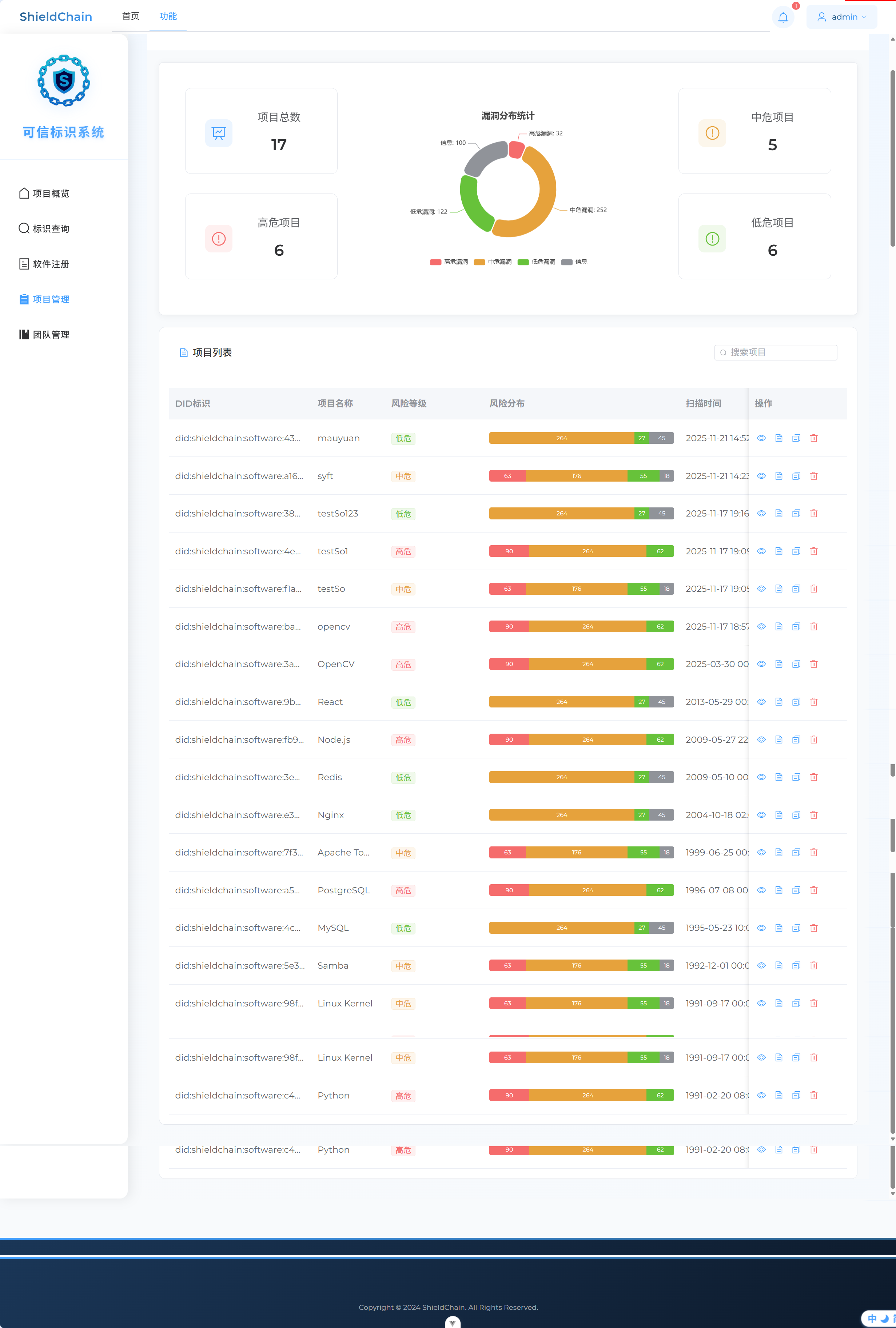
DID操作接口开发
使用当前DID作为前后端传输参数
前端
1. 前后端交互路径
javascript
// src/api/did.js
import request from '@/utils/request'

//冻结DID
export const freezeDID = (did) => {
    console.log('调用freezeDID API,DID:', did);
    return request({
        url: `/did/freeze/${did}`,
        method: 'put',
        timeout: 10000 // 设置超时
    });
};
// 注销DID
export const revokeDID = (did) => {
  return request.put(`/did/revoke/${did}`)
}

// 密钥轮换
export const rotateKey = (did) => {
  return request.post(`/did/key-rotation/${did}`)
}

// 设置密钥更新周期
export const setKeyRotationCycle = (did, cycle) => {
  return request.put(`/did/key-rotation-cycle/${did}/${cycle}`)
}

// 获取DID文档
export const getDIDDocument = (did) => {
  return request.get(`/did/document/${did}`)
}
2. 逻辑(有点问题在冻结的地方)
javascript
<template>
<div class="did-operations">
<el-card shadow="never" class="table-card">
<template #header>
<div class="card-header">
<div class="header-left">
<span class="title">DID 操作</span>
</div>
</div>
</template>
<div class="did-content">
<!-- DID信息展示 -->
<div class="did-info" v-if="didInfo">
<div class="did-header">
<div class="did-main">
<span class="did-id">{{ didInfo.id }}</span>
<el-tag
:type="didInfo.status === 'active' ? 'success' : didInfo.status === 'frozen' ? 'warning' : 'danger'"
size="small"
>
{{ getStatusText(didInfo.status) }}
</el-tag>
</div>
<div class="did-time">
创建时间:{{ didInfo.createdAt }}
</div>
</div>
<div class="did-actions">
<el-button-group>
<el-button
class="btn-view"
@click="handleViewDocument"
:icon="Document"
>
查看DID文档
</el-button>
<el-button
class="btn-freeze"
@click="handleFreeze"
:disabled="didInfo.status === 'frozen' || didInfo.status === 'revoked'"
:icon="Lock"
>
冻结DID
</el-button>
<el-button
class="btn-revoke"
@click="handleRevoke"
:disabled="didInfo.status === 'revoked'"
:icon="Delete"
>
注销DID
</el-button>
<el-button
class="btn-update-key"
@click="handleUpdateKey"
:disabled="didInfo.status !== 'active'"
:icon="RefreshRight"
>
更新密钥
</el-button>
<el-button
class="btn-update-cycle"
@click="handleUpdateCycle"
:disabled="didInfo.status !== 'active'"
:icon="Timer"
>
更新周期
</el-button>
</el-button-group>
</div>
</div>
<!-- DID文档对话框 -->
<el-dialog
v-model="documentDialogVisible"
title="DID文档"
width="800px"
class="document-dialog"
>
<div class="document-content">
<el-descriptions :column="1" border>
<el-descriptions-item label="DID标识">
{{ didInfo.id }}
</el-descriptions-item>
<el-descriptions-item label="控制器">
{{ didInfo.controller }}
</el-descriptions-item>
<el-descriptions-item label="标识密钥">
<div class="key-info">
<span class="key-id">{{ didInfo.publicKey.id }}</span>
<el-tag size="small" type="info">{{ didInfo.publicKey.type }}</el-tag>
</div>
<div class="key-value">{{ didInfo.publicKey.publicKeyHex }}</div>
</el-descriptions-item>
<el-descriptions-item label="认证方式">
{{ didInfo.authentication.join(', ') }}
</el-descriptions-item>
<el-descriptions-item label="服务端点">
<div v-for="service in didInfo.service" :key="service.id" class="service-item">
<div class="service-header">
<span>{{ service.type }}</span>
<el-tag size="small">{{ service.id }}</el-tag>
</div>
<div class="service-endpoint">{{ service.serviceEndpoint }}</div>
</div>
</el-descriptions-item>
</el-descriptions>
</div>
</el-dialog>
<!-- 更新密钥对话框 -->
<el-dialog
v-model="keyUpdateDialogVisible"
title="更新标识密钥"
width="500px"
class="key-update-dialog"
>
<el-form
ref="keyUpdateFormRef"
:model="keyUpdateForm"
:rules="keyUpdateRules"
label-width="100px"
>
<el-form-item label="密钥类型" prop="keyType">
<el-select v-model="keyUpdateForm.keyType">
<el-option label="Ed25519" value="Ed25519" />
<el-option label="Secp256k1" value="Secp256k1" />
</el-select>
</el-form-item>
<el-form-item label="公钥" prop="publicKey">
<el-input
v-model="keyUpdateForm.publicKey"
type="textarea"
rows="3"
placeholder="请输入新的公钥"
/>
</el-form-item>
</el-form>
<template #footer>
<span class="dialog-footer">
<el-button @click="keyUpdateDialogVisible = false">取消</el-button>
<el-button type="primary" @click="submitKeyUpdate">
确认更新
</el-button>
</span>
</template>
</el-dialog>
<!-- 添加更新周期对话框 -->
<el-dialog
v-model="cycleUpdateDialogVisible"
title="设置密钥更新周期"
width="400px"
class="cycle-update-dialog"
>
<el-form
ref="cycleUpdateFormRef"
:model="cycleUpdateForm"
:rules="cycleUpdateRules"
label-width="100px"
>
<el-form-item label="更新周期" prop="cycle">
<el-select v-model="cycleUpdateForm.cycle" placeholder="请选择更新周期">
<el-option label="1个月" value="1" />
<el-option label="3个月" value="3" />
<el-option label="6个月" value="6" />
<el-option label="12个月" value="12" />
</el-select>
</el-form-item>
</el-form>
<template #footer>
<span class="dialog-footer">
<el-button @click="cycleUpdateDialogVisible = false">取消</el-button>
<el-button type="primary" @click="submitCycleUpdate" :loading="cycleLoading" >
确认
</el-button>
</span>
</template>
</el-dialog>
</div>
</el-card>
</div>
</template>
<script setup>
import { ref } from 'vue'
import { ElMessage, ElMessageBox } from 'element-plus'
import {
Document,
Lock,
Delete,
RefreshRight,
Timer
} from '@element-plus/icons-vue'
import { ElLoading } from 'element-plus'
import { freezeDID, revokeDID, rotateKey, setKeyRotationCycle, getDIDDocument } from '@/api/did'
// DID信息
const didInfo = ref({
id: 'did:shieldchain:software:3a7f5c8e21d94b0a6e3f8c1b2d7a9f0e5c6b8a9d2f4e1c7b3d8a0e9f6c5d7b1a',
status: 'active', // active, frozen, revoked
createdAt: '2024-03-15 10:30:00',
controller: 'did:shieldchain:controller',
publicKey: {
id: 'did:shieldchain:123456789abcdefghi#key-1',
type: 'Ed25519VerificationKey2020',
publicKeyHex: '0x1234567890abcdef...'
},
authentication: [
'did:shieldchain:123456789abcdefghi#key-1'
],
service: [
{
id: 'did:shieldchain:123456789abcdefghi#service-1',
type: 'DIDCommMessaging',
serviceEndpoint: 'https://shieldchain.com/endpoint'
}
]
})
//const didIdentifier = 'did:shieldchain:software:3a7f5c8e21d94b0a6e3f8c1b2d7a9f0e5c6b8a9d2f4e1c7b3d8a0e9f6c5d7b1a';
// 状态文本映射
const getStatusText = (status) => {
const statusMap = {
'active': '活跃',
'frozen': '已冻结',
'revoked': '已注销'
}
return statusMap[status] || status
}
// 对话框控制
const documentDialogVisible = ref(false)
const keyUpdateDialogVisible = ref(false)
const cycleUpdateDialogVisible = ref(false)
// 密钥更新表单
const keyUpdateFormRef = ref(null)
const keyUpdateForm = ref({
keyType: '',
publicKey: ''
})
const keyUpdateRules = {
keyType: [
{ required: true, message: '请选择密钥类型', trigger: 'change' }
],
publicKey: [
{ required: true, message: '请输入公钥', trigger: 'blur' }
]
}
// 更新周期表单
const cycleUpdateFormRef = ref(null)
const cycleUpdateForm = ref({
cycle: ''
})
const cycleLoading = ref(false) // 新增:初始化加载状态(关键!)
const cycleUpdateRules = {
cycle: [
{ required: true, message: '请选择更新周期', trigger: 'change' }
]
}
// 处理函数
const handleViewDocument = () => {
documentDialogVisible.value = true
}
const handleFreeze = async () => {
console.log('测试:handleFreeze被调用');
// 方法1:使用原生confirm测试
const userConfirmed = confirm('确定要冻结该DID吗?');
console.log('用户选择:', userConfirmed);
if (userConfirmed) {
// 方法2:直接显示成功消息,跳过API调用
ElMessage.success('DID冻结成功');
await freezeDID(didInfo.value.id);
didInfo.value.status = 'frozen';
}
};
const handleRevoke = async () => {
const userConfirmed = confirm('确定要注销该DID吗?');
console.log('用户选择:', userConfirmed);
if (userConfirmed) {
ElMessage.success('DID已注销');
await revokeDID(didInfo.value.id);
didInfo.value.status = 'revoked';
}
}
const handleUpdateKey = async () => {
let loading;
try {
// 直接创建 Loading(无弹窗确认,直接执行)
loading = ElLoading.service({
lock: true,
text: '正在更新密钥...',
background: 'rgba(0, 0, 0, 0.7)'
});
await rotateKey(didInfo.value.id);
ElMessage.success('密钥更新成功');
//await fetchDIDInfo();
} catch (error) {
ElMessage.error('密钥更新失败: ' + (error?.message || '未知错误'));
} finally {
// 安全关闭 Loading(同上)
if (loading && typeof loading.close === 'function') {
loading.close();
}
}
};
// 打开更新周期设置对话框
const handleUpdateCycle = () => {
console.log('打开周期设置对话框');
// 重置表单,清空可能的历史选择(可选,但建议有)
// cycleUpdateForm.value.cycle = '';
// 显示对话框
cycleUpdateDialogVisible.value = true;
};
// 提交周期设置
const submitCycleUpdate = async () => {
let loadingInstance; // 用于控制加载状态
// 检查表单引用是否存在
if (!cycleUpdateFormRef.value) {
console.error('表单引用未找到');
return;
}
try {
// 显示加载状态,防止重复提交
loadingInstance = ElLoading.service({
lock: true,
text: '正在设置更新周期...',
background: 'rgba(0, 0, 0, 0.7)'
});
cycleLoading.value = true;
// 1. 进行表单验证 [2,5](@ref)
await cycleUpdateFormRef.value.validate();
console.log('表单验证通过,周期为:', cycleUpdateForm.value.cycle);
// 2. 调用后端API [1](@ref)
// 假设 setKeyRotationCycle 是你引入的API方法
await setKeyRotationCycle(didInfo.value.id, cycleUpdateForm.value.cycle);
// 3. 成功后给出反馈
ElMessage.success(`密钥更新周期已设置为 ${cycleUpdateForm.value.cycle} 个月`);
// 4. 关闭对话框并重置表单
cycleUpdateDialogVisible.value = false;
cycleUpdateForm.value.cycle = ''; // 清空选择,方便下次设置
} catch (error) {
// 错误处理 [3](@ref)
if (error.fields) {
// 这是表单验证失败的错误,通常不需要额外提示,因为Element Plus会自动显示错误信息
console.log('表单验证未通过:', error.fields);
return; // 直接返回,不显示全局错误消息
}
// 其他错误(如网络错误、后端返回错误等)
console.error('设置失败:', error);
ElMessage.error('设置失败: ' + (error.message || '未知错误'));
} finally {
// 无论成功或失败,都关闭加载状态
cycleLoading.value = false;
if (loadingInstance) {
loadingInstance.close();
}
}
};后端
1. 注册路径
java
  protected void addInterceptors(InterceptorRegistry registry){
        log.info("开始注册自定义拦截器...");
        registry.addInterceptor(jwtTokenInterceptor)
                .addPathPatterns("/user/**")
                .addPathPatterns("/software/**")
                .addPathPatterns("/message/**")
                .addPathPatterns("/sbom-vuln/**")
                .addPathPatterns("/projects/**")
                .addPathPatterns("/did/**")
                .excludePathPatterns("/user/login");
    }
2. controller
java
package com.sky.controller;

import com.sky.result.Result;
import com.sky.service.DIDOperationService;
import io.swagger.annotations.Api;
import io.swagger.annotations.ApiOperation;
import lombok.extern.slf4j.Slf4j;
import org.springframework.beans.factory.annotation.Autowired;
import org.springframework.web.bind.annotation.*;

@RestController
@RequestMapping("/did")
@Slf4j
@Api(tags = "DID操作管理")
public class DIDController {

    @Autowired
    private DIDOperationService didOperationService;

    @PutMapping("/freeze/{did}")
    @ApiOperation("冻结DID")
    public Result<String> freezeDID(@PathVariable String did) {
        log.info("冻结DID: {}", did);
        didOperationService.freezeDID(did);
        return Result.success("DID冻结成功");
    }

    @PutMapping("/revoke/{did}")
    @ApiOperation("注销DID")
    public Result<String> revokeDID(@PathVariable String did) {
        log.info("注销DID: {}", did);
        didOperationService.revokeDID(did);
        return Result.success("DID注销成功");
    }

    @PostMapping("/key-rotation/{did}")
    @ApiOperation("密钥轮换")
    public Result<String> rotateKey(@PathVariable String did) {
        log.info("密钥轮换: {}", did);
        didOperationService.rotateKey(did);
        return Result.success("密钥轮换成功");
    }

    @PutMapping("/key-rotation-cycle/{did}/{cycle}")
    @ApiOperation("设置密钥更新周期")
    public Result<String> setKeyRotationCycle(@PathVariable String did, @PathVariable Integer cycle) {
        log.info("设置密钥更新周期: {}, 周期: {}个月", did, cycle);
        didOperationService.setKeyRotationCycle(did, cycle);
        return Result.success("密钥更新周期设置成功");
    }
}
3. service
java
package com.sky.service;

public interface DIDOperationService {

    /**
     * 冻结DID
     * @param did
     */
    void freezeDID(String did);

    /**
     * 注销DID
     * @param did
     */
    void revokeDID(String did);

    /**
     * 秘钥轮换
     * @param did
     */
    void rotateKey(String did);

    /**
     * 设置密钥轮换周期
     * @param did
     * @param cycle
     */
    void setKeyRotationCycle(String did, Integer cycle);
}
java
package com.sky.service.impl;

import com.sky.entity.Software;
import com.sky.mapper.SoftwareMapper;
import com.sky.service.DIDOperationService;
import com.sky.utils.DIDUtil;
import com.sky.utils.SimpleEncryptUtil;
import lombok.extern.slf4j.Slf4j;
import org.springframework.beans.factory.annotation.Autowired;
import org.springframework.stereotype.Service;
import org.springframework.transaction.annotation.Transactional;

import java.security.KeyPair;
import java.security.PrivateKey;
import java.security.PublicKey;
import java.time.LocalDateTime;
import java.util.Base64;

@Service
@Slf4j
public class DIDOperationServiceImpl implements DIDOperationService {

    @Autowired
    private SoftwareMapper softwareMapper;

    /**
     * 冻结DID
     * @param did
     */
    @Transactional
    public void freezeDID(String did) {
        Software software = softwareMapper.selectByDid(did);
        if (software == null) {
            throw new RuntimeException("DID不存在");
        }

        // 更新DID状态为冻结(2)
        software.setDidStatus(2);

        softwareMapper.updateSoftwareStatus(software);
        log.info("DID冻结成功: {}", did);
    }

    /**
     * 注销DID
     * @param did
     */
    @Transactional
    public void revokeDID(String did) {
        Software software = softwareMapper.selectByDid(did);
        if (software == null) {
            throw new RuntimeException("DID不存在");
        }
        // 更新DID状态为吊销(0)
        software.setDidStatus(0);

        softwareMapper.updateSoftwareStatus(software);
        log.info("DID注销成功: {}", did);
    }

    /**
     * 密钥更新
     * @param did
     */
    @Transactional
    public void rotateKey(String did) {
        Software software = softwareMapper.selectByDid(did);
        if (software == null) {
            throw new RuntimeException("DID不存在");
        }

        if (software.getDidStatus() != 1) {
            throw new RuntimeException("只有有效状态的DID才能更新密钥");
        }

        try {
            // 生成新的密钥对
            KeyPair keyPair = DIDUtil.generateECCKeyPair();
            PublicKey publicKey = keyPair.getPublic();
            PrivateKey privateKey = keyPair.getPrivate();

            // 加密私钥
            String encryptedPrivateKey = SimpleEncryptUtil.encryptForSoftware(
                    Base64.getEncoder().encodeToString(privateKey.getEncoded())
            );
            // 更新密钥信息
            software.setPublicKey(Base64.getEncoder().encodeToString(publicKey.getEncoded()));
            software.setPrivateKeyEncrypt(encryptedPrivateKey);
            software.setLastRotationTime(LocalDateTime.now());

            softwareMapper.updateKey(software);
            log.info("密钥轮换成功: {}", did);

        } catch (Exception e){

        }

    }

    /**
     * 设置密钥轮换周期
     * @param did
     * @param cycle
     */
    @Transactional
    public void setKeyRotationCycle(String did, Integer cycle) {
        Software software = softwareMapper.selectByDid(did);
        if (software == null) {
            throw new RuntimeException("DID不存在");
        }

        if (software.getDidStatus() != 1) {
            throw new RuntimeException("只有有效状态的DID才能设置更新周期");
        }

        software.setKeyRotationCycle(cycle);

        softwareMapper.updateKeyRotationCycle(software);
        log.info("密钥更新周期设置成功: {}, 周期: {}个月", did, cycle);
    }
}
4. mapper
java
 /**
     * 更新软件DID状态
     * @param software
     */
    @AutoFill(value = OperationType.UPDATE)
    @Update("update software set did_status = #{didStatus}, update_time = #{updateTime}, update_user =#{updateUser} " +
            "where did = #{did}")
    void updateSoftwareStatus(Software software);


    /**
     * 更新密钥
     * @param software
     */
    @AutoFill(value = OperationType.UPDATE)
    @Update("update software set public_key = #{publicKey}, private_key_encrypt = #{privateKeyEncrypt}, " +
            "last_rotation_time = #{lastRotationTime}, update_time = #{updateTime}, update_user =#{updateUser} " +
            "where did = #{did}")
    void updateKey(Software software);


    /**
     * 设置密钥更新周期
     * @param software
     */
    @AutoFill(value = OperationType.UPDATE)
    @Update("update software set key_rotation_cycle = #{keyRotationCycle}, update_time = #{updateTime}, update_user =#{updateUser} " +
            "where did = #{did}")
    void updateKeyRotationCycle(Software software);
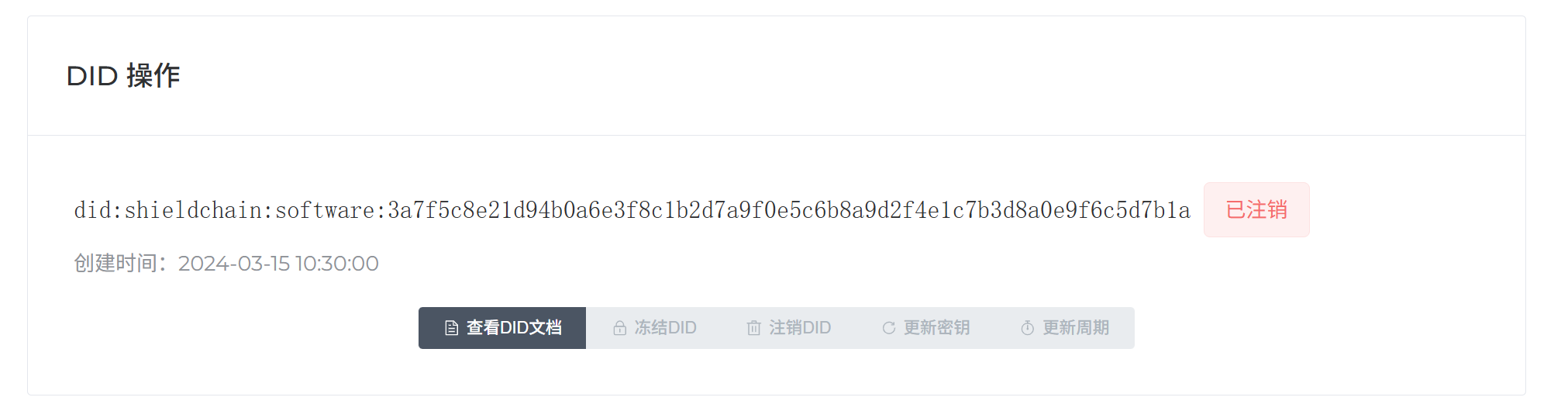
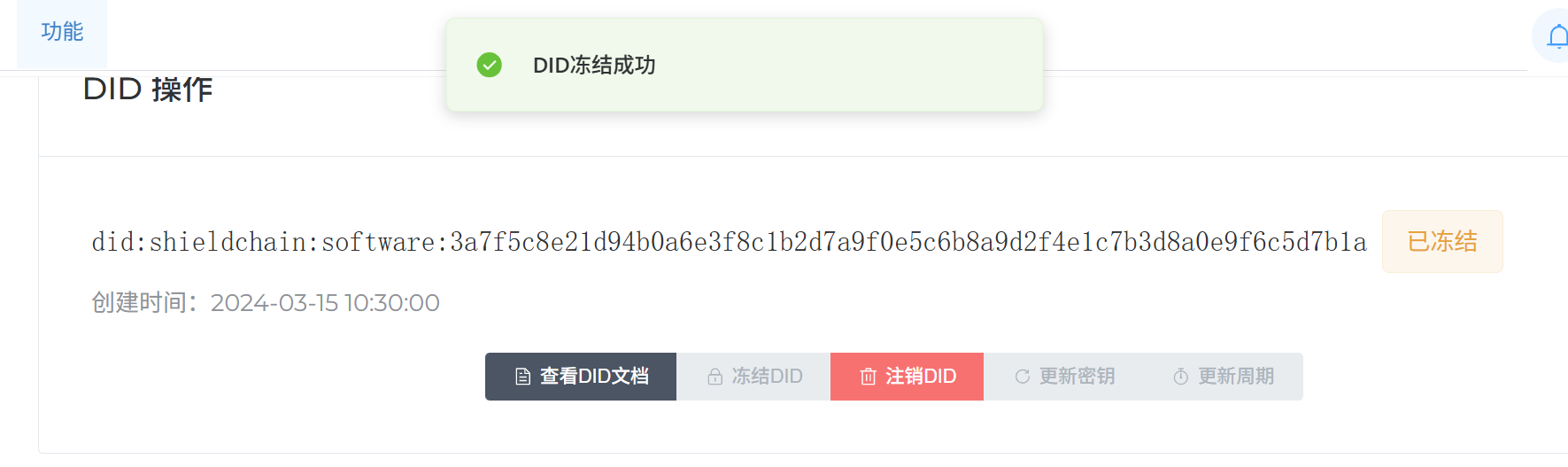
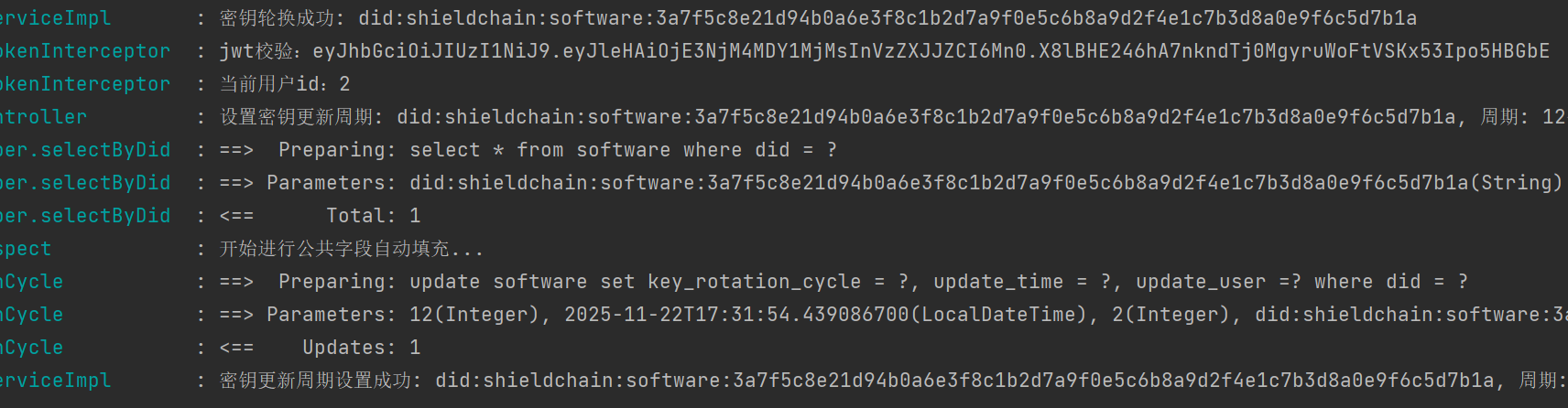
测试
DID密钥更新消息定时提醒
这部分没有真正实现,下面是AI的参考代码
-
数据库
ALTER TABLE software ADD COLUMN (
key_rotation_cycle INT DEFAULT 3 COMMENT '密钥更新周期(月)',
last_rotation_time DATETIME COMMENT '最后密钥更新时间',
next_reminder_time DATETIME COMMENT '下次提醒时间',
reminder_sent BOOLEAN DEFAULT FALSE COMMENT '提醒是否已发送'
); -
KeyRotationReminderTask
java
// server/task/KeyRotationReminderTask.java
package com.software.identifier.server.task;

import com.software.identifier.server.service.KeyRotationService;
import lombok.extern.slf4j.Slf4j;
import org.springframework.beans.factory.annotation.Autowired;
import org.springframework.scheduling.annotation.Scheduled;
import org.springframework.stereotype.Component;

@Component
@Slf4j
public class KeyRotationReminderTask {

    @Autowired
    private KeyRotationService keyRotationService;

    /**
     * 每天凌晨1点检查需要提醒的密钥更新
     * cron表达式: 秒 分 时 日 月 周
     */
    @Scheduled(cron = "0 0 1 * * ?")
    public void checkKeyRotationReminders() {
        log.info("开始执行密钥更新提醒检查任务");
        try {
            int reminderCount = keyRotationService.checkAndSendReminders();
            log.info("密钥更新提醒任务执行完成,共发送 {} 条提醒", reminderCount);
        } catch (Exception e) {
            log.error("密钥更新提醒任务执行失败", e);
        }
    }

    /**
     * 每30分钟检查一次紧急提醒(距离到期时间小于3天)
     */
    @Scheduled(cron = "0 */30 * * * ?")
    public void checkUrgentReminders() {
        log.debug("检查紧急密钥更新提醒");
        try {
            int urgentCount = keyRotationService.checkUrgentReminders();
            if (urgentCount > 0) {
                log.info("发送 {} 条紧急密钥更新提醒", urgentCount);
            }
        } catch (Exception e) {
            log.error("紧急提醒检查任务执行失败", e);
        }
    }
}- service
java
// server/service/KeyRotationService.java
package com.software.identifier.server.service;

import com.software.identifier.common.entity.Software;
import com.software.identifier.server.mapper.SoftwareMapper;
import lombok.extern.slf4j.Slf4j;
import org.springframework.beans.factory.annotation.Autowired;
import org.springframework.stereotype.Service;
import org.springframework.transaction.annotation.Transactional;

import java.time.LocalDateTime;
import java.util.List;

@Service
@Slf4j
public class KeyRotationService {

    @Autowired
    private SoftwareMapper softwareMapper;

    @Autowired
    private NotificationService notificationService;

    /**
     * 检查并发送密钥更新提醒
     */
    @Transactional
    public int checkAndSendReminders() {
        LocalDateTime now = LocalDateTime.now();
        List<Software> softwaresDueForRotation = softwareMapper.selectDueForRotation(now);

        int sentCount = 0;
        for (Software software : softwaresDueForRotation) {
            try {
                sendReminder(software);
                // 更新提醒状态
                software.setReminderSent(true);
                software.setUpdateTime(now);
                softwareMapper.update(software);
                sentCount++;
            } catch (Exception e) {
                log.error("发送密钥更新提醒失败,DID: {}", software.getDid(), e);
            }
        }
        return sentCount;
    }

    /**
     * 检查紧急提醒(3天内到期)
     */
    @Transactional
    public int checkUrgentReminders() {
        LocalDateTime now = LocalDateTime.now();
        LocalDateTime urgentThreshold = now.plusDays(3);

        List<Software> urgentSoftwares = softwareMapper.selectUrgentForRotation(urgentThreshold);

        int sentCount = 0;
        for (Software software : urgentSoftwares) {
            if (!software.isReminderSent() || shouldResendUrgentReminder(software)) {
                try {
                    sendUrgentReminder(software);
                    software.setReminderSent(true);
                    software.setUpdateTime(now);
                    softwareMapper.update(software);
                    sentCount++;
                } catch (Exception e) {
                    log.error("发送紧急密钥更新提醒失败,DID: {}", software.getDid(), e);
                }
            }
        }
        return sentCount;
    }

    private boolean shouldResendUrgentReminder(Software software) {
        // 如果上次提醒是3天前发送的,可以重新发送紧急提醒
        return software.getUpdateTime().isBefore(LocalDateTime.now().minusDays(3));
    }

    /**
     * 发送普通提醒
     */
    private void sendReminder(Software software) {
        String title = "密钥更新提醒 - DID: " + software.getDid();
        String content = buildReminderContent(software, false);
        notificationService.sendNotification(software.getCreateUser(), title, content);
    }

    /**
     * 发送紧急提醒
     */
    private void sendUrgentReminder(Software software) {
        String title = "【紧急】密钥更新提醒 - DID: " + software.getDid();
        String content = buildReminderContent(software, true);
        notificationService.sendNotification(software.getCreateUser(), title, content);
    }

    private String buildReminderContent(Software software, boolean isUrgent) {
        StringBuilder content = new StringBuilder();
        if (isUrgent) {
            content.append("【紧急提醒】");
        }
        content.append("您的DID密钥即将到期,请及时更新。\n\n");
        content.append("DID标识: ").append(software.getDid()).append("\n");
        content.append("软件名称: ").append(software.getName()).append("\n");
        content.append("当前密钥周期: ").append(software.getKeyRotationCycle()).append("个月\n");
        content.append("最后更新时间: ").append(software.getLastRotationTime()).append("\n");
        content.append("建议更新时间: ").append(calculateNextRotationDate(software)).append("\n\n");
        content.append("请登录系统进行密钥更新操作。");

        return content.toString();
    }

    private LocalDateTime calculateNextRotationDate(Software software) {
        return software.getLastRotationTime().plusMonths(software.getKeyRotationCycle());
    }
}
java
// server/service/NotificationService.java
package com.software.identifier.server.service;

import lombok.extern.slf4j.Slf4j;
import org.springframework.beans.factory.annotation.Autowired;
import org.springframework.mail.SimpleMailMessage;
import org.springframework.mail.javamail.JavaMailSender;
import org.springframework.mail.javamail.MimeMessageHelper;
import org.springframework.stereotype.Service;

import javax.mail.MessagingException;
import javax.mail.internet.MimeMessage;

@Service
@Slf4j
public class NotificationService {

    @Autowired(required = false)
    private JavaMailSender mailSender;

    @Autowired
    private WebSocketNotificationService webSocketService;

    /**
     * 发送通知(站内信 + 邮件)
     */
    public void sendNotification(Integer userId, String title, String content) {
        try {
            // 1. 发送站内信(WebSocket实时通知)
            webSocketService.sendNotificationToUser(userId, title, content);

            // 2. 发送邮件提醒
            sendEmailNotification(userId, title, content);

            log.info("成功向用户 {} 发送密钥更新提醒", userId);
        } catch (Exception e) {
            log.error("发送通知失败,用户ID: {}", userId, e);
        }
    }

    /**
     * 发送邮件通知
     */
    private void sendEmailNotification(Integer userId, String title, String content) {
        if (mailSender == null) {
            log.debug("邮件发送器未配置,跳过邮件通知");
            return;
        }

        try {
            // 根据用户ID查询邮箱地址
            String toEmail = getUserEmail(userId);
            if (toEmail == null) {
                log.warn("用户 {} 未设置邮箱地址,跳过邮件发送", userId);
                return;
            }

            MimeMessage message = mailSender.createMimeMessage();
            MimeMessageHelper helper = new MimeMessageHelper(message, true, "UTF-8");

            helper.setTo(toEmail);
            helper.setSubject(title);
            helper.setText(buildEmailContent(content), true); // true表示支持HTML

            mailSender.send(message);
            log.debug("密钥更新提醒邮件已发送至: {}", toEmail);
        } catch (MessagingException e) {
            log.error("发送邮件失败", e);
        }
    }

    private String buildEmailContent(String content) {
        return "<!DOCTYPE html>" +
                "<html>" +
                "<head><meta charset='UTF-8'></head>" +
                "<body>" +
                "<div style='font-family: Arial, sans-serif; max-width: 600px; margin: 0 auto;'>" +
                "<h2 style='color: #1890ff;'>软件标识管理系统 - 密钥更新提醒</h2>" +
                "<div style='background: #f5f5f5; padding: 20px; border-radius: 5px;'>" +
                content.replace("\n", "<br>") +
                "</div>" +
                "<p style='color: #666; font-size: 12px;'>此为系统自动发送邮件,请勿回复。</p>" +
                "</div>" +
                "</body>" +
                "</html>";
    }

    private String getUserEmail(Integer userId) {
        // 这里需要实现根据用户ID查询邮箱的逻辑
        // 可以从用户表或缓存中获取
        return "user@example.com"; // 示例返回值
    }
}- mapper
java
// server/mapper/SoftwareMapper.java
package com.software.identifier.server.mapper;

import com.software.identifier.common.entity.Software;
import org.apache.ibatis.annotations.Mapper;
import org.apache.ibatis.annotations.Param;
import org.apache.ibatis.annotations.Select;

import java.time.LocalDateTime;
import java.util.List;

@Mapper
public interface SoftwareMapper {

    /**
     * 查询需要提醒密钥更新的软件
     */
    @Select("SELECT * FROM software WHERE " +
            "key_rotation_cycle IS NOT NULL AND " +
            "last_rotation_time IS NOT NULL AND " +
            "did_status = 1 AND " +  // 只查询活跃状态的DID
            "next_reminder_time <= #{currentTime} AND " +
            "reminder_sent = FALSE")
    List<Software> selectDueForRotation(@Param("currentTime") LocalDateTime currentTime);

    /**
     * 查询需要紧急提醒的软件(3天内到期)
     */
    @Select("SELECT * FROM software WHERE " +
            "key_rotation_cycle IS NOT NULL AND " +
            "last_rotation_time IS NOT NULL AND " +
            "did_status = 1 AND " +
            "last_rotation_time + INTERVAL key_rotation_cycle MONTH <= #{urgentThreshold}")
    List<Software> selectUrgentForRotation(@Param("urgentThreshold") LocalDateTime urgentThreshold);

    /**
     * 更新软件信息
     */
    int update(Software software);
}- websocket实时通知
java
// server/service/WebSocketNotificationService.java
package com.software.identifier.server.service;

import com.fasterxml.jackson.core.JsonProcessingException;
import com.fasterxml.jackson.databind.ObjectMapper;
import lombok.extern.slf4j.Slf4j;
import org.springframework.stereotype.Service;
import org.springframework.web.socket.TextMessage;
import org.springframework.web.socket.WebSocketSession;

import java.io.IOException;
import java.util.Map;
import java.util.concurrent.ConcurrentHashMap;

@Service
@Slf4j
public class WebSocketNotificationService {

    private final Map<Integer, WebSocketSession> userSessions = new ConcurrentHashMap<>();
    private final ObjectMapper objectMapper = new ObjectMapper();

    /**
     * 向指定用户发送通知
     */
    public void sendNotificationToUser(Integer userId, String title, String content) {
        WebSocketSession session = userSessions.get(userId);
        if (session != null && session.isOpen()) {
            try {
                Map<String, Object> message = Map.of(
                    "type", "keyRotationReminder",
                    "title", title,
                    "content", content,
                    "timestamp", System.currentTimeMillis()
                );

                String messageJson = objectMapper.writeValueAsString(message);
                session.sendMessage(new TextMessage(messageJson));

                log.debug("WebSocket通知已发送给用户: {}", userId);
            } catch (IOException e) {
                log.error("WebSocket消息发送失败,用户ID: {}", userId, e);
                // 移除无效的session
                userSessions.remove(userId, session);
            }
        }
    }

    /**
     * 注册用户WebSocket会话
     */
    public void registerUserSession(Integer userId, WebSocketSession session) {
        userSessions.put(userId, session);
        log.debug("用户 {} WebSocket会话已注册", userId);
    }

    /**
     * 移除用户WebSocket会话
     */
    public void removeUserSession(Integer userId) {
        userSessions.remove(userId);
        log.debug("用户 {} WebSocket会话已移除", userId);
    }
}- application.yml
javascript
# 定时任务配置
spring:
  task:
    scheduling:
      pool:
        size: 5
      thread-name-prefix: key-rotation-scheduler-

  # 邮件配置(可选)
  mail:
    host: smtp.qq.com
    username: your-email@qq.com
    password: your-auth-code
    properties:
      mail:
        smtp:
          auth: true
          starttls:
            enable: true

# 自定义配置
app:
  key-rotation:
    reminder:
      enabled: true
      # 提前提醒天数
      advance-days: 7
      # 紧急提醒天数
      urgent-days: 3
前端
javascript
<!-- frontend/src/components/NotificationCenter.vue -->
<template>
  <div class="notification-center">
    <el-badge :value="unreadCount" :max="99" class="notification-badge">
      <el-button circle @click="showNotifications = true">
        <el-icon><Bell /></el-icon>
      </el-button>
    </el-badge>

    <el-dialog v-model="showNotifications" title="通知中心" width="500px">
      <div class="notification-list">
        <div v-for="notification in notifications" :key="notification.id"
             class="notification-item" :class="{ unread: !notification.read }">
          <div class="notification-header">
            <span class="title">{{ notification.title }}</span>
            <el-tag v-if="!notification.read" size="small" type="danger">新</el-tag>
            <span class="time">{{ formatTime(notification.timestamp) }}</span>
          </div>
          <div class="notification-content">{{ notification.content }}</div>
        </div>
      </div>
    </el-dialog>
  </div>
</template>

<script setup>
import { ref, onMounted, onUnmounted } from 'vue'
import { ElMessage } from 'element-plus'
import { Bell } from '@element-plus/icons-vue'

const showNotifications = ref(false)
const notifications = ref([])
const unreadCount = ref(0)
let websocket = null

// 连接到WebSocket
const connectWebSocket = () => {
  const userId = localStorage.getItem('userId') // 从本地存储获取用户ID
  if (!userId) return

  const wsUrl = `ws://localhost:8080/ws/notifications/${userId}`
  websocket = new WebSocket(wsUrl)

  websocket.onopen = () => {
    console.log('WebSocket连接已建立')
  }

  websocket.onmessage = (event) => {
    const message = JSON.parse(event.data)
    if (message.type === 'keyRotationReminder') {
      handleKeyRotationReminder(message)
    }
  }

  websocket.onclose = () => {
    console.log('WebSocket连接已关闭')
    // 3秒后重连
    setTimeout(connectWebSocket, 3000)
  }
}

// 处理密钥更新提醒
const handleKeyRotationReminder = (message) => {
  const newNotification = {
    id: Date.now(),
    title: message.title,
    content: message.content,
    timestamp: message.timestamp,
    read: false,
    type: 'keyRotation'
  }

  notifications.value.unshift(newNotification)
  unreadCount.value++

  // 显示桌面通知(如果浏览器支持)
  if ('Notification' in window && Notification.permission === 'granted') {
    new Notification(message.title, {
      body: message.content,
      icon: '/favicon.ico'
    })
  }

  ElMessage.warning('您有新的密钥更新提醒')
}

onMounted(() => {
  connectWebSocket()
  // 请求通知权限
  if ('Notification' in window && Notification.permission === 'default') {
    Notification.requestPermission()
  }
})

onUnmounted(() => {
  if (websocket) {
    websocket.close()
  }
})
</script>