重点:onMeasure(),onlayout(),计算子视图的规格
多手搓代码,才有手感
kotlin
package com.mircles.test.ui

import android.content.Context
import android.graphics.Rect
import android.util.AttributeSet
import android.view.View
import android.view.ViewGroup
import kotlin.math.max
import androidx.core.view.isGone

class CustomViewGroup @JvmOverloads constructor(
    context: Context,
    attrs: AttributeSet? = null,
    defStyleAttr: Int = 0
) : ViewGroup(context, attrs, defStyleAttr) {

    //存储每行的视图及其位置,mutableListOf<T>()
    private val lines = mutableListOf<List<Pair<View, Rect>>>()

    override fun onMeasure(widthMeasureSpec: Int, heightMeasureSpec: Int) {
        //1. 解析父容器给出的测量要求和可用空间
        val widthMode = MeasureSpec.getMode(widthMeasureSpec)
        val widthSize = MeasureSpec.getSize(widthMeasureSpec)
        val heightMode = MeasureSpec.getMode(heightMeasureSpec)
        val heightSize = MeasureSpec.getSize(heightMeasureSpec)

        //2. 测量所有子视图
        measureChildren(widthMeasureSpec, heightMeasureSpec)

        //3. 计算流式布局的行和每行的高度、宽度
        lines.clear()
        var currentLine = mutableListOf<Pair<View, Rect>>()
        var currentLineHeight = 0
        var currentLineWidth = 0
        val maxWidth = if (widthMode == MeasureSpec.UNSPECIFIED) Integer.MAX_VALUE else widthSize

        for (i in 0 until childCount) {
            val child = getChildAt(i)
            if (child.isGone) continue

            val params = child.layoutParams as MarginLayoutParams
            val childWidth = child.measuredWidth + params.leftMargin + params.rightMargin
            val childHeight = child.measuredHeight + params.topMargin + params.bottomMargin

            //判断是否需要换行
            if (currentLineWidth + childWidth > maxWidth) {
                //保存上一行
                if (currentLine.isNotEmpty()) {
                    lines.add(currentLine)
                    currentLine = mutableListOf()
                    currentLineWidth = 0
                    currentLineHeight = 0
                }
            }
            //将子视图添加到当前行
            val rect = Rect().apply {
                left = currentLineWidth + params.leftMargin
                top = currentLineHeight + params.topMargin
                right = left + child.measuredWidth
                bottom = top + child.measuredHeight

            }
            currentLine.add(child to rect)
            currentLineWidth += childWidth
            currentLineHeight = max(currentLineHeight, childHeight)

        }

        if (currentLine.isNotEmpty()) {
            lines.add(currentLine)
        }

        //4. 计算整个布局的最终宽高并设置
        val totalWidth =
            if (widthMode == MeasureSpec.EXACTLY) widthSize else lines.maxOfOrNull { line ->
                line.sumOf {
                    it.second.right + (it.first.layoutParams as MarginLayoutParams).rightMargin
                }
            } ?: 0

        val totalHeight =
            if (heightMode == MeasureSpec.EXACTLY) heightSize else lines.sumOf { line ->
                line.maxOf { it.second.bottom + (it.first.layoutParams as MarginLayoutParams).bottomMargin }
            }

        setMeasuredDimension(totalWidth, totalHeight)

    }


    override fun onLayout(
        changed: Boolean,
        l: Int,
        t: Int,
        r: Int,
        b: Int
    ) {
        //该方法是必须实现的
        //5.遍历所有行和行内的子视图,调用其layout方法确定最终位置
        var currentTop = 0
        for (line in lines) {
            val lineHeight = line.maxOf {
                it.second.height() + (it.first.layoutParams as MarginLayoutParams).bottomMargin
            }

            for ((child, rect) in line) {
                child.layout(
                    rect.left, rect.top + currentTop, rect.right,
                    rect.bottom + currentTop
                )
            }

            currentTop += lineHeight

        }

    }

    override fun generateLayoutParams(attrs: AttributeSet?): LayoutParams? {
        return MarginLayoutParams(context, attrs)
    }

    override fun generateDefaultLayoutParams(): LayoutParams? {
        return MarginLayoutParams(LayoutParams.WRAP_CONTENT, LayoutParams.WRAP_CONTENT)
    }

    override fun generateLayoutParams(p: LayoutParams?): LayoutParams? {
        return MarginLayoutParams(p)
    }

    override fun shouldDelayChildPressedState(): Boolean {
        return super.shouldDelayChildPressedState()
    }


}
xml
<?xml version="1.0" encoding="utf-8"?>
<ScrollView xmlns:android="http://schemas.android.com/apk/res/android"
    android:orientation="vertical"
    android:layout_width="match_parent"
    android:layout_height="match_parent">


    <com.mircles.test.ui.CustomViewGroup
        android:layout_width="match_parent"
        android:layout_height="wrap_content"
        >

        <TextView
            android:layout_width="100dp"
            android:layout_height="60dp"
            android:background="@color/purple_200"
            android:text="111111"/>

        <TextView
            android:layout_width="wrap_content"
            android:layout_height="70dp"
            android:background="@color/teal_200"
            android:text="这是什么"/>

        <TextView
            android:layout_width="120dp"
            android:layout_height="80dp"
            android:background="@color/purple_700"
            android:text="一个橘子"/>


        <TextView
            android:layout_width="100dp"
            android:layout_height="60dp"
            android:background="@color/teal_200"
            android:text="22222"/>

        <TextView
            android:layout_width="match_parent"
            android:layout_height="100dp"
            android:background="@color/teal_700"
            android:text="333333"/>

        <TextView
            android:layout_width="400dp"
            android:layout_height="300dp"
            android:background="@color/purple_700"
            android:text="444444"/>

        <TextView
            android:layout_width="400dp"
            android:layout_height="100dp"
            android:background="@color/teal_200"
            android:text="5555555"/>
        <TextView
            android:layout_width="100dp"
            android:layout_height="200dp"
            android:background="@color/purple_700"
            android:text="66666666"/>

    </com.mircles.test.ui.CustomViewGroup>

</ScrollView>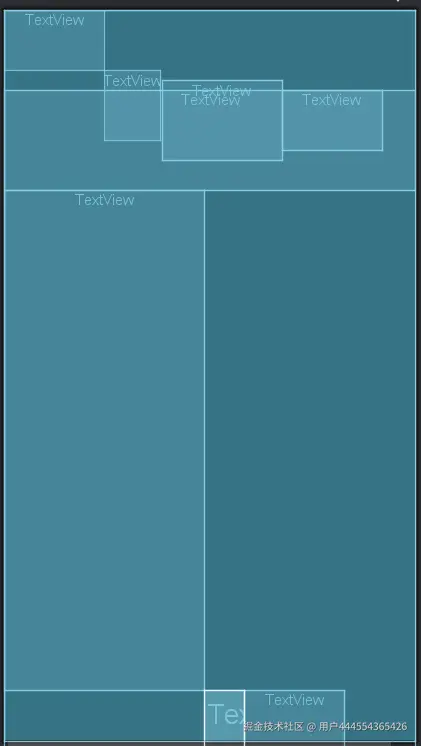
提示:这明显是有BUG,还需要继续分析实现的代码....
窝趣,面试官问,你觉得你的优点是什么?
我:............(我不造呀,不都不知自己有什么长处,死脑子快转起来......)
现在开始想......
......是打造培养优点