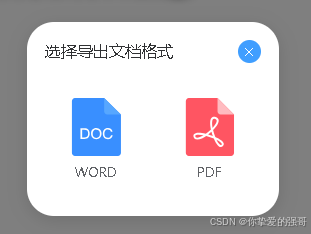
<template>
  <div :class="$options.name" v-if="visible">
    <!-- 如果不加v-if="visible"弹窗中使用el-tabs组件就会死循环卡死,这个是elementUI的bug -->
    <el-dialog
      :append-to-body="true"
      :close-on-click-modal="true"
      :close-on-press-escape="true"
      :custom-class="`${$options.name}-el-dialog radius`"
      :destroy-on-close="true"
      :fullscreen="false"
      :show-close="true"
      :title="title"
      :width="`280px`"
      :visible.sync="visible"
      style="animation: none"
      :top="`calc(50vh - 150px)`"
    >
      <div
        style="margin: -20px 0px -10px; max-height: 500px"
        v-loading="loading"
        :element-loading-text="elementLoadingText"
      >
        <!-- 弹窗内容 -->
        <div class="form-body">
          <div class="container">
            <div v-for="(a, i) in list" :key="i" class="btn" @click="exportData(a)">
              <div class="icon">
                <img :src="a.icon" draggable="false" />
              </div>
              <p>{{ a.label }}</p>
            </div>
          </div>
        </div>
      </div>
    </el-dialog>
  </div>
</template>
<script>
export default {
  name: `sgSelectExportDocumentType`,
  components: {},
  data() {
    return {
      title: `选择导出文档格式`,
      loading: false, //加载状态
      elementLoadingText: ``, //加载提示文字

      visible: false,
      form: {},
      disabled: false, //是否只读

      list: [
        { label: `WORD`, icon: `~@/../static/img/fileType/doc.svg` },
        { label: `PDF`, icon: `~@/../static/img/fileType/pdf.svg` },
      ],
    };
  },
  props: [`value`, `data`],

  watch: {
    loading(newValue, oldValue) {
      newValue || (this.elementLoadingText = ``);
    },

    value: {
      handler(d) {
        this.visible = d;
      },
      deep: true,
      immediate: true,
    },
    visible(d) {
      this.$emit("input", d);
    },

    data: {
      handler(newValue, oldValue) {
        //console.log(`深度监听${this.$options.name}:`, newValue, oldValue);
        if (Object.keys(newValue || {}).length) {
          this.form = this.$g.deepCopy(newValue);
          this.$g.cF2CP(`disabled`, this);
          this.$g.cF2CP(`title`, this);
          this.$g.cF2CP(`list`, this);
        }
      },
      deep: true, //深度监听
      immediate: true, //立即执行
    },
  },
  methods: {
    exportData(d) {
      this.$emit(`exportData`, d);
      this.cancel();
    },
    cancel() {
      this.visible = false;
    },
  },
};
</script>
<style lang="scss" scoped>
.sgSelectExportDocumentType {
}

>>> .sgSelectExportDocumentType-el-dialog {
  .container {
    width: 100%;
    height: 100%;
    display: flex;
    align-items: center;
    justify-content: center;
    flex-wrap: nowrap;
    text-align: center;
    .btn {
      /*禁止选中文本*/
      user-select: none;
      margin: 0 10px;
      box-sizing: border-box;
      border: 1px solid transparent;
      border-radius: 11px;
      padding: 10px 10px 20px;
      cursor: pointer;
      transition: 0.2s;
      p {
        transition: 0.2s;
      }
      &:hover {
        filter: brightness(1.1);
        border-color: #409eff;
        background-color: #409eff11;
        p {
          color: #409eff;
        }
      }
      &:active {
        transform: translate(1px, 1px);
        opacity: 0.618;
      }

      .icon {
        box-sizing: border-box;
        padding: 20px;
        box-sizing: border-box;
        padding: 10px;
        img {
          object-position: center;
          object-fit: contain;
        }
        i {
          width: 64px;
          height: 64px;
          font-size: 60px;
          color: #409eff;
        }
      }
    }
  }
}
</style>