本文以仿猫眼电影M站首页布局为案例,展示ArkUI在实际开发中的应用。内容包括案例效果及相关知识点,深入解析布局框架以及头部、脚部、内容区域的构建思路与代码实现,最后提供完整代码和教程资源,助力你强化实践能力。
1. 案例效果截图
如图1-1所示。
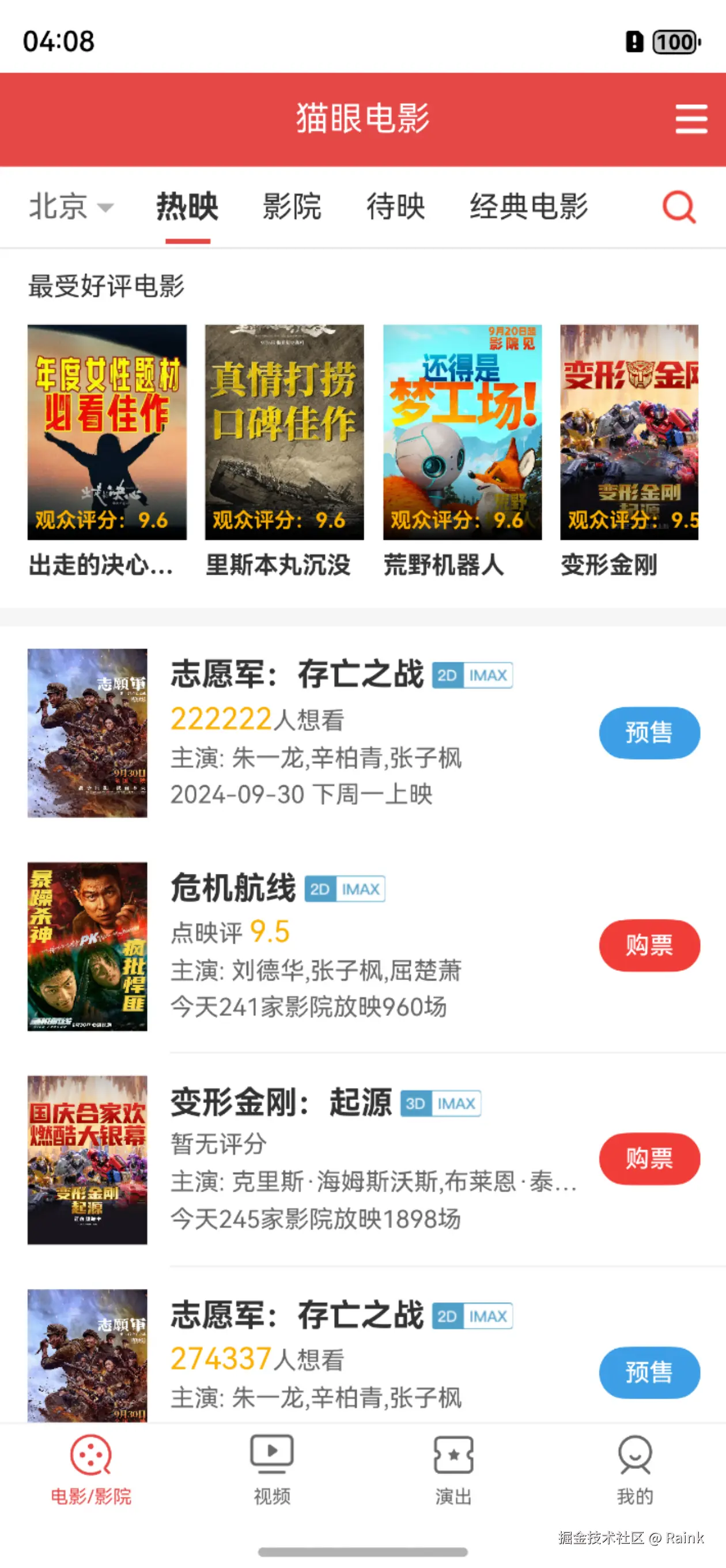
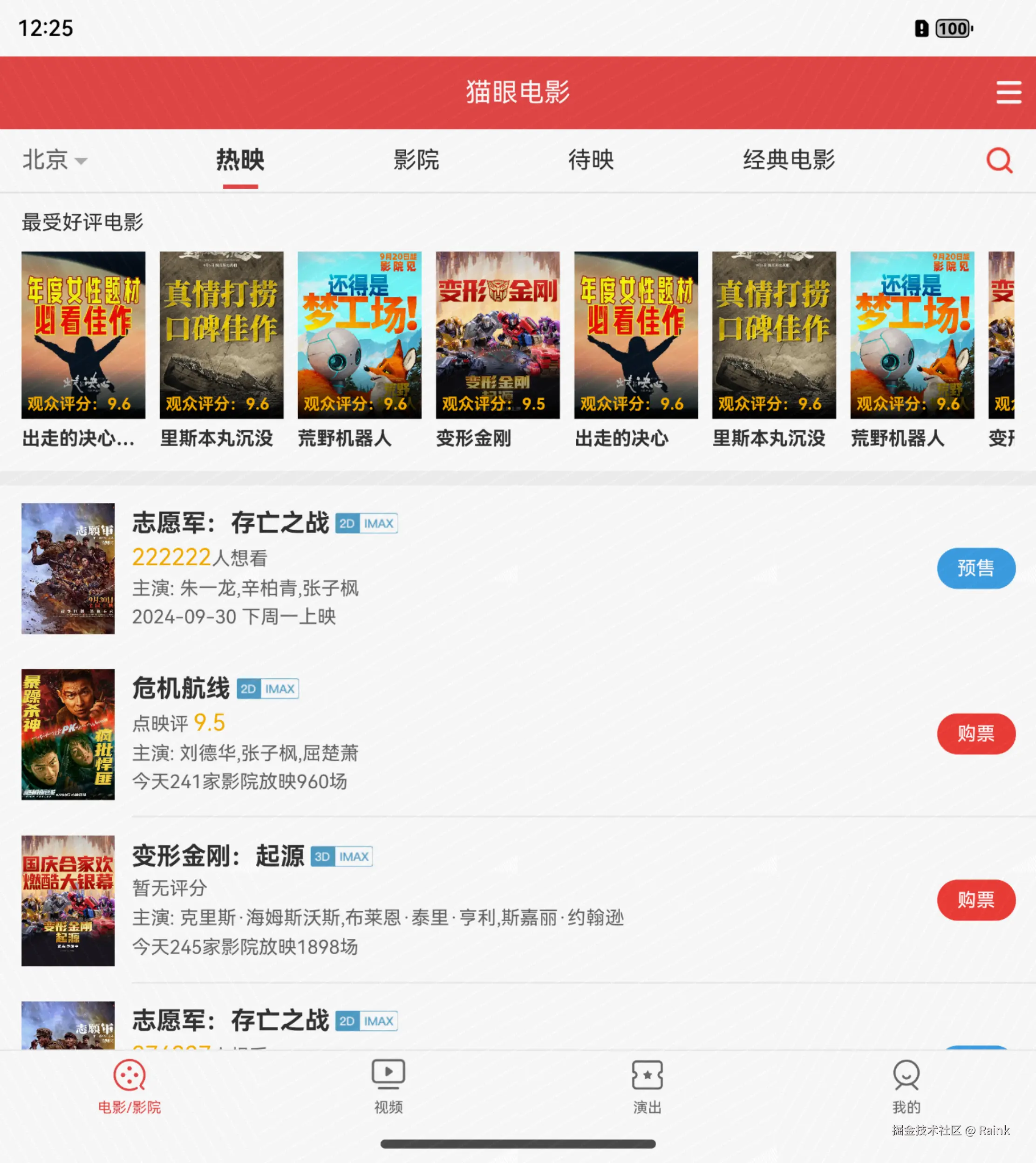
图1-1 案例效果截图
2. 案例运用到的知识点
- 核心知识点
- UI范式基本语法。
- 文本显示Text、Span组件。
- 线性布局Column、Row组件。
- 层叠布局Stack组件。
- 按钮Button组件。
- 显示图片Image组件。
- 其他知识点
- DevEco Studio的基本使用。
- 简单的资源分类访问。
- 移动端APP布局基本技巧。
3. 布局框架
可以按照图3-1来思考布局的框架:
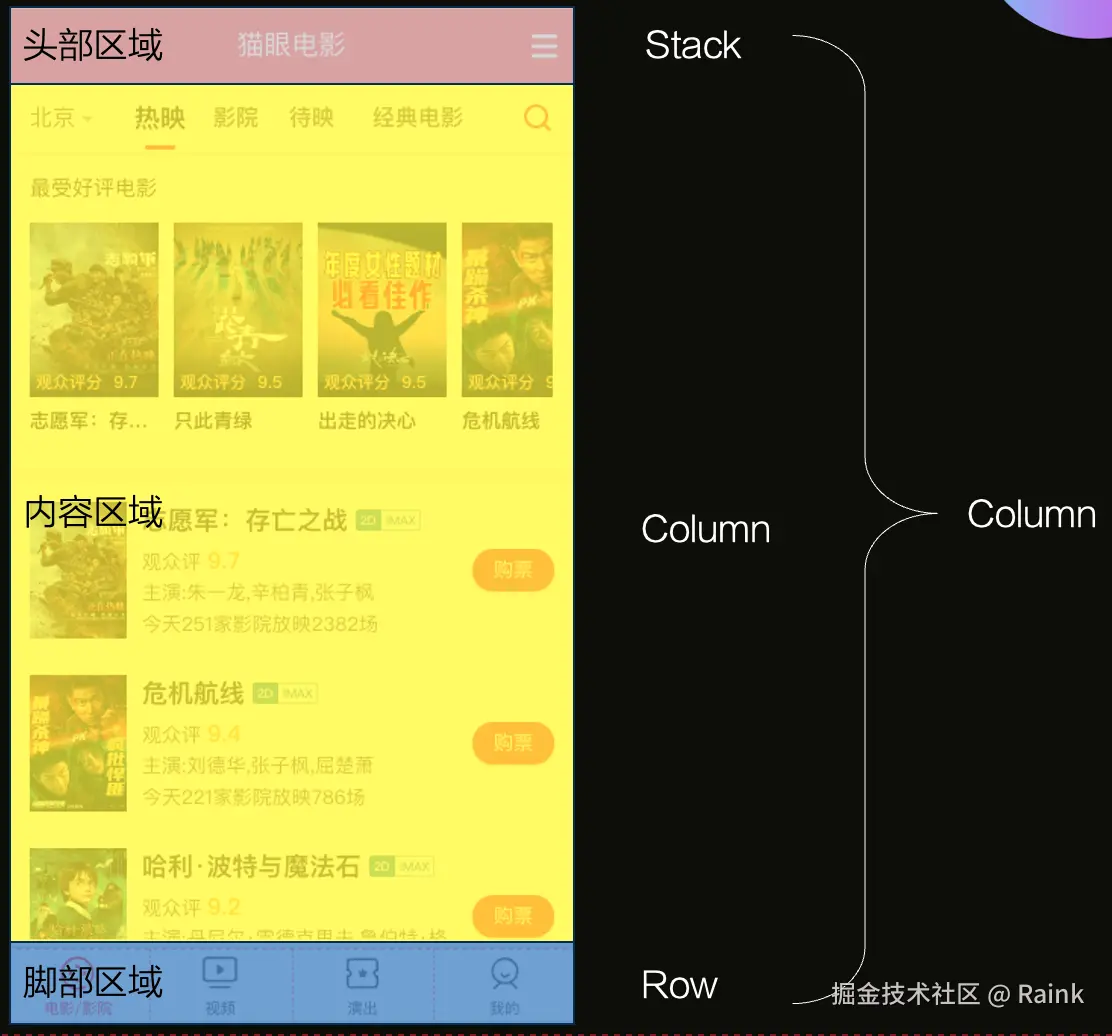
图3-1 布局框架图
框架的代码如下:
less
@Entry
@Component
struct Index {
  build() {
    Column() {
      Stack() {}
        .width('100%').height(50).backgroundColor('#e54847')

      Column() {
        Text('content')
      }.width('100%').layoutWeight(1)

      Row() {}
        .width('100%').height(50).backgroundColor('#fff')
        .border({width: { top: 1}, color: '#eee'})
    }
  }
}
4. 头部区域
可以按照图4-1思路来构建布局:
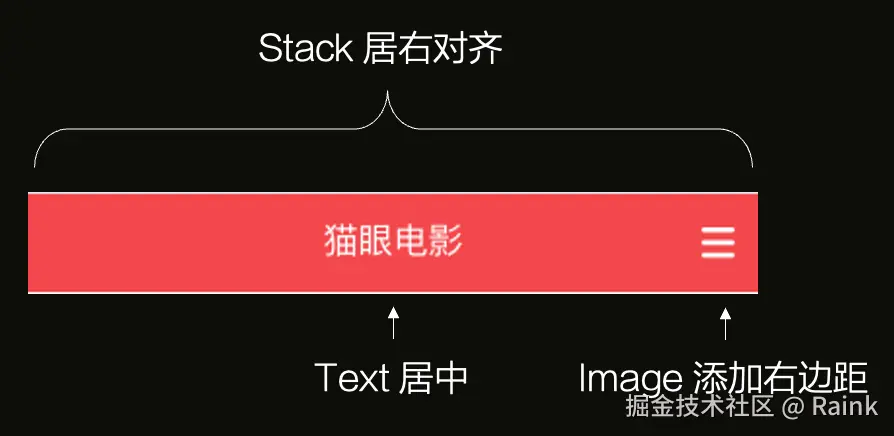
图4-1 布局示意图
代码如下:
scss
// 头部区域
Stack({ alignContent: Alignment.End }) {
  Text('猫眼电影')
    .width('100%').height('100%').textAlign(TextAlign.Center)
    .fontColor('#fff').fontSize(18)
  Image($rawfile('menu.png'))
    .width(17).height(16).margin({ right: 10 })
}.width('100%').height(50).backgroundColor('#e54847')
5. 脚部区域
可以按照图5-1思路来构建布局:
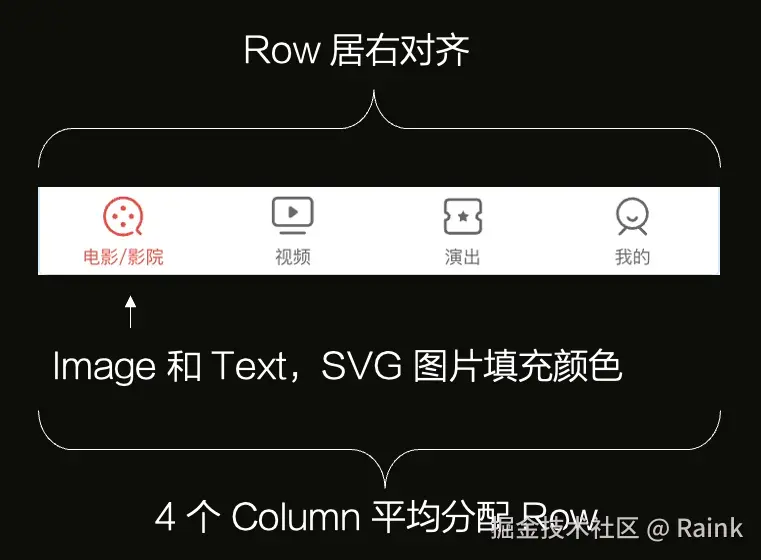
图5-1 布局示意图
代码如下:
scss
// 脚部区域
Row() {
  Column() {
    Image($rawfile('movie.svg'))
      .width(25).height(25).fillColor('#e54847')
    Text('电影/影院')
      .fontSize(10).fontColor('#e54847')
  }.layoutWeight(1).height('100%').justifyContent(FlexAlign.SpaceEvenly)

  Column() {
    Image($rawfile('video.png'))
      .width(25).height(25).fillColor('#696969')
    Text('视频')
      .fontSize(10).fontColor('#696969')
  }.layoutWeight(1).height('100%').justifyContent(FlexAlign.SpaceEvenly)

  Column() {
    Image($rawfile('perform.svg'))
      .width(25).height(25).fillColor('#696969')
    Text('演出')
      .fontSize(10).fontColor('#696969')
  }.layoutWeight(1).height('100%').justifyContent(FlexAlign.SpaceEvenly)

  Column() {
    Image($rawfile('mine.svg'))
      .width(25).height(25).fillColor('#696969')
    Text('我的')
      .fontSize(10).fontColor('#696969')
  }.layoutWeight(1).height('100%').justifyContent(FlexAlign.SpaceEvenly)
}
.width('100%').height(50).border({ width: { top: 1 }, color: '#eee' })
.backgroundColor('#fff')
6. 内容区域
可以参照图6-1思考内容区域的整体框架布局:
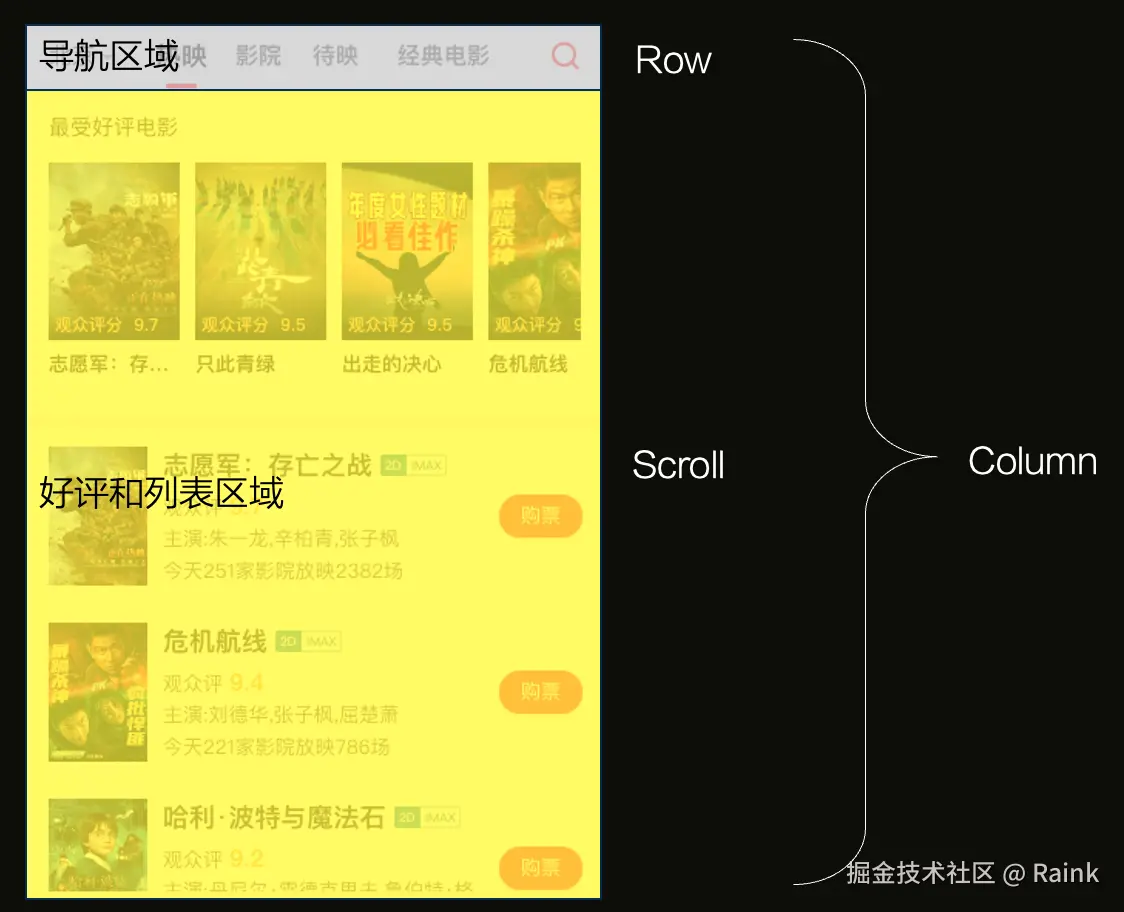
图6-1 布局示意图
代码如下:
scss
// 内容区域
Column() {
  Row() {}
    .width('100%').height(44).border({width: {bottom: 1}, color: '#e6e6e6'})

  Scroll() {}
    .layoutWeight(1)
}.width('100%').layoutWeight(1)
6.1. 导航区
内容区域的导航区可以参照图6-2思考布局:
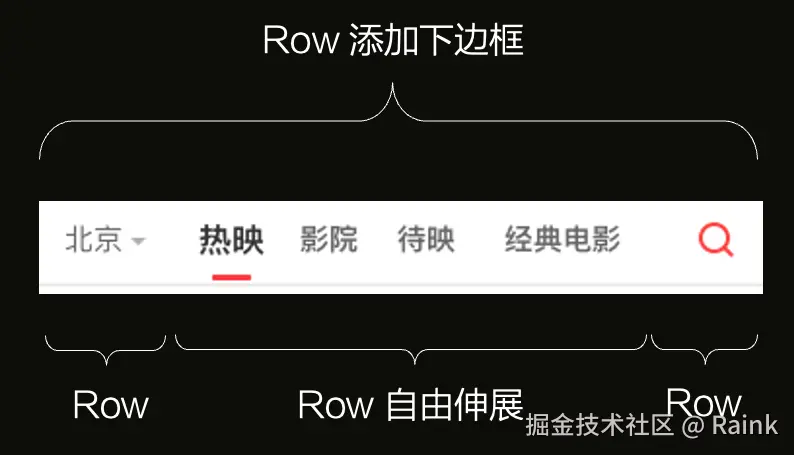
图6-2 布局示意图
代码如下:
scss
// 导航区
Row() {
  Row() {
    Text('北京').fontColor('#666')
    Text('')
      .width(0).height(0)
      .border({
        width: 5,
        color: {
          top: '#b0b0b0',
          left: Color.Transparent,
          right: Color.Transparent,
          bottom: Color.Transparent
        }
      })
      .margin({top: 6, left: 4})
  }.offset({x: 15}).width(60)

  Row() {
    Stack() {
      Text('热映')
        .fontSize(17).fontWeight(FontWeight.Bold)
      Text('')
        .width(24).border({width: {bottom: 3}, color: '#e54847'}).offset({y: 18})
    }
    Text('影院')
    Text('待映')
    Text('经典电影')
  }.justifyContent(FlexAlign.SpaceEvenly).layoutWeight(1)

  Row() {
    Image($rawfile('search-red.png'))
      .width(20).height(20)
  }.justifyContent(FlexAlign.Center).width(50)
}.width('100%').height(44).border({width: {bottom: 1}, color: '#e6e6e6'})
6.2. 最受好评区
可以参照图6-3考虑整体布局:
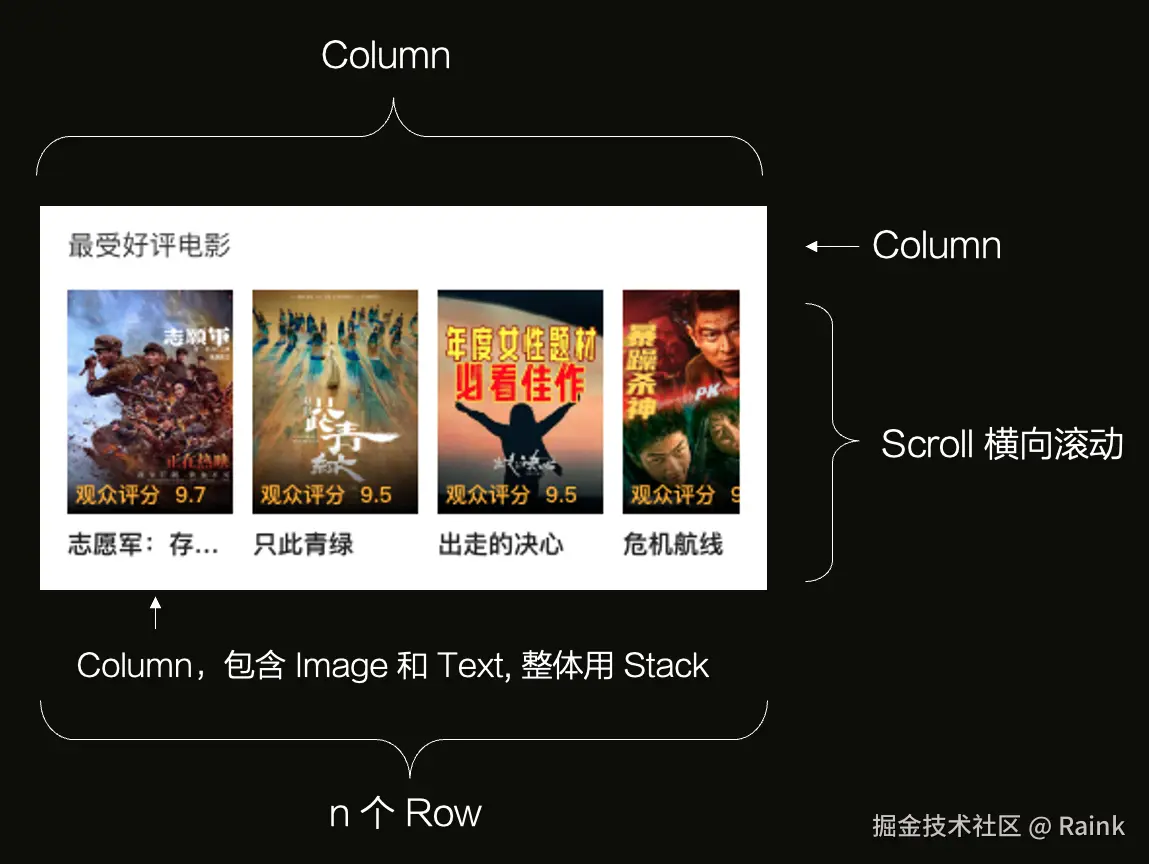
图6-3 布局示意图
代码如下:
scss
// 好评和列表区内容
Column() {
  // 好评区
  Column() {
    Text('最受好评电影')
      .width('100%').fontSize(14).fontColor('#333')
      .textAlign(TextAlign.Start).margin({ bottom: 12 })
    Scroll() {
      Row() {
        Column() {
          Stack({ alignContent: Alignment.BottomStart }) {
            Image('https://p0.pipi.cn/basicdata/'
                  + '54ecdeddf2a92339dd2c95022e99e5fe27091.jpg?'
                  + 'imageMogr2/thumbnail/2500x2500%3E'
            ).width(85).height(115)
            Text('')
              .width('100%').height(35).linearGradient({
                direction: GradientDirection.Bottom,
                colors: [['rgba(0,0,0,0)', 0], [0x000000, 1]]
              })
            Text('观众评分:9.6')
              .fontColor('#faaf00').fontSize(11)
              .fontWeight(700).offset({ x: 4, y: -4 })
          }.height(115).margin({ bottom: 6 })
          Text('出走的决心')
            .fontSize(13).fontWeight(FontWeight.Bold).width(85)
            .textAlign(TextAlign.Start).margin({ bottom: 3 })
        }.width(85).margin({ right: 10 })

        // ... 其余7个Column与上述结构相同,因篇幅限制已省略,详见本书配套源码。
      }
    }
    .scrollable(ScrollDirection.Horizontal).scrollBar(BarState.Off)
    .edgeEffect(EdgeEffect.Spring)
  }.width('100%').padding({ top: 12, bottom: 12, left: 15, right: 15 })
}.height('100%')
6.3. 列表区
列表区整体布局参照图6-4。
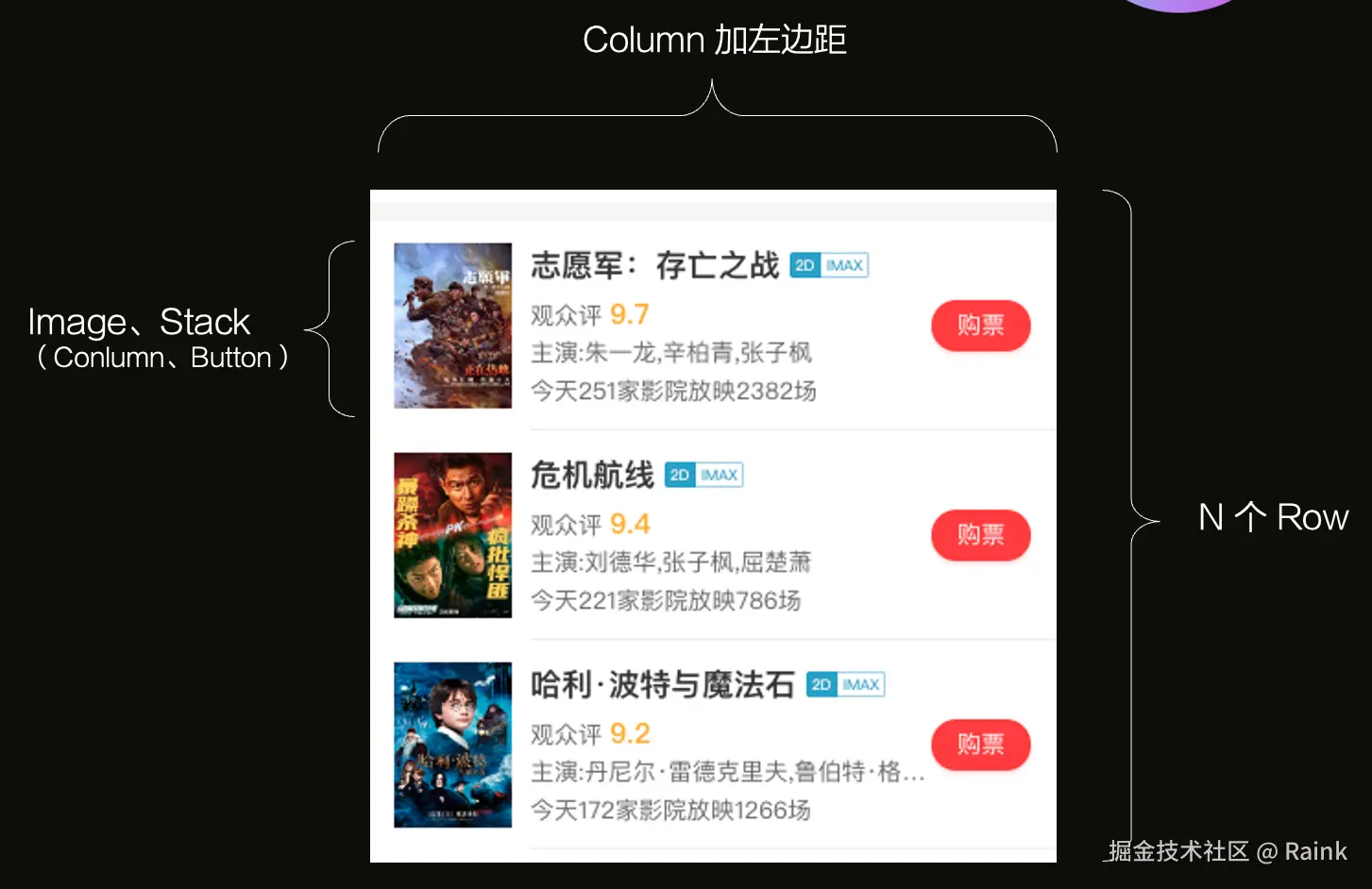
图6-4 布局示意图
代码如下:
scss
// 列表区
Column() {
  Row() {
    Image('https://p0.pipi.cn/basicdata/'
          + '54ecdedd5377e187a9e7aa5ee9ec15a184b18.jpg?'
          + 'imageMogr2/thumbnail/2500x2500%3E?imageView2/1/w/128/h/180'
    ).width(64).height(90)

    Stack({ alignContent: Alignment.End }) {
      Column() {
        Row() {
          Text('志愿军:存亡之战').fontSize(17).fontWeight(FontWeight.Bold)
          Image($rawfile('v2dimax.png')).width(43).height(14).margin({ left: 4 })
        }
        Text() {
          Span('274337').fontColor('#faaf00')
          Span('人想看').fontColor('#666').fontSize(13)
        }
        Text('主演: 朱一龙,辛柏青,张子枫').fontColor('#666').fontSize(13)
        Text('2024-09-30 下周一上映').fontColor('#666').fontSize(13)
      }
        .alignItems(HorizontalAlign.Start).height('100%').width('100%')
        .justifyContent(FlexAlign.SpaceEvenly).padding({ right: 53 })

      Button() {
        Text('预售').fontColor('#fff').fontSize(13).fontWeight(500)
      }.width(54).height(28).backgroundColor('#3C9FE6')

    }
      .height('100%').layoutWeight(1).margin({ left: 12 })
      .padding({ top: 12, right: 14, bottom: 12, left: 0 })
      .border({ width: { bottom: 1 }, color: '#eee' })
  }.height(144)

  // ... 其余7个Row与上述结构相同,因篇幅限制已省略,详见本书配套源码。
}.backgroundColor('#fff').padding({ left: 15 })
--THE END--
本文配套视频教程观看地址:
✋ 需要参加鸿蒙认证的请点击 鸿蒙认证链接